
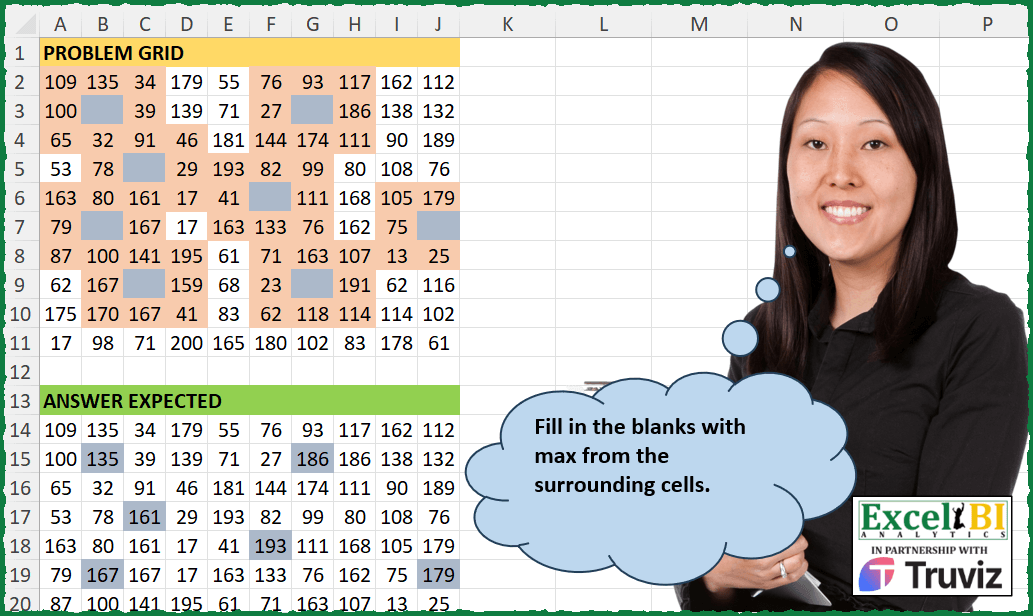
Fill in the blanks with max from the immediate surrounding cells.
📌 Challenge Details and Links
ExcelBI Excel Challenge Number: 462
Challenge Difficulty: ⭐️
📥Download Sample File
📥Link to the solutions on LinkedIn
Solving the challenge of Fill Missing Cells with Max with Power Query
Power Query solution 1 for Fill Missing Cells with Max, proposed by John V.:
let
 S = Excel.CurrentWorkbook(){[Name="data"]}[Content],
 C = Table.ColumnNames(S), d = {-1..1}, p = {0..9},
 T = Table.Column, M = List.TransformMany,
 L = M(p, each p, (x,y) =>
 let
 i = T(S, C{x}){y}
 in
 if i = null then List.Max( M(d, each d, (a,b) => try T(S, C{x+a}){y+b} otherwise null) ) else i
 )
in
 Table.FromColumns(List.Split(L, 10))

Blessings!
Power Query solution 2 for Fill Missing Cells with Max, proposed by Aditya Kumar Darak 🇮🇳:
let
  Source = Excel.CurrentWorkbook(){[Name = "data"]}[Content] meta [Table = "A2:J11", Header = false],
  ToRows = Table.ToRows(Source),
  Rows = List.Count(ToRows) - 1,
  Cols = Table.ColumnCount(Source) - 1,
  Generate = List.TransformMany(
    {0 .. Rows},
    (x) => {0 .. Cols},
    (x, y) =>
      [
        V = ToRows{y}{x},
        G = List.TransformMany(
          {y - 1, y, y + 1},
          (a) => {x - 1, x, x + 1},
          (a, b) => try ToRows{a}{b} otherwise null
        ),
        R = V ?? List.Max(G)
      ][R]
  ),
  Return = Table.FromColumns(List.Split(Generate, Rows + 1))
in
  Return
Power Query solution 3 for Fill Missing Cells with Max, proposed by Alejandro Simón 🇵🇦 🇪🇸:
let
  Source = Excel.CurrentWorkbook(){[Name = "Table1"]}[Content],
  Replace = Table.TransformColumnNames(
    Table.ReplaceValue(Source, null, "A", Replacer.ReplaceValue, Table.ColumnNames(Source)),
    each Text.RemoveRange(_, 0, 6)
  ),
  Idx = Table.AddIndexColumn(Replace, "Idx", 0, 1, Int64.Type),
  Unpivot = Table.UnpivotOtherColumns(Idx, {"Idx"}, "At", "Va"),
  Pros = Table.AddColumn(
    Unpivot,
    "B",
    (x) =>
      if x[Va] <> "A" then
        x[Va]
      else
        let
          a = List.Transform(
            {x[Idx] - 1, x[Idx] + 1},
            each try Table.ToRows(Source){_}{Number.From(x[At]) - 1} otherwise null
          ),
          b = List.Transform(
            {Number.From(x[At]) - 2, Number.From(x[At])},
            each try

                if x[Idx] - 1 < 0 then
                  List.FirstN(List.Skip(Table.ToColumns(Source){_}, x[Idx]), 2)
                else
                  List.FirstN(List.Skip(Table.ToColumns(Source){_}, x[Idx] - 1), 3)
            otherwise
              {null}
          ),
          c = List.Max(List.Combine({a, List.Combine(b)}))
        in
          c
  ),
  Sol = Table.RemoveColumns(
    Table.Pivot(Table.RemoveColumns(Pros, "Va"), List.Distinct(Pros[At]), "At", "B"),
    "Idx"
  )
in
  Sol
Power Query solution 4 for Fill Missing Cells with Max, proposed by Brian Julius:
let
  S = Excel.CurrentWorkbook(){[Name = "Table1"]}[Content],
  ReplNulls = Table.AddIndexColumn(
    Table.ReplaceValue(S, null, - 999, Replacer.ReplaceValue, Table.ColumnNames(S)),
    "Row",
    1,
    1
  ),
  Unpiv = Table.TransformColumns(
    Table.UnpivotOtherColumns(ReplNulls, {"Row"}, "Column", "Value"),
    {"Column", each Number.From(Text.AfterDelimiter(_, "Column"))}
  ),
  AddCJ = Table.AddColumn(Unpiv, "CrossJ", each Unpiv),
  MaxNeigh = Table.AddColumn(
    AddCJ,
    "MaxNeig",
    each
      if [Value] <> - 999 then
        [Value]
      else
        [
          a   = [CrossJ],
          b   = [Row],
          c   = [Column],
          m   = (x, y) => List.Max(Table.SelectRows(a, each [Row] = x and [Column] = y)[Value]),
          up  = m(b - 1, c),
          dn  = m(b + 1, c),
          le  = m(b, c - 1),
          rt  = m(b, c + 1),
          d1  = m(b - 1, c - 1),
          d2  = m(b - 1, c + 1),
          d3  = m(b + 1, c - 1),
          d4  = m(b + 1, c + 1),
          max = List.Max({up, dn, le, rt, d1, d2, d3, d4})
        ][max]
  ),
  Rem = Table.RemoveColumns(MaxNeigh, {"Value", "CrossJ"}),
  Pv = Table.RemoveColumns(
    Table.Pivot(
      Table.TransformColumnTypes(Rem, {{"Column", Text.Type}}),
      List.Distinct(Table.TransformColumnTypes(Rem, {{"Column", Text.Type}})[Column]),
      "Column",
      "MaxNeig"
    ),
    "Row"
  )
in
  Pv
Power Query solution 5 for Fill Missing Cells with Max, proposed by Ramiro Ayala Chávez:
let
  S = Excel.CurrentWorkbook(){[Name = "Table1"]}[Content],
  a = List.Combine(Table.ToRows(S)),
  b = List.PositionOfAny(a, {null}, 2),
  c = Table.FromColumns(
    {
      List.Combine(
        List.Transform(
          b,
          each {_ - 11} & {_ - 10} & {_ - 9} & {_ - 1} & {_ + 1} & {_ + 9} & {_ + 10} & {_ + 11}
        )
      )
    },
    {"P"}
  ),
  d = Table.FromRows(List.Zip({List.Positions(a), a}), {"P", "N"}),
  e = Table.AddColumn(c, "L", each d[N]{List.PositionOf(d[P], [P])})[L],
  f = List.Transform(List.Split(e, List.Count(b)), each List.Max(_)),
  g = List.Generate(
    () => [i = 0],
    each [i] < List.Count(f),
    each [i = [i] + 1],
    each List.ReplaceValue(a, null, f{[i]}, Replacer.ReplaceValue)
  ),
  h = List.InsertRange(g, List.Count(f), {List.Last(g)}),
  i = List.Transform(List.InsertRange(b, 0, {- 1}), each _ + 1),
  j = List.InsertRange(b, List.Count(f), {99}),
  k = List.Transform(List.Positions(j), each j{_} - i{_} + 1),
  l = List.Generate(
    () => [i = 0],
    each [i] < List.Count(k),
    each [i = [i] + 1],
    each List.Range(h{[i]}, i{[i]}, k{[i]})
  ),
  Sol = Table.FromColumns(List.Zip(List.Split(List.Combine(l), 10)))
in
  Sol
Power Query solution 6 for Fill Missing Cells with Max, proposed by Rafael González B.:
let
Source = Excel.CurrentWorkbook(){0}[Content], F = Table.ToRows(Source),
Fx_Grid = (LF as list, LD as list) =>
let
ListF = LF,
ListD = LD,
LM = List.Max, LPO = List.PositionOf, LR = List.Range,
R = List.Accumulate(
{0..List.Count(ListD)-1},
{},
(s,c) => let
a = ListD{c},
b = let
b0 = LPO(ListF, ListD),
l1 = LPO(ListD, a, 2),
xx = LR(ListF{b0 - 1},c - 1, 3),
yy = LR(ListF{b0 + 1}, c - 1, 3),
zz = List.RemoveNulls(LR(ListF{b0}, c - 1, 3)),
b2 = if b0 > 0
then LM(xx & yy & zz)
else if b0 = List.Count(ListD)-1
then LM(xx & zz)
else LM(yy & zz)
in
b2,
d = a ?? b
in
s & {d})
in
R,
Pre_R = List.Transform(F, each Fx_Grid(F, _)),
Result = Table.FromRows(Pre_R)
in
Result
🧙🏻♂️🧙🏻♂️🧙🏻♂️
Solving the challenge of Fill Missing Cells with Max with Excel
Excel solution 1 for Fill Missing Cells with Max, proposed by Bo Rydobon 🇹🇭:
=MAP(
    A2:J11,
    LAMBDA(
        z,
        IF(
            z,
            z,
            MAX(
                OFFSET(
                    z,
                    -1,
                    -1,
                    3,
                    3
                )
            )
        )
    )
)
Excel solution 2 for Fill Missing Cells with Max, proposed by Bo Rydobon 🇹🇭:
=LET(
    z,
    A2:J11,
    MAP(
        z,
        LAMBDA(
            y,
            IF(
                y,
                y,
                MAX(
                    MAP(
                        z,
                        LAMBDA(
                            x,
                            MAX(
                                ROWS(
                                    x:y
                                ),
                                COLUMNS(
                                    x:y
                                )
                            )<3
                        )
                    )*z
                )
            )
        )
    )
)
Excel solution 3 for Fill Missing Cells with Max, proposed by Rick Rothstein:
=MAP(
    A2:J11,
    LAMBDA(
        x,
        LET(
            z,
            x=0,
            MAX(
                OFFSET(
                    x,
                    -1*z,
                    -1*z,
                    1+2*z,
                    1+2*z
                )
            )
        )
    )
)
Excel solution 4 for Fill Missing Cells with Max, proposed by John V.:
=MAP(
    A2:J11,
    LAMBDA(
        x,
        IF(
            x,
            x,
            MAX(
                OFFSET(
                    x,
                    -1,
                    -1,
                    3,
                    3
                )
            )
        )
    )
)

Non Volatile:
✅=MAKEARRAY(
    10,
    10,
    LAMBDA(
        r,
        c,
        LET(
            b,
            A2:K11,
            i,
            INDEX(
                b,
                r,
                c
            ),
            IF(
                i,
                i,
                MAX(
                    INDEX(
                        b,
                        r+{-1;0;1},
                        c+{-1,
                        0,
                        1}
                    )
                )
            )
        )
    )
)
Excel solution 5 for Fill Missing Cells with Max, proposed by محمد حلمي:
=SCAN(
    0,
    A2:J11,
    LAMBDA(
        a,
        v,
        IF(
            v,
            v,
            MAX(
                OFFSET(
                    v,
                    -1,
                    -1,
                    3,
                    3
                )
            )
        )
    )
)
Excel solution 6 for Fill Missing Cells with Max, proposed by محمد حلمي:
=MAP(
    A2:J11,
    LAMBDA(
        v,
        IF(
            v,
            v,
            MAX(
                OFFSET(
                    v,
                    -1,
                    -1,
                    3,
                    3
                )
            )
        )
    )
)
Excel solution 7 for Fill Missing Cells with Max, proposed by Kris Jaganah:
=MAP(
    A2:J11,LAMBDA(
        x,IF(
            x="",MAX(
                OFFSET(
                    x,{1;
                    1;
                    0;
                    -1;
                    -1;
                    1;
                    0;
                    -1},{1;
                    0;
                    1;
                    1;
                    0;
                    -1;
                    -1;
                    -1}
                )
            ),x
        )
    )
)
Excel solution 8 for Fill Missing Cells with Max, proposed by Julian Poeltl:
=MAP(
    A2:J11,
    LAMBDA(
        A,
        IF(
            A=0,
            MAX(
                OFFSET(
                    A,
                    -1,
                    -1,
                    3,
                    3
                )
            ),
            A
        )
    )
)
Excel solution 9 for Fill Missing Cells with Max, proposed by Aditya Kumar Darak 🇮🇳:
=LET(

     _d,
     A2:J11,

     _fc,
     TAKE(
         _d,
          1,
          1
     ),

     _r,
     MAP(

          _d,

          LAMBDA(
              a,

               LET(

                    r,
                    ROWS(
                        a:_fc
                    ) + {-1; 0; 1},

                    c,
                    COLUMNS(
                        a:_fc
                    ) + {-1,
                    0,
                    1},

                    IF(
                        a,
                         a,
                         MAX(
                             TOCOL(
                                 INDEX(
                                     _d,
                                      r,
                                      c
                                 ),
                                  3
                             )
                         )
                    )

               )

          )

     ),

     _r

)
Excel solution 10 for Fill Missing Cells with Max, proposed by Aditya Kumar Darak 🇮🇳:
=IF(
    A2:J11 = "",
     MAP(
         A2:J11,
          LAMBDA(
              a,
               MAX(
                   OFFSET(
                       a,
                        -1,
                        -1,
                        3,
                        3
                   )
               )
          )
     ),
     A2:J11
)
Excel solution 11 for Fill Missing Cells with Max, proposed by Timothée BLIOT:
=MAKEARRAY(
    10,
    10,
    LAMBDA(
        x,
        y,
        IF(
            INDEX(
                A2:J11,
                x,
                y
            )<>"",
            INDEX(
                A2:J11,
                x,
                y
            ),
            MAX(
                OFFSET(
                    INDEX(
                A2:J11,
                x,
                y
            ),
                    -1,
                    -1,
                    3,
                    3
                )
            )
        )
    )
)
Excel solution 12 for Fill Missing Cells with Max, proposed by Nikola Z Grujicic - Nikola Ž Grujičić:
=WRAPROWS(
    LET(
        k,
         TOCOL(
             A2:J11
         ),
         l,
        TOCOL(
            LET(
                x,
                A2:J11,
                 y,
                 A1:K12,
                 prvi,
                 IF(
                     x=0,
                     INDEX(
                         y,
                          ROW(
                              x
                          )-1,
                          COLUMN(
                              x
                          )-1
                     ),
                     0
                 ),
                drugi,
                 IF(
                     x=0,
                     INDEX(
                         y,
                          ROW(
                              x
                          )-1,
                          COLUMN(
                              x
                          )
                     ),
                     0
                 ),
                 treci,
                 IF(
                     x=0,
                     INDEX(
                         y,
                          ROW(
                              x
                          )-1,
                          COLUMN(
                              x
                          )+1
                     ),
                     0
                 ),
                 cetvrti,
                 IF(
                     x=0,
                     INDEX(
                         y,
                          ROW(
                              x
                          ),
                          COLUMN(
                              x
                          )-1
                     ),
                     0
                 ),
                 peti,
                 IF(
                     x=0,
                     INDEX(
 &                        y,
                          ROW(
                              x
                          ),
                          COLUMN(
                              x
                          )+1
                     ),
                     0
                 ),
                 sesti,
                 IF(
                     x=0,
                     INDEX(
                         y,
                          ROW(
                              x
                          )+1,
                          COLUMN(
                              x
                          )-1
                     ),
                     0
                 ),
                 sedmi,
                 IF(
                     x=0,
                     INDEX(
                         y,
                          ROW(
                              x
                          )+1,
                          COLUMN(
                              x
                          )
                     ),
                     0
                 ),
                 osmi,
                 IF(
                     x=0,
                     INDEX(
                         y,
                          ROW(
                              x
                          )+1,
                          COLUMN(
                              x
                          )+1
                     ),
                     0
                 ),
                 MAP(
                     prvi,
                      drugi,
                      treci,
                      cetvrti,
                      peti,
                      sesti,
                      sedmi,
                      osmi,
                      LAMBDA(
                          p,
                          d,
                          t,
                          c,
                          pe,
                          s,
                          se,
                          o,
                           MAX(
                               p,
                               d,
                               t,
                               c,
                               pe,
                               s,
                               se,
                               o
                           )
                      )
                 )
            )
        ),
         k+l
    ),
    10
)
Excel solution 13 for Fill Missing Cells with Max, proposed by Sunny Baggu:
=LET(

     rng,
     A2:J11,

     v,
     SEQUENCE(
         ROWS(
             rng
         ),
          COLUMNS(
             rng
         )
     ),

     IF(

          rng = "",

          MAP(

               v,

               LAMBDA(
                   x,

                    LET(

                         a,
                         x + {-1,
                         0,
                         1},

                         b,
                         a - 10,

                         c,
                         a + 10,

                         d,
                         TOCOL(
                             VSTACK(
                                 b,
                                  a,
                                  c
                             )
                         ),

                         MAX(
                             XLOOKUP(
                                 d,
                                  TOCOL(
                                      v
                                  ),
                                  TOCOL(
             rng
         )
                             )
                         )

                    )

               )

          ),

          rng

     )

)
Excel solution 14 for Fill Missing Cells with Max, proposed by LEONARD OCHEA 🇷🇴:
=MAP(
    A2:J11,
    LAMBDA(
        a,
        IF(
            a,
            a,
            MAX(
                OFFSET(
                    a,
                    {-1,
                    0,
                    1},
                    {-1;0;1}
                )
            )
        )
    )
)
Excel solution 15 for Fill Missing Cells with Max, proposed by Asheesh Pahwa:
=SCAN(
    0,
    A2:J11,
    LAMBDA(
        x,
        y,
        IF(
            y="",
            MAX(
                OFFSET(
                    y,
                    -1,
                    -1,
                    3,
                    3
                )
            ),
            y
        )
    )
)
Excel solution 16 for Fill Missing Cells with Max, proposed by Andy Heybruch:
=MAP(
    A2:J11,
    LAMBDA(
        _x,
        IF(
            _x>0,
            _x,
            MAX(
                OFFSET(
                    _x,
                    -1,
                    -1,
                    3,
                    3
                )
            )
        )
    )
)
Excel solution 17 for Fill Missing Cells with Max, proposed by Bilal Mahmoud kh.:
=MAKEARRAY(
    10,
    10,
    LAMBDA(
        r,
        c,
        IF(
            OFFSET(
                A1,
                r,
                c-1,
                1,
                1
            )<>"",
            OFFSET(
                A1,
                r,
                c-1,
                1,
                1
            ),
            MAX(
                OFFSET(
                    A1,
                    r-1,
                    c-2,
                    3,
                    3
                )
            )
        )
    )
)
Excel solution 18 for Fill Missing Cells with Max, proposed by Mey Tithveasna:
=MAP(
    A2:J11,
    LAMBDA(
        a,
        IF(
            a>0,
            a,
            MAX(
                OFFSET(
                    a-1,
                    -1,
                    3,
                    3
                )
            )
        )
    )
)
Excel solution 19 for Fill Missing Cells with Max, proposed by Milan Shrimali:
=map(

    A2:J11,

    lambda(
        x,

        if(
            x="",
            max(
                tocol(
                    offset(
                        x,
                        -1,
                        -1,
                        3,
                        3
                    )
                )
            )
            ,
            x
        )
    )
)
Excel solution 20 for Fill Missing Cells with Max, proposed by Sandeep Marwal:
=MAP(
    A2:J11,
    LAMBDA(
        a,
        IF(
            ISBLANK(
                a
            ),
            MAX(
                OFFSET(
                    a,
                    {-1,
                    -1,
                    -1,
                    0,
                    0,
                    1,
                    1,
                    1},
                    {-1,
                    0,
                    1,
                    -1,
                    1,
                    -1,
                    0,
                    1}
                )
            ),
            a
        )
    )
)
Excel solution 21 for Fill Missing Cells with Max, proposed by Ernesto Vega Castillo:
=SCAN(
    0,
    A2:J11,
    LAMBDA(
        a,
        b,
        IF(
            b="",
            MAX(
                OFFSET(
                    b,
                    -1,
                    -1,
                    3,
                    3
                )
            ),
            b
        )
    )
)
Excel solution 22 for Fill Missing Cells with Max, proposed by Ernesto Vega Castillo:
=IF(
    A2:J11="",
    SCAN(
        ,
        A2:J11,
        LAMBDA(
            a,
            b,
            MAX(
                OFFSET(
                    b,
                    -1,
                    -1,
                    3,
                    3
                )
            )
        )
    ),
    A2:J11
)
Excel solution 23 for Fill Missing Cells with Max, proposed by Burhan Cesur:
=LET(
    x,
    A2:J11,
    MAKEARRAY(
        ROWS(
            x
        ),
        COLUMNS(
            x
        ),
        LAMBDA(
            r,
            c,
            IF(
                INDEX(
                    x,
                    r,
                    c
                )="",
                MAX(
                    INDEX(
                        A2:K11,
                        SEQUENCE(
                            3,
                            ,
                            r-1
                        ),
                        SEQUENCE(
                            ,
                            3,
                            c-1
                        )
                    )
                ),
                INDEX(
                    x,
                    r,
                    c
                )
            )
        )
    )
)
Excel solution 24 for Fill Missing Cells with Max, proposed by Josh Brodrick:
=MAP(
    A2:J11,
    LAMBDA(
        x,
        IF(
            x=0,
            MAX(
                INDIRECT(
                    ADDRESS(
                        ROW(
                            x
                        )-1,
                        COLUMN(
                            x
                        )-1
                    )&":"&ADDRESS(
                        ROW(
                            x
                        )+1,
                        COLUMN(
                            x
                        )+1
                    )
                )
            ),
            x
        )
    )
)
Excel solution 25 for Fill Missing Cells with Max, proposed by Tyler Cameron:
=LET(
    a,
    A2:J11,
    MAKEARRAY(
        ROWS(
            a
        ),
        COLUMNS(
            a
        ),
        LAMBDA(
            r,
            c,
            IF(
                INDEX(
                    a,
                    r,
                    c
                )="",
                MAX(
                    TOCOL(
                        INDEX(
                            a,
                            r+{-1,
                            0,
                            1},
                            c+TOCOL(
                                {-1,
                                0,
                                1}
                            )
                        ),
                        3
                    )
                ),
                INDEX(
                    a,
                    r,
                    c
                )
            )
        )
    )
)
Excel solution 26 for Fill Missing Cells with Max, proposed by Alexandra Popoff:
= LAMBDA(z_in,
     LET(
z_input,
     if(
         z_in="",
         "a",
         value(
             z_in
         )
     ),
     //Force value + transform null into "a"" to handle 0 and null differently
z_Max_y, ROWS(z_input), // Get Matrice height
z_Max_x, COLUMNS(z_input), // Get Matrice length
z_Out, MAKEARRAY(z_Max_y,z_Max_x, // Recreate input by going through each value
LAMBDA(z_y, z_x,LET(
z_i, INDEX(z_input, z_y, z_x), // save current value
// Get combo of (x,y) around the current value
 z_seq_y, INT(SEQUENCE(3 * 3, 1, z_y, 1 / 3)) - 1,
 z_seq_x, MOD(SEQUENCE(3 * 3, , 0), 3) + z_x - 1,
IF(z_i <> "a", z_i, // not missing value => get current value
MAX(IFERROR(
INDEX(z_input, z_seq_y, z_seq_x), // get list of value around central point
0) // If outside of input matrix, then 0
))))),
z_Out))
Solving the challenge of Fill Missing Cells with Max with Python
Python solution 1 for Fill Missing Cells with Max, proposed by Konrad Gryczan, PhD:
import pandas as pd
na_coords = [(i, j) for i in range(len(input)) for j in range(len(input[0])) if pd.isna(input[i, j])]
def get_surrounding_values(x, y, matrix):
 values = []
 for i in range(-1, 2):
 for j in range(-1, 2):
 if 0 <= x+i < len(matrix) and 0 <= y+j < len(matrix[0]):
 values.append(matrix[x+i, y+j])
 return max(values, default=None)
for x, y in na_coords:
 input[x, y] = get_surrounding_values(x, y, input)
print((input == test).all()) # True
Solving the challenge of Fill Missing Cells with Max with Python in Excel
Python in Excel solution 1 for Fill Missing Cells with Max, proposed by Alejandro Campos:
grid =xl("A2:J11").ffill()
grid = np.array(grid, dtype=object)
grid = np.array([
 [max([grid[i+di, j+dj] for di in (-1,0,1) for dj in (-1,0,1) if 0<=i+di<10 and 0<=j+dj<10 and grid[i+di,j+dj] is not None])
 if grid[i, j] is None else grid[i, j] for j in range(10)] for i in range(10)
])
filled_df = pd.DataFrame(grid)
filled_df
Python in Excel solution 2 for Fill Missing Cells with Max, proposed by Abdallah Ally:
import pandas as pd
dfo = pd.read_excel(file_path, skiprows=1, nrows=10, header=None) # Original df
dff = pd.read_excel(file_path, skiprows=13, nrows=10, header=None) # Final df
# Perform data wrangling
def custom_fillna(df):
 dfs = [df.shift(1), df.shift(-1), # axis=0, default
 df.shift(1, axis=1), df.shift(-1, axis=1),
 df.shift(1).shift(1, axis=1), df.shift(1).shift(-1, axis=1),
 df.shift(-1).shift(1, axis=1), df.shift(-1).shift(-1, axis=1)
 ]
 for i in df.index:
 for j in range(len(df.columns)):
 if pd.isnull(df.iat[i, j]):
 df.iat[i, j] = max([x.iat[i, j] for x in dfs])
 return df.astype(int)
# Create a requred data frame
df = custom_fillna(dfo)
df
Solving the challenge of Fill Missing Cells with Max with R
R solution 1 for Fill Missing Cells with Max, proposed by Konrad Gryczan, PhD:
library(tidyverse)
library(readxl)
 as.matrix()
 as.matrix()
na_coords = which(is.na(input), arr.ind = T)
get_surrounding_values = function(x, y, matrix){
 values = c()
 for (i in -1:1) {
 for (j in -1:1) {
 if (x + i > 0 & x + i <= nrow(matrix) & y + j > 0 & y + j <= ncol(matrix)) {
 values = c(values, matrix[x + i, y + j])
 }
 }
 }
 return(max(values, na.rm = T))
}
for (i in 1:nrow(na_coords)) {
 input[na_coords[i, 1], na_coords[i, 2]] = get_surrounding_values(na_coords[i, 1], na_coords[i, 2], input)
}
identical(input, test)
#> [1] TRUE
Solving the challenge of Fill Missing Cells with Max with Excel VBA
Excel VBA solution 1 for Fill Missing Cells with Max, proposed by Anjan Kumar Bose:
Sub Khalijagahbharo()
 Dim lastRow As Long, lastCol As Long
 Dim currentRow As Long, currentCol As Long
 With ActiveSheet
 lastRow = .UsedRange.Rows.Count
 lastCol = .UsedRange.Columns.Count
 End With
 ' Loop through each cell (excluding borders)
 For currentRow = 2 To lastRow - 1
 For currentCol = 2 To lastCol - 1
 ' Get surrounding cell values
 Dim surroundingRange As Range
 Set surroundingRange = Range(Cells(currentRow, currentCol).Offset(-1, -1), Cells(currentRow, currentCol).Offset(1, 1))
 Dim maxValue As Variant
 maxValue = Application.WorksheetFunction.Max(surroundingRange.Cells.SpecialCells(xlCellTypeValues))
 Cells(currentRow, currentCol).Value = maxValue
 Next currentCol
 Next currentRow
End Sub
Excel VBA solution 2 for Fill Missing Cells with Max, proposed by Rushikesh K.:
Sub FillBlanksWithMax()
 Dim ws As Worksheet
 Dim rng As Range
 Dim cell As Range
 Dim maxVal As Double
 Dim i As Long, j As Long
 Dim surroundingCells As Range
 Dim tempCell As Range

 Set ws = ThisWorkbook.Sheets("Sheet1")
 Set rng = ws.Range("A2:J11")

 For Each cell In rng
 If IsEmpty(cell.Value) Then
 maxVal = -1 * Application.Max(ws.Cells)
 Set surroundingCells = ws.Range( _
 cell.Offset(-1, -1).Resize(3, 3).Address( _
 RowAbsolute:=False, ColumnAbsolute:=False))

 For Each tempCell In surroundingCells
 If tempCell.Value > maxVal Then
 maxVal = tempCell.Value
 End If
 End If
 Next tempCell

 If maxVal <> -1 * Application.Max(ws.Cells) Then
 cell.Value = maxVal
 End If
 End If
 Next cell
End Sub
&