
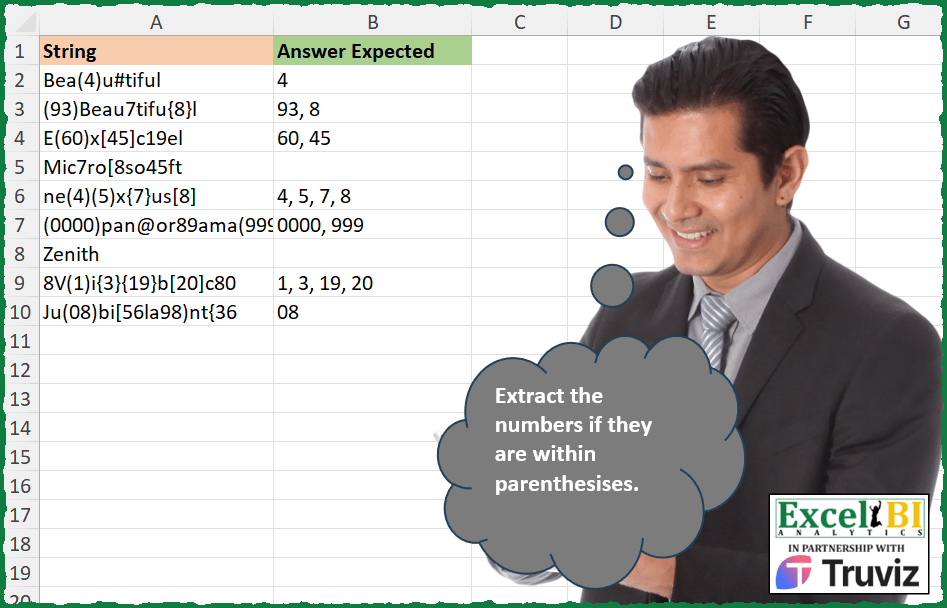
Extract the numbers if they are within parenthesises.
📌 Challenge Details and Links
ExcelBI Excel Challenge Number: 457
Challenge Difficulty: ⭐️
📥Download Sample File
📥Link to the solutions on LinkedIn
Solving the challenge of Extract Numbers in Parentheses with Power Query
Power Query solution 1 for Extract Numbers in Parentheses, proposed by Aditya Kumar Darak 🇮🇳:
let
  Source = Excel.CurrentWorkbook(){[Name = "data"]}[Content],
  Return = Table.AddColumn(
    Source,
    "Answer",
    each [
      S1 = Splitter.SplitTextByCharacterTransition({"(", "[", "{"}, {"0" .. "9"})(
        "A" & [String] & "A"
      ),
      S2 = List.Transform(
        S1,
        (f) => Splitter.SplitTextByCharacterTransition({"0" .. "9"}, {")", "]", "}"})(f)
      ),
      C = List.Combine(S2),
      F = List.Select(C, (f) => f = Text.Select(f, {"0" .. "9"})),
      R = Text.Combine(F, ", ")
    ][R]
  )
in
  Return
Power Query solution 2 for Extract Numbers in Parentheses, proposed by Alejandro Simón 🇵🇦 🇪🇸:
let
 Source = Excel.CurrentWorkbook(){[Name="Table1"]}[Content],
 Sol = Table.AddColumn(Source, "Answer", each
let
a = Text.TrimEnd([String], {"0".."9"}),
b = Text.SplitAny(a, "()[]{}"),
c = List.Select(b, each try Number.From(_) is number otherwise false)
in Text.Combine(c, ", "))
in
 Sol

O

let
 Source = Excel.CurrentWorkbook(){[Name="Table1"]}[Content],
 Sol = Table.AddColumn(Source, "Answer", each
let
a = Text.TrimStart(Text.TrimEnd([String], {"0".."9"}), {"0".."9"}),
b = Text.SplitAny(a, "()[]{}"),
c = List.Select(b, each try Number.From(_) is number otherwise false)
in Text.Combine(c, ", "))
in
 Sol
Power Query solution 3 for Extract Numbers in Parentheses, proposed by Luan Rodrigues:
let
  Fonte = Tabela1,
  res = Table.AddColumn(
    Fonte,
    "Personalizar",
    each [
      a = Text.TrimStart(Text.TrimEnd([String], {"0" .. "9"}), {"0" .. "9"}),
      b = Text.Combine(
        List.Select(Text.SplitAny(a, "()[]{}"), each (try Number.From(_) otherwise null) is number),
        ", "
      )
    ][b]
  )
in
  res
Power Query solution 4 for Extract Numbers in Parentheses, proposed by Brian Julius:
let
 Source = Table.SelectColumns(
 Excel.Workbook(
 File.Contents(
 "C:UsersbrjulDownloadsExcel_Challenge_457 - Extract Numbers in Parenthesises.xlsx"
 ),
 true,
 true
 ){[Item = "Sheet1", Kind = "Sheet"]}[Data],
 "String"
 ),
 Rscript = R.Execute(
 "library(stringr)#(lf)df <- dataset#(lf)target <- ""\((.*?)\)|\{(.*?)\}|\[(.*?)\]"" #(lf)df$Answer <- sapply(str_extract_all(df$String, target ), function(x) paste(x, collapse = "", ""))",
 [dataset = Source]
 ),
 Clean = Table.TransformColumns(
 Rscript{[Name = "df"]}[Value],
 {{"Answer", each Text.Remove(_, {"(", ")", "[", "]", "{", "}"})}}
 )
in
 Clean
Power Query solution 5 for Extract Numbers in Parentheses, proposed by Ramiro Ayala Chávez:
let
  S = Excel.CurrentWorkbook(){[Name = "Table1"]}[Content],
  Sol = Table.AddColumn(
    S,
    "Answer Expected",
    each
      let
        a = Text.ToList([String]),
        C = Text.Combine,
        S = List.Select,
        B = Text.BetweenDelimiters,
        T = List.Transform,
        L = Text.Length,
        b = C(List.ReplaceMatchingItems(a, List.Zip({{"{", "}", "[", "]"}, {"(", ")", "(", ")"}}))),
        c = List.Count(S(Text.ToList(b), each Text.Contains(_, ")"))),
        d = List.Generate(() => [i = 0], each [i] < c, each [i = [i] + 1], each B(b, "(", ")", [i])),
        e = T(d, each Text.Select(_, {"0" .. "9"})),
        f = T(List.Positions(e), each if L(e{_}) = L(d{_}) then e{_} else ""),
        g = C(S(f, each _ <> ""), ", ")
      in
        g
  )
in
  Sol
Power Query solution 6 for Extract Numbers in Parentheses, proposed by Venkata Rajesh:
let
  Source = Data,
  Output = Table.AddColumn(
    Source,
    "Expected",
    each [
      x = [String],
      y = List.Accumulate(
        {"()", "{}", "[]"},
        {},
        (state, current) =>
          state
            & [
              d = Text.ToList(current),
              p = Text.PositionOf(x, d{0}, Occurrence.All),
              n = List.Transform(
                p,
                each [
                  a = Text.Middle(x, _),
                  b = Text.BetweenDelimiters(a, d{0}, d{1}),
                  c =
                    if Text.Contains(a, d{1}) and b = Text.Select(b, {"0" .. "9"}) then
                      b
                    else
                      null
                ][c]
              )
            ][n]
      ),
      z = Text.Combine(List.RemoveNulls(y), ", ")
    ][z]
  )
in
  Output
Solving the challenge of Extract Numbers in Parentheses with Excel
Excel solution 1 for Extract Numbers in Parentheses, proposed by Bo Rydobon 🇹🇭:
=MAP(
    A2:A10,
    LAMBDA(
        a,
        LET(
            b,
            DROP(
                TEXTSPLIT(
                    a&"a(_",
                    {"{",
                    "[",
                    "("},
                    {")",
                    "]",
                    "}"},
                    ,
                    ,
                    ""
                ),
                ,
                1
            ),
            TEXTJOIN(
                ", ",
                ,
                REPT(
                    b,
                    ISNUMBER(
                        -b
                    )
                )
            )
        )
    )
)
Excel solution 2 for Extract Numbers in Parentheses, proposed by Bo Rydobon 🇹🇭:
=MAP(A2:A11,
    LAMBDA(a,
    LET(b,
    IFERROR(
        TEXTAFTER(
            TEXTSPLIT(
                a&"a",
                {")",
                "]",
                "}"}
            ),
            {"(",
            "[",
            "{"},
            -1
        ),
        ""
    ),
    TEXTJOIN(", ",
    ,
    REPT(b,
    ISNUMBER(
        -b
    )*(b=TEXT(
        b,
        REPT(
            0,
            LEN(
                b
            )
        )
    )))))))

for
(4)(5)(1e5)(jan1))
Excel solution 3 for Extract Numbers in Parentheses, proposed by Rick Rothstein:
=MAP(
    A2:A10,
    LAMBDA(
        x,
        LET(
            n,
            TAKE(
                WRAPROWS(
                    TEXTSPLIT(
                        x&"z",
                        {"(",
                        ")",
                        "{",
                        "}",
                        "[",
                        "]"}
                    ),
                    2
                ),
                ,
                -1
            ),
            TEXTJOIN(
                ", ",
                ,
                FILTER(
                    n,
                    ISNUMBER(
                        -n
                    ),
                    ""
                )
            )
        )
    )
)
Excel solution 4 for Extract Numbers in Parentheses, proposed by John V.:
=MAP(
    A2:A10,
    LAMBDA(
        x,
        LET(
            i,
            TEXTSPLIT(
                x&"a",
                {"(";"[";"{"},
                {")";"]";"}"}
            ),
            TEXTJOIN(
                ", ",
                ,
                IF(
                    ISNUMBER(
                        -i
                    ),
                    i,
                    ""
                )
            )
        )
    )
)
Excel solution 5 for Extract Numbers in Parentheses, proposed by محمد حلمي:
=MAP(
    A2:A10,
    LAMBDA(
        a,
        LET(

            i,
            TEXTSPLIT(
                a,
                {"(",
                "{",
                "["}
            ),
            j,
            TEXTSPLIT(
                i,
                {")",
                "}",
                "]"}
            ),

            TEXTJOIN(
                ", ",
                ,
                IFERROR(
                    REPT(
                        IF(
                            -j,
                            j,
                            j
                        ),
                        i>j
                    ),
                    ""
                )
            )
        )
    )
)

for
(4)(5)(1e5)(jan1))0(999((99

only extract 4,
     5

=MAP(A2:A10,
    LAMBDA(a,
    LET(i,
    TEXTSPLIT(
        a,
        {"(",
        "{",
        "["}
    ),

j,
    TEXTSPLIT(
        i,
        {")",
        "}",
        "]"}
    ),
    TEXTJOIN(", ",
    ,
    IFERROR(
REPT(j,
    ((-j=0)+(LEN(
        j
    )=LEN(
        --j
    )))*(i>j)),
    "")))))
Excel solution 6 for Extract Numbers in Parentheses, proposed by Kris Jaganah:
=MAP(
    A2:A10,
    LAMBDA(
        x,
        LET(
            a,
            TEXTSPLIT(
                x&"-",
                {"{";"(";"["},
                {"}";")";"]"},
                ,
                ,
                ""
            ),
            b,
            DROP(
                a,
                ,
                1
            ),
            IFERROR(
                TEXTJOIN(
                    ", ",
                    ,
                    FILTER(
                        b,
                        --ISERR(
                            --b
                        )=0
                    )
                ),
                ""
            )
        )
    )
)
Excel solution 7 for Extract Numbers in Parentheses, proposed by Julian Poeltl:
=MAP(
    A2:A10,
    LAMBDA(
        S,
        LET(
            L,
            LEN(
                S
            ),
            SP,
            MID(
                S,
                SEQUENCE(
                    L
                ),
                SEQUENCE(
                    L,
                    ,
                    L,
                    -1
                )
            ),
            ST,
            VSTACK(
                TEXTAFTER(
                    TEXTBEFORE(
                        SP,
                        ")"
                    ),
                    "("
                ),
                TEXTAFTER(
                    TEXTBEFORE(
                        SP,
                        "]"
                    ),
                    "["
                ),
                TEXTAFTER(
                    TEXTBEFORE(
                        SP,
                        "}"
                    ),
                    "{"
                )
            ),
            IN,
            ISNUMBER(
                ST*1
            ),
            A,
            UNIQUE(
                FILTER(
                    ST,
                    IN
                )
            ),
            IFERROR(
                TEXTJOIN(
                    ", ",
                    ,
                    A
                ),
                ""
            )
        )
    )
)
Excel solution 8 for Extract Numbers in Parentheses, proposed by Timothée BLIOT:
=MAP(
    A2:A10,
    LAMBDA(
        z,
        IFNA(
            ARRAYTOTEXT(
                REGEXEXTRACT(
                    z,
                    "(?<=[({[])d+(?=[)}]])",
                    1
                )
            ),
            ""
        )
    )
)
Excel solution 9 for Extract Numbers in Parentheses, proposed by Sunny Baggu:
=MAP(
 A2:A10,

 LAMBDA(s,

 LET(
 _e1,
     LAMBDA(
         x,
          t,
          UNIQUE(
              TOCOL(
                  SEARCH(
                      t,
                       x,
                       SEQUENCE(
                           LEN(
                               x
                           )
                       )
                  ),
                   3
              )
          )
     ),

 b,
     LAMBDA(
         p,
          cri,

          TOCOL(
              MID(
                  p,
                   TAKE(
                       cri,
                        ,
                        -1
                   ) + 1,
                   TAKE(
                       cri,
                        ,
                        1
                   ) - TAKE(
                       cri,
                        ,
                        -1
                   ) - 1
              ),
               3
          )

     ),

 _k1,
     HSTACK(TAKE(_e1(s,
     ")"),
     ROWS(_e1(s,
     "("))),
     _e1(s,
     "(")),

 _k2,
     HSTACK(TAKE(_e1(s,
     "]"),
     ROWS(_e1(s,
     "["))),
     _e1(s,
     "[")),

 _k3,
     HSTACK(TAKE(_e1(s,
     "}"),
     ROWS(_e1(s,
     "{"))),
     _e1(s,
     "{")),

 TEXTJOIN(

      ",",

      ,

      VSTACK(
          IFERROR(
              b(
                  s,
                   _k1
              ),
               ""
          ),
           IFERROR(
               b(
                   s,
                    _k2
               ),
                ""
           ),
           IFERROR(
               b(
                   s,
                    _k3
               ),
                ""
           )
      )

 )
 )
 )
)
Excel solution 10 for Extract Numbers in Parentheses, proposed by Abdallah Ally:
=MAP(A2:A11,
    LAMBDA(z,
    LET(a,
    z,
    f,
    LAMBDA(u,
     v,
    w,
    LET(m,
    TEXTSPLIT(
        SUBSTITUTE(
            SUBSTITUTE(
                u,
                v,
                " _"
            ),
            w,
            "_ "
        ),
        " "
    ),
    n,
    SUBSTITUTE(
        m,
        "_",
        ""
    ),
    o,
    MAP(m,
    n,
    LAMBDA(x,
    y,
    IF((LEFT(
        x
    )&RIGHT(
        x
    )="__")*NOT(
        ISERR(
            SUM(
                -MID(
                    y,
                    SEQUENCE(
                        LEN(
                            y
                        )
                    ),
                    1
                )
            )
        )
    ),
    y,
    ""))),
    TEXTJOIN(
        ", ",
        ,
        o
    ))),
    TEXTJOIN(
        ", ",
        ,
        f(
            a,
            "(",
            ")"
        ),
        f(
            a,
            "[",
            "]"
        ),
        f(
            a,
            "{",
            "}"
        )
    ))))
Excel solution 11 for Extract Numbers in Parentheses, proposed by 🇵🇪 Ned Navarrete C.:
=MAP(
    "a"&A2:A10&"a",
    LAMBDA(
        r,
        LET(
            c,
            INDEX(
                TEXTSPLIT(
                    r,
                    {")",
                    "}",
                    "]"},
                    {"(",
                    "{",
                    "["}
                ),
                ,
                1
            ),
            ARRAYTOTEXT(
                FILTER(
                    c,
                    ISNUMBER(
                        --c
                    ),
                    ""
                )
            )
        )
    )
)
Excel solution 12 for Extract Numbers in Parentheses, proposed by ferhat CK:
=LET(
    a,
    A2:A10,
    n,
    CHAR(
        {40,
        123,
        91}
    ),
    m,
    CHAR(
        {41,
        125,
        93}
    ),

    MAP(
        a,
        LAMBDA(
            x,
            IFERROR(
                TEXTJOIN(
                    ",",
                    ,
                    FILTER(
                        TEXTBEFORE(
                            TEXTSPLIT(
                                x,
                                n
                            ),
                            m
                        ),
                        ISNUMBER(
                            --TEXTBEFORE(
                            TEXTSPLIT(
                                x,
                                n
                            ),
                            m
                        )
                        )
                    )
                ),
                ""
            )
        )
    )
)
Excel solution 13 for Extract Numbers in Parentheses, proposed by Andy Heybruch:
=MAP(
    A2:A10,
    LAMBDA(
        _string,
        LET(

            _array,
            TAKE(
                TEXTSPLIT(
                    _string&"x",
                    {"(",
                    "{",
                    "["},
                    {")",
                    "}",
                    "]"}
                ),
                ,
                -1
            ),

            IFERROR(
                TEXTJOIN(
                    ", ",
                    ,
                    FILTER(
                        _array,
                        ISNUMBER(
                            --_array
                        )
                    )
                ),
                ""
            )
        )
    )
)
Excel solution 14 for Extract Numbers in Parentheses, proposed by Mey Tithveasna:
=TEXTJOIN(
    ",",
     TRUE,

              IFERROR(
                  MID(
                      A2,
                       FIND(
                           "(",
                            A2
                       ) + 1,
                       FIND(
                           ")",
                            A2,
                            FIND(
                                "(",
                                 A2
                            )
                       ) - FIND(
                           "(",
                            A2
                       ) - 1
                  ),
                   ""
              ),

    IFERROR(
        MID(
            A2,
             FIND(
                 "[",
                  A2
             ) + 1,
             FIND(
                 "]",
                  A2,
                  FIND(
                      "[",
                       A2
                  )
             ) - FIND(
                 "[",
                  A2
             ) - 1
        ),
         ""
    ),

    IFERROR(
        MID(
            A2,
             FIND(
                 "{",
                  A2
             ) + 1,
             FIND(
                 "}",
                  A2,
                  FIND(
                      "{",
                       A2
                  )
             ) - FIND(
                 "{",
                  A2
             ) - 1
        ),
         ""
    )

)

=TEXTJOIN(
    ",",
    ,
    IFERROR(
        MID(
            LEFT(
                A2,
                FIND(
                    ")",
                    A2
                )-1
            ),
            FIND(
                "(",
                A2
            )+1,
            99
        ),
        ""
    ),
    IFERROR(
        MID(
            LEFT(
                A2,
                FIND(
                    "}",
                    A2
                )-1
            ),
            FIND(
                "{",
                A2
            )+1,
            99
        ),
        ""
    ),
    IFERROR(
        MID(
            LEFT(
                A2,
                FIND(
                    "]",
                    A2
                )-1
            ),
            FIND(
                "[",
                A2
            )+1,
            99
        ),
        ""
    )
)
Excel solution 15 for Extract Numbers in Parentheses, proposed by Milan Shrimali:
=map(
    A1:A10,
    lambda(
        z,
        let(
            rng,
            z,
            seq,
            arrayformula(
                mid(
                    rng,
                    SEQUENCE(
                        len(
                            rng
                        )
                    ),
                    1
                )
            ),
            result1,
            map(
                byrow(
                    seq,
                    lambda(
                        x,
                        if(
                            arrayformula(
                                and(
                                    offset(
                                        x,
                                        -1,
                                        0
                                    )="(",
                                    offset(
                                        x,
                                        1,
                                        0
                                    )=")"
                                )
                            ),
                            x,
                            ""
                        )
                    )
                ),
                 lambda(
                     y,
                     iferror(
                         if(
                             value(
                                 y
                             ),
                             y,
                             ""
                         )
                     )
                 )
            ),
             joinresult1,
            textjoin(
                ",",
                ,
                filter(
                    result1,
                    result1<>""
                )
            ),
            result2,
            map(
                byrow(
                    seq,
                    lambda(
                        x,
                        if(
                            arrayformula(
                                and(
                                    offset(
                                        x,
                                        -1,
                                        0
                                    )="[",
                                    offset(
                                        x,
                                        1,
                                        0
                                    )="]"
                                )
                            ),
                            x,
                            ""
                        )
                    )
                ),
                 lambda(
                     yy,
                     iferror(
                         if(
                             value(
                                 yy
                             ),
                             yy,
                             ""
                         )
                     )
                 )
            ),
             joinresult2,
            textjoin(
                ",",
                ,
                filter(
                    result2,
                    result2<>""
                )
            ),
            result3,
            map(
                byrow(
                    seq,
                    lambda(
                        x,
                        if(
                            arrayformula(
                                and(
                                    offset(
                                        x,
                                        -1,
                                        0
                                    )="{",
                                    offset(
                                        x,
                                        1,
                                        0
                                    )="}"
                                )
                            ),
                            x,
                            ""
                        )
                    )
                ),
                 lambda(
                     zz,
                     iferror(
                         if(
                             value(
                                 zz
                             ),
                             zz,
                             ""
                         )
                     )
                 )
            ),
             joinresult3,
            textjoin(
                ",",
                ,
                filter(
                    result3,
                    result3<>""
                )
            ),
            textjoin(
                ",",
                ,
                joinresult1,
                joinresult2,
                joinresult3
            )
        )
    )
)
Excel solution 16 for Extract Numbers in Parentheses, proposed by Peter Tholstrup:
=LET(

     source,
     A2:A10,

     extract,
     LAMBDA(
         source,

          LET(

               add_spaces,
               LET(

                    sub,
                    LAMBDA(
                        text,
                         char,
                         SUBSTITUTE(
                             text,
                              char,
                              char & " "
                         )
                    ),

                    add_spaces1,
                    sub(
                        source,
                         ")"
                    ),

                    add_spaces2,
                    sub(
                        add_spaces1,
                         "]"
                    ),

                    sub(
                        add_spaces2,
                         "}"
                    )

               ),

               split,
               TEXTSPLIT(
                   add_spaces,
                    " "
               ),

               text_between,
               LAMBDA(
                   text,
                    a,
                    b,
                    TEXTBEFORE(
                        TEXTAFTER(
                            text,
                             a
                        ),
                         b
                    )
               ),

               is_number,
               LAMBDA(
                   x,
                    NOT(
                        ISERROR(
                            --x
                        )
                    )
               ),

               get_number,
               LAMBDA(
                   text,

                    LET(

                         a,
                         text_between(
                             text,
                              "(",
                              ")"
                         ),

                         b,
                         text_between(
                             text,
                              "[",
                              "]"
                         ),

                         c,
                         text_between(
                             text,
                              "{",
                              "}"
                         ),

                         IFS(
                             is_number(
                                 a
                             ),
                              a,
                              is_number(
                                  b
                              ),
                              b,
                              is_number(
                                  c
                              ),
                              c,
                              TRUE,
                              ""
                         )

                    )

               ),

               TEXTJOIN(
                   ", ",
                    1,
                    get_number(
                        split
                    )
               )

          )

     ),

     MAP(
         source,
          extract
     )

)
Excel solution 17 for Extract Numbers in Parentheses, proposed by Ziad A.:
=IFERROR(
    JOIN(
        ", ",
        SPLIT(
            REGEXREPLACE(
                A2,
                "((d+)|[d+]|{d+})|.",
                "$1"
            ),
            "()[]{}"
        )
    )
)
Excel solution 18 for Extract Numbers in Parentheses, proposed by Rayan S.:
=MAP(A2:A10,
    LAMBDA(x,
    LET(c,
    TOCOL(
        DROP(
            TEXTSPLIT(
                x,
                {"(",
                ")",
                "{",
                "}",
                "[",
                "]"}
            ),
            ,
            -1
        ),
        3
    ),
    TEXTJOIN(", ",
    ,
    IFERROR(IF((c+0)>=0,
    c,
    ""),
    "")))))
Excel solution 19 for Extract Numbers in Parentheses, proposed by Hussain Ali Nasser:
=MAP(
    A2:A10,
    LAMBDA(
        x,
        LET(
            a,
             TEXTAFTER(
                 x,
                  {"{",
                 "(",
                 "["},
                  SEQUENCE(
                      10
                  ),
                  ,
                  ,
                  ""
             ),
             b,
             TEXTBEFORE(
                 a,
                  {"}",
                 ")",
                 "]"},
                  ,
                  ,
                  ,
                  ""
             ),
             TEXTJOIN(
                 ", ",
                  TRUE,
                  FILTER(
                      b,
                      ISNUMBER(
                          --b
                      ),
                      ""
                  )
             )
        )
    )
)
Excel solution 20 for Extract Numbers in Parentheses, proposed by Tyler Cameron:
=LET(
    z,
    LAMBDA(
        i,
        j,
        k,
        TEXTBEFORE(
            TEXTSPLIT(
                i,
                j
            ),
            k
        )
    ),
    MAP(
        A2:A11,
        LAMBDA(
            t,
            LET(
                a,
                TOROW(
                    MAP(
                        DROP(
                            HSTACK(
                                z(
                                    t,
                                    "(",
                                    ")"
                                ),
                                z(
                                    t,
                                    "{",
                                    "}"
                                ),
                                z(
                                    t,
                                    "[",
                                    "]"
                                )
                            ),
                            ,
                            1
                        ),
                        LAMBDA(
                            x,
                            IF(
                                SUM(
                                    --ISNUMBER(
                                        --MID(
                                            x,
                                            SEQUENCE(
                                                LEN(
                                                    x
                                                )
                                            ),
                                            1
                                        )
                                    )
                                )=LEN(
                                                    x
                                                ),
                                x,
                                ""
                            )
                        )
                    ),
                    3
                ),
                IFERROR(
                    ARRAYTOTEXT(
                        FILTER(
                            a,
                            a<>""
                        )
                    ),
                    ""
                )
            )
        )
    )
)
Excel solution 21 for Extract Numbers in Parentheses, proposed by Tyler Cameron:
=MAP(
    A2:A10,
    LAMBDA(
        x,
        LET(
            a,
            DROP(
                DROP(
                    TEXTSPLIT(
                        x,
                        {"(",
                        ")",
                        "{",
                        "}",
                        "[",
                        "]"}
                    ),
                    ,
                    1
                ),
                ,
                -1
            ),
            IFERROR(
                ARRAYTOTEXT(
                    TOCOL(
                        IF(
                            ISERR(
                                --a
                            ),
                            --a,
                            a
                        ),
                        3
                    )
                ),
                ""
            )
        )
    )&
)
Solving the challenge of Extract Numbers in Parentheses with Python
Python solution 1 for Extract Numbers in Parentheses, proposed by Luan Rodrigues:
import pandas as pd
import re
file = r'Excel_Challenge_457 - Extract Numbers in Parenthesises.xlsx'
df = pd.read_excel(file,usecols="A")
df['Answer'] = df['String'].apply(lambda x: ", ".join(re.findall(r'[([{](d+)[)]}]', x)))
print(df)
Solving the challenge of Extract Numbers in Parentheses with Python in Excel
Python in Excel solution 1 for Extract Numbers in Parentheses, proposed by Abdallah Ally:
# I love regular expressions
import pandas as pd
import re
file_path = 'Excel_Challenge_457 - Extract Numbers in Parenthesises.xlsx'
df = pd.read_excel(file_path).astype(str).replace('nan', '')
# Perform data transformation and cleansing
df['My Answer'] = df['String'].apply(lambda x: ', '.join(re.findall('[[({](d+)[])}]', x)))
df['Check'] = df['Answer Expected'] == df['My Answer']
# Display Results
df
Python in Excel solution 2 for Extract Numbers in Parentheses, proposed by JvdV -:
=PY():
import re
[', '.join(re.findall(r'(?=(d+)|{d+}|[d+]).(d+)',s))for s in xl("A2:A10")[0]]
Assuming we have to match numbers between matching paranthesis.
Solving the challenge of Extract Numbers in Parentheses with R
R solution 1 for Extract Numbers in Parentheses, proposed by Konrad Gryczan, PhD:
library(tidyverse)
library(readxl)
input = read_excel("Excel/457 Extract Numbers in Parenthesises.xlsx", range = "A1:A10")
test = read_excel("Excel/457 Extract Numbers in Parenthesises.xlsx", range = "B1:B10")
pattern = "(?<=\()\d+(?=\))|(?<=\[)\d+(?=\])|(?<=\{)\d+(?=\})"
result = input %>%
 mutate(`Answer Expected` = map(String, ~str_extract_all(.x, pattern) %>%
 map_chr(~paste(.x, collapse = ", ")))) %>%
 mutate(`Answer Expected` = map_chr(`Answer Expected`, ~ifelse(.x == "", NA, .x))) %>%
 select(-String)
identical(result, test)
# [1] TRUE
Solving the challenge of Extract Numbers in Parentheses with Excel VBA
Excel VBA solution 1 for Extract Numbers in Parentheses, proposed by Rushikesh K.:
Sub ExtractNumbers()
 Dim ws As Worksheet
 Dim rng As Range
 Dim cell As Range
 Dim regex As Object
 Dim matches As Object
 Dim match As Object
 Dim output As String
 Dim rowNum As Long

 Set ws = ThisWorkbook.Sheets("Sheet1")

 Set rng = ws.Range("A1:A" & ws.Cells(ws.Rows.Count, "A").End(xlUp).Row)

 Set regex = CreateObject("VBScript.RegExp")
 With regex
 .Global = True
 .MultiLine = True
 .IgnoreCase = True
 End With

 For Each cell In rng
 output = ""
 rowNum = cell.Row

 regex.Pattern = "(([0-9]+))"
 Set matches = regex.Execute(cell.Value)
 For Each match In matches
 output = output & match.SubMatches(0) & ", "
 Next match

 regex.Pattern = "[([0-9]+)]"
 Set matches = regex.Execute(cell.Value)
 For Each match In matches
 output = output & match.SubMatches(0) & ", "
 Next match

 regex.Pattern = "{([0-9]+)}"
 Set matches = regex.Execute(cell.Value)
 For Each match In matches
 output = output & match.SubMatches(0) & ", "
 Next match

 If Len(output) > 0 Then
 output = Left(output, Len(output) - 2)
 End If

 ws.Cells(rowNum, "B").Value = output
 Next cell
End Sub
&