
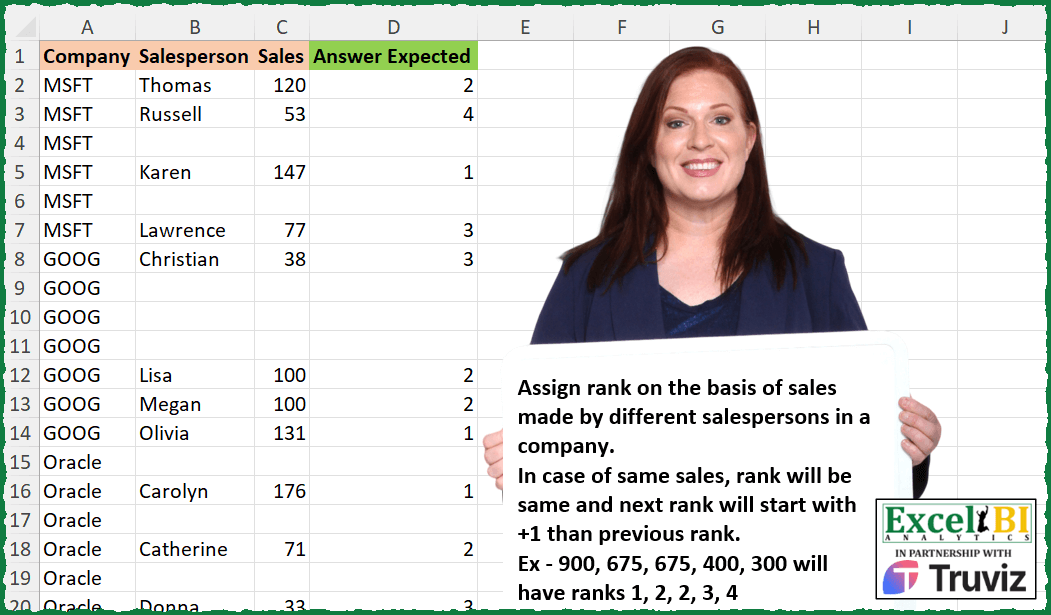
Assign rank on the basis of sales made by different salespersons in a company. In case of same sales, rank will be same and next rank will start with +1 than previous rank. Ex – 900, 675, 675, 400, 300 will have ranks 1, 2, 2, 3, 4
📌 Challenge Details and Links
ExcelBI Excel Challenge Number: 450
Challenge Difficulty: ⭐️
📥Download Sample File
📥Link to the solutions on LinkedIn
Solving the challenge of Rank Sales with Tie Handling with Power Query
Power Query solution 1 for Rank Sales with Tie Handling, proposed by Zoran Milokanović:
let
  Source = Excel.CurrentWorkbook(){[Name = "Input"]}[Content],
  S = Table.AddColumn(
    Source,
    "Answer Expected",
    each
      let
        c = each [Company],
        s = each [Sales],
        l = List.Sort(
          List.Distinct(s(Table.SelectRows(Source, (r) => c(r) = c(_) and s(r) <> null))),
          each 1 / _
        )
      in
        ({null} & {1 .. List.Count(l)}){List.PositionOf(l, s(_)) + 1}
  )
in
  S
Power Query solution 2 for Rank Sales with Tie Handling, proposed by Aditya Kumar Darak 🇮🇳:
let
  Source = Excel.CurrentWorkbook(){[Name = "data"]}[Content],
  Return = Table.AddColumn(
    Source,
    "Answer",
    each [
      S = Table.SelectRows(Source, (f) => f[Company] = [Company] and f[Sales] > [Sales]),
      C = List.Count(List.Distinct(S[Sales])) + 1,
      R = if [Sales] = null then null else C
    ][R]
  )
in
  Return
Power Query solution 3 for Rank Sales with Tie Handling, proposed by Alejandro Simón 🇵🇦 🇪🇸:
let
  Source = Excel.CurrentWorkbook(){[Name = "Table1"]}[Content],
  Sol = Table.Combine(
    Table.Group(
      Source,
      {"Company"},
      {
        {
          "A",
          each
            let
              a = Table.AddIndexColumn(_, "Idx"),
              b = Table.AddRankColumn(a, "R", {"Sales", 1}, [RankKind = RankKind.Dense]),
              c = Table.AddColumn(b, "Rank", each if [Sales] = null then null else [R]),
              d = Table.Sort(c, "Idx"),
              e = Table.RemoveColumns(d, {"Idx", "R"})
            in
              e
        }
      }
    )[A]
  )
in
  Sol
Power Query solution 4 for Rank Sales with Tie Handling, proposed by Brian Julius:
let
  Source = Table.AddIndexColumn(Excel.CurrentWorkbook(){[Name = "Table1"]}[Content], "Idx", 1, 1),
  ReplNull = Table.ReplaceValue(Source, null, - 99, Replacer.ReplaceValue, {"Sales"}),
  Group = Table.Group(ReplNull, {"Company"}, {{"All", each _}}),
  AddRank = Table.RemoveColumns(
    Table.AddColumn(
      Group,
      "RankSales",
      each Table.AddRankColumn(
        [All],
        "Rank",
        {"Sales", Order.Descending},
        [RankKind = RankKind.Dense]
      )
    ),
    "All"
  ),
  Expand = Table.ExpandTableColumn(
    AddRank,
    "RankSales",
    {"Salesperson", "Sales", "Idx", "Rank"},
    {"Salesperson", "Sales", "Idx", "Rnk"}
  ),
  Sort = Table.RemoveColumns(Table.Sort(Expand, {{"Idx", Order.Ascending}}), "Idx"),
  RestorNull = Table.RemoveColumns(
    Table.AddColumn(
      Table.ReplaceValue(Sort, - 99, null, Replacer.ReplaceValue, {"Sales"}),
      "Rank",
      each if [Sales] = null then null else [Rnk]
    ),
    "Rnk"
  )
in
  RestorNull
Power Query solution 5 for Rank Sales with Tie Handling, proposed by Ramiro Ayala Chávez:
let
  Source = Excel.CurrentWorkbook(){[Name = "Table1"]}[Content],
  L      = List.Transform,
  G      = Table.Group,
  I      = Table.AddIndexColumn,
  R      = Table.RemoveColumns,
  S      = Table.Sort,
  a      = G(I(Source, "P"), {"Company"}, {"G", each _})[G],
  b      = L(a, each G(_, {"Sales"}, {"S", each _})),
  c      = L(b, each S(_, {"Sales", 1})),
  d      = Table.Combine(L(c, each I(_, "I", 1)))[[S], [I]],
  e      = Table.ExpandTableColumn(d, "S", {"Company", "Salesperson", "Sales", "P"}),
  f      = R(Table.AddColumn(e, "Answer Expected", each if [Sales] = null then null else [I]), "I"),
  Sol    = R(S(f, {"P", 0}), "P")
in
  Sol
Power Query solution 6 for Rank Sales with Tie Handling, proposed by Luke Jarych:
let
  Source = Excel.CurrentWorkbook(){[Name = "Table1"]}[Content],
  GroupedRows = Table.Group(
    Source,
    {"Company"},
    {
      {
        "GroupedCompanies",
        each
          let
            a = Table.AddIndexColumn(_, "Index", 1),
            b = Table.AddRankColumn(
              a,
              "Rank",
              {"Sales", Order.Descending},
              [RankKind = RankKind.Dense]
            ),
            c = Table.AddColumn(b, "Expected Answer", each if [Sales] = null then null else [Rank]),
            d = Table.Sort(c, "Index")
          in
            d
      }
    }
  ),
  Answer = Table.ExpandTableColumn(
    GroupedRows,
    "GroupedCompanies",
    {"Salesperson", "Sales", "Expected Answer"}
  )
in
  Answer
Power Query solution 7 for Rank Sales with Tie Handling, proposed by Mihai Radu O:
let
  Source = Excel.CurrentWorkbook(){[Name = "Table1"]}[Content],
  sol = Table.AddColumn(
    Source,
    "R",
    each
      let
        a = Table.SelectRows(Source, (x) => x[Company] = [Company] and x[Salesperson] <> null),
        b = Table.AddRankColumn(a, "Rank", {"Sales", Order.Descending}, [RankKind = RankKind.Dense]),
        c = Table.SelectRows(b, (x) => x[Salesperson] = [Salesperson])[Rank]
      in
        try c{0} otherwise null
  )[[R]]
in
  sol
Power Query solution 8 for Rank Sales with Tie Handling, proposed by Venkata Rajesh:
let
  Source = Data,
  Output = Table.AddColumn(
    Source,
    "Rank",
    each [
      company = [Company],
      list = List.Distinct(
        List.Sort(
          List.RemoveNulls(Table.SelectRows(Source, each [Company] = company)[Sales]),
          Order.Descending
        )
      ),
      rank = if [Sales] = null then "" else List.PositionOf(list, [Sales]) + 1
    ][rank]
  )
in
  Output
Solving the challenge of Rank Sales with Tie Handling with Excel
Excel solution 1 for Rank Sales with Tie Handling, proposed by Bo Rydobon 🇹🇭:
=MAP(
    C2:C20,
    LAMBDA(
        s,
        IF(
            s,
            XMATCH(
                s,
                -SORT(
                    -UNIQUE(
                        FILTER(
                            C2:C20,
                            @+s:A20=A2:A20
                        )
                    )
                )
            ),
            ""
        )
    )
)
Excel solution 2 for Rank Sales with Tie Handling, proposed by John V.:
=MAP(A2:A20,
    C2:C20,
    LAMBDA(a,
    b,
    IF(b,
    XMATCH(b,
    -SORT(-UNIQUE(C2:C20/(A2:A20=a)))),
    "")))
Excel solution 3 for Rank Sales with Tie Handling, proposed by محمد حلمي:
=LET(i,
    A2:A20,
    j,
    C2:C20,
    MAP(i,
    j,
    LAMBDA(a,
    b,

IF(b,
    ROWS(UNIQUE(j*(i=a)*(j>=b)))-1,
    ""))))
Excel solution 4 for Rank Sales with Tie Handling, proposed by محمد حلمي:
=LET(i,
    A2:A20,
    j,
    C2:C20,
    MAP(i,
    j,
    LAMBDA(a,
    b,
    IF(b,
    XMATCH(-b,
    UNIQUE(SORT(-(i=a)*j))),
    ""))))
Excel solution 5 for Rank Sales with Tie Handling, proposed by محمد حلمي:
=MAP(C2:C20,
    LAMBDA(s,
    IF(s,
    XMATCH(s,
    -SORT(-UNIQUE((@+s:A20=A2:A20)*C2:C20))),
    "")))
Excel solution 6 for Rank Sales with Tie Handling, proposed by Kris Jaganah:
=LET(
    a,
    A2:A20,
    b,
    B2:B20,
    c,
    C2:C20,
    d,
    GROUPBY(
        HSTACK(
            a,
            b
        ),
        c,
        SUM,
        0,
        0,
        3,
        0,
        b<>0
    ),
    e,
    TAKE(
        d,
        ,
        1
    ),
    f,
    TAKE(
        d,
        ,
        -1
    ),
    g,
    XMATCH(
        e&f,
        UNIQUE(
            e&f
        )
    ),
    h,
    XLOOKUP(
        a&b,
        e&CHOOSECOLS(
            d,
            2
        ),
        XLOOKUP(
            e,
            e,
            g,
            ,
            ,
            -1
        )-g+1,
        ""
    ),
    h
)
Excel solution 7 for Rank Sales with Tie Handling, proposed by Julian Poeltl:
=LET(
    C,
    A2:A20,
    S,
    C2:C20,
    MAP(
        C,
        S,
        LAMBDA(
            A,
            B,
            IF(
                B>0,
                XMATCH(
                    B,
                    LARGE(
                        UNIQUE(
                            FILTER(
                                S,
                                C=A
                            )
                        ),
                        SEQUENCE(
                            COUNT(
                                UNIQUE(
                            FILTER(
                                S,
                                C=A
                            )
                        )
                            )
                        )
                    )
                ),
                ""
            )
        )
    )
)
Excel solution 8 for Rank Sales with Tie Handling, proposed by Julian Poeltl:
=LET(
    C,
    A2:A20,
    S,
    C2:C20,
    MAP(
        C,
        S,
        LAMBDA(
            A,
            B,
            IF(
                B>0,
                XMATCH(
                    B,
                    LET(
                        UF,
                        UNIQUE(
                            FILTER(
                                S,
                                C=A
                            )
                        ),
                        LARGE(
                            UF,
                            SEQUENCE(
                                COUNT(
                                    UF
                                )
                            )
                        )
                    )
                ),
                ""
            )
        )
    )
)
Excel solution 9 for Rank Sales with Tie Handling, proposed by Aditya Kumar Darak 🇮🇳:
=MAP(
 A2:A20,

 C2:C20,

 LAMBDA(a,
     b,
     IF(b,
     ROWS(UNIQUE(FILTER(C2:C20,
     (A2:A20 = a) * (C2:C20 >= b)))),
     ""))
)
Excel solution 10 for Rank Sales with Tie Handling, proposed by Timothée BLIOT:
=MAP(A2:A20,
    B2:B20,
    C2:C20,
    LAMBDA(x,
    y,
    z,
    IF(y="",
    "",
    SUM(--(z<=UNIQUE(
        FILTER(
            C2:C20,
            A2:A20=x
        )
    ))))))
Excel solution 11 for Rank Sales with Tie Handling, proposed by Hussein SATOUR:
=LET(c,
    A2:A20,
    s,
    C2:C20,
    a,
    MAP(c,
    s,
    LAMBDA(x,
    y,
    COUNT(UNIQUE(FILTER(s,
    (c=x)*(s>=y)))))),
    IF(
        s,
        a,
        ""
    ))
Excel solution 12 for Rank Sales with Tie Handling, proposed by Oscar Mendez Roca Farell:
=LET(a,
     A2:A20,
     c,
     C2:C20,
     MAP(a,
     c,
     LAMBDA(x,
     y,
     IF(y,
     SUM(N(UNIQUE(FILTER(c,
     (a=x)*(c>0)))>=y)),
     ""))))
Excel solution 13 for Rank Sales with Tie Handling, proposed by Duy Tùng:
=LET(a,
    A2:A20,
    c,
    C2:C20,
    MAP(a,
    c,
    LAMBDA(x,
    v,
    IF(v,
    XMATCH(v,
    SORT(UNIQUE(TOCOL(c/(a=x),
    3)),
    ,
    -1)),
    ""))))
Excel solution 14 for Rank Sales with Tie Handling, proposed by Sunny Baggu:
=LET(

     _u,
     UNIQUE(
         TAKE(
             A2:A20,
              ,
              1
         )
     ),

     DROP(

          REDUCE(

               "",

               _u,

               LAMBDA(
                   a,
                    v,

                    VSTACK(

                         a,

                         LET(

                              _fl,
                              FILTER(
                                  IF(
                                      A2:C20 = "",
                                       "",
                                       A2:C20
                                  ),
                                   A2:A20 = v
                              ),

                              _us,
                              SORT(
                                  UNIQUE(
                                      TOCOL(
                                          IF(
                                              --TAKE(
                                                  _fl,
                                                   ,
                                                   -1
                                              ) > 0,
                                               TAKE(
                                                  _fl,
                                                   ,
                                                   -1
                                              ),
                                               x
                                          ),
                                           3
                                      )
                                  ),
                                   ,
                                   -1
                              ),

                              IFNA(
                                  XMATCH(
                                      TAKE(
                                                  _fl,
                                                   ,
                                                   -1
                                              ),
                                       _us
                                  ),
                                   ""
                              )

                         )

                    )

               )

          ),

          1

     )

)
Excel solution 15 for Rank Sales with Tie Handling, proposed by 🇵🇪 &Ned Navarrete C.:
=REDUCE(
    D1,
    UNIQUE(
        A2:A20
    ),
    LAMBDA(
        c,
        v,
        LET(
            f,
            FILTER(
                C2:C20,
                A2:A20=v
            ),
            j,
            UNIQUE(
                SORT(
                    FILTER(
                        f,
                        f
                    ),
                    ,
                    -1
                )
            ),
            VSTACK(
                c,
                IFNA(
                    XMATCH(
                        f,
                        j
                    ),
                    ""
                )
            )
        )
    )
)
Excel solution 16 for Rank Sales with Tie Handling, proposed by Andy Heybruch:
=LET(_company,
    A2:A20,
    _sales,
    C2:C20,

MAP(_company,
    _sales,

LAMBDA(_c,
    _s,
    IFERROR(XMATCH(_s,
    SORT(UNIQUE(FILTER(_sales,
    (_c=_company)*(_sales>0))),
    1,
    -1),
    0),
    ""))))
Excel solution 17 for Rank Sales with Tie Handling, proposed by Milan Shrimali:
=map(A1:A17,
    C1:C17,

lambda(
    x,
    y,

    iferror(
        let(
            a,
            filter(
                $A$1:$C$17,
                $C$1:$C$17<>""
                coywisedata,
                filter(
                    a,
                    filter(
                        a,
                        {1,
                        0,
                        0}
                    )=x
                ),

                lastcol,
                sort(
                    filter(
                        coywisedata,
                        {0,
                        0,
                        1}
                    ),
                    1,
                    0
                ),

                match(
                    y,
                    unique(
                        lastcol
                    ),
                    0
                )
            )
            ,
            ""
        )
    )
)
Excel solution 18 for Rank Sales with Tie Handling, proposed by Mihai Radu O:
= b) * (sales <> "")),
     ,
     -1)
 ),

 _c,
     FILTER(sales,
     (comp = b)),

 d,
     XMATCH(
         _c,
          c
     ),

 VSTACK(
     a,
      d
 )
 )
 )
 ),

 ""
 )
)
Excel solution 19 for Rank Sales with Tie Handling, proposed by Nicolas Micot:
=SI(B2="";
    "";
    SIERREUR(LIGNES(UNIQUE(FILTRE($C$2:$C$20;
    ($A$2:$A$20=A2)*($B$2:$B$20<>"")*($C$2:$C$20>C2);
    NA())))+1;
    1))
Excel solution 20 for Rank Sales with Tie Handling, proposed by Ziad A.:
=MAP(
    A2:A,
    C2:C,
    LAMBDA(
        c,
        s,
        IFNA(
            XMATCH(
                s,
                SORTN(
                    FILTER(
                        C2:C,
                        A2:A=c
                    ),
                    9,
                    2,
                    1,

                )
            )
        )
    )
)
Excel solution 21 for Rank Sales with Tie Handling, proposed by Sandeep Marwal:
=LET(
    range,
    $A$2:$C$20,

    company,
    $A$2:$A$20,

    sales,
    $C$2:$C$20,

    fltr,
    MAP(
        sales,
        company,
        LAMBDA(
            a,
            b,
            IFERROR(
                MATCH(
                    a,
                    UNIQUE(
                        CHOOSECOLS(
                            SORTBY(
                                FILTER(
                                    range,
                                     company=b
                                ),
                                TAKE(
                                    FILTER(
                                        range,
                                        company=b
                                    ),
                                    ,
                                    -1
                                ),
                                -1
                            ),
                            3
                        )
                    ),
                    0
                ),
                ""
            )
        )
    ),

    fltr
)
Excel solution 22 for Rank Sales with Tie Handling, proposed by Burhan Cesur:
=
IFERROR(
MAP(A2:A20,
    C2:C20,
    LAMBDA(s,
    y,

XMATCH(y,

UNIQUE(
SORT(
FILTER(C2:C20,
    (A2:A20=s)*(C2:C20<>"")),
    ,
    -1)),
    0))),
    "")
Excel solution 23 for Rank Sales with Tie Handling, proposed by Tyler Cameron:
=MAP(
    C2:C20,
    A2:A20,
    LAMBDA(
        x,
        y,
        IF(
            x="",
            "",
            XMATCH(
                x,
                UNIQUE(
                    SORT(
                        FILTER(
                            C2:C20,
                            A2:A20=y
                        ),
                        ,
                        -1
                    )
                )
            )
        )
    )
)
Solving the challenge of Rank Sales with Tie Handling with Python
Python solution 1 for Rank Sales with Tie Handling, proposed by Konrad Gryczan, PhD:
import pandas as pd
input = pd.read_excel("450 Ranking.xlsx",  usecols="A:C", nrows=20)
test = pd.read_excel("450 Ranking.xlsx", usecols="D:D", nrows=20)
input["rank"] = input.groupby("Company")["Sales"].rank(method="dense", ascending=False)
print(input["rank"].equals(test["Answer Expected"])) # True
Python solution 2 for Rank Sales with Tie Handling, proposed by Luke Jarych:
Python xlwings & pandas:
 import pandas as pd   import xlwings as xw
df = rng.options(pd.DataFrame, header = True, index=False, numbers=int).value
df['Salesperson'] = df['Salesperson'].fillna('')   df['Rank'] = df.groupby('Company')['Sales'].rank(ascending=False, method='min')   df['Sales'] = df['Sales'].fillna(-999).astype(int).astype(str).replace('-999', '')   df['Rank'] = df['Rank'].fillna(-999).astype(int).astype(str).replace('-999', '')
Solving the challenge of Rank Sales with Tie Handling with Python in Excel
Python in Excel solution 1 for Rank Sales with Tie Handling, proposed by Abdallah Ally:
import pandas as pd
file_path = 'Excel_Challenge_450 - Ranking.xlsx'
df = pd.read_excel(file_path)
# Perform data transformation and cleansing
df['My Answer'] = df.groupby('Company')['Sales'].rank(method='dense', ascending=False)
# By default pandas converts columns with missing values to float
df[df.columns[1:]] = df[df.columns[1:]].fillna('0')
df[df.columns[2:]] = df[df.columns[2:]].astype(int).astype(str)
df = df.replace('0', '')
# Display results
df
Solving the challenge of Rank Sales with Tie Handling with R
R solution 1 for Rank Sales with Tie Handling, proposed by Konrad Gryczan, PhD:
library(tidyverse)
library(readxl)
input = read_excel("Excel/450 Ranking.xlsx", range = "A1:C20")
test = read_excel("Excel/450 Ranking.xlsx", range = "D1:D20")
result = input %>%
 mutate(rank = dense_rank(desc(Sales)), .by = Company)
Solving the challenge of Rank Sales with Tie Handling with Excel VBA
Excel VBA solution 1 for Rank Sales with Tie Handling, proposed by Rushikesh K.:
Sub AssignRanks()
 Dim lastRow As Long
 Dim ws As Worksheet
 Dim rng As Range
 Dim salesArr() As Variant
 Dim rankArr() As Variant
 Dim i As Long, j As Long
 Dim currentSales As Double
 Dim currentRank As Long
 Dim currentCompany As String

 Set ws = ThisWorkbook.Sheets("Sheet1")

 lastRow = ws.Cells(ws.Rows.Count, "A").End(xlUp).Row

 Set rng = ws.Range("A2:D" & lastRow)

 salesArr = rng.Value

 ReDim rankArr(1 To UBound(salesArr, 1), 1 To 1)

 currentCompany = salesArr(1, 1)
 currentRank = 1

 For i = 1 To UBound(salesArr, 1)
 If salesArr(i, 1) <> currentCompany Then
 currentCompany = salesArr(i, 1)
 currentRank = 1
 End If

 If Not IsEmpty(salesArr(i, 3)) Then
 currentRank = 1
 currentSales = salesArr(i, 3)
 For j = 1 To UBound(salesArr, 1)
 If salesArr(j, 1) = currentCompany Then
 If Not IsEmpty(salesArr(j, 3)) Then
 If salesArr(j, 3) > currentSales Then
 currentRank = currentRank + 1
 End If
 End If
 End If
 Next j
 rankArr(i, 1) = currentRank
 End If
 Next i

 ws.Range("D2").Resize(UBound(rankArr, 1), 1).Value = rankArr
End Sub
Solving the challenge of Rank Sales with Tie Handling with DAX
DAX solution 1 for Rank Sales with Tie Handling, proposed by Zoran Milokanović:
EVALUATE
ADDCOLUMNS(Input, "Answer Expected",
 VAR R = RANKX(CALCULATETABLE(Input, ALLEXCEPT(Input, Input[Company])), Input[Sales], , DESC, Dense)
 RETURN IF(ISBLANK(Input[Sales]), BLANK(), R)
)
&&