
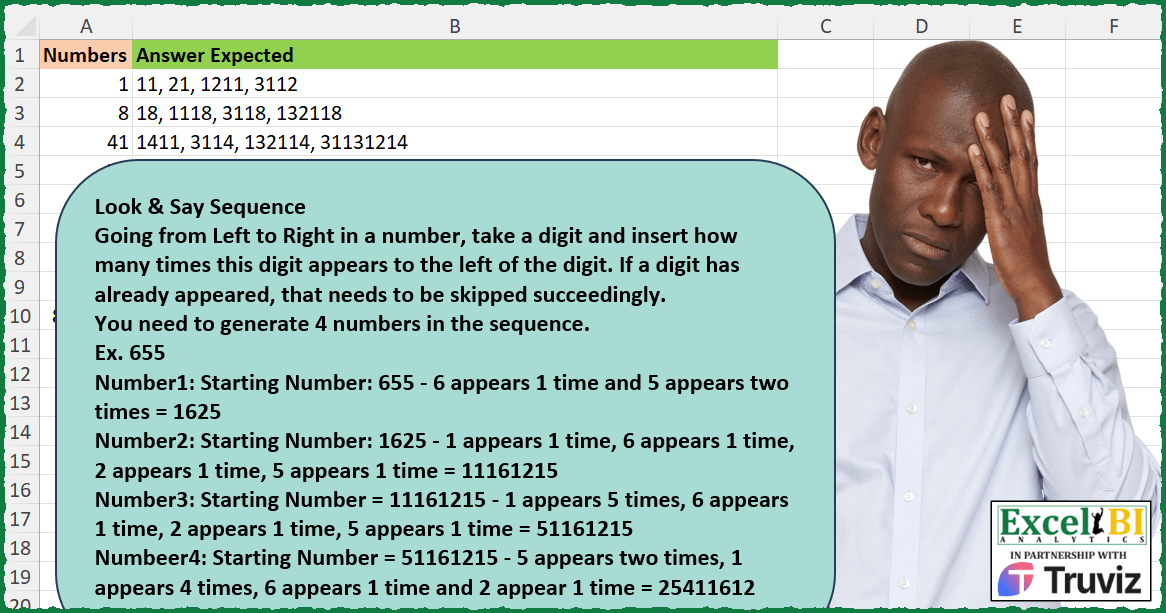
Look & Say Sequence Going from Left to Right in a number, take a digit and insert how many times this digit appears to the left of the digit. . If a digit has already appeared, that needs to be skipped succeedingly. You need to generate 4 numbers in the sequence. Ex. 655 Number1: Starting Number: 655 – 6 appears 1 time and 5 appears two times = 1625 Number2: Starting Number: 1625 – 1 appears 1 time, 6 appears 1 time, 2 appears 1 time, 5 appears 1 time = 11161215 Number3: Starting Number = 11161215 – 1 appears 5 times, 6 appears 1 time, 2 appears 1 time, 5 appears 1 time = 51161215 Numbeer4: Starting Number = 51161215 – 5 appears two times, 1 appears 4 times, 6 appears 1 time and 2 appear 1 time = 25411612
📌 Challenge Details and Links
ExcelBI Excel Challenge Number: 444
Challenge Difficulty: ⭐️⭐️
📥Download Sample File
📥Link to the solutions on LinkedIn
Solving the challenge of Generate Look-and-Say Sequence with Power Query
Power Query solution 1 for Generate Look-and-Say Sequence, proposed by Aditya Kumar Darak 🇮🇳:
let
  Source = Excel.CurrentWorkbook(){[Name = "data"]}[Content],
  Return = Table.AddColumn(
    Source,
    "Answer",
    each [
      G = List.Generate(
        () => [a = 0, b = Text.From([Numbers])],
        (f) => f[a] <= 4,
        (f) => [
          a = f[a] + 1,
          L = List.Distinct(Text.ToList(f[b])),
          T = List.Transform(L, (x) => Text.From(Text.Length(Text.Select(f[b], x))) & x),
          b = Text.Combine(T)
        ],
        (f) => f[b]
      ),
      S = List.Skip(G),
      C = Text.Combine(S, ", ")
    ][C]
  )
in
  Return
Power Query solution 2 for Generate Look-and-Say Sequence, proposed by Ramiro Ayala Chávez:
let
  S = Excel.CurrentWorkbook(){[Name = "Table1"]}[Content],
  Sol = Table.AddColumn(
    S,
    "Answer Expected",
    each
      let
        a  = [Numbers],
        T  = Table.FromColumns,
        L  = Text.ToList,
        F  = Text.From,
        G  = Table.Group,
        C  = Table.RowCount,
        Z  = List.Zip,
        TC = Text.Combine,
        LC = List.Combine,
        LT = List.Transform,
        b  = G(T({L(F(a))}), {"Column1"}, {"G", each C(_)}),
        c  = Z({b[G], b[Column1]}),
        d  = TC(LC(LT(c, each LT(_, F)))),
        e  = G(T({L(F(d))}), {"Column1"}, {"G", each C(_)}),
        f  = Z({e[G], e[Column1]}),
        g  = TC(LC(LT(f, each LT(_, F)))),
        h  = G(T({L(F(g))}), {"Column1"}, {"G", each C(_)}),
        i  = Z({h[G], h[Column1]}),
        j  = TC(LC(LT(i, each LT(_, F)))),
        k  = G(T({L(F(j))}), {"Column1"}, {"G", each C(_)}),
        l  = Z({k[G], k[Column1]}),
        m  = TC(LC(LT(l, each LT(_, F)))),
        n  = d & ", " & g & ", " & j & ", " & m
      in
        n
  )
in
  Sol
Solving the challenge of Generate Look-and-Say Sequence with Excel
Excel solution 1 for Generate Look-and-Say Sequence, proposed by Bo Rydobon 🇹🇭:
=MAP(
    A2:A10,
    LAMBDA(
        x,
        ARRAYTOTEXT(
            SCAN(
                x,
                {1,
                2,
                3,
                4},
                LAMBDA(
                    n,
                    v,
                    LET(
                        m,
                        MID(
                            n,
                            SEQUENCE(
                                LEN(
                                    n
                                )
                            ),
                            1
                        ),
                        CONCAT(
                            SORTBY(
                                DROP(
                                    GROUPBY(
                                        HSTACK(
                                            XMATCH(
                                                m,
                                                m
                                            ),
                                            m
                                        ),
                                        m,
                                        ROWS,
                                        0,
                                        0
                                    ),
                                    ,
                                    1
                                ),
                                {2,
                                1}
                            )
                        )
                    )
                )
            )
        )
    )
)
Excel solution 2 for Generate Look-and-Say Sequence, proposed by Rick Rothstein:
=MAP(
    A2:A10,
    LAMBDA(
        r,
        ARRAYTOTEXT(
            SCAN(
                r,
                {1,
                2,
                3,
                4},
                LAMBDA(
                    a,
                    x,
                    LET(
                        u,
                        UNIQUE(
                            MID(
                                a,
                                SEQUENCE(
                                    LEN(
                                        a
                                    )
                                ),
                                1
                            )
                        ),
                        CONCAT(
                            LEN(
                                        a
                                    )-LEN(
                                SUBSTITUTE(
                                    a,
                                    u,
                                    ""
                                )
                            )&u
                        )
                    )
                )
            )
        )
    )
)
Excel solution 3 for Generate Look-and-Say Sequence, proposed by John V.:
=MAP(
    A2:A10,
    LAMBDA(
        x,
        ARRAYTOTEXT(
            SCAN(
                x,
                ROW(
                    1:4
                ),
                LAMBDA(
                    a,
                    v,
                    LET(
                        i,
                        MID(
                            a,
                            SEQUENCE(
                                LEN(
                                    a
                                )
                            ),
                            1
                        ),
                        u,
                        TOROW(
                            UNIQUE(
                                i
                            )
                        ),
                        CONCAT(
                            BYCOL(
                                N(
                                    i=u
                                ),
                                SUM
                            )&u
                        )
                    )
                )
            )
        )
    )
)
Excel solution 4 for Generate Look-and-Say Sequence, proposed by محمد حلمي:
=MAP(
    A2:A10,
    LAMBDA(
        a,
        ARRAYTOTEXT(
            SCAN(
                a,
                SEQUENCE(
                    4
                ),
                LAMBDA(
                    a,
                    v,
                    LET(
                        e,
                        MID(
                            a,
                            SEQUENCE(
                                LEN(
                                    a
                                )
                            ),
                            1
                        ),
                        x,
                        UNIQUE(
                            e
                        ),
                        CONCAT(
                            MAP(
                                x,
                                LAMBDA(
                                    n,
                                    SUM(
                                        N(
                                            n=e
                                        )
                                    )
                                )
                            )&x
                        )
                    )
                )
            )
        )
    )
)
Excel solution 5 for Generate Look-and-Say Sequence, proposed by Kris Jaganah:
=MAP(A2:A10,
    LAMBDA(w,
    ARRAYTOTEXT(SCAN(w,
    SEQUENCE(
        4
    ),
    LAMBDA(y,
    z,
    LET(a,
    MID(
        y,
        SEQUENCE(
            LEN(
                y
            )
        ),
        1
    ),
    CONCAT(MAP(UNIQUE(
        a
    ),
    LAMBDA(x,
    SUM(--(a=x))&x)))))))))
Excel solution 6 for Generate Look-and-Say Sequence, proposed by Julian Poeltl:
=MAP(
    A2:A10,
    LAMBDA(
        Nu,
        LET(
            C,
            LAMBDA(
                N,
                LET(
                    SP,
                    MID(
                        N,
                        SEQUENCE(
                            LEN(
                                N
                            )
                        ),
                        1
                    ),
                    U,
                    UNIQUE(
                        SP
                    ),
                    Co,
                    MAP(
                        U,
                        LAMBDA(
                            A,
                            COUNTA(
                                FILTER(
                                    SP,
                                    SP=A
                                )
                            )
                        )
                    ),
                    CONCAT(
                        Co&U
                    )
                )
            ),
            TEXTJOIN(
                ", ",
                ,
                C(
                    Nu
                ),
                C(
                    C(
                    Nu
                )
                ),
                C(
                    C(
                    C(
                    Nu
                )
                )
                ),
                C(
                    C(
                    C(
                    C(
                    Nu
                )
                )
                )
                )
            )
        )
    )
)
Excel solution 7 for Generate Look-and-Say Sequence, proposed by Timothée BLIOT:
=MAP(A2:A10,
    LAMBDA(z,
    ARRAYTOTEXT(SCAN(z,
    {1;1;1;1},
    LAMBDA(a,
    v,
     LET(B,
    MID(
        a,
        SEQUENCE(
            LEN(
                a
            )
        ),
        1
    ),
    CONCAT(MAP(UNIQUE(
        B
    ),
    LAMBDA(x,
    SUM(--(x=B))&x)))))))))
Excel solution 8 for Generate Look-and-Say Sequence, proposed by Oscar Mendez Roca Farell:
=MAP(
    A2:A10,
     LAMBDA(
         a,
          ARRAYTOTEXT(
              SCAN(
                  a,
                   ROW(
                       1:4
                   ),
                   LAMBDA(
                       i,
                        x,
                        LET(
                            m,
                             --MID(
                                 i,
                                  SEQUENCE(
                                      LEN(
                                          i
                                      )
                                  ),
                                  1
                             ),
                             f,
                             FREQUENCY(
                                 m,
                                  m
                             ),
                             CONCAT(
                                 IFS(
                                     f,
                                      HSTACK(
                                          f,
                                           m
                                      ),
                                      1,
                                      ""
                                 )
                             )
                        )
                   )
              )
          )
     )
)

Or alternatively:
=MAP(
    A2:A10,
     LAMBDA(
         a,
          LET(
              F,
               LAMBDA(
                   j,
                    LET(
                        m,
                         MID(
                             j,
                              SEQUENCE(
                                  LEN(
                                      j
                                  )
                              ),
                              1
                         ),
                         REDUCE(
                             "",
                              UNIQUE(
                                  m
                              ),
                              LAMBDA(
                                  i,
                                   x,
                                   i&SUM(
                                       N(
                                           m=x
                                       )
                                   )&x
                              )
                         )
                    )
               ),
               ARRAYTOTEXT(
                   SCAN(
                       a,
                        ROW(
                       1:4
                   ),
                        LAMBDA(
                            i,
                             x,
                             F(
                                          i
                                      )
                        )
                   )
               )
          )
     )
)
Excel solution 9 for Generate Look-and-Say Sequence, proposed by Sunny Baggu:
=MAP(

     A2:A10,

     LAMBDA(
         t,

          ARRAYTOTEXT(

               SCAN(

                    t,

                    SEQUENCE(
                        4
                    ),

                    LAMBDA(
                        a,
                         v,

                         LET(

                              _m,
                              MID(
                                  a,
                                   SEQUENCE(
                                       LEN(
                                           a
                                       )
                                   ),
                                   1
                              ),

                              _u,
                              UNIQUE(
                                  _m
                              ),

                              _c,
                              MAP(
                                  _u,
                                   LAMBDA(
                                       a,
                                        SUM(
                                            N(
                                                _m = a
                                            )
                                        )
                                   )
                              ),

                              CONCAT(
                                  _c & _u
                              )

                         )

                    )

               )

          )

     )

)
Excel solution 10 for Generate Look-and-Say Sequence, proposed by LEONARD OCHEA 🇷🇴:
=MAP(
    A2:A10,
    LAMBDA(
        x,
        ARRAYTOTEXT(
            SCAN(
                x,
                SEQUENCE(
                    4
                ),
                LAMBDA(
                    a,
                    b,
                    LET(
                        m,
                        MID(
                            a,
                            SEQUENCE(
                                LEN(
                                    a
                                )
                            ),
                            1
                        ),
            &            u,
                        UNIQUE(
                            m
                        ),
                        CONCAT(
                            BYROW(
                                N(
                                    u=TOROW(
                            m
                        )
                                ),
                                SUM
                            )&u
                        )
                    )
                )
            )
        )
    )
)
Excel solution 11 for Generate Look-and-Say Sequence, proposed by Diarmuid Early:
=MAP(A2:A10,
    LAMBDA(in,

 ARRAYTOTEXT(SCAN(in,
    SEQUENCE(
        4
    ),
    LAMBDA(a,
    v,

 LET(digits,
    MID(
        a,
        SEQUENCE(
            LEN(
                a
            )
        ),
        1
    ),

 digUni,
    UNIQUE(
        digits
    ),

 digCnt,
    BYROW(--(digUni=TOROW(
        digits
    )),
    SUM),

 CONCAT(
     HSTACK(
         digCnt,
         digUni
     )
 )))))))

The idea:
* digits lists the digits from the previous number
* digUni is the unique digits (in the order they appear)
* digCnt is the count of each unique digit
* The CONCAT combines the counts and digits in order to form the next number
* SCAN runs that operation 4 times (starting from the input)
* ARRAYTOTEXT merges those 4 numbers into a comma-separated list
* MAP applies that whole operation to each starting number

I tried a GROUPBY solution first,
     but I had to wrap it in 2 SORTBYs (to switch the column order and to have the digits in order of appearance instead of ascending order)
Excel solution 12 for Generate Look-and-Say Sequence, proposed by Burhan Cesur:
=MAP(A2:A10,
    LAMBDA(x,
    TEXTJOIN(", ",
    ,
    SCAN(x,
    SEQUENCE(
        4
    ),
    LAMBDA(s,
    v,

LET(c,
    s,
    a,
    MID(
        c,
        SEQUENCE(
            LEN(
                c
            )
        ),
        1
    ),

CONCAT(TOROW(HSTACK(BYROW(1*(UNIQUE(
    a
)=TRANSPOSE(
    a
)),
    SUM),
    UNIQUE(
    a
))))))))))
Excel solution 13 for Generate Look-and-Say Sequence, proposed by Tyler Cameron:
=LET(z,
    LAMBDA(u,
    LET(a,
    MID(
        u,
        SEQUENCE(
            LEN(
                u
            )
        ),
        1
    ),
    CONCAT(MAP(UNIQUE(
        a
    ),
    LAMBDA(x,
    SUM(--(x=a))&x))))),
    MAP(
        A2:A10,
        LAMBDA(
            x,
            LET(
                l,
                z(
                    x
                ),
                m,
                z(
                    l
                ),
                n,
                z(
                    m
                ),
                o,
                z(
                    n
                ),
                TEXTJOIN(
                    ", ",
                    ,
                    l,
                    m,
                    n,
                    o
                )
            )
        )
    ))
Excel solution 14 for Generate Look-and-Say Sequence, proposed by Talia Cao, CPA:
=MAP(A2:A10, LAMBDA(n, ARRAYTOTEXT(
 SCAN(n, SEQUENCE(4), LAMBDA(a, v,
 LET(Chrs,   MID(a, SEQUENCE(LEN(a)), 1),
 Uniq,   TRANSPOSE(UNIQUE(Chrs)),
 Ct,     BYCOL(--(Uniq=Chrs), LAMBDA(c, SUM(c))),
 CONCAT(Ct & Uniq)
))))))
Solving the challenge of Generate Look-and-Say Sequence with Python
Python solution 1 for Generate Look-and-Say Sequence, proposed by Konrad Gryczan, PhD:
import pandas as pd
input = pd.read_excel("443 Look and Say Sequence.xlsx", usecols="A", nrows=10)
test = pd.read_excel("443 Look and Say Sequence.xlsx", usecols="B", nrows=10)
def generate_next(number):
 number_str = str(number)
 digits = []

 for digit in number_str:
 if digit not in digits:
 digits.append(digit)

 result = ""
 for digit in digits:
 count = number_str.count(digit)
 result += str(count) + digit

 return int(result)
def generate_sequence(start_digit, iter=4):
 result = [start_digit]

 for i in range(iter):
 next_number = generate_next(result[-1])
 result.append(next_number)

 all_numbers = [str(num) for num in result if num != start_digit]
 return ", ".join(all_numbers)
result = input.copy()
result["Answer Expected"] = result["Numbers"].map(lambda x: generate_sequence(x))
print(result["Answer Expected"].equals(test["Answer Expected"])) # True
Solving the challenge of Generate Look-and-Say Sequence with Python in Excel
Python in Excel solution 1 for Generate Look-and-Say Sequence, proposed by Abdallah Ally:
import pandas as pd
file_path = 'Excel_Challenge_443 - Look and Say Sequence.xlsx'
df = pd.read_excel(file_path)
# Perform data transformation and cleansing
def look_say_sequence(col):
 number = str(col)
 numbers = []
 for i in range(4):
 digits = ''
 for num in number:
 if num not in digits:
 digits += num
 numbers.append(''.join([str(number.count(x)) + x for x in digits]))
 number = numbers[-1]
 return ', '.join(numbers)
df['My Answer'] = df['Numbers'].apply(look_say_sequence)
df['Check'] = df['Answer Expected'] == df['My Answer']
df
Python in Excel solution 2 for Generate Look-and-Say Sequence, proposed by ferhat CK:
al2 = xl("A1:A10", headers=True)
ansEx = []
for j in al2.Numbers:
 y = []
 x = str(j)
 for _ in range(4):
 v = np.array(list(x))
 indexes = np.unique(v, return_index=True)[1]
 x = "".join([str((v == v[index]).sum()) + v[index] for index in sorted(indexes)])
 y.append(x)
 ansEx.append(", ".join(y))
pd.DataFrame({"Answer Expected": ansEx})
Solving the challenge of Generate Look-and-Say Sequence with R
R solution 1 for Generate Look-and-Say Sequence, proposed by Konrad Gryczan, PhD:
library(tidyverse)
library(readxl)
input = read_excel("Excel/443 Look and Say Sequence.xlsx", range = "A1:A10")
test = read_excel("Excel/443 Look and Say Sequence.xlsx", range = "B1:B10")
generate_next = function(number) {
 number_str = as.character(number)
 digits = str_split(number_str, "")[[1]]

 unique_digits = unique(digits)

 result = map_chr(unique_digits, function(digit) {
 count = sum(digits == digit)
 paste0(count, digit)
 }) %>% paste0(collapse = "")

 as.numeric(result)
}
generate_sequence = function(start_digit, iter = 4) {
 result = start_digit

 for (i in 1:iter) {
 next_number = generate_next(result[length(result)])
 result = c(result, next_number)
 }

 all = result %>%
 setdiff(., start_digit) %>%
 paste0(collapse = ", ")

 return(all)
}
result = input %>%
 mutate(`Answer Expected` = map_chr(Numbers, generate_sequence))
R solution 2 for Generate Look-and-Say Sequence, proposed by Anil Kumar Goyal:
library(tidyverse)
data.frame(
 Numbers = c(1, 8, 41)
) %>%
 mutate(`Answer Expected` = map_chr(Numbers, .f = (.a) {
 accumulate(1:4, ~ .x %>%
 str_split("") %>%
 unlist() %>%
 {table(.)[unique(.)]} %>%
 tibble::enframe() %>%
 {c(rbind(.$value, .$name))} %>%
 str_c(collapse = ""),
 .init = .a)[-1] %>%
 unlist() %>%
 str_c(collapse = ", ")
 }))
&&