
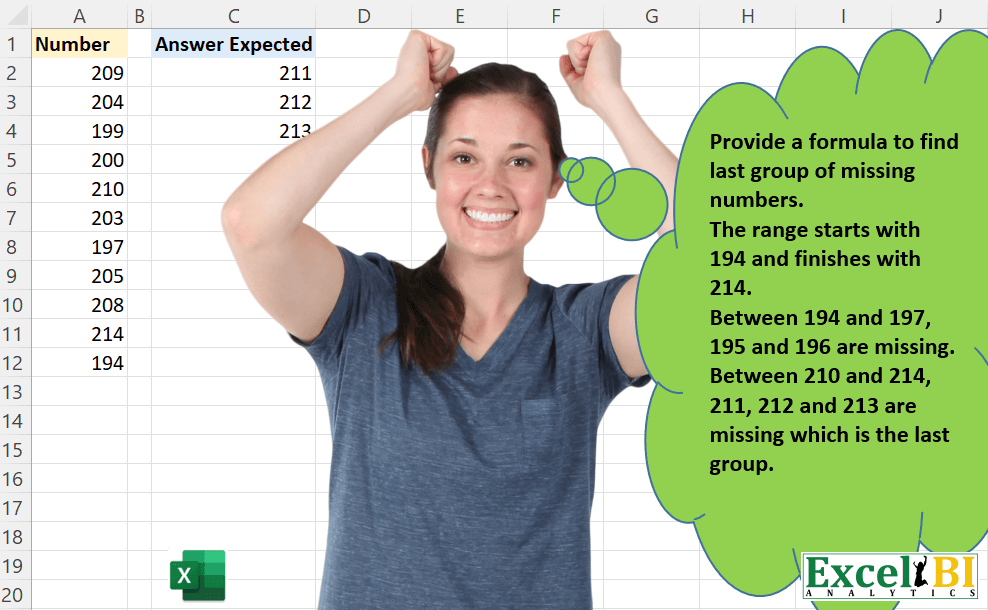
Provide a formula to find last group of missing numbers. If you study the range, the range starts with 194 and finishes with 214. Between 194 and 197, 195 and 196 are missing. Between 210 and 214, 211, 212 and 213 are missing which is the last missing group.
📌 Challenge Details and Links
ExcelBI Excel Challenge Number: 42
Challenge Difficulty: ⭐️
📥Download Sample File
📥Link to the solutions on LinkedIn
Solving the challenge of Find Last Group of Missing Numbers with Power Query
Power Query solution 1 for Find Last Group of Missing Numbers, proposed by Brian Julius:
let
  Source = Table.FromRows(
    Json.Document(
      Binary.Decompress(
        Binary.FromText(
          "i45WMjKwVIrVAdEmYNrQEsY3gNCGUNrAGCpvDuWbQmkLqDqYfiAdCwA=",
          BinaryEncoding.Base64
        ),
        Compression.Deflate
      )
    ),
    let
      _t = ((type nullable text) meta [Serialized.Text = true])
    in
      type table [Number = _t]
  ),
  Sort = Table.TransformColumnTypes(
    Table.AddIndexColumn(Table.Sort(Source, {{"Number", Order.Ascending}}), "Index", 1, 1),
    {"Number", Int64.Type}
  ),
  Prev = Table.AddColumn(Sort, "Previous", each try Sort[Number]{[Index] - 2} otherwise null),
  Consec = Table.AddColumn(
    Prev,
    "Consecutive",
    each if [Number] - [Previous] = 1 then "Yes" else "No"
  ),
  Filter = Table.Last(Table.SelectRows(Consec, each ([Consecutive] = "No"))),
  ListNums = List.Numbers(Filter[Previous] + 1, Filter[Number] - Filter[Previous] - 1),
  Clean = Table.RenameColumns(
    Table.FromList(ListNums, Splitter.SplitByNothing(), null, null, ExtraValues.Error),
    {"Column1", "Expected Answer"}
  )
in
  Clean
Power Query solution 2 for Find Last Group of Missing Numbers, proposed by Bhavya Gupta:
let
  Source = Excel.CurrentWorkbook(){[Name = "Table1"]}[Content],
  Sorted = Table.Sort(Source, {{"Number", Order.Ascending}}),
  Index = Table.AddIndexColumn(Sorted, "Index", 0, 1, Int64.Type),
  NextRow = Table.AddColumn(Index, "Custom", each Index[Number]{[Index] + 1}),
  NoErrors = Table.RemoveRowsWithErrors(NextRow, {"Custom"}),
  Subtraction = Table.AddColumn(NoErrors, "Subtraction", each [Custom] - [Number], type number),
  MinMax = List.Transform(
    Table.ToColumns(Table.SelectRows(Subtraction, each [Subtraction] > 1)[[Number], [Custom]]),
    each List.Last(_)
  ),
  FinalMissing = {List.Min(MinMax) + 1 .. List.Max(MinMax) - 1}
in
  FinalMissing
Power Query solution 3 for Find Last Group of Missing Numbers, proposed by Matthias Friedmann:
lete range and then identifies the missing numbers and finally selects the last group of them:
let
 Source = Excel.CurrentWorkbook(){[Name = "MissingGroup"]}[Content][Number],
 Range = {List.Min(Source) .. List.Max(Source)},
 LastMissing = List.LastN(
 List.RemoveLastN(
 List.ReplaceMatchingItems(
 Range,
 List.Zip({Source, List.Repeat({"x"}, List.Count(Source))})
 ), each _ = "x"
 ), each _ <> "x"
 )
in
 LastMissing
Power Query solution 4 for Find Last Group of Missing Numbers, proposed by Victor Wang:
let
  Source = Excel.CurrentWorkbook(){[Name = "Table1"]}[Content][Number],
  allNums = {List.Min(Source) .. List.Max(Source)},
  Result = List.LastN(
    List.RemoveLastN(allNums, each List.Contains(Source, _)),
    each not List.Contains(Source, _)
  )
in
  Result
Power Query solution 5 for Find Last Group of Missing Numbers, proposed by Venkata Rajesh:
let
  Source = Data,
  Sorted = Table.Sort(Source, {{"Number", Order.Ascending}}),
  Index = Table.AddIndexColumn(Sorted, "Index", 0, 1, Int64.Type),
  Missing = Table.AddColumn(
    Index,
    "Missing",
    each try {[Number] + 1 .. Index{[Index] + 1}[Number] - 1} otherwise {}
  ),
  #"Filtered Rows" = Table.SelectRows(Missing, each (List.Count([Missing]) <> 0)),
  #"Kept Last Rows" = Table.LastN(#"Filtered Rows", 1),
  Missing1 = #"Kept Last Rows"{0}[Missing]
in
  Missing1
Solving the challenge of Find Last Group of Missing Numbers with Excel
Excel solution 1 for Find Last Group of Missing Numbers, proposed by Rick Rothstein:
=LET(a,
    SORT(
        A2:A12,
        ,
        -1
    ),
    s,
    SEQUENCE(
        COUNT(
            a
        )-1
    ),
    p,
    MIN(
        IF(
            INDEX(
                a,
                s
            )-1<>INDEX(
                a,
                s+1
            ),
            s
        )
    ),
    x,
    INDEX(
        a,
        p+1
    ),
    y,
    INDEX(
        a,
        p
    ),
    x+SEQUENCE(@(y-x-1)))
Excel solution 2 for Find Last Group of Missing Numbers, proposed by Rick Rothstein:
=LET(
    a,
    SORT(
        A2:A12,
        ,
        -1
    ),
    s,
    SEQUENCE(
        COUNT(
            a
        )-1
    ),
    p,
    MIN(
        IF(
            INDEX(
                a,
                s
            )-1<>INDEX(
                a,
                s+1
            ),
            s
        )
    ),
    x,
    SUM(
        INDEX(
            a,
            p+1
        )
    ),
    y,
    SUM(
        INDEX(
            a,
            p
        )
    ),
    SEQUENCE(
        y-x-1,
        ,
        x+1
    )
)
Excel solution 3 for Find Last Group of Missing Numbers, proposed by Rick Rothstein:
=LET(
    a,
    SORT(
        A2:A12,
        ,
        -1
    ),
    s,
    SEQUENCE(
        COUNT(
            a
        )-1
    ),
    p,
    MIN(
        IF(
            INDEX(
                a,
                s
            )-1<>INDEX(
                a,
                s+1
            ),
            s
        )
    ),
    x,
    INDEX(
        a,
        p+1
    ),
    y,
    INDEX(
        a,
        p
    ),
    x&" - "&y
)
The output shows the two searched for bounds,
    ,
    ,
     210 and 214,
     I just  simply displayed them together to show that x and y are calculated correctly. Now let's display the actual count of values that will need to be displayed...
=LET(
    a,
    SORT(
        A2:A12,
        ,
        -1
    ),
    s,
    SEQUENCE(
        COUNT(
            a
        )-1
    ),
    p,
    MIN(
        IF(
            INDEX(
                a,
                s
            )-1<>INDEX(
                a,
                s+1
            ),
            s
        )
    ),
    x,
    INDEX(
        a,
        p+1
    ),
    y,
    INDEX(
        a,
        p
    ),
    y-x-1
)
The value of this formula is 3.... no problem. But now comes the problem. Wrap that calculation with a SEQUENCE function call...
=LET(
    a,
    SORT(
        A2:A12,
        ,
        -1
    ),
    s,
    SEQUENCE(
        COUNT(
            a
        )-1
    ),
    p,
    MIN(
        IF(
            INDEX(
                a,
                s
            )-1<>INDEX(
                a,
                s+1
            ),
            s
        )
    ),
    x,
    INDEX(
        a,
        p+1
    ),
    y,
    INDEX(
        a,
        p
    ),
    SEQUENCE(
        y-x-1
    )
)
Excel solution 4 for Find Last Group of Missing Numbers, proposed by John V.:
=LET(s,
    SORT(
        A2:A12
    ),
    d,
    DROP(
        s,
        1
    ),
    b,
    0/(d-s>1),
    LOOKUP(
        1,
        b,
        s
    )+SEQUENCE(
        LOOKUP(
            1,
            b,
            d-s
        )-1
    ))
Excel solution 5 for Find Last Group of Missing Numbers, proposed by John V.:
=LET(s,
    SORT(
        A2:A12
    ),
    u,
    DROP(
        s,
        -1
    ),
    d,
    DROP(
        s,
        1
    ),
    f,
    LAMBDA(x,
    LOOKUP(1,
    0/(d-u>1),
    x)),
    f(
        u
    )+SEQUENCE(
        f(
            d-u
        )-1
    ))
Excel solution 6 for Find Last Group of Missing Numbers, proposed by محمد حلمي:
=LET(
    r,
    A2:A12,
    e,
    SORT(
        r
    ),
    s,
    DROP(
        e,
        1
    ),
    a,
    XLOOKUP(
        TRUE,
        s-e>1,
        e,
        ,
        ,
        -1
    )+1,
    SEQUENCE(
        XLOOKUP(
            a,
            e,
            e,
            ,
            1
        )-a,
        ,
        a
    )
)
Excel solution 7 for Find Last Group of Missing Numbers, proposed by محمد حلمي:
=IF(ROWS($C$2:C2)<=INDEX(
SMALL($A$2:$A$12,ROW($A$2:$A$12)-1),
MAX(IF((IFERROR(INDEX(
SMALL($A$2:$A$12,ROW($A$2:$A$12)-1),N(IF(1,ROW($A$2:$A$12)))),)-
SMALL($A$2:$A$12,ROW($A$2:$A$12)-1))>1,ROW($A$2:$A$12)-1))+1)-
LOOKUP(2,1/((IFERROR(INDEX(
SMALL($A$2:$A$12,ROW($A$2:$A$12)-1),N(IF(1,ROW($A$2:$A$12)))),)-
SMALL($A$2:$A$12,ROW($A$2:$A$12)-1))>1),
SMALL($A$2:$A$12,ROW($A$2:$A$12)-1))-1,
LOOKUP(2,1/((IFERROR(INDEX(
SMALL($A$2:$A$12,ROW($A$2:$A$12)-1),N(IF(1,ROW($A$2:$A$12)))),)-
SMALL($A$2:$A$12,ROW($A$2:$A$12)-1))>1),
SMALL($A$2:$A$12,ROW($A$2:$A$12)-1))+ROW(A1),"")
Excel solution 8 for Find Last Group of Missing Numbers, proposed by محمد حلمي:
=LET(
    r,
    A2:A12,
    e,
    SORT(
        r
    ),
    s,
    DROP(
        e,
        1
    ),
    a,
    XLOOKUP(
        TRUE,
        s-e>1,
        e,
        ,
        ,
        -1
    ),
    SEQUENCE(
        XLOOKUP(
            1+a+1,
            r,
            r,
            ,
            1
        )-a-1,
        ,
        a+1
    )
)
Excel solution 9 for Find Last Group of Missing Numbers, proposed by محمد حلمي:
=LET(
    e,
    SORT(
        A2:A12
    ),
    a,
    XLOOKUP(
        TRUE,
        DROP(
            e,
            1
        )-e>1,
        e,
        ,
        ,
        -1
    )+1,
    SEQUENCE(
        XLOOKUP(
            a,
            e,
            e,
            ,
            1
        )-a,
        ,
        a
    )
)
Excel solution 10 for Find Last Group of Missing Numbers, proposed by 🇰🇷 Taeyong Shin:
=LET(
    a,
     A2:A12,

     b,
     SEQUENCE(
         MAX(
             a
         )-MIN(
             a
         )+1,
          ,
          MIN(
             a
         )
     ),

     c,
     FILTER(
         b,
          ISNA(
              XMATCH(
                  b,
                   a
              )
          )
     ),

     ROW(
         INDIRECT(
              XLOOKUP(
                  MAX(
                      c
                  ),
                   a,
                   a,
                   ,
                   -1
              )+1 & ":" & MAX(
                      c
                  )
         )
     )

)
Excel solution 11 for Find Last Group of Missing Numbers, proposed by Aditya Kumar Darak 🇮🇳:
= LET(
 _num,
 A2:A12,
 _min,
 MIN(_num),
 _max,
 MAX(_num),
 _seq,
 SEQUENCE(_max - _min + 1, , _min),
 _cnt,
 COUNTIFS(_num, _seq),
 _lar,
 ROWS(DROP(_cnt, XMATCH(0, _cnt, 0, -1))),
 _calc,
 _cnt * _seq,
 FILTER(
 _seq,
 (_seq >   LARGE(_calc, _lar + 1))
 * (_seq < LARGE(_calc, _lar))))
Excel solution 12 for Find Last Group of Missing Numbers, proposed by Aditya Kumar Darak 🇮🇳:
= LET(

     _num,

     A2:A12,

     _min,

     MIN(
         _num
     ),

     _max,

     MAX(
         _num
     ),

     _seq,

     SEQUENCE(
         _max - _min + 1,
          ,
          _min
     ),

     _cnt,

     COUNTIFS(
         _num,
          _seq
     ),

     _calc,

     SCAN(
         0,
          _cnt,
          LAMBDA(
              a,
               b,
               a + b
          )
     ) * NOT(
         _cnt
     ),

     FILTER(
         _seq,
          _calc = MAX(
              _calc
          )
     )
)
Excel solution 13 for Find Last Group of Missing Numbers, proposed by Timothée BLIOT:
=LET(

    Number,
     A2:A12,

    Sorted,
     SORT(
         Number,
         ,
         -1
     ),

    Taken,
     TAKE(
         Sorted,
         2
     ),

    SEQUENCE(
        MAX(
            Taken
        )-MIN(
            Taken
        )-1,
        ,
        MIN(
            Taken
        )+1
    ),

)
Excel solution 14 for Find Last Group of Missing Numbers, proposed by Bhavya Gupta:
=LET(
    Ns,
    A2:A12,
    S,
    SORT(
        Ns
    ),
    r_1,
    DROP(
        S,
        1
    ),
    r_2,
    DROP(
        S,
        -1
    ),
    r_3,
    r_1-r_2,
    r_4,
    XLOOKUP(
        TRUE,
        r_3>1,
        HSTACK(
            r_2,
            r_1
        ),
        ,
        ,
        -1
    ),
    SEQUENCE(
        MAX(
            r_4
        )-MIN(
            r_4
        )-1,
        ,
        MIN(
            r_4
        )+1
    )
)
Excel solution 15 for Find Last Group of Missing Numbers, proposed by Bhavya Gupta:
=LET(Ns,
    A2:A12,
    r_1,
    SEQUENCE(
        MAX(
            Ns
        )-MIN(
            Ns
        )+1,
        ,
        MIN(
            Ns
        )
    ),
    r_2,
    XMATCH(
        r_1,
        Ns
    ),
    r_3,
    XLOOKUP(
        TRUE,
        ISNA(
            r_2
        ),
        r_1,
        ,
        ,
        -1
    ),
    r_4,
    XLOOKUP(1,
    ISNUMBER(
            r_2
        )*(r_1
Excel solution 16 for Find Last Group of Missing Numbers, proposed by Charles Roldan:
=LET(
    x,
     A2:A12,
     s,
     SORT(
         x
     ),
     d,
     DROP(
         s,
          1
     ) - DROP(
         s,
          -1
     ),
     j,
     XMATCH(
         MAX(
             d
         ),
          d
     ),
     DROP(
         SEQUENCE(
             SUM(
                 INDEX(
                     d,
                      j
                 )
             ),
              ,
              SUM(
                  INDEX(
                      s,
                       j
                  )
              )
         ),
          1
     )
)
Excel solution 17 for Find Last Group of Missing Numbers, proposed by Charles Roldan:
=LET(
    x,
     A2:A12,
     s,
     SORT(
         x
     ),
     d,
     DROP(
         s,
          1
     ) - DROP(
         s,
          -1
     ),
     m,
     MAX(
         d
     ),
     LOOKUP(
         m,
          d,
          s
     ) + SEQUENCE(
         m - 1
     )
)
Excel solution 18 for Find Last Group of Missing Numbers, proposed by Jardiel Euflázio:
=LET(


    a,
    A2:A12,

    b,
    MIN(
        a
    ),

    c,
    SEQUENCE(
        1+MAX(
        a
    )-b,
        ,
        b
    ),

    d,
    FILTER(
        c,
        ISERROR(
            MATCH(
                c,
                a,
                0
            )
        )
    ),


    FILTER(
        d,
        TAKE(
            SEQUENCE(
                1+MAX(
                    d
                )-MIN(
                    d
                ),
                ,
                MIN(
                    d
                )
            ),
            -ROWS(
                    d
                )
        )=d
    )


)
Excel solution 19 for Find Last Group of Missing Numbers, proposed by Victor Momoh (MVP, MOS, R.Eng):
=LET(a,
    SORT(
        A2:A12
    ),
    r,
    SEQUENCE(
        COUNT(
        A2:A12
    )
    ),
    d,
    MAX(
        IFERROR(
            IF(
                INDEX(
                    a,
                    1+r
                )-INDEX(
                    a,
                    r
                )>0,
                a
            ),
            0
        )
    ),
    e,
    INDEX(
        a,
        MATCH(
            d,
            a,
            0
        )+1
    ),
    d+SEQUENCE(@(e-d-1)))

Using Xlookup
=LET(a,
    SORT(
        A2:A12
    ),
    b,
    MAP(
        a,
        LAMBDA(
            x,
            XLOOKUP(
                x+0.01,
                a,
                a,
                x,
                1
            )-x
        )
    ),
    c,
    XLOOKUP(1,
    --(b>0),
    a,
    ,
    ,
    -1),
    d,
    INDEX(
        a,
        MATCH(
            c,
            a,
            0
        )+1
    ),
    c+SEQUENCE(@(d-c-1)))
Excel solution 20 for Find Last Group of Missing Numbers, proposed by Sarun Chimamphant:
=LET(
    a,
    A2:A12,
    mi,
    MIN(
        a
    ),
    ma,
    MAX(
        a
    ),
    s,
    SEQUENCE(
        ma-mi+1,
        ,
        mi
    ),
    TEXTSPLIT(
        FILTERXML(
            ""&CONCAT(
                BYROW(
                    s,
                    LAMBDA(
                        r,
                        IF(
                            ISNUMBER(
                                MATCH(
                                    r,
                                    a,

                                )
                            ),
                            "",
                            r&","
                        )
                    )
                )
            )&"",
            "//b[node()][last()]"
        ),
        ,
        ",",
        1
    )
)
Excel solution 21 for Find Last Group of Missing Numbers, proposed by Fábio Gatti:
=LAMBDA(
    pNumbers,
    pMin,
    pMax,

     LET(

          BaseNumbers,
         SEQUENCE(
             pMax-pMin+1,
             ,
             pMin
         ),

          MissingNumbers,
         ISERROR(
             MATCH(
                 BaseNumbers,
                 pNumbers,
                 0
             )
         ),

          Result,
         FILTER(
             BaseNumbers,
             MissingNumbers
         ),


          Result

     )

)(A2:A12,
    210,
    214)
Excel solution 22 for Find Last Group of Missing Numbers, proposed by Fábio Gatti:
=LET(
 vArray,
    A2:A12,


 pMin,
    MIN(
        vArray
    ),

 pMax,
    MAX(
        vArray
    ),


 InvNumbers,
    SEQUENCE(
        pMax-pMin+1,
        ,
        pMax,
        -1
    ),

 MissingNumbers,
    ISERROR(
        MATCH(
            InvNumbers,
            vArray,
            0
        )
    ),

 OnlyMissingNos,
    FILTER(
        InvNumbers,
        MissingNumbers
    ),

 ArrayDiff,
    (MAX(
        OnlyMissingNos+1
    ))-OnlyMissingNos,

 SeqOk,
    SEQUENCE(
        ROWS(
            ArrayDiff
        )
    ),

 Result,
    FILTER(
        OnlyMissingNos,
        ArrayDiff=SeqOk
    ),


 SORT(
     Result
 )
)
Excel solution 23 for Find Last Group of Missing Numbers, proposed by Riley Johnson:
=LET(
 numbers,
     $A$2:$A$12,


 _s_numbers,
     SORT(
          numbers
     ),

 _next_nums,
     DROP(
          _s_numbers,
          1
     ),

 _prev_nums,
     DROP(
          _s_numbers,
          -1
     ),


 _next,
     XLOOKUP( TRUE,
     ( _next_nums - _prev_nums ) > 1,
     _next_nums,
     0,
     0,
     -1 ),

 _prev,
     XLOOKUP( TRUE,
     ( _next_nums - _prev_nums ) > 1,
     _prev_nums,
     0,
     0,
     -1 ),


 _result,
     SEQUENCE(
          _next - _prev - 1,
          1,
          _prev + 1,
          1
     ),

 _result
)
Excel solution 24 for Find Last Group of Missing Numbers, proposed by Glen Wolfgram:
=SEQUENCE(
    MAX(
        A2:A12
    )-LARGE(
        A2:A12,
        2
    )-1,
    ,
    LARGE(
        A2:A12,
        2
    )+1,
    1
)