
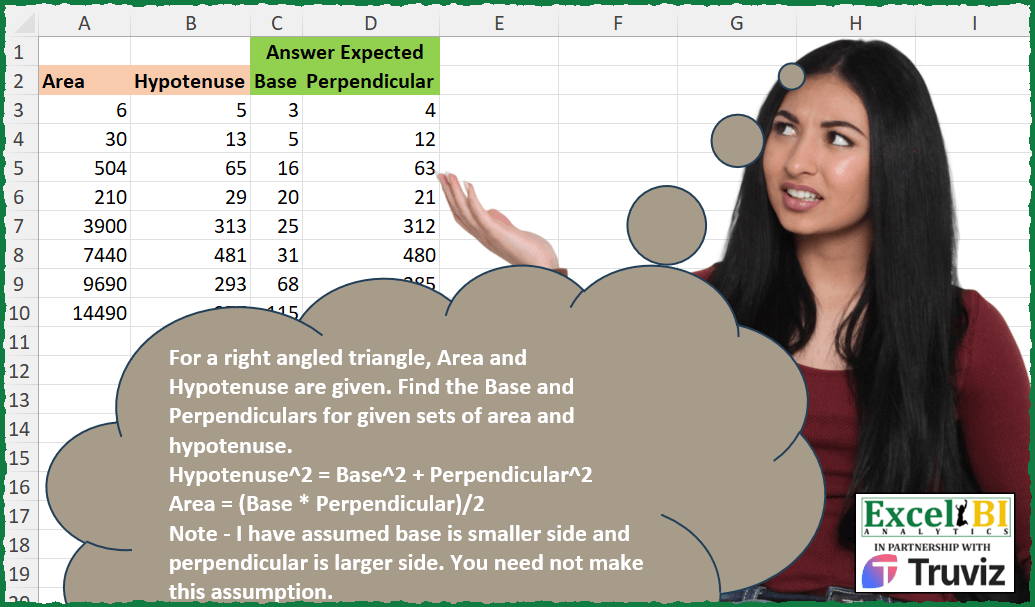
For a right angled triangle, Area and Hypotenuse are given. Find the Base and Perpendiculars for given sets of area and hypotenuse. Hypotenuse^2 = Base^2 + Perpendicular^2 Area = (Base * Perpendicular)/2 Note – I have assumed base is smaller side and perpendicular is larger side. You need not make this assumption.
📌 Challenge Details and Links
ExcelBI Excel Challenge Number: 406
Challenge Difficulty: ⭐️⭐️
📥Download Sample File
📥Link to the solutions on LinkedIn
Solving the challenge of Find Sides of Right Triangle with Power Query
Power Query solution 1 for Find Sides of Right Triangle, proposed by Alejandro Simón 🇵🇦 🇪🇸:
let
  Source = Excel.CurrentWorkbook(){[Name = "Table1"]}[Content],
  Sol = Table.Combine(
    Table.AddColumn(
      Source,
      "A",
      (x) =>
        let
          a = List.Transform(
            List.Reverse({1 .. x[Hypotenuse] - 1}),
            each Number.Sqrt(Number.Power(x[Hypotenuse], 2) - _ * _)
          ),
          b = List.Select(a, each _ = Int64.From(_)),
          c = Table.FromRows({{b{0}, List.Last(b)}}, {"Base", "Perpendicular"})
        in
          c
    )[A]
  )
in
  Sol
Power Query solution 2 for Find Sides of Right Triangle, proposed by Alejandro Simón 🇵🇦 🇪🇸:
let
  Source = Excel.CurrentWorkbook(){[Name = "Table1"]}[Content],
  Sol = Table.Combine(
    Table.AddColumn(
      Source,
      "A",
      (w) =>
        let
          a = List.Skip(
            List.Generate(
              () => [x = w[Hypotenuse], y = 1],
              each [x] > 0,
              each [x = [x] - 1, y = Number.Sqrt(Number.Power(w[Hypotenuse], 2) - x * x)],
              each [y]
            )
          ),
          b = List.Select(a, each Int64.From(_) = _),
          c = Table.FromRows({{List.Min(b), List.Max(b)}}, {"Base", "Perpendicular"})
        in
          c
    )[A]
  )
in
  Sol
Power Query solution 3 for Find Sides of Right Triangle, proposed by Ramiro Ayala Chávez:
let
  S = Excel.CurrentWorkbook(){[Name = "Table1"]}[Content],
  Fx = (A, h) =>
    let
      A = A,
      h = h,
      a = 2 * A,
      b = Number.Power(h * h + 4 * A, 1 / 2),
      c = {1 .. 500},
      d = List.Generate(
        () => [i = 0, j = 1],
        each [i] < List.Count(c),
        each if [j] = List.Count(c) then [i = [i] + 1, j = [i] + 2] else [i = [i], j = [j] + 1],
        each {c{[i]}} & {c{[j] - 1}}
      ),
      e = List.Select(d, each _{0} + _{1} = b and _{0} * _{1} = a){0}
    in
      e,
  f = Table.AddColumn(S, "Base", each Fx([Area], [Hypotenuse]){0}),
  Sol = Table.AddColumn(f, "Perpendicular", each Fx([Area], [Hypotenuse]){1})
in
  Sol
Solving the challenge of Find Sides of Right Triangle with Excel
Excel solution 1 for Find Sides of Right Triangle, proposed by Bo Rydobon 🇹🇭:
=LET(h,
    B3:B10^2,
    (h+{-1,
    1}*SQRT(
        h^2-16*A3:A10^2
    ))/2)
Excel solution 2 for Find Sides of Right Triangle, proposed by John V.:
=MMULT((B3:B10^2+{-4,
    4}*A3:A10)^0.5/2,
    {-1,
    1;1,
    1})
Excel solution 3 for Find Sides of Right Triangle, proposed by محمد حلمي:
=LET(e,
    SEQUENCE(
        300
    ),
    r,
    A3:A10*2,
    p,
    MAP(r,
    B3:B10,
    LAMBDA(a,
    h,
    XLOOKUP(a,
    (h^2-e^2)^0.5*e,
    e))),
    HSTACK(
        p,
        r/p
    ))
Excel solution 4 for Find Sides of Right Triangle, proposed by Kris Jaganah:
=LET(a,
    A3:A10,
    b,
    B3:B10^2,
    c,
    (((b-4*a)^0.5)+((b+4*a)^0.5))/2,
    HSTACK((b-c^2)^0.5,
    c))
Excel solution 5 for Find Sides of Right Triangle, proposed by Julian Poeltl:
=LET(RES,
    MAP(B3:B10,
    A3:A10,
    LAMBDA(HA,
    AA,
    LET(Col,
    TOCOL((SEQUENCE(
        HA
    )*SEQUENCE(
        ,
        HA
    ))/2),
    Base,
    MOD(
        SEQUENCE(
            HA^2
        )-1,
        HA
    )+1,
    Per,
    ROUNDDOWN((SEQUENCE(
        HA^2,
        ,
        0,
        5
    )/HA),
    0)+1,
    ResPer,
    XLOOKUP(AA&(
            HA^2
        ),
    Col&(Base^2+Per^2),
    Base),
    ResPer))),
    HSTACK(
        A3:A10/RES*2,
        RES
    ))
Excel solution 6 for Find Sides of Right Triangle, proposed by Timothée BLIOT:
=REDUCE({"Base",
    "Perpendicular"},
    ROW(
        1:8
    ),

LAMBDA(w,
    v,
     LET(S,
     INDEX(
         A3:A10,
         v
     ),
     H,
    INDEX(
        B3:B10,
        v
    ),

B,
    ((H^2+(4*S))^0.5-(H^2-(4*S))^0.5)/2,
     A,
    2*S/B,
     VSTACK(
         w,
         HSTACK(
             B,
             A
         )
     ))))
Excel solution 7 for Find Sides of Right Triangle, proposed by Hussein SATOUR:
=LET(a,
    A3:A10,
     h,
    B3:B10,
     p,
    SQRT((h^2+SQRT(
        h^4-16*a^2
    ))/2),
     HSTACK(
         2*a/p,
         p
     ))
Excel solution 8 for Find Sides of Right Triangle, proposed by Sunny Baggu:
=LET(
 _c,
     B3:B10 ^ 2,

 _d,
     A3:A10,

 _a,
     0.5 * (SQRT(
         _c - 4 * _d
     ) + SQRT(
         _c + 4 * _d
     )),

 _b,
     2 * _d / _a,

 HSTACK(
     _a,
      _b
 )
)
Excel solution 9 for Find Sides of Right Triangle, proposed by Sunny Baggu:
=LET(
 _a,
     0.5 * (SQRT(
         B3:B10 ^ 2 - 4 * A3:A10
     ) + SQRT(
         B3:B10 ^ 2 + 4 * A3:A10
     )),

 _b,
     2 * A3:A10 / _a,

 HSTACK(
     _a,
      _b
 )
)
Excel solution 10 for Find Sides of Right Triangle, proposed by Sunny Baggu:
=LET(

     _a,
     RADIANS(
         0.5 * DEGREES(
             ASIN(
                 4 * A3:A10 / B3:B10 ^ 2
             )
         )
     ),

     HSTACK(
         B3:B10 * SIN(
             _a
         ),
          B3:B10 * COS(
             _a
         )
     )

)
Excel solution 11 for Find Sides of Right Triangle, proposed by 🇵🇪 Ned Navarrete C.:
LET(s,
    (B3:B10^2+4*A3:A10)^0.5,
    (s-(s^2-8*A3:A10)^0.5*{1,
    -1})/2)
Excel solution 12 for Find Sides of Right Triangle, proposed by Charles Roldan:
=MMULT(
    SQRT(
        B3:B10 ^ 2 / 4 + {1,
        -1} * A3:A10
    ),
     {1,
    1;-1,
    1}
)
Excel solution 13 for Find Sides of Right Triangle, proposed by Enrico Giorgi:
=LET(perpendicular,
    SQRT((B3^2+SQRT(
        B3^4-16*A3^2
    ))/2),
    base,
    2*A3/perpendicular,
    CHOOSE(
        {1,
        2},
        base,
        perpendicular
    ))

➡ ITALIAN FORMULA
=LET(perpendicular;RADQ((B3^2+RADQ(
        B3^4-16*A3^2
    ))/2);base;2*A3/perpendicular;SCEGLI(
        {12};base;perpendicular
    ))
Excel solution 14 for Find Sides of Right Triangle, proposed by Peter Compton:
=LET(
    hypsq,
    B2^2,
    dataset,
    SEQUENCE(
        B2
    )^2+TRANSPOSE(
        SEQUENCE(
        B2
    )^2
    ),
    step1,
    FILTER(
        BYCOL(
            dataset,
            LAMBDA(
                x,
                XMATCH(
                    hypsq,
                    x
                )
            )
        ),
        NOT(
            ISNA(
                BYCOL(
            dataset,
            LAMBDA(
                x,
                XMATCH(
                    hypsq,
                    x
                )
            )
        )
            )
        )
    ),
    HSTACK(
        MIN(
            step1
        ),
        MAX(
            step1
        )
    )
)
Solving the challenge of Find Sides of Right Triangle with Python in Excel
Python in Excel solution 1 for Find Sides of Right Triangle, proposed by John V.:
Hi everyone!
One [Py] option could be:
np.dot(np.sqrt(z(xl("B3:B10"))**2 + z([-4, 4]) * z(xl("A3:A10"))) / 2, z([[-1, 1], [1, 1]]))
Blessings!
Python in Excel solution 2 for Find Sides of Right Triangle, proposed by Owen Price:
h = xl("B3:B10").values ** 2
np.sqrt((h + np.array([-1, 1]) * np.sqrt(h ** 2 - 16 * xl("A3:A10").values ** 2)) / 2)
Solving the challenge of Find Sides of Right Triangle with R
R solution 1 for Find Sides of Right Triangle, proposed by Konrad Gryczan, PhD:
library(tidyverse)
library(readxl)
library(numbers)
input = tibble(area = c(6,30,504, 210,3900, 7440),
 hypotenuse = c(5,13,65,29, 313, 481))
test = tibble(base = c(3,5,16,20,25,31),
 perpendicular = c(4,12,63,21,312,480))
process_triangle = function(area, hypotenuse) {
 ab = 2 * area
 ab_divisors = divisors(ab)
 grid = expand_grid(a = ab_divisors, b = ab_divisors) %>%
 mutate(r = a * b,
 hyp = hypotenuse,
 hyp_sq = hyp**2,
 sides_sq = a**2+b**2,
 check = hyp_sq == sides_sq,
 select(base = a, perpendicular = b)
 return(grid)
}
result = input %>%
 mutate(res = map2(area, hypotenuse, process_triangle)) %>%
 unnest(res) %>%
 select(3:4)
&&&