
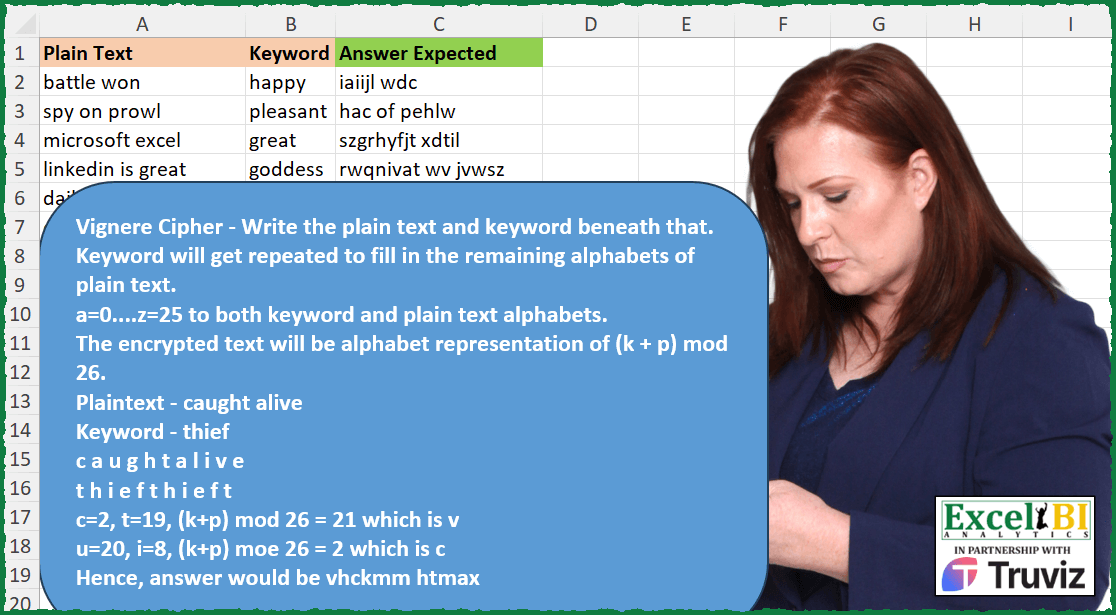
Vignere Cipher – Write the plain text (p) and keyword (k) beneath that. Keyword will get repeated to fill in the remaining alphabets of plain text (blanks will be ignored). a=0….z=25 to both keyword and plain text alphabets. The encrypted text will be alphabet representation of (k + p) mod 26. Plaintext – caught alive Keyword – thief c a u g h t a l i v e t h i e f t h i e f t c=2, t=19, (k+p) mod 26 = 21 which is v u=20, i=8, (k+p) moe 26 = 2 which is c Hence, answer would be vhckmm htmax
📌 Challenge Details and Links
ExcelBI Excel Challenge Number: 402
Challenge Difficulty: ⭐️⭐️⭐️⭐️
📥Download Sample File
📥Link to the solutions on LinkedIn
Solving the challenge of Encrypt Using Vigenere Cipher with Power Query
Power Query solution 1 for Encrypt Using Vigenere Cipher, proposed by John V.:
let
 S = Excel.CurrentWorkbook(){0}[Content],
 N = Character.ToNumber,
 R = Table.AddColumn(S, "R", each
 let
 a = Text.ToList([Plain Text]),
 b = List.Skip(List.Accumulate(a, {-1}, (s, c) => s & {List.Last(s) + Number.From(c > "9")})),
 c = Text.Repeat([Keyword], 9),
 t = List.Transform(List.Zip({a, b}), each if _{0} = " " then " " else Character.FromNumber(97 + Number.Mod(N(_{0}) + N(Text.At(c, _{1})) - 194, 26)))
 in
 Text.Combine(t)
 )[[R]]
in
 R

Blessings!
Power Query solution 2 for Encrypt Using Vigenere Cipher, proposed by Alejandro Simón 🇵🇦 🇪🇸:
let
  Source = Excel.CurrentWorkbook(){[Name = "Table1"]}[Content],
  Sol = Table.AddColumn(
    Source,
    "Answer",
    each
      let
        a = Text.ToList([Plain Text]),
        b = List.Transform(Text.Split([Plain Text], " "), Text.Length),
        c = List.Select(a, each _ <> " "),
        d = List.Count(c),
        e = List.FirstN(
          Text.ToList(Text.Repeat([Keyword], Number.RoundUp(d / Text.Length([Keyword])))),
          d
        ),
        f = List.Zip({{"a" .. "z"}, {0 .. 25}}),
        g = List.Transform({c, e}, each List.ReplaceMatchingItems(_, f)),
        h = List.Transform({0 .. List.Count(c) - 1}, each Number.Mod(g{0}{_} + g{1}{_}, 26)),
        i = List.Transform(f, List.Reverse),
        j = List.Transform({h}, each Text.Combine(List.ReplaceMatchingItems(_, i))){0},
        k = Text.Combine(Splitter.SplitTextByLengths(b)(j), " ")
      in
        k
  )[[Answer]]
in
  Sol
Power Query solution 3 for Encrypt Using Vigenere Cipher, proposed by Glyn Willis:
let
  Source = Excel.CurrentWorkbook(){[Name = "Table1"]}[Content],
  #"Changed Type" = Table.TransformColumnTypes(
    Source,
    {{"Plain Text", type text}, {"Keyword", type text}, {"Answer Expected", type text}}
  ),
  #"Added Custom" = Table.AddColumn(
    #"Changed Type",
    "Custom",
    each [
      a = {"a" .. "z"},
      t = [Plain Text],
      k = [Keyword],
      p = Text.PositionOf(t, " ", Occurrence.All),
      lgp = List.Generate(
        () => [index = 0, pos = p{index}, newpos = pos],
        each [index] < List.Count(p),
        each [index = [index] + 1, pos = p{index}, newpos = pos - ([index] + 1)],
        each [newpos]
      ),
      rs = Text.Remove(t, " "),
      rsl = Text.Length(rs),
      kr = Text.Start(Text.Repeat(k, Number.RoundUp(rsl / Text.Length(k), 0)), rsl),
      lt = List.Transform(
        List.Zip({Text.ToList(kr), Text.ToList(rs)}),
        (x) => Number.Mod((List.PositionOf(a, x{0}) + List.PositionOf(a, x{1})), 26)
      ),
      gp = Text.Combine(List.Transform(lt, (x) => a{x}?)),
      st = Text.Combine(Splitter.SplitTextByPositions({0} & lgp)(gp), " ")
    ][st],
    type text
  )
in
  #"Added Custom"
Solving the challenge of Encrypt Using Vigenere Cipher with Excel
Excel solution 1 for Encrypt Using Vigenere Cipher, proposed by Bo Rydobon 🇹🇭:
=MAP(A2:A10,
    B2:B10,
    LAMBDA(p,
    k,
    LET(m,
    MID(
        p,
        SEQUENCE(
            LEN(
                p
            )
        ),
        1
    ),
    CONCAT(IF(m>"9",
    CHAR(MOD(CODE(
        m
    )+CODE(MID(REPT(
        k,
        9
    ),
    SCAN(0,
    m,
    LAMBDA(a,
    v,
    a+(v>"9"))),
    1))-12,
    26)+97),
    m)))))
Excel solution 2 for Encrypt Using Vigenere Cipher, proposed by John V.:
=MAP(
    A2:A10,
    B2:B10,
    LAMBDA(
        a,
        b,
        LET(
            t,
            MID(
                a,
                SEQUENCE(
                    LEN(
                        a
                    )
                ),
                1
            ),
            c,
            CODE(
                t
            ),
            CONCAT(
                IF(
                    c=32,
                    t,
                    CHAR(
                        97+MOD(
                            c+CODE(
                                MID(
                                    REPT(
                                        b,
                                        9
                                    ),
                                    SCAN(
                                        ,
                                        c>32,
                                        SUM
                                    ),
                                    1
                                )
                            )-194,
                            26
                        )
                    )
                )
            )
        )
    )
)
Excel solution 3 for Encrypt Using Vigenere Cipher, proposed by محمد حلمي:
=MAP(
    A2:A10,
    B2:B10,
    LAMBDA(
        a,
        b,
        LET(
            e,
            MID(
                a,

                SEQUENCE(
                    LEN(
                        a
                    )
                ),
                1
            ),
            j,
            " ",
            CONCAT(
                IF(
                    e=j,
                    j,
                    CHAR(

                        MOD(
                            CODE(
                                e
                            )+CODE(
                                MID(
                                    b,
                                    SCAN(
                                        0,
                                        e=j,
                                        LAMBDA(
                                            a,
                                            d,

                                            IF(
                                                d,
                                                a,
                                                1+IF(
                                                    a+1>LEN(
                                                        b
                                                    ),
                                                    ,
                                                    a
                                                )
                                            )
                                        )
                                    ),
                                    1
                                )
                            )-194,
                            26
                        )+97
                    )
                )
            )
        )
    )
)
Excel solution 4 for Encrypt Using Vigenere Cipher, proposed by Kris Jaganah:
=MAP(A2:A10,
    B2:B10,
    LAMBDA(x,
    y,
    LET(a,
    TEXTSPLIT(
        x,
        ,
        " "
    ),
    b,
    CONCAT(
        a
    ),
    c,
    SEQUENCE(
        LEN(
            b
        )
    ),
    d,
    MID(
        b,
        c,
        1
    ),
    e,
    LEN(
        y
    ),
    f,
    MID(
        y,
        c,
        1
    ),
    g,
    MOD(
        c,
        e
    ),
    h,
    IF(
        g=0,
        e,
        g
    ),
    i,
    XLOOKUP(
        h,
        TAKE(
        c,
        e
    ),
        TAKE(
            f,
            e
        )
    ),
    j,
    SEQUENCE(
        ,
        26,
        0
    ),
    k,
    CHAR(
        j+97
    ),
    l,
    XLOOKUP(MOD(BYROW(((d=k)+(i=k))*j,
    SUM),
    26),
    j,
    k),
    m,
    SCAN(
        ,
        LEN(
        a
    ),
        SUM
    ),
    TRIM(
        CONCAT(
            TOCOL(
                HSTACK(
                    l,
                    XLOOKUP(
                        c,
                        m,
                        IF(
                            m,
                            " "
                        )
                    )
                ),
                3
            )
        )
    ))))
Excel solution 5 for Encrypt Using Vigenere Cipher, proposed by Julian Poeltl:
=MAP(
    A2:A10,
    B2:B10,
    LAMBDA(
        Text,
        KW,
        LET(
            F,
            0,
            AZ,
            CHAR(
                SEQUENCE(
                    26
                )+64
            ),
            TF,
            SEQUENCE(
                    26
                )-1,
            TextM,
            SUBSTITUTE(
                Text,
                " ",
                REPT(
                    " ",
                    LEN(
                        KW
                    )
                )
            ),
            TKW,
            REPT(
                KW,
                8
            ),
            TLS,
            CONCAT(
                IFERROR(
                    LOWER(
                        XLOOKUP(
                            MOD(
                                XLOOKUP(
                                    MID(
                                        TextM,
                                        SEQUENCE(
                                            1,
                                            LEN(
                                                TextM
                                            )
                                        ),
                                        1
                                    ),
                                    AZ,
                                    TF
                                )+XLOOKUP(
                                    MID(
                                        TKW,
                                        SEQUENCE(
                                            1,
                                            LEN(
                                                TextM
                                            )
                                        )-F,
                                        1
                                    ),
                                    AZ,
                                    TF
                                ),
                                26
                            ),
                            TF,
                            AZ
                        )
                    ),
                    " "
                )
            ),
            SUBSTITUTE(
                TLS,
                REPT(
                    " ",
                    LEN(
                        KW
                    )-1
                ),
                ""
            )
        )
    )
)
Excel solution 6 for Encrypt Using Vigenere Cipher, proposed by Timothée BLIOT:
=MAP(
    A2:A10,
    B2:B10,
    LAMBDA(
        e,
        f,
        LET(
            K,
            CODE(
                MID(
                    f,
                    SEQUENCE(
                        LEN(
                            f
                        )
                    ),
                    1
                )
            )-97,
            A,
            SUBSTITUTE(
                e,
                " ",
                ""
            ),
            L,
            LEN(
                A
            ),
            S,
            SEQUENCE(
                L
            ),
            M,
            MAP(
                S,
                LAMBDA(
                    x,
                     INDEX(
                         K,
                         MOD(
                             x-1,
                             ROWS(
                                 K
                             )
                         )+1
                     )
                )
            ),
            T,
            CODE(
                MID(
                    A,
                    S,
                    1
                )
            )-97,
            C,
            CONCAT(
                CHAR(
                     MOD(
                         M+T,
                         26
                     )+97
                )
            ),
            W,
            SCAN(
                0,
                LEN(
                    TEXTSPLIT(
                        e,
                        ,
                        " "
                    )
                ),
                LAMBDA(
                    w,
                    v,
                    v+w
                )
            ),
             TEXTJOIN(
                 " ",
                 ,
                 MAP(
                     SEQUENCE(
                         ROWS(
                             W
                         )
                     ),
                     LAMBDA(
                         v,
                         LET(
                             X,
                             INDEX(
                                 W,
                                 v
                             ),
                              Y,
                             IF(
                                 v-1=0,
                                 0,
                                 INDEX(
                                     W,
                                     v-1
                                 )
                             ),
                             MID(
                                 C,
                                 Y+1,
                                 X-Y
                             )
                         )
                     )
                 )
             )
        )
    )
)
Excel solution 7 for Encrypt Using Vigenere Cipher, proposed by Sunny Baggu:
=MAP(
 A2:A10,

 B2:B10,

 LAMBDA(c,
     d,

 LET(
 _p1,
     SUBSTITUTE(
         c,
          " ",
          ""
     ),

 _k1,
     LEFT(
         REPT(
             d,
              5
         ),
          LEN(
              _p1
          )
     ),

 _sp,
     UNIQUE(
         TOCOL(
             SEARCH(
                 " ",
                  c,
                  SEQUENCE(
                      LEN(
                          c
                      )
                  )
             ),
              3
         )
     ),

 _e1,
     LAMBDA(
         x,
          CODE(
              MID(
                  x,
                   SEQUENCE(
                       LEN(
                           x
                       )
                   ),
                   1
              )
          ) - CODE(
              "a"
          )
     ),

 _t,
     CONCAT(CHAR(MOD(_e1(
              _p1
          ) + _e1(_k1),
     26) + 97)),

 REDUCE(
     _t,
      _sp,
      LAMBDA(
          a,
           v,
           REPLACE(
               a,
                v,
                0,
                " "
           )
      )
 )
 )
 )
)
Excel solution 8 for Encrypt Using Vigenere Cipher, proposed by Asheesh Pahwa:
=LET(pt,
    A7,
    k,
     B7,
     alp,
     CHAR(
         SEQUENCE(
             26,
             ,
             97
         )
     ),

sr,
    SEQUENCE(
        26
    )-1,
    m,
     MID(
         pt,
          SEQUENCE(
              LEN(
                  pt
              )
          ),
         1
     ),
    ky,
    MID(
        k,
        SEQUENCE(
            LEN(
                k
            )
        ),
         1
    ),
    f,
    FILTER(
        m,
        m<>" "
    ),
    s,
    SEQUENCE(
        ROWS(
            f
        )
    ),
     c,
    ROUNDUP(
        COUNTA(
            s
        )/2,
        0
    ),
    t,
    IF(
        c>LEN(
                k
            ),
        LEN(
                k
            ),
        c
    ),
    d,
    MOD(
        s,
        t
    ),
    e,
    IF(
        d,
        d,
        t
    ),
     p,
    INDEX(
        ky,
        e
    ),
    w,
    XLOOKUP(
        f,
        alp,
         sr
    ),
     z,
     XLOOKUP(
         p,
         alp,
         sr
     ),
    sm,
     MOD(
         w+z,
          26
     ),
    g,
    XLOOKUP(
        sm,
        sr,
        alp
    ),
    sq,
    SEQUENCE(
        ROWS(
            m
        &)
    ),
     fm,
     LAMBDA(AI,
     MAP(SEQUENCE (ROWS(
         AI
     )),
     LAMBDA(x,
    SUM(--(TAKE(
        AI,
        x
    )=CHOOSEROWS(
        Al,
        x
    )))))),
     pl,
    fm(
            m
        ),
    op,
    fm (
            f
        ),
     kl,
    m&pl,
    jk,
    f&op,

CONCAT(
    XLOOKUP(
        kl,
        jk,
        g,
        " "
    )
))
Excel solution 9 for Encrypt Using Vigenere Cipher, proposed by Charles Roldan:
=LET(V,
     LAMBDA(
         a,
         b,
          CHAR(
              MOD(
                  CODE(
                      a
                  ) + CODE(
                      b
                  ) + 14,
                   26
              ) + 97
          )
     ),

MAP(A2:A10,
     B2:B10,
     LAMBDA(
         f,
          f(
              f
          )
     )(LAMBDA(f,
     LAMBDA(x,
    y,
     IF(LEN(
         x
     ),

LET(lx,
     LEFT(
         x
     ),
     rx,
     REPLACE(
         x,
          1,
          1,

     ),
     ly,
     LEFT(
         y
     ),
     ry,
     REPLACE(
         y,
          1,
          1,

     ),

IF(lx = " ",
     lx & f(
              f
          )(rx,
     y),
     V(
         lx,
          ly
     ) & f(
              f
          )(rx,
     ry & ly))),
     ))))))
Solving the challenge of Encrypt Using Vigenere Cipher with Python in Excel
Python in Excel solution 1 for Encrypt Using Vigenere Cipher, proposed by Abdallah Ally:
import pandas as pd
from math import ceil
file_path = 'Excel_Challenge_402 - Vignere Cipher.xlsx'
df = pd.read_excel(file_path, usecols='A:C')
def vignere_cipher(col1, col2):
 encrypted_text = ''
 text = col2 * ceil(len(col1) / len(col2))
 for i in range(len(col1)):
 if col1[i] == ' ':
 text = text[:i] + ' ' + text[i:]
 for i in range(len(col1)):
 if col1[i] == ' ':
 encrypted_text += ' '
 else:
 encrypted_text += chr(((ord(col1[i]) + ord(text[i]) - 194) % 26) + 97)
 return encrypted_text
df['My Answer'] = df.apply(lambda x: vignere_cipher(x['Plain Text'], x['Keyword']), axis=1)
print(df)
https://github.com/mathematiciantz/Excel_BI_Challenges/blob/main/Excel_Challenge_402_Vignere_Cipher.py
&&