
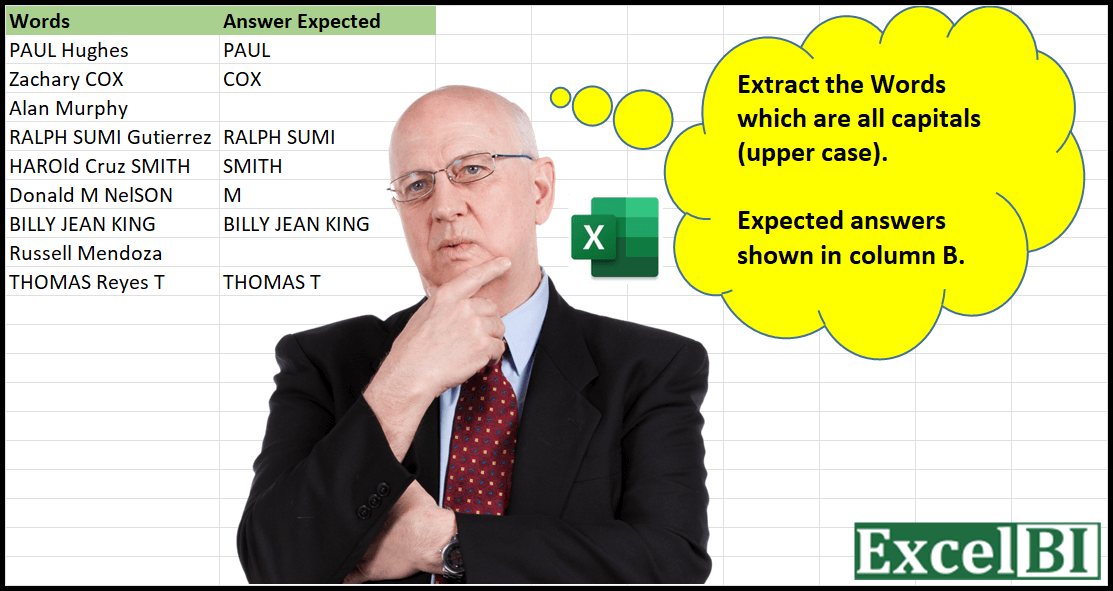
Provide a formula to Extract the Words which are all capitals (upper case). Hence if a word is “HAROLD Benison THOMAS” then answer would be “HAROLD THOMAS”
📌 Challenge Details and Links
ExcelBI Excel Challenge Number: 4
Challenge Difficulty: ⭐️⭐️
📥Download Sample File
📥Link to the solutions on LinkedIn
Solving the challenge of Extract All-Caps Words with Power Query
Power Query solution 1 for Extract All-Caps Words, proposed by Aditya Kumar Darak 🇮🇳:
let
  Source = Excel.CurrentWorkbook(){[Name = "data"]}[Content],
  Function = (f as text) =>
    let
      a = Text.Split(f, " "),
      b = List.Select(a, (x) => x = Text.Upper(x)),
      c = Text.Combine(b, " ")
    in
      c,
  Return = Table.AddColumn(Source, "Result", each Function([Words]))
in
  Return
Power Query solution 2 for Extract All-Caps Words, proposed by Aditya Kumar Darak 🇮🇳:
let
  Source = Excel.CurrentWorkbook(){[Name = "data"]}[Content],
  Calculations = Table.AddColumn(
    Source,
    "Records",
    each [
      a = Text.Split([Words], " "),
      b = List.Select(a, (f) => f = Text.Upper(f)),
      c = Text.Combine(b, " ")
    ]
  ),
  Return = Table.ExpandRecordColumn(Calculations, "Records", {"c"}, {"Result"})
in
  Return
Power Query solution 3 for Extract All-Caps Words, proposed by Aditya Kumar Darak 🇮🇳:
let
  Source = Excel.CurrentWorkbook(){[Name = "data"]}[Content],
  Split  = Table.AddColumn(Source, "Split", each Text.Split([Words], " ")),
  Select = Table.AddColumn(Split, "Select", each List.Select([Split], (f) => f = Text.Upper(f))),
  Result = Table.AddColumn(Select, "Result", each Text.Combine([Select], " ")),
  Final  = Table.SelectColumns(Result, {"Words", "Result"})
in
  Final
Power Query solution 4 for Extract All-Caps Words, proposed by Bhavya Gupta:
let
  Source = Excel.CurrentWorkbook(){[Name = "Table1"]}[Content],
  #"Duplicated Column" = Table.DuplicateColumn(Source, "Words", "Words - Copy"),
  #"Split Column by Delimiter" = Table.ExpandListColumn(
    Table.TransformColumns(
      #"Duplicated Column",
      {
        {
          "Words - Copy",
          Splitter.SplitTextByDelimiter(" ", QuoteStyle.Csv),
          let
            itemType = (type nullable text) meta [Serialized.Text = true]
          in
            type {itemType}
        }
      }
    ),
    "Words - Copy"
  ),
  #"Added Custom" = Table.AddColumn(
    #"Split Column by Delimiter",
    "Only Capital",
    each if [#"Words - Copy"] = Text.Upper([#"Words - Copy"]) then [#"Words - Copy"] else null
  ),
  #"Removed Columns" = Table.RemoveColumns(#"Added Custom", {"Words - Copy"}),
  #"Grouped Rows" = Table.Group(
    #"Removed Columns",
    {"Words"},
    {{"All", each Text.Combine([Only Capital], " "), type nullable text}}
  )
in
  #"Grouped Rows"
Power Query solution 5 for Extract All-Caps Words, proposed by Sergei Baklan:
let
  Source = Excel.CurrentWorkbook(){[Name = "data"]}[Content],
  #"Promoted Headers" = Table.PromoteHeaders(Source, [PromoteAllScalars = true]),
  UppercaseWords = Table.AddColumn(
    #"Promoted Headers",
    "Uppercase Words",
    each [
      w = Text.Split([Words], " "),
      u = Text.Split(Text.Upper([Words]), " "),
      c = Text.Combine(List.RemoveMatchingItems(w, List.RemoveMatchingItems(w, u)), " ")
    ][c],
    type text
  )
in
  UppercaseWords
Power Query solution 6 for Extract All-Caps Words, proposed by Udit Chatterjee:
let
  Source = #"Challenge-04",
  addReqColumn = Table.AddColumn(
    Source,
    "Uppercase Words",
    each Text.Replace(
      Text.Trim(
        Text.Combine(
          List.Transform(Text.Split([Words], " "), each if _ = Text.Upper(_) then _ else ""),
          " "
        )
      ),
      "  ",
      " "
    ),
    type text
  )
in
  addReqColumn
Power Query solution 7 for Extract All-Caps Words, proposed by Hakeem Lawrence:
let
  Source = Sheet1,
  Remove_Column = Table.RemoveColumns(Source, {"Column2"}),  // Remove Answer column
  Promote_Headers = Table.PromoteHeaders(Remove_Column, [PromoteAllScalars = true]),  // Promote first row to header
  Extracted = Table.AddColumn(
    Promote_Headers,
    "Answers",
    each List.Select(Text.Split([Words], " "), each _ = Text.Upper(_))
  ),  // Add Column with lists where values from words column are uppercased
  Result = Table.TransformColumns(
    Extracted,
    {"Answers", each Text.Combine(List.Transform(_, Text.From), " "), type text}
  ) // Extract values
in
  Result
Solving the challenge of Extract All-Caps Words with Excel
Excel solution 1 for Extract All-Caps Words, proposed by Rick Rothstein:
=TEXTJOIN(
    " ",
    1,
    LET(
        N,
        TRIM(
            MID(
                SUBSTITUTE(
                    " "&A1,
                    " ",
                    REPT(
                        " ",
                        99
                    )
                ),
                SEQUENCE(
                    6
                )*99,
                99
            )
        ),
        IF(
            EXACT(
                N,
                UPPER(
                    N
                )
            ),
            N,
            ""
        )
    )
)
Excel solution 2 for Extract All-Caps Words, proposed by Rick Rothstein:
=TEXTJOIN(
    " ",
    1,
    LET(
        N,
        TEXTSPLIT(
            A1,
            " "
        ),
        IF(
            EXACT(
                N,
                UPPER(
                    N
                )
            ),
            N,
            ""
        )
    )
)
Excel solution 3 for Extract All-Caps Words, proposed by John V.:
=LET(
    t,
    TEXTSPLIT(
        A2,
        " "
    ),
    TEXTJOIN(
        " ",
        ,
        REPT(
            t,
            EXACT(
                t,
                UPPER(
                    t
                )
            )
        )
    )
)
Excel solution 4 for Extract All-Caps Words, proposed by محمد حلمي:
=MAP(
    A2:A10,
    LAMBDA(
        a,
        LET(
            x,
            TEXTSPLIT(
                a,
                " "
            ),

            i,
            TEXTSPLIT(
                x,
                CHAR(
                    SEQUENCE(
                        26
                    )+96
                )
            ),

            TEXTJOIN(
                " ",
                ,
                REPT(
                    i,
                    i=x
                )
            )
        )
    )
)
Excel solution 5 for Extract All-Caps Words, proposed by محمد حلمي:
=MAP(
    A2:A10,
    LAMBDA(
        a,
        LET(
            i,
            TEXTSPLIT(
                a,
                " "
            ),

            TEXTJOIN(
                " ",
                ,
                REPT(
                    i,
                    EXACT(
                        UPPER(
                            i
                        ),
                        i
                    )
                )
            )
        )
    )
)
Excel solution 6 for Extract All-Caps Words, proposed by 🇰🇷 Taeyong Shin:
=TRIM(
    REGEXREPLACE(
        A2:A10,
         "b(p{Lu}+)b|.",
         "$1 "
    )
)
Excel solution 7 for Extract All-Caps Words, proposed by Julian Poeltl:
=IFERROR(
    MAP(
        A2:A10,
        LAMBDA(
            W,
            LET(
                SP,
                TEXTSPLIT(
                    W,
                    " "
                ),
                TEXTJOIN(
                    " ",
                    ,
                    FILTER(
                        SP,
                        MAP(
                            SP,
                            LAMBDA(
                                A,
                                EXACT(
                                    A,
                                    UPPER(
                                        A
                                    )
                                )
                            )
                        )
                    )
                )
            )
        )
    ),
    ""
)
Excel solution 8 for Extract All-Caps Words, proposed by Bhavya Gupta:
=LET(
    a,
    TEXTSPLIT(
        A2,
        " "
    ),
    TEXTJOIN(
        " ",
        TRUE,
        FILTER(
            a,
            EXACT(
                a,
                UPPER(
                    a
                )
            ),
            ""
        )
    )
)
Excel solution 9 for Extract All-Caps Words, proposed by Charles Roldan:
=MAP(
    A2:A10,
     LAMBDA(
         x,
          LET(
              a,
               TEXTSPLIT(
                   x,
                    " "
               ),
               TEXTJOIN(
                   " ",
                    TRUE,
                    FILTER(
                        a,
                         EXACT(
                             a,
                              UPPER(
                                  a
                              )
                         ),
                         ""
                    )
               )
          )
     )
)
Excel solution 10 for Extract All-Caps Words, proposed by Tolga Demirci, PMP, PMI-ACP, MOS-Expert:
=TEXTJOIN(
    ;
    ;
    IFERROR(
        IF(
            IF(
                UPPER(
                    MID(
                        $A2;
                        ROW(
                            $A$1:$A$100
                        );
                        1
                    )
                )<>" ";
                FIND(
                    TEXT(
                        MID(
                        $A2;
                        ROW(
                            $A$1:$A$100
                        );
                        1
                    );
                        "?"
                    );
                    UPPER(
                    MID(
                        $A2;
                        ROW(
                            $A$1:$A$100
                        );
                        1
                    )
                );
                    1
                );
                ""
            );
            TEXT(
                MID(
                        $A2;
                        ROW(
                            $A$1:$A$100
                        );
                        1
                    );
                "?"
            );
            ""
        );
        ""
    )
)
Excel solution 11 for Extract All-Caps Words, proposed by Jardiel Euflázio:
=IFERROR(
    TEXTJOIN(
        " ",
        ,
        FILTER(
            TEXTSPLIT(
                A2,
                ,
                " "
            ),
            EXACT(
                TEXTSPLIT(
                    A2,
                    ,
                    " "
                ),
                UPPER(
                    TEXTSPLIT(
                        A2,
                        ,
                        " "
                    )
                )
            )
        )
    ),
    ""
)

A known variation

=TEXTJOIN(
    " ",
    ,
    IF(
        EXACT(
            TEXTSPLIT(
                A2,
                ,
                " "
            ),
            UPPER(
                TEXTSPLIT(
                    A2,
                    ,
                    " "
                )
            )
        ),
        TEXTSPLIT(
            A2,
            ,
            " "
        ),
        ""
    )
)
Excel solution 12 for Extract All-Caps Words, proposed by Cary Ballard, DML:
=MAP(
    A2:A10,
     LAMBDA(
         m,
          LET(
              b,
               TEXTSPLIT(
                   m,
                    " "
               ),
               IFERROR(
                   TEXTJOIN(
                       " ",
                        ,
                        TOROW(
                            IFS(
                                EXACT(
                                    b,
                                     UPPER(
                                         b
                                     )
                                ),
                                 b
                            ),
                             2
                        )
                   ),
                    ""
               )
          )
     )
)
Excel solution 13 for Extract All-Caps Words, proposed by Amardeep Singh:
=MAP(
    A2:A10,
    LAMBDA(
        x,

        LET(
            d,
            TEXTSPLIT(
                x,
                " "
            ),

            r,
            IF(
                EXACT(
                    d,
                    UPPER(
                        d
                    )
                ),
                d,
                ""
            ),

            TEXTJOIN(
                " ",
                TRUE,
                r
            )
        )
    )
)
Excel solution 14 for Extract All-Caps Words, proposed by Juliano Santos Lima:
=IFERROR(
TEXTJOIN(" ",,
FILTERXML(""&
SUBSTITUTE(A2," ","")&" Excel solution 15 for Extract All-Caps Words, proposed by Daniel Madhadha:
=TEXTJOIN(
    " ",
    TRUE,
    IF(
        EXACT(
            TEXTSPLIT(
                A2,
                " "
            ),
            UPPER(
                TEXTSPLIT(
                    A2,
                    " "
                )
            )
        ),
        UPPER(
            TEXTSPLIT(
                A2,
                " "
            )
        ),
        ""
    )
)
Excel solution 16 for Extract All-Caps Words, proposed by Yasir Ali Khan:
=ArrayFormula(
    IFERROR(
        JOIN(
            " ",
            FILTER(
                SPLIT(
                &    A2,
                    " "
                ),
                EXACT(
                    SPLIT(
                        A2,
                        " "
                    ),
                    UPPER(
                        SPLIT(
                            A2,
                            " "
                        )
                    )
                )
            )
        )
    )
)
Excel solution 17 for Extract All-Caps Words, proposed by Muhammad Waqas Khan:
=IFERROR(
TEXTJOIN(
" ",
,
FILTERXML(
""&SUBSTITUTE(
A2,
" ",
""
)&"Solving the challenge of Extract All-Caps Words with Python in Excel
Python in Excel solution 1 for Extract All-Caps Words, proposed by Aditya Kumar Darak 🇮🇳:
data = xl("A1:A10", headers=True)
data["Answer"] = [" ".join(x for x in i.split() if x.isupper()) for i in data.Words]
data
&&