
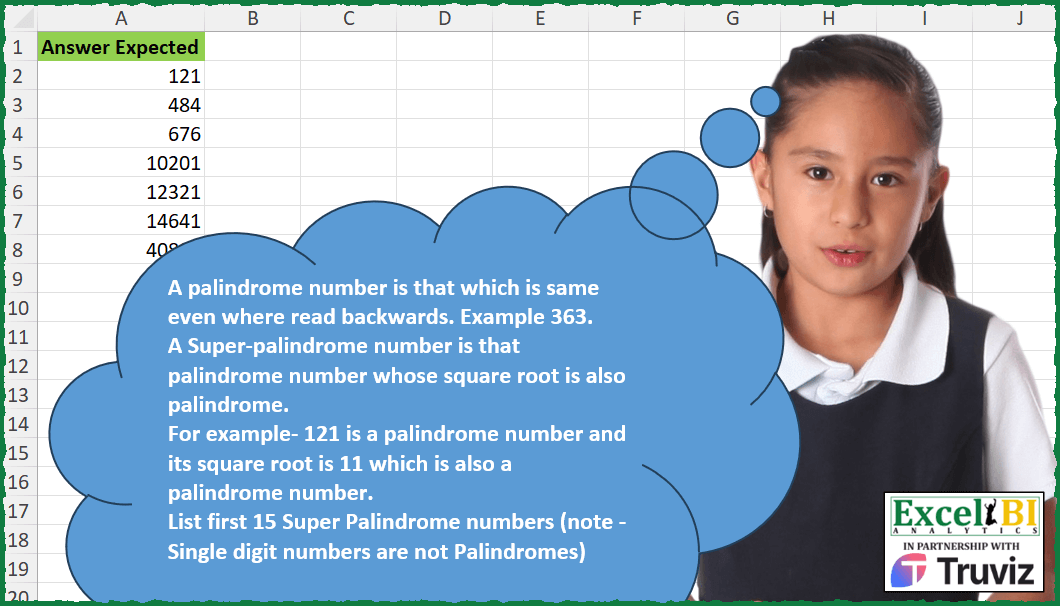
A palindrome number is that which is same even where read backwards. Example 363. A Super-palindrome number is that palindrome number whose square root is also palindrome. For example- 121 is a palindrome number and its square root is 11 which is also a palindrome number. List first 15 Super Palindrome numbers (note – Single digit numbers are not Palindromes)
📌 Challenge Details and Links
ExcelBI Excel Challenge Number: 394
Challenge Difficulty: ⭐️⭐️⭐️⭐️
📥Download Sample File
📥Link to the solutions on LinkedIn
Solving the challenge of List Super-Palindrome Numbers with Power Query
Power Query solution 1 for List Super-Palindrome Numbers, proposed by John V.:
let
  T = Text.From,
  R = Text.Reverse,
  r = List.Generate(
    () => [i = 10, v = null, n = 0],
    each [n] <= 15,
    each [
      i = 1 + [i],
      v = if (T(i) = R(T(i))) and (T(i * i) = R(T(i * i))) then i * i else null,
      n = if v = null then [n] else 1 + [n]
    ],
    each [v]
  )
in
  List.RemoveNulls(r)
Power Query solution 2 for List Super-Palindrome Numbers, proposed by Kris Jaganah:
let
  Source = Excel.CurrentWorkbook(){[Name = "Table1"]}[Content],
  Ans = Table.SelectRows(
    Table.TransformColumns(
      Source,
      {
        "Number",
        each
          let
            a = Number.Sqrt(_),
            b = Text.From(a),
            c = if Text.Reverse(b) = b then _ else null
          in
            c
      }
    ),
    each ([Number] > 0)
  )
in
  Ans
Power Query solution 3 for List Super-Palindrome Numbers, proposed by Alejandro Simón 🇵🇦 🇪🇸:
let
 Sol = List.RemoveNulls(List.Skip(List.Generate(
()=> [x = 119, y = 0, z = 0],
each [z]<=15,
each [x=[x]+1, y = if Text.From(x)= Text.Reverse(Text.From(x)) and Text.From(Number.Sqrt(x)) = Text.Reverse(Text.From(Number.Sqrt(x))) then x else null,
 z = if y <> null then [z]+1 else [z]],
each [y])))
in
 Sol
El resultado difiere del presentado en el reto, pero a varios participantes les pasó igual.


        Show translation


        Show translation of this comment
Power Query solution 4 for List Super-Palindrome Numbers, proposed by Ramiro Ayala Chávez:
let
  l   = {11 .. 1000000},
  a   = List.Transform(l, Text.From),
  b   = List.Select(a, each Text.Reverse(_) = _),
  c   = List.Transform(b, Number.From),
  d   = List.Transform(c, each Number.Power(_, 2)),
  e   = List.Transform(d, Text.From),
  f   = List.Select(e, each Text.Reverse(_) = _),
  g   = List.Transform(f, Number.From),
  h   = Table.FromColumns({g}, {"Answer Expected"}),
  Sol = Table.FirstN(h, 15)
in
  Sol
Power Query solution 5 for List Super-Palindrome Numbers, proposed by Rafael González B.:
let
Origen = List.Generate(
() => [i = 0, l = {}, N = 11],
each [i] <= 15,
each [
N = [N] + 1,
i = if oo and pp then [i] + 1 else [i],
o = Text.From([N]),
oo = o = Text.Reverse(o),
p = Number.Power([N],2),
pp = Text.From(p) = Text.Reverse(Text.From(p)),
l = if oo and pp then [l] & {p} else [l]
],
each [l]
)
in
List.Last(Origen)
🧙♂️🧙♂️🧙♂️
Power Query solution 6 for List Super-Palindrome Numbers, proposed by Glyn Willis:
let
  Source = List.Sort(
    List.Transform(
      List.Select(
        List.Combine(
          List.Transform(
            {1 .. 100},
            (x) =>
              List.Transform(
                {""} & {0 .. 9},
                (y) => Number.From(Text.From(x) & Text.From(y) & Text.Reverse(Text.From(x)))
              )
          )
        ),
        (z) => Number.Mod(z * z, 1) = 0
      ),
      (w) => w * w
    )
  ),
  Custom1 = List.Select(Source, each _ = Number.From(Text.Reverse(Text.From(_))))
in
  Custom1
Power Query solution 7 for List Super-Palindrome Numbers, proposed by Ian Segard:
let Source = {10..15000}, #"Converted to Table" = Table.FromList(Source, Splitter.SplitByNothing(), null, null, ExtraValues.Error), #"Changed Type" = Table.TransformColumnTypes(#"Converted to Table",{{"Column1", type text}}), #"Added Custom" = Table.AddColumn(#"Changed Type", "Custom", each Text.Reverse([Column1])), #"Added Conditional Column" = Table.AddColumn(#"Added Custom", "Custom.1", each if [Column1] = [Custom] then "y" else "m"), #"Filtered Rows" = Table.SelectRows(#"Added Conditional Column", each ([Custom.1] = "y")), #"Removed Columns" = Table.RemoveColumns(#"Filtered Rows",{"Custom", "Custom.1"}), #"Changed Type1" = Table.TransformColumnTypes(#"Removed Columns",{{"Column1", Int64.Type}}), #"Inserted Square" = Table.AddColumn(#"Changed Type1", "Square", each Number.Power([Column1], 2), Int64.Type), #"Changed Type2" = Table.TransformColumnTypes(#"Inserted Square",{{"Square", type text}}), #"Added Custom1" = Table.AddColumn(#"Changed Type2",
Solving the challenge of List Super-Palindrome Numbers with Excel
Excel solution 1 for List Super-Palindrome Numbers, proposed by Bo Rydobon 🇹🇭:
=LET(
    p,
    LAMBDA(
        a,
        FILTER(
            a,
            --BYROW(
                MID(
                    a,
                    15-SEQUENCE(
                        ,
                        14
                    ),
                    1
                ),
                CONCAT
            )=a
        )
    ),

    p(
        p(
            SEQUENCE(
                11111,
                ,
                11
            )
        )^2
    )
)
Excel solution 2 for List Super-Palindrome Numbers, proposed by John V.:
=TOCOL(MAP(ROW(11:11111),LAMBDA(n,LET(p,LAMBDA(x,x=--CONCAT(MID(x,10-ROW(1:9),1))),n^2/p(n)/p(n^2)))),2)

or with Bo Rydobon 🇹🇭 idea:
✅=LET(p,LAMBDA(x,TOCOL(x/(x=--BYROW(MID(x,10-COLUMN(A:I),1),CONCAT)),2)),p(p(ROW(11:11111))^2))
Excel solution 3 for List Super-Palindrome Numbers, proposed by محمد حلمي:
=LET(
    s,
    SEQUENCE(
        11111,
        ,
        11
    ),
    v,
    LAMBDA(
        a,

        a=--CONCAT(
            MID(
                a,
                20-SEQUENCE(
                    19
                ),
                1
            )
        )
    ),

    e,
    FILTER(
        s,
        MAP(
            s,
            v
        )
    )^2,
    FILTER(
        e,
        MAP(
            e,
            v
        )
    )
)

///


=LET(
    e,
    LAMBDA(
        x,
        FILTER(
            x,
            MAP(
                x,
                LAMBDA(
        a,

        a=--CONCAT(
            MID(
                a,
                20-SEQUENCE(
                    19
                ),
                1
            )
        )
    )
            )
        )
    ),

    e(
        e(
            SEQUENCE(
        11111,
        ,
        11
    )
        )^2
    )
)
Excel solution 4 for List Super-Palindrome Numbers, proposed by Kris Jaganah:
=TOCOL(MAP(A2:A10,
    LAMBDA(x,
    LET(a,
    x^0.5,
    x/(--CONCAT(
        MID(
            a,
            SEQUENCE(
                LEN(
                    a
                ),
                ,
                LEN(
                    a
                ),
                -1
            ),
            1
        )
    )=a)))),
    3)
Excel solution 5 for List Super-Palindrome Numbers, proposed by Sunny Baggu:
=LET(

     _a,
     SEQUENCE(
         ROUNDUP(
             7000000 / 100,
              0
         ),
          100,
          100
     ),

     _b,
     TOCOL(
         IF(
             SQRT(
                 _a
             ) = INT(
                 SQRT(
                 _a
             )
             ),
              _a,
              x
         ),
          3
     ),

     TAKE(

          FILTER(

               _b,

               MAP(

                    _b,

                    LAMBDA(
                        x,
                         LET(
                             _e1,
                              LAMBDA(
                                  x,
                                   x = CONCAT(
                                       MID(
                                           x,
                                            LEN(
                                                x
                                            ) + 1 - SEQUENCE(
                                                LEN(
                                                x
                                            )
                                            ),
                                            1
                                       )
                                   ) + 0
                              ),
                              _e1(
                                                x
                                            )
                         )
                    )

               )

          ),

          15

     )

)
Excel solution 6 for List Super-Palindrome Numbers, proposed by 🇵🇪 Ned Navarrete C.:
=LET(e,
    LAMBDA(m,
    TOCOL(MAP(m,
    LAMBDA(r,
    LET(i,
    --CONCAT(
        MID(
            r,
            10-SEQUENCE(
                9
            ),
            1
        )
    ),
    r/(i=r)))),
    3)),
    TAKE(
        e(
            e(
                SEQUENCE(
                    10^5,
                    ,
                    11
                )
            )^2
        ),
        15
    ))
Excel solution 7 for List Super-Palindrome Numbers, proposed by Charles Roldan:
=LET(M,
     LAMBDA(
         g,
          g(
              g
          )
     ),

K,
     LAMBDA(
         f,
          LAMBDA(
              n,
              [m],
               f(
                   n
               )
          )
     ),

Succ,
     LAMBDA(
         f,
          M(
              LAMBDA(
                  g,
                   LAMBDA(
                       n,

                        IF(
                            f(
                                n + 1
                            ),
                             n + 1,
                             g(
              g
          )(
                                n + 1
                            )
                        )
                   )
              )
          )
     ),

_isPal,
     M(LAMBDA(g,
     LAMBDA(n,
     IF(LEN(
                   n
               ) < 2,
     TRUE,

 IF(LEFT(
                   n
               ) = RIGHT(
                   n
               ),
     g(
              g
          )(MID(
         n,
          2,
          LEN(
                   n
               ) - 2
     ))))))),
     _isSubPal,
     LAMBDA(
         n,
          AND(
              MAP(
                  n ^ {1,
                  2},
                   _isPal
              )
          )
     ),

SCAN(
    10,
     SEQUENCE(
         15
     ),
     K(
         Succ(
             _isSubPal
         )
     )
) ^ 2
)
Excel solution 8 for List Super-Palindrome Numbers, proposed by Tyler Cameron:
=LET(
    u,
    SEQUENCE(
        11101,
        ,
        11
    )^2,
    FILTER(
        u,
        MAP(
            u,

            LAMBDA(
                x,
                LET(
                    a,
                    SQRT(
                        x
                    ),
                    b,
                    LEN(
                        a
                    ),
                    d,
                    ROUNDDOWN(
                        b/2,
                        0
                    ),
                    e,
                    LEN(
                        x
                    ),
                    f,
                    ROUNDDOWN(
                        e/2,
                        0
                    ),

                    AND(
                        CONCAT(
                            MID(
                                a,
                                SEQUENCE(
                                    d
                                ),
                                1
                            )
                        )=CONCAT(
                            MID(
                                a,
                                SEQUENCE(
                                    d,
                                    ,
                                    b,
                                    -1
                                ),
                                1
                            )
                        ),

                        CONCAT(
                            MID(
                                x,
                                SEQUENCE(
                                    f
                                ),
                                1
                            )
                        )=CONCAT(
                            MID(
                                x,
                                SEQUENCE(
                                    f,
                                    ,
                                    e,
                                    -1
                                ),
                                1
                            )
                        )
                    )
                )
            )
        )
    )
)
Solving the challenge of List Super-Palindrome Numbers with Python in Excel
Python in Excel solution 1 for List Super-Palindrome Numbers, proposed by Abdallah Ally:
import pandas as pd
df = pd.read_excel(file_path, usecols='A')
def is_palindrome(n):
 return str(n) == str(n)[::-1]
def super_palindrome(n):
 numbers = []
 number = 10
 while len(numbers) < n:
 sqrt_num = number ** 0.5
 if (is_palindrome(number) and is_palindrome(int(sqrt_num))
 and sqrt_num == int(sqrt_num)):
 numbers.append(number)
 number += 1
 return numbers
df['My Answer'] = pd.Series(super_palindrome(15))
print(df)
Solving the challenge of List Super-Palindrome Numbers with R
R solution 1 for List Super-Palindrome Numbers, proposed by Konrad Gryczan, PhD:
library(tidyverse)
library(readxl)
is_palindrome = function(x) {
 x = as.character(x)
 x == str_c(rev(str_split(x, "")[[1]]), collapse = "")
}
result = tibble(palindrome = keep(10:1e5, is_palindrome)) %>%
 mutate(square = palindrome^2,
 is_palindrome = map_lgl(sq&uare, is_palindrome)) %>%
 filter(is_palindrome) %>%
 slice(1:15) %>%
 select(square)
&&