
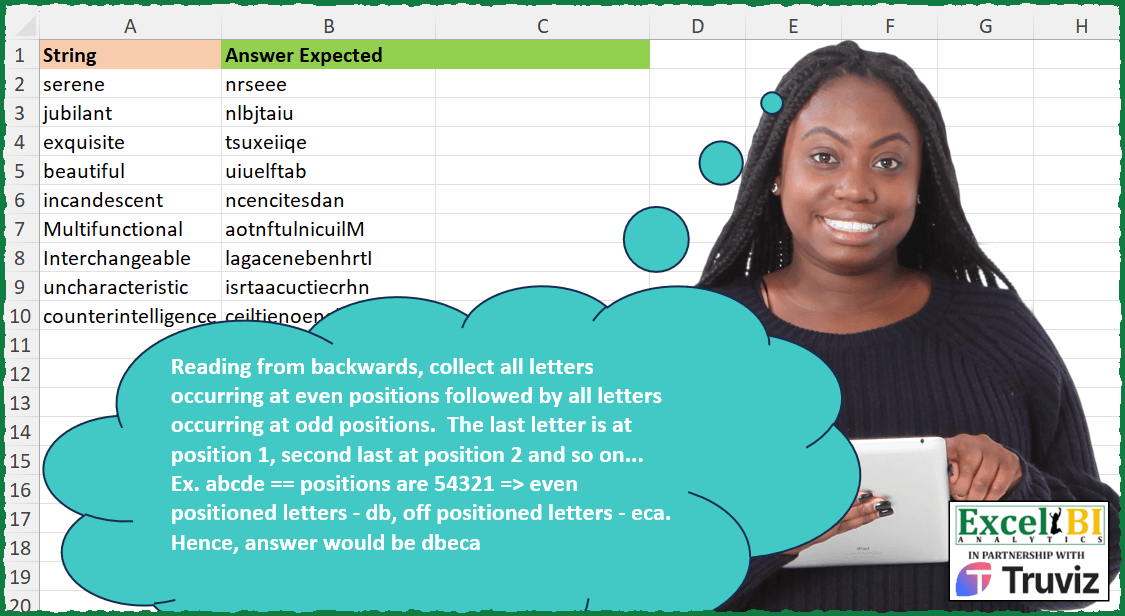
Reading from backwards, collect all letters occurring at even positions followed by all letters occurring at odd positions. The last letter is at position 1, second last at position 2 and so on… Ex. abcde == positions are 54321 => even positioned letters – db, off positioned letters – eca. Hence, answer would be dbeca
📌 Challenge Details and Links
ExcelBI Excel Challenge Number: 392
Challenge Difficulty: ⭐️⭐️
📥Download Sample File
📥Link to the solutions on LinkedIn
Solving the challenge of Reorder Letters by Position Type with Power Query
Power Query solution 1 for Reorder Letters by Position Type, proposed by John V.:
let
 S = Excel.CurrentWorkbook(){0}[Content],
 L = List.Transform,
 R = Table.AddColumn(S, "R", each
 let
 a = Text.ToList(Text.Reverse([String])), b = {1..List.Count(a)},
 c = L(b, each Number.From(Number.IsOdd(_))),
 d = List.Sort(List.Zip({a, b, c}), each _{2} + _{1}/100)
 in
 Text.Combine(L(d, each _{0}))
 )[[R]]
in
 R

Another way (List.Alternate idea from Ramiro Ayala Chávez):

✅
let
 S = Excel.CurrentWorkbook(){0}[Content],
 A = List.Alternate,
 R = Table.AddColumn(S, "R", each
 let
 a = Text.ToList(Text.Reverse([String]))
 in
 Text.Combine(A(a, 1, 1) & A(a, 1, 1, 1))
 )[[R]]
in
 R

Blessings!
Power Query solution 2 for Reorder Letters by Position Type, proposed by Alejandro Simón 🇵🇦 🇪🇸:
let
  Source = Excel.CurrentWorkbook(){[Name = "Table1"]}[Content],
  Sol = Table.AddColumn(
    Source,
    "Answer",
    each
      let
        a = Text.ToList([String]),
        b = List.Reverse({1 .. List.Count(a)}),
        c = List.Sort(List.Zip({a, b}), each _{1}),
        d = List.Select(c, each Number.IsEven(_{1})),
        e = List.Select(c, each Number.IsOdd(_{1})),
        f = Text.Combine(List.Transform(d & e, each _{0}))
      in
        f
  )[[Answer]]
in
  Sol
Power Query solution 3 for Reorder Letters by Position Type, proposed by Luan Rodrigues:
let
  Fonte = Tabela1,
  res = Table.AddColumn(
    Fonte,
    "Personalizar",
    each
      let
        a = List.Zip({Text.ToList([String]), List.Reverse({1 .. Text.Length([String])})}),
        b = List.Reverse(List.Select(a, each Number.IsEven(_{1})))
          & List.Reverse(List.Select(a, each Number.IsOdd(_{1}))),
        c = Text.Combine(List.Transform(b, each _{0}))
      in
        c
  )
in
  res
Power Query solution 4 for Reorder Letters by Position Type, proposed by Ramiro Ayala Chávez:
let
  S = Excel.CurrentWorkbook(){[Name = "Table1"]}[Content],
  Fx = (x) =>
    let
      a = List.Reverse(Text.ToList(x)),
      b = List.Alternate(a, 1, 1),
      c = List.Alternate(a, 1, 1, 1)
    in
      Text.Combine(b & c),
  Sol = Table.AddColumn(S, "Answer Expected", each Fx([String]))
in
  Sol
Power Query solution 5 for Reorder Letters by Position Type, proposed by Jozef Hetes:
let
  Source = Excel.CurrentWorkbook(){[Name = "Table1"]}[Content],
  Transformations = Table.AddColumn(
    Source,
    "Final Text",
    each [
      a         = Table.FromColumns({List.Reverse(Text.ToList([String]))}, {"Letter"}),
      b         = Table.AddIndexColumn(a, "i", 1, 1),
      even      = Text.Combine(Table.AlternateRows(b, 0, 1, 1)[Letter]),
      odd       = Text.Combine(Table.AlternateRows(b, 1, 1, 1)[Letter]),
      finaltext = even & odd
    ][finaltext]
  )
in
  Transformations
Solving the challenge of Reorder Letters by Position Type with Excel
Excel solution 1 for Reorder Letters by Position Type, proposed by Bo Rydobon 🇹🇭:
=MAP(
    A2:A10,
    LAMBDA(
        a,
        LET(
            s,
            61-SEQUENCE(
                60
            ),
            CONCAT(
                SORTBY(
                    MID(
                        a,
                        s,
                        1
                    ),
                    ISEVEN(
                        s+LEN(
                            a
                        )
                    )
                )
            )
        )
    )
)
Excel solution 2 for Reorder Letters by Position Type, proposed by Rick Rothstein:
=MAP(
    A2:A10,
    LAMBDA(
        x,
        LET(
            c,
            LEN(
                x
            ),
            g,
            MID(
                x,
                2+c-2*SEQUENCE(
                    ROUNDUP(
                        c/2,
                        0
                    )
                )+{0,
                -1},
                1
            ),
            CONCAT(
                TOCOL(
                    CHOOSECOLS(
                        g,
                        {2,
                        1}
                    ),
                    2,
                    1
                )
            )
        )
    )
)
Excel solution 3 for Reorder Letters by Position Type, proposed by John V.:
=MAP(
    A2:A10,
    LAMBDA(
        x,
        LET(
            s,
            ROW(
                1:20
            ),
            CONCAT(
                SORTBY(
                    MID(
                        x,
                        21-s,
                        1
                    ),
                    MOD(
                        s+LEN(
                            x
                        ),
                        2
                    )
                )
            )
        )
    )
)
Excel solution 4 for Reorder Letters by Position Type, proposed by محمد حلمي:
=MAP(
    A2:A10,
    LAMBDA(
        a,
        CONCAT(
            TOCOL(
                SORTBY(

                    MID(
                        a,
                        41-SEQUENCE(
                            20,
                            2
                        ),
                        1
                    ),
                    --ISODD(
                        LEN(
                            a
                        )
                    )={0,
                    1}
                ),
                ,
                1
            )
        )
    )
)
Excel solution 5 for Reorder Letters by Position Type, proposed by Kris Jaganah:
=MAP(
    A2:A10,
    LAMBDA(
        x,
        LET(
            a,
            SEQUENCE(
                LEN(
                    x
                )
            ),
            b,
            -SORT(
                -a
            ),
            CONCAT(
                SORTBY(
                    MID(
                        x,
                        a,
                        1
                    ),
                    MOD(
                        b,
                        2
                    ),
                    1,
                    b,
                    1
                )
            )
        )
    )
)
Excel solution 6 for Reorder Letters by Position Type, proposed by Julian Poeltl:
=MAP(
    A2:A10,
    LAMBDA(
        S,
        LET(
            AR,
            E_SplitTextintoLetter_Array(
                E_ReverseString(
                    S
                )
            ),
            EV,
            ISEVEN(
                SEQUENCE(
                    1,
                    LEN(
                    S
                )
                )
            ),
            CONCAT(
                HSTACK(
                    TRANSPOSE(
                        FILTER(
                            TRANSPOSE(
                                AR
                            ),
                            TRANSPOSE(
                                EV
                            )=TRUE
                        )
                    ),
                    TRANSPOSE(
                        FILTER(
                            TRANSPOSE(
                                AR
                            ),
                            TRANSPOSE(
                                EV
                            )=FALSE
                        )
                    )
                )
            )
        )
    )
)

E_ReverseString: =LAMBDA(
    String,
    CONCAT(
        MID(
            String,
            SEQUENCE(
                ,
                LEN(
                    String
                ),
                LEN(
                    String
                ),
                -1
            ),
            1
        )
    )
)
E_SplitTextintoLetter_Array:
=LAMBDA(
    Text,
    MID(
        Text,
        SEQUENCE(
            1;LEN(
                Text
            )
        ),
        1
    )
)
Excel solution 7 for Reorder Letters by Position Type, proposed by Timothée BLIOT:
=MAP(
    A2:A10,
    LAMBDA(
        z,
        LET(
            A,
            LEN(
                z
            ),
            CONCAT(
                TOCOL(
                    SORTBY(
                        SORTBY(
                            WRAPROWS(
                                MID(
                                    z,
                                    SEQUENCE(
                                        A
                                    ),
                                    1
                                ),
                                2
                            ),
                            SEQUENCE(
                                ROUNDUP(
                                    A/2,
                                    0
                                )
                            ),
                            -1
                        ),
                        IF(
                            ISODD(
                                        A
                                    ),
                            {2,
                            1},
                            {1,
                            2}
                        )
                    ),
                    3,
                    1
                )
            )
        )
    )
)
Excel solution 8 for Reorder Letters by Position Type, proposed by Hussein SATOUR:
=MAP(
    A2:A10,
    LAMBDA(
        x,
        LET(
            a,
            SEQUENCE(
                LEN(
                    x
                )
            ),
            c,
            MID(
                x,
                LEN(
                    x
                )+1-a,
                1
            ),
            CONCAT(
                FILTER(
                    c,
                    ISEVEN(
                        a
                    )
                ),
                FILTER(
                    c,
                    ISODD(
                        a
                    )
                )
            )
        )
    )
)
Excel solution 9 for Reorder Letters by Position Type, proposed by Oscar Mendez Roca Farell:
=MAP(
    A2:A10,
     LAMBDA(
         a,
          LET(
              _l,
               LEN(
                   a
               ),
               CONCAT(
                   TOCOL(
                       MID(
                           a,
                            CHOOSECOLS(
                                WRAPROWS(
                                    1+_l-SEQUENCE(
                                        _l
                                    ),
                                     2
                                ),
                                 {2,
                                 1}
                            ),
                            1
                       ),
                        2,
                        1
                   )
               )
          )
     )
)
Excel solution 10 for Reorder Letters by Position Type, proposed by Sunny Baggu:
=MAP(

     A2:A10,

     LAMBDA(
         t,

          LET(

               _m,
               MID(
                   t,
                    SEQUENCE(
                        LEN(
                            t
                        ),
                         ,
                         LEN(
                            t
                        ),
                         -1
                    ),
                    1
               ),

               _c,
               WRAPROWS(
                   _m,
                    2,
                    ""
               ),

               CONCAT(
                   TAKE(
                       _c,
                        ,
                        -1
                   )
               ) & CONCAT(
                   TAKE(
                       _c,
                        ,
                        1
                   )
               )

          )

     )

)
Excel solution 11 for Reorder Letters by Position Type, proposed by Asheesh Pahwa:
=LET(
    a,
    F269:F275,
    MAP(
        a,
         LAMBDA(
             x,
             LET(
                  b,
                 MID(
                     x,
                     SEQUENCE(
                         LEN(
                             x
                         ),
                         ,
                         LEN(
                             x
                         ),
                         -1
                     ),
                     1
                 ),
                 c,
                 SEQUENCE(
                     ROWS(
                         b
                     )
                 ),

                 e,
                 ISEVEN(
                     --c
                 ),
                 f,
                 FILTER(
                     b,
                     e
                 ),

                 g,
                 FILTER(
                     b,
                     NOT(
                         e
                     )
                 ),
                 CONCAT(
                     f,
                     g
                 )
             )
         )
    )
)
Excel solution 12 for Reorder Letters by Position Type, proposed by Asheesh Pahwa:
=LET(
    a,
    F269:F275,
    MAP(
        a,
         LAMBDA(
             x,
             LET(
                  b,
                 MID(
                     x,
                     SEQUENCE(
                         LEN(
                             x
                         ),
                         ,
                         LEN(
                             x
                         ),
                         -1
                     ),
                     1
                 ),
                 c,
                 SEQUENCE(
                     ROWS(
                         b
                     )
                 ),

                 e,
                 ISEVEN(
                     --c
                 ),
                 f,
                 FILTER(
                     b,
                     e
                 ),

                 g,
                 FILTER(
                     b,
                     NOT(
                         e
                     )
                 ),
                 CONCAT(
                     f,
                     g
                 )
             )
         )
    )
)
Excel soluti&on 13 for Reorder Letters by Position Type, proposed by Pieter de Bruijn:
=MAP(A2:A10,
    LAMBDA(a,
    CONCAT(TOROW(MID(a,
    CHOOSECOLS((LEN(
        a
    )+1-SEQUENCE((LEN(
        a
    )+1)/2,
    2))/1,
    2,
    1),
    1),
    2,
    1))))
Excel solution 14 for Reorder Letters by Position Type, proposed by Giorgi Goderdzishvili:
=MAP(
    A2:A10,
    LAMBDA(
        x,
        LET(

            _str,
            x,

            _ln,
             LEN(
                 _str
             ),

            _ev,
             SEQUENCE(
                 ,
                 _ln/2,
                 _ln-1,
                 -2
             ),

            _od,
             SEQUENCE(
                 ,
                 _ln/2+ISODD(
                     _ln
                 ),
                 _ln,
                 -2
             ),

            CONCAT(
                MID(
                    _str,
                    _ev,
                    1
                ),
                MID(
                    _str,
                    _od,
                    1
                )
            )
        )
    )
)
Excel solution 15 for Reorder Letters by Position Type, proposed by Edwin Tisnado:
=MAP(
    A2:A10,
    LAMBDA(
        x,
        LET(
            s,
            SORT(
                SEQUENCE(
                    LEN(
                        x
                    )/2+0.5,
                    2
                ),
                ,
                -1
            ),
            CONCAT(
                BYCOL(
                    MID(
                        x,
                        s,
                        1
                    ),
                    LAMBDA(
                        i,
                        CONCAT(
                            i
                        )
                    )
                )
            )
        )
    )
)
Excel solution 16 for Reorder Letters by Position Type, proposed by Josh Brodrick:
=LET(
    array,
    SEQUENCE(
        1,
        LEN(
            $A2
        ),
        1,
        1
    ),

    even,
    MAP(
        array,
        LAMBDA(
            x,
            IF(
                MOD(
                    x,
                    2
                )=1,
                IFERROR(
                    MID(
                        $A2,
                        ODD(
                            LEN(
            $A2
        )-x
                        ),
                        1
                    ),
                    ""
                ),
                ""
            )
        )
    ),

    odd,
    MAP(
        array,
        LAMBDA(
            x,
            IF(
                MOD(
                    x,
                    2
                )=1,
                IFERROR(
                    MID(
                        $A2,
                        EVEN(
                            LEN(
            $A2
        )-x
                        ),
                        1
                    ),
                    ""
                ),
                ""
            )
        )
    ),

    IF(
        MOD(
            LEN(
                A2
            ),
            2
        )<>1,
        CONCAT(
            even,
            odd
        ),
        CONCAT(
            odd,
            even
        )
    )
)
Excel solution 17 for Reorder Letters by Position Type, proposed by Tyler Cameron:
=MAP(A2:A10,
    LAMBDA(x,
    CONCAT(INDEX(MID(
        x,
        SEQUENCE(
            LEN(
                x
            )
        ),
        1
    ),
    VSTACK(SEQUENCE((ROUNDUP(
        LEN(
                x
            )/2,
        0
    )),
    ,
    LEN(
                x
            )-1,
    -2),
    SEQUENCE((ROUNDUP(
        LEN(
                x
            )/2,
        0
    )),
    ,
    LEN(
                x
            ),
    -2))))))
Solving the challenge of Reorder Letters by Position Type with Python in Excel
Python in Excel solution 1 for Reorder Letters by Position Type, proposed by John V.:
Hi everyone!
One [Python] Option could be:
Blessings!
Python in Excel solution 2 for Reorder Letters by Position Type, proposed by Abdallah Ally:
import pandas as pd
file_path = 'Excel_Challenge_392 - Collect Even and Odd from Backwards.xlsx'
df = pd.read_excel(file_path)
def collect_letters(col):
 even, odd = [], []   # unpacking
 for ind, char in enumerate(reversed(list(col))):
 even.append(char) if ind % 2 else odd.append(char)   # conditional expression
 return "".join(even + odd)
df['My Answer'] = df['String'].apply(collect_letters)
print(df)
https://github.com/mathematiciantz/Excel_BI_Challenges/blob/main/Excel_Challenge_392%20-%20Collect%20Even%20and%20Odd%20from%20Backwards.py
Solving the challenge of Reorder Letters by Position Type with R
R solution 1 for Reorder Letters by Position Type, proposed by Konrad Gryczan, PhD:
library(tidyverse)
library(stringi)
library(readxl)
input = read_excel("Excel/392 Collect Even and Odd from Backwards.xlsx", range = "A1:A10")
test = read_excel("Excel/392 Collect Even and Odd from Backwards.xlsx", range = "B1:B10")
transform = function(string) {
 str_rev = stri_reverse(string)
 chars = str_split(str_rev, "")[[1]]
 even_chars = chars[seq_along(chars) %% 2 == 0] %>%
 paste0(collapse = "")
 odd_chars = chars[seq_along(chars) %% 2 == 1] %>%
 paste0(collapse = "")
 return(paste0(even_chars, odd_chars))
}
result = input %>%
 mutate(transformed = map_chr(String, transform))
&&