
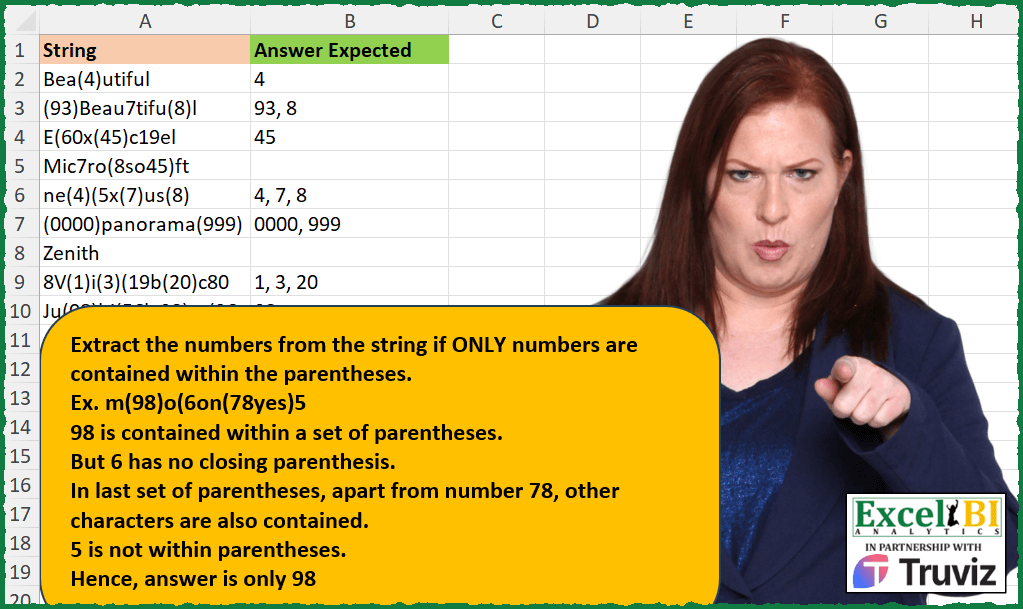
Extract the numbers from the string if ONLY numbers are contained within the parentheses. Ex. m(98)o(6on(78yes)5 98 is contained within a set of parentheses. But 6 has no closing parenthesis. In last set of parentheses, apart from number 78, other characters are also contained. 5 is not within parentheses. Hence, answer is only 98
📌 Challenge Details and Links
ExcelBI Excel Challenge Number: 386
Challenge Difficulty: ⭐️⭐️
📥Download Sample File
📥Link to the solutions on LinkedIn
Solving the challenge of Extract Numbers Inside Parentheses with Power Query
Power Query solution 1 for Extract Numbers Inside Parentheses, proposed by John V.:
let
 S = Excel.CurrentWorkbook(){0}[Content],
 R = Table.AddColumn(S, "R", each
 let
 a = Text.SplitAny(";" & [String] & ";", "()"),
 b = List.Select(a, each try Number.From(_) >= 0 otherwise null)
 in
 Text.Combine(b, ", ")
 )[[R]]
in
 R

Blessings!
Power Query solution 2 for Extract Numbers Inside Parentheses, proposed by Alejandro Simón 🇵🇦 🇪🇸:
let
  Source = Excel.CurrentWorkbook(){[Name = "Table1"]}[Content],
  Sol = Table.AddColumn(
    Source,
    "Answer",
    each
      let
        a = List.Accumulate({"a" .. "z", "A" .. "Z"}, [String], (s, c) => Text.Replace(s, c, " ")),
        b = Text.Split(a, " "),
        c = List.Select(b, each _ <> ""),
        d = List.Transform(
          c,
          each Text.TrimStart(Text.TrimEnd(_, {"(", "0" .. "9"}), {")", "0" .. "9"})
        ),
        e = List.Transform(List.Select(d, each _ <> ""), each Text.Remove(_, {"(", ")"}))
      in
        Text.Combine(e, ", ")
  )[[Answer]]
in
  Sol
Power Query solution 3 for Extract Numbers Inside Parentheses, proposed by Luan Rodrigues:
let
  Fonte = Tabela1,
  res = Table.AddColumn(
    Fonte,
    "tab",
    each
      let
        a = Text.Combine(
          List.ReplaceMatchingItems(Text.ToList([String]), {{"(", " ("}, {")", ") "}})
        ),
        b = List.Select(
          Text.Split(a, " "),
          (x) =>
            try
              Text.Start(x, 1)
                = "(" and Text.End(x, 1)
                = ")" and Number.From(Text.Remove(x, {"(", ")"})) is number
            otherwise
              null
        ),
        c = Text.Combine(List.Transform(b, each Text.Remove(_, {"(", ")"})), ", ")
      in
        c
  )
in
  res
Power Query solution 4 for Extract Numbers Inside Parentheses, proposed by Rafael González B.:
let
Source = Excel.CurrentWorkbook(){0}[Content],
Result = Table.AddColumn(Source, "Answer Expected", each
let
T = [String],
LT = Table.FromList(Text.SplitAny(T, "()"), Splitter.SplitByNothing()),
TAC = Table.AddColumn(LT, "Test", each try Number.From([Column1]) otherwise ""),
TC = Text.Combine(Table.SelectRows(TAC, each ([Test] <> null and [Test] <> ""))[Column1], ", ")
in
TC
)
in
Result[[Answer Expected]]
🧙♂️🧙♂️🧙♂️
Power Query solution 5 for Extract Numbers Inside Parentheses, proposed by Rafael González B.:
let
  Source = Excel.CurrentWorkbook(){0}[Content],
  Result = Table.AddColumn(
    Source,
    "Answer Expected",
    each
      let
        T = [String],
        TI = Text.Insert(T, Text.Length(T), "|"),
        LT = Table.FromList(Text.SplitAny(TI, "()"), Splitter.SplitByNothing()),
        TAC = Table.AddColumn(LT, "Test", each try Number.From([Column1]) otherwise ""),
        TC = Text.Combine(
          Table.SelectRows(TAC, each ([Test] <> null and [Test] <> ""))[Column1],
          ", "
        )
      in
        TC
  )
in
  Result[[Answer Expected]]
Solving the challenge of Extract Numbers Inside Parentheses with Excel
Excel solution 1 for Extract Numbers Inside Parentheses, proposed by Bo Rydobon 🇹🇭:
=MAP(
    A2:A11,
    LAMBDA(
        a,
        LET(
            b,
            TEXTSPLIT(
                "a"&a&"a",
                ")",
                "("
            ),
            TEXTJOIN(
                ", ",
                ,
                IF(
                    ISERROR(
                        -b
                    ),
                    "",
                    b
                )
            )
        )
    )
)
Excel solution 2 for Extract Numbers Inside Parentheses, proposed by Rick Rothstein:
=MAP(
    A2:A10,
    LAMBDA(
        a,
        LET(
            x,
            TEXTSPLIT(
                a,
                "(",
                ")"
            ),
            TEXTJOIN(
                ", ",
                ,
                IF(
                    ISERROR(
                        -x
                    ),
                    "",
                    x
                )
            )
        )
    )
)

Howerver,
     محمد حلمي pointed out that this formula fails if one of the values is just a single number (no parentheses). If that needs to be protected against,
     then...

=MAP(
    A2:A10,
    LAMBDA(
        a,
        LET(
            x,
            TEXTSPLIT(
                a,
                "(",
                ")"
            ),
            IF(
                COUNTA(
                    x
                )>1,
                TEXTJOIN(
                    ", ",
                    ,
                    IF(
                        ISERROR(
                        -x
                    ),
                        "",
                        x
                    )
                ),
                ""
            )
        )
    )
)
Excel solution 3 for Extract Numbers Inside Parentheses, proposed by John V.:
=MAP(
    A2:A10,
    LAMBDA(
        x,
        LET(
            i,
            TEXTSPLIT(
                ";"&x&";",
                {"(";")"}
            ),
            TEXTJOIN(
                ", ",
                ,
                IF(
                    ISERR(
                        -i
                    ),
                    "",
                    i
                )
            )
        )
    )
)
Excel solution 4 for Extract Numbers Inside Parentheses, proposed by محمد حلمي:
=MAP(
    A2:A10,
    LAMBDA(
        a,
        LET(
            i,
            TEXTSPLIT(
                a,
                ")",
                "("
            ),

            x,
            DROP(
                i,
                1,
                -1
            ),
            TEXTJOIN(
                ", ",
                ,
                IFERROR(
                    REPT(
                        x,

                        ISNUMBER(
                            -x
                        )*ISTEXT(
                            DROP(
                                i,
                                1,
                                1
                            )
                        )
                    ),
                    ""
                )
            )
        )
    )
)
Excel solution 5 for Extract Numbers Inside Parentheses, proposed by 🇰🇷 Taeyong Shin:
=MAP(
    A2:A10&"|",
    LAMBDA(
        e,
        LET(
            t,
            TEXTSPLIT(
                e,
                {"(",
                ")"}
            ),
            TEXTJOIN(
                ", ",
                ,
                REPT(
                    t,
                    ISNUMBER(
                        -t
                    )
                )
            )
        )
    )
)
Excel solution 6 for Extract Numbers Inside Parentheses, proposed by Kris Jaganah:
=MAP(
    A2:A10,
    LAMBDA(
        x,
        LET(
            a,
            TEXTSPLIT(
                "#"&x&"#",
                ,
                "("
            ),
            b,
            TEXTSPLIT(
                a,
                ")"
            ),
            ARRAYTOTEXT(
                FILTER(
                    b,
                    -ISERR(
                        -b
                    )=0,
                    ""
                )
            )
        )
    )
)
Excel solution 7 for Extract Numbers Inside Parentheses, proposed by Kris Jaganah:
=MAP(A2:A10,
    LAMBDA(x,
    LET(a,
    TOCOL(
        TEXTSPLIT(
            x&"#",
            "(",
            ")",
            ,
            ,
            ""
        )
    ),
    ARRAYTOTEXT(FILTER(a,
    -(ISERR(
        -a
    ))=0,
    "")))))
Excel solution 8 for Extract Numbers Inside Parentheses, proposed by Julian Poeltl:
=MAP(
    A2:A10,
    LAMBDA(
        String,
        TEXTJOIN(
            ", ",
            TRUE,
            IF(
                ISNUMBER(
                    LEFT(
                        TEXTSPLIT(
                            String,
                            "("
                        ),
                        SEARCH(
                            ")",
                            TEXTSPLIT(
                                String,
                                "("
                            )
                        )-1
                    )*1
                )=TRUE,
                LEFT(
                    TEXTSPLIT(
                        String,
                        "("
                    ),
                    SEARCH(
                        ")",
                        TEXTSPLIT(
                            String,
                            "("
                        )
                    )-1
                ),
                ""
            )
        )
    )
)
Excel solution 9 for Extract Numbers Inside Parentheses, proposed by Timothée BLIOT:
=MAP(
    A2:A10,
    LAMBDA(
        x,
        ARRAYTOTEXT(
            IFNA(
                REGEXEXTRACT(
                    x,
                    "(?<=()d+(?=))",
                    1
                ),
                ""
            )
        )
    )
)
Excel solution 10 for Extract Numbers Inside Parentheses, proposed by Sunny Baggu:
=IFERROR(

     MAP(

          A2:A10,

          LAMBDA(
              t,

               LET(

                    _a,
                    UNIQUE(
                        TOCOL(
                            SEARCH(
                                "(",
                                 t,
                                 SEQUENCE(
                                     LEN(
                                         t
                                     )
                                 )
                            ),
                             3
                        )
                    ) + 1,

                    _b,
                    TOROW(
                        UNIQUE(
                            TOCOL(
                                SEARCH(
                                    ")",
                                     t,
                                     SEQUENCE(
                                     LEN(
                                         t
                                     )
                                 )
                                ),
                                 3
                            )
                        )
                    ),

                    _c,
                    TOCOL(
                        MID(
                            t,
                             _a,
                             -_a + _b
                        ),
                         3
                    ),

                    ARRAYTOTEXT(
                        FILTER(
                            _c,
                             ISNUMBER(
                                 _c + 0
                             ),
                             ""
                        )
                    )

               )

          )

     ),

     ""

)
Excel solution 11 for Extract Numbers Inside Parentheses, proposed by LEONARD OCHEA 🇷🇴:
=MAP(A2:A10,
    LAMBDA(x,
    LET(s,
    SEQUENCE(
        LEN(
            x
        )
    ),
    p,
    FIND(
        "(",
        x,
        s
    )+1,
    e,
    UNIQUE(MID(x,
    p,
    FIND(
        ")",
        x,
        s
    )-(p))),
    TEXTJOIN(
        ", ",
        ,
        IF(
            ISNUMBER(
                --e
            ),
            e,
            ""
        )
    ))))
Excel solution 12 for Extract Numbers Inside Parentheses, proposed by Pieter de B.:
=MAP(
    A2:A10,
    LAMBDA(
        a,
        LET(
            b,
            TEXTSPLIT(
                a,
                {"(",
                ")"}
            ),
            TEXTJOIN(
                ", ",
                ,
                IF(
                    ISERR(
                        -b
                    ),
                    "",
                    b
                )
            )
        )
    )
)
Excel solution 13 for Extract Numbers Inside Parentheses, proposed by Gerson Pineda:
=MAP(
    A2:A10,
    LAMBDA(
        x,
        LET(
            i,
            TEXTSPLIT(
                x&"^|",
                "|",
                {"(",
                ")"}
            ),
            TEXTJOIN(
                ",",
                ,
                IF(
                    ISNUMBER(
                        -i
                    ),
                    i,
                    ""
                )
            )
        )
    )
)

=MAP(
    A2:A10,
    LAMBDA(
        x,
        LET(
            i,
            TEXTSPLIT(
                x&"^|",
                "|",
                {"(",
                ")"}
            ),
            TEXTJOIN(
                ",",
                ,
                IF(
                    ISERROR(
                        -i
                    ),
                    "",
                    i
                )
            )
        )
    )
)
Excel solution 14 for Extract Numbers Inside Parentheses, proposed by Nicolas Micot:
=LET(
    _string;
    A2;

    _split;
    FRACTIONNER.TEXTE(
        _string;
        ;
        "("
    );

    _avantParenthese;
    TEXTE.AVANT(
        _split;
        ")";
        ;
        ;
        ;
        ""
    );

    JOINDRE.TEXTE(
        ", ";
        VRAI;
        FILTRE(
            _avantParenthese;
            SIERREUR(
                _avantParenthese+0;
                ""
            )<>"";
            ""
        )
    )
)
Excel solution 15 for Extract Numbers Inside Parentheses, proposed by Ziad A.:
=MAP(
    A2:A,
    LAMBDA(
        s,
        TRIM(
            REGEXREPLACE(
       &         s,
                "((d+))|.",
                "$1 "
            )
        )
    )
)
Excel solution 16 for Extract Numbers Inside Parentheses, proposed by Gabriel Raigosa:
=MAP(
    A2:A10,
    LAMBDA(
        x,
        LET(
            d,
            TEXTSPLIT(
                x&",",
                "(",
                ")"
            ),
            n,
            TOCOL(
                d
            ),
            TEXTJOIN(
                ", ",
                ,
                FILTER(
                    n,
                    ISNUMBER(
                        n*1
                    ),
                    ""
                )
            )
        )
    )
)

▶️ES:
=MAP(
    A2:A10,
    LAMBDA(
        x,
        LET(
            d,
            DIVIDIRTEXTO(
                x&",",
                "(",
                ")"
            ),
            n,
            ENCOL(
                d
            ),
            UNIRCADENAS(
                ", ",
                ,
                FILTRAR(
                    n,
                    ESNUMERO(
                        n*1
                    ),
                    ""
                )
            )
        )
    )
)
Excel solution 17 for Extract Numbers Inside Parentheses, proposed by Surendra Reddy:
=MAP(
    A2:A10,
    LAMBDA(
        x,
        LET(
            z,
            0,
            s,
            TEXTBEFORE(
                TEXTSPLIT(
                    x,
                    "("
                ),
                ")"
            ),
            TEXTJOIN(
                ", ",
                ,
                IF(
                    ISNUMBER(
                        IFNA(
                            XMATCH(
                                s*1,
                                z
                            ),
                            s
                        )*1
                    ),
                    s,
                    ""
                )
            )
        )
    )
)
Solving the challenge of Extract Numbers Inside Parentheses with Python
Solving the challenge of Extract Numbers Inside Parentheses with Python in Excel
Python in Excel solution 1 for Extract Numbers Inside Parentheses, proposed by John V.:
Hi everyone!
One [Python] option could be:
import re
[', '.join(re.findall(r'((d+))', i)) for i in xl("A2:A10")[0]]
Blessings!
Python in Excel solution 2 for Extract Numbers Inside Parentheses, proposed by Abdallah Ally:
import re
import pandas as pd
# Specify a file name
file_name = r'C:UsersaallyDownloadsExcel_Challenge_386 - Extract Numbers in Parentheses.xlsx'
df = pd.read_excel(file_name)
def answer(col):
 return ", ".join(re.findall(r'((d+))', col))

df['My Answer'] = df['String'].apply(answer)
# Replace empty string values by na values
df['My Answer'] = df['My Answer'].replace('', float('nan'))
print(df)
Python in Excel solution 3 for Extract Numbers Inside Parentheses, proposed by JvdV -:
Trough =PY():
import re
[', '.join(re.findall(r'((d+))',s))for s in xl("A2:A10")[0]]
Python in Excel solution 4 for Extract Numbers Inside Parentheses, proposed by Giorgi Goderdzishvili:
lst = list(xl("A1:A10", headers=True).String)
fn = []
for i in lst:
 emp = []
 for ind,j in enumerate(i):
 if j=='(':
 lst = i.find(')',ind)
 check = i[ind+1:lst]
 if check.isdigit() and lst>0:
 emp.append(check)
 fn.append(', '.join(emp))
fn
Solving the challenge of Extract Numbers Inside Parentheses with R
R solution 1 for Extract Numbers Inside Parentheses, proposed by Konrad Gryczan, PhD:
library(tidyverse)
library(readxl)
input = read_excel("Excel/386 Extract Numbers in Parentheses.xlsx", range = "A1:A10")
test = read_excel("Excel/386 Extract Numbers in Parentheses.xlsx", range = "B1:B10")
extract = function(x) {
 x = str_extract_all(x, "\((\d+)\)") %>%
 unlist() %>%
 str_remove_all("\D") %>%
 str_c(collapse = ", ")
 if (x == "") x = NA_character_
 return(x)
}
result = input %>%
 rowwise() %>%
 mutate(result = map_chr(String, extract))
&&