
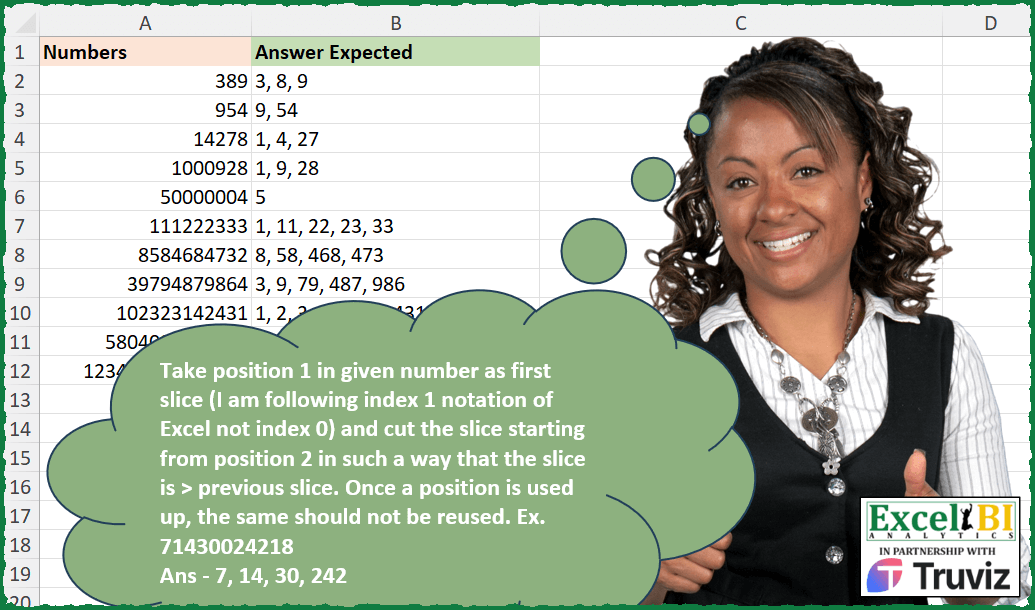
Take position 1 in given number as first slice (I am following index 1 notation of Excel not index 0) and cut the slice starting from position 2 in such a way that the slice is > previous slice. Once a position is used up, the same should not be reused. Ex. 71430024218 First slice – 7 Second slice – 14 (14 > 7) Third slice – 30 (30 > 14) Fourth slice – 242 (242 > 30) (Actually, it is 0242 but 0 is leading, hence discarded) Remaining slice is 18 which is < 242, hence 18 will not be part of the answer.
📌 Challenge Details and Links
ExcelBI Excel Challenge Number: 384
Challenge Difficulty: ⭐️⭐️⭐️⭐️⭐️
📥Download Sample File
📥Link to the solutions on LinkedIn
Solving the challenge of Slice Numbers with Greater Rules with Power Query
Power Query solution 1 for Slice Numbers with Greater Rules, proposed by John V.:
let
 S = Excel.CurrentWorkbook(){0}[Content],
 T = Text.From, M = Text.Middle,
 R = Table.AddColumn(S, "R", each
 let
 n = T([Numbers]),
 r = (p, c, a) =>
 let
 v = Number.From(M(n, p, c)),
 b = if v > a then ", " & T(v) & @r(p + c, 1, v) else @r(p, 1 + c, a)
 in
 if p + c > Text.Length(n) then "" else b
 in
 M(r(0, 1, 0), 2)
 )[[R]]
in
 R

Blessings!
Solving the challenge of Slice Numbers with Greater Rules with Excel
Excel solution 1 for Slice Numbers with Greater Rules, proposed by Bo Rydobon 🇹🇭:
=LET(
    R,
    LAMBDA(
        r,
        a,
        b,
        j,
        LET(
            l,
            --LEFT(
                a,
                SEQUENCE(
                    9
                )
            ),
            x,
            XMATCH(
                TRUE,
                l>b
            ),
            c,
            INDEX(
                l,
                x
            ),

            IF(
                ISNA(
                    x
                ),
                MID(
                    j,
                    3,
                    99
                ),
                r(
                    r,
                    MID(
                        a,
                        x+1,
                        99
                    ),
                    c,
                    j&", "&c
                )
            )
        )
    ),
    MAP(
        A2:A12,
        LAMBDA(
            a,
            R(
                R,
                a,
                ,

            )
        )
    )
)
Excel solution 2 for Slice Numbers with Greater Rules, proposed by John V.:
=LET(
    r,
    LAMBDA(
        r,
        n,
        p,
        c,
        a,
        LET(
            v,
            --MID(
                n,
                p,
                c
            ),
            IF(
                p+c<2+LEN(
                    n
                ),
                IF(
                    v>a,
                    ", "&v&r(
                        r,
                        n,
                        c+p,
                        1,
                        v
                    ),
                    r(
                        r,
                        n,
                        p,
                        1+c,
                        a
                    )
                ),
                ""
            )
        )
    ),
    MAP(
        A2:A12,
        LAMBDA(
            x,
            MID(
                r(
                    r,
                    x,
                    1,
                    1,

                ),
                3,
                99
            )
        )
    )
)
Excel solution 3 for Slice Numbers with Greater Rules, proposed by محمد حلمي:
=MID(
    A12,
    SEQUENCE(
        15
    ),
    SEQUENCE(
        ,
        3
    )
)
Excel solution 4 for Slice Numbers with Greater Rules, proposed by محمد حلمي:
=MAP(A2:A12,
    LAMBDA(a,
    LET(s,
    SEQUENCE(
        20
    ),

i,
    --MID(
        a,
        s,
        1
    ),
    TEXTJOIN(", ",
    ,
    REDUCE(@i,
    s,
    LAMBDA(z,
    x,

VSTACK(z,
    LET(j,
    LEN(
        z
    ),
    e,
    --SCAN(,
    DROP(i,

SUM((TAKE(
    i,
    SUM(
        j
    )
)=0)+j)),
    LAMBDA(
        a,
        d,
        a&d
    )),

IFERROR(
    XLOOKUP(
        TRUE,
        e>MAX(
        z
    ),
        e
    ),
    ""
)))))))))
Excel solution 5 for Slice Numbers with Greater Rules, proposed by Timothée BLIOT:
=MAP(
    A2:A12,
    LAMBDA(
        z,
        ARRAYTOTEXT(
            TOCOL(
                --REDUCE(
                    --LEFT(
                        z
                    ),
                     ROW(
                         $1:$20
                     ),
                    LAMBDA(
                        w,
                        v,
                        LET(
                            A,
                            LEN(
                                CONCAT(
                                    w
                                )
                            ),
                            B,
                            LEN(
                        z
                    )-A,
                            IF(
                                B<=0,
                                w,
                                 LET(
                                      C,
                                     MID(
                                         z,
                                         A+1,
                                         B
                                     ),
                                     D,
                                     --TAKE(
                                         w,
                                         -1
                                     ),
                                     E,
                                     MID(
                                         C,
                                         1,
                                         SEQUENCE(
                                             B
                                         )
                                     ),
                                     F,
                                     FILTER(
                                         E,
                                         --E>D,
                                         ""
                                     ),
                                     VSTACK(
                                         w,
                                         IFERROR(
                                             FILTER(
                                                 F,
                                                 --F=MIN(
                                                     --F
                                                 )
                                             ),
                                             ""
                                         )
                                     )
                                 )
                            )
                        )
                    )
                ),
                3
            )
        )
    )
)
Excel solution 6 for Slice Numbers with Greater Rules, proposed by Andres Rojas Moncada:
=MAP(
    A2:A12,
    LAMBDA(
        x,
        LET(
            r,
            REDUCE(
                "0-0",
                SEQUENCE(
                    LEN(
                        x
                    )
                ),
                LAMBDA(
                    a,
                    v,

                    LET(
                        p,
                        TAKE(
                            a,
                            1
                        ),
                        n,
                        --TEXTBEFORE(
                            p,
                            "-"
                        ),
                        i,
                        --TEXTAFTER(
                            p,
                            "-"
                        ),
                        nn,
                        --MID(
                            x,
                            i+1,
                            v-i
                        ),

                        IF(
                            nn>n,
                            VSTACK(
                                nn&"-"&v,
                                a
                            ),
                            a
                        )
                    )
                )
            ),
            ARRAYTOTEXT(
                TOCOL(
                    DROP(
                        SORT(
                            TEXTBEFORE(
                                r,
                                "-"
                            )*1
                        ),
                        1
                    ),
                    2
                )
            )
        )
    )
)
Solving the challenge of Slice Numbers with Greater Rules with Python in Excel
Python in Excel solution 1 for Slice Numbers with Greater Rules, proposed by Giorgi Goderdzishvili:
lst =[str(i) for i in xl("A1:A12", headers=True).Numbers]
fin = []
for i in lst:
 lp = []
 st = 0
 mving = 0
 step = 1
 while (mving+step)<=len(i):
 nxt = int(i[mving:mving+step])
 if nxt>st:
 lp.append(str(nxt))
 st = nxt
 mving +=step
 step = 1
 else:
 step+=1
 fin.append(', '.join(lp))
fin
Solving the challenge of Slice Numbers with Greater Rules with R
R solution 1 for Slice Numbers with Greater Rules, proposed by Bo Rydobon 🇹🇭:
=MAP(A2:A12,LAMBDA(z,ARRAYTOTEXT(--DROP(REDUCE(0,SEQUENCE(20),LAMBDA(a,n,LET(m,MID(z,n+SUM(LEN(a)-1),SEQUENCE(9)),x,XMATCH(TRUE,-m<-TAKE(a,-1)),IFNA(VSTACK(a,INDEX(m,x)),a)))),1))))R solution 2 for Slice Numbers with Greater Rules, proposed by Konrad Gryczan, PhD:
library(tidyverse)
library(readxl)
input = read_excel("Excel/384 Extract Increasing Numbers.xlsx", range = "A1:A12")
test = read_excel("Excel/384 Extract Increasing Numbers.xlsx", range = "B1:B12")
recursive_append <- function(n, p = 0, c = 1, a = 0) {
 if (p + c > nchar(n)) {
 return("")
 } else {
 v <- as.numeric(substr(n, p + 1, p + c))
 if (!is.na(v) && v > a) {
 b <- paste(", ", v, recursive_append(n, p + c, 1, v), sep = "")
 } else {
 b <- recursive_append(n, p, c + 1, a)
 }
 return(b)
 }
}
result = input %>%
 rowwise() %>%
 mutate(R = substring(recursive_append(as.character(Numbers)), 1)) %>%
 mutate(R = str_sub(R, 3, -1))
R solution 3 for Slice Numbers with Greater Rules, proposed by JvdV -:
=LET(x,LAMBDA(f,n,c,o,s,LET(y,MID(n,s,ROW(1:99)),z,@TOCOL(IFS(-y<-o,y),3),IF(ISERR(z),c,f(f,n,REPT(c&", ",o>0)&--z,z,s+LEN(z))))),MAP(A2:A12,LAMBDA(a,x(x,a,,,1))))Solving the challenge of Slice Numbers with Greater Rules with Excel VBA
Excel VBA solution 1 for Slice Numbers with Greater Rules, proposed by Nicolas Micot:
VBA solution:
Function f_slice(nombre) As String
Dim resultat As String, restant As String
Dim nbCar As Integer, valeur As Integer, extract As Integer
valeur = 0
restant = nombre
nbCar = 1
Do
 extract = Left(restant, nbCar)
 If extract > valeur Then
 resultat = resultat & IIf(resultat <> "", ", ", "") & extract
 valeur = extract
 restant = Replace(restant, extract, "", Count:=1)
 nbCar = 1
 Else
 nbCar = nbCar + 1
 End If
Loop Until nbCar > Len(restant)
f_slice = resultat
End Function
&&&