
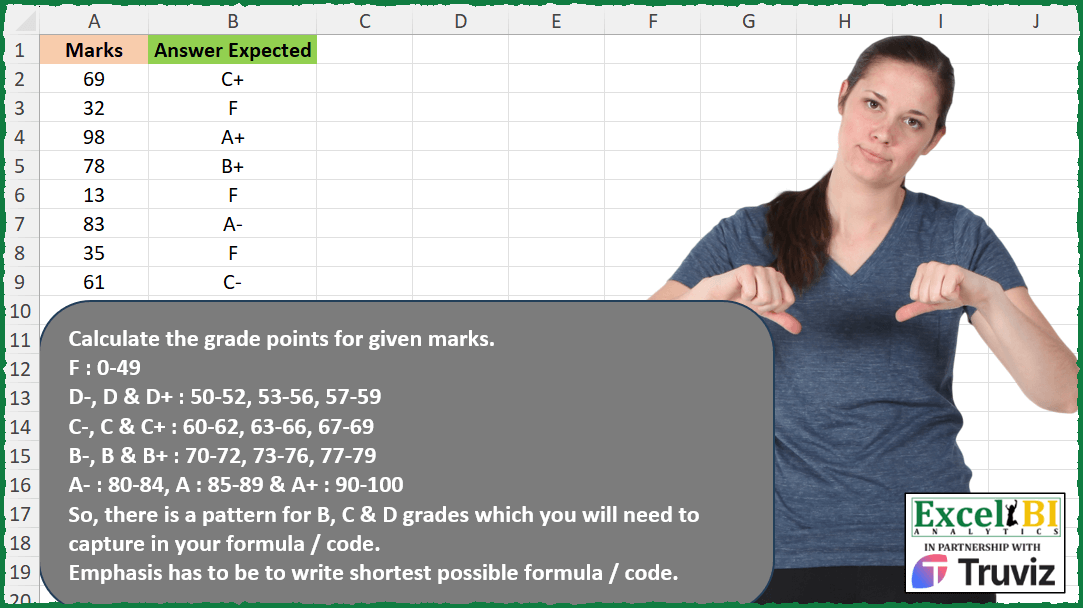
Calculate the grade points for given marks. F : 0-49 D-, D & D+ : 50-52, 53-56, 57-59 C-, C & C+ : 60-62, 63-66, 67-69 B-, B & B+ : 70-72, 73-76, 77-79 A- : 80-84, A : 85-89 & A+ : 90-100 So, there is a pattern for B, C & D grades which you will need to capture in your formula / code. Emphasis has to be to write shortest possible formula / code.
📌 Challenge Details and Links
ExcelBI Excel Challenge Number: 375
Challenge Difficulty: ⭐️
📥Download Sample File
📥Link to the solutions on LinkedIn
Solving the challenge of Convert Marks to Grade Points with Power Query
Power Query solution 1 for Convert Marks to Grade Points, proposed by Alejandro Simón 🇵🇦 🇪🇸:
let
  Source = Excel.CurrentWorkbook(){[Name = "Table1"]}[Content],
  Sol = Table.AddColumn(
    Source,
    "Answer",
    each
      let
        a = [Marks],
        b = {49}
          & List.TransformMany({0, 10, 20}, (x) => {52, 56, 59}, (x, y) => x + y)
          & {84, 89, 100},
        c = {"F", "D-", "D", "D+", "C-", "C", "C+", "B-", "B", "B+", "A-", "A", "A+"},
        d = List.Zip({b, c}),
        e = List.First(List.Select(d, each _{0} >= a)){1}
      in
        e
  )
in
  Sol
Power Query solution 2 for Convert Marks to Grade Points, proposed by Luan Rodrigues:
let
  Fonte = Tabela1,
  tab =
    let
      a = Web.Page(
        Web.Contents(
          "https://www.torontomu.ca/first-year-engineering-office/current-students/grades/"
        )
      ){0}[Data][[Letter Grade], [Percentage]],
      b = Table.TransformColumns(
        a,
        {"Percentage", each Expression.Evaluate("{" & Text.Replace(_, "-", "..") & "}")}
      )
    in
      b,
  res = Table.AddColumn(
    Fonte,
    "join",
    each Table.SelectRows(tab, (x) => List.ContainsAny(x[Percentage], {[Marks]}))[Letter Grade]{0}
  )
in
  res
Power Query solution 3 for Convert Marks to Grade Points, proposed by An Nguyen:
let
 Dataset = Excel.CurrentWorkbook () { [Name = "Marks"] } [Content] ,
 Marks = List.Buffer (Dataset [Marks] ) ,
 Categorize = hashtag#table ({"Key", "Threshold"}, {
 { "F" , 0 } , { "D-" ,50 } , { "D" , 53 } , { "D+", 57 } ,
 { "C-", 60 } , { "C", 63 } , { "C+", 67 } , { "B-", 70 } ,
 { "B", 73 } , { "B+", 77 } , { "A-", 80 } , { "A ", 85 } ,
 { "A+", 90 }     }
 ) ,
 Threshold = List.Buffer ( Categorize [Threshold] ) ,
 Answer = List.Transform ( Marks , (m) => let Count = List.Count (List.Select ( Threshold , each _ <= m ) ) , Result = Categorize[Key] { Count - 1 }
 in Result )
in
 Answer
Power Query solution 4 for Convert Marks to Grade Points, proposed by Rafael González B.:
let
Source = Excel.CurrentWorkbook(){0}[Content],
Reg = {
[#"A+" = {90..100}],
[A = {85..89}],
[#"A-" = {80..84}],
[#"B+" = {77..79}],
[B = {73..76}],
[#"B-" = {70..72}],
[#"C+" = {67..69}],
[C = {63..66}],
[#"C-" = {60..62}],
[#"D+" = {57..59}],
[#"D" = {53..56}],
[#"D-" = {50..52}],
[F = {0..49}]
},
Result = Table.AddColumn(Source, "Answer Expected", each
let
n = [Marks],
NT =
let
a = List.Transform(Reg, each
let
o = Record.Field(_, Record.FieldNames(_){0}),
p = List.Contains(o, n)
in
p),
b = List.PositionOf(a, true),
c = Record.FieldNames(Reg{b}){0}
in
c
in
NT
)[[Answer Expected]]
in
Result
🧙♂️🧙♂️🧙♂️
Power Query solution 5 for Convert Marks to Grade Points, proposed by Glyn Willis:
let
 CfgTbl = hashtag#table({"g","l","u"},{{"F",0,49},{"D-",50,52},{"D",53,56},{"D+",57,59},{"C-",60,62},{"C",63,66},{"C+",67,69},{"B-",70,72},{"B",73,76},{"B+",77,79},{"A-",80,84},{"A",85,89},{"A+",90,100}}),
 ExpndTbl = Table.AddKey(Table.ExpandListColumn(Table.AddColumn(CfgTbl, "m", each {[l]..[u]}), "m"),{"m"},true),
 Source = Table.AddKey(Excel.CurrentWorkbook(){[Name="Table1"]}[Content],{"Marks"},true),
 #"Changed Type" = Table.TransformColumnTypes(Source,{{"Marks", Int64.Type}, {"Answer Expected", type text}}),
 #"Merged Queries" = Table.NestedJoin(#"Changed Type", {"Marks"}, ExpndTbl, {"m"}, "G", JoinKind.LeftOuter),
 #"Expanded Grade" = Table.ExpandTableColumn(#"Merged Queries", "G", {"g"}, {"Grade"})
in
 #"Expanded Grade"
Solving the challenge of Convert Marks to Grade Points with Excel
Excel solution 1 for Convert Marks to Grade Points, proposed by Bo Rydobon 🇹🇭:
=LOOKUP(
    A2:A20,
    {0,
    0,
    50,
    50,
    53,
    57,
    60,
    63,
    67,
    70,
    73,
    77,
    80,
    85,
    90},
    TOCOL(
        CHAR(
            70-{0;2;3;4;5}
        )&{"-",
        "",
        "+"}
    )
)
Excel solution 2 for Convert Marks to Grade Points, proposed by Rick Rothstein:
=TRIM(
    MID(
        "F D-D D+C-C C+B-B B+A-A A+",
        2*XMATCH(
            A2:A20,
            {0,
            50,
            53,
            57,
            60,
            63,
            67,
            70,
            73,
            77,
            80,
            85,
            90},
            -1
        )-1,
        2
    )
)
Excel solution 3 for Convert Marks to Grade Points, proposed by Rick Rothstein:
=LOOKUP(
    A2:A20,
    {0,
    50,
    53,
    57,
    60,
    63,
    67,
    70,
    73,
    77,
    80,
    85,
    90},
    {"F",
    "D-",
    "D",
    "D+",
    "C-",
    "C",
    "C+",
    "B-",
    "B",
    "B+",
    "A-",
    "A",
    "A+"}
)
Excel solution 4 for Convert Marks to Grade Points, proposed by John V.:
=XLOOKUP(
    A2:A20,{50;
    53;
    57;
    60;
    63;
    67;
    70;
    73;
    77;
    80;
    85;
    90},TOCOL(
        {"D";
        "C";
        "B";
        "A"}&{"-","","+"}
    ),"F",-1
)
Excel solution 5 for Convert Marks to Grade Points, proposed by محمد حلمي:
=VLOOKUP(
    A2:A20,
    {0,
    "F";50,
    "D-";53,
    "D";57,
    "D+";60,
    "C-";63,
    "C";67,
    "C+";70,
    "B-";73,
    "B";77,
    "B+";80,
    "A-";85,
    "A";90,
    "A+"},
    2
)
Excel solution 6 for Convert Marks to Grade Points, proposed by Kris Jaganah:
=XLOOKUP(
    A2:A20,
    {100,
    89,
    84,
    79,
    76,
    72,
    69,
    66,
    62,
    59,
    56,
    52,
    49},
    {"A+",
    "A",
    "A-",
    "B+",
    "B",
    "B-",
    "C+",
    "C",
    "C-",
    "D+",
    "D",
    "D-",
    "F"},
    ,
    1
)
Excel solution 7 for Convert Marks to Grade Points, proposed by Julian Poeltl:
=LET(
    G,
    A2,
    GMod,
    MOD(
        G-50,
        10
    )+1,
    ADD,
    XLOOKUP(
        GMod,
        {3,
        7,
        10},
        {"-",
        "",
        "+"},
        ,
        1
    ),
    L,
    XLOOKUP(
        G-49,
        {0,
        10,
        20,
        30,
        51},
        {"F",
        "D",
        "C",
        "B",
        "A"},
        ,
        1
    ),
    IFS(
        G<50,
        "F",
        G>89,
        "A+",
        G>84,
        "A",
        G>79,
        "A-",
        1,
        L&ADD
    )
)
Excel solution 8 for Convert Marks to Grade Points, proposed by Timothée BLIOT:
=XLOOKUP(
    A2:A20,
    {100;
    89;
    84;
    79;
    76;
    72;
    69;
    66;
    62;
    59;
    56;
    52;
    49},
    {"A+";
    "A";
    "A-";
    "B+";
    "B";
    "B-";
    "C+";
    "C";
    "C-";
    "D+";
    "D";
    "D-";
    "F"},,1
)
Excel solution 9 for Convert Marks to Grade Points, proposed by Sunny Baggu:
=LET(

     _b,
     CHAR(
         CODE(
             "D"
         ) + {0; -1; -2}
     ),

     _dcb,
     IF(
         _b <> "",
          _b & HSTACK(
              "-",
               "",
               "+"
          )
     ),

     _dcbnum,
     {0; 10; 20} + 53 + {-3,
     0,
     4},

     _gr,
     VSTACK(
         "F",
          TOCOL(
              _dcb
          ),
          "A-",
          "A",
          "A+"
     ),

     _grm,
     VSTACK(
         0,
          TOCOL(
              _dcbnum
          ),
          {80; 85; 90}
     ),

     XLOOKUP(
         A2:A20,
          _grm,
          _gr,
          ,
          -1
     )

)
Excel solution 10 for Convert Marks to Grade Points, proposed by Abdallah Ally:
=LOOKUP(
    A2:A20,
     {0,
    50,
    53,
    57,
    60,
    63,
    67,
    70,
    73,
    77,
    80,
    85,
    90;"F",
    "D-",
    "D",
    "D+",
    "C-",
    "C",
    "C+",
    "B-",
    "B",
    "B+",
    "A-",
    "A",
    "A+"}
)

=XLOOKUP(
    A2:A20,
    --TEXTSPLIT(
        "0 50 53 57 60 63 67 70 73 77 80 85 90",
        " "
    ),
    TEXTSPLIT(
        "F D- D D+ C- C C+ B- B B+ A- A A+",
        " "
    ),
    "",
    -1
)
Excel solution 11 for Convert Marks to Grade Points, proposed by 🇵🇪 Ned Navarrete C.:
=LOOKUP(
    A2:A20,
    VSTACK(
        0,
        TOCOL(
            {50;60;70}+{0,
            3,
            7}
        ),
        {80;85;90}
    ),
    VSTACK(
        "F",
        TOCOL(
            {"D";"C";"B";"A"}&{"-",
            "",
            "+"}
        )
    )
)
Excel solution 12 for Convert Marks to Grade Points, proposed by JvdV -:
=LOOKUP(
    A2:A20&"",
    TEXTSPLIT(
        "2F1502D-1532D1572D+1602C-1632C1672C+1702B-1732B1772B+1802A-1852A192A+",
        2,
        1
    )
)
Excel solution 13 for Convert Marks to Grade Points, proposed by Pieter de Bruijn:
=LOOKUP(
    A2:A20,
    {0,
    "F";50,
    "D-";53,
    "D";57,
    "D+";60,
    "C-";63,
    "C";67,
    "C+";70,
    "B-";73,
    "B";77,
    "B+";80,
    "A-";85,
    "A";90,
    "A+"}
)
Excel solution 14 for Convert Marks to Grade Points, proposed by Edwin Tisnado:
=XLOOKUP(
    A2:A20,{49;
    52;
    56;
    59;
    62;
    66;
    69;
    72;
    76;
    79;
    84;
    89;
    100},{"F";
    "D-";
    "D";
    "D+";
    "C-";
    "C";
    "C+";
    "B-";
    "B";
    "B+";
    "A-";
    "A";
    "A+"},,1
)
Excel solution 15 for Convert Marks to Grade Points, proposed by Diarmuid Early:
=LET(a,A2:A20,IFS(a<50,"F",a>89,"A+",a>84,"A",a>79,"A-",1,CHAR(73-INT(a/10))&VLOOKUP(MOD(a,10),{0,"-";3,"";7,"+"},2)))
Inspired by Rick's solutions, I can trim mine slightly - either by replacing the VLOOKUP with a LOOKUP (115 characters):
=LET(a,A2:A20,IFS(a<50,"F",a>89,"A+",a>84,"A",a>79,"A-",1,CHAR(73-INT(a/10))&LOOKUP(MOD(a,10),{0,"-";3,"";7,"+"})))
...or by replacing it with a MID and TRIM (116 characters):
=LET(a,A2:A20,IFS(a<50,"F",a>89,"A+",a>84,"A",a>79,"A-",1,CHAR(73-INT(a/10))&TRIM(MID("---  +++",MOD(a,10)+1,1))))
Rick, I can also shave 1 character off your (amazing!) 104 solution with a little trickery: add a space to the start of the string in MID, and you can drop the -1:
=TRIM(MID(" F D-D D+C-C C+B-B B+A-A A+",2*XMATCH(A2:A20,{0,50,53,57,60,63,67,70,73,77,80,85,90},-1),2))
Excel solution 16 for Convert Marks to Grade Points, proposed by Gabriel Raigosa:
=XLOOKUP(
    A2:A20,
     {49;
    52;
    56;
    59;
    62;
    66;
    69;
    72;
    76;
    79;
    84;
    89;
    100},
     {"F";
    "D-";
    "D";
    "D+";
    "C-";
    "C";
    "C+";
    "B-";
    "B";
    "B+";
    "A-";
    "A";
    "A+"},,1
)

▶️ES:
 =BUSCARX(
     A2:A20,
      {49;
     52;
     56;
     59;
     62;
     66;
     69;
     72;
     76;
     79;
     84;
     89;
     100},
      {"F";
     "D-";
     "D";
     "D+";
     "C-";
     "C";
     "C+";
     "B-";
     "B";
     "B+";
     "A-";
     "A";
     "A+"},,1
 )
Excel solution 17 for Convert Marks to Grade Points, proposed by Anjan Kumar Bose:
=IF(A2<50,"F",IF(A2<53,"D-",IF(A2<57,"D",IF(A2<60,"D+",IF(A2<63,"C-",IF(A2<67,"C",IF(A2<70,"C+",IF(A2<73,"B-",IF(A2<77,"B",IF(A2<80,"B+",IF(A2<85,"A-",IF(A2<90,"A","A+"))))))))))))Excel solution 18 for Convert Marks to Grade Points, proposed by Arden Nguyen, CPA:
=XLOOKUP(A2:A20,{50;53;57;60;63;67;70;73;77;80;85;90},TOCOL({"D";"C";"B";"A"}&{"-","","+"}),"F",-1)Solving the challenge of Convert Marks to Grade Points with Python
Python solution 1 for Convert Marks to Grade Points, proposed by Jan Willem Van Holst:
In Python:
import pandas as pd
df=pd.read_csv(r"C:JWLENOVOPYTHONExcel_Challenge_375.csv", sep=',', usecols=[0,1])
scoringDict = {}
lowScore = 50
for letter in ['D', 'C', 'B']:
 for step in [(2,'-'), (3,''), (2,'+')]:
 sign = step[1]
 add = step[0]
 highScore = lowScore+add+1
 scoringDict.update({range(lowScore, highScore): letter+sign})
 lowScore = lowScore + add + 1
scoringDict.update({range(0,50):'F', range(80,85):'A-', range(85,90):'A', range(90,101):'A+'})
def fx(score):
 for key in scoringDict:
 if score in key:
 return scoringDict[key]

df['answer'] = [fx(elem) for elem in df['Marks'].to_numpy().tolist()]
Solving the challenge of Convert Marks to Grade Points with Python in Excel
Python in Excel solution 1 for Convert Marks to Grade Points, proposed by Alejandro Campos:
marks = xl("A2:A20")[0]
grades = ['F']*50 + ['D-']*3 + ['&D']*4 + ['D+']*3 + ['C-']*3 + ['C']*4 + ['C+']*3 + ['B-']*3 + ['B']*4 + ['B+']*3 + ['A-']*5 + ['A']*5 + ['A+']*11
df = pd.DataFrame({'Marks': marks, 'Grade Points': [grades[m] for m in marks]})
df
Solving the challenge of Convert Marks to Grade Points with R
R solution 1 for Convert Marks to Grade Points, proposed by Konrad Gryczan, PhD:
library(readxl)
input = read_excel("Excel/375 Students Grades.xlsx", range = "A1:A20")
test = read_excel("Excel/375 Students Grades.xlsx", range = "B1:B20")
calculate_grade <- function(marks) {
 case_when(
 marks >= 90 & marks <= 100 ~ "A+",
 marks >= 85 & marks < 90 ~ "A",
 marks >= 80 & marks < 85 ~ "A-",
 marks >= 70        ~ ifelse(marks %in% 70:72, "B-", ifelse(marks %in% 73:76, "B", "B+")),
 marks >= 60        ~ ifelse(marks %in% 60:62, "C-", ifelse(marks %in% 63:66, "C", "C+")),
 marks >= 50        ~ ifelse(marks %in% 50:52, "D-", ifelse(marks %in% 53:56, "D", "D+")),
 marks < 50        ~ "F"
 )
}
result = input %>%
 mutate(grade = map(Marks, calculate_grade) %>% unlist())
&&