
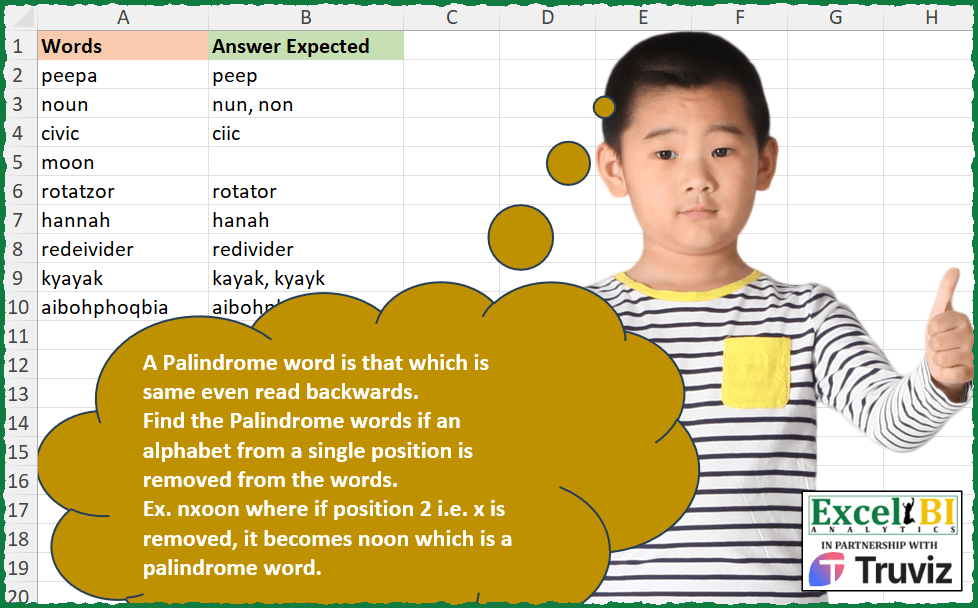
A Palindrome word is that which is same even read backwards. Find the Palindrome words if an alphabet from a single position is removed from the words. Ex. nxoon where if position 2 i.e. x is removed, it becomes noon which is a palindrome word. eede – if position 1 i.e. first e is removed, then ede is palindrome. if position 3 i.e. d is removed, then eee is palindrome. Hence, answer is ede, eee
📌 Challenge Details and Links
ExcelBI Excel Challenge Number: 374
Challenge Difficulty: ⭐️
📥Download Sample File
📥Link to the solutions on LinkedIn
Solving the challenge of Find Palindromes by One Deletion with Power Query
Power Query solution 1 for Find Palindromes by One Deletion, proposed by John V.:
let
 S = Excel.CurrentWorkbook(){0}[Content],
 R = Table.AddColumn(S, "R", each
 let
 w = [Words], t = List.Transform({0..Text.Length(w) - 1}, each
 let o = Text.RemoveRange(w, _) in if o = Text.Reverse(o) then o else null
 )
 in
 Text.Combine(List.Distinct(t), ", ")
 )[[R]]
in
 R

Blessings!
Power Query solution 2 for Find Palindromes by One Deletion, proposed by Alejandro Simón 🇵🇦 🇪🇸:
let
  Source = Excel.CurrentWorkbook(){[Name = "Table1"]}[Content],
  Sol = Table.AddColumn(
    Source,
    "Answer",
    (x) =>
      let
        a = Text.Length(x[Words]),
        b = List.Transform({0 .. a - 1}, each Text.RemoveRange(x[Words], _, 1)),
        c = List.Distinct(List.Select(b, each _ = Text.Reverse(_)))
      in
        Text.Combine(c, ", ")
  )[[Answer]]
in
  Sol
Power Query solution 3 for Find Palindromes by One Deletion, proposed by Luan Rodrigues:
let
  Fonte = Tabela1,
  res = Table.AddColumn(
    Fonte,
    "Personalizar",
    each [
      a = List.Transform(
        {0 .. Text.Length([Words])},
        (x) =>
          [a = try Text.RemoveRange([Words], x) otherwise null, b = {a} & {a = Text.Reverse(a)}][b]
      ),
      b = Text.Combine(
        List.Transform(List.Distinct(List.Select(a, each _{1} = true and _{0} <> null)), each _{0}),
        ", "
      )
    ][b]
  )
in
  res
Power Query solution 4 for Find Palindromes by One Deletion, proposed by Brian Julius:
let
  Source = Excel.CurrentWorkbook(){[Name = "Table1"]}[Content],
  AddAnswer = Table.AddColumn(
    Source,
    "Answer",
    each [
      z = Text.Trim([Words]),
      a = Text.ToList(z),
      b = List.Count(a) - 1,
      c = {0 .. b},
      d = List.Transform(c, each Text.ReplaceRange(z, _, 1, "")),
      e = List.Transform(d, each if _ = Text.Reverse(_) then _ else null),
      f = List.Distinct(e),
      g = Text.Combine(f, ", ")
    ][g]
  )
in
  AddAnswer
Power Query solution 5 for Find Palindromes by One Deletion, proposed by Ramiro Ayala Chávez:
let
  Origen = Excel.CurrentWorkbook(){[Name = "Table1"]}[Content],
  Fx = (x) =>
    let
      a = Text.ToList(x),
      b = List.Generate(
        () => [i = 0],
        each [i] < List.Count(a),
        each [i = [i] + 1],
        each List.RemoveRange(a, [i], 1)
      ),
      c = List.Transform(b, each Text.Combine(_)),
      d = List.Zip({List.Positions(c), c}),
      e = {0 .. List.Count(a) - 1},
      f = List.Select(e, each c{_} = Text.Reverse(c{_})),
      g = List.Select(d, each List.ContainsAny(_, f)),
      h = Text.Combine(List.Distinct(List.Transform(g, each _{1})), ", ")
    in
      h,
  Sol = Table.AddColumn(Origen, "Answer Expected", each Fx([Words]))
in
  Sol
Power Query solution 6 for Find Palindromes by One Deletion, proposed by Glyn Willis:
let
  Source = Excel.CurrentWorkbook(){[Name = "Table1"]}[Content],
  #"Changed Type" = Table.TransformColumnTypes(
    Source,
    {{"Words", type text}, {"Answer Expected", type text}}
  ),
  #"Added Custom" = Table.AddColumn(
    #"Changed Type",
    "Custom",
    each [
      w = [Words],
      l = Text.Length(w) - 1,
      t = {0 .. l},
      r = List.Select(
        List.Transform(
          t,
          (x) =>
            let
              y = Text.RemoveRange(w, x, 1)
            in
              {y} & {Text.Reverse(y)}
        ),
        (x) => x{0} = x{1}
      ),
      o = Text.Combine(List.Distinct(List.Transform(r, (x) => x{0})), ", ")
    ][o],
    type text
  )
in
  #"Added Custom"
Power Query solution 7 for Find Palindromes by One Deletion, proposed by Arden Nguyen, CPA:
let
  Source = Excel.CurrentWorkbook(){[Name = "Table1"]}[Content],
  a = Table.AddColumn(
    Source,
    "Answer",
    each
      let
        _a = List.TransformMany(
          {[Words]},
          (x) => {0 .. Text.Length(x) - 1},
          (x, y) =>
            [
              __a = Text.ReplaceRange(x, y, 1, ""),
              __b = if __a <> Text.Reverse(__a) then null else __a
            ][__b]
        )
      in
        Text.Combine(List.Distinct(_a), ",")
  )
in
  a
Solving the challenge of Find Palindromes by One Deletion with Excel
Excel solution 1 for Find Palindromes by One Deletion, proposed by Bo Rydobon 🇹🇭:
=MAP(
    A2:A10,
    LAMBDA(
        a,
        LET(
            l,
            LEN(
                a
            ),
            s,
            SEQUENCE(
                l
            ),
            TEXTJOIN(
                ", ",
                ,
                MAP(
                    UNIQUE(
                        REPLACE(
                            a,
                            s,
                            1,

                        )
                    ),
                    LAMBDA(
                        b,
                        REPT(
                            b,
                            b=CONCAT(
                                MID(
                                    b,
                                    1+l-s,
                                    1
                                )
                            )
                        )
                    )
                )
            )
        )
    )
)
Excel solution 2 for Find Palindromes by One Deletion, proposed by Rick Rothstein:
=MAP(
    A2:A10,
    LAMBDA(
        r,
        TEXTJOIN(
            ", ",
            ,
            UNIQUE(
                SCAN(
                    "",
                    REPLACE(
                        r,
                        SEQUENCE(
                            LEN(
                                r
                            )
                        ),
                        1,
                        ""
                    ),
                    LAMBDA(
                        a,
                        x,
                        IF(
                            x=CONCAT(
                                MID(
                                    x,
                                    SEQUENCE(
                                        ,
                                        LEN(
                                            x
                                        ),
                                        LEN(
                                            x
                                        ),
                                        -1
                                    ),
                                    1
                                )
                            ),
                            x,
                            ""
                        )
                    )
                )
            )
        )
    )
)
Excel solution 3 for Find Palindromes by One Deletion, proposed by John V.:
=MAP(
    A2:A10,
    LAMBDA(
        w,
        TEXTJOIN(
            ", ",
            ,
            UNIQUE(
                MAP(
                    REPLACE(
                        w,
                        SEQUENCE(
                            LEN(
                                w
                            )
                        ),
                        1,

                    ),
                    LAMBDA(
                        x,
                        REPT(
                            x,
                            CONCAT(
                                MID(
                                    x,
                                    16-ROW(
                                        1:15
                                    ),
                                    1
                                )
                            )=x
                        )
                    )
                )
            )
        )
    )
)
Excel solution 4 for Find Palindromes by One Deletion, proposed by محمد حلمي:
=MAP(
    A2:A10,
    LAMBDA(
        x,
        TEXTJOIN(
            ", ",
            ,
            MAP(

                UNIQUE(
                    REPLACE(
                        x,
                        SEQUENCE(
                            LEN(
                                x
                            )
                        ),
                        1,

                    )
                ),
                LAMBDA(

                    a,
                    REPT(
                        a,
                        a=CONCAT(
                            MID(
                                a,
                                21-SEQUENCE(
                                    20
                                ),
                                1
                            )
                        )
                    )
                )
            )
        )
    )
)
Excel solution 5 for Find Palindromes by One Deletion, proposed by محمد حلمي:
=MAP(
    A2:A10,
    LAMBDA(
        r,
        TEXTJOIN(
            ", ",
            ,

            UNIQUE(
                MAP(
                    REPLACE(
                        r,
                        SEQUENCE(
                            LEN(
                                r
                            )
                        ),
                        1,

                    ),

                    LAMBDA(
                        x,
                        IF(
                            x=CONCAT(
                                MID(
                                    x,
                                    21-SEQUENCE(
                                        20
                                    ),
                                    1
                                )
                            ),
                            x,
                            ""
                        )
                    )
                )
            )
        )
    )
)
Excel solution 6 for Find Palindromes by One Deletion, proposed by Kris Jaganah:
=MAP(
    A2:A10,
    LAMBDA(
        y,
        LET(
            a,
            SEQUENCE(
                LEN(
                    y
                )
            ),
            TEXTJOIN(
                ", ",
                ,
                UNIQUE(
                    MAP(
                        a,
                        LAMBDA(
                            x,
                            LET(
                                p,
                                CONCAT(
                                    FILTER(
                                        MID(
                                            y,
                                            a,
                                            1
                                        ),
                                        a<>x
                                    )
                                ),
                                q,
                                CONCAT(
                                    MID(
                                        p,
                                        -SORT(
                                            DROP(
                                                -a,
                                                -1
                                            )
                                        ),
                                        1
                                    )
                                ),
                                IF(
                                    p=q,
                                    p,
                                    ""
                                )
                            )
                        )
                    )
                )
            )
        )
    )
)
Excel solution 7 for Find Palindromes by One Deletion, proposed by Julian Poeltl:
=MAP(
    A2:A10,
    LAMBDA(
        W,
        LET(
            R,
            UNIQUE(
                TRANSPOSE(
                    REPLACE(
                        W,
                        SEQUENCE(
                            1,
                            LEN(
                                W
                            )
                        ),
                        1,
                        ""
                    )
                )
            ),
            IP,
            MAP(
                R,
                LAMBDA(
                    A,
                    E_ISPalindrome(
                        A
                    )
                )
            ),
            IFERROR(
                TEXTJOIN(
                    ", ",
                    ,
                    FILTER(
                        R,
                        IP=TRUE
                    )
                ),
                ""
            )
        )
    )
)

E_ISPalindrome: =LAMBDA(PAL?,
    LET(Text,
    PAL?,
    L,
    LEFT(Text,
    ROUNDUP((LEN(
        Text
    )-1)/2,
    0)),
    R,
    CONCAT(L_ReverseHorizontalArray(MID(RIGHT(Text,
    ROUNDUP((LEN(
        Text
    )-1)/2,
    0)),
    SEQUENCE(,
    LEN(RIGHT(Text,
    ROUNDUP((LEN(
        Text
    )-1)/2,
    0)))),
    1))),
    RES,
    L=R,
    RES))
L_ReverseHorizontalArray:
=LAMBDA(
    Array,
    TRANSPOSE(
        INDEX(
            TRANSPOSE(
                Array
            ),
            SEQUENCE(
                ROWS(
                    TRANSPOSE(
                Array
            )
                ),
                1,
                ROWS(
                    TRANSPOSE(
                Array
            )
                ),
                -1
            ),
            SEQUENCE(
                1,
                COLUMNS(
                    TRANSPOSE(
                Array
            )
                )
            )
        )
    )
)
Excel solution 8 for Find Palindromes by One Deletion, proposed by Timothée BLIOT:
=MAP(
    A2:A10,
    LAMBDA(
        z,
        LET(
            A,
            LEN(
                z
            ),
            B,
            SEQUENCE(
                A
            ),
            C,
            REPLACE(
                z,
                B,
                1,
                ""
            ),
            IFERROR(
                ARRAYTOTEXT(
                    TOCOL(
                        UNIQUE(
                            MAP(
                                C,
                                LAMBDA(
                                    x,
                                    IF(
                                        CONCAT(
                                            MID(
                                                x,
                                                DROP(
                                                    A-B,
                                                    -1
                                                ),
                                                1
                                            )
                                        )=&x,
                                        x,
                                        1/0
                                    )
                                )
                            )
                        ),
                        3
                    )
                ),
                ""
            )
        )
    )
)

Solution1
=MAP(
    A2:A10,
    LAMBDA(
        v,
        LET(
            A,
            LEN(
                v
            ),
            B,
            SEQUENCE(
                A
            ),
            C,
            MID(
                v,
                B,
                1
            ),
            TEXTJOIN(
                ", ",
                ,
                UNIQUE(
                    MAP(
                        MAP(
                            B,
                            LAMBDA(
                                x,
                                CONCAT(
                                    VSTACK(
                                        IFERROR(
                                            TAKE(
                                                C,
                                                x-1
                                            ),
                                            ""
                                        ),
                                        IFERROR(
                                            TAKE(
                                                C,
                                                -A+x
                                            ),
                                            ""
                                        )
                                    )
                                )
                            )
                        ),
                        LAMBDA(
                            n,
                            LET(
                                X,
                                LEN(
                                    n
                                )/2,
                                IF(
                                    CONCAT(
                                         MID(
                                             RIGHT(
                                                 n,
                                                 X
                                             ),
                                             SEQUENCE(
                                                 X,
                                                 ,
                                                 X,
                                                 -1
                                             ),
                                             1
                                         )
                                    )=LEFT(
                                                 n,
                                                 X
                                             ),
                                    n,
                                    ""
                                )
                            )
                        )
                    )
                )
            )
        )
    )
)
Excel solution 9 for Find Palindromes by One Deletion, proposed by Hussein SATOUR:
=MAP(
    A2:A10,
     LAMBDA(
         y,
          LET(
              a,
               REPLACE(
                   y,
                    SEQUENCE(
                        LEN(
                            y
                        )
                    ),
                    1,
                    ""
               ),
               IFERROR(
                   ARRAYTOTEXT(
                       UNIQUE(
                           FILTER(
                               a,
                                MAP(
                                    a,
                                     LAMBDA(
                                         x,
                                          CONCAT(
                                              MID(
                                                  x,
                                                   SEQUENCE(
                                                       LEN(
                                                           x
                                                       ),
                                                       ,
                                                        LEN(
                                                           x
                                                       ),
                                                        -1
                                                   ),
                                                   1
                                              )
                                          )
                                     )
                                ) = a
                           )
                       )
                   ),
                    ""
               )
          )
     )
)
Excel solution 10 for Find Palindromes by One Deletion, proposed by Sunny Baggu:
=MAP(

     A2:A10,

     LAMBDA(
         x,

          LET(

               _a,
               REPLACE(
                   x,
                    SEQUENCE(
                        LEN(
                            x
                        )
                    ),
                    1,
                    ""
               ),

               _b,
               MAP(
                   _a,
                    LAMBDA(
                        a,
                         CONCAT(
                             MID(
                                 a,
                                  LEN(
                                      a
                                  ) + 1 - SEQUENCE(
                                      LEN(
                                      a
                                  )
                                  ),
                                  1
                             )
                         )
                    )
               ),

               ARRAYTOTEXT(
                   UNIQUE(
                       FILTER(
                           _a,
                            _a = _b,
                            ""
                       )
                   )
               )

          )

     )

)
Excel solution 11 for Find Palindromes by One Deletion, proposed by Abdallah Ally:
=MAP(
    A2:A10,
    LAMBDA(
        u,
        LET(
            a,
            u,
            b,
            SEQUENCE(
                LEN(
                    a
                )
            ),
            c,
             REDUCE(
                 "",
                 b,
                 LAMBDA(
                     x,
                     y,
                     LET(
                         s,
                         REPLACE(
                             a,
                             y,
                             1,
                             ""
                         ),
                         t,
                         CONCAT(
                             MID(
                                 s,
                                 SORT(
                                     DROP(
                                         b,
                                         -1
                                     ),
                                     1,
                                     -1
                                 ),
                                 1
                             )
                         ),
                         IF(
                             s=t,
                             VSTACK(
                                 x,
                                 s
                             ),
                             x
                         )
                     )
                 )
             ),
            TEXTJOIN(
                ", ",
                1,
                c
            )
        )
    )
)
Excel solution 12 for Find Palindromes by One Deletion, proposed by Abdallah Ally:
=MAP(
    A2:A10,
    LAMBDA(
        x,
        LET(
            a,
            x,
            b,
            SEQUENCE(
                LEN(
                    a
                )
            ),
            f,
            LAMBDA(
                f,
                 n,
                w,
                LET(
                    s,
                    REPLACE(
                        a,
                        n,
                        1,
                        ""
                    ),
                    t,
                    DROP(
                        b,
                        -1
                    ),
                    u,
                    CONCAT(
                        MID(
                            s,
                            SORT(
                                t,
                                1,
                                -1
                            ),
                            1
                        )
                    ),
                    IF(
                        n>LEN(
                    a
                ),
                        TEXTJOIN(
                            ", ",
                            1,
                            w
                        ),
                        f(
                            f,
                            n+1,
                            IF(
                                s=u,
                                VSTACK(
                                    w,
                                    s
                                ),
                                w
                            )
                        )
                    )
                )
            ),
            f(
                f,
                1,
                {""}
            )
        )
    )
)
Excel solution 13 for Find Palindromes by One Deletion, proposed by 🇵🇪 Ned Navarrete C.:
=MAP(
    A2:A10,
    LAMBDA(
        f,
         LET(
             l,
             LEN(
                 f
             ),
             s,
             SEQUENCE(
                 l
             ),
             m,
             REPLACE(
                 f,
                 s,
                 1,
                 ""
             ),
             n,
             MAP(
                 m,
                 LAMBDA(
                     r,
                     CONCAT(
                         MID(
                             r,
                             l-SEQUENCE(
                                 l-1
                             ),
                             1
                         )
                     )
                 )
             ),
             ARRAYTOTEXT(
                 UNIQUE(
                     FILTER(
                         m,
                         m=n,
                         ""
                     )
                 )
             )
         )
    )
)
Excel solution 14 for Find Palindromes by One Deletion, proposed by Pieter de B.:
=MAP(
    A2:A10,
    LAMBDA(
        a,
        TEXTJOIN(
            ", ",
            1,
            UNIQUE(
                MAP(
                    SEQUENCE(
                        LEN(
                            a
                        )
                    ),
                    LAMBDA(
                        y,
                        LET(
                            z,
                            REPLACE(
                                a,
                                y,
                                1,
                                ""
                            ),
                            v,
                            LEN(
                                z
                            )-1,
                            IF(
                                LEFT(
                                    z,
                                    v
                                )=CONCAT(
                                    MID(
                                        RIGHT(
                                    z,
                                    v
                                ),
                                        SEQUENCE(
                                            v,
                                            ,
                                            v,
                                            -1
                                        ),
                                        1
                                    )
                                ),
                                z,
                                ""
                            )
                        )
                    )
                )
            )
        )
    )
)

Previous post:
=MAP(
    A2:A10,
    LAMBDA(
        a,
        REDUCE(
            "",
            SEQUENCE(
                        LEN(
                            a
                        )
                    ),
            LAMBDA(
                x,
                y,
                LET(
                    z,
                    REPLACE(
                        a,
                        y,
                        1,
                        ""
                    ),
                    v,
                    LEN(
                                z
                            )-1,
                    TEXTJOIN(
                        ", ",
                        1,
                        x,
                        IF(
                            LEFT(
                                    z,
                                    v
                                )=CONCAT(
                                    MID(
                                        RIGHT(
                                    z,
                                    v
                                ),
                                        SEQUENCE(
                                            v,
                                            ,
                                            v,
                                            -1
                                        ),
                                        1
                                    )
                                ),
                            z,
                            ""
                        )
                    )
                )
            )
        )
    )
)
Excel solution 15 for Find Palindromes by One Deletion, proposed by Charles Roldan:
=LET(M,
     LAMBDA(
         g,
          g(
              g
          )
     ),

_SubWords,
     M(LAMBDA(g,
     LAMBDA(Word,
    [Index],

 VSTACK(LEFT(
     Word,
      Index
 ) & RIGHT(
     Word,
      LEN(
          Word
      ) - 1 - Index
 ),

 IF(Index + 1 < LEN(
          Word
      ),
     g(
              g
          )(Word,
     Index + 1)))))),

_isPal,
     M(LAMBDA(g,
     LAMBDA(String,

 IF(LEN(
     String
 ) <= 1,
     TRUE,

 IF(LEFT(
     String
 ) = RIGHT(
     String
 ),

 g(
              g
          )(MID(
     String,
      2,
      LEN(
     String
 ) - 2
 ))))))),

_Subset,
     LAMBDA(
         x,
         f,
          FILTER(
              x,
               MAP(
                   x,
                    f
               ),
               ""
          )
     ),

_SubPals,
     LAMBDA(
         Word,

          ARRAYTOTEXT(
              _Subset(
                  UNIQUE(
                      _SubWords(
          Word
      )
                  ),
                   _isPal
              )
          )
     ),

MAP(
    A2:A10,
     _SubPals
))
Excel solution 16 for Find Palindromes by One Deletion, proposed by Charles Roldan:
=MAP(
 A2:A10,

 LAMBDA(Word,

 LET(
 Length,
     LEN(
         Word
     ),

 Index,
     SEQUENCE(
         Length / 2
     ),

 ARRAYTOTEXT(
 LAMBDA(
     Item,
      Crit,
      FILTER(
          Item,
           MAP(
               Item,
                Crit
           ),
           ""
      )
 )(
 UNIQUE(
     REPLACE(
         Word,
          SEQUENCE(
              Length
          ),
          1,

     )
 ),

 LAMBDA(
     SubWord,
      AND(
          MID(
              SubWord,
               Index,
               1
          ) = MID(
              SubWord,
               Length - Index,
               1
          )
      )
 )
 )
 )
 )
 )
)
Excel solution 17 for Find Palindromes by One Deletion, proposed by Charles Roldan:
=MAP(A2:A10,
     LAMBDA(a,
     LET(N,
     LEN(
         a
     ),
     k,
     SEQUENCE(
         N / 2
     ),
     ARRAYTOTEXT(LAMBDA(
         x,
         f,
          FILTER(
              x,
               MAP(
                   x,
                    f
               ),
               ""
          )
     )(UNIQUE(
         REPLACE(
             a,
              SEQUENCE(
                  N
              ),
              1,

         )
     ),
     LAMBDA(
         y,
          AND(
              MID(
                  y,
                   k,
                   1
              ) = MID(
                  y,
                   N - k,
                   1
              )
          )
     ))))))
Excel solution 18 for Find Palindromes by One Deletion, proposed by Giorgi Goderdzishvili:
=MAP(A2:A10,
    LAMBDA(x,
    LET(
_wr,
    x,

_rms,
     REPLACE(
         _wr,
         SEQUENCE(
             ,
             LEN(
                 _wr
             )
         ),
         1,
         ""
     ),

_mp,
     MAP&(_rms,
    LEN(
        _rms
    ),
    LAMBDA(w,
    l,

LET(
 _fr,
    MID(
        w,
        SEQUENCE(
            ,
            l
        ),
        1
    ),

_sc,
     MID(
         w,
         SEQUENCE(
             ,
             l,
             l,
             -1
         ),
         1
     ),

IF(SUM(--(_fr=_sc))=l,
    w,
    "")))),

TEXTJOIN(
    ", ",
    ,
    UNIQUE(
        _mp,
        TRUE
    )
))))
Excel solution 19 for Find Palindromes by One Deletion, proposed by Edwin Tisnado:
=MAP(
    A2:A10,
    LAMBDA(
        i,
        LET(
            f,
            LAMBDA(
                x,
                CONCAT(
                    MID(
                        x,
                        SEQUENCE(
                            20,
                            ,
                            20,
                            -1
                        ),
                        1
                    )
                )
            ),
            TEXTJOIN(
                ", ",
                1,
                UNIQUE(
                    MAP(
                        SEQUENCE(
                            LEN(
                                i
                            )
                        ),
                        LAMBDA(
                            y,
                            LET(
                                a,
                                REPLACE(
                                    i,
                                    y,
                                    1,
                                    ""
                                ),
                                IF(
                                    a=f(
                                        a
                                    ),
                                    a,
                                    ""
                                )
                            )
                        )
                    )
                )
            )
        )
    )
)
Excel solution 20 for Find Palindromes by One Deletion, proposed by Anup Kumar:
=MAP(
    A2:A10,
    LAMBDA(
        ar,
        LET(

            wd,
             TRIM(
                 ar
             ),

            ln,
             LEN(
                 wd
             ),

            sb,
             REPLACE(
                 wd,
                 SEQUENCE(
                     ln
                 ),
                 1,
                 ""
             ),

            rv,
             SCAN(
                 1,
                 sb,
                 LAMBDA(
                     x,
                     y,
                     CONCAT(
                         MID(
                             y,
                             SEQUENCE(
                                 ln-1,
                                 ,
                                 ln-1,
                                 -1
                             ),
                             1
                         )
                     )
                 )
             ),

            IFERROR(
                ARRAYTOTEXT(
                    UNIQUE(
                        FILTER(
                            sb,
                            sb=rv
                        )
                    )
                ),
                ""
            )

        )
    )
)
Excel solution 21 for Find Palindromes by One Deletion, proposed by Andres Rojas Moncada:
=MAP(
    A2:A10,
    LAMBDA(
        x,
        LET(
            l,
            LARGO(
                x
            ),
            s,
            SECUENCIA(
                l
            ),
            m,
            SECUENCIA(
                l-1,
                1,
                l-1,
                -1
            ),
            d,
            UNICOS(
                REEMPLAZAR(
                    x,
                    s,
                    1,
                    ""
                )
            ),

            MATRIZATEXTO(
                FILTRAR(
                    d,
                    MAP(
                        d,
                        LAMBDA(
                            e,
                            CONCAT(
                                EXTRAE(
                                    e,
                                    m,
                                    1
                                )
                            )
                        )
                    )=d,
                    ""
                )
            )
        )
    )
)
Excel solution 22 for Find Palindromes by One Deletion, proposed by Hazem Hassan:
=MAP(A2:A10,

LAMBDA(r,

LET(a,

SEQUENCE(
    LEN(
        r
    )
),

s,
    BYCOL(
        IF(
            a<>TOROW(
                a
            ),
            MID(
                r,
                a,
                1
            ),
            ""
        ),
        CONCAT
    ),

TEXTJOIN(",",
    1,
    (UNIQUE(
        IF(
            MAP(
                s,
                LAMBDA(
                    x,
                    CONCAT(
                        MID(
                            x,
                            SORT(
                                a,
                                ,
                                -1
                            ),
                            1
                        )
                    )
                )
            )=s,
            s,
            ""
        ),
        1
    ))))))
Excel solution 23 for Find Palindromes by One Deletion, proposed by Arden Nguyen, CPA:
=MAP(

     A2:A10,

     LAMBDA(
         x,

          LET(

               a,
               LEN(
                   x
               ),

               b,
               REPLACE(
                   x,
                    SEQUENCE(
                        a
                    ),
                    1,
                    ""
               ),

               c,
               MID(
                   b,
                    SEQUENCE(
                        ,
                         a - 1,
                         a - 1,
                         -1
                    ),
                    1
               ),

               d,
               BYROW(
                   c,
                    LAMBDA(
                        r,
                         CONCAT(
                             r
                         )
                    )
               ),

               ARRAYTOTEXT(
                   UNIQUE(
                       FILTER(
                           b,
                            b = d,
                            ""
                       )
                   )
               )

          )

     )

)
Excel solution 24 for Find Palindromes by One Deletion, proposed by Luis Couto:
=MAP(A2:A10,LAMBDA(x,LET(l,SEQUENCE(LEN(x),,1),m,REPLACE(x,l,1,""),f,BYROW(m,LAMBDA(w,LET(t,DROP(l,-1),p,MID(w,t,1),AND(p=SORTBY(p,-t))))),ARRAYTOTEXT(FILTER(m,f,"")))))Excel solution 25 for Find Palindromes by One Deletion, proposed by Peter Compton:
=LET(text,SUBSTITUTE($A$6," ",""),firstorder,MID(text,SEQUENCE(LEN(text)),1),secondorder,SEQUENCE(COUNTA(firstorder),,COUNTA(firstorder),-1),final,INDEX(firstorder,secondorder),TAKE(IF(firstorder=final,"Palindrome","Not"),1))Solving the challenge of Find Palindromes by One Deletion with Python
Python solution 1 for Find Palindromes by One Deletion, proposed by Giorgi Goderdzishvili:
lst = ['peepa','noun','civic','moon','rotatzor','hannah','redeivider','kyayak','aibohphoqbia']
for i in lst:
 emp_ls = []
 for k in range(len(i)):
 w = i[:k]+i[k+1:]
 if w == w[::-1]:
 emp_ls.append(w)
 ls = set(emp_ls)
 if len(ls)!=0:
 print(ls)
 else: print('')
Python solution 2 for Find Palindromes by One Deletion, proposed by Jan Willem Van Holst:
In Python:
import pandas as pd
df=pd.read_csv(r"C:JWLENOVOPYTHONPQ challengesExcel_Challenge_374.csv", sep=';').fillna('')
def fx(Word):
 pallinList = []
 for i in range(len(Word)):
 pallinList.append(dropWord)

 return ', '.join(set(pallinList))
df['answer'] = [fx(elem) for elem in df['Words'].to_numpy().tolist()]
df['check'] = df['answer']==df['Answer Expected']
print(df)
Solving the challenge of Find Palindromes by One Deletion with Python in Excel
Python in Excel solution 1 for Find Palindromes by One Deletion, proposed by John V.:
Hi everyone!
One [Python] option could be:
Blessings!
Python in Excel solution 2 for Find Palindromes by One Deletion, proposed by JvdV -:
=MAP(A2:A10,LAMBDA(x,LET(l,LEN(x),w,REPLACE(x,SEQUENCE(l),1,),TEXTJOIN(", ",,UNIQUE(REPT(w,BYROW(MID(w,l+1-SEQUENCE(,l),1),CONCAT)=w))))))
[', '.join(np.unique([x for i in range(len(s))if(x:=s[:i]+s[i+1:])if x==x[::-1]]))for s in xl("A2:A10")[0]]
Solving the challenge of Find Palindromes by One Deletion with R
R solution 1 for Find Palindromes by One Deletion, proposed by Konrad Gryczan, PhD:
library(tidyverse)
library(readxl)
library(stringi)
input = read_excel("Excel/374 Palindrome After Removal.xlsx", range = "A1:A10")
test = read_excel("Excel/374 Palindrome After Removal.xlsx", range = "B1:B10")
is_palindrome = function(word) {
}
find_palindromes = function(string) {
 vec = str_split(string, "")[[1]]
 n = length(vec)
 is_full_palindrome = is_palindrome(string)

 possible_palindromes = map(1:n, ~ paste0(vec[-.x], collapse = "")) %>%
 unlist() %>%
 keep(is_palindrome)

 ifelse(is_full_palindrome,
 possible_palindromes <- c(possible_palindromes, string),
 possible_palindromes <- possible_palindromes)

 unique(possible_palindromes) %>% paste0(collapse = ", ")
}
result = input %>%
 mutate(`Answer Expected` = map_chr(`Words`, find_palindromes)) %>%
 bind_cols(test) %>%
 mutate(check = `Answer Expected...2` == `Answer Expected...3`)
R solution 2 for Find Palindromes by One Deletion, proposed by Konrad Gryczan, PhD:
library(tidyverse)
library(readxl)
library(stringi)
input = read_excel("Excel/374 Palindrome After Removal.xlsx", range = "A1:A10")
test = read_excel("Excel/374 Palindrome After Removal.xlsx", range = "B1:B10")
is_palindrome = function(word) {
}
find_palindromes = function(string) {
 vec = str_split(string, "")[[1]]
 n = length(vec)
 possible_palindromes = map(1:n, ~ paste0(vec[-.x], collapse = "")) %>%
 unlist() %>%
 keep(is_palindrome)
 if (length(possible_palindromes) == 0) {
 return(NA_character_)
 }
 else{
 unique(possible_palindromes) %>% paste0(collapse = ", ")
 }
}
result = input %>%
 mutate(`Answer Expected` = map_chr(`Words`, find_palindromes))
Solving the challenge of Find Palindromes by One Deletion with Excel VBA
Excel VBA solution 1 for Find Palindromes by One Deletion, proposed by Nicolas Micot:
Formula:
=LET(_textes;REMPLACER(A2;SEQUENCE(NBCAR(A2));1;"");
_reverse;LAMBDA(l_texte;CONCAT(STXT(l_texte;SEQUENCE(NBCAR(l_texte);;NBCAR(l_texte);-1);1)));
JOINDRE.TEXTE(", ";VRAI;FILTRE(_textes;MAP(_textes;LAMBDA(l_texte;l_texte=_reverse(l_texte)));"")))
VBA solution:
Function f_challenge374(ByVal texte As String) As String
Dim resultat As String, texteReduit As String
Dim numCar As Integer
For numCar = 1 To Len(texte)
 texteReduit = IIf(numCar = 1, "", Left(texte, numCar - 1)) & IIf(numCar = Len(texte), "", Mid(texte, numCar + 1))
 If StrComp(texteReduit, StrReverse(texteReduit), vbTextCompare) = 0 Then
 resultat = resultat & IIf(resultat = "", "", ", ") & texteReduit
 End If
Next numCar
f_challenge374 = resultat
End Function
&