
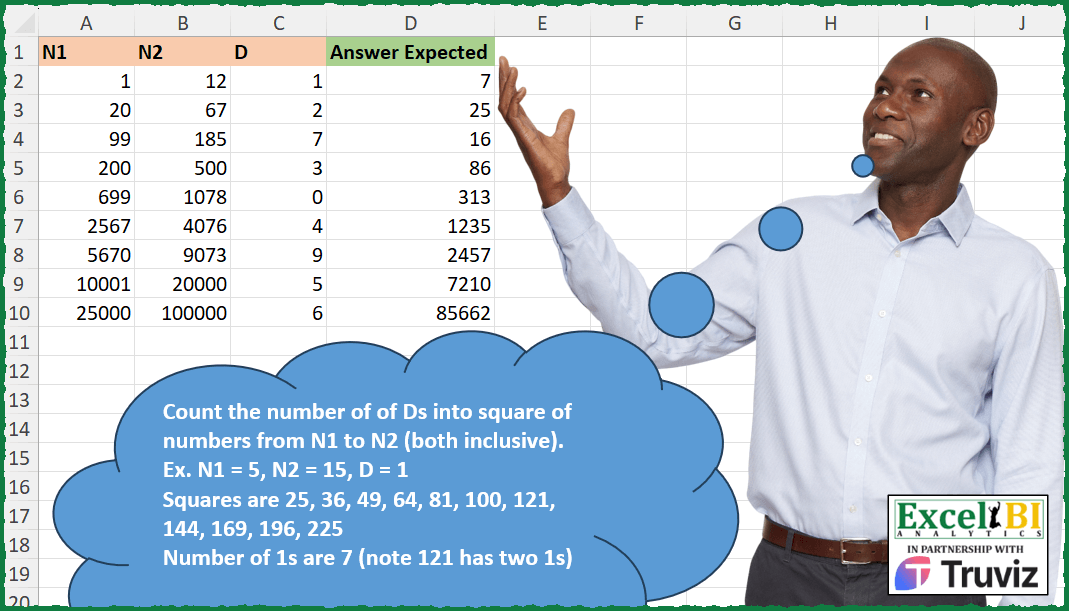
Count the number of of Ds into square of numbers from N1 to N2 (both inclusive). Ex. N1 = 5, N2 = 15, D = 1 Squares are 25, 36, 49, 64, 81, 100, 121, 144, 169, 196, 225 Number of 1s are 7 (note 121 has two 1s)
📌 Challenge Details and Links
ExcelBI Excel Challenge Number: 373
Challenge Difficulty: ⭐️
📥Download Sample File
📥Link to the solutions on LinkedIn
Solving the challenge of Count Digits in Square Range with Power Query
Power Query solution 1 for Count Digits in Square Range, proposed by John V.:
let
 S = Excel.CurrentWorkbook(){0}[Content],
 R = Table.AddColumn(S, "R", each
 let
 T = Text.From, L = Text.Length, D = T([D]),
 r = List.Transform({[N1]..[N2]}, each [a = T(_*_),b = L(a) - L(Text.Replace(a, D, ""))][b])
 in
 List.Sum(r)
 )[[R]]
in
 R

Blessings!
Power Query solution 2 for Count Digits in Square Range, proposed by Kris Jaganah:
let
  Source = Excel.CurrentWorkbook(){[Name = "Table1"]}[Content],
  Ans = Table.AddColumn(
    Source,
    "Answer Expected",
    each
      let
        a = Text.Combine(
          List.Transform(List.Numbers([N1], [N2] - [N1] + 1), each Text.From(Number.Power(_, 2)))
        ),
        b = Text.Length(a) - Text.Length(Replacer.ReplaceText(a, Text.From([D]), ""))
      in
        b
  )
in
  Ans
Power Query solution 3 for Count Digits in Square Range, proposed by Alejandro Simón 🇵🇦 🇪🇸:
let
  Source = Excel.CurrentWorkbook(){[Name = "Table1"]}[Content],
  Sol = Table.AddColumn(
    Source,
    "Answer",
    (x) =>
      let
        a = {x[N1] .. x[N2]},
        b = List.Combine(List.Transform(a, each Text.ToList(Text.From(_ * _)))),
        c = List.Count(List.Select(b, each Number.From(_) = x[D]))
      in
        c
  )[[Answer]]
in
  Sol
Power Query solution 4 for Count Digits in Square Range, proposed by Luan Rodrigues:
let
  Fonte = Tabela1,
  res = Table.AddColumn(
    Fonte,
    "Personalizar",
    each Text.Length(
      Text.Select(
        Text.Combine(List.Transform({[N1] .. [N2]}, (x) => Text.From(Number.Power(x, 2)))),
        {Text.From([D])}
      )
    )
  )
in
  res
Power Query solution 5 for Count Digits in Square Range, proposed by Brian Julius:
let
  Source = Excel.CurrentWorkbook(){[Name = "Table1"]}[Content],
  ReType = Table.TransformColumnTypes(Source, {{"N1", Int64.Type}, {"N2", Int64.Type}}),
  AddAnswer = Table.AddColumn(
    ReType,
    "Answer",
    each [
      a = {[N1] .. [N2]},
      b = List.Transform(a, each Number.Power(_, 2)),
      c = Text.Combine(List.Transform(b, each Text.From(_)), ""),
      d = Text.Select(c, Text.From([D])),
      e = Text.Length(d)
    ][e]
  )
in
  AddAnswer
Power Query solution 6 for Count Digits in Square Range, proposed by Ramiro Ayala Chávez:
let
  Origen = Excel.CurrentWorkbook(){[Name = "Tabla1"]}[Content],
  Fx = (x, y, z) =>
    let
      a = x,
      b = y,
      c = Text.From(z),
      d = List.Transform(List.Transform({a .. b}, each Number.Power(_, 2)), Text.From),
      e = List.Select(d, each Text.Contains(_, c)),
      f = List.Count(List.Select(List.Combine(List.Transform(e, each Text.ToList(_))), each _ = c))
    in
      f,
  Sol = Table.AddColumn(Origen, "Expected Answer", each Fx([N1], [N2], [D]))
in
  Sol
Power Query solution 7 for Count Digits in Square Range, proposed by Rafael González B.:
let
Source = Excel.CurrentWorkbook(){0}[Content],
Result = Table.AddColumn(Source, "Expected Answer", each
let
N1 = [N1],
N2 = [N2],
D = Text.From([D]),
CL = {N1..N2},
LT = List.Transform(CL, each Text.From(Number.Power(_,2))),
LC = Text.Combine(LT),
TE = Text.Select(LC, {D})
in
Text.Length(TE)
)
in
Result[[Expected Answer]]
🧙♂️🧙♂️🧙♂️
Power Query solution 8 for Count Digits in Square Range, proposed by Arden Nguyen, CPA:
let
  Source = Excel.CurrentWorkbook(){[Name = "Table1"]}[Content],
  r = Table.AddColumn(
    Source,
    "Custom",
    each [
      a = List.Transform({[N1] .. [N2]}, (x) => Text.From(x * x)),
      b = Text.Combine(a),
      c = Text.Select(b, Text.From([D])),
      d = Text.Length(c)
    ][d]
  )
in
  r
Solving the challenge of Count Digits in Square Range with Excel
Excel solution 1 for Count Digits in Square Range, proposed by Bo Rydobon 🇹🇭:
=MAP(A2:A10,B2:B10,C2:C10,LAMBDA(a,b,c,LET(s,SEQUENCE(b-a+1,,a)^2,SUM(LEN(s)-LEN(SUBSTITUTE(s,c,))))))Excel solution 2 for Count Digits in Square Range, proposed by Rick Rothstein:
=MAP(
    A2:A10,
    B2:B10,
    C2:C10,
    LAMBDA(
        a,
        b,
        c,
        LET(
            s,
            SEQUENCE(
                b-a+1,
                ,
                a
            )^2,
            SUM(
                LEN(
                    s
                )-LEN(
                    SUBSTITUTE(
                        s,
                        c,
                        ""
                    )
                )
            )
        )
    )
)
Excel solution 3 for Count Digits in Square Range, proposed by Rick Rothstein:
=MAP(
    A2:A10,
    B2:B10,
    C2:C10,
    LAMBDA(
        a,
        b,
        c,
        LET(
            s,
            SEQUENCE(
                b-a+1,
                ,
                a
            )^2,
            REDUCE(
                0,
                s,
                LAMBDA(
                    a,
                    x,
                    a+LEN(
                        x
                    )-LEN(
                        SUBSTITUTE(
                            x,
                            c,
                            ""
                        )
                    )
                )
            )
        )
    )
)
Excel solution 4 for Count Digits in Square Range, proposed by John V.:
=MAP(
    A2:A10,
    B2:B10,
    C2:C10,
    LAMBDA(
        a,
        b,
        c,
        LET(
            n,
            SEQUENCE(
                1+b-a,
                ,
                a
            )^2,
            SUM(
                LEN(
                    n
                )-LEN(
                    SUBSTITUTE(
                        n,
                        c,

                    )
                )
            )
        )
    )
)
Excel solution 5 for Count Digits in Square Range, proposed by محمد حلمي:
=MAP(
    A2:A10,
    B2:B10,
    C2:C10,
    LAMBDA(
        a,
        b,
        c,
        LET(
            e,
            SEQUENCE(
                b-a+1,
                ,
                a
            )^2,
            SUM(
                LEN(
                    e
                )-LEN(
                    SUBSTITUTE(
                        e,
                        c,

                    )
                )
            )
        )
    )
)
Excel solution 6 for Count Digits in Square Range, proposed by Kris Jaganah:
=MAP(
    A2:A10,
    B2:B10,
    C2:C10,
    LAMBDA(
        x,
        y,
        z,
        LET(
            a,
            SEQUENCE(
                y-x+1,
                ,
                x
            )^2,
            SUM(
                LEN(
                    a
                )-LEN(
                    SUBSTITUTE(
                        a,
                        z,
                        ""
                    )
                )
            )
        )
    )
)
Excel solution 7 for Count Digits in Square Range, proposed by Julian Poeltl:
=MAP(
    A2:A10,
    B2:B10,
    C2:C10,
    LAMBDA(
        NO,
        NT,
        D,
        LET(
            S,
            SEQUENCE(
                NT-NO+1,
                ,
                NO
            )^2,
            SUM(
                LEN(
                    S
                )-LEN(
                    SUBSTITUTE(
                        S,
                        D,
                        ""
                    )
                )
            )
        )
    )
)
Excel solution 8 for Count Digits in Square Range, proposed by Timothée BLIOT:
=MAP(
    A2:A10,
    B2:B10,
    C2:C10,
    LAMBDA(
        x,
        y,
        z,
        LET(
            A,
            SEQUENCE(
                y-x+1,
                ,
                x
            )^2,
            SUM(
                LEN(
                    A
                )-LEN(
                    SUBSTITUTE(
                        A,
                        z,
                        ""
                    )
                )
            )
        )
    )
)
Excel solution 9 for Count Digits in Square Range, proposed by Hussein SATOUR:
=MAP(
    A2:A10,
    B2:B10,
    C2:C10,
     LAMBDA(
         x,
         y,
         z,
          LET(
              a,
               SEQUENCE(
                   y-x+1,
                   ,
                   x
               )^2,
               SUM(
                   LEN(
                       a
                   ) - LEN(
                       SUBSTITUTE(
                           a,
                            z,
                            ""
                       )
                   )
               )
          )
     )
)
Excel solution 10 for Count Digits in Square Range, proposed by Sunny Baggu:
=MAP(

     A2:A10,

     B2:B10,

     C2:C10,

     LAMBDA(
         x,
          y,
          z,

          LET(

               _s,
               SEQUENCE(
                   y - x + 1,
                    ,
                    x
               ) ^ 2,

               SUM(
                   MAP(
                       _s,
                        LAMBDA(
                            a,
                             LEN(
                                 a
                             ) - LEN(
                                 SUBSTITUTE(
                                     a,
                                      z,
                                      ""
                                 )
                             )
                        )
                   )
               )

          )

     )

)


Solution:2
=MAP(

     A2:A10,

     B2:B10,

     C2:C10,

     LAMBDA(
         a,
          b,
          c,

          LET(

               _s,
               SEQUENCE(
                   b - a + 1,
                    ,
                    a
               ) ^ 2,

               SUM(

                    MAP(

                         _s,

                         LAMBDA(
                             x,

                              IFERROR(

                                   ROWS(

                                        UNIQUE(
                                            TOCOL(
                                                SEARCH(
                                                    c,
                                                     x,
                                                     SEQUENCE(
                                                         LEN(
                                                             x
                                                         )
                                                     )
                                                ),
                                                 3
                                            )
                                        )

                                   ),

                                   0

                              )

                         )

                    )

               )

          )

     )

)
Excel solution 11 for Count Digits in Square Range, proposed by Abdallah Ally:
=MAP(A2:A10,
    B2:B10,
    C2:C10,
    LAMBDA(a,
    b,
    c,
    REDUCE(0,
    SEQUENCE(
        b-a+1,
        ,
        a
    )^2,
    LAMBDA(x,
    y,
    x+SUM(--(--MID(
        y,
        SEQUENCE(
            LEN(
                y
            )
        ),
        1
    )=c))))))
Excel solution 12 for Count Digits in Square Range, proposed by Pieter de B.:
=MAP(
    A2:A10,
    B2:B10,
    C2:C10,
    LAMBDA(
        a,
        b,
        c,
        LET(
            s,
            SEQUENCE(
                1+b-a,
                ,
                a
            )^2,
            SUM(
                LEN(
                    s
                )-LEN(
                    SUBSTITUTE(
                        s,
                        c,
                        ""
                    )
                )
            )
        )
    )
)

Or
=MAP(
    A2:A10,
    B2:B10,
    C2:C10,
    LAMBDA(
        a,
        b,
        c,
        LET(
            s,
            SEQUENCE(
                ,
                1+b-a,
                a
            )^2,
            SUM(
                N(
                    TOROW(
                        -MID(
                            s,
                            SEQUENCE(
                                10
                            ),
                            1
                        ),
                        2
                    )=-c
                )
            )
        )
    )
)
Excel solution 13 for Count Digits in Square Range, proposed by Bilal Mahmoud kh.:
=MAP(A2:A10,B2:B10,C2:C10,LAMBDA(x,y,z,LET(R,CONCAT(POWER(TOROW(SEQUENCE(y-x+1,,x)),2)),E,LEN(R)-LEN(SUBSTITUTE(R,z,"")),E)))Excel solution 14 for Count Digits in Square Range, proposed by JvdV –:
=BYROW(
    +A2:C10,
    LAMBDA(
        r,
        LET(
            s,
            SEQUENCE(
                MAX(
                    r
                )-@r+1,
                ,
                @r
          &  )^2,
            SUM(
                LEN(
                    s
                )-LEN(
                    SUBSTITUTE(
                        s,
                        MIN(
                    r
                ),

                    )
                )
            )
        )
    )
)

Here,
     the interpretation is that MAX() equals N2 for N2>d,
     whereas MIN()
Excel solution 15 for Count Digits in Square Range, proposed by Nicolas Micot:
=LET(
    _n1;
    A2;

    _n2;
    B2;

    _d;
    C2;

    _seq;
    SEQUENCE(
        _n2-_n1+1;
        ;
        _n1;
        1
    );

    SOMME(
        MAP(
            _seq;
            LAMBDA(
                _nombre;
                NBCAR(
                    _nombre^2
                )-NBCAR(
                    SUBSTITUE(
                        _nombre^2;
                        _d;
                        ""
                    )
                )
            )
        )
    )
)
Excel solution 16 for Count Digits in Square Range, proposed by Ziad A.:
=MAP(
    A2:A10,
    B2:B10,
    C2:C10,
    LAMBDA(
        a,
        b,
        c,
        SUMPRODUCT(
            LEN(
                REGEXREPLACE(
                    SEQUENCE(
                        b-a+1,
                        1,
                        a
                    )^2&"",
                    "[^"&c&"]",

                )
            )
        )
    )
)
Excel solution 17 for Count Digits in Square Range, proposed by Giorgi Goderdzishvili:
=MAP(
    A2:A10,
    B2:B10,
    C2:C10,
    LAMBDA(
        a,
        b,
        c,
        LET(

            _sq,
            SEQUENCE(
                ,
                b-a+1,
                a
            )^2,

            SUM(
                LEN(
                    _sq
                )-LEN(
                    SUBSTITUTE(
                        _sq,
                        c,
                        ""
                    )
                )
            )
        )
    )
)
Excel solution 18 for Count Digits in Square Range, proposed by Rayan S.:
=MAP(

     A2:A10,

     B2:B10,

     C2:C10,

     LAMBDA(
         x,
          y,
          z,

          LET(

               seq,
               SEQUENCE(
                   y - x + 1,
                    ,
                    x
               ) ^ 2,

               t,
               REDUCE(
                   ,
                    seq,
                    LAMBDA(
                        x,
                         y,
                         x & y
                    )
               ),

               s,
               MID(
                   t,
                    SEQUENCE(
                        LEN(
                            t
                        )
                    ),
                    1
               ) + 0,

               COUNTA(
                   FILTER(
                       s,
                        s = z
                   )
               )

          )

     )

)
Excel solution 19 for Count Digits in Square Range, proposed by Hazem Hassan:
=MAP(
    A2:A10,
    B2:B10,
    C2:C10,
    LAMBDA(
        x,
        y,
        z,
        COUNTA(
            TEXTSPLIT(
                CONCAT(
                    SEQUENCE(
                        y-x+1,
                        ,
                        x
                    )^2
                ),
                ,
                z,

            )
        )-1
    )
)

but the problem is CONCAT return error :" Text Too Long"
I think his will work :

=MAP(
    A2:A10,
    B2:B10,
    C2:C10,
    LAMBDA(
        x,
        y,
        z,
        SUM(
            MAP(
                SEQUENCE(
                        y-x+1,
                        ,
                        x
                    )^2,
                LAMBDA(
                    x,
                    ROWS(
                        TEXTSPLIT(
                            x,
                            ,
                            z
                        )
                    )-1
                )
            )
        )
    )
)

//

another way:
=MAP(A2:A10,
    B2:B10,
    C2:C10,
    LAMBDA(x,
    y,
    z,
    LET(a,
    SEQUENCE(
                        y-x+1,
                        ,
                        x
                    )^2,
    SUM(TOCOL((--MID(
        a,
        SEQUENCE(
            ,
            MAX(
                LEN(
                    a
                )
            )
        ),
        1
    )=z)*1,
    3)))))
Excel solution 20 for Count Digits in Square Range, proposed by Josh Brodrick:
=LET(array,
    SEQUENCE(B2-(A2-1),
    ,
    A2)^2,
    count,
    LEN(
        array
    )-LEN(
        SUBSTITUTE(
            array,
            C2,
            ""
        )
    ),
    SUM(
        count
    ))
Excel solution 21 for Count Digits in Square Range, proposed by Arden Nguyen, CPA:
=MAP(
    A2:A10,
    B2:B10,
    C2:C10,
    LAMBDA(
        x,
        y,
        z,
        LET(

            a,
            SEQUENCE(
                y-x+1,
                ,
                x
            )^2,

            b,
            MID(
                a,
                SEQUENCE(
                    1,
                    MAX(
                        LEN(
                            a
                        )
                    )
                ),
                1
            )=VALUETOTEXT(
                z
            ),

            SUM(
                --b
            )

        )
    )
)
Excel solution 22 for Count Digits in Square Range, proposed by Tyler Cameron:
=SUM(BYROW(SEQUENCE(B2-(A2-1),
    ,
    A2)^2,
    LAMBDA(
        x,
        LEN(
            x
        )-LEN(
            SUBSTITUTE(
                x,
                C2,
                ""
            )
        )
    )))
Solving the challenge of Count Digits in Square Range with Python
Python solution 1 for Count Digits in Square Range, proposed by Giorgi Goderdzishvili:
for i in lst:
 cntr = 0
 for k in range(i[0],i[1]+1):
 sq = k**2
 cntr+=str(sq).count(str(i[2]))
 print(cntr)
Python solution 2 for Count Digits in Square Range, proposed by Jan Willem Van Holst:
In Python:
import pandas as pd
df = pd.read_csv(r"C:JWLENOVOPYTHONExcel_Challenge_373.csv", sep=';')
inputDict = df[['N1', 'N2', 'D']].to_dict()
def fx(N1, N2, D):
 numbers = ''.join([str(x*x) for x in list(range(N1,N2+1))]).count(str(D))
 return numbers
answer = [fx(inputDict['N1'][i], inputDict['N2'][i], inputDict['D'][i]) for i in range(len(df))]
Solving the challenge of Count Digits in Square Range with Python in Excel
Python in Excel solution 1 for Count Digits in Square Range, proposed by John V.:
Hi everyone!
One [Python] option could be:
[sum(str(i*i).count(str(c)) for i in range(a, 1 + b)) for a, b, c in xl("A2:C10").values]
Blessings!
Solving the challenge of Count Digits in Square Range with R
R solution 1 for Count Digits in Square Range, proposed by Konrad Gryczan, PhD:
library(tidyverse)
library(readxl)
input = read_excel("Excel/373 Count Digits in Squares.xlsx", range = "A1:C10")
test = read_excel("Excel/373 Count Digits in Squares.xlsx", range = "D1:D10")
count_digits = function(x, y, digit) {
 s = seq(x, y)
 sq = s^2
 u = unlist(strsplit(as.character(sq), ""))
 n = sum(u == digit)
 return(n)
}
result = input %>%
 mutate(count = pmap_int(list(N1, N2, D), count_digits)) %>%
 bind_cols(test) %>%
 mutate(check = count == `Answer Expected`)
result
Solving the challenge of Count Digits in Square Range with DAX
DAX solution 1 for Count Digits in Square Range, proposed by Zoran Milokanović:
EVALUATE
ADDCOLUMNS('Input', "Answer Expected",
 SUMX(
 ADDCOLUMNS(
 GENERATESERIES(Input[N1], Input[N2]), "Square",
 VAR S = CONVERT(POWER([Value], 2), STRING)
 RETURN
 LEN(S) - LEN(SUBSTITUTE(S, CONVERT(Input[D], STRING), ""))
 ),
 [Square]
 )
)
&&