
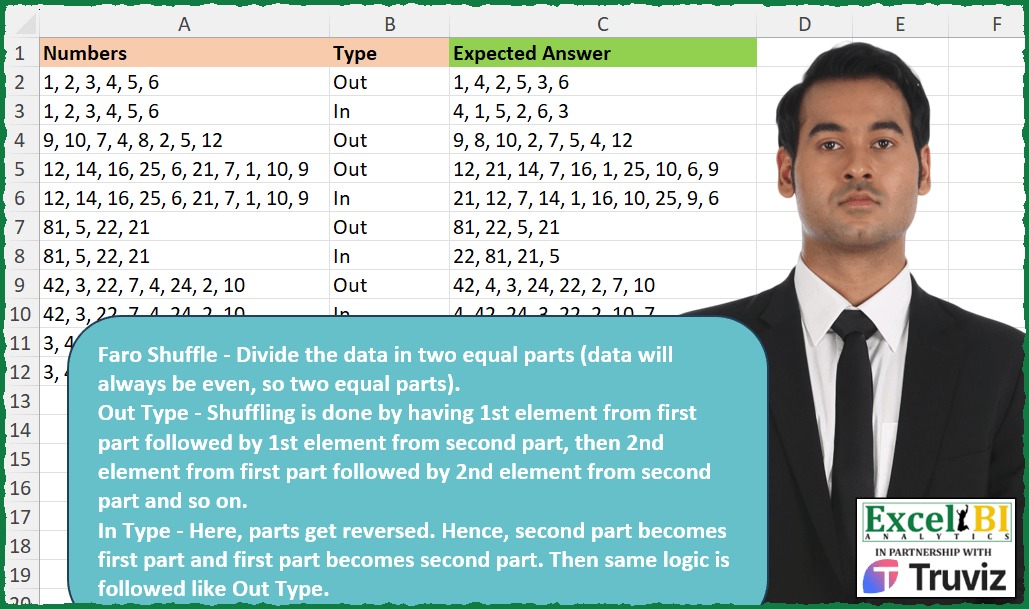
Faro Shuffle – Divide the data in two equal parts (data will always be even, so two equal parts). Out Type – Shuffling is done by having 1st element from first part followed by 1st element from second part, then 2nd element from first part followed by 2nd element from second part and so on. In Type – Here, parts get reversed. Hence, second part becomes first part and first part becomes second part. Then same logic is followed like Out Type. Ex. 1, 2, 3, 4, 5, 6 => Two equal parts are 1, 2, 3 and 4, 5, 6 Out – 1, 4, 2, 5, 3, 6 In – 4, 1, 5, 2, 6, 3
📌 Challenge Details and Links
ExcelBI Excel Challenge Number: 369
Challenge Difficulty: ⭐️
📥Download Sample File
📥Link to the solutions on LinkedIn
Solving the challenge of Perform Faro Shuffle Types with Power Query
Power Query solution 1 for Perform Faro Shuffle Types, proposed by John V.:
let
 S = Excel.CurrentWorkbook(){0}[Content],
 R = Table.AddColumn(S, "R", each
 let
 s = Text.Split([Numbers], ", "),
 t = [Type],
 n = List.Split(s, List.Count(s) / 2),
 r = Text.Combine(List.Combine(List.Zip(if t = "In" then {n{1}, n{0}} else {n{0}, n{1}})), ", ")
 in
 r
 )[[R]]
in
 R

Blessings!
Power Query solution 2 for Perform Faro Shuffle Types, proposed by Kris Jaganah:
let
  Source = Excel.CurrentWorkbook(){[Name = "Table1"]}[Content],
  Ans = Table.AddColumn(
    Source,
    "Expected Answer",
    each
      let
        a = Text.Split([Numbers], ", "),
        b = List.Count(a) / 2,
        c = List.FirstN(a, b),
        d = List.LastN(a, b)
      in
        Text.Combine(
          List.Combine(
            List.Combine(
              List.Transform(if [Type] = "In" then List.Zip({d, c}) else List.Zip({c, d}), each {_})
            )
          ),
          ", "
        )
  )
in
  Ans
Power Query solution 3 for Perform Faro Shuffle Types, proposed by Aditya Kumar Darak 🇮🇳:
let
  Source = Excel.CurrentWorkbook(){[Name = "data"]}[Content],
  Return = Table.AddColumn(
    Source,
    "Answer",
    each [
      S = Text.Split([Numbers], ", "),
      L = List.Split(S, List.Count(S) / 2),
      Z = List.Zip(if [Type] = "Out" then L else List.Reverse(L)),
      R = Text.Combine(List.Combine(Z), ", ")
    ][R]
  )
in
  Return
Power Query solution 4 for Perform Faro Shuffle Types, proposed by Alejandro Simón 🇵🇦 🇪🇸:
let
  Source = Excel.CurrentWorkbook(){[Name = "Table1"]}[Content],
  Sol = Table.AddColumn(
    Source,
    "Answer",
    each
      let
        a = Text.Split([Numbers], ", "),
        b = List.Split(a, List.Count(a) / 2),
        c = e(b),
        d = e(List.Reverse(b)),
        e = List.Zip,
        f = List.Combine,
        g = Text.Combine,
        h = if [Type] = "Out" then g(f(c), ", ") else g(f(d), ", ")
      in
        h
  )[[Answer]]
in
  Sol
Power Query solution 5 for Perform Faro Shuffle Types, proposed by Luan Rodrigues:
let
  Fonte = Tabela1,
  res = Table.AddColumn(
    Fonte,
    "Personalizar",
    each [
      a = Text.Split([Numbers], ", "),
      b = List.Split(a, List.Count(a) / 2),
      c = Text.Combine(
        if [Type] = "Out" then
          List.Transform(List.Zip(b), each Text.Combine(_, ", "))
        else
          List.Transform(List.Zip(b), each Text.Reverse(Text.Combine(_, ", "))),
        ", "
      )
    ][c]
  )
in
  res
Power Query solution 6 for Perform Faro Shuffle Types, proposed by Brian Julius:
let
  Source = Excel.CurrentWorkbook(){[Name = "Table1"]}[Content],
  AddAnswer = Table.AddColumn(
    Source,
    "Answer",
    each [
      z = [Type],
      a = Text.Split([Numbers], ", "),
      b = Value.Divide(List.Count(a), 2),
      c = List.Split(a, b),
      d = if z = "Out" then c else List.Reverse(c),
      e = List.Zip(d),
      f = List.Combine(e)
    ][f]
  ),
  Extract = Table.TransformColumns(
    AddAnswer,
    {"Answer", each Text.Combine(List.Transform(_, Text.From), ", "), type text}
  )
in
  Extract
Power Query solution 7 for Perform Faro Shuffle Types, proposed by An Nguyen:
let
  Dataset = Excel.CurrentWorkbook(){[Name = "Raw"]}[Content],
  Transform = (n, t) =>
    let
      BufferedList = List.Buffer(Text.Split(n, ", ")),
      Length = List.Count(BufferedList),
      TopList = List.FirstN(BufferedList, Length / 2),
      BottomList = List.LastN(BufferedList, Length / 2),
      TextCombine = List.Accumulate(
        List.Skip(TopList, 1),
        [
          Result =
            if t = "Out" then
              Text.Combine({TopList{0}, BottomList{0}}, ", ")
            else
              Text.Combine({BottomList{0}, TopList{0}}, ", "),
          Counter = 0
        ],
        (state, current) => [
          Counter = state[Counter] + 1,
          Result =
            if t = "Out" then
              Text.Combine({state[Result], current, BottomList{Counter}}, ", ")
            else
              Text.Combine({state[Result], BottomList{Counter}, current}, ", ")
        ]
      )[Result]
    in
      TextCombine,
  Answer = Table.AddColumn(Dataset, "Expected Answer", each Transform([Numbers], [Type]))
in
  Answer[Expected Answer]
Power Query solution 8 for Perform Faro Shuffle Types, proposed by Ramiro Ayala Chávez:
let
  Origen = Excel.CurrentWorkbook(){[Name = "Tabla1"]}[Content],
  Fx = (x, y) =>
    let
      a = x,
      b = Text.Split(a, ", "),
      c = y,
      d = List.Split(b, List.Count(b) / 2),
      e =
        if c = "Out" then
          Text.Combine(List.Combine(List.Zip({d{0}, d{1}})), ", ")
        else
          Text.Combine(List.Combine(List.Zip({d{1}, d{0}})), ", ")
    in
      e,
  Sol = Table.AddColumn(Origen, "Expected Answer", each Fx([Numbers], [Type]))
in
  Sol
Power Query solution 9 for Perform Faro Shuffle Types, proposed by Rafael González B.:
let
Source = Excel.CurrentWorkbook(){0}[Content],
Fx_InOut = (ST as text, Type as text) =>
let
T = ST,
Typ = Type,
TS = Text.Split(T, ", "),
LS = List.Split(TS, List.Count(TS)/2),
LZ = List.Zip({LS{0}, LS{1}}),
LT = List.Transform(LZ, each List.Reverse(_)),
R = if Typ = "Out" then List.Combine(LZ) else List.Combine(LT)
in
Text.Combine(R, ", "),
Result = Table.AddColumn(Source, "Expected Answer", each Fx_InOut([Numbers], [Type]))[[Expected Answer]]
in
Result
🧙♂️🧙♂️🧙♂️
Power Query solution 10 for Perform Faro Shuffle Types, proposed by Glyn Willis:
let
  Source = Excel.CurrentWorkbook(){[Name = "Table1"]}[Content],
  #"Changed Type" = Table.TransformColumnTypes(
    Source,
    {{"Numbers", type text}, {"Type", type text}, {"Expected Answer", type text}}
  ),
  #"Added Custom" = Table.AddColumn(
    #"Changed Type",
    "Custom",
    each [
      T   = Text.Split([Numbers], ", "),
      N   = List.Count(T),
      P   = List.Zip({List.Range(T, 0, N / 2), List.Range(T, N / 2, N)}),
      Out = List.Transform({0 .. (N / 2) - 1}, (x) => P{x}{0} & ", " & P{x}{1}),
      In  = List.Transform({0 .. (N / 2) - 1}, (x) => P{x}{1} & ", " & P{x}{0}),
      R   = if [Type] = "In" then Text.Combine(In, ", ") else Text.Combine(Out, ", ")
    ][R]
  )
in
  #"Added Custom"
Solving the challenge of Perform Faro Shuffle Types with Excel
Excel solution 1 for Perform Faro Shuffle Types, proposed by Bo Rydobon 🇹🇭:
=MAP(
    A2:A12,
    B2:B12,
    LAMBDA(
        a,
        b,
        LET(
            t,
            TEXTSPLIT(
                a,
                ,
                ", "
            ),
            ARRAYTOTEXT(
                SORTBY(
                    WRAPCOLS(
                        t,
                        ROWS(
                            t
                        )/2
                    ),
                    {"in",
                    0}=b
                )
            )
        )
    )
)
Excel solution 2 for Perform Faro Shuffle Types, proposed by Rick Rothstein:
=MAP(
    A2:A12,
    B2:B12,
    LAMBDA(
        a,
        b,
        LET(
            t,
            TEXTSPLIT(
                a,
                ", "
            ),
            f,
            TAKE(
                t,
                ,
                COUNTA(
                    t
                )/2
            ),
            s,
            TAKE(
                t,
                ,
                -COUNTA(
                    t
                )/2
            ),
            TEXTJOIN(
                ", ",
                ,
                TOROW(
                    IF(
                        b="Out",
                        VSTACK(
                            f,
                            s
                        ),
                        VSTACK(
                            s,
                            f
                        )
                    ),
                    ,
                    TRUE
                )
            )
        )
    )
)
Excel solution 3 for Perform Faro Shuffle Types, proposed by John V.:
=MAP(A2:A12,
    B2:B12,
    LAMBDA(a,
    b,
    LET(n,
    TEXTSPLIT(
        a,
        ,
        ", "
    ),
    ARRAYTOTEXT(SORTBY(WRAPCOLS(
        n,
        ROWS(
            n
        )/2
    ),
    {1,
    2}*-1^(b="in"))))))
Excel solution 4 for Perform Faro Shuffle Types, proposed by محمد حلمي:
=0))Excel solution 5 for Perform Faro Shuffle Types, proposed by محمد حلمي:
=MAP(A2:A12,
    B2:B12,
    LAMBDA(a,
    b,
    LET(i,
    TEXTSPLIT(
        a,
        ,
        ", "
    ),

ARRAYTOTEXT(SORTBY(WRAPCOLS(
    i,
    ROWS(
        i
    )/2
),
    (b="in")*{2,
    1})))))
Excel solution 6 for Perform Faro Shuffle Types, proposed by 🇰🇷 Taeyong Shin:
=MAP(A2:A12,
    B2:B12,
    LAMBDA(a,
    b,
    LET(t,
    TEXTSPLIT(
        a,
        ,
        ", "
    ),
    ARRAYTOTEXT(CHOOSECOLS(WRAPCOLS(
        t,
        ROWS(
            t
        )/2
    ),
    (1-2*(b="in"))*{1,
    2})))))
Excel solution 7 for Perform Faro Shuffle Types, proposed by Kris Jaganah:
=MAP(
    A2:A12,
    B2:B12,
    LAMBDA(
        x,
        y,
        LET(
            a,
            TEXTSPLIT(
                x,
                ,
                ", "
            ),
            b,
            ROWS(
                a
            )/2,
            c,
            WRAPCOLS(
                a,
                b
            ),
            ARRAYTOTEXT(
                IF(
                    y="In",
                    CHOOSECOLS(
                        c,
                        2,
                        1
                    ),
                    c
                )
            )
        )
    )
)
Excel solution 8 for Perform Faro Shuffle Types, proposed by Julian Poeltl:
=MAP(
    A2:A12,
    B2:B12,
    LAMBDA(
        N,
        T,
        LET(
            SP,
            TEXTSPLIT(
                N,
                ", "
            ),
            L,
            COUNTA(
                SP
            ),
            PO,
            CHOOSECOLS(
                SP,
                SEQUENCE(
                    L/2
                )
            ),
            PT,
            CHOOSECOLS(
                SP,
                SEQUENCE(
                    L/2,
                    ,
                    L/2+1
                )
            ),
            TEXTJOIN(
                ", ",
                ,
                TRANSPOSE(
                    IF(
                        T="Out",
                        VSTACK(
                            PO,
                            PT
                        ),
                        VSTACK(
                            PT,
                            PO
                        )
                    )
                )
            )
        )
    )
)
Excel solution 9 for Perform Faro Shuffle Types, proposed by Timothée BLIOT:
=MAP(A2:A12,
    B2:B12,
    LAMBDA(x,
    y,
    LET(A,
    TEXTSPLIT(
        x,
        ,
        ", "
    ),
    B,
    ROWS(
        A
    ),
    C,
     HSTACK (TAKE(
         A,
         B/2
     ),
    TAKE(
        A,
        -B/2
    )),
    ARRAYTOTEXT(
        TOCOL(
            IF(
                y="In",
                 SORTBY(
                     C,
                     {2,
                     1}
                 ),
                C
            )
        )
    ))))
Excel solution 10 for Perform Faro Shuffle Types, proposed by Oscar Mendez Roca Farell:
=MAP(A2:A12,
     B2:B12,
     LAMBDA(a,
     b,
     LET(_m,
    TEXTSPLIT(
        a,
         ,
        ", "
    ),
    _i,
     ROWS(
         _m
     )/2*(-1)^(b>"O"),
     ARRAYTOTEXT(
         HSTACK(
             DROP(
                 _m,
                 _i
             ),
              TAKE(
                 _m,
                 _i
             )
         )
     ))))
Excel solution 11 for Perform Faro Shuffle Types, proposed by Sunny Baggu:
=MAP(

     A2:A12,

     B2:B12,

     LAMBDA(
         x,
          y,

          LET(

               _ts,
               TEXTSPLIT(
                   x,
                    ,
                    ", "
               ),

               _c1,
               TAKE(
                   _ts,
                    ROWS(
                        _ts
                    ) / 2
               ) & ", ",

               _c2,
               TAKE(
                   _ts,
                    -ROWS(
                        _ts
                    ) / 2
               ) & ", ",

               TEXTBEFORE(
                   CONCAT(
                       IF(
                           y = "Out",
                            _c1 & _c2,
                            _c2 & _c1
                       )
                   ),
                    ", ",
                    -1
               )

          )

     )

)
Excel solution 12 for Perform Faro Shuffle Types, proposed by LEONARD OCHEA 🇷🇴:
=MAP(
    A2:A12,
    B2:B12,
    LAMBDA(
        a,
        b,
        LET(
            d,
            TEXTSPLIT(
                a,
                &,
                ", "
            ),
            n,
            COUNTA(
                d
            )/2,
            ARRAYTOTEXT(
                IF(
                    b="In",
                    HSTACK(
                        TAKE(
                            d,
                            -n
                        ),
                        TAKE(
                            d,
                            n
                        )
                    ),
                    WRAPCOLS(
                            d,
                            n
                        )
                )
            )
        )
    )
)
Excel solution 13 for Perform Faro Shuffle Types, proposed by 🇵🇪 Ned Navarrete C.:
=MAP(
    A2:A12,
    B2:B12,
    LAMBDA(
        n,
        t,
         LET(
             p,
             TEXTSPLIT(
                 n,
                 ", "
             ),
             e,
             WRAPCOLS(
                 p,
                 COUNTA(
                     p
                 )/2
             ),
              ARRAYTOTEXT(
                  SORTBY(
                      e,
                      {1,
                      2}*IF(
                          t="in",
                          -1,
                          1
                      )
                  )
              )
         )
    )
)
Excel solution 14 for Perform Faro Shuffle Types, proposed by An Nguyen:
=MAP(A2:A12,B2:B12,LAMBDA(x,y, LET(a,TEXTSPLIT(x,,","), l,COUNTA(a)/2,
 b,TAKE(a,l), c,TAKE(a,-l), IF(y="Out",ARRAYTOTEXT(b&", "&c),ARRAYTOTEXT(c&", "&b)))))
Excel solution 15 for Perform Faro Shuffle Types, proposed by Pieter de B.:
=MAP(
    A2:A12,
    B2:B12,
    LAMBDA(
        a,
        b,
        LET(
            t,
            TEXTSPLIT(
                a,
                ", "
            ),
            ARRAYTOTEXT(
                CHOOSECOLS(
                    WRAPCOLS(
                        t,
                        COUNTA(
                            t
                        )/2
                    ),
                    IF(
                        b="In",
                        {2,
                        1},
                        {1,
                        2}
                    )
                )
            )
        )
    )
)
Excel solution 16 for Perform Faro Shuffle Types, proposed by Ziad A.:
=MAP(
    A2:A10,
    B2:B10,
    LAMBDA(
        n,
        t,
        SUBSTITUTE(
            JOIN(
                " ",
                QUERY(
                    SORT(
                        WRAPROWS(
                            SPLIT(
                                n,
                                ","
                            ),
                            COLUMNS(
                                SPLIT(
                                    n,
                                    ","
                                )
                            )/2
                        ),
                        {1;0},
                        t="In"
                    ),
                    ,
                    2
                )
            ),
            " ",
            ", "
        )
    )
)
Excel solution 17 for Perform Faro Shuffle Types, proposed by Giorgi Goderdzishvili:
=MAP(
    A2:A12,
    B2:B12,
    LAMBDA(
        x,
        y,
        LET(

            _nm,
            x,

            _sp,
             1*TEXTSPLIT(
                 _nm,
                 ", "
             ),

            _fr,
             TAKE(
                 _sp,
                 ,
                 COLUMNS(
                     _sp
                 )/2
             ),

            _sc,
            TAKE(
                _sp,
                ,
                -COLUMNS(
                     _sp
                 )/2
            ),

            _cnF,
             TEXTJOIN(
                 ", ",
                 ,
                 BYCOL(
                     VSTACK(
                         _fr,
                         _sc
                     ),
                     LAMBDA(
                         x,
                         TEXTJOIN(
                             ", ",
                             ,
                             x
                         )
                     )
                 )
             ),

            _cnS,
            TEXTJOIN(
                ", ",
                ,
                BYCOL(
                    VSTACK(
                        _sc,
                        _fr
                    ),
                    LAMBDA(
                        x,
                        TEXTJOIN(
                            ", ",
                            ,
                            x
                        )
                    )
                )
            ),

            IF(
                y="out",
                _cnF,
                _cnS
            )
        )
    )
)
Excel solution 18 for Perform Faro Shuffle Types, proposed by Edwin Tisnado:
=MAP(
    A2:A12,
    B2:B12,
    LAMBDA(
        x,
        y,
        LET(
            t,
            TEXTSPLIT(
                x,
                ,
                ", "
            ),
            a,
            WRAPCOLS(
                t,
                ROWS(
                    t
                )/2
            ),
            ARRAYTOTEXT(
                IF(
                    y="In",
                    CHOOSECOLS(
                        a,
                        {2,
                        1}
                    ),
                    a
                )
            )
        )
    )
)
Excel solution 19 for Perform Faro Shuffle Types, proposed by LUIS FLORENTINO COUTO CORTEGOSO:
=MAP(A2:A12,
    B2:B12,
     LAMBDA(x,
    y,
    LET(d,
    TEXTSPLIT(
        x,
        ,
        ", "
    ),
    l,
    ROWS(
        d
    ),
    n,
    l/2,
    ARRAYTOTEXT(WRAPCOLS(SORTBY(d,
    1---(SEQUENCE(
        l
    )^(y="in")>n)),
    n)))))
Excel solution 20 for Perform Faro Shuffle Types, proposed by Rayan S.:
=MAP(

     A2:A12,

     B2:B12,

     LAMBDA(
         x,
          y,

          LET(

               arr,
               WRAPCOLS(
                   TEXTSPLIT(
                       x,
                        ", "
                   ),
                    COUNTA(
                        TEXTSPLIT(
                            x,
                             ", "
                        )
                    ) / 2
               ),

               O,
               TEXTJOIN(
                   ", ",
                    ,
                    TOCOL(
                        arr,
                         ,
                         FALSE
                    )
               ),

               I,
               TEXTJOIN(
                   ", ",
                    ,
                    TAKE(
                        arr,
                         ,
                         -1
                    ) & ", " & TAKE(
                        arr,
                         ,
                         1
                    )
               ),

               SWITCH(
                   TRUE(),
                    y = "In",
                    I,
                    O
               )

          )

     )

)
Excel solution 21 for Perform Faro Shuffle Types, proposed by Hazem Hassan:
=MAP(

     A2:A12,

     B2:B12,

     LAMBDA(
         x,
          y,

          LET(

               a,
               TEXTSPLIT(
                   x,
                    ,
                    ", "
               ),

               b,
               COUNTA(
                   a
               ) / 2,

               r,
               SEQUENCE(
                   b
               ),

               n,
               r + b,

               TEXTJOIN(

                    ", ",

                    1,

                    IF(

                         y = "out",

                         TOCOL(
                             INDEX(
                                 a,
                                  HSTACK(
                                      r,
                                       n
                                  )
                             ),

                         ),

                         TOCOL(
                             INDEX(
                                 a,
                                  HSTACK(
                                      n,
                                       r
                                  )
                             ),

                         )

                    )

               )

          )

     )

)
Excel solution 22 for Perform Faro Shuffle Types, proposed by Hazem Hassan:
=MAP(

     A2:A12,

     B2:B12,

     LAMBDA(
         x,
          y,

          LET(

               a,
               TEXTSPLIT(
                   x,
                    ,
                    ",",
                    1
               ),

               b,
               COUNTA(
                   a
               ) / 2,

               r,
               TAKE(
                   a,
                    b
               ),

               n,
               DROP(
                   a,
                    b
               ),

               TRIM(

                    IF(

                         y = "out",

                         TEXTJOIN(
                             ",",
                              1,
                              r & "," & n
                         ),

                         TEXTJOIN(
                             ",",
                              1,
                              n & ", " & r
                         )

                    )

               )

          )

     )

)
Excel solution 23 for Perform Faro Shuffle Types, proposed by Hazem Hassan:
=MAP(

     A2:A12,

     B2:B12,

     LAMBDA(
         x,
          y,

          LET(

               a,
               TEXTSPLIT(
                   x,
                    ","
               ),

               b,
               WRAPROWS(
                   a,
                    COUNTA(
                        a
                    ) / 2
               ),

               TEXTJOIN(

                    ",",

                    1,

                    TOCOL(

                         IF(
                             y = "out",
                              b,
                              SORTBY(
                                  b,
                                   {2; 1}
                              )
                         ),

                         ,

                         1

                    )

               )

          )

     )

)
Excel solution 24 for Perform Faro Shuffle Types, proposed by Hazem Hassan:
=MAP(

     A2:A12,

     B2:B12,

     LAMBDA(
         x,
          y,

          LET(

               a,
               TEXTSPLIT(
                   x,
                    ,
                    ","
               ),

               b,
               SEQUENCE(
                   COUNTA(
                       a
                   )
               ),

               n,
               COUNTA(
                   b
               ) / 2,

               r,
               FILTER(
                   a,
                    b <= n
               ),

               e,
               FILTER(
                   a,
                    b > n
               ),

               TEXTJOIN(

                    ",",

                    1,

                    IF(
                        y = "out",
                         r & "," & e,
                         e & "," & r
                    )

               )

          )

     )

)
Excel solution 25 for Perform Faro Shuffle Types, proposed by Arden Nguyen, CPA:
=MAP(A2:A12,
    B2:B12,
    LAMBDA(x,
    y,
    LET(
a,
    0+TEXTSPLIT(
        x,
        ", "
    ),

b,
    COUNTA(
        a
    )/2,

c,
    WRAPCOLS(
        a,
        b
    ),

d,
    MMULT(c,
    --(MUNIT(
        2
    )=0)),

TEXTJOIN(
    ", ",
    TRUE,
    IF(
        y="Out",
        c,
        d
    )
)))
)
Solving the challenge of Perform Faro Shuffle Types with Python
Python solution 1 for Perform Faro Shuffle Types, proposed by Jan Willem Van Holst:
In Python:
import pandas as pd
df = pd.read_csv(r"C:JWLENOVOPYTHONExcel_Challenge_369.csv", sep=";")
Numbers=df[df.columns[0]].to_list()
Type=df[df.columns[1]].to_list()
UnpackNumbers = [elem.split(", ") for elem in Numbers]
def fx(Number, Type):
 split = int(len(Number)/2)
 if Type == "In":
 resultList = [first[x]+ ", " + second[x] for x in range(split)]
 result = ", ".join(resultList)
 return result
answer = [fx(UnpackNumbers[x], Type[x]) for x in range(len(Numbers))]
Solving the challenge of Perform Faro Shuffle Types with Python in Excel
Python in Excel solution 1 for Perform Faro Shuffle Types, proposed by John V.:
Hi everyone!
One [Python] Option could be:
def s(n, t):
 n = n.split(", ")
 m = len(n) // 2
 return ', '.join(i for r in (zip(n[m:], n[:m]) if t == 'In' else zip(n[:m], n[m:])) for i in r)
[s(a, b) for a, b in xl("A2:B12").values]
Blessings!
Solving the challenge of Perform Faro Shuffle Types with R
R solution 1 for Perform Faro Shuffle Types, proposed by Konrad Gryczan, PhD:
We have mistake in `Expected Answer` in row 9 (with numbers 22 and 2).
library(tidyverse)
library(readxl)
input = read_excel("Excel/369 Faro Shuffle.xlsx", range = "A1:B12")
test = read_excel("Excel/369 Faro Shuffle.xlsx", range = "C1:C12")
shuffle = function(input, type) {
 numbers = str_extract_all(input, "\d+")[[1]]
 len = length(numbers)
 p1 = numbers[1:(len/2)]
 p2 = numbers[(len/2 + 1):len]
 if (type == "In") {
 shuffle_deck = map2_chr(p2, p1, ~ paste0(.x, ", ", .y)) %>% paste0(collapse = ", ")
 } else {
 shuffle_deck = map2_chr(p1, p2, ~ paste0(.x, ", ", .y)) %>% paste0(collapse = ", ")
 }
 return(shuffle_deck)
}
result = input %>%
 mutate(Result = map2_chr(Numbers, Type, shuffle)) %>%
 bind_cols(test) %>%
 mutate(Correct = ifelse(Result == `Expected Answer`, "Yes", "No"))

          &
Solving the challenge of Perform Faro Shuffle Types with DAX
DAX solution 1 for Perform Faro Shuffle Types, proposed by Zoran Milokanović:
DEFINE
COLUMN Input[Expected Answer] =
 VAR P = SUBSTITUTE(Input[Numbers], ", ", "|")
 VAR L = PATHLENGTH(P)
 VAR S = ADDCOLUMNS(GENERATESERIES(1, L), "N", PATHITEM(P, [Value]), "S", MOD([Value] - 1, L / 2))
 RETURN
 IF(Input[Type] = "Out", CONCATENATEX(S, [N], ", ", [S], ASC, [Value], ASC), CONCATENATEX(S, [N], ", ", [S], ASC, [Value], DESC))
EVALUATE Input
&