
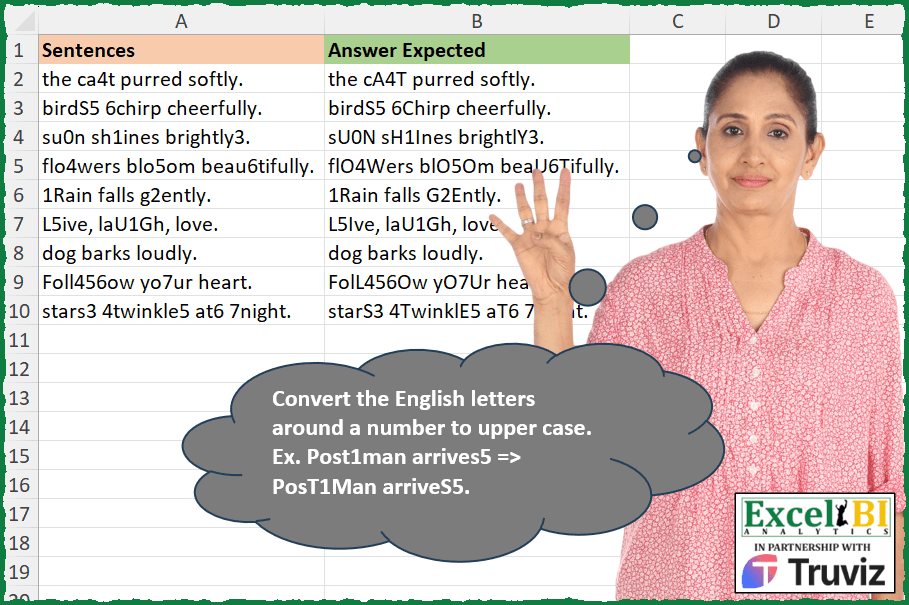
Convert the English letters around a number to upper case. Ex. Post1man arrives5 => PosT1Man arriveS5.
📌 Challenge Details and Links
ExcelBI Excel Challenge Number: 362
Challenge Difficulty: ⭐️
📥Download Sample File
📥Link to the solutions on LinkedIn
Solving the challenge of Uppercase Letters Around Numbers with Power Query
Power Query solution 1 for Uppercase Letters Around Numbers, proposed by John V.:
let
 S = Excel.CurrentWorkbook(){0}[Content],
 R = Table.AddColumn(S, "R", each
 let
 b = Text.ToList(" " & [Sentences] & " "),
 c = List.Transform( {1..List.Count(b) - 2}, each if List.ContainsAny({b{_ - 1}, b{_ + 1}}, {"0".."9"}) then Text.Upper(b{_}) else b{_})
 in
 Text.Combine(c)
 )[[R]]
in
 R

Blessings!
Power Query solution 2 for Uppercase Letters Around Numbers, proposed by Aditya Kumar Darak 🇮🇳:
let
  Source = Excel.CurrentWorkbook(){[Name = "data"]}[Content],
  Return = Table.AddColumn(
    Source,
    "Answer",
    each [
      P = Text.PositionOfAny([Sentences], {"0" .. "9"}, - 1),
      R = List.Accumulate(
        P,
        [Sentences],
        (x, y) =>
          [
            S = if y = 0 then 0 else y - 1,
            E = if y = 0 then 2 else 3,
            a = Text.Upper(Text.Range(x, S, E)),
            b = Text.ReplaceRange(x, S, E, a)
          ][b]
      )
    ][R]
  )
in
  Return
Power Query solution 3 for Uppercase Letters Around Numbers, proposed by Alejandro Simón 🇵🇦 🇪🇸:
let
  Source = Excel.CurrentWorkbook(){[Name = "Table1"]}[Content],
  Sol = Table.AddColumn(
    Source,
    "Answer",
    each
      let
        a = Text.ToList([Sentences]),
        b = List.Transform(
          {0 .. List.Count(a) - 2},
          each if try Number.From(a{_ + 1}) is number otherwise false then Text.Upper(a{_}) else a{_}
        )
          & {List.Last(a)},
        c = {List.First(b)}
          & List.Transform(
            {1 .. List.Count(b) - 1},
            each
              if try Number.From(a{_ - 1}) is number otherwise false then
                Text.Upper(b{_})
              else
                b{_}
          )
      in
        Text.Combine(c)
  )[[Answer]]
in
  Sol
Power Query solution 4 for Uppercase Letters Around Numbers, proposed by An Nguyen:
let
  fx = (txt) =>
    let
      Position = List.Buffer(Text.PositionOfAny(txt, {"0" .. "9"}, Occurrence.All)),
      Upper = List.Accumulate(
        Position,
        [Answer = txt],
        (state, current) => [
          Rep = (a, b) =>
            Text.ReplaceRange(state[Answer], a, b, Text.Upper(Text.Middle(state[Answer], a, b))),
          Answer = try Rep(current - 1, 3) otherwise Rep(current, 2)
        ]
      )[Answer]
    in
      Upper,
  Dataset = Excel.CurrentWorkbook(){[Name = "Strings"]}[Content][Column1],
  Final = List.Transform(Dataset, each fx(_))
in
  Final
Power Query solution 5 for Uppercase Letters Around Numbers, proposed by Ramiro Ayala Chávez:
let
  Origen = Excel.CurrentWorkbook(){[Name = "Tabla1"]}[Content],
  Fx = (x) =>
    let
      a = Text.ToList(x),
      b = Table.FromColumns({a, {null} & a, List.Skip(a)}, {"A", "B", "C"}),
      c = Table.AddColumn(
        b,
        "D",
        each
          if [B]
            = "0" or [B]
            = "1" or [B]
            = "2" or [B]
            = "3" or [B]
            = "4" or [B]
            = "5" or [B]
            = "6" or [B]
            = "7" or [B]
            = "8" or [B]
            = "9"
          then
            Text.Upper([A])
          else
            [A]
      ),
      d = Table.AddColumn(
        c,
        "E",
        each
          if [C]
            = "0" or [C]
            = "1" or [C]
            = "2" or [C]
            = "3" or [C]
            = "4" or [C]
            = "5" or [C]
            = "6" or [C]
            = "7" or [C]
            = "8" or [C]
            = "9"
          then
            Text.Upper([A])
          else
            [D]
      )[E],
      e = Text.Combine(List.RemoveNulls(d), "")
    in
      e,
  Sol = Table.AddColumn(Origen, "Answer Expected", each Fx([Sentences]))
in
  Sol
Power Query solution 6 for Uppercase Letters Around Numbers, proposed by Rafael González B.:
let
Source = Excel.CurrentWorkbook(){0}[Content],
Result = Table.AddColumn(Source, "Answer Expected", each
let
T = [Sentences],
LT = Text.ToList(T),
P = List.PositionOfAny(LT, {"0".."9"},2),
LA = List.Accumulate(P, T, (s,c) =>
let
a = try Text.ReplaceRange(s,c + 1, 1, Text.Upper(Text.At(T, c + 1))) otherwise T ,
b = try Text.ReplaceRange(a,c - 1, 1, Text.Upper(Text.At(T, c - 1))) otherwise a
in
b
)
in
LA)[[Answer Expected]]
in
Result
🧙♂️🧙♂️🧙♂️
Power Query solution 7 for Uppercase Letters Around Numbers, proposed by Glyn Willis:
let
  Source = Excel.CurrentWorkbook(){[Name = "Table1"]}[Content],
  #"Changed Type" = Table.TransformColumnTypes(
    Source,
    {{"Sentences", type text}, {"Answer Expected", type text}}
  ),
  #"Added Custom" = Table.AddColumn(
    #"Changed Type",
    "R",
    each [
      L = Text.ToList([Sentences]),
      T = Table.AddColumn(
        Table.FromColumns(
          {L, {null} & List.RemoveLastN(L, 1), List.RemoveFirstN(L, 1) & {null}},
          {"S", "P", "N"}
        ),
        "F",
        (r) => if List.ContainsAny({r[P]} & {r[N]}, {"0" .. "9"}) then "1" else null
      ),
      R = Text.Combine(Table.AddColumn(T, "U", each if [F] = "1" then Text.Upper([S]) else [S])[U])
    ][R]
  )
in
  #"Added Custom"
Solving the challenge of Uppercase Letters Around Numbers with Excel
Excel solution 1 for Uppercase Letters Around Numbers, proposed by Bo Rydobon 🇹🇭:
=MAP(
    A2:A10,
    LAMBDA(
        a,
        LET(
            s,
            SEQUENCE(
                LEN(
                    a
                )
            ),
            m,
            MID(
                a,
                s,
                1
            ),
            CONCAT(
                IF(
                    BYROW(
                        ISERR(
                            -MID(
                                a,
                                s+{1,
                                -1},
                                1
                            )
                        ),
                        AND
                    ),
                    m,
                    UPPER(
                        m
                    )
                )
            )
        )
    )
)
Excel solution 2 for Uppercase Letters Around Numbers, proposed by Bo Rydobon 🇹🇭:
=MAP(
    A2:A10,
    LAMBDA(
        a,
        LET(
            s,
            SEQUENCE(
                50
            ),
            m,
            MID(
                a,
                s,
                1
            ),
            CONCAT(
                IF(
                    ISERR(
                        -MID(
                            a,
                            s-1,
                            1
                        )
                    )*ISERR(
                        -MID(
                            a,
                            s+1,
                            1
                        )
                    ),
                    m,
                    UPPER(
                        m
                    )
                )
            )
        )
    )
)
Excel solution 3 for Uppercase Letters Around Numbers, proposed by Rick Rothstein:
=MAP(
    A2:A10,
    LAMBDA(
        t,
        REDUCE(
            "",
            SEQUENCE(
                LEN(
                    t
                )
            ),
            LAMBDA(
                a,
                x,
                LET(
                    m,
                    MID(
                        t,
                        x,
                        1
                    ),
                    a&IF(
                        SUM(
                            ISNUMBER(
                                -MID(
                                    t,
                                    x+{-1,
                                    1},
                                    1
                                )
                            )
                        ),
                        UPPER(
                            m
                        ),
                        m
                    )
                )
            )
        )
    )
)
Excel solution 4 for Uppercase Letters Around Numbers, proposed by John V.:
=MAP(
    A2:A10,
    LAMBDA(
        x,
        LET(
            s,
            ROW(
                1:30
            ),
            m,
            MID(
                x,
                s,
                1
            ),
            CONCAT(
                IF(
                    BYROW(
                        -MID(
                            x,
                            s+{-1,
                            1},
                            1
                        ),
                        COUNT
                    ),
                    UPPER(
                        m
                    ),
                    m
                )
            )
        )
    )
)
Excel solution 5 for Uppercase Letters Around Numbers, proposed by محمد حلمي:
=MAP(A2:A10,
    LAMBDA(a,
    LET(
e,
    MID(
        a,
        SEQUENCE(
            50
        ),
        1
    ),
    i,
    (e>"•")*(e<"a"),

CONCAT(
    IFNA(
        IF(
            VSTACK(
                0,
                i
            )+DROP(
                i,
                1
            ),
            UPPER(
                e
            ),
            e
        ),
        ""
    )
))))
Excel solution 6 for Uppercase Letters Around Numbers, proposed by محمد حلمي:
=TRIM(
    REDUCE(
        " ",
        SEQUENCE(
            50
        ),
        LAMBDA(
            a,
            c,
            LET(

                r,
                RIGHT(
                    a
                ),
                d,
                MID(
                    A2:A10,
                    c,
                    1
                ),

                IF(
                    ISERR(
                        -d
                    )*ISERR(
                        -r
                    ),
                    a&d,
                    LEFT(
                        a,
                        c-1
                    )&UPPER(
                        r&d
                    )
                )
            )
        )
    )
)
Excel solution 7 for Uppercase Letters Around Numbers, proposed by Kris Jaganah:
=MAP(
    A2:A10,
    LAMBDA(
        x,
        LET(
            a,
            SEQUENCE(
                LEN(
                    x
                )
            ),
            b,
            MID(
                x,
                a,
                1
            ),
            CONCAT(
                IF(
                    BYROW(
                        IFERROR(
                            -MID(
                                x,
                                a-{1,
                                -1},
                                1
                            ),

                        ),
                        SUM
                    ),
                    UPPER(
                        b
                    ),
                    b
                )
            )
        )
    )
)
Excel solution 8 for Uppercase Letters Around Numbers, proposed by Julian Poeltl:
=MAP(
    A2:A10,
    LAMBDA(
        S,
        LET(
            SP,
            MID(
                S,
                SEQUENCE(
                    ,
                    LEN(
                        S
                    )
                ),
                1
            ),
            IN,
            ISNUMBER(
                SP*1
            ),
            SMI,
            HSTACK(
                DROP(
                    IN,
                    ,
                    1
                ),
                FALSE
            ),
            SMP,
            HSTACK(
                FALSE,
                DROP(
                    IN,
                    ,
                    -1
                )
            ),
            U,
            --SMP+--SMI,
            CONCAT(
                IF(
                    U>0,
                    UPPER(
                        SP
                    ),
                    SP
                )
            )
        )
    )
)
Excel solution 9 for Uppercase Letters Around Numbers, proposed by Timothée BLIOT:
=MAP(
    A2:A10,
    LAMBDA(
        z,
        REGEXREPLACE(
            z,
            "(w?d+w?)",
            "U$1"
        )
    )
)
Excel solution 10 for Uppercase Letters Around Numbers, proposed by Nikola Z Grujicic - Nikola Ž Grujičić:
=MAP(A2:A10,
    LAMBDA(a,
     LET(d,
     MID(
         a,
          SEQUENCE(
              LEN(
                  a
              )
          ),
         1
     ),
    b,
     SEQUENCE(
         ROWS(
             d
         )
     ),
    e,
     CODE(
             d
         ),
    f,
    (e>47)*(e<58)*b,
     g,
     IF(
         f>0,
         f-1,
         ""
     ),
    h,
     IF(
         f>0,
         f+1,
         ""
     ),
    i,
     VSTACK(
         g,
          h
     ),
     j,
     FILTER(i,
    (i<>"")*(i<=ROWS(
             d
         ))),
    l,
    --ISNUMBER(
        MATCH(
            b,
            j,
            0
        )
    ),
     m,
     IF(
         l,
          UPPER(
             d
         ),
         d
     ),
    TEXTJOIN(
        "",
        ,
        m
    ))))
Excel solution 11 for Uppercase Letters Around Numbers, proposed by Hussein SATOUR:
=MAP(
    A2:A10,
     LAMBDA(
         x,
          LET(
              a,
               MID(
                   x,
                    SEQUENCE(
                        LEN(
                            x
                        )
                    ),
                    1
               ),
               CONCAT(
                   IF(
                       ISERR(
                           --VSTACK(
                               DROP(
                                   a,
                                   1
                               ),
                                TAKE(
                                    a,
                                    -1
                                )
                           )
                       )+ISERR(
                           --VSTACK(
                               TAKE(
                                   a,
                                   1
                               ),
                                DROP(
                                    a,
                                    -1
                                )
                           )
                       )=1,
                        UPPER(
      &                      a
                        ),
                        a
                   )
               )
          )
     )
)
Excel solution 12 for Uppercase Letters Around Numbers, proposed by Oscar Mendez Roca Farell:
=MAP(
    A2:A10,
     LAMBDA(
         a,
          LET(
              _t,
               TOCOL(
                   FIND(
                       ROW(
                           1:10
                       )-1,
                       a
                   )+{-1,
                   1},
                   2
               ),
              _p,
               IF(
                   _t,
                   _t,
                   1
               ),
              _w,
               UPPER(
                   TOCOL(
                       MID(
                           a,
                           _p,
                            1
                       ),
                        3
                   )
               ),
               IFERROR(
                   REDUCE(
                       a,
                        SEQUENCE(
                            ROWS(
                                _w
                            )
                        ),
                        LAMBDA(
                            i,
                             x,
                             REPLACE(
                                 i,
                                 I NDEX(
                                     _p,
                                      x
                                 ),
                                  1,
                                  INDEX(
                                      _w,
                                       x
                                  )
                             )
                        )
                   ),
                    a
               )
          )
     )
)
Excel solution 13 for Uppercase Letters Around Numbers, proposed by Sunny Baggu:
=MAP(

     A2:A10,

     LAMBDA(
         x,

          LET(

               _seq,
               SEQUENCE(
                   LEN(
                       x
                   )
               ),

               _m,
               MID(
                   x,
                    _seq,
                    1
               ),

               _v,
               UNIQUE(
                   TOCOL(
                       IF(
                           ISNUMBER(
                               -_m
                           ),
                            _seq + {-1,
                            1},
                            x
                       ),
                        3
                   )
               ),

               IFERROR(

                    REDUCE(

                         x,

                         FILTER(
                             _v,
                              _v > 0
                         ),

                         LAMBDA(
                             a,
                              v,
                              REPLACE(
                                  a,
                                   v,
                                   1,
                                   UPPER(
                                       INDEX(
                                           _m,
                                            v
                                       )
                                   )
                              )
                         )

                    ),

                    x

               )

          )

     )

)
Excel solution 14 for Uppercase Letters Around Numbers, proposed by Sunny Baggu:
=MAP(

     A2:A10,

     LAMBDA(
         x,

          LET(

               _seq,
               SEQUENCE(
                   LEN(
                       x
                   )
               ),

               _m,
               MID(
                   x,
                    _seq,
                    1
               ),

               _fc,
               FILTER(
                   _seq,
                    ISNUMBER(
                        --_m
                    )
               ),

               _num,
               UNIQUE(
                   TOCOL(
                       _fc + {-1,
                        1}
                   )
               ),

               _cri,
               NOT(
                   MAP(
                       _num,
                        LAMBDA(
                            b,
                             OR(
                                 MAP(
                                     _fc,
                                      LAMBDA(
                                          a,
                                           OR(
                                               b = a
                                           )
                                      )
                                 )
                             )
                        )
                   )
               ),

               _cri1,
               FILTER(
                   _num,
                    _cri
               ),

               _cri2,
               UPPER(
                   INDEX(
                       _m,
                        _cri1
                   )
               ),

               IFERROR(
                   CONCAT(
                       IFNA(
                           XLOOKUP(
                               _seq,
                                _cri1,
                                _cri2
                           ),
                            _m
                       )
                   ),
                    x
               )

          )

     )

)
Excel solution 15 for Uppercase Letters Around Numbers, proposed by Abdallah Ally:
=MAP(
    A2:A10,
    LAMBDA(
        x,
        LET(
            a,
            x,
            b,
            SEQUENCE(
                LEN(
                    a
                )
            ),
            c,
            MID(
                a,
                b,
                1
            ),
             REDUCE(
                 "",
                 b,
                 LAMBDA(
                     x,
                     y,
                     IF(
                         NOT(
                             ISERR(
                                 -MID(
                                     a,
                                     y-1,
                                     1
                                 )
                             )
                         )+NOT(
                             ISERR(
                                 -MID(
                                     a,
                                     y+1,
                                     1
                                 )
                             )
                         ),
                         x&UPPER(
                             MID(
                                 a,
                                 y,
                                 1
                             )
                         ),
                         x&MID(
                                 a,
                                 y,
                                 1
                             )
                     )
                 )
             )
        )
    )
)
Excel solution 16 for Uppercase Letters Around Numbers, proposed by Asheesh Pahwa:
=MAP(A2:A10,
     LAMBDA (x,
    LET(b,
     MID(
         x,
         SEQUENCE(
             LEN(
                 x
             )
         ),
         1
     ),

c,
    ISNUMBER(
        --b
    ),
    d,
    FILTER(
        b,
        c
    ),

e,
     MAP(
         d,
          LAMBDA(
              x,
              XMATCH(
                  x,
                  b
              )
          )
     ),

f,
     DROP(
         REDUCE(
             "",
             e,
              LAMBDA(
                  x,
                  y,
                  VSTACK(
                      x,
                      CONCAT(

                          INDEX(
                              b,
                              y+{-1;0;1}
                          )
                      )
                  )
              )
         ),
         1
     ),
    g,
     DROP (REDUCE("",
    e,
    LAMBDA(x,
    y,
    VSTACK(x,
    UPPER (CONCAT(INDEX(b,
    y+(-1;0;1})))))),
    1),

h,
    IFERROR(
        REDUCE(
            x,
            SEQUENCE(
                ROWS(
                    g
                )
            ),
            LAMBDA(
                x,
                y,
                SUBSTITUTE(
                    x,
                    INDEX(
                        f,
                        y
                    ),
                    INDEX(
                        g,
                        y
                    )
                )
            )
        ),
        x
    ),
    h)))
Excel solution 17 for Uppercase Letters Around Numbers, proposed by CA Raghunath Gundi:
=REDUCE(
    A3,
    MID(
        A3,
        LET(
            x,
            IFERROR(
                FIND(
                    SEQUENCE(
                        ,
                        10,
                        0
                    ),
                    A3
                ),
                ""
            ),
            FILTER(
                x,
                ISNUMBER(
                    --x
                )
            )
        )-1,
        3
    ),
    LAMBDA(
        Text,
        Array,
        SUBSTITUTE(
            Text,
            Array,
            UPPER(
                Array
            )
        )
    )
)
Excel solution 18 for Uppercase Letters Around Numbers, proposed by Giorgi Goderdzishvili:
=MAP(
    A2:A10,
    LAMBDA(
        t,
        LET(

            _snt,
            t,

            _sq,
            SEQUENCE(
                ,
                LEN(
                    _snt
                ),
                1
            ),

            _cr,
            MID(
                _snt,
                _sq,
                1
            ),

            _ch,
            ISNUMBER(
                --_cr
            )*1,

            _fl,
            FILTER(
                _sq,
                _ch
            )+{-1;1},

            _upp,
             IF(
                 ISNUMBER(
                     XMATCH(
                         _sq,
                         _fl,
                         0
                     )
                 ),
                 UPPER(
                     _cr
                 ),
                 _cr
             ),

            CONCAT(
                _upp
            )
        )
    )
)
Excel solution 19 for Uppercase Letters Around Numbers, proposed by Sandeep Marwal:
=LET(a,A2,
split,MID(A2,SEQUENCE(LEN(A2)),1),
output,MAP(split,LAMBDA(b,OFFSET(b,-1,))),
output)

same formula is working fine when referring "split" to a array in worksheet.

=LET(a,A2,
split,G7#,
output,MAP(split,LAMBDA(b,OFFSET(b,-1,))),
output)


where g7# = =LET(a,A2,
split,MID(A2,SEQUENCE(LEN(A2)),1),
split)
Excel solution 20 for Uppercase Letters Around Numbers, proposed by Edwin Tisnado:
=MAP(
    A2:A10,
    LAMBDA(
        i,
        REDUCE(
            " "&i,
            IFERROR(
                SEARCH(
                    {0,
                    1,
                    2,
                    3,
                    4,
                    5,
                    6,
                    7,
                    8,
                    9},
                    " "&i
                ),

            ),
            LAMBDA(
                x,
                y,
                IF(
                    y,
                    REPLACE(
                        x,
                        y-1,
                        3,
                        UPPER(
                            MID(
                                x,
                                y-1,
                                3
                            )
                        )
                    ),
                    x
                )
            )
        )
    )
)
Excel solution 21 for Uppercase Letters Around Numbers, proposed by Abdelrahman Omer, MBA, PMP:
=MAP(
    A2:A10,
    LAMBDA(
        x,
        LET(
            a,
            MID(
                x,
                SEQUENCE(
                    LEN(
                        x
                    )
                ),
                1
            ),
            b,
            ISNUMBER(
                a+0
            ),
            c,
            DROP(
                VSTACK(
                    0,
                    b
                )-b+IFNA(
                    DROP(
                        b,
                        1
                    )-b,
                    b
                )>0,
                -1
            ),
            CONCAT(
                IF(
                    c,
                    UPPER(
                        a
                    ),
                    a
                )
            )
        )
    )
)
Solving the challenge of Uppercase Letters Around Numbers with Python
Python solution 1 for Uppercase Letters Around Numbers, proposed by Jan Willem Van Holst:
in Python
import pandas as pd
df=pd.read_csv(r"C:JWLENOVOPYTHONExcel_Challenge_362 - Uppercase Conversion Around Numbers.csv",sep=";")
myList = df['Sentences'].to_list()
def fx(myString):
 stringList = list(myString.strip(" "))
 for i in  range(1,len(stringList)-1):
 if stringList[i].isdigit():
 stringList[i-1]=stringList[i-1].capitalize()
 stringList[i+1]=stringList[i+1].capitalize()
 return ''.join(x for x in stringList)
result = [fx(elem) for elem in myList]
Solving the challenge of Uppercase Letters Around Numbers with Python in Excel
Python in Excel solution 1 for Uppercase Letters Around Numbers, proposed by John V.:
Hi everyone!
Blessings!
Python in Excel solution 2 for Uppercase Letters Around Numbers, proposed by JvdV -:
=REDUCE(A2:A10,ROW(1:99),LAMBDA(x,y,IF(BYROW(-MID(x,y-{1,-1},1),COUNT),REPLACE(x,y,1,UPPER(MID(x,y,1))),x)))
With PY():
import re
[re.sub(r'(D?d+D?)',lambda m:m[1].upper(),s) for s in xl("A2:A10")[0]]
Solving the challenge of Uppercase Letters Around Numbers with R
R solution 1 for Uppercase Letters Around Numbers, proposed by Konrad Gryczan, PhD:
library(tidyverse)
library(readxl)
input = read_excel("Excel/362 Uppercase Conversion Around Numbers.xlsx", range = "A1:A10")
test = read_excel("Excel/362 Uppercase Conversion Around Numbers.xlsx", range = "B1:B10")
convert = function(sentence) {
 pos_foll = str_locate_all(sentence, pattern = "[a-z](?=[0-9])") %>% unlist()
 pos_pre = str_locate_all(sentence, pattern = "(?<=[0-9])[a-z]") %>% unlist()
 pos = c(pos_foll, pos_pre) %>% unique()

 chars = str_split(sentence, pattern = "")[[1]]
 chars[pos] = str_to_upper(chars[pos])
 sentence = paste(chars, collapse = "")

 return(sentence)
}
result = input %>%
 mutate(`Answer Expected` = map_chr(Sentences, convert))
Solving the challenge of Uppercase Letters Around Numbers with Excel VBA
Excel VBA solution 1 for Uppercase Letters Around Numbers, proposed by Nicolas Micot:
VBA code:
Function f_upperCase_around_numbers(ByVal sentence As String) As String
Dim numCar As Integer
Dim resultat As String
sentence = " " & sentence & " "
For numCar = 2 To Len(sentence) - 1
 If Mid(sentence, numCar - 1, 1) Like "#" Or Mid(sentence, numCar + 1, 1) Like "#" Then
 resultat = resultat & UCase(Mid(sentence, numCar, 1))
 Else
 resultat = resultat & Mid(sentence, numCar, 1)
 End If
Next numCar
f_upperCase_around_numbers = resultat
End Function
&