
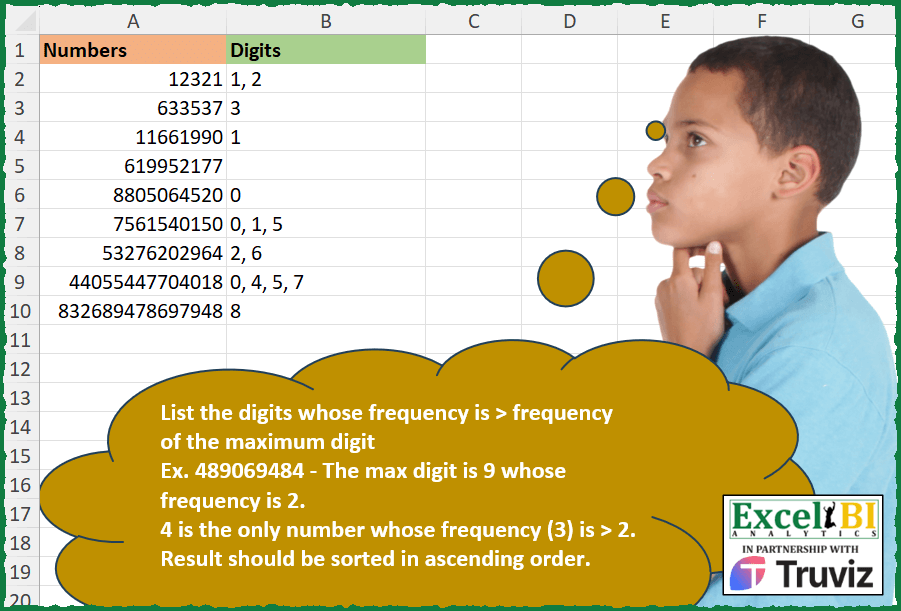
List the digits whose frequency is > frequency of the maximum digit Ex. 489069484 – The max digit is 9 whose frequency is 2. 4 is the only number whose frequency (3) is > 2. Result should be sorted in ascending order.
📌 Challenge Details and Links
ExcelBI Excel Challenge Number: 356
Challenge Difficulty: ⭐️⭐️
📥Download Sample File
📥Link to the solutions on LinkedIn
Solving the challenge of Digits with Higher Frequency with Power Query
Power Query solution 1 for Digits with Higher Frequency, proposed by Luan Rodrigues:
let
  Fonte = Tabela1,
  res = Table.AddColumn(
    Fonte,
    "Personalizar",
    each [
      a = List.Transform(Text.ToList(Text.From([Numbers])), Number.From),
      b = List.Distinct(List.Transform(a, (x) => List.Count(List.Select(a, each _ = List.Max(a))))){
        0
      },
      c = List.Distinct(List.Transform(a, (x) => {x} & {List.Count(List.Select(a, each _ = x))})),
      d = Text.Combine(
        List.Sort(List.Transform(List.Select(c, each _{1} > b), each Text.From(_{0}))),
        ", "
      )
    ][d]
  ),
  Personalizar = res{0}[Personalizar]
in
  Personalizar
Power Query solution 2 for Digits with Higher Frequency, proposed by Rafael González B.:
let
Source = Excel.CurrentWorkbook(){0}[Content],
Anw = Table.AddColumn(Source, "Answer Expected", each
let
T = Text.From([Numbers]),
TL = Text.ToList(T),
LN = List.Transform(TL, each Number.From(_)),
LM = List.Max(LN),
LCM = List.Count(List.Select(LN, each _ = LM)),
LMo = List.Transform(LN, each List.Count(List.Select(LN, (y) => y = _))),
LZ = List.Zip({LN, LMo}),
LL = List.Select(LZ, each _{1} > LCM),
LT = List.Transform(LL, each Text.From(_{0})),
LD = List.Sort(List.Distinct(LT)),
R = Text.Combine(LD, ", ")
in
R)[[Answer Expected]]
in
Anw
🧙♂️🧙♂️🧙♂️
Solving the challenge of Digits with Higher Frequency with Excel
Excel solution 1 for Digits with Higher Frequency, proposed by Bo Rydobon 🇹🇭:
=MAP(
    A2:A10,
    LAMBDA(
        a,
        LET(
            s,
            SEQUENCE(
                10
            )-1,
            n,
            LEN(
                a
            )-LEN(
                SUBSTITUTE(
                    a,
                    s,

                )
            ),
            TEXTJOIN(
                ", ",
                ,
                REPT(
                    s,
                    n>LOOKUP(
                        2,
                        1/n,
                        n
                    )
                )
            )
        )
    )
)
Excel solution 2 for Digits with Higher Frequency, proposed by Rick Rothstein:
=MAP(
    A2:A10,
    LAMBDA(
        x,
        LET(
            s,
            SEQUENCE(
                10,
                ,
                0
            ),
            l,
            LEN(
                x
            )-LEN(
                SUBSTITUTE(
                    x,
                    s,
                    ""
                )
            ),
            d,
            FILTER(
                s,
                l
            ),
            c,
            FILTER(
                l,
                l>0
            ),
            TEXTJOIN(
                ", ",
                ,
                DROP(
                    IF(
                        DROP(
                            c,
                            -1
                        )>TAKE(
                            c,
                            -1
                        ),
                        d,
                        ""
                    ),
                    -1
                )
            )
        )
    )
)
Excel solution 3 for Digits with Higher Frequency, proposed by John V.:
=MAP(
    A2:A10,
    LAMBDA(
        x,
        LET(
            b,
            ROW(
                1:10
            )-1,
            f,
            LEN(
                x
            )-LEN(
                SUBSTITUTE(
                    x,
                    b,

                )
            ),
            TEXTJOIN(
                ", ",
                ,
                REPT(
                    b,
                    f>XLOOKUP(
                        MAX(
                            IF(
                                f,
                                b
                            )
                        ),
                        b,
                        f
                    )
                )
            )
        )
    )
)
Excel solution 4 for Digits with Higher Frequency, proposed by محمد حلمي:
=MAP(
    A2:A10,
    LAMBDA(
        a,
        LET(
            i,
            SORT(
                --MID(
                    a,
                    SEQUENCE(
                        LEN(
                            a
                        )
                    ),
                    1
                )
            ),
            TEXTJOIN(
                ", ",
                ,

                REPT(
                    i,
                    DROP(
                        FREQUENCY(
                            i,
                            i
                        ),
                        -1
                    )>SUM(
                        N(
                            MAX(
                                i
                            )=i
                        )
                    )
                )
            )
        )
    )
)

////


=MAP(
    A2:A10,
    LAMBDA(
        a,
        LET(
            i,
            --MID(
                a,

                SEQUENCE(
                        LEN(
                            a
                        )
                    ),
                1
            ),
            ARRAYTOTEXT(
                SORT(
                    FILTER(
                        i,

                        DROP(
                        FREQUENCY(
                            i,
                            i
                        ),
                        -1
                    )>SUM(
                        N(
                            MAX(
                                i
                            )=i
                        )
                    ),
                        ""
                    )
                )
            )
        )
    )
)
Excel solution 5 for Digits with Higher Frequency, proposed by Kris Jaganah:
=MAP(A2:A10,LAMBDA(y,LET(a,--MID(y,SEQUENCE(LEN(y)),1),b,MAP(a,LAMBDA(x,SUM(--(a=x)))),TEXTJOIN(", ",,UNIQUE(SORT(FILTER(a,b>UNIQUE(FILTER(b,MAX(a)=a)),"")))))))Excel solution 6 for Digits with Higher Frequency, proposed by Timothée BLIOT:
=x)) to count occurrences: =MAP(A2:A10,
    LAMBDA(z,
    LET(A,
    SORT(
        --MID(
            z,
            SEQUENCE(
                LEN(
                    z
                )
            ),
            1
        )
    ),
    B,
    MAP(A,
    LAMBDA(x,
    SUM(--(A=x)))),
    ARRAYTOTEXT(
        UNIQUE(
            FILTER(
                A,
                B>TAKE(
                    B,
                    -1
                ),
                ""
            )
        )
    ))))

Using the frequency function to count occurrences:
=MAP(
    A2:A10,
    LAMBDA(
        z,
        LET(
            A,
            SORT(
        --MID(
            z,
            SEQUENCE(
                LEN(
                    z
                )
            ),
            1
        )
    ),
            B,
            DROP(
                FREQUENCY(
                    A,
                    A
                ),
                -1
            ),
            C,
            B>0,
            D,
            FILTER(
                B,
                C
            ),
            ARRAYTOTEXT(
                FILTER(
                    FILTER(
                        A,
                        C
                    ),
                    D>TAKE(
                        D,
                        -1
                    ),
                    ""
                )
            )
        )
    )
)
Excel solution 7 for Digits with Higher Frequency, proposed by Sunny Baggu:
=MAP(
 A2:A10,

 LAMBDA(a,

 LET(
 _m,
     --MID(
         a,
          SEQUENCE(
              LEN(
                  a
              )
          ),
          1
     ),

 _c,
     MAP(_m,
     LAMBDA(a,
     SUM(--(_m = a)))),

 _mc,
     XLOOKUP(
         MAX(
             _m
         ),
          _m,
          _c
     ),

 ARRAYTOTEXT(
     SORT(
         UNIQUE(
             FILTER(
                 _m,
                  _c > _mc,
                  ""
             )
         )
     )
 )
 )
 )
)
Excel solution 8 for Digits with Higher Frequency, proposed by Abdallah Ally:
=MAP(A2:A10,
    LAMBDA(x,
    LET(a,
    x,
    b,
    --MID(
        a,
        SEQUENCE(
            LEN(
                a
            )
        ),
        1
    ),
    c,
     BYROW(b,
    LAMBDA(x,
    SUM(--(x=b)))),
     ARRAYTOTEXT(
         SORT(
             UNIQUE(
                  FILTER(
                      b,
                      c>TAKE(
                          FILTER(
                              c,
                              b=MAX(
                                  b
                              )
                          ),
                          1
                      ),
                      ""
                  )
             )
         )
     ))))
Excel solution 9 for Digits with Higher Frequency, proposed by 🇵🇪 Ned Navarrete C.:
=MAX(
    s
))),
     n,
    MAP(s,
    LAMBDA(r,
    SUM(--(s=r)))),
     IFERROR(ARRAYTOTEXT(SORT(UNIQUE(TOCOL(s/(n>m),
    3)))),
    ""))))
Excel solution 10 for Digits with Higher Frequency, proposed by Pieter de B.:
=MAP(A2:A10,
    LAMBDA(a,
    LET(d,
    -MID(
        a,
        SEQUENCE(
            LEN(
                a
            )
        ),
        1
    ),
    f,
    DROP(
        FREQUENCY(
            d,
            d
        ),
        -1
    ),
    m,
    MIN(
        d
    ),
    IFERROR(ARRAYTOTEXT(SORT(TOCOL(-d/(f>XLOOKUP(
        m,
        d,
        f
    )),
    2))),
    ""))))
Excel solution 11 for Digits with Higher Frequency, proposed by Asheesh Pahwa:
=MAP(E6:E13,
    LAMBDA (z,
     LET(b,
    --MID(
        z,
        SEQUENCE(
            LEN(
                z
            )
        ),
        1
    ),
    c,
    MAX(
        b
    ),
    d,
     MAP (b,
     LAMBDA(x,
    SUM((b=x)*1))),
     e,
    XLOOKUP(
        c,
        b,
        d
    ),

ARRAYTOTEXT(SORT(UNIQUE (FILTER (b,
    d>e,
     "")))))))
Excel solution 12 for Digits with Higher Frequency, proposed by Thang Van:
=IFERROR(
    MAP(
        A2:A10,
        LAMBDA(
            _each,
            LET(

                _seq,
                SEQUENCE(
                    LEN(
                        _each
                    ),
                    ,
                    1
                ),

                _ts,
                MID(
                    _each,
                    _seq,
                    1
                )*1,

                _max,
                MAX(
                    _ts
                ),

                _count,
                MAP(
                    _ts,
                    LAMBDA(
                        _each,
                        SUM(
                            IF(
                                _ts=_each,
                                1,
                                0
                            )
                        )
                    )
                ),

                _temp,
                HSTACK(
                    _ts,
                    _count
                ),

                _max_fre,
                VLOOKUP(
                    _max,
                    _temp,
                    2,
                    0
                ),

                _r,
                SORT(
                    UNIQUE(
                        CHOOSECOLS(
                            FILTER(
                                _temp,
                                CHOOSECOLS(
                                    _temp,
                                    2
                                )>_max_fre
                            ),
                            1
                        )
                    ),
                    1
                ),

                ARRAYTOTEXT(
                    _r
                )

            )
        )
    ),
    ""
)
Excel solution 13 for Digits with Higher Frequency, proposed by Giorgi Goderdzishvili:
=
MAP(A2:A10,
    LAMBDA(x,
    LET(
_nm,
    x,

_cr,
    1* MID(
        _nm,
        SEQUENCE(
            ,
            LEN(
                _nm
            )
        ),
        1
    ),

_mx,
    MAX(
        _cr
    ),

_mxL,
     LEN(
                _nm
            )-LEN(
         SUBSTITUTE(
             _nm,
             _mx,
             ""
         )
     ),

_oth,
     LEN(
                _nm
            )-LEN(
         SUBSTITUTE(
             _nm,
             _cr,
             ""
         )
     ),

_flt,
     FILTER(_cr,
     (_oth>_mxL)*(_cr<>_mx),
    ""),

TEXTJOIN(
    ", ",
    ,
    SORT(
        UNIQUE(
            _flt,
            TRUE
        ),
        ,
        1,
        TRUE
    )
))))
Solving the challenge of Digits with Higher Frequency with Python in Excel
Python in Excel solution 1 for Digits with Higher Frequency, proposed by JvdV –:
Through PY():
[', '.join([i for i in [*'0123456789'] if x.count(i)>x.count(sorted([*x])[-1])]) for x in xl("A2:A10")[0]]
Solving the challenge of Digits with Higher Frequency with R
R solution 1 for Digits with Higher Frequency, proposed by Konrad Gryczan, PhD:
library(tidyverse)
library(readxl)
input = read_excel("Excel/356 Count Digit Frequencies.xlsx", range = "A1:A10")
test = read_excel("Excel/356 Count Digit Frequencies.xlsx", range = "B1:B10")
evaluate = function(number) {
 result = str_split(number, "")[[1]] %>%
 table() %>%
 as.data.frame() %>%
 select(digit = 1, freq = 2) %>%
 mutate(digit = as.numeric(as.character(digit)),
 freq_of_max = freq[which.max(digit)]) %>%
 filter(freq > freq_of_max) %>%
 pull(digit) %>%
 paste0(collapse = ", ") %>%
 ifelse(nchar(.) == 0, NA, .)
 return(result)
}
result = input %>%
 mutate(Digits = map_chr(Numbers, evaluate))
R solution 2 for Digits with Higher Frequency, proposed by Krzysztof Nowak:
library(tidyverse)
numbers <- c(12321, 633537, 11661990, 619952177, 8805064520, 7561540150, 53276202964, 44055447704018, 832689478697948)
Task <- data.frame(Numbers = numbers)
FindByFreq <- function(x) {


 paste(NumbersInScope,collapse = ",") # concatenate results

}
Answer <- Task |>
 mutate(Digits = map(Numbers,FindByFreq))
&&