
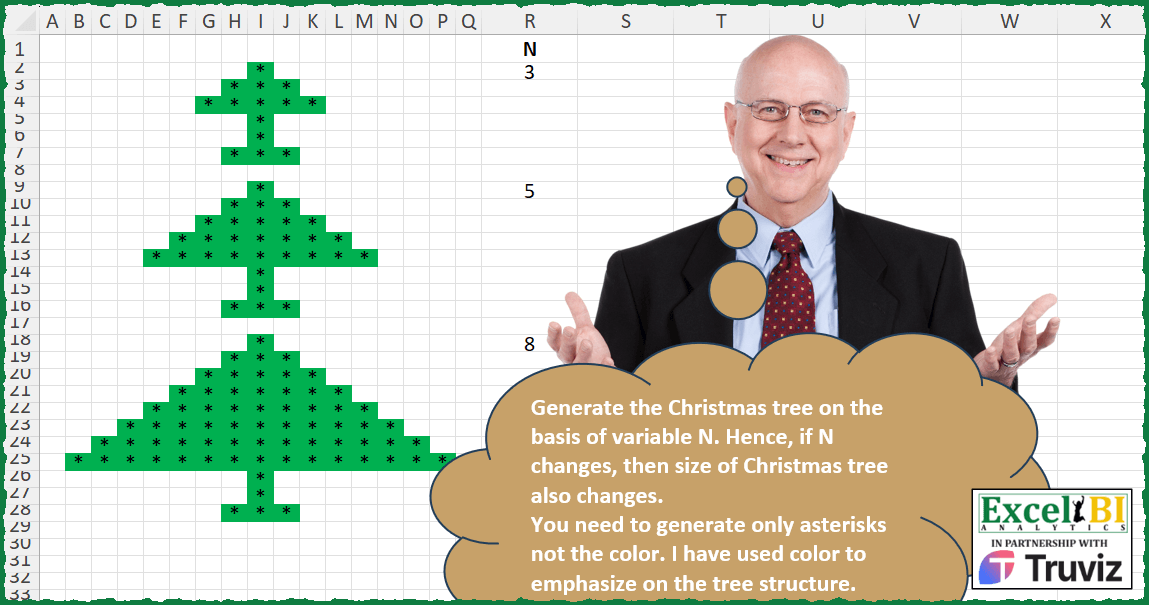
Merry Christmas to all the readers!!! Today’s challenge, undoubtedly, will be on Christmas. Generate the Christmas tree on the basis of variable N. Hence, if N changes, then size of Christmas tree also changes. You need to generate only asterisks not the color. I have used color to emphasize on the tree structure. I have shown the examples for N = 3, 5 & 8.
📌 Challenge Details and Links
ExcelBI Excel Challenge Number: 354
Challenge Difficulty: ⭐️⭐️⭐️⭐️
📥Download Sample File
📥Link to the solutions on LinkedIn
Solving the challenge of Create a Christmas Tree Shape with Power Query
Power Query solution 1 for Create a Christmas Tree Shape, proposed by Onsaeli Julius Mollel:
let
  Source = Excel.CurrentWorkbook(){[Name = "Table1"]}[Content],
  #"Removed Other Columns" = Table.SelectColumns(Source, {"N"}),
  #"Added Custom3" = Table.AddColumn(
    #"Removed Other Columns",
    "Seq List.Transform",
    each List.Transform({0 .. [N]}, each Text.Repeat("*", 1 + 2 * _))
  ),
  #"Renamed Columns" = Table.RenameColumns(#"Added Custom3", {{"Seq List.Transform", "Seq"}}),
  #"Added Custom" = Table.AddColumn(
    #"Renamed Columns",
    "Stem+roots",
    each {"*"} & {"*"} & {"***"} & {" "}
  ),
  #"Added Custom1" = Table.AddColumn(
    #"Added Custom",
    "Combine",
    each List.Combine({[Seq]} & {[#"Stem+roots"]})
  ),
  #"Added Custom2" = Table.AddColumn(#"Added Custom1", "Custom", each List.RemoveLastN([Combine])),
  #"Added Custom4" = Table.AddColumn(#"Added Custom2", "Custom.1", each Table.FromList([Custom])),
  #"Replaced Errors" = Table.ReplaceErrorValues(#"Added Custom4", {{"Custom.1", null}}),
  #"Expanded Custom.1" = Table.ExpandTableColumn(
    #"Replaced Errors",
    "Custom.1",
    {"Column1"},
    {"Column1"}
  ),
  #"Removed Other Columns1" = Table.SelectColumns(#"Expanded Custom.1", {"N", "Column1"}),
  #"Renamed Columns1" = Table.RenameColumns(#"Removed Other Columns1", {{"Column1", "Tree"}})
in
  #"Renamed Columns1"
Solving the challenge of Create a Christmas Tree Shape with Excel
Excel solution 1 for Create a Christmas Tree Shape, proposed by Bo Rydobon 🇹🇭:
=LET(
    n,
    8,
    REPT(
        "*",
        ABS(
            SEQUENCE(
                ,
                n*2-1
            )-n
        )
Excel solution 2 for Create a Christmas Tree Shape, proposed by Rick Rothstein:
=LET(n,
    R18,
    c,
    4*n-3,
    s,
    LEN(
        TRIM(
            REPT(
                "* ",
                SEQUENCE(
                    n,
                    ,
                    ,
                    2
                )
            )
        )
    ),
    t,
    IFNA(TEXTSPLIT(TEXTJOIN("/",
    ,
    REPT(" ",
    (c-s)/4)&TRIM(REPT("* ",
    (s+1)/2))),
    " ",
    "/"),
    ""),
    VSTACK(
        t,
        TAKE(
            t,
            1
        ),
        TAKE(
            t,
            2
        )
    ))
Excel solution 3 for Create a Christmas Tree Shape, proposed by John V.:
=LET(n,
    8,
    c,
    SEQUENCE(
        ,
        2*n-1
    ),
    REPT("*",
    ABS(
        c-n
    )<(c=n)+MOD(
        SEQUENCE(
            n+3
        ),
        1+n
    )))
✅=MAKEARRAY(
    3+R2,
    2*R2-1,
    LAMBDA(
        r,
        c,
        REPT(
            "*",
            ABS(
                c-R2
            )
Excel solution 4 for Create a Christmas Tree Shape, proposed by Kris Jaganah:
=LET(
    a,
    R2,
    IFNA(
        DROP(
            REDUCE(
                "",
                VSTACK(
                    SEQUENCE(
                        a
                    ),
                    1,
                    1,
                    2
                ),
                LAMBDA(
                    x,
                    y,
                    VSTACK(
                        x,
                        HSTACK(
                            EXPAND(
                                "",
                                ,
                                a-y+1
                            ),
                            REPT(
                                "*",
                                SEQUENCE(
                                    ,
                                    y*2-1,
                                    ,
                                    0
                                )
                            )
                        )
                    )
                )
            ),
            1,
            1
        ),
        ""
    )
)
Excel solution 5 for Create a Christmas Tree Shape, proposed by Julian Poeltl:
=LET(N,R2,AR,MAKEARRAY(N+3,(N-1)*2+1,LAMBDA(A,B,IFS(B=N,"*",AND(A=N+3,OR(B=N-1,B=N+1)),"*",A=N,"*",AND(SUM(A+B)>=N+1,AExcel solution 6 for Create a Christmas Tree Shape, proposed by Timothée BLIOT:
=LET(
    A,
    R2,
    MAKEARRAY(
        A+3,
        A*2-1,
        LAMBDA(
            x,
            y,
            SWITCH(
                TRUE,
                OR(
                    AND(
                        y>A-x,
                        yA-2,
                        y
Excel solution 7 for Create a Christmas Tree Shape, proposed by Hussein SATOUR:
=LET(

    a,
     REPT(
         "*/",
          SEQUENCE(
              R2,
              ,
              ,
              2
          )
     ),

    b,
     REPT(
         " /",
          SEQUENCE(
              R2,
              ,
              R2-1,
               -1
          )
     ),

    c,
     TEXTJOIN(
         "|",
         ,
          TEXTBEFORE(
              b&a&b,
               "/",
               -1
          ),
          REPT(
              REPT(
                  " /",
                   R2-1
              ) & "*/"& REPT(
                  " /",
                   R2-1
              ) &"|",
               2
          ),
          REPT(
              " /",
               R2-2
          ) & "*/*/*/"& REPT(
              " /",
               R2-2
          )
     ),

    TEXTSPLIT(
        c,
         "/",
         "|",
        1
    )
)
Excel solution 8 for Create a Christmas Tree Shape, proposed by Sunny Baggu:
=LET(
 _a,
     MAKEARRAY(
 R2,

 2 * R2 - 1,

 LAMBDA(r,
     c,
     IF((c <= (R2 + r - 1)) * (c >= (R2 - r + 1)),
     "*",
     ""))
 ),

 VSTACK(
     _a,
      IF(
          SEQUENCE(
              2
          ),
           TAKE(
               _a,
                1
           )
      ),
      INDEX(
          _a,
           2,

      )
 )
)
Excel solution 9 for Create a Christmas Tree Shape, proposed by LEONARD OCHEA 🇷🇴:
=LET(n,
    8,
    x,
    n-1,
    y,
    2^x,
    z,
    2*n-1,
    m,
    SCAN(y,
    SEQUENCE(
        x
    ),
     LAMBDA(a,
    b,
    a+SUM(2^(x+b*{-1,
    1})))),
    s,
    VSTACK(
        y,
        m,
        y,
        y,
        @m
    ),
    IF(
        --MID(
            BASE(
                s,
                2,
                z
            ),
            SEQUENCE(
                ,
                z
            ),
            1
        ),
        "*",
        ""
    ))


=LET(
    n,
    A1,
    s,
    SEQUENCE(
        n
    ),
    r,
    REPT(
        " ",
        n-s
    ),
    m,
    r&REPT(
        "*",
        2*s-1
    )&r,
    MID(
        VSTACK(
            m,
            @m,
            TAKE(
                m,
                2
            )
        ),
        SEQUENCE(
            ,
            2*n-1
        ),
        1
    )
)
&&&