
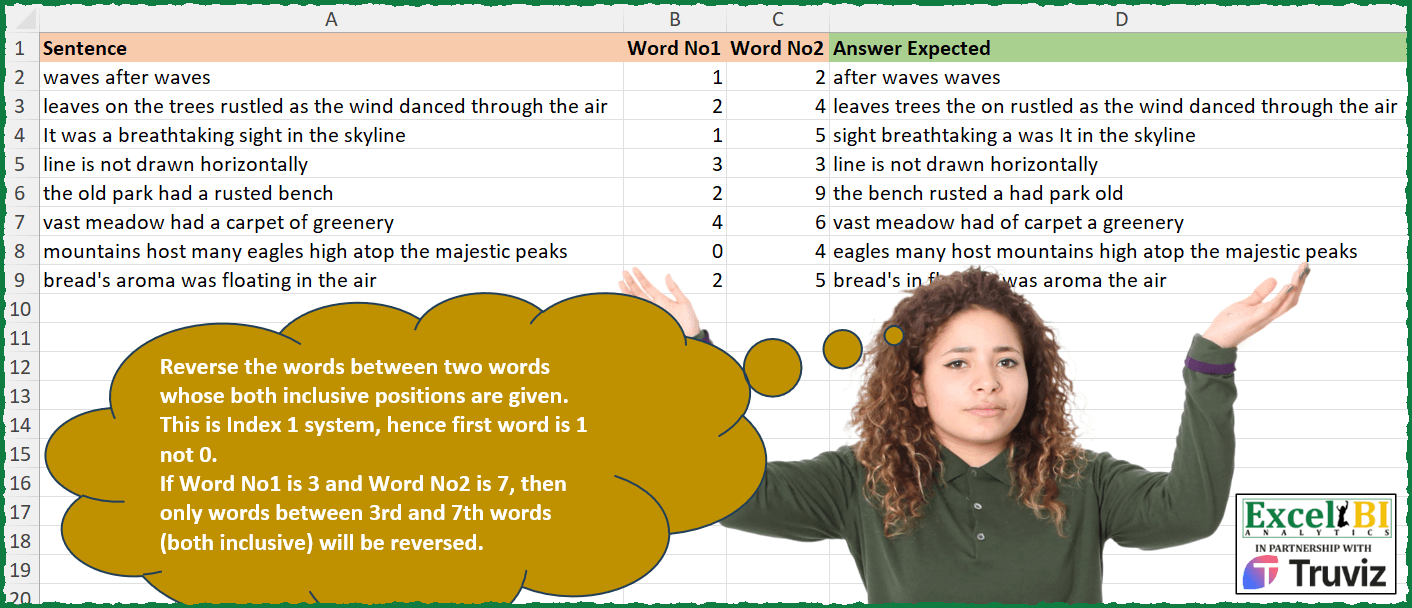
Reverse the words between two words whose both inclusive positions are given. This is Index 1 system, hence first word is 1 not 0. If Word No1 is 3 and Word No2 is 7, then only words between 3rd and 7th words (both inclusive) will be reversed. Ex. He is performing on the stage. Word No1 is 2 and Word No2 is 4. Hence, only “is performing on” will be reversed. Hence, answer would be “he on performing is the stage”.
📌 Challenge Details and Links
ExcelBI Excel Challenge Number: 351
Challenge Difficulty: ⭐️⭐️
📥Download Sample File
📥Link to the solutions on LinkedIn
Solving the challenge of Reverse Words Between Indexes with Power Query
Power Query solution 1 for Reverse Words Between Indexes, proposed by John V.:
let
 S = Excel.CurrentWorkbook(){0}[Content],
 R = Table.AddColumn(S, "R", each
 let
 a = Text.Split([Sentence], " "),
 m = List.Max({[Word No1] - 1, 0}), n = List.Min({[Word No2], List.Count(a)}) - 1, L = List.Transform,
 b = L(List.Positions(a), each if _ < m or _ > n then _ else m + n - _),
 c = Text.Combine(L(b, each a{_}), " ")
 in
 c
 )[[R]]
in
 R
Blessings!
Power Query solution 2 for Reverse Words Between Indexes, proposed by Aditya Kumar Darak 🇮🇳:
let
  Source = Excel.CurrentWorkbook(){[Name = "data"]}[Content],
  Return = Table.AddColumn(
    Source,
    "Answer",
    each [
      S  = Text.Split([Sentence], " "),
      W1 = [Word No1],
      W2 = [Word No2],
      R1 = List.Range(S, 0, List.Max({0, W1 - 1})),
      R2 = List.Range(S, List.Max({0, W1 - 1}), W2 - List.Max({1, W1}) + 1),
      R3 = List.Range(S, W2, List.Count(S)),
      O  = Text.Combine(R1 & List.Reverse(R2) & R3, " ")
    ][O]
  )
in
  Return
Power Query solution 3 for Reverse Words Between Indexes, proposed by Alexis Olson:
let
  Source = Excel.CurrentWorkbook(){[Name = "Table1"]}[Content],
  #"Added Custom" = Table.AddColumn(
    Source,
    "Answer",
    each [
      fullSentence = Text.Split([Sentence], " "),
      wordIndex    = {1 .. List.Count(fullSentence)},
      first        = List.Select(wordIndex, (i) => i < [Word No1]),
      second       = List.Select(wordIndex, (i) => (i >= [Word No1]) and (i <= [Word No2])),
      third        = List.Select(wordIndex, (i) => i > [Word No2]),
      order        = List.Combine({first, List.Reverse(second), third}),
      result       = Text.Combine(List.Transform(order, (i) => fullSentence{i - 1}), " ")
    ][result]
  )
in
  #"Added Custom"
Solving the challenge of Reverse Words Between Indexes with Excel
Excel solution 1 for Reverse Words Between Indexes, proposed by Bo Rydobon 🇹🇭:
=BYROW(+A2:C9,
    LAMBDA(z,
    LET(t,
    TEXTSPLIT(
        @z,
        ,
        " "
    ),
    s,
    SEQUENCE(
        ROWS(
            t
        )
    ),
    m,
    MATCH(
        s,
        N(
            z
        )+{0,
        0,
        1}
    ),
    TEXTJOIN(" ",
    ,
    SORTBY(t,
    m,
    ,
    -(m=2)*s,
    )))))
Excel solution 2 for Reverse Words Between Indexes, proposed by Bo Rydobon 🇹🇭:
=MAP(A2:A9,
    B2:B9,
    C2:C9,
    LAMBDA(z,
    a,
    b,
    LET(t,
    TEXTSPLIT(
        z,
        ,
        " "
    ),
    s,
    SEQUENCE(
        ROWS(
            t
        )
    ),
    TEXTJOIN(" ",
    ,
    REPT(
        t,
        s=a)*(s<=b)),
    -s),
    REPT(
        t,
        s>b
    )))))
Excel solution 3 for Reverse Words Between Indexes, proposed by John V.:
=MAP(A2:A9,
    B2:B9,
    C2:C9,
    LAMBDA(a,
    b,
    c,
    LET(w,
    TEXTSPLIT(
        a,
        ,
        " "
    ),
    s,
    SEQUENCE(
        ROWS(
            w
        )
    ),
    TEXTJOIN(" ",
    ,
    SORTBY(w,
    IF((sc),
    s,
    b+c-s))))))
Excel solution 4 for Reverse Words Between Indexes, proposed by محمد حلمي:
=BYROW(A2:C9,
    LAMBDA(a,
    LET(d,
    TEXTSPLIT(
        @+a,
        ,
        " "
    ),

s,
    SEQUENCE(
        ROWS(
            d
        )
    ),
    b,
    MIN(
        a
    ),
    TEXTJOIN(" ",
    ,

SORTBY(d,
    -IF((s>b)*(s<=MAX(
        a
    )),
    s,
    (s
Excel solution 5 for Reverse Words Between Indexes, proposed by Kris Jaganah:
=MAP(A2:A9,
    B2:B9,
    C2:C9,
    LAMBDA(x,
    y,
    z,
    LET(a,
    TEXTSPLIT(
        x,
        ,
        " "
    ),
    b,
    SEQUENCE(
        ROWS(
            a
        )
    ),
    c,
    SORT(IFS((b>=y)*(b<=z),
    b,
    b
Excel solution 6 for Reverse Words Between Indexes, proposed by Julian Poeltl:
=MAP(
    A2:A9,
    B2:B9,
    C2:C9,
    LAMBDA(
        S,
        WOT,
        WTT,
        LET(
            WO,
            IF(
                WOT>0,
                WOT,
                1
            ),
            SP,
            TEXTSPLIT(
                S,
                " "
            ),
            L,
            LEN(
                S
            )-LEN(
                SUBSTITUTE(
                    S,
                    " ",
                    ""
                )
            )+1,
            WT,
            IF(
                WTT>L,
                L,
                WTT
            ),
            SSS,
            IFERROR(
                SEQUENCE(
                    1,
                    WT-WO+1,
                    WT,
                    -1
                ),
                ""
            ),
            SSSS,
            IFERROR(
                SEQUENCE(
                    1,
                    L-WT,
                    WT+1
                ),
                ""
            ),
            SS,
            IF(
                WO>1,
                HSTACK(
                    SEQUENZ(
                        1,
                        WO-1
                    ),
                    SSS,
                    SSSS
                ),
                HSTACK(
                    SSS,
                    SSSS
                )
            ),
            FS,
            TRANSPOSE(
                FILTER(
                    TRANSPOSE(
                        SS
                    ),
                    TRANSPOSE(
                        SS
                    )<>""
                )
            ),
            TS,
            TEXTJOIN(
                " ",
                ,
                SORTBY(
                    SP,
                    FS
                )
            ),
            TS
        )
    )
)
Excel solution 7 for Reverse Words Between Indexes, proposed by Timothée BLIOT:
=MAP(
    A2:A9,
    B2:B9,
    C2:C9,
    LAMBDA(
        x,
        y,
        z,
        LET(
            A,
            TEXTSPLIT(
                x,
                ,
                " "
            ),
            M,
            MAX(
                y-1,
                0
            ),
             N,
            MIN(
                -ROWS(
                    A
                )+z,
                0
            ),
            B,
            DROP(
                DROP(
                    A,
                    M
                ),
                N
            ),
            TEXTJOIN(
                " ",
                ,
                VSTACK(
                     IFERROR(
                          TAKE(
                    A,
                    M
                ),
                         ""
                     ),
                    SORTBY(
                        B,
                        SEQUENCE(
                            ROWS(
                                B
                            )
                        ),
                        -1
                    ),
                    IFERROR(
                        TAKE(
                            A,
                            N
                        ),
                        ""
                    )
                )
            )
        )
    )
)
Excel solution 8 for Reverse Words Between Indexes, proposed by Nikola Z Grujicic - Nikola Ž Grujičić:
=MAP(A2:A9,B2:B9,C2:C9,LAMBDA(a, b, c, LET(g, TEXTSPLIT(a,," "), x, ROWS(g), h, SEQUENCE(x), i, IF(b<1,1,b), j, IF(c>x, x, c), k, SEQUENCE(j-i+1,,j,-1), l, IF(i>1,SEQUENCE(i-1),""),m, IF(j"",""),p, INDEX(g, MATCH(o,h,0)), TEXTJOIN(" ",,p)))) Excel solution 9 for Reverse Words Between Indexes, proposed by Sunny Baggu:
=MAP(
 A2:A9,

 B2:B9,

 C2:C9,

 LAMBDA(a,
     b,
     c,

 LET(
 _ts,
     TEXTSPLIT(
         a,
          ,
          " "
     ),

 _r,
     SEQUENCE(
         ROWS(
             _ts
         )
     ),

 _c1,
     (_r >= MAX(
         1,
          b
     )) * (_r <= MIN(
         ROWS(
             _r
         ),
          c
     )),

 _c2,
     1 - _c1,

 _c1c2,
     _r * _c1,

 _c3,
     FILTER(
         _c1c2,
          _c1c2 <> 0
     ),

 _c4,
     FILTER(
         _r,
          _c2 <> 0
     ),

 _a,
     SORTBY(
         FILTER(
             _ts,
              _c1c2 <> 0
         ),
          _c3,
          -1
     ),

 _b,
     FILTER(
         _ts,
          _c2
     ),

 _c,
     SORTBY(
         IFERROR(
             VSTACK(
                 _a,
                  _b
             ),
              _a
         ),
          IFERROR(
              VSTACK(
                  _c3,
                   _c4
              ),
               _c3
          ),
          1
     ),

 TEXTJOIN(
     " ",
      ,
      _c
 )
 )
 )
)
Excel solution 10 for Reverse Words Between Indexes, proposed by LEONARD OCHEA 🇷🇴:
=MAP(A2:A9,B2:B9,C2:C9,LAMBDA(a,b,c,LET(t,TEXTSPLIT(a," "),n,COUNTA(t),s,SEQUENCE(n),d,IF(b,b,1),e,IF(c>n,n,c),TEXTJOIN(" ",,INDEX(t,IF((s>=d)*(s<=e),e-s+d,s))))))Excel solution 11 for Reverse Words Between Indexes, proposed by 🇵🇪 Ned Navarrete C.:
=MAP(A2:A9,
    B2:B9,
    C2:C9,
    LAMBDA(a,
    b,
    c,
    LET(m,
    TEXTSPLIT(
        a,
        ,
        " "
    ),
    n,
    ROWS(
        m
    ),
    s,
    SEQUENCE(
        n
    ),
    p,
    SEQUENCE(IF(
        c>n,
        n,
        c
    )-b+(b<>0),
    ,
    b+(b=0)),
    TEXTJOIN(
        " ",
        ,
        INDEX(
            m,
            IFNA(
                XLOOKUP(
                    s,
                    p,
                    SORT(
                        p,
                        ,
                        -1
                    )
                ),
                s
            )
        )
    ))))
Excel solution 12 for Reverse Words Between Indexes, proposed by Pieter de Bruijn:
=MAP(
    A2:A9,
    B2:B9,
    C2:C9,
    LAMBDA(
        a,
        b,
        c,
        LET(
            t,
            TEXTSPLIT(
                a,
                ,
                " ",

            ),
            r,
            ROWS(
                t
            ),
            x,
            SEQUENCE(
                ,
                r
            ),
            y,
            SEQUENCE(
                ,
                r,
                MIN(
                    r,
                    c
                )-1+MAX(
                    b,
                    1
                ),
                -1
            ),
            TEXTJOIN(
                " ",
                ,
                INDEX(
                    t,
                    IF(
                        x>=b,
                        IF(
                            x<=c,
                            y,
                            x
                        ),
                        x
                    )
                )
            )
        )
    )
)
or
=MAP(
    A2:A9,
    B2:B9,
    C2:C9,
    LAMBDA(
        a,
        b,
        c,
        LET(
            t,
            TEXTSPLIT(
                a,
                ,
                " ",

            ),
            r,
            ROWS(
                t
            ),
            x,
            SEQUENCE(
                ,
                r
            ),
            y,
            SEQUENCE(
                ,
                r,
                MIN(
                    r,
                    c
                )-1+MAX(
                    b,
                    1
                ),
                -1
            ),
            TRIM(
                CONCAT(
                    INDEX(
                    t,
                    IF(
                        x>=b,
                        IF(
                            x<=c,
                            y,
                            x
                        ),
                        x
                    )
                )&" "
                )
            )
        )
    )
)
Excel solution 13 for Reverse Words Between Indexes, proposed by Giorgi Goderdzishvili:
=MAP(
    A2:A9,
    B2:B9,
    C2:C9,
    LAMBDA(
        x,
        y,
        z,
        LET(

            _snt,
            x,

            _sp,
             TEXTSPLIT(
                 _snt,
                 " "
             ),

            _sq,
             SEQUENCE(
                 ,
                 COLUMNS(
                     _sp
                 )
             ),

            _st,
            MAX(
                y,
                1
            ),

            _nd,
            MIN(
                z,
                COLUMNS(
                     _sp
                 )
            ),

            _sqM,
             SEQUENCE(
                 ,
                 _nd-_st+1,
                 _st
             ),

            _sqMr,
             SEQUENCE(
                 ,
                 _nd-_st+1,
                 _nd,
                 -1
             ),

            _rv,
             IF(
                 ISERROR(
                     XMATCH(
                         _sq,
                         _sqM,
                         0
                     )
                 ),
                 _sq,
                 XLOOKUP(
                     _sq,
                     _sqM,
                     _sqMr
                 )
             ),

            _fin,
            TEXTJOIN(
                " ",
                ,
                INDEX(
                    _sp,
                    1,
                    _rv
                )
            ),

            _fin
        )
    )
)
Excel solution 14 for Reverse Words Between Indexes, proposed by Abdelrahman Omer, MBA, PMP:
=MAP(A2:A9,
    B2:B9,
    C2:C9,
    LAMBDA(x,
    y,
    z,
    LET(a,
    x,
    b,
    (y=0)*(y+1)+y,
    d,
    TEXTSPLIT(
        x,
        ,
        " "
    ),
    g,
    COUNTA(
        d
    ),
    c,
    IF(
        z>g,
        g,
        z
    ),
    e,
    VSTACK(
        IFERROR(
            SEQUENCE(
                b-1
            ),
            ""
        ),
        SEQUENCE(
            c-b+1,
            ,
            c,
            -1
        ),
        IFERROR(
            SEQUENCE(
                g-c,
                ,
                c+1
            ),
            ""
        )
    ),
    TEXTJOIN(
        " ",
        ,
        INDEX(
            d,
       &     FILTER(
                e,
                e<>""
            )
        )
    ))))
Excel solution 15 for Reverse Words Between Indexes, proposed by Ricardo Alexis Domínguez Hernández:
=MAP(A2:A9,
    B2:B9,
    C2:C9,

LAMBDA(a,
    b,
    c,

TEXTJOIN(" ",
    TRUE,
    INDEX(TEXTSPLIT(
        a,
        " "
    ),
    ,

BYCOL(SEQUENCE(
    ,
    COUNTA(
        TEXTSPLIT(
            a,
            " "
        )
    )
),

LAMBDA(x,
    IF(NOT(
        AND(
            x>=MAX(
                1,
                b
            ),
            x<=MIN(
                c,
                COUNTA(
                    TEXTSPLIT(
                        a,
                        " "
                    )
                )
            )
        )
    ),
    x,
    MIN(
        c,
        COUNTA(
            TEXTSPLIT(
                a,
                " "
            )
        )
    )-(x-MAX(
                1,
                b
            )))))))))
Solving the challenge of Reverse Words Between Indexes with Python in Excel
Python in Excel solution 1 for Reverse Words Between Indexes, proposed by John V.:
Hi everyone!
One [Python] option could be:
d['r'] = d.apply(lambda r: ' '.join((w := r[0].split())[:r[1]-1] + w[r[1]-1:r[2]][::-1] + w[r[2]:]), 1)
d['r'].tolist()
Blessings!
Solving the challenge of Reverse Words Between Indexes with R
R solution 1 for Reverse Words Between Indexes, proposed by Konrad Gryczan, PhD:
library(tidyverse)
library(readxl)
 words[start_pos:end_pos] <- rev(words[start_pos:end_pos])
 paste(words, collapse = " ")
}
result = input %>%
 mutate(reversed = pmap_chr(list(text = Sentence,
 select(reversed)
&&