
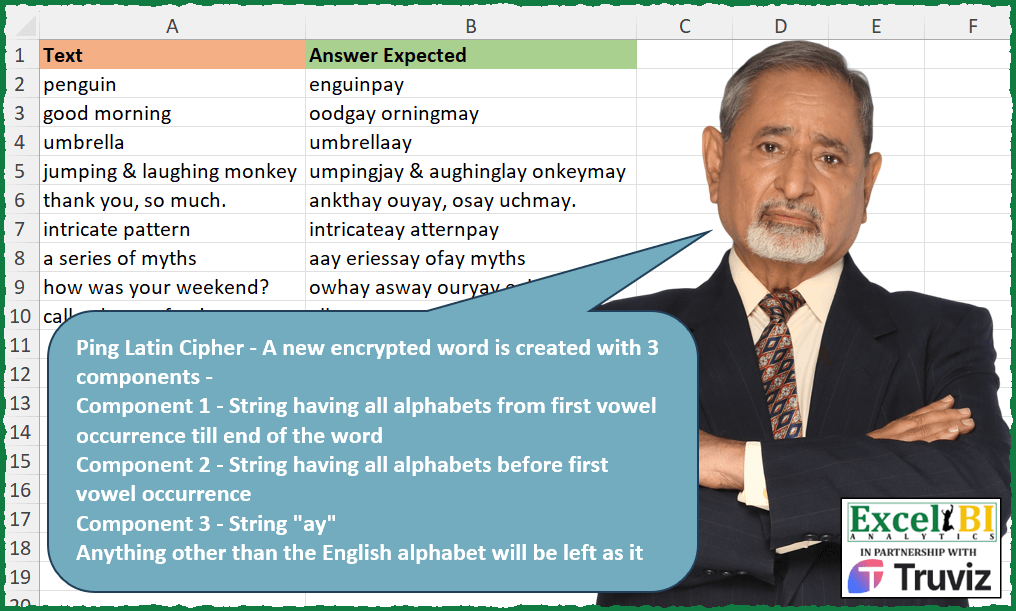
Pig Latin Cipher – A new encrypted word is created with 3 components – Component 1 – String having all alphabets from first vowel occurrence till end of the word Component 2 – String having all alphabets before first vowel occurrence Component 3 – String “ay” Anything other than the English alphabet will be left as it is. Ex – tiger Component 1 – “iger” Component 2 – “t” Component 3 = “ay” Hence, result would be “igertay”
📌 Challenge Details and Links
ExcelBI Excel Challenge Number: 348
Challenge Difficulty: ⭐️⭐️
📥Download Sample File
📥Link to the solutions on LinkedIn
Solving the challenge of Convert to Pig Latin Cipher with Power Query
Power Query solution 1 for Convert to Pig Latin Cipher, proposed by Zoran Milokanović:
let
  Source = Excel.CurrentWorkbook(){[Name = "Input"]}[Content],
  E = each
    let
      p = Text.PositionOfAny(_, {"a", "e", "i", "o", "u"})
    in
      (if p = - 1 then _ else Text.End(_, Text.Length(_) - p) & Text.Start(_, p)) & "ay",
  S = Table.TransformRows(
    Source,
    each
      let
        a = each List.Contains({"a" .. "z"}, _)
      in
        Text.Combine(
          List.Transform(
            List.Accumulate(
              Text.ToList([Text]),
              {},
              (s, c) =>
                let
                  l = List.Last(s)
                in
                  if s = {} then
                    s & {c}
                  else if a(Text.At(Text.Reverse(l), 0)) and a(c) then
                    List.RemoveLastN(s) & {l & c}
                  else
                    s & {c}
            ),
            each if a(Text.At(_, 0)) then E(_) else _
          )
        )
  )
in
  S
Power Query solution 2 for Convert to Pig Latin Cipher, proposed by Alejandro Simón 🇵🇦 🇪🇸:
let
  Source = Excel.CurrentWorkbook(){[Name = "Table1"]}[Content],
  Sol = Table.AddColumn(
    Source,
    "Answer",
    (x) =>
      let
        a = Text.ToList,
        b = Text.Replace,
        c = List.Transform,
        y = List.Zip({{".", ",", "?", "!"}, {" .", " ,", " ?", " !"}}),
        z = List.Accumulate(y, x[Text], (s, c) => b(s, c{0}, c{1})),
        d = Text.Split(z, " "),
        e = c(d, a),
        f = c(e, each try List.PositionOfAny(_, a("aeiou")) otherwise null),
        g = c(
          {0 .. List.Count(e) - 1},
          each Text.Combine(
            try List.Skip(e{_}, f{_}) & List.FirstN(e{_}, f{_}) & {"a", "y"} otherwise e{_}
          )
        ),
        h = Text.Combine(g, " "),
        i = List.Accumulate(y, h, (s, c) => b(s, c{1}, c{0}))
      in
        i
  )[[Answer]]
in
  Sol
Power Query solution 3 for Convert to Pig Latin Cipher, proposed by Luan Rodrigues:
let
  Fonte = Tabela1,
  res = Table.AddColumn(
    Fonte,
    "Personalizar",
    each Text.Combine(
      [
        a = List.Transform(
          Text.Split([Text], " "),
          each [
            o = Splitter.SplitTextByCharacterTransition({"a" .. "z"}, {"a", "e", "i", "o", "u"})(_),
            p =
              if List.ContainsAny(
                List.Difference({"a" .. "z"}, {"a", "e", "i", "o", "u"}),
                {Text.ToList(List.First(o)){0}}
              )
                = true
              then
                Text.Select(Text.Combine(List.RemoveFirstN(o) & {List.First(o)}), {"a" .. "z"})
                  & "ay"
              else if o{0} = Text.Combine(o) = true then
                null
              else
                Text.Combine(o & {"ay"})
          ][p]
        ),
        b = List.Transform(
          List.Zip(
            {
              a,
              List.Transform(
                Text.Split([Text], " "),
                each Text.Select(_, {".", ",", "?", "&", "!"})
              )
            }
          ),
          Text.Combine
        )
      ][b],
      " "
    )
  )
in
  res
Solving the challenge of Convert to Pig Latin Cipher with Excel
Excel solution 1 for Convert to Pig Latin Cipher, proposed by Bo Rydobon 🇹🇭:
=MAP(
    A2:A10,
    LAMBDA(
        a,
        LET(
            d,
            IFERROR(
                TEXTSPLIT(
                    a,
                    CHAR(
                        SEQUENCE(
                            26,
                            ,
                            97
                        )
                    ),
                    ,
                    1
                ),
                ""
            ),

            m,
            MAP(
                IFERROR(
                    TEXTSPLIT(
                        a,
                        d,
                        ,
                        1
                    ),
                    a
                ),
                LAMBDA(
                    b,
                    LET(
                        c,
                        @TEXTSPLIT(
                            b,
                            {"a",
                            "e",
                            "i",
                            "o",
                            "u"}
                        ),
                        MID(
                            b,
                            LEN(
                                c
                            )+1,
                            99
                        )&c&"ay"
                    )
                )
            ),

            CONCAT(
                m&EXPAND(
                    d,
                    ,
                    COUNTA(
                        m
                    ),
                    ""
                )
            )
        )
    )
)
Excel solution 2 for Convert to Pig Latin Cipher, proposed by John V.:
=MAP(A2:A10,
    LAMBDA(t,
    TEXTJOIN(" ",
    ,
    MAP(TEXTSPLIT(
        t,
        " "
    ),
    LAMBDA(x,
    LET(w,
    IF(
        COUNT(
            SEARCH(
                CHAR(
                    ROW(
                        97:122
                    )
                ),
                x
            )
        ),
        x&"ay",
        x
    ),
    s,
    SEQUENCE(
        LEN(
            w
        )
    ),
    m,
    MID(
        w,
        s,
        1
    ),
    CONCAT(SORTBY(m,
    s+((s0
        )
    ))+2*(s>LEN(
        x
    ))+3*(m<"a"))/1%))))))))
Excel solution 3 for Convert to Pig Latin Cipher, proposed by محمد حلمي:
=
MAP(
    A2:A10,
    LAMBDA(
        x,
        TEXTJOIN(
            " ",
            ,

            MAP(
                TEXTSPLIT(
                    x,
                    " "
                ),
                LAMBDA(
                    a,
                    LET(

                        e,
                        {"a",
                        "e",
                        "i",
                        "o",
                        "u"},
                        r,
                        RIGHT(
                            a
                        ),
                        j,
                        r<"9",

                        s,
                        MIN(
                            FIND(
                                e,
                                a&e
                            )
                        ),

                        IF(
                            a<"9",
                            a,
                            MID(
                                a,
                                s,
                                LEN(
                            a
                        )-s-j+1
                            )&
                            LEFT(
                                a,
                                s-1
                            )&"ay"&REPT(
                                r,
                                j
                            )
                        )
                    )
                )
            )
        )
    )
)
Why >"9"
To avoid most signs other than English letters
Test this please
=SORT(
    CHAR(
        SEQUENCE(
            255
        )
    )
)
Excel solution 4 for Convert to Pig Latin Cipher, proposed by Julian Poeltl:
=MAP(
    A2:A10,
    LAMBDA(
        T,
        LET(
            V,
            HSTACK(
                "A",
                "E",
                "I",
                "O",
                "U"
            ),
            SP,
            TEXTSPLIT(
                T,
                " "
            ),
            I,
            CODE(
                RIGHT(
                    SP
                )
            )<64,
            C,
            IF(
                I,
                LEFT(
                    SP,
                    LEN(
                    SP
                )-1
                ),
                SP
            ),
            II,
            IF(
                I,
                RIGHT(
                    SP
                ),
                ""
            ),
            TEXTJOIN(
                " ",
                ,
                MAP(
                    C,
                    II,
                    LAMBDA(
                        A,
                        B,
                        LET(
                            S,
                            MID(
                                A,
                                SEQUENCE(
                                    LEN(
                                        A
                                    )
                                ),
                                1
                            ),
                            X,
                            XMATCH(
                                TRUE,
                                ISNUMBER(
                                    XMATCH(
                                        S,
                                        V
                                    )
                                )
                            ),
                            IFERROR(
                                IFERROR(
                                    CONCAT(
                                        VSTACK(
                                            DROP(
                                                S,
                                                X-1
                                            ),
                                            TAKE(
                                                S,
                                                X-1
                                            )
                                        )
                                    ),
                                    CONCAT(
                                        S
                                    )
                                )&"ay"&B,
                                B
                            )
                        )
                    )
                )
            )
        )
    )
)
Excel solution 5 for Convert to Pig Latin Cipher, proposed by Timothée BLIOT:
=MAP(
    A2:A10,
    LAMBDA(
        z,
        REGEXREPLACE(
            z,
             "(b([^aeious]*)(?=[aeiou]))((?=[aeiou])(w+))",
            "$4$1ay"
        )
    )
)
Excel solution 6 for Convert to Pig Latin Cipher, proposed by Timothée BLIOT:
=0,
     x & "ay",
    MID(
        x,
        V,
         LEN(
             x
         )-V+1
    )&MID(
        x,
        1,
        V-1
    ) & "ay") ))),
     TRIM(
         S(
             CONCAT(
                 TOCOL(
                     VSTACK(
                          HSTACK(
                              "",
                              A
                          ),
                         C
                     ),
                     3,
                     1
                 )
             ),
             "*",
             " "
         )
     ))))
Excel solution 7 for Convert to Pig Latin Cipher, proposed by Hussein SATOUR:
=MAP(A2:A10,
     LAMBDA(x,
     TEXTJOIN(" ",
    ,
     MAP(TEXTSPLIT(
         x,
         ,
         " "
     ),
     LAMBDA(y,
     LET(a,
     MID(
         y,
          SEQUENCE(
              LEN(
                  y
              )
          ),
          1
     ),
     b,
     FILTER(a,
     (CODE(
         a
     )>96) * (CODE(
         a
     )<123)),
     d,
     IFERROR(
         FIND(
             b,
              "aeiou"
         ),
          0
     ),
     c,
     XMATCH(
         TRUE,
          d>0
     )-1,
     IF(ISERROR(
         CONCAT(
             b
         )
     ),
     y,
     CONCAT(IFERROR(
         CONCAT(
             IF(
                 SUM(
                     d
                 ) = 0,
                  b,
                  VSTACK(
                      DROP(
                          b,
                           c
                      ),
                       TAKE(
                          b,
                           c
                      )
                  )
             )
         ),
          y
     )&"ay",
     IFERROR(FILTER(a,
     (CODE(
         a
     ) <97) + (CODE(
         a
     )>122)),
     "")))))))))
Excel solution 8 for Convert to Pig Latin Cipher, proposed by Oscar Mendez Roca Farell:
=MAP(
    A2:A10,
     LAMBDA(
         a,
          CONCAT(
              MAP(
                  TEXTSPLIT(
                      REDUCE(
                          a,
                           {",",
                          ".",
                          "?",
                          "!"},
                           LAMBDA(
                               i,
                                x,
                                SUBSTITUTE(
                                    i,
                                     x,
                                     " "&x
                                )
                           )
                      ),
                       ,
                       " ",
                       1
                  ),
                   LAMBDA(
                       t,
                        LET(
                            _l,
                             MID(
                                 t,
                                  AGGREGATE(
                                      15,
                                      6,
                                      FIND(
                                          {"a",
                                          "e",
                                          "i",
                                          "o",
                                          "u"},
                                           t
                                      ),
                                       1
                                  ),
                                  1
                             ),
                             IFERROR(
                                 " "&_l&TEXTAFTER(
                                     t,
                                     _l
                                 )&TEXTBEFORE(
                                     t,
                                     _l
                                 )&"ay",
                                  t
                             )
                        )
                   )
              )
          )
     )
)
Excel solution 9 for Convert to Pig Latin Cipher, proposed by LEONARD OCHEA 🇷🇴:
=LET(
    F,
    LAMBDA(
        x,
        LET(
            m,
            MIN(
                TOROW(
                    FIND(
                        {"a";"e";"i";"o";"u"},
                        x
                    ),
                    2
                )
            ),
            RIGHT(
                x,
                LEN(
                    x
                )-m+1
            )&LEFT(
                x,
                m-1
            )&"ay"
        )
    ),
    MAP(
        A2:A10,
        LAMBDA(
            a,
            TEXTJOIN(
                " ",
                ,
                MAP(
                    TEXTSPLIT(
                        a,
                        " "
                    ),
                    LAMBDA(
                        b,
                        IF(
                            COUNT(
                                FIND(
                                    RIGHT(
                                        b
                                    ),
                 &                   CHAR(
                                        SEQUENCE(
                                            26,
                                            ,
                                            97
                                        )
                                    )
                                )
                            ),
                            IFERROR(
                                F(
                                        b
                                    ),
                                b&"ay"
                            ),
                            IFERROR(
                                F(
                                    LEFT(
                                        b,
                                        LEN(
                                        b
                                    )-1
                                    )
                                )&RIGHT(
                                        b
                                    ),
                                b
                            )
                        )
                    )
                )
            )
        )
    )
)
Excel solution 10 for Convert to Pig Latin Cipher, proposed by Stefan Olsson:
=MAP(
    A2:A10,

    LAMBDA(
        _t,

        REGEXREPLACE(
            _t,
             "b(?:([a-z]*?)([aeiou][a-z]*)|([a-z]+))",
             "$2$1$3ay"
        )

    )
)
Excel solution 11 for Convert to Pig Latin Cipher, proposed by Pieter de Bruijn:
=MAP(A2:A10,
    LAMBDA(x,
    TEXTJOIN(" ",
    ,
    MAP(TEXTSPLIT(
        x,
        " "
    ),
    LAMBDA(y,
    LET(t,
    MID(
        y,
        SEQUENCE(
            ,
            LEN(
                y
            )
        ),
        1
    ),
    s,
    SCAN(4,
    t,
    LAMBDA(a,
    b,
    IF(OR(
        b={"?",
        "*"}
    ),
    4,
    IF(ISERR(
        SEARCH(
            b,
            "aeiou"
        )
    ),
    IF((CODE(
        b
    )>64)*(CODE(
        b
    )<123),
    IF(
        a=4,
        1,
        IF(
            a=1,
            1,
            2
        )
    ),
    4),
    2)))),
    CONCAT(
        FILTER(
            t,
            s=2,
            ""
        ),
        FILTER(
            t,
            s=1,
            ""
        ),
        IF(
            SUM(
                N(
                    s<4
                )
            ),
            "ay",
            ""
        ),
        FILTER(
            t,
            s=4,
            ""
        )
    )))))))
Excel solution 12 for Convert to Pig Latin Cipher, proposed by Giorgi Goderdzishvili:
=MAP(A2:A10,
    LAMBDA(tg,
    LET(
_vow,
     {"a",
    "e",
    "I",
    "o",
    "u"},

_txt,
    tg,

_sp,
     TEXTSPLIT(
         _txt,
         " "
     ),

_dif,
     MAP(_sp,
    LAMBDA(y,

LET(_lt,
    MID(
        y,
        SEQUENCE(
            ,
            LEN(
                y
            )
        ),
        1
    ),

_cd,
     CODE(
         _lt
     ),

SUM(--((_cd<97) + (_cd>122)))))),

_mp,
     MAP(_sp,
    LAMBDA(x,

XMATCH(TRUE,

(XMATCH(
    MID(
        x,
        SEQUENCE(
            ,
            LEN(
                x
            )
        ),
        1
    ),
    _vow,
    0
))>0,
    0))),

_st,
     LEFT(
         _sp,
         _mp-1
     ),

_end,
     MAP(
         _sp,
         _mp,
         _dif,
         LAMBDA(
             a,
             b,
             c,
             MID(
                 a,
                 b,
                 LEN(
                     a
                 ) - b -c+1
             )
         )
     ),

_finMp,
     MAP(
         _end,
         _st,
         _sp,
         _dif,
         LAMBDA(
             x,
             y,
             z,
             t,

             IF(
                 AND(
                     LEN(
                         z
                     )=1,
                     t
                 ),
                  z,

                 IF(
                     ISERROR(
                x
            ),
                     z&"ay",

                     CONCAT(
                         IFERROR(
                             x,
                             z
                         ),
                         IFERROR(
                             y,
                             z
                         ),
                         "ay",
                         RIGHT(
                             z,
                             t
                         )
                     )
                 )
             )
         )
     ),

_fn,
    TEXTJOIN(
        " ",
        ,
        _finMp
    ),

_fn)))
Excel solution 13 for Convert to Pig Latin Cipher, proposed by Edwin Tisnado:
=MAP(
    A2:A10,
    LAMBDA(
        p,
        LET(
            f,
            LAMBDA(
                t,
                LET(
                    a,
                    {"a",
                    "e",
                    "i",
                    "o",
                    "u"},
                    b,
                    MIN(
                        SEARCH(
                            a,
                            t&a
                        )
                    ),
                    c,
                    MID(
                        t,
                        b,
                        31
                    ),
                    d,
                    LEN(
                        t
                    ),
                    e,
                    c&IF(
                        b>d,
                        "",
                        LEFT(
                            t,
                            d-LEN(
                                c
                            )
                        )
                    )&IF(
                        b>d,
                        t,
                        "ay"
                    ),
                    r,
                    {"?",
                    "!",
                    ",",
                    "."},
                    m,
                    MIN(
                        FIND(
                            r,
                            e&r
                        )
                    ),
                    REPLACE(
                        e,
                        m,
                        1,
                        ""
                    )&MID(
                        e,
                        m,
                        1
                    )
                )
            ),
            TEXTJOIN(
                " ",
                ,
                MAP(
                    TEXTSPLIT(
                        p,
                        " "
                    ),
                    LAMBDA(
                        x,
                        f(
                            x
                        )
                    )
                )
            )
        )
    )
)
Excel solution 14 for Convert to Pig Latin Cipher, proposed by Abdelrahman Omer, MBA, PMP:
=MAP(A2:A10,
    LAMBDA(a,
    LET(b,
    TEXTSPLIT(
        a,
        ,
        " "
    ),
     TEXTJOIN(" ",
    ,
    BYROW(b,
    LAMBDA(x,
    LET(a,
    MIN(
        IFERROR(
            SEARCH(
                {"a";"e";"i";"o";"u"},
                x
            ),
            99
        )
    ),
    y,
    RIGHT(
        x
    ),
    IF(x<"9",
    x,
    CONCAT(MID(x,
    a,
    LEN(
        x
    )-(a>1)-(y<"9")),
    LEFT(
        x,
        a-1
    ),
    "ay",
    REPT(y,
    --(y<"9")))))))))))
Excel solution 15 for Convert to Pig Latin Cipher, proposed by Anup Kumar:
=MAP(A2:A10,
     LAMBDA(s,
    LET(
wa,
     TEXTSPLIT(
         s,
         " "
     ),

TEXTJOIN(
    " ",
    ,
    MAP(
        wa,
         LAMBDA(
             x,

              LET(
                  wd,
                  x,
                  ln,
                  LEN(
                      wd
                  ),
                  lc,
                   UNICODE(
                       RIGHT(
                           wd,
                           1
                       )
                   ),

                   st,
                  MIN(
                      IFERROR(
                          SEARCH(
                              {"a";"e";"i";"o";"u"},
                              wd
                          ),
                          5^5
                      )
                  ),

                   IF(
                       AND(
                           lc<123,
                           lc>96
                       ),
                       IF(
                           ln=1,
                            wd&"ay",
                           IF(
                               st=5^5,
                                wd&"ay",
                                MID(
                                    wd,
                                    st,
                                    ln-st+1
                                )&LEFT(
                                    wd,
                                    st-1
                                )&"ay"
                           )
                       ),
                       IF(
                           ln=1,
                           wd,
                           MID(
                               wd,
                               st,
                               ln-st
                           )&LEFT(
                                    wd,
                                    st-1
                                )&"ay"&UNICHAR(
                                    lc
                                )
                       )
                   )
              )

         )
    )
)
Excel solution 16 for Convert to Pig Latin Cipher, proposed by Diarmuid Early:
=LET(
    vowels,
    {"a",
    "e",
    "i",
    "o",
    "u"},
    ltrs,
    CHAR(
        SEQUENCE(
            26,
            ,
            97
        )
    ),

     pigLatify,
    LAMBDA(
        input,
        LET(

             stub,
            TEXTBEFORE(
                input,
                vowels,
                ,
                ,
                ,
                ""
            ),

             rest,
            IF(
                stub="",
                input,
                TEXTAFTER(
                    input,
                    stub
                )
            ),

             punc,
            TEXTAFTER(
                "a"&input,
                ltrs,
                -1,
                ,
                ,
                ""
            ),

             restExPunc,
            IF(
                punc="",
                rest,
                TEXTBEFORE(
                    rest,
                    punc
                )
            ),

             result,
            restExPunc&stub&IF(
                punc<>input,
                "ay",
                ""
            )&punc,

             result
        )
    ),

     allWords,
    TEXTSPLIT(
        TEXTJOIN(
            "|",
            ,
            A2:A10
        ),
        " ",
        "|"
    ),

     pigLatWords,
    MAP(
        allWords,
        pigLatify
    ),

     output,
    BYROW(
        pigLatWords,
        LAMBDA(
            rw,
            TEXTJOIN(
                " ",
                ,
                TOROW(
                    rw,
                    2
                )
            )
        )
    ),

     output
)
Excel solution 17 for Convert to Pig Latin Cipher, proposed by Jeremy Freelove:
=MAP(A2:A10,
    LAMBDA(ro,
    TEXTJOIN(" ",
    ,
    MAP(TEXTSPLIT(
        ro,
        " "
    ),
    LAMBDA(w,
    LET(r,
    MID(
        w,
        SEQUENCE(
            LEN(
                w
            )
        ),
        1
    ),
    chr,
    (CODE(
        r
    )<97)+(CODE(
        r
    )>122),
    l,
    FILTER(
        r,
        chr=0,
        ""
    ),
    n,
    FILTER(
        r,
        chr=1,
        ""
    ),
    WL,
    COUNTA(
        l
    ),
    v,
    (l="a")+(l="e")+(l="i")+(l="o")+(l="u"),
    NW,
    SORTBY(
        l,
        SEQUENCE(
            WL
        )-WL*ISNUMBER(
            FIND(
                1,
                LEFT(
                    TEXTJOIN(
                        ,
                        ,
                        v
                    ),
                    SEQUENCE(
            WL
        )
                )
            )
        )
    ),
    TEXTJOIN(
        ,
        ,
        NW,
        IF(
            LEN(
                TEXTJOIN(
                    ,
                    ,
                    NW
                )
            )>0,
            "ay",
            ""
        ),
        n
    )))))))
Solving the challenge of Convert to Pig Latin Cipher with Python in Excel
Python in Excel solution 1 for Convert to Pig Latin Cipher, proposed by JvdV -:
=PY(xl("A2:A10").replace(r'b(?:(w*?)([aeiou]w*)|(w+))', r'213ay', regex=True)[0].values)
'b(?:([a-z]*?)([aeiou][a-z]*)|([a-z]+))'
* '(w*?)([aeiou]w*)' - A 1st alternation holding a 1st capture group matching 0+ but as little as possible word-characters. And a 2nd capture group holding a starting vowel and 0+ but greedy word-characters;
=MAP(A2:A10,LAMBDA(s,TEXTJOIN(" ",,MAP(TEXTSPLIT(s," "),LAMBDA(i,LET(v,{"a","e","i","o","u"},b,TEXTBEFORE(i,v,,,,""),a,TEXTAFTER(1&i,1&b),t,RIGHT(i)<"a",IF(LEN(i)-t,LEFT(a,LEN(a)-t)&b&"ay"&RIGHT(a,t),i)))))))
Python in Excel solution 2 for Convert to Pig Latin Cipher, proposed by Owen Price:
1. import re to use regular expression pattern matching
2. Import A2:A10 into a series called s
3. Define a pig_latin function which accepts a phrase and:
 b) creates a list comprehension which
import re
s = xl("A2:A10",False)[0]
def pig_latin(phrase):
 return ' '.join([w if len(w)==1 and not w.isalpha()
 else re.sub(r'^([^aeiou]*)(w*)', '\2\1ay', w)
 for w in words])
s.apply(pig_latin).values
Solving the challenge of Convert to Pig Latin Cipher with R
R solution 1 for Convert to Pig Latin Cipher, proposed by Konrad Gryczan, PhD:
library(tidyverse)
library(readxl)
input = read_excel("Pig Latin Cipher.xlsx", range = "A1:A10") %>% janitor::clean_names()
test = read_excel("Pig Latin Cipher.xlsx", range = "B1:B10") %>% janitor::clean_names()
pigify = function(word) {
 chars = str_split(word, "")[[1]]
 vowels = c("a", "e", "i", "o", "u")
 first_vowel = which(chars %in% vowels)[1]
 if (is.na(first_vowel)) {
 return(paste0(word, "ay"))
 }
 else {
 return(paste0(substr(word, first_vowel, nchar(word)), substr(word, 1, first_vowel - 1), "ay"))
 }
}
result = input %>%
 mutate(answer_expected = str_replace_all(text, "\w+", pigify))
&&