
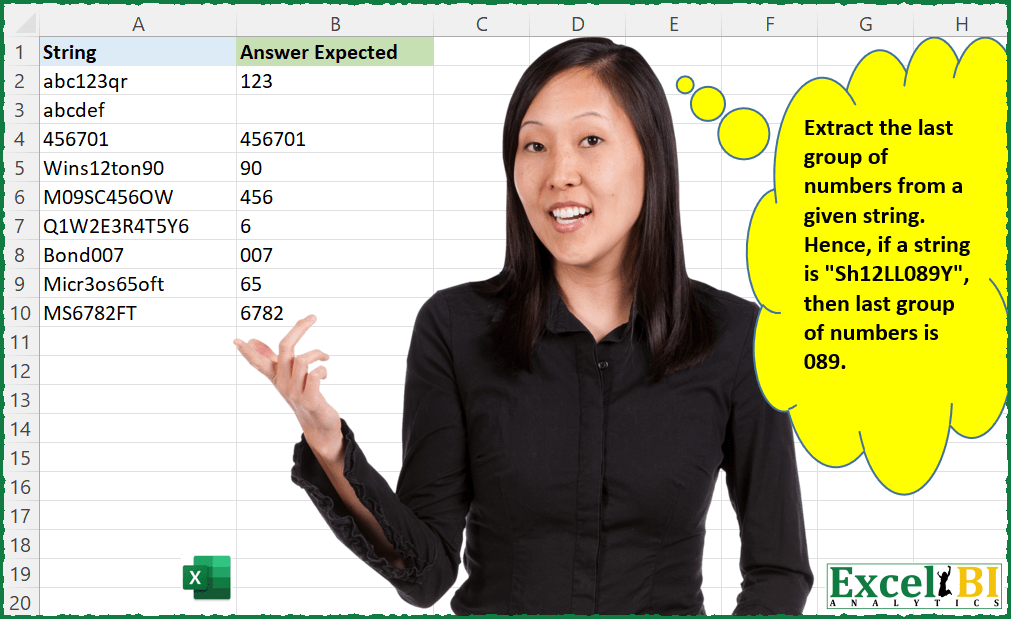
Extract the last group of numbers from a given string. Hence, if a string is “Sh12LL089Y”, then last group of numbers is 089.
📌 Challenge Details and Links
ExcelBI Excel Challenge Number: 34
Challenge Difficulty: ⭐️⭐️
📥Download Sample File
📥Link to the solutions on LinkedIn
Solving the challenge of Extract last group of digits from string with Power Query
Power Query solution 1 for Extract last group of digits from string, proposed by Brian Julius:
let
  Source = Table.AddIndexColumn(StringsRaw, "Index", 1, 1),
  Split = Table.SplitColumn(
    Source,
    "String",
    Splitter.SplitTextByCharacterTransition((c) => not List.Contains({"0" .. "9"}, c), {"0" .. "9"}),
    {"String.1", "String.2", "String.3", "String.4", "String.5", "String.6", "String.7"}
  ),
  Unpivot = Table.UnpivotOtherColumns(Split, {"Index"}, "Attribute", "Value"),
  Split2 = Table.SplitColumn(
    Unpivot,
    "Attribute",
    Splitter.SplitTextByDelimiter(".", QuoteStyle.Csv),
    {"Attribute.1", "Attribute.2"}
  ),
  Strip = Table.AddColumn(Split2, "Custom", each Text.Remove([Value], {"A" .. "z"})),
  Clean = Table.TransformColumnTypes(
    Table.SelectColumns(Strip, {"Custom", "Index", "Attribute.2"}),
    {"Attribute.2", Int64.Type}
  ),
  Group = Table.Group(
    Clean,
    {"Index"},
    {
      {"All", each _, type table [Custom = text, Index = number, Attribute.2 = nullable number]},
      {"Max", each List.Max([Attribute.2]), type nullable number}
    }
  ),
  Expand = Table.SelectRows(
    Table.ExpandTableColumn(Group, "All", {"Custom", "Attribute.2"}, {"Custom", "Attribute.2"}),
    each [Attribute.2] = [Max]
  ),
  Rename = Table.RenameColumns(
    Table.SelectColumns(Expand, {"Custom"}),
    {"Custom", "Expected Answer"}
  )
in
  Rename
Power Query solution 2 for Extract last group of digits from string, proposed by Matthias Friedmann:
let
 Source = Excel.CurrentWorkbook(){[Name="LastNumberGroup"]}[Content],
 #"Added Custom1" = Table.AddColumn(Source, "Start", each
 Text.Start(Text.From([String]),
 List.PositionOfAny(Text.ToList(Text.From([String])),{"0".."9"},Occurrence.Last)+1
 )
 ),
 #"Added Custom2" = Table.AddColumn(#"Added Custom1", "Last Number Group", each
 Text.End([Start],
 Text.Length([Start])-List.PositionOfAny(Text.ToList([Start]),{"A".."Z","a".."z"},Occurrence.Last)-1
 )
 )[[Last Number Group]]
in
 #"Added Custom2"
Power Query solution 3 for Extract last group of digits from string, proposed by Venkata Rajesh:
Text.Select(
  List.Last(
    Splitter.SplitTextByCharacterTransition({"A" .. "Z", "a" .. "z"}, {"0" .. "9"})([String])
  ),
  {"0" .. "9"}
)
Power Query solution 4 for Extract last group of digits from string, proposed by Sue Bayes:
let
  Source = Data,
  #"Added Custom" = Table.AddColumn(
    Source,
    "Custom",
    each Text.TrimEnd(
      Text.Combine(
        List.Transform(
          Text.ToList([String]),
          each if Value.Is(Value.FromText(_), type number) then _ else "_"
        )
      ),
      "_"
    )
  ),
  #"Split after delimiter" = Table.RemoveColumns(
    Table.AddColumn(
      #"Added Custom",
      "Answer",
      each Text.AfterDelimiter([Custom], "_", {0, RelativePosition.FromEnd}),
      type text
    ),
    "Custom"
  )
in
  #"Split after delimiter"
Power Query solution 5 for Extract last group of digits from string, proposed by KHURRAM SHAHZAD:
Add Custom Column option and write following;
= try Number.From([String])
 otherwise
 Text.Select([String],{"0".."9"})
Solving the challenge of Extract last group of digits from string with Excel
Excel solution 1 for Extract last group of digits from string, proposed by Rick Rothstein:
=MAP(A2:A10,LAMBDA(x,LET(L,MID(x,SEQUENCE(LEN(x)),1),T,TEXTSPLIT(TRIM(CONCAT(IF(ISNUMBER(0+L),L," ")))," "),INDEX(IFERROR(T,""),COUNTA(T)))))Excel solution 2 for Extract last group of digits from string, proposed by Rick Rothstein:
=MAP(
    A2:A10,
    LAMBDA(
        x,
        TEXTAFTER(
            " "&TRIM(
                CONCAT(
                    IFERROR(
                        0+MID(
                            x,
                            ROW(
                                1:99
                            ),
                            1
                        ),
                        " "
                    )
                )
            ),
            " ",
            -1
        )
    )
)
Excel solution 3 for Extract last group of digits from string, proposed by محمد حلمي:
=
MAP(A2:A10,
LAMBDA(A,LET(E,TEXTSPLIT(A,CHAR(ROW(65:122)),,1),IFERROR(INDEX(E,COUNTA(E)),""))))
Excel solution 4 for Extract last group of digits from string, proposed by محمد حلمي:
=
MAP(
    A2:A10,

    LAMBDA(
        A,
        LET(
            E,
            TEXTSPLIT(
                A,
                CHAR(
                    ROW(
                        65:122
                    )
                ),
                ,
                1
            ),
            IFERROR(
                TAKE(
                    E,
                    ,
                    -1
                ),
                ""
            )
        )
    )
)
Excel solution 5 for Extract last group of digits from string, proposed by 🇰🇷 Taeyong Shin:
=REGEXEXTRACT(
    A2:A10,
    "d+(?!.*d)|$"
)
Excel solution 6 for Extract last group of digits from string, proposed by Aditya Kumar Darak 🇮🇳:
= MAP(

     A2:A10,

     LAMBDA(

          a,

          LET(

               _splt,

               MID(
                   a,
                    SEQUENCE(
                        LEN(
                            a
                        )
                    ),
                    1
               ),

               _calc,

               IF(
                   ISNUMBER(
                       --_splt
                   ),
                    _splt,
                    " "
               ),

               TEXTAFTER(
                   " " & TRIM(
                       CONCAT(
                           _calc
                       )
                   ),
                    " ",
                    -1,
                    ,
                    1
               )
          )
     )
)

Sol - 2: = MAP(

     " " & A2:A10,

     LAMBDA(

          a,

          LET(

               _splt,

               MID(
                   a,
                    SEQUENCE(
                        LEN(
                            a
                        )
                    ),
                    1
               ),

               _c1,

               ISNUMBER(
                       --_splt
                   ),

               _calc,

               SCAN(
                   0,
                    NOT(
                        _c1
                    ),
                    LAMBDA(
                        b,
                         c,
                         b + c
                    )
               ) * _c1,

               _max,

               MAX(
                           _calc
                       ),

               IF(
                   _max,
                    CONCAT(
                        FILTER(
                            _splt,
                             _max = _calc
                        )
                    ),
                    ""
               )
          )
     )
)
Excel solution 7 for Extract last group of digits from string, proposed by Timothée BLIOT:
=LET(
    CleanedData,


    IFERROR(
        TEXTSPLIT(
            TRIM(

                REDUCE(
                    A2,
                    VSTACK(
                        CHAR(
                            SEQUENCE(
                                26,
                                1,
                                65,
                                1
                            )
                        ),
                        LOWER(
                            CHAR(
                            SEQUENCE(
                                26,
                                1,
                                65,
                                1
                            )
                        )
                        )
                    ),
                    LAMBDA(
                        a,
                        v,
                        SUBSTITUTE(
                            a,
                            v,
                            " "
                        )
                    )
                )

            ),
            " "
        ),
        ""
    ),


    INDEX(
        CleanedData,
        1,
        COLUMNS(
            CleanedData
        )
    )
)
Excel solution 8 for Extract last group of digits from string, proposed by Duy Tùng:
=MAP(
    A2:A10,
    LAMBDA(
        x,
        IFNA(
            BYROW(
                REGEXEXTRACT(
                    x,
                    "d+",
                    1
                )*1,
                LAMBDA(
                    v,
                    LOOKUP(
                        6^9,
                        v
                    )
                )
            ),
            ""
        )
    )
)
Excel solution 9 for Extract last group of digits from string, proposed by Bhavya Gupta:
=TEXTAFTER(
    " "&TRIM(
        REDUCE(
            UPPER(
                A2:A10
            ),
            CHAR(
                SEQUENCE(
                    26,
                    ,
                    65
                )
            ),
            LAMBDA(
                x,
                y,
                SUBSTITUTE(
                    x,
                    y,
                    " "
                )
            )
        )
    ),
    " ",
    -1
)
Excel solution 10 for Extract last group of digits from string, proposed by Charles Roldan:
=MAP(A2:A10,
     LAMBDA(
         g,
          g(
              g
          )
     )(LAMBDA(g,
     LAMBDA(x,
    [y],
     LET(n,
     LEN(
         x
     ),
     IF(n,
     LET(r,
     RIGHT(
         x
     ),
     w,
     REPLACE(
         x,
          n,
          1,

     ),
     IF(ISERR(
         --r
     ),
     IF(y,
     "",
     g(
              g
          )(w)),
     g(
              g
          )(w,
     1) & r)),
     ""))))))
Excel solution 11 for Extract last group of digits from string, proposed by Jardiel Euflázio:
=BYROW(

    A2:A10,


    LAMBDA(

        d,


        LET(

            a,
            LEN(
                d
            ),

            b,
            SEQUENCE(
                a
            ),

            c,
            MID(
                d,
                b,
                1
            ),


            TAKE(
                TEXTSPLIT(
                    " "&TRIM(
                        CONCAT(
                            IF(
                                ISNUMBER(
                                    0+c
                                ),
                                c,
                                " "
                            )
                        )
                    ),
                    ,
                    " "
                ),
                -1
            )

        )

    )

)
Excel solution 12 for Extract last group of digits from string, proposed by Jardiel Euflázio:
=BYROW(

    A2:A10,


    LAMBDA(

        j,


        LET(

            a,
            LEN(
                j
            ),

            b,
            SEQUENCE(
                a
            ),

            c,
            MID(
                j,
                b,
                1
            ),

            d,
            0+c,

            e,
            ISNUMBER(
                d
            ),

            f,
            IF(
                e,
                d,
                " "
            ),

            g,
            CONCAT(
                f
            ),

            h,
            " "&TRIM(
                g
            ),

            i,
            TEXTSPLIT(
                h,
                ,
                " "
            ),


            INDEX(

                i,

                COUNTA(
                    i
                )

            )


        )

    )

)
Excel solution 13 for Extract last group of digits from string, proposed by Jardiel Euflázio:
=BYROW(
A2:A10,

LAMBDA(
i,

LET(

a,LEN(i),
b,SEQUENCE(a),
c,MID(i,b,1),
d,IFERROR(0+c," "),
e,CONCAT(d,),
f,TRIM(e),
g," "&f,
h,LEN(g),

TRIM(RIGHT(SUBSTITUTE(g," ",REPT(" ",h)),h))

)
)
)
Excel solution 14 for Extract last group of digits from string, proposed by Jardiel Euflázio:
=BYROW(

    A2:A10,


    LAMBDA(

        a,


        TAKE(


            TEXTSPLIT(
                " "&TRIM(
                    CONCAT(
                        IFERROR(
                            0+MID(
                                a,
                                SEQUENCE(
                                    LEN(
                                        a
                                    )
                                ),
                                1
                            ),
                            " "
                        )
                    )
                ),
                ,
                " "
            ),

            -1

        )


    )

)
Excel solution 15 for Extract last group of digits from string, proposed by Cary Ballard, DML:
=MAP(

     A2:A10,

     LAMBDA(
         m,
          LET(
              a,
               TAKE(
                   TEXTSPLIT(
                       m,
                        TEXTSPLIT(
                            m,
                             SEQUENCE(
                                 10,
                                  ,
              &                    0
                             ),
                             ,
                             1
                        ),
                        ,
                        1
                   ),
                    ,
                    -1
               ),
               IF(
                   ISNUMBER(
                       --m
                   ),
                    m,
                    IFERROR(
                        a,
                         m
                    )
               )
          )
     )

)
Excel solution 16 for Extract last group of digits from string, proposed by Riley Johnson:
=LET(

     _strings,
     Table1[String],


     _extract_group,
    LAMBDA(
        _chars,
        _ME,

         LET(

              _last_char,
              INDEX(
                   +_chars,
                   ROWS(
                        _chars
                   )
              ),


              IF(
                   ISNUMBER(
                        --_last_char
                   ),

                   _ME(
                        DROP(
                             _chars,
                             -1
                        ),
                        _ME
                   ) & _last_char,

                   ""

              )

         )

    ),


     _extract,
     LAMBDA(
         _string,

          LET(

               _chars,
               MID(
                    _string,
                    SEQUENCE(
                         LEN(
                             _string
                         )
                    ),
                    1
               ),

               _last_num,
               XMATCH(
                    TRUE,
                    ISNUMBER(
                         --_chars
                    ),
                    0,
                    -1
               ),


               IF(
                    OR(
                         ISNUMBER(
                         --_chars
                    )
                    ),

                    _extract_group(
                         TAKE(
                              _chars,
                              _last_num
                         ),
                         _extract_group
                    ),

                    ""

               )

          )

     ),


     MAP(
         _strings,
          _extract
     )

)
Excel solution 17 for Extract last group of digits from string, proposed by Crispo Mwangi:
=CONCAT(
    IFERROR(
        MID(
            A2,
            SEQUENCE(
                LEN(
                    A2
                )
            ),
            1
        )+0,
        ""
    )
)
Solving the challenge of Extract last group of digits from string with Python in Excel
Python in Excel solution 1 for Extract last group of digits from string, proposed by Alejandro Campos:
import re
strings = xl("A2:A10")[0]
def extract_last_group(s):
 match = re.findall(r'd+', s)
 return match[-1] if match else ''
results = [extract_last_group(s) for s in strings]
df = pd.DataFrame({'String': strings, 'Last Group of Numbers': results})
df