
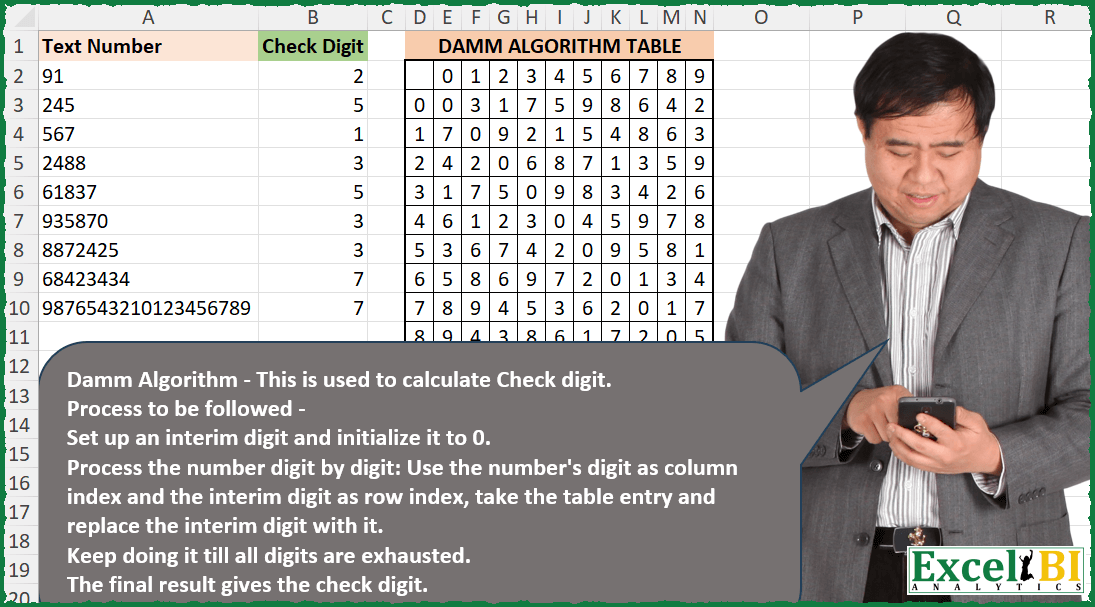
Calculate check digit using Damm algorithm. Damm Algorithm – This is used to calculate Check digit. Process to be followed – Set up an interim digit and initialize it to 0. Process the number digit by digit: Use the number’s digit as column index and the interim digit as row index, take the table entry and replace the interim digit with it. Keep doing it till all digits are exhausted. The final result gives the check digit. The source of the challenge is given in Excel file itself, in case, you need to refer. This also has an illustrated example.
📌 Challenge Details and Links
ExcelBI Excel Challenge Number: 338
Challenge Difficulty: ⭐️⭐️
📥Download Sample File
📥Link to the solutions on LinkedIn
Solving the challenge of Calculate check digit using Damm algorithm with Power Query
Power Query solution 1 for Calculate check digit using Damm algorithm, proposed by Zoran Milokanović:
let
  Source = each Excel.CurrentWorkbook(){[Name = _]}[Content],
  R = (x, y) =>
    if List.IsEmpty(x) then
      y
    else
      @R(List.Skip(x), Table.ToRows(Table.PromoteHeaders(Source("Table2"))){y}{x{0} + 1}),
  S = List.Transform(
    Source("Table1")[Text Number],
    each R(List.Transform(Text.ToList(_), Number.From), 0)
  )
in
  S
Power Query solution 2 for Calculate check digit using Damm algorithm, proposed by Zoran Milokanović:
let
  Source = each Excel.CurrentWorkbook(){[Name = _]}[Content],
  T = List.Transform,
  S = List.Skip,
  C = T(
    Source("Table1")[Text Number],
    each List.Accumulate(
      T(Text.ToList(_), Number.From),
      0,
      (s, c) => T(S(Table.ToRows(Source("Table2"))), S){s}{c}
    )
  )
in
  C
Power Query solution 3 for Calculate check digit using Damm algorithm, proposed by Alejandro Simón 🇵🇦 🇪🇸:
let
 PH = Table.PromoteHeaders(Excel.CurrentWorkbook(){1}[Content], [PromoteAllScalars=true]),
 Sol = Table.AddColumn(Excel.CurrentWorkbook(){0}[Content], "Check Digit", each
 let
 a = Text.ToList([Text Number]),
 b = List.Accumulate(a, 0, (s,c)=> Record.Field(PH{s}, c))
 in b)
in
 Sol


        Show translation


        Show translation of this comment
Power Query solution 4 for Calculate check digit using Damm algorithm, proposed by Alejandro Simón 🇵🇦 🇪🇸:
let
  PH = Table.PromoteHeaders(Excel.CurrentWorkbook(){1}[Content], [PromoteAllScalars = true]),
  Sol = Table.AddColumn(
    Excel.CurrentWorkbook(){0}[Content],
    "Check Digit",
    each
      let
        a = List.Transform(Text.ToList([Text Number]), Number.From),
        b = List.Accumulate(a, 0, (s, c) => Record.ToList(PH{s}){c + 1})
      in
        b
  )
in
  Sol
Power Query solution 5 for Calculate check digit using Damm algorithm, proposed by Rafael González B.:
let
Source = Excel.CurrentWorkbook(){1}[Content],
DT = Excel.CurrentWorkbook(){0}[Content],
Result = Table.AddColumn(Source, "Check Digit", each
let
nt = Text.ToList([Text Number]),
DigVer = List.Generate(
() => [i = -1, F = 0, C = nt{0}, V = 0],
each [i] < List.Count(nt)-1,
each [
i = [i] + 1,
RF = Record.Field,
F = RF(DT{[F]}, [C]),
C = nt{i+1},
V = RF(DT{F}, C)
],
each [V]
)
in
List.Last(DigVer)
)
in
Result
🧙♂️🧙♂️🧙♂️
Solving the challenge of Calculate check digit using Damm algorithm with Excel
Excel solution 1 for Calculate check digit using Damm algorithm, proposed by Bo Rydobon 🇹🇭:
=MAP(
    A2:A10,
    LAMBDA(
        n,
        REDUCE(
            0,
            MID(
                n,
                SEQUENCE(
                    LEN(
                        n
                    )
                ),
                1
            )+1,
            LAMBDA(
                a,
                v,
                INDEX(
                    E3:N12,
                    a+1,
                    v
                )
            )
        )
    )
)
Excel solution 2 for Calculate check digit using Damm algorithm, proposed by Bo Rydobon 🇹🇭:
=REDUCE(
    0,
    SEQUENCE(
        20
    ),
    LAMBDA(
        a,
        n,
        IFERROR(
            INDEX(
                E3:N12,
                a+1,
                MID(
                    A2:A10,
                    n,
                    1
                )+1
            ),
            a
        )
    )
)
Excel solution 3 for Calculate check digit using Damm algorithm, proposed by Rick Rothstein:
=MAP(
    A2:A10,
    LAMBDA(
        n,
        REDUCE(
            0,
            MID(
                n,
                SEQUENCE(
                    LEN(
                        n
                    )
                ),
                1
            ),
            LAMBDA(
                a,
                x,
                INDEX(
                    E3:N12,
                    a+1,
                    x+1
                )
            )
        )
    )
)
Excel solution 4 for Calculate check digit using Damm algorithm, proposed by John V.:
=MAP(
    A2:A10,
    LAMBDA(
        x,
        REDUCE(
            0,
            MID(
                x,
                SEQUENCE(
                    LEN(
                        x
                    )
                ),
                1
            ),
            LAMBDA(
                a,
                v,
                INDEX(
                    E3:N12,
                    1+a,
                    1+v
                )
            )
        )
    )
)
Excel solution 5 for Calculate check digit using Damm algorithm, proposed by محمد حلمي:
=MAP(
    A2:A10,
    LAMBDA(
        x,
        REDUCE(
            0,
            SEQUENCE(
                LEN(
                    x
                )
            ),
            LAMBDA(
                a,
                d,
                INDEX(
                    E3:N12,
                    TAKE(
                        a,
                        -1
                    )+1,
                    MATCH(
                        --MID(
                            x,
                            d,
                            1
                        ),
                        E2:N2
                    )
                )
            )
        )
    )
)
Excel solution 6 for Calculate check digit using Damm algorithm, proposed by Julian Poeltl:
=MAP(
    A2:A10,
    LAMBDA(
        A,
        TAKE(
            SCAN(
                0,
                MID(
                    A,
                    SEQUENCE(
                        LEN(
                            A
                        )
                    ),
                    1
                ),
                LAMBDA(
                    A,
                    B,
                    INDEX(
                        F3:O12,
                        A+1,
                        B+1
                    )
                )
            ),
            -1
        )
    )
)
Excel solution 7 for Calculate check digit using Damm algorithm, proposed by Timothée BLIOT:
=MAP(A2:A10,LAMBDA(z,TAKE(SCAN(0,--MID(z,SEQUENCE(LEN(z)),1),LAMBDA(a,v, INDEX(E3:N12,XMATCH(a,D3:D12),XMATCH(v,E2:N2)))),-1)))Excel solution 8 for Calculate check digit using Damm algorithm, proposed by Sunny Baggu:
=MAP(

     A2:A10,

     LAMBDA(
         x,

          REDUCE(

               0,

               MID(
                   x,
                    SEQUENCE(
                        LEN(
                            x
                        )
                    ),
                    1
               ) + 0,

               LAMBDA(
                   a,
                    v,

                    INDEX(
                        E3:N12,
                         XMATCH(
                             a,
                              D3:D12
                         ),
                         XMATCH(
                             v,
                              E2:N2
                         )
                    )

               )

          )

     )

)
Excel solution 9 for Calculate check digit using Damm algorithm, proposed by LEONARD OCHEA 🇷🇴:
=MAP(
    A2:A10,
    LAMBDA(
        x,
        REDUCE(
            0,
            SEQUENCE(
                LEN(
                    x
                )
            ),
            LAMBDA(
                a,
                b,
                INDEX(
                    E3:N12,
                    a+1,
                    MID(
                        x,
                        b,
                        1
                    )+1
                )
            )
        )
    )
)
Excel solution 10 for Calculate check digit using Damm algorithm, proposed by Charles Roldan:
=LET(Data,
    A2:A10,
    DammTable,
    E3:N12,

TextToArray,
    LAMBDA(
        a,
        MID(
            a,
            SEQUENCE(
                LEN(
                    a
                )
            ),
            1
        )
    ),

Successor,
    LAMBDA(
        a,
        b,
        INDEX(
            DammTable,
            a+1,
            b+1
        )
    ),

Check,
    LAMBDA(
        Number,
        REDUCE(
            0,
            --TextToArray(
                Number
            ),
            Successor
        )
    ),

MAP(
    Data,
    Check
)
Excel solution 11 for Calculate check digit using Damm algorithm, proposed by Julien Lacaze:
=MAP(
    A2:A10,
    LAMBDA(
        a,
        REDUCE(
            0,
            MID(
                a,
                SEQUENCE(
                    LEN(
                        a
                    )
                ),
                1
            ),
            LAMBDA(
                b,
                v,
                INDEX(
                    D2:N12,
                    b+2,
                    v+2
                )
            )
        )
    )
)
Excel solution 12 for Calculate check digit using Damm algorithm, proposed by Pieter de Bruijn:
=LAMBDA(
    t,
    MAP(
        t,
        LAMBDA(
            n,
            REDUCE(
                0,
                MID(
                    n,
                    SEQUENCE(
                        LEN(
                            n
                        )
                    ),
                    1
                )+1,
                LAMBDA(
                    x,
                    y,
                    INDEX(
                        E3:N12,
                        x+1,
                        y
                    )
                )
            )
        )
    )
)(A2:A10)
Excel solution 13 for Calculate check digit using Damm algorithm, proposed by Ziad A.:
=MAP(
    A2:A10,
    LAMBDA(
        n,
        REDUCE(
            INDEX(
                E3:N12,
                1,
                XMATCH(
                    --LEFT(
                        n
                    ),
                    E2:N2
                )
            ),
            SEQUENCE(
                LEN(
                        n
                    )-1
            ),
            LAMBDA(
                a,
                i,
                INDEX(
                    E3:N12,
                    a+1,
                    XMATCH(
                        --MID(
                            n,
                            i+1,
                            1
                        ),
                        E2:N2
                    )
                )
            )
        )
    )
)

EDIT (There's no need to hardcode the first iteration)

=MAP(
    A2:A10,
    LAMBDA(
        n,
        REDUCE(
            ,
            SEQUENCE(
                LEN(
                        n
                    )
            ),
            LAMBDA(
                a,
                i,
                INDEX(
                    E3:N12,
                    a+1,
                    XMATCH(
                        --MID(
                            n,
                            i,
                            1
                        ),
                        E2:N2
                    )
                )
            )
        )
    )
)

EDIT 2 (No need for XMATCH. Inspired by Rick Rothstein)

=MAP(
    A2:A10,
    LAMBDA(
        n,
        REDUCE(
            ,
            SEQUENCE(
                LEN(
                        n
                    )
            ),
            LAMBDA(
                a,
                i,
                INDEX(
                    E3:N12,
                    a+1,
                    MID(
                            n,
                            i,
                            1
                        )+1
                )
            )
        )
    )
)
Excel solution 14 for Calculate check digit using Damm algorithm, proposed by Giorgi Goderdzishvili:
=MAP(A2:A10,LAMBDA(y,LET(
_grid,$E$3:$N$12,
_nm,TEXT(y,"###"),
_arr,MID(_nm,SEQUENCE(,LEN(_nm)),1)*1,
REDUCE(0,_arr,LAMBDA(a,v,INDEX(_grid,a+1,v+1))))))
Excel solution 15 for Calculate check digit using Damm algorithm, proposed by Edwin Tisnado:
=MAP(A2:A10,LAMBDA(t,REDUCE(0,MID(t,SEQUENCE(LEN(t)),1),LAMBDA(x,y,INDEX(E3:N12,x+1,y+1)))))Excel solution 16 for Calculate check digit using Damm algorithm, proposed by Abdelrahman Omer, MBA, PMP:
=MAP(A2:A10,LAMBDA(a,REDUCE(0,MID(a,SEQUENCE(LEN(a)),1),LAMBDA(x,y,INDEX(E3:N12,x+1,y+1)))))Excel solution 17 for Calculate check digit using Damm algorithm, proposed by LUIS FLORENTINO COUTO CORTEGOSO:
=LET(
    _f,
    LAMBDA(
        n,
        LET(
            d,
            VALUE(
                MID(
                    n,
                    SEQUENCE(
                        LEN(
                            n
                        ),
                        1
                    ),
                    1
                )
            ),
            REDUCE(
                0,
                d,
                LAMBDA(
                    f,
                    c,
               &     INDEX(
                        E3:N12,
                        f+1,
                        c+1
                    )
                )
            )
        )
    ),
    MAP(
        A2:A10,
        LAMBDA(
            x,
            _f(
                x
            )
        )
    )
)
Solving the challenge of Calculate check digit using Damm algorithm with Python in Excel
Python in Excel solution 1 for Calculate check digit using Damm algorithm, proposed by John V.:
Hi everyone!
def f(n):
 return reduce(lambda i, d: xl("E3:N12")[int(d)][i], str(n), 0)
[f(x) for x in xl("A2:A10")[0]]
Blessings!
Python in Excel solution 2 for Calculate check digit using Damm algorithm, proposed by Owen Price:
Here's a Python method:
def damm_algorithm(op_array):
 def check(sequence):
 interim = 0
 for digit in str(sequence):
 digit = int(digit)
 interim = op_array[interim][digit]
 return interim

 return check

xl("A3:A11")[0].apply(damm_algorithm(xl("F4:O13").values)).values
Solving the challenge of Calculate check digit using Damm algorithm with R
R solution 1 for Calculate check digit using Damm algorithm, proposed by Konrad Gryczan, PhD:
library(tidyverse)
library(readxl)
input = read_excel("Damm Algorithm.xlsx", range = "A1:A10")
test = read_excel("Damm Algorithm.xlsx", range = "B1:B10")
code_table = read_excel("Damm Algorithm.xlsx", range = "D2:N12", col_names = T) %>%
 column_to_rownames("...1") %>%
 as.matrix()
compute_damm_check_digit <- function(number, damm_matrix) {
 digits <- as.integer(unlist(strsplit(as.character(number), "")))
 accumulate(digits, ~ damm_matrix[.x + 1, .y + 1], .init = 0) %>%
 tail(1)
}
result = input %>%
 mutate(`Check Digit` = map_dbl(input$`Text Number`, compute_damm_check_digit, damm_matrix = code_table))
&&