
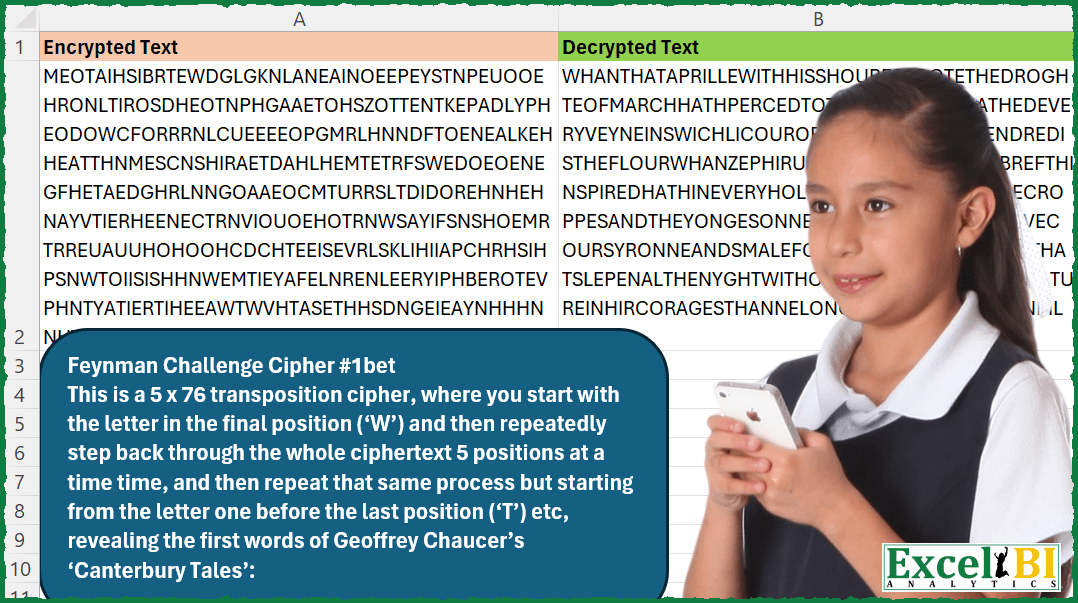
This is a 5 x 76 transposition cipher, where you start with the letter in the final position (‘W’) and then repeatedly step back through the whole ciphertext 5 positions at a time time, and then repeat that same process but starting from the letter one before the last position (‘T’) etc, revealing the first words of Geoffrey Chaucer’s ‘Canterbury Tales’. Note – Input and output don’t have line breaks. They are continuous text. I have just wrapped the text for sake of presentation. Source of challenge in mentioned in Excel file, in case you need it.
📌 Challenge Details and Links
ExcelBI Excel Challenge Number: 335
Challenge Difficulty: ⭐️
📥Download Sample File
📥Link to the solutions on LinkedIn
Solving the challenge of Decrypt using 5×76 transposition cipher with Power Query
Power Query solution 1 for Decrypt using 5×76 transposition cipher, proposed by Zoran Milokanović:
let
  Source = Excel.CurrentWorkbook(){0}[Content][Encrypted Text]{0},
  N = 5,
  K = 76,
  S = Text.Combine(
    List.TransformMany(
      {0 .. N - 1},
      (x) => {0 .. K - 1},
      (x, y) => Text.At(Source, N * (K - y) - 1 - x)
    )
  )
in
  S
Power Query solution 2 for Decrypt using 5×76 transposition cipher, proposed by Zoran Milokanović:
let
  Source = Excel.CurrentWorkbook(){[Name = "Input"]}[Content][Encrypted Text]{0},
  L = Text.Length(Source),
  S = List.Accumulate(
    {0 .. L - 1},
    "",
    (s, c) => s & Text.At(Text.Reverse(Source), Number.RoundDown(5 * c / L) + Number.Mod(5 * c, L))
  )
in
  S
Power Query solution 3 for Decrypt using 5×76 transposition cipher, proposed by Zoran Milokanović:
let
  Source = Excel.CurrentWorkbook(){[Name = "Input"]}[Content],
  S = Table.AddColumn(
    Source,
    "Decrypted Text",
    each Text.Combine(
      List.Combine(List.Zip(List.Split(List.Reverse(Text.ToList([Encrypted Text])), 5)))
    )
  )
in
  S
Power Query solution 4 for Decrypt using 5×76 transposition cipher, proposed by Kris Jaganah:
let
  Source = Excel.CurrentWorkbook(){[Name = "Table1"]}[Content],
  Split = Table.TransformColumns(
    Source,
    {{"Encrypted Text", Splitter.SplitTextByRepeatedLengths(1)}}
  ),
  ToCol = Table.FromList(Split{0}[Encrypted Text]),
  Index = Table.AddIndexColumn(ToCol, "Index", 1, 1, Int64.Type),
  Sort = Table.Sort(Index, {{"Index", Order.Descending}}),
  Idx1 = Table.AddIndexColumn(Sort, "Index.1", 1, 1 / 5, Int64.Type),
  Idx1Trnf = Table.TransformColumns(Idx1, {"Index.1", each Number.RoundDown(Number.Round(_, 1), 0)}),
  Group = Table.Group(Idx1Trnf, {"Index.1"}, {"All", each _}),
  Idx2 = Table.AddColumn(Group, "Custom", each Table.AddIndexColumn([All], "Idx_2", 1, 1)),
  Xpand = Table.ExpandTableColumn(
    Idx2,
    "Custom",
    {"Column1", "Index.1", "Idx_2"},
    {"Decrypted Text", "Index.1.1", "Idx_2"}
  ),
  Sort1 = Table.Sort(Xpand, {{"Idx_2", Order.Ascending}, {"Index.1.1", Order.Ascending}}),
  EncryptCol = Table.AddColumn(Sort1, "Encrypted Text", each Text.Combine(Source[Encrypted Text])),
  Combine = Table.Group(
    EncryptCol,
    {"Encrypted Text"},
    {"Decrypted Text", each Text.Combine([Decrypted Text])}
  )
in
  Combine
Power Query solution 5 for Decrypt using 5×76 transposition cipher, proposed by Alejandro Simón 🇵🇦 🇪🇸:
let
 Source = Excel.CurrentWorkbook(){0}[Content],
 Sol = Table.AddColumn(Source, "A", (x)=>
 let
 a = Text.Reverse(x[Encrypted Text]),
 b = List.TransformMany({0..4}, (y)=> {0..75}, (y,z)=> Text.At(a, y+z*5)),
 c = Text.Combine(b)
 in c)[[A]]
in
 Sol

Solución Original:

let
 Source = Excel.CurrentWorkbook(){0}[Content],
 Sol = Table.AddColumn(Source, "A", (x)=>
 let
 a = Text.Reverse(x[Encrypted Text]),
 b = List.Transform({0..4}, each List.Transform({0..75}, (y)=> Text.At(a, _+y*5))),
 c = Text.Combine(List.Combine(b))
 in c)[[A]]
in
 Sol


        Show translation


        Show translation of this comment
Power Query solution 6 for Decrypt using 5×76 transposition cipher, proposed by Alejandro Simón 🇵🇦 🇪🇸:
let
  Source = Excel.CurrentWorkbook(){0}[Content],
  Sol = Table.AddColumn(
    Source,
    "A",
    (x) =>
      let
        a = Text.Reverse(x[Encrypted Text]),
        b = List.Transform({0 .. 4}, each List.Transform({0 .. 75}, (y) => Text.At(a, _ + y * 5))),
        c = Text.Combine(List.Combine(b))
      in
        c
  )[[A]]
in
  Sol
Power Query solution 7 for Decrypt using 5×76 transposition cipher, proposed by Alejandro Simón 🇵🇦 🇪🇸:
let
  Source = Excel.CurrentWorkbook(){0}[Content],
  Sol = Table.AddColumn(
    Source,
    "A",
    (x) =>
      let
        a = Text.Reverse(x[Encrypted Text]),
        b = Text.ToList(a),
        c = List.Transform({0 .. 4}, each List.Transform({0 .. 75}, (y) => b{_ + 5 * y})),
        d = Text.Combine(List.Combine(c))
      in
        d
  )[[A]]
in
  Sol
Power Query solution 8 for Decrypt using 5×76 transposition cipher, proposed by Luan Rodrigues:
let
  Fonte = Tabela1,
  res = Table.AddColumn(
    Fonte,
    "Personalizar",
    each Text.Combine(
      List.Combine(
        List.Zip(
          List.RemoveLastN(
            List.TransformMany(
              List.Select({0 .. Text.Length([Encrypted Text])}, (n) => n / 5 = Int16.From(n / 5)),
              (x) => {Text.Reverse([Encrypted Text])},
              (x, y) => Text.ToList(Text.Range(y, x, 5))
            ),
            1
          )
        )
      )
    )
  )
in
  res
Power Query solution 9 for Decrypt using 5×76 transposition cipher, proposed by Alexis Olson:
let
  CipherText = Excel.CurrentWorkbook(){[Name = "Table1"]}[Content][Encrypted Text]{0},
  n = 5,
  k = 76,
  Indices = List.Combine(
    List.Transform({1 .. n}, (i) => List.Transform({0 .. k - 1}, (j) => n * (k - j) - i))
  ),
  Answer = Text.Combine(List.Transform(Indices, each Text.At(CipherText, _)))
in
  Answer
Solving the challenge of Decrypt using 5×76 transposition cipher with Excel
Excel solution 1 for Decrypt using 5×76 transposition cipher, proposed by Bo Rydobon 🇹🇭:
=CONCAT(
    MID(
        A2,
        WRAPCOLS(
            LEN(
                A2
            )+1-SEQUENCE(
                LEN(
                A2
            )
            ),
            5
        ),
        1
    )
)
Excel solution 2 for Decrypt using 5×76 transposition cipher, proposed by Rick Rothstein:
=LET(
    c,
    LEN(
        A2
    ),
    f,
    LAMBDA(
        t,
        s,
        TEXTJOIN(
            "",
            1,
            MID(
                t,
                SEQUENCE(
                    ROUNDUP(
                        LEN(
                            t
                        )/5,
                        0
                    ),
                    ,
                    s,
                    -5
                ),
                1
            )
        )
    ),
    REDUCE(
        "",
        SEQUENCE(
            5,
            ,
            0
        ),
        LAMBDA(
            a,
            x,
            a&f(
                LEFT(
                    A2,
                    c-x
                ),
                c-x
            )
        )
    )
)
Excel solution 3 for Decrypt using 5×76 transposition cipher, proposed by John V.:
=CONCAT(MID(A2,386-5*COLUMN(A:BX)-ROW(1:5),1))Excel solution 4 for Decrypt using 5×76 transposition cipher, proposed by محمد حلمي:
=LET(
    s,
    SEQUENCE(
        380
    ),

    CONCAT(
        SORTBY(
            MID(
                A2,
                s,
                1
            ),
            -MOD(
                s-1,
                5
            )+1,
            ,
            -s,

        )
    )
)
Excel solution 5 for Decrypt using 5×76 transposition cipher, proposed by محمد حلمي:
=CONCAT(
    TOCOL(
        MID(
            A2,
            381-SEQUENCE(
                76,
                5
            ),
            1
        ),
        ,
        1
    )
)
Excel solution 6 for Decrypt using 5×76 transposition cipher, proposed by Kris Jaganah:
=LET(
    a,
    A2,
    b,
    SEQUENCE(
        LEN(
            a
        )
    ),
    CONCAT(
        INDEX(
            MID(
                a,
                SORT(
                    b,
                    ,
                    -1
                ),
                1
            ),
            WRAPCOLS(
                b,
                5
            )
        )
    )
)
Excel solution 7 for Decrypt using 5×76 transposition cipher, proposed by Kris Jaganah:
=CONCAT(
    WRAPCOLS(
        MID(
            A2,
            SEQUENCE(
                LEN(
                    A2
                ),
                ,
                LEN(
                    A2
                ),
                -1
            ),
            1
        ),
        5
    )
)
Excel solution 8 for Decrypt using 5×76 transposition cipher, proposed by Kris Jaganah:
=CONCAT(
    TOCOL(
        MID(
            A2,
            SEQUENCE(
                76,
                5,
                380,
                -1
            ),
            1
        ),
        ,
        1
    )
)
Excel solution 9 for Decrypt using 5×76 transposition cipher, proposed by Julian Poeltl:
=CONCAT(
    MID(
        A2,
        TOCOL(
            SEQUENCE(
                LEN(
                    A2
                )/5,
                5,
                LEN(
                    A2
                ),
                -1
            ),
            ,
            1
        ),
        1
    )
)
Excel solution 10 for Decrypt using 5×76 transposition cipher, proposed by Timothée BLIOT:
=LET(
    A,
    MID(
        A2,
        SEQUENCE(
            LEN(
                A2
            )
        ),
        1
    ),
    B,
    SORTBY(
        A,
        SEQUENCE(
            ROWS(
                A
            )
        ),
        -1
    ),
    CONCAT(
        WRAPCOLS(
            B,
            5
        )
    )
)
Excel solution 11 for Decrypt using 5×76 transposition cipher, proposed by Hussein SATOUR:
=CONCAT(
    MID(
        A2,
        WRAPCOLS(
            SEQUENCE(
                LEN(
                    A2
                ),
                ,
                LEN(
                    A2
                ),
                -1
            ),
            5
        ),
        1
    )
)
Excel solution 12 for Decrypt using 5×76 transposition cipher, proposed by Sunny Baggu:
=LET(

     _s,
     SEQUENCE(
         LEN(
             A2
         )
     ),

     _ts,
     CONCAT(
         MID(
             A2,
              LEN(
             A2
         ) + 1 - _s,
              1
         )
     ),

     CONCAT(
         TOCOL(
             MID(
                 _ts,
                  SEQUENCE(
                      LEN(
             A2
         ) / 5,
                       5
                  ),
                  1
             ),
              ,
              1
         )
     )

)
Excel solution 13 for Decrypt using 5×76 transposition cipher, proposed by Sunny Baggu:
=LET(

     _s,
     SEQUENCE(
         LEN(
             A2
         )
     ),

     _ts,
     MID(
         A2,
          LEN(
             A2
         ) + 1 - _s,
          1
     ),

     _n,
     MAKEARRAY(

          LEN(
             A2
         ) / 5,

          5,

          LAMBDA(
              r,
               c,
               INDEX(
                   SEQUENCE(
                       76,
                        ,
                        c,
                        5
                   ),
                    r
               )
          )

     ),

     CONCAT(
         TOCOL(
             XLOOKUP(
                 _n,
                  _s,
                  _ts
             ),
              ,
              1
         )
     )

)
Excel solution 14 for Decrypt using 5×76 transposition cipher, proposed by Sunny Baggu:
=CONCAT(
 MID(
 A2,
 WRAPCOLS(SEQUENCE(LEN(A2), , LEN(A2), -1), 5),
 1
 )
)
Excel solution 15 for Decrypt using 5×76 transposition cipher, proposed by LEONARD OCHEA 🇷🇴:
=LET(
    l,
    LEN(
        A2
    ),
    t,
    5,
    REDUCE(
        "",
        SEQUENCE(
            t,
            ,
            0
        ),
        LAMBDA(
            c,
            d,
            CONCAT(
                c,
                REDUCE(
                    "",
                    SEQUENCE(
                        INT(
                            l/t
                        )+1,
                        ,
                        0
                    ),
                    LAMBDA(
                        a,
                        b,
                        CONCAT(
                            a,
                            IFERROR(
                                MID(
                                    A2,
                                    l-t*b-d,
                                    1
                                ),
                                ""
                            )
                        )
                    )
                )
            )
        )
    )
)
Excel solution 16 for Decrypt using 5×76 transposition cipher, proposed by Charles Roldan:
=LAMBDA(
    x,

    CONCAT(
        WRAPC&OLS(
            MID(
                x,
                 SORT(
                     SEQUENCE(
                         LEN(
                             x
                         )
                     ),
                      ,
                      -1
                 ),
                 1
            ),
             5
        )
    )

)(A2)
Excel solution 17 for Decrypt using 5×76 transposition cipher, proposed by Mey Tithveasna:
=CONCAT(
    MID(
        A2,
        WRAPCOLS(
            LEN(
                A2
            )-
            SEQUENCE(
                LEN(
                A2
            )
            )+1,
            5
        ),
        1
    )
)
Excel solution 18 for Decrypt using 5×76 transposition cipher, proposed by Pieter de Bruijn:
=CONCAT(TOCOL(MID(A2,
    SEQUENCE(
        ROUNDUP(
            LEN(
                A2
            )/5,

        ),
        ,
        LEN(
                A2
            ),
        -5
    )-SEQUENCE(,
    LEN(
                A2
            )/(LEN(
                A2
            )/5),
    0),
    1),
    2,
    1))

or
=LET(a,
    LEN(
                A2
            ),
    CONCAT(TOCOL(MID(A2,
    SEQUENCE(
        ROUNDUP(
            a/5,

        ),
        ,
        a,
        -5
    )-SEQUENCE(,
    a/(a/5),
    0),
    1),
    2,
    1)))
Excel solution 19 for Decrypt using 5×76 transposition cipher, proposed by Ziad A.:
=TEXTJOIN(,,ARRAYFORMULA(MID(A2,SEQUENCE(1,76,LEN(A2),-5)-SEQUENCE(5,1,),1)))Excel solution 20 for Decrypt using 5×76 transposition cipher, proposed by Ziad A.:
=CONCAT(
    MID(
        A2,
        SEQUENCE(
            ,
            76,
            LEN(
                A2
            ),
            -5
        )-SEQUENCE(
            5,
            ,
            0
        ),
        1
    )
)
Excel solution 21 for Decrypt using 5×76 transposition cipher, proposed by Giorgi Goderdzishvili:
=LET(
_wr,
    A2,

_ln,
     LEN(
         _wr
     ),

_sq,
    _ln/5,

_mkr,
     MAKEARRAY(5,
    _sq,
    LAMBDA(r,
    c,

(_sq-c)*5+(6-r))),

_new,
    CONCAT(
        TOCOL(
             MID(
                 _wr,
                 _mkr,
                 1
             )
        )
    ),

_new)
Excel solution 22 for Decrypt using 5×76 transposition cipher, proposed by Edwin Tisnado:
=CONCAT(
    MID(
        A2,
        TRANSPOSE(
            SEQUENCE(
                76,
                5,
                380,
                -1
            )
        ),
        1
    )
)
Excel solution 23 for Decrypt using 5×76 transposition cipher, proposed by Abdelrahman Omer, MBA, PMP:
=CONCAT(
    BYCOL(
        MID(
            A2,
            SEQUENCE(
                76,
                5,
                380,
                -1
            ),
            1
        ),
        LAMBDA(
            x,
            CONCAT(
                x
            )
        )
    )
)
Excel solution 24 for Decrypt using 5×76 transposition cipher, proposed by LUIS FLORENTINO COUTO CORTEGOSO:
=REDUCE(
    "",
    LEFT(
        A2,
        LEN(
            A2
        )-{0;1;2;3;4}
    ),
    LAMBDA(
        a,
        t,
        a&LET(
            l,
            LEN(
                t
            ),
            c,
            MID(
                t,
                SEQUENCE(
                    l,
                    ,
                    l,
                    -1
                ),
                1
            ),
            CONCAT(
                CHOOSEROWS(
                    c,
                    SEQUENCE(
                        ROUNDUP(
                            l/5,
                            0
                        ),
                        ,
                        1,
                        5
                    )
                )
            )
        )
    )
)
Excel solution 25 for Decrypt using 5×76 transposition cipher, proposed by Hazem Hassan:
=CONCAT(
    MID(
        A2,
        WRAPCOLS(
            SORT(
                SEQUENCE(
                    LEN(
                        A2
                    )
                ),
                ,
                -1
            ),
            5
        ),
        1
    )
)
Excel solution 26 for Decrypt using 5×76 transposition cipher, proposed by Muhammad Waqas Khan:
=CONCAT(
    TOCOL(
        MID(
            A2,
            SEQUENCE(
                76,
                5,
                380,
                -1
            ),
            1
        ),
        ,
        1
    )
)
Excel solution 27 for Decrypt using 5×76 transposition cipher, proposed by Ritesh Agarwal:
=CONCAT(
    MID(
        A2,
        TOCOL(
            SEQUENCE(
                LEN(
                    A2
                )/5,
                5,
                LEN(
                    A2
                ),
                -1
            ),
            ,
            TRUE
        ),
        1
    )
)
Solving the challenge of Decrypt using 5×76 transposition cipher with Python in Excel
Python in Excel solution 1 for Decrypt using 5×76 transposition cipher, proposed by John V.:
Hi everyone!
''.join(t[:len(t)-i][::-5] for i in range(5))
Blessings!
Python in Excel solution 2 for Decrypt using 5×76 transposition cipher, proposed by JvdV –:
=PY(''.join([xl("A2")[-x::-5] for x in range(1,6)]))Solving the challenge of Decrypt using 5×76 transposition cipher with R
R solution 1 for Decrypt using 5×76 transposition cipher, proposed by Konrad Gryczan, PhD:
library(tidyverse)
library(readxl)
library(stringi)
input = read_excel("Feynman Challenge Cipher.xlsx", range = "A1:A2")
test = read_excel("Feynman Challenge Cipher.xlsx", range = "B1:B2")
result = input$`Encrypted Text` %>%
 stri_reverse() %>%
 str_split("") %>%
 unlist() %>%
 matrix(ncol = 5, byrow = TRUE) %>%
 t() %>%
 as_tibble() %>%
 pmap_chr(~paste(c(...), collapse = "")) %>%
 paste(collapse = "")
&&