
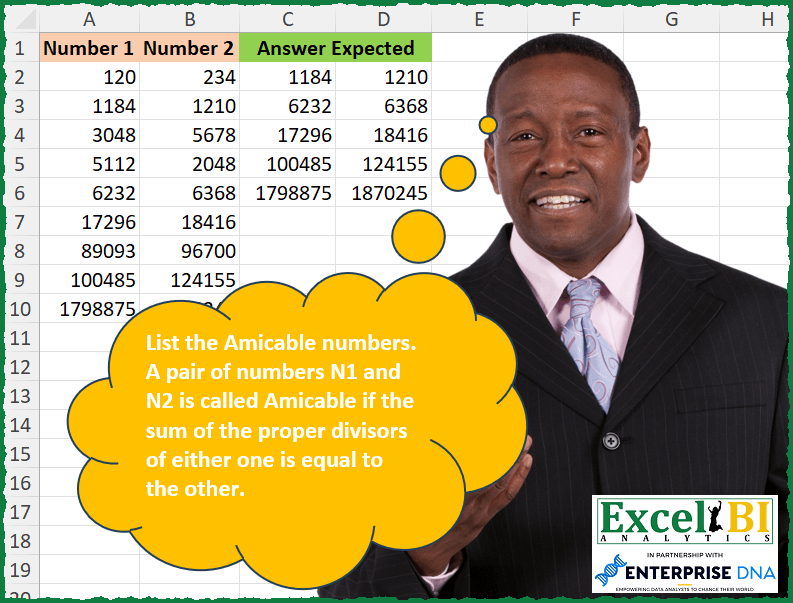
List the Amicable numbers. A pair of numbers N1 and N2 is called Amicable if the sum of the proper divisors of either one is equal to the other. Ex. 220 and 284 Proper divisors of 220 – 1, 2, 4, 5, 10, 11, 20, 22, 44, 55 and 110 -> The sum of proper divisors is 284. Proper divisors of 284 – 1, 2, 4, 71 and 142 -> The sum of proper divisors is 220.
📌 Challenge Details and Links
ExcelBI Excel Challenge Number: 334
Challenge Difficulty: ⭐️
📥Download Sample File
📥Link to the solutions on LinkedIn
Solving the challenge of List all Amicable numbers with Power Query
Power Query solution 1 for List all Amicable numbers, proposed by Zoran Milokanović:
let
  Source = Excel.CurrentWorkbook(){[Name = "Input"]}[Content],
  I = Int64.From,
  L = each List.Sum(
    List.Select(
      {1 .. I(_ / 2)},
      (s) =>
        let
          d = _ / s
        in
          d = I(d)
    )
  ),
  S = Table.SelectRows(Source, each L([Number 1]) = [Number 2] and [Number 1] = L([Number 2]))
in
  S
Power Query solution 2 for List all Amicable numbers, proposed by Alejandro Simón 🇵🇦 🇪🇸:
let
  Source = Excel.CurrentWorkbook(){0}[Content],
  Fx = (f) =>
    let
      a = {2 .. Number.RoundDown(Number.Sqrt(f))},
      b = List.Sum(
        List.Combine(List.Transform(List.Select(a, each Number.Mod(f, _) = 0), each {_} & {f / _}))
      )
        + 1
    in
      b,
  Sol = Table.SelectRows(Source, each Fx([Number 1]) = [Number 2] and Fx([Number 2]) = [Number 1])
in
  Sol
Power Query solution 3 for List all Amicable numbers, proposed by Luan Rodrigues:
let
  Fonte = Tabela1,
  fx = (n) => List.Sum(List.Select(List.Transform({1 .. n}, (x) => n / x), each _ = Int64.From(_))),
  res = Table.SelectRows(Fonte, each fx([Number 1]) = fx([Number 2]))
in
  res
Power Query solution 4 for List all Amicable numbers, proposed by Luan Rodrigues:
let
  Fonte = Tabela1,
  res = Table.SelectRows(
    Fonte,
    each [
      a = List.Sum(
        List.Select(
          List.Transform({1 .. [Number 1]}, (x) => [Number 1] / x),
          each _ = Int64.From(_)
        )
      ),
      b = List.Sum(
        List.Select(
          List.Transform({1 .. [Number 2]}, (x) => [Number 2] / x),
          each _ = Int64.From(_)
        )
      ),
      c = a = b
    ][c]
  )
in
  res
Power Query solution 5 for List all Amicable numbers, proposed by Ramiro Ayala Chávez:
let
  Origen = Excel.CurrentWorkbook(){[Name = "Tabla1"]}[Content],
  Fx = (x) =>
    let
      a = x,
      b = {1 .. Number.RoundDown(a / 2)},
      c = List.Transform(b, each a / _),
      d = List.Zip({b, c}),
      e = List.Select(d, each Number.Mod(_{1}, 1) = 0),
      f = List.Sum(List.Transform(e, each _{0}))
    in
      f,
  g = Table.AddColumn(Origen, "N1", each Fx([Number 1])),
  h = Table.AddColumn(g, "N2", each Fx([Number 2])),
  Sol = Table.SelectRows(h, each [Number 1] = [N2] and [Number 2] = [N1])[[Number 1], [Number 2]]
in
  Sol
Power Query solution 6 for List all Amicable numbers, proposed by Rafael González B.:
let
Source = Excel.CurrentWorkbook(){0}[Content],
Anw = Table.SelectRows(Source, each let
N1 = [Number 1],
N2 = [Number 2],
AN =
let
LN1 = {1..N1},
LN2 = {1..N2},
Fn_SPN = (L1 as list, n as number) =>
let
a = List.Transform(L1, each n/_),
b = List.Select(a, each Number.Mod(_,1) = 0),
x = List.Sum(List.RemoveFirstN(b))
in
x,
Check = Fn_SPN(LN1, N1) = N2 and Fn_SPN(LN2, N2) = N1
in
Check
in
AN)
in
Anw
🧙♂️🧙♂️🧙♂️
Solving the challenge of List all Amicable numbers with Excel
Excel solution 1 for List all Amicable numbers, proposed by Bo Rydobon 🇹🇭:
=LET(a,
    A2:A10,
    b,
    B2:B10,
    x,
    LAMBDA(
        a,
        LET(
            s,
            SEQUENCE(
                a^0.5,
                ,
                2
            ),
            SUM(
                1,
                IF(
                    MOD(
                        a,
                        s
                    ),
                    ,
                    s+a/s
                )
            )
        )
    ),
    FILTER(A2:B10,
    (MAP(
        a,
        x
    )=b)*(MAP(
        b,
        x
    )=a)))
Excel solution 2 for List all Amicable numbers, proposed by John V.:
=FILTER(A2:B10,
    MAP(A2:A10,
    B2:B10,
    LAMBDA(x,
    y,
    LET(f,
    LAMBDA(n,
    LET(s,
    SEQUENCE(
        n/2
    ),
    SUM(TOCOL(s/(MOD(
        n,
        s
    )=0),
    2)))),
    AND(
        f(
            x
        )=y,
        f(
            y
        )=x
    )))))
Excel solution 3 for List all Amicable numbers, proposed by محمد حلمي:
=FILTER(
    A2:B10,
    B2:B10=MAP(
        A2:A10,
        LAMBDA(
            a,
            LET(

                s,
                SEQUENCE(
                    a^0.5
                ),
                SUM(
                    IF(
                        MOD(
                            a/s,
                            1
                        ),
                        ,
                        s+a/s
                    )
                )-a
            )
        )
    )
)
Excel solution 4 for List all Amicable numbers, proposed by Kris Jaganah:
=FILTER(A2:B10,MAP(A2:A10,B2:B10,LAMBDA(x,y,LET(a,SEQUENCE(x/2),b,SUM(FILTER(a,INT(x/a)=x/a)),c,SEQUENCE(y/2),d,SUM(FILTER(c,INT(y/c)=y/c)),(x=d)*(y=b)))))Excel solution 5 for List all Amicable numbers, proposed by Julian Poeltl:
=FILTER(A2:B10,
    LET(L,
    LAMBDA(
        A,
        SUM(
            FILTER(
                SEQUENCE(
                    A/2
                ),
                MOD(
                    A/SEQUENCE(
                    A/2
                ),
                    1
                )=0
            )
        )
    ),
    MAP(A2:A10,
    B2:B10,
    LAMBDA(A,
    B,
    (L(
        A
    )=B)*(L(
        B
    )=A)))))
Excel solution 6 for List all Amicable numbers, proposed by Timothée BLIOT:
=LET(A,A2:A10,B,B2:B10, D,LAMBDA(n,SEQUENCE(ROUNDDOWN(n/2,0))), S,LAMBDA(n,m,SUM(IF(MOD(n,D(n))=0,D(n),0))=m),
FILTER(HSTACK(A,B), MAP(A,B,LAMBDA(x,y,--S(x,y)+--S(y,x)>1))))
Excel solution 7 for List all Amicable numbers, proposed by Hussein SATOUR:
=FILTER(
    A2:B10,
     MAP(
         A2:A10,
         B2:B10,
          LAMBDA(
              y,
              z,
               LET(
                   F,
                    LAMBDA(
                        x,
                         LET(
                             b,
                              SEQUENCE(
                                  ROUNDUP(
                                      SQRT(
                                          x
                                      ),
                                      0
                                  )
                              ),
                              c,
                              x/b,
                              SUM(
                                  FILTER(
                                      HSTACK(
                                          b,
                                          c
                                      ),
                                       c=INT(
                                           c
                                       )
                                  )
                              )
                         )
                    ),
                    F(
                        y
                    )=F(
                        z
                    )
               )
          )
     )
)
Excel solution 8 for List all Amicable numbers, proposed by Sunny Baggu:
=LET(

     _s,
     LAMBDA(
         x,

          SUM(
              FILTER(
                  SEQUENCE(
                      x / 2
                  ),
                   0 = MOD(
                       x,
                        SEQUENCE(
                      x / 2
                  )
                   )
              )
          )

     ),

     FILTER(

          A2:B10,

          MAP(

               A2:A10,

               B2:B10,

               LAMBDA(
                   a,
                    b,
                    AND(
                        _s(
                            a
                        ) = b,
                         _s(
                             b
                         ) = a
                    )
               )

          )

     )

)
Excel solution 9 for List all Amicable numbers, proposed by Abdallah Ally:
=FILTER(
    A2:B10,
    MAP(
        A2:A10,
        B2:B10,
        LAMBDA(
            x,
            y,
            LET(
                a,
                x,
                b,
                y,
                c,
                SEQUENCE(
                    a/2
                ),
                d,
                SEQUENCE(
                    b/2
                ),
                SUM(
                    FILTER(
                        c,
                        MOD(
                            a,
                            c
                        )=0
                    ),
                    a
                )=SUM(
                    FILTER(
                        d,
                        MOD(
                            b,
                            d
                        )=0
                    ),
                    b
                )
            )
        )
    )
)
Excel solution 10 for List all Amicable numbers, proposed by Thang Van:
=LET(_rng1,A2:A10,
_rn2,MAP(A2:A10,B2:B10,LAMBDA(_eachA,_eachB,
LET(
_array,ROW(INDIRECT("1:"&INT(_eachA/2))),
_temp,MAP(_array,LAMBDA(_e,IF(MOD(_eachA,_e)=0,_e,""))),
_r,IF(SUM(FILTER(_temp,_temp<>""))=_eachB,_eachB,""),
_r
)
)
),
FILTER(HSTACK(_rng1,_rn2),_rn2<>"")
)
Excel solution 11 for List all Amicable numbers, proposed by Pieter de Bruijn:
=FILTER(
    A2:B10,
    BYROW(
        MAP(
            A2:B10,
            LAMBDA(
                a,
                LET(
                    x,
                    a/SEQUENCE(
                        a/2
                    ),
                    SUM(
                        TOCOL(
                            IFS(
                                x=INT(
                                    x
                                ),
                                x
                            ),
                            2
                        )
                    )
                )
            )
        )*{1,
        -1},
        SUM
    )=0
)
Excel solution 12 for List all Amicable numbers, proposed by Giorgi Goderdzishvili:
=FILTER(
    A2:B10,
    MAP(
        A2:A10,
        B2:B10,
        LAMBDA(
            x,
            y,

            LET(

                _nm1,
                x,

                _nm2,
                y,

                _sq1,
                SEQUENCE(
                    _nm1/2
                ),

                _sq2,
                SEQUENCE(
                    _nm2/2
                ),

                _dv1,
                 MOD(
                     _nm1,
                     _sq1
                 )=0,

                _dv2,
                MOD(
                    _nm2,
                    _sq2
                )=0,

                _chck,
                 AND(
                     SUM(
                         FILTER(
                             _sq1,
                             _dv1
                         )
                     ) = _nm2,
                     SUM(
                         FILTER(
                             _sq2,
                             _dv2
                         )
                     )=_nm1
                 ),

                _chck
            )
        )
    )
)
Excel solution 13 for List all Amicable numbers, proposed by Edwin Tisnado:
=LET(
    a,
    A2:A10,
    b,
    B2:B10,
    FILTER(
        HSTACK(
            a,
            b
        ),
        MAP(
            a,
            b,
            LAMBDA(
                i,
                j,
                LET(
                    f,
                    LAMBDA(
                        l,
                        LET(
                            s,
                            SEQUENCE(
                                l/2
                            ),
                            SUM(
                                FILTER(
                                    s,
                                    MOD(
                                        l,
                                        s
                                    )=0
                                )
                            )
                        )
                    ),
                    AND(
                        f(
                            i
                        )=j,
                        f(
                            j
                        )=i
                    )
                )
            )
        )
    )
)
Excel solution 14 for List all Amicable numbers, proposed by Abdelrahman Omer, MBA, PMP:
=FILTER(A2:B10,
    MAP(A2:A10,
    B2:B10,
    LAMBDA(a,
    b,
    LET(c,
    MIN(
        a,
        b
    ),
    MAX(
        a,
        b
    )=SUM(SEQUENCE((c-1)/2,
    2)*(MOD(c,
    SEQUENCE((c-1)/2,
    2))=0))))))
Excel solution 15 for List all Amicable numbers, proposed by Hazem Hassan:
=FILTER(A2:B10,
    B2:B10=BYROW(A2:A10,
    LAMBDA(x,
    LET(a,
    SEQUENCE(
        x/2
    ),
    SUM(a*(MOD(
        x,
        a
    )=0))))))
Excel solution 16 for List all Amicable numbers, proposed by Hazem Hassan:
=LET(
    a,
    A2:A10,
    b,
    BYROW(
        a,
        LAMBDA(
            x,
            SUM(
                FILTER(
                    SEQUENCE(
                        x/2
                    ),
                    0=MOD(
                        x,
           &             SEQUENCE(
                        x/2
                    )
                    )
                )
            )
        )
    ),
    FILTER(
        HSTACK(
            a,
            b
        ),
        ISNUMBER(
            VLOOKUP(
                b,
                B2:B10,
                1,
                0
            )
        )
    )
)
Excel solution 17 for List all Amicable numbers, proposed by Ricardo Alexis Domínguez Hernández:
=LET(
    array,
    IFERROR(
        SORT(
            HSTACK(
                MAP(
                    A2:A10,
                    B2:B10,

                    LAMBDA(
                        a,
                        b,

                        IF(
                            SUM(
                                LET(
                                    x,
                                    SEQUENCE(
                                        ROUND(
                                            a/2,
                                            0
                                        ),
                                        2
                                    ),
                                    IF(
                                        MOD(
                                            a,
                                            x
                                        )=0,
                                        x,
                                        ""
                                    )
                                )
                            )=SUM(
                                LET(
                                    x,
                                    SEQUENCE(
                                        ROUND(
                                            b/2,
                                            0
                                        ),
                                        2
                                    ),
                                    IF(
                                        MOD(
                                            b,
                                            x
                                        )=0,
                                        x,
                                        ""
                                    )
                                )
                            ),
                            TEXTJOIN(
                                ",",
                                TRUE,
                                a
                            ),
                            ""
                        )
                    )
                ),

                MAP(
                    A2:A10,
                    B2:B10,

                    LAMBDA(
                        a,
                        b,

                        IF(
                            SUM(
                                LET(
                                    x,
                                    SEQUENCE(
                                        ROUND(
                                            a/2,
                                            0
                                        ),
                                        2
                                    ),
                                    IF(
                                        MOD(
                                            a,
                                            x
                                        )=0,
                                        x,
                                        ""
                                    )
                                )
                            )=SUM(
                                LET(
                                    x,
                                    SEQUENCE(
                                        ROUND(
                                            b/2,
                                            0
                                        ),
                                        2
                                    ),
                                    IF(
                                        MOD(
                                            b,
                                            x
                                        )=0,
                                        x,
                                        ""
                                    )
                                )
                            ),
                            TEXTJOIN(
                                ",",
                                TRUE,
                                b
                            ),
                            ""
                        )
                    )
                )
            )*1,
            ,
            1
        ),
        0
    ),

    FILTER(
        array,
        CHOOSECOLS(
            array,
            1
        )>0
    )
)
Excel solution 18 for List all Amicable numbers, proposed by Moshe Moses, FCCA:
=0,y,0)))=B2)Solving the challenge of List all Amicable numbers with Python in Excel
Python in Excel solution 1 for List all Amicable numbers, proposed by John V.:
Hi everyone!
One [Python] Option could be:
s = lambda n: sum(i for i in range(1, 1 + n//2) if n % i == 0)
[(i, j) for i, j in zip(d[0], d[1]) if s(i) == j and s(j) == i]
Blessings!
Solving the challenge of List all Amicable numbers with R
R solution 1 for List all Amicable numbers, proposed by Konrad Gryczan, PhD:
library(tidyverse)
library(readxl)
library(numbers)
input = read_excel("Amicable Numbers.xlsx", range = "A1:B10") %>% janitor::clean_names()
test = read_excel("Amicable Numbers.xlsx", range = "C1:D6") %>% janitor::clean_names()
divs = function(x) {
 divs_x = divisors(x)
 divs_x[divs_x != x]
}
are_amicable = function(x, y) {
 map2_lgl(x, y, ~ sum(divs(.x)) == .y && sum(divs(.y)) == .x)
}
result = input %>%
 filter(are_amicable(number_1, number_2))
Solving the challenge of List all Amicable numbers with Excel VBA
Excel VBA solution 1 for List all Amicable numbers, proposed by Vasin Nilyok:
VBA
Sub AmicableNumbers()
LastRow = Cells(Rows.Count, 1).End(xlUp).Row
Dim No1Collection As New Collection, No2Collection As New Collection
rAns = 2
For r = 2 To LastRow
 No1Q = Cells(r, 1)
 No2Q = Cells(r, 2)
 For c = 1 To 2
 maxDiv = Fix(Cells(r, c) / 2)
 For i = 1 To maxDiv
 If Cells(r, c) Mod i = 0 Then
 If c = 1 Then
 No1Collection.Add i
 Else
 No2Collection.Add i
 End If
 End If
 Next i
 Next c
 SumDiv1 = 0
 SumDiv2 = 0
 For n = 1 To No1Collection.Count
 SumDiv1 = SumDiv1 + No1Collection(n)
 Next n
 For nn = 1 To No2Collection.Count
 SumDiv2 = SumDiv2 + No2Collection(nn)
 Next nn
 If SumDiv1 = No2Q And SumDiv2 = No1Q Then
 Cells(rAns, 5) = No1Q
 Cells(rAns, 6) = No2Q
 rAns = rAns + 1
 End If
 Set No1Collection = New Collection
 Set No2Collection = New Collection
Next r
End Sub
&&