
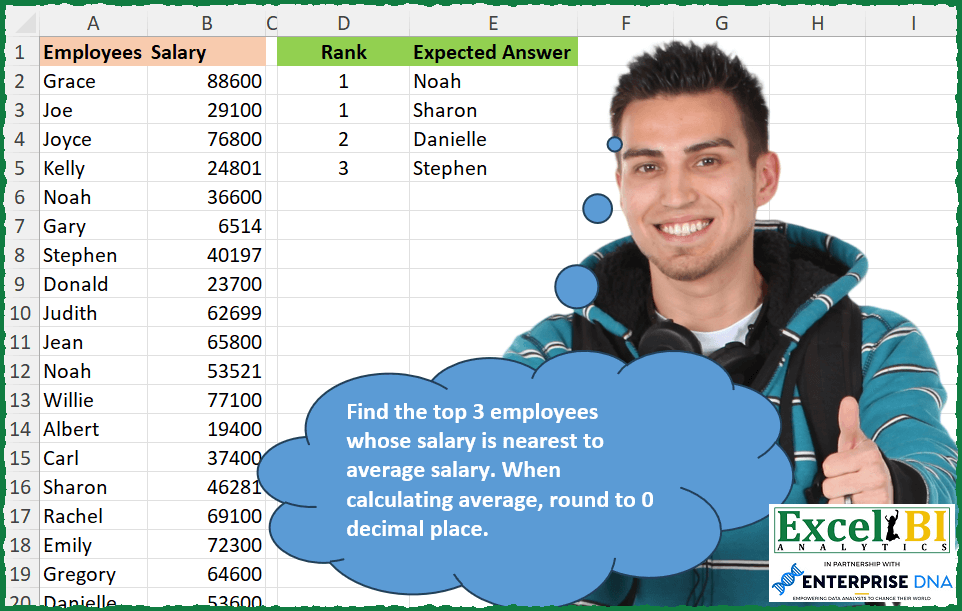
Find the top 3 employees whose salary is nearest to average salary. When calculating average, round to 0 decimal place.
📌 Challenge Details and Links
ExcelBI Excel Challenge Number: 322
Challenge Difficulty: ⭐️
📥Download Sample File
📥Link to the solutions on LinkedIn
Solving the challenge of Top 3 employees nearest to average salary with Power Query
Power Query solution 1 for Top 3 employees nearest to average salary, proposed by Zoran Milokanović:
let
  Source = Table.ToColumns(Excel.CurrentWorkbook(){[Name = "Input"]}[Content]),
  S =
    let
      t = List.Transform,
      r = t(Source{1}, each Number.Abs(_ - Int64.From(List.Average(Source{1})))),
      f = List.MinN(List.Distinct(r), 3)
    in
      Table.Combine(
        t(
          List.Positions(f),
          each Table.FromRows(
            (t(List.PositionOf(r, f{_}, 2), (o) => {_ + 1, Source{0}{o}})),
            {"Rank", "Expected Answer"}
          )
        )
      )
in
  S
Power Query solution 2 for Top 3 employees nearest to average salary, proposed by Kris Jaganah:
let
  Source = Excel.CurrentWorkbook(){[Name = "Table1"]}[Content],
  Ave = Table.AddColumn(
    Source,
    "Average",
    each Number.Abs([Salary] - Number.Round(List.Average(Source[Salary]), 0))
  ),
  Rank = Table.AddRankColumn(Ave, "Rank", {"Average", Order.Ascending}, [RankKind = RankKind.Dense]),
  Select = Table.SelectColumns(Rank, {"Rank", "Employees"}),
  Filter = Table.SelectRows(Select, each [Rank] <= 3)
in
  Filter
Power Query solution 3 for Top 3 employees nearest to average salary, proposed by Aditya Kumar Darak 🇮🇳:
let
  Source = Excel.CurrentWorkbook(){[Name = "data"]}[Content],
  Average = Number.Round(List.Average(Source[Salary])),
  Diff = Table.AddColumn(Source, "Diff", each Number.Abs([Salary] - Average)),
  Rank = Table.AddRankColumn(Diff, "Rank", "Diff", [RankKind = RankKind.Dense])[[Rank], [Employees]],
  Return = Table.SelectRows(Rank, each [Rank] <= 3)
in
  Return
Power Query solution 4 for Top 3 employees nearest to average salary, proposed by Alejandro Simón 🇵🇦 🇪🇸:
let
  Source = Excel.CurrentWorkbook(){[Name = "Table1"]}[Content],
  Calc = Table.AddColumn(
    Source,
    "A",
    each
      let
        a = [Salary],
        b = Number.Round(List.Average(Source[Salary], 0)),
        c = Number.Abs(a - b)
      in
        c
  ),
  Sol = Table.SelectRows(
    Table.AddRankColumn(Calc, "Rank", {"A", Order.Ascending}, [RankKind = RankKind.Dense])[
      [Rank],
      [Employees]
    ],
    each [Rank] <= 3
  )
in
  Sol
Power Query solution 5 for Top 3 employees nearest to average salary, proposed by Luan Rodrigues:
let
  Fonte = Tabela1,
  media = Number.Round(List.Average(Fonte[Salary])),
  add = Table.TransformColumns(Fonte, {{"Salary", each Number.Abs(_ - media)}}),
  fil = Table.SelectRows(
    add,
    each List.ContainsAny({[Salary]}, List.MinN(List.Distinct(add[Salary]), 3))
  ),
  gp = Table.AddIndexColumn(
    Table.Sort(
      Table.Group(
        fil,
        {"Salary"},
        {{"tab", each Table.Sort(_, {each [Employees], 0})[[Employees]]}}
      ),
      {each [Salary], 0}
    )[[tab]],
    "Rank",
    1,
    1
  ),
  res = Table.ExpandTableColumn(gp, "tab", {"Employees"})
in
  res
Power Query solution 6 for Top 3 employees nearest to average salary, proposed by Brian Julius:
let
  Source = Excel.CurrentWorkbook(){[Name = "Table1"]}[Content],
  MeanSalary = Number.Round(List.Average(Source[Salary]), 0),
  AbsDeviation = Table.Sort(
    Table.AddColumn(Source, "AbsDev", each Number.Abs([Salary] - MeanSalary)),
    {"AbsDev", Order.Ascending}
  ),
  Cutoff = List.Max((List.FirstN(List.Distinct(AbsDeviation[AbsDev]), 3))),
  Filter = Table.SelectColumns(
    Table.Sort(
      Table.SelectRows(AbsDeviation, each [AbsDev] <= Cutoff),
      {{"AbsDev", Order.Ascending}, {"Employees", Order.Ascending}}
    ),
    "Employees"
  )
in
  Filter
Power Query solution 7 for Top 3 employees nearest to average salary, proposed by Ramiro Ayala Chávez:
let
  Origen = Excel.CurrentWorkbook(){[Name = "Tabla1"]}[Content],
  a = Table.AddColumn(Origen, "Avg", each Number.Round(List.Average(Origen[Salary]))),
  b = Table.AddColumn(a, "Diff", each Number.Abs([Salary] - [Avg])),
  c = Table.AddIndexColumn(
    Table.MinN(Table.Group(b, {"Diff"}, {{"Group", each _}}), "Diff", 3),
    "Rank",
    1
  ),
  Sol = Table.SelectColumns(
    Table.ExpandTableColumn(c, "Group", {"Employees"}, {"Expected Answer"}),
    {"Rank", "Expected Answer"}
  )
in
  Sol
Power Query solution 8 for Top 3 employees nearest to average salary, proposed by Rafael González B.:
let
Source = Excel.CurrentWorkbook(){0}[Content],
TC = Table.TransformColumnTypes(Source,{{"Salary", Int64.Type}}),
Avg = Number.Round(List.Average(TC[Salary])),
Cal = Table.AddColumn(TC, "Check", each Number.Abs(Avg - [Salary])),
Rank = Table.AddRankColumn(Cal, "Ranking", {"Check", Order.Ascending},[RankKind = RankKind.Dense] ),
Select = Table.SelectRows(Rank, each [Ranking] <= 3 ),
Result = Table.Sort(Select,{{"Ranking", Order.Ascending}, {"Employees", Order.Ascending}})
in
Result[[Ranking],[Employees]]
🧙♂️ 🧙♂️ 🧙♂️
Power Query solution 9 for Top 3 employees nearest to average salary, proposed by Luke Jarych:
let
  Source = Excel.CurrentWorkbook(){[Name = "Table1"]}[Content],
  AverageSalary = Number.Round(List.Average(Source[Salary]), 0),
  CheckClosestSalary = Table.AddColumn(
    Source,
    "DiffSalary",
    each Number.Abs([Salary] - AverageSalary)
  ),
  RankColumn = Table.AddRankColumn(CheckClosestSalary, "Rank", {"DiffSalary"}, [RankKind = 1]),
  SelectTop3Ranked = Table.SelectRows(RankColumn, each [Rank] <= 3)
in
  SelectTop3Ranked[[Rank], [Employees]]
Solving the challenge of Top 3 employees nearest to average salary with Excel
Excel solution 1 for Top 3 employees nearest to average salary, proposed by Bo Rydobon 🇹🇭:
=LET(
    s,
    B2:B20,
    t,
    ABS(
        s-ROUND(
            AVERAGE(
                s
            ),

        )
    ),
    x,
    XMATCH(
        t,
        SORT(
            UNIQUE(
                t
            )
        )
    ),
    SORT(
        FILTER(
            HSTACK(
                x,
                A2:A20
            ),
            x<4
        )
    )
)
Excel solution 2 for Top 3 employees nearest to average salary, proposed by Rick Rothstein:
=LET(
    b,
    B2:B20,
    d,
    ABS(
        b-ROUND(
            AVERAGE(
                b
            ),
            0
        )
    ),
    s,
    SORT(
        HSTACK(
            d,
            A2:A20
        )
    ),
    n,
    TAKE(
        s,
        ,
        1
    ),
    e,
    DROP(
        s,
        ,
        1
    ),
    x,
    XMATCH(
        n,
        UNIQUE(
            n
        ),

    ),
    FILTER(
        HSTACK(
            x,
            e
        ),
        x<=3
    )
)
Excel solution 3 for Top 3 employees nearest to average salary, proposed by John V.:
=LET(
    s,
    B2:B20,
    d,
    ROUND(
        ABS(
            s-AVERAGE(
                s
            )
        ),

    ),
    p,
    XMATCH(
        d,
        SORT(
            UNIQUE(
                d
            )
        )
    ),
    SORT(
        FILTER(
            HSTACK(
                p,
                A2:A20
            ),
            p<4
        )
    )
)
Excel solution 4 for Top 3 employees nearest to average salary, proposed by محمد حلمي:
=LET(e,
    ABS(
        B2:B20-ROUND(
            AVERAGE(
                B2:B20
            ),

        )
    ),
    v,
    SORT(
        FILTER(
            HSTACK(
                A2:A20,
                e
            ),
            e<=SMALL(
                UNIQUE(
                    e
                ),
                3
            )
        ),
        2
    ),
    HSTACK(SCAN(0,
    --(DROP(
        v,
        ,
        1
    )=VSTACK(
        0,
        DROP(
            v,
            -1,
            1
        )
    )),
    LAMBDA(a,
    d,
    (d=0)+a)),
    TAKE(
        v,
        ,
        1
    )))
Excel solution 5 for Top 3 employees nearest to average salary, proposed by Kris Jaganah:
=LET(
    a,
    A2:A20,
    b,
    B2:B20,
    c,
    SORT(
        HSTACK(
            a,
            ABS(
                b-ROUND(
                    AVERAGE(
                        b
                    ),
                    0
                )
            )
        ),
        2,
        1
    ),
    d,
    TAKE(
        c,
        ,
        -1
    ),
    e,
    XMATCH(
        d,
        UNIQUE(
            d
        )
    ),
    FILTER(
        HSTACK(
            e,
            TAKE(
                c,
                ,
                1
            )
        ),
        e<=3
    )
)
Excel solution 6 for Top 3 employees nearest to average salary, proposed by Julian Poeltl:
=LET(
    D,
    ABS(
        B2:B20-ROUND(
            AVERAGE(
                B2:B20
            ),
            0
        )
    ),
    U,
    SORT(
        UNIQUE(
            D
        )
    ),
    R,
    REDUCE(
        HSTACK(
            "Rank",
            "Expected Answer"
        ),
        SEQUENCE(
            3
        ),
        LAMBDA(
            A,
            B,
            VSTACK(
                A,
                HSTACK(
                    B,
                    FILTER(
                        A2:A20,
                        D=INDEX(
                            U,
                            B
                        )
                    )
                )
            )
        )
    ),
    HSTACK(
        SCAN(
            "",
            TAKE(
                R,
                ,
                1
            ),
            LAMBDA(
                A,
                B,
                IF(
                    ISERROR(
                        B
                    ),
                    A,
                    B
                )
            )
        ),
        DROP(
                R,
                ,
                1
            )
    )
)
Excel solution 7 for Top 3 employees nearest to average salary, proposed by Timothée BLIOT:
=LET(A,B2:B20, B,ROUND(AVERAGE(A),0), C,ABS(A-B), D,MAP(C,LAMBDA(x,SUM(--(x>UNIQUE(C)))+1)), SORT(FILTER(HSTACK(D,A2:A20),D<=3)))Excel solution 8 for Top 3 employees nearest to average salary, proposed by Hussein SATOUR:
=LET(
    b,
     B2:B20,
     d,
     ABS(
         b- ROUND(
             AVERAGE(
                 b
             ),
              0
         )
     ),
     e,
     XMATCH(
         d,
          UNIQUE(
              SORT(
                  d
              )
          )
     ),
     SORT(
         FILTER(
             HSTACK(
                 e,
                  A2:A20
             ),
              e < 4
         ),
          1
     )
)
Excel solution 9 for Top 3 employees nearest to average salary, proposed by Sunny Baggu:
=LET(

     _diff,
     ABS(
         B2:B20 - ROUND(
             AVERAGE(
                 B2:B20
             ),
              0
         )
     ),

     _t3,
     TAKE(
         UNIQUE(
             SORT(
                 _diff
             )
         ),
          3
     ),

     REDUCE(

          {"Rank",
          "Expected Answer"},

          SEQUENCE(
              ROWS(
                  _t3
              )
          ),

          LAMBDA(
              a,
               v,
               VSTACK(
                   a,
                    IFNA(
                        HSTACK(
                            v,
                             FILTER(
                                 A2:A20,
                                  _diff = INDEX(
                                      _t3,
                                       v
                                  )
                             )
                        ),
                         v
                    )
               )
          )

     )

)
Excel solution 10 for Top 3 employees nearest to average salary, proposed by Sunny Baggu:
=LET(

     _diff,
     ROUND(
         ABS(
             AVERAGE(
                 B2:B20
             ) - B2:B20
         ),
          0
     ),

     _udiff,
     UNIQUE(
         SORT(
             _diff
         )
     ),

     _rank,
     XMATCH(
         _diff,
          _udiff
     ),

     SORT(
         FILTER(
             HSTACK(
                 _rank,
                  A2:A20
             ),
              _rank <= 3
         )
     )

)
Excel solution 11 for Top 3 employees nearest to average salary, proposed by Abdallah Ally:
=LET(a,B2:B20,b,ABS(ROUND(AVERAGE(a),0)-a),c,SORT(b),d, SCAN(1,SEQUENCE(COUNT(a)),LAMBDA(x,y,IFS(y=1,x,TAKE(TAKE(c,y),-1)=TAKE(TAKE(c,y-1),-1),x,1,x+1))),FILTER(HSTACK(d,SORTBY(A2:A20,b)),d<=3))Excel solution 12 for Top 3 employees nearest to average salary, proposed by Md. Zohurul Islam:
=LET(
    u,
    A2:A20,
    v,
    B2:B20,

    a,
    ABS(
        v-ROUND(
            AVERAGE(
                v
            ),
            0
        )
    ),

    b,
    SORT(
        UNIQUE(
            a
        )
    ),

    x,
    XMATCH(
        a,
        b
    ),

    d,
    SORT(
        FILTER(
            HSTACK(
                x,
                u
            ),
            x<=3
        ),
        1
    ),

    d
)
Excel solution 13 for Top 3 employees nearest to average salary, proposed by Pieter de Bruijn:
=LET(
    a,
    ABS(
        B2:B20-ROUND(
            AVERAGE(
                B2:B20
            ),
            0
        )
    ),
    u,
    UNIQUE(
        a
    ),
    r,
    MMULT(
        N(
            TOROW(
                u
            )
Excel solution 14 for Top 3 employees nearest to average salary, proposed by Nicolas Micot:
=LET(
    _ecart;
    MAP(
        B2:B20;
        LAMBDA(
            l_salaire;
            ABS(
                l_salaire-ARRONDI(
                    MOYENNE(
                        B2:B20
                    );
                    0
                )
            )
        )
    );

    _ecartUnique;
    TRIER(
        UNIQUE(
            _ecart
        )
    );

    _rang;
    EQUIV(
        _ecart;
        _ecartUnique;
        0
    );

    TRIER(
        FILTRE(
            ASSEMB.H(
                _rang;
                A2:A20
            );
            _rang<=3
        );
        1;
        1
    )
)
Excel solution 15 for Top 3 employees nearest to average salary, proposed by Giorgi Goderdzishvili:
=LET(

    emp,
    A2:A20,

    sl,
    B2:B20,

    avg,
     ROUND(
         AVERAGE(
             sl
         ),
         0
     ),

    lst,
     ABS(
         avg-sl
     ),

    rnk,
     XMATCH(
         lst,
         UNIQUE(
             SORT(
                 lst
             )
         )
     ),

    fn,
    SORT(
        FILTER(
            HSTACK(
                rnk,
                emp
            ),
            rnk<=3
        ),
        1
    ),

    fn
)
Excel solution 16 for Top 3 employees nearest to average salary, proposed by Edwin Tisnado:
=LET(
    x,
    A2:A20,
    y,
    B2:B20,
    a,
    ROUND(
        AVERAGE(
            y
        ),
        0
    ),
    b,
    ABS(
        y-a
    ),
    z,
    XMATCH(
        b,
        SORT(
            UNIQUE(
                b
            )
        ),

    ),
    SORT(
        FILTER(
            HSTACK(
                z,
                x
            ),
            z<=3
        ),
        ,
        1
    )
)
Excel solution 17 for Top 3 employees nearest to average salary, proposed by Abdelrahman Omer, MBA, PMP:
=LET(a,B2:B20,b,(ABS(ROUND(AVERAGE(a),0)-a)),
c,SORTBY(A2:A20,b),
d,SMALL(UNIQUE(b),3),
FILTER(HSTACK(
XMATCH(SORT(b),UNIQUE(SORT(b)),0),
c),SORT(b)<=d))
Excel solution 18 for Top 3 employees nearest to average salary, proposed by Daniel Garzia:
=LET(
    s,
    B2:B20,
    d,
    ABS(
        s-ROUND(
            AVERAGE(
                s
            ),

        )
    ),
    r,
    SORT(
        HSTACK(
            XMATCH(
                d,
                SORT(
                    UNIQUE(
                        d
                    )
                )
            ),
            A2:A20
        )
    ),
    FILTER(
        r,
        TAKE(
            r,
            ,
            1
        )<4
    )
)
Excel solution 19 for Top 3 employees nearest to average salary, proposed by Anup Kumar:
=LET(

    dt,
    A2:B20,

    avg,
     ROUND(
         AVERAGE(
             DROP(
                 dt,
                 ,
                 1
             )
         ),
         0
     ),

    diff,
     ABS(
         avg-TAKE(
             dt,
             ,
             -1
         )
     ),

    dArr,
     SORT(
         HSTACK(
             TAKE(
                 dt,
                 ,
                 1
             ),
             diff
         ),
         2
     ),

    tops,
     SMALL(
         UNIQUE(
             DROP(
                 dArr,
                 ,
                 1
             )
         ),
         3
     ),

    nm,
     FILTER(
         dArr,
         TAKE(
             dArr,
             ,
             -1
         )<=tops
     ),

    HSTACK(
        XMATCH(
            DROP(
                nm,
                ,
                1
            ),
            UNIQUE(
                DROP(
                nm,
                ,
                1
            )
            )
        ),
        TAKE(
                nm,
                ,
                1
            )
    )

)
Excel solution 20 for Top 3 employees nearest to average salary, proposed by LUIS FLORENTINO COUTO CORTEGOSO:
=LET(
    e,
    A2:A20,
    s,
    B2:B20,
    mid,
    ROUND(
        AVERAGE(
            s
        ),
        0
    ),

     dif,
    ABS(
        s-mid
    ),
    ds,
    SORT(
        dif
    ),

     di,
    MAP(
        SEQUENCE(
            ROWS(
                e
            )
        ),
        LAMBDA(
            j,
            COUNT(
                UNIQUE(
                    TAKE(
                        ds,
                        j
                    )
                )
            )
        )
    ),

     TAKE(
         HSTACK(
             di,
             SORTBY(
                 e,
                 dif
             )
         ),
         4
     )
)
Excel solution 21 for Top 3 employees nearest to average salary, proposed by Hazem Hassan:
=LET(
    A,
    B2:B20,
    B,
    A2:A20,
    w,
    ABS(
        A-ROUND(
            AVERAGE(
                A
            ),
            0
        )
    ),
    C,
    XMATCH(
        w,
        TAKE(
            SORT(
                UNIQUE(
                    w
                ),
                ,
                1
            ),
            3
        ),
        0
    ),
    d,
    TOCOL(
        C,
        3
    ),
    SORT(
        HSTACK(
            d,
            XLOOKUP(
                d,
                C,
                B
            )
        ),
        1,
        1
    )
)
Excel solution 22 for Top 3 employees nearest to average salary, proposed by Hazem Hassan:
=LET(
    b,
    A2:A20,
    a,
    ABS(
        B2:B20-ROUND(
            AVERAGE(
                B2:B20
            ),
            0
        )
    ),
    d,
    SORT(
        a,
        ,
        1
    ),
    e,
    ROUNDUP(
        d/MIN(
            d
        ),
        0
    ),
    FILTER(
        HSTACK(
            e,
            SORTBY(
                b,
                a,
                1
            )
        ),
        e<=3
    )
)
Excel solution 23 for Top 3 employees nearest to average salary, proposed by Bruno Rafael Diaz Ysla:
=LET(

     _PROMEDIO;
     PROMEDIO(
         B2:B20
     );

     _CRITERIO;
     REDONDEAR(

          ABS(
              B2:B20 - _PROMEDIO
          );

          0

     );

     _ORDEN;
     ORDENARPOR(
         A2:A20;
          _CRITERIO;
          1
     );

     _ORDEN1;
     ORDENARPOR(

          _CRITERIO;

          _CRITERIO;

          1

     );

     _SOLU;
     COINCIDIR(
         _ORDEN1;
          UNICOS(
              _ORDEN1
          )
     );

     _SOLU1;
     APILARH(
         _SOLU;
          _ORDEN
     );

     _FILTRO;
     FILTRAR(
         _SOLU1;
          _SOLU < 4
     );

     _FILTRO

)
Solving the challenge of Top 3 employees nearest to average salary with Python in Excel
Python in Excel solution 1 for Top 3 employees nearest to average salary, proposed by John V.:
Hi everyone!
One [Python] option could be:
d = pd.Series(round(abs(i - s.mean()), 0) for i in s)
sorted([i, j] for i, j in zip(d.rank(method = "dense"), xl("A2:A20")[0]) if i < 4)
Blessings!
Solving the challenge of Top 3 employees nearest to average salary with R
R solution 1 for Top 3 employees nearest to average salary, proposed by Konrad Gryczan, PhD:
library(tidyverse)
library(readxl)
input = read_excel("Employees nearest to average salary.xlsx", range= "A1:b20")
test = read_excel("Employees nearest to average salary.xlsx", range= "E1:E5")
result = input %>%
 mutate(mean_salary = round(mean(Salary),0),
 diff_to_mean = abs(Salary - mean_salary)) %>%
 arrange(diff_to_mean) %>%
 mutate(rank = dense_rank(diff_to_mean)) %>%
 filter(rank <= 3) %>%
 select(`Expected Answer` = Employees)
identical(result, test)
Solving the challenge of Top 3 employees nearest to average salary with DAX
DAX solution 1 for Top 3 employees nearest to average salary, proposed by Zoran Milokanović:
DEFINE
VAR a = ROUND(AVERAGE(Input[Salary]), 0)
EVALUATE
SELECTCOLUMNS(FILTER(ADDCOLUMNS(Input, "Rank", RANKX(ALL(Input), ABS(Input[Salary] - a), , ASC, Dense)), [Rank] < 4), "Rank", [Rank], "Expected Answer", Input[Employees])
ORDERBY [Rank]
&&