
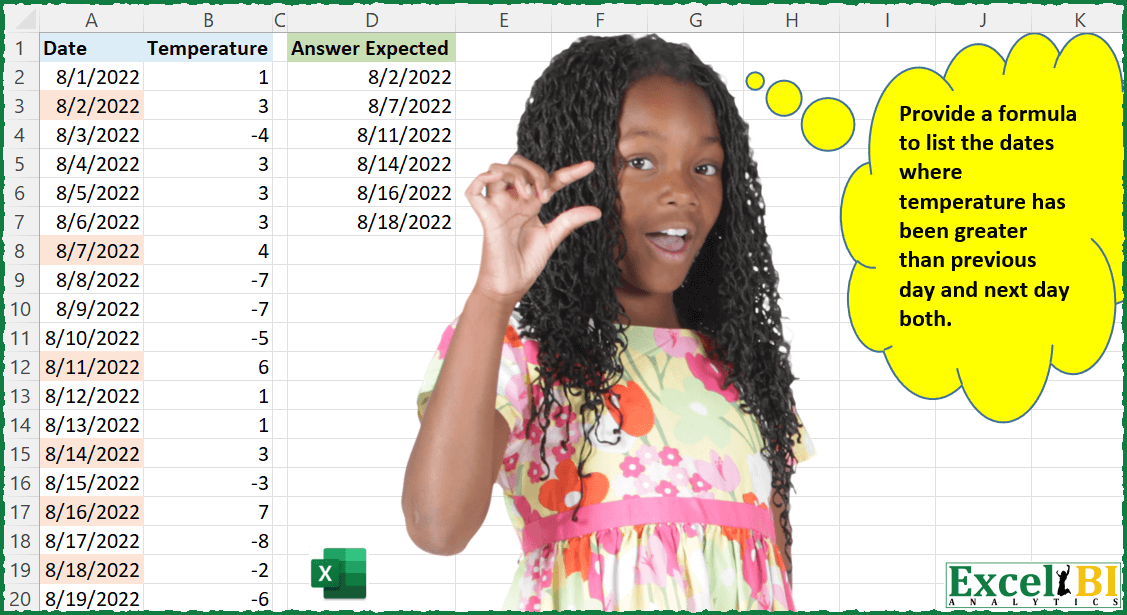
Provide a formula to list the dates when temperature has been greater than previous day and next day both. On 1-Aug-22, temp was 1, on 2-Aug-22, temp was 3 and on 3-Aug-22 temp was -4. Hence, temp on 2-Aug-22 is greater than 1-Aug-22 & 3-Aug-22 both.
📌 Challenge Details and Links
ExcelBI Excel Challenge Number: 32
Challenge Difficulty: ⭐️
📥Download Sample File
📥Link to the solutions on LinkedIn
Solving the challenge of List Local Temperature Peaks with Power Query
Power Query solution 1 for List Local Temperature Peaks, proposed by Brian Julius:
let
  Source = Table.AddIndexColumn(
    Table.AddIndexColumn(
      Table.TransformColumnTypes(TemperatureRaw, {{"Date", Date.Type}, {"Temperature", Int64.Type}}),
      "IndexB",
      - 1,
      1
    ),
    "IndexF",
    1,
    1
  ),
  AddBack = Table.AddColumn(
    Source,
    "Back",
    each try Table.Column(Source, "Temperature"){[IndexB]} otherwise null
  ),
  AddFwd = Table.AddColumn(
    AddBack,
    "Fwd",
    each try Table.Column(AddBack, "Temperature"){[IndexF]} otherwise null
  ),
  FilterTwice = Table.SelectRows(
    Table.SelectRows(AddFwd, each ([Back] <> null) and ([Fwd] <> null)),
    each ([Temperature] > [Back]) and ([Temperature] > [Fwd])
  ),
  Clean = Table.RenameColumns(Table.SelectColumns(FilterTwice, "Date"), {"Date", "Expected Answer"})
in
  Clean
Power Query solution 2 for List Local Temperature Peaks, proposed by Matthias Friedmann:
let
  Source = PeakTemperatureDATA,
  #"Filtered Rows" = Table.SelectRows(
    Source,
    each
      let
        temp = Source[Temperature],
        prev = {null} & List.RemoveLastN(temp, 1),
        next = List.RemoveFirstN(temp, 1),
        row  = List.PositionOf(Source[Date], [Date])
      in
        try temp{row} > prev{row} and temp{row} > next{row} otherwise false
  )[[Date]]
in
  #"Filtered Rows"
Power Query solution 3 for List Local Temperature Peaks, proposed by Antriksh Sharma:
let
  Source = DataSource,
  DateList = List.Buffer(DataSource[Date]),
  Flag = Table.AddColumn(
    Source,
    "Flag",
    (CurrentRow) =>
      let
        CurrentDate = CurrentRow[Date],
        PriorDate = List.Max(List.Select(DateList, each _ < CurrentDate)),
        NextDate = List.Min(List.Select(DateList, each _ > CurrentDate)),
        Check = DataSource{[Date = CurrentDate]}[Temperature]
          > DataSource{[Date = PriorDate]}[Temperature]
            and DataSource{[Date = CurrentDate]}[Temperature]
          > DataSource{[Date = NextDate]}[Temperature],
        Status = if PriorDate is null or NextDate is null then null else Check
      in
        Status
  ),
  Result = Table.SelectColumns(Table.SelectRows(Flag, each [Flag] = true), "Date")
in
  Result
Power Query solution 4 for List Local Temperature Peaks, proposed by Antriksh Sharma:
let
 Source = Table.Buffer ( DataSource ),
 NewTable = hashtag#table( type table [Date = date], {}),
 Index = {1..Table.RowCount ( Source ) - 1},
 DatesToKeep =
 List.Accumulate (
 Index,
 NewTable,
 (State, Current) =>
 Table.InsertRows (
 State,
 Table.RowCount ( State),
 {
 let
 PriorDate = Source[Temperature]{Current-1},
 CurrentDate = Source[Temperature]{Current},
 NextDate = Source[Temperature]{Current+1},
 Check =
 if CurrentDate > PriorDate and CurrentDate > NextDate
 then Source[Date]{Current}
 else null
 in
 [Date = Check]
 }
 )
 ),
 Result =
 Table.SelectRows ( DatesToKeep, each [Date] <> null )
in
 Result
Power Query solution 5 for List Local Temperature Peaks, proposed by Venkata Rajesh:
let
  Source = Data,
  Result = Table.SelectRows(
    Table.AddColumn(
      Source,
      "Custom",
      each
        let
          _row = Table.PositionOf(Source, _)
        in
          try

              if Source{_row}[Temperature]
                > Source{_row - 1}[Temperature] and Source{_row}[Temperature]
                > Source{_row + 1}[Temperature]
              then
                true
              else
                false
          otherwise
            false
    ),
    each ([Custom] = true)
  )[Date]
in
  Result
Power Query solution 6 for List Local Temperature Peaks, proposed by Sue Bayes:
let
  Source = Table.TransformColumnTypes(Data, {{"Date", type date}, {"Temperature", Int64.Type}}),
  Index = Table.AddIndexColumn(Source, "Index", 0, 1, Int64.Type),
  AddPrevRow = Table.AddColumn(
    Index,
    "PrevRow",
    each try Index[Temperature]{[Index] - 1} otherwise null
  ),
  AddNextRow = Table.AddColumn(
    AddPrevRow,
    "Next Row",
    each try Index[Temperature]{[Index] + 1} otherwise null
  ),
  CheckCondition = Table.SelectColumns(
    Table.SelectRows(
      Table.AddColumn(
        AddNextRow,
        "Custom",
        each
          if [Temperature] > [PrevRow] and [Temperature] > [Next Row] then
            [Temperature]
          else
            null
      ),
      each [Custom] <> null
    ),
    "Date"
  )
in
  CheckCondition
Power Query solution 7 for List Local Temperature Peaks, proposed by Thomas DUCROQUETZ:
let
 Source = YourData,
 ModifType= Table.TransformColumnTypes(Source,{{"Date", type date}, {"Temperature", Int64.Type}},"en-us"),
 Filtered =
 Table.SelectRows(
 ModifType,
 each
 let
 currDate = [Date],
 prevTemp = Table.SelectRows( ModifType , each [Date] = Date.AddDays(currDate , -1) )[Temperature]{0} ?,
 nextTemp = Table.SelectRows( ModifType , each [Date] = Date.AddDays(currDate , 1) )[Temperature]{0} ?,
 Greater = [Temperature] > prevTemp and [Temperature] > nextTemp
 in Greater
 )
in
 Filtered

Thanks for the challenge !
Power Query solution 8 for List Local Temperature Peaks, proposed by Hristo Tsenov:
let
 Source = Excel.CurrentWorkbook(){[Name="Table1"]}[Content],
 Merge = Table.NestedJoin(Table.ExpandListColumn(Table.AddColumn(Source, "Custom", each {Date.AddDays([Date],-1),Date.AddDays([Date],1)}), "Custom"), {"Custom"}, #"Source", {"Date"}, "Dates", JoinKind.LeftOuter),
 Temp = Table.ExpandTableColumn(Merge, "Dates", {"Temperature"}, {"Temp to Check"}),
 Check = Table.AddColumn(Temp, "Check", each try if [Temperature]>[Temp to Check] then 1 else 0 otherwise 0),
 Select = Table.SelectColumns(Table.SelectRows(Table.Group(Check, {"Date"}, {{"Count", each List.Sum([Check]), type number}}), each ([Count] = 2)),{"Date"}),
 Date = Table.TransformColumnTypes(Select,{{"Date", type date}})
in
 Date

On row level it could be done with Index Column or Table.PositionOf.
Power Query solution 9 for List Local Temperature Peaks, proposed by Ondřej Vejvoda:
let
  Source = Excel.CurrentWorkbook(){[Name = "Table1"]}[Content],
  Change_Types = Table.TransformColumnTypes(
    Source,
    {{"Date", type date}, {"Temperature", Int64.Type}}
  ),
  Index = Table.AddIndexColumn(Change_Types, "Index", 0, 1, Int64.Type),
  Add_Previous_Row = Table.AddColumn(
    Index,
    "Previous Row",
    each try Index[Temperature]{[Index] - 1} otherwise 0
  ),
  Add_Next_Row = Table.AddColumn(
    Add_Previous_Row,
    "Next Row",
    each try Index[Temperature]{[Index] + 1} otherwise 0
  ),
  Is_Higher = Table.AddColumn(
    Add_Next_Row,
    "Higher then Previous and Next",
    each if [Temperature] > [Previous Row] and [Temperature] > [Next Row] then true else false
  ),
  Filter_higher = Table.SelectRows(Is_Higher, each ([Higher then Previous and Next] = true)),
  Remove_Other_Columns = Table.SelectColumns(Filter_higher, {"Date"})
in
  Remove_Other_Columns
Power Query solution 10 for List Local Temperature Peaks, proposed by Christopher Keeling:
let
  Source = Table.FromRows(
    Json.Document(
      Binary.Decompress(
        Binary.FromText(
          "Zc9JCgAhDETRu2StmMGpzyLe/xotxEVJto8Q6q9FLIVnUValREI7HVIgczKgXN1qPGuReqQBdH9N/D/cvmjCaM0NC7qThiixSDFAMCBfw4I7AwvydHsS1O1JONv2Dw==",
          BinaryEncoding.Base64
        ),
        Compression.Deflate
      )
    ),
    let
      _t = ((type nullable text) meta [Serialized.Text = true])
    in
      type table [Date = _t, Temperature = _t]
  ),
  #"Changed Type" = Table.TransformColumnTypes(
    Source,
    {{"Date", type date}, {"Temperature", Int64.Type}}
  ),
  AddedIndex = Table.AddIndexColumn(#"Changed Type", "Index", 0, 1, Int64.Type),
  PreviousDay = Table.AddColumn(
    AddedIndex,
    "PreviousDay",
    each try AddedIndex[Temperature]{[Index] - 1} otherwise null
  ),
  NextDay = Table.AddColumn(
    PreviousDay,
    "NextDay",
    each try PreviousDay[Temperature]{[Index] + 1} otherwise null
  ),
  TempCheck = Table.AddColumn(
    NextDay,
    "HigherInd",
    each if [Temperature] > [PreviousDay] and [Temperature] > [NextDay] then 1 else 0
  ),
  OnlyHigherRows = Table.SelectRows(TempCheck, each ([HigherInd] = 1)),
  OnlyDate = Table.SelectColumns(OnlyHigherRows, {"Date"})
in
  OnlyDate
Solving the challenge of List Local Temperature Peaks with Excel
Excel solution 1 for List Local Temperature Peaks, proposed by John V.:
=FILTER(A3:A19,
    (B3:B19>B2:B18)*(B3:B19>B4:B20))

► Referencing just one range for each column:
=FILTER(
    A3:A19,
    MAP(
        B3:B19,
        LAMBDA(
            x,
            AND(
                x>SUBTOTAL(
                    4,
                    OFFSET(
                        x,
                        {-1,
                        1},

                    )
                )
            )
        )
    )
)
Excel solution 2 for List Local Temperature Peaks, proposed by محمد حلمي:
=FILTER(
    A2:A20,
    MAP(
        B2:B20,

        LAMBDA(
            a,
            AND(
                a>N(
                    OFFSET(
                        a,
                        {-1,
                        1},

                    )
                )
            )
        )
    )
)
Excel solution 3 for List Local Temperature Peaks, proposed by محمد حلمي:
=FILTER(A2:A20,
    MAP(B2:B20,
    B1:B19,
    B3:B21,

LAMBDA(a,
    b,
    c,
    (a>b)*(a>c))))

////

=FILTER(A2:A20,
    BYROW(B2:B20,

LAMBDA(a,
    (a>OFFSET(
        a,
        -1,

    ))*(a>OFFSET(
        a,
        1,

    )))))
Excel solution 4 for List Local Temperature Peaks, proposed by 🇰🇷 Taeyong Shin:
=TOCOL(
     IF(
         B3:B19>B4:B20,
          IF(
              B3:B19>B2:B18,
               A3:A19,
               x
          ),
          x
     ),
     2
)

=FILTER(
    A2:A20,
     MAP(
         B2:B20,
          LAMBDA(
              m,
               AND(
                   m > N(
                       OFFSET(
                           m,
                            {-1,
                           1},

                       )
                   )
               )
          )
     )
)
Excel solution 5 for List Local Temperature Peaks, proposed by Kris Jaganah:
=LET(a,
    IFERROR((B2:B20>B1:B20)*(B2:B20>B3:B20),
    ""),
    FILTER(
        A2:A21,
        a=1
    ))
Excel solution 6 for List Local Temperature Peaks, proposed by Julian Poeltl:
=FILTER(A2:A20,
    LET(T,
    B2:B20,
    (T>OFFSET(
        T,
        -1,
        0
    ))*(T>OFFSET(
        T,
        1,
        0
    ))))
Excel solution 7 for List Local Temperature Peaks, proposed by Aditya Kumar Darak 🇮🇳:
= LET(

     _seq,

     SEQUENCE(
         ROWS(
             date
         ) - 2,
          ,
          2
     ),

     _c1,

     INDEX(
         temp.,
          _seq
     ) > INDEX(
         temp.,
          _seq - 1
     ),

     _c2,

     INDEX(
         temp.,
          _seq
     ) > INDEX(
         temp.,
          _seq + 1
     ),

     FILTER(
         INDEX(
             date,
              _seq
         ),
          _c1 * _c2
     )
)
Excel solution 8 for List Local Temperature Peaks, proposed by Timothée BLIOT:
=LET(
Temperatures,
     $B$2:$B$20,

Dates,
     $A$2:$A$20,


CheckCells,
     IF(
 (Temperatures > IFERROR(
     OFFSET(
         Temperatures,
          -1,
          0
     ),
      ""
 )) *
 (Temperatures > IFERROR(
     OFFSET(
         Temperatures,
          1,
          0
     ),
      ""
 )),

 1,
     0),


Answer,
    FILTER(
        Dates,
         CheckCells,
        ""
    ),


Answer)
Excel solution 9 for List Local Temperature Peaks, proposed by Oscar Mendez Roca Farell:
=IFERROR(AGGREGATE(15;6;A$2:A$20/(MMULT(--(B$2:B$20>IF({1};B$1:B$19;B$3:B$21));{1;1})=2);ROW(A1));"")Excel solution 10 for List Local Temperature Peaks, proposed by Bhavya Gupta:
=LET(Dt,A2:A20,Tmp,B2:B20,Pr,VSTACK(DROP(Tmp,1),"a")*1,Sr,VSTACK("a",DROP(Tmp,-1))*1,FILTER(Dt,IFERROR((Tmp>Pr)*(Tmp>Sr),0)))Excel solution 11 for List Local Temperature Peaks, proposed by Bhavya Gupta:
=LET(Dt,
    A2:A20,
    Tmp,
    B2:B20,
    S,
    ROWS(
        Tmp
    ),
    FILTER(Dt,
    MAP(SEQUENCE(
        S
    ),
    LAMBDA(r,
    LET(C,
    INDEX(
        Tmp,
        r
    ),
    IF(OR(
        r=1,
        r=S
    ),
    0,
    (C>INDEX(
        Tmp,
        r-1
    ))*(C>INDEX(
        Tmp,
        r+1
    ))))))))
Excel solution 12 for List Local Temperature Peaks, proposed by Bhavya Gupta:
=LET(Date,
    A2:A20,
    Temp,
    B2:B20,

 Ctemp,
    DROP(
        DROP(
            Temp,
            1
        ),
        -1
    ),

 Stemp,
    DROP(
        B2:B20,
        2
    ),

 Ptemp,
    DROP(
        B2:B20,
        -2
    ),

 FILTER(Date,
    VSTACK(0,
    (Ctemp>Stemp)*(Ctemp>Ptemp),
    0)))
Excel solution 13 for List Local Temperature Peaks, proposed by Bhavya Gupta:
=LET(Dt,A2:A20,Tmp,B2:B20,Pr,XLOOKUP(Dt-1,Dt,Tmp,,-1),Sr,XLOOKUP(Dt+1,Dt,Tmp,,1),FILTER(Dt,IFNA((Tmp>Pr)*(Tmp>Sr),0)))Excel solution 14 for List Local Temperature Peaks, proposed by Charles Roldan:
=LET(_Data,A2:B20,FILTER(INDEX(_Data,,1),
VSTACK(FALSE,0=(MMULT(1-(0
Excel solution 15 for List Local Temperature Peaks, proposed by Oscar Javier Rosero Jiménez:
=LET(
_f;
    (FILA(
        A2:A20
    )*(A2:A20=A2:A20))-1;

_fu;
    INDICE(
        A2:A20;
        _f
    );

_t;
    INDICE(
        B2:B20;
        _f
    );

_ts;
    INDICE(B2:B20;
    (1+_f));

_ta;
    INDICE(B2:B20;
    (_f)-1);

_Res;
    SI.ERROR(((_t>_ta)*(_t>_ts)*_fu);
    0);

FILTRAR(
    _Res;
    _Res>0
))
Excel solution 16 for List Local Temperature Peaks, proposed by Oscar Javier Rosero Jiménez:
=LET(
_f;
    (ROW(
        A2:A20
    ))-1;

_fu;
    INDEX(
        A2:A20;
        _f
    );

_t;
    INDEX(
        B2:B20;
        _f
    );

_ts;
    INDEX(B2:B20;
    (1+_f));

_ta;
    INDEX(B2:B20;
    (_f)-1);

_Res;
    IFERROR(((_t>_ta)*(_t>_ts)*_fu);
    0);

FILTER(
    _Res;
    _Res>0
))
Excel solution 17 for List Local Temperature Peaks, proposed by Oscar Javier Rosero Jiménez:
=LET(
_f;
    (ROW(
        A2:A20
    ))-1;

_fu;
    INDEX(
        A2:A20;
        _f
    );

_t;
    INDEX(
        B2:B20;
        _f
    );

_ts;
    INDEX(B2:B20;
    (1+_f));

_ta;
    INDEX(B2:B20;
    (_f)-1);

_Res;
    IFERROR(((_t>_ta)*(_t>_ts)*_fu);
    0);

FILTER(
    _Res;
    _Res>0
))
Excel solution 18 for List Local Temperature Peaks, proposed by Jardiel Euflázio:
=FILTER(
A3:A20,

(B3:B20>B2:B19)*(B3:B20>B4:B21)
)
Excel solution 19 for List Local Temperature Peaks, proposed by Jardiel Euflázio:
=TEXTSPLIT(
    TEXTJOIN(
        ",",
        ,
        IF(
            B3:B20>B2:B19,
            IF(
                B3:B20>B4:B21,
                A3:A20,
                ""
            ),
            ""
        )
    ),
    ,
    ","
)
Excel solution 20 for List Local Temperature Peaks, proposed by Jardiel Euflázio:
=LET(

    a,
    IF(
        B3:B20>B2:B19,
        IF(
            B3:B20>B4:B21,
            A3:A20
        )
    ),


    FILTER(

        a,

        ISNUMBER(
            a
        )

    )


)
Excel solution 21 for List Local Temperature Peaks, proposed by Victor Momoh (MVP, MOS, R.Eng):
=FILTER(A2:A20,
    (B2:B20>B3:B21)*((B2:B20>B1:B19))) - Lazy man's approach

=FILTER(A2:A20,
    MAP(B2:B20,
    LAMBDA(x,
    (x>OFFSET(
        x,
        1,
        0
    ))*(x>OFFSET(
        x,
        -1,
        0
    )))))

=LET(a,
    B2:B20,
    FILTER(OFFSET(
        a,
        0,
        -1
    ),
    (a>OFFSET(
        a,
        1,
        0
    ))*(a>OFFSET(
        a,
        -1,
        0
    ))))
Excel solution 22 for List Local Temperature Peaks, proposed by Cary Ballard, DML:
=LET(
 a,
     A2:A20,

 b,
     B2:B20,

 fx,
     LAMBDA(
         x,
         y,
          CHOOSEROWS(
              x,
               y
          )
     ),

 c,
     MAP(SEQUENCE(
         ROWS(
             b
         )
     ),
     LAMBDA(m,
     (fx(
         b,
          m
     ) > fx(
         b,
          m - 1
     )) * (fx(
         b,
          m
     ) > fx(
         b,
          m + 1
     )))),

 FILTER(
     a,
      IFERROR(
          c,
          0
      )
 )
)
Excel solution 23 for List Local Temperature Peaks, proposed by Viswanathan M B:
=Let(DTS, A2:A20,
 Temp, B2:B20,
 PrevTemp, Xlookup(DTS-1, DTS, temp,+temp,-1),
 NextTemp, Xlookup(DTS+1, DTS, temp, +temp,1),
 Filter(DTS, (temp>prevtemp)*(temp>nexttemp))
)
Excel solution 24 for List Local Temperature Peaks, proposed by Juliano Santos Lima:
=SORT(
    IF(
        B3:B20>B2:B19,
        IF(
            B3:B20>B4:B21,
            A3:A20,
            ""
        ),
        ""
    )
)
Excel solution 25 for List Local Temperature Peaks, proposed by Nazmul Islam Jobair:
=FILTER(A2:A20,(B2:B20>B1:B19)*(B2:B20>B3:B21))Excel solution 26 for List Local Temperature Peaks, proposed by Riley Johnson:
=LET(
 _dates,
     Table1[Date],

 _temps,
     Table1[Temperature],

 _indices,
     SEQUENCE(
          ROWS(
               _dates
          )
     ),

 _min,
     MIN(
          _indices
     ),

 _max,
     MAX(
          _indices
     ),

 _compare_temps,
     LAMBDA(_curr_index,
    _other_index,
    _low_bound,
    _upper_bound,

 IF( ( _other_index < _low_bound) + ( _other_index > _upper_bound ) > 0,

 FALSE,

 INDEX(
      _temps,
      _curr_index
 ) > INDEX(
      _temps,
      _other_index
 )
 )
 ),

 FILTER(
      _dates,

      _compare_temps(
           _indices,
           _indices - 1,
           _min,
           _max
      )
      * _compare_temps(
           _indices,
           _indices + 1,
           _min,
           _max
      ),

      "No Dates"

 )
)
Excel solution 27 for List Local Temperature Peaks, proposed by Agah Dikici:
=LET(rng,
    B2:B19,
    FILTER(OFFSET(
        rng,
        ,
        -1
    ),
    (rng>OFFSET(
        rng,
        1,
        0
    ))*(rng>OFFSET(
        rng,
        -1,
        0
    ))))