
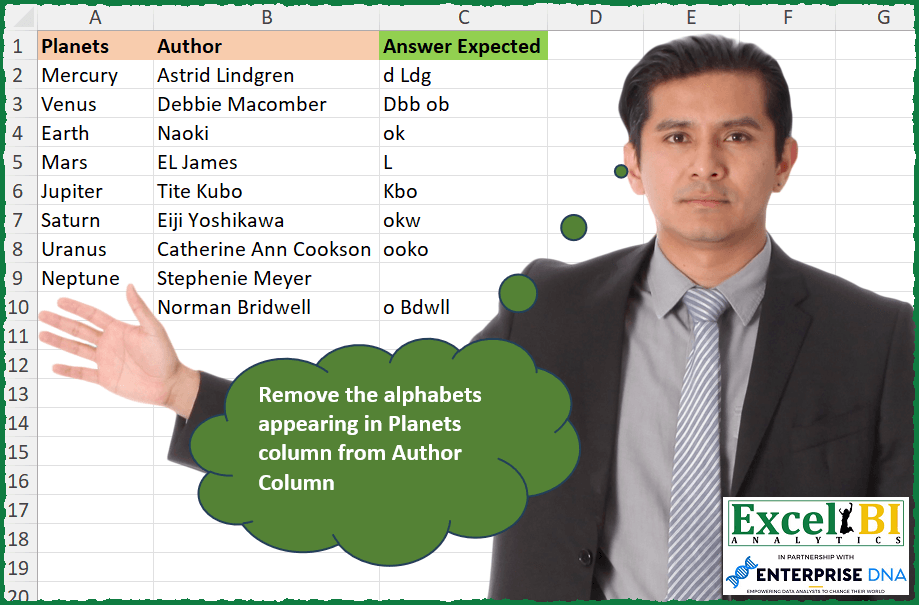
Remove the English letters appearing in Planets column from Author Column.
📌 Challenge Details and Links
ExcelBI Excel Challenge Number: 315
Challenge Difficulty: ⭐️
📥Download Sample File
📥Link to the solutions on LinkedIn
Solving the challenge of Remove letters in Planets column from Author Column with Power Query
Power Query solution 1 for Remove letters in Planets column from Author Column, proposed by Bo Rydobon 🇹🇭:
let
  Source = Excel.CurrentWorkbook(){[Name = "Table1"]}[Content],
  Ans = Table.TransformRows(
    Source,
    each
      let
        c = Text.Lower(Text.Combine(Source[Planets]))
      in
        Text.Trim(
          Text.Combine(List.Select(Text.SplitAny([Author], c & Text.Upper(c)), each _ >= ""))
        )
  )
in
  Ans
Power Query solution 2 for Remove letters in Planets column from Author Column, proposed by Zoran Milokanović:
letters w/ hashtag#powerquery. hashtag#bitanbit hashtag#powerbi

let
 Source = Excel.CurrentWorkbook(){[Name = "Input"]}[Content],
 S = Table.TransformRows(Source, each Text.Trim(List.Accumulate({0 .. Text.Length([Author]) - 1}, "", (s, c) => s & (let l = Text.At([Author], c) in if Text.PositionOf(Text.Combine(Source[Planets]), l, 0, Comparer.OrdinalIgnoreCase) >= 0 then "" else l))))
in
 S
Power Query solution 3 for Remove letters in Planets column from Author Column, proposed by Aditya Kumar Darak 🇮🇳:
let
  Source = Excel.CurrentWorkbook(){[Name = "data"]}[Content],
  Remove = List.TransformMany(
    List.RemoveNulls(Source[Planets]),
    Text.ToList,
    (x, y) => {Text.Upper(y), Text.Lower(y)}
  ),
  Return = Table.AddColumn(
    Source,
    "Answer",
    each Text.Trim(Text.Remove([Author], List.Combine(Remove)))
  )
in
  Return
Power Query solution 4 for Remove letters in Planets column from Author Column, proposed by Alejandro Simón 🇵🇦 🇪🇸:
let
  Planets = List.Distinct(
    List.Combine(
      List.Transform(
        Excel.CurrentWorkbook(){[Name = "Table1"]}[Content][Planets],
        each Text.ToList(Text.Lower(_))
      )
    )
  ),
  Author = Excel.CurrentWorkbook(){[Name = "Table2"]}[Content],
  Sol = Table.AddColumn(
    Author,
    "Answer",
    each
      let
        a = Text.ToList([Author]),
        b = List.RemoveMatchingItems(a, Planets, Comparer.OrdinalIgnoreCase),
        c = Text.TrimStart(Text.Combine(b), " ")
      in
        c
  )[[Answer]]
in
  Sol
Power Query solution 5 for Remove letters in Planets column from Author Column, proposed by Luan Rodrigues:
let
  Fonte = Tabela1,
  sub = List.Transform(
    List.Distinct(
      List.Combine(
        List.Transform(List.RemoveNulls(Fonte[Planets]), each Text.ToList(Text.Lower(_)))
      )
    ),
    each {Text.Lower(_)} & {null}
  ),
  res = Table.AddColumn(
    Fonte,
    "Personalizar",
    each Text.Trim(
      Text.Combine(
        List.RemoveNulls(
          List.ReplaceMatchingItems(Text.ToList([Author]), sub, Comparer.OrdinalIgnoreCase)
        )
      )
    )
  )
in
  res
Power Query solution 6 for Remove letters in Planets column from Author Column, proposed by Alexis Olson:
let
  Source = Excel.CurrentWorkbook(){[Name = "Table1"]}[Content],
  Planets = Text.Combine(Source[Planets]),
  Letters = List.Distinct(Text.ToList(Text.Lower(Planets) & Text.Upper(Planets))),
  Answer = Table.AddColumn(
    Source,
    "Answer Expected",
    each Text.Trim(Text.Remove([Author], Letters))
  )
in
  Answer
Power Query solution 7 for Remove letters in Planets column from Author Column, proposed by Brian Julius:
let
  Source = Excel.CurrentWorkbook(){[Name = "Table1"]}[Content],
  AddLetterList = Table.AddColumn(
    Source,
    "LetterList",
    each [
      a = List.FirstN(Source[Planets], 8),
      b = List.Transform(a, each Text.ToList(_)),
      c = List.Combine(b),
      d = List.Transform(c, each Text.Upper(_)),
      e = List.Transform(c, each Text.Lower(_)),
      f = List.Distinct(List.Combine({d, e}))
    ][f]
  ),
  AddTextRemove = Table.RemoveColumns(
    Table.AddColumn(AddLetterList, "Answer", each Text.Trim(Text.Remove([Author], [LetterList]))),
    "LetterList"
  )
in
  AddTextRemove
Power Query solution 8 for Remove letters in Planets column from Author Column, proposed by Ramiro Ayala Chávez:
let
  Origen = Excel.CurrentWorkbook(){[Name = "Tabla1"]}[Content],
  a = List.Transform(List.RemoveLastN(Origen[Planets]), each Text.ToList(Text.Lower(_))),
  b = List.Distinct(List.Combine(a)),
  c = List.Transform(b, each Text.Upper(_)),
  d = List.Transform(Origen[Author], each List.RemoveItems(Text.ToList(_), b & c)),
  Sol = Table.FromColumns({List.Transform(d, each Text.Trim(Text.Combine(_)))}, {"Answer Expected"})
in
  Sol
Power Query solution 9 for Remove letters in Planets column from Author Column, proposed by Rafael González B.:
let
  Source = Excel.CurrentWorkbook(){0}[Content],
  LP =
    let
      a = List.RemoveNulls(Source[Planets]),
      b = List.Transform(a, each Text.ToList(_)),
      c = List.Combine(b)
    in
      c,
  Ans = Table.AddColumn(
    Source,
    "Answer",
    each
      let
        aa = Text.ToList([Author]),
        bb = List.RemoveMatchingItems(aa, LP, Comparer.OrdinalIgnoreCase),
        cc = Text.Combine(bb),
        dd = Text.Trim(cc)
      in
        dd
  )[[Answer]]
in
  Ans
Power Query solution 10 for Remove letters in Planets column from Author Column, proposed by Luke Jarych:
let
  Source = Excel.CurrentWorkbook(){[Name = "Table1"]}[Content],
  ListOfPlanets = List.Combine(
    List.Transform(List.RemoveNulls(Source[Planets]), each Text.ToList(_))
  ),
  AddTableCol = Table.AddColumn(
    Source,
    "ExpectedAnwer",
    each
      let
        a = Text.ToList([Author]),
        b = List.RemoveMatchingItems(a, ListOfPlanets, Comparer.OrdinalIgnoreCase),
        c = Text.Trim(Text.Combine(b, " "))
      in
        c
  )
in
  AddTableCol
Solving the challenge of Remove letters in Planets column from Author Column with Excel
Excel solution 1 for Remove letters in Planets column from Author Column, proposed by Bo Rydobon 🇹🇭:
=MAP(
    B2:B10,
    LAMBDA(
        b,
        LET(
            m,
            MID(
                b,
                SEQUENCE(
                    LEN(
                        b
                    )
                ),
                1
            ),
            TRIM(
                CONCAT(
                    REPT(
                        m,
                        ISERR(
                            SEARCH(
                                m,
                                CONCAT(
                                    A2:A9
                                )
                            )
                        )
                    )
                )
            )
        )
    )
)
Excel solution 2 for Remove letters in Planets column from Author Column, proposed by Rick Rothstein:
=LET(
    c,
    CONCAT(
        A2:A9
    ),
    m,
    MID(
        c,
        SEQUENCE(
            LEN(
                c
            )
        ),
        1
    ),
    TRIM(
        TEXTSPLIT(
            CONCAT(
                TEXTSPLIT(
                    TEXTJOIN(
                        "/",
                        ,
                        B2:B10
                    ),
                    m,
                    ,
                    ,
                    1
                )
            ),
            ,
            "/"
        )
    )
)
Excel solution 3 for Remove letters in Planets column from Author Column, proposed by Rick Rothstein:
=MAP(B2:B10,LAMBDA(b,LET(c,CONCAT(A$2:A$9),u,MID(c,SEQUENCE(LEN(c)),1),TRIM(REDUCE(b,u,LAMBDA(a,x,SUBSTITUTE(SUBSTITUTE(a,LOWER(x),""),UPPER(x),"")))))))Excel solution 4 for Remove letters in Planets column from Author Column, proposed by John V.:
=BYROW(MID(B2:B10,COLUMN(A:Z),1),LAMBDA(r,TRIM(CONCAT(IF(COUNTIF(A2:A9,"*"&r&"*"),"",r)))))Excel solution 5 for Remove letters in Planets column from Author Column, proposed by محمد حلمي:
=MAP(B2:B10,LAMBDA(b,TRIM(CONCAT(TEXTSPLIT(b,MID(CONCAT(A2:A9),SEQUENCE(SUM(LEN(A2:A9))),1),,,1)))))Excel solution 6 for Remove letters in Planets column from Author Column, proposed by Kris Jaganah:
=MAP(B2:B10,LAMBDA(x,LET(a,MID(x,SEQUENCE(LEN(x)),1),TRIM(CONCAT(FILTER(a,ISERR(SEARCH(a,CONCAT(A2:A9)))))))))Excel solution 7 for Remove letters in Planets column from Author Column, proposed by Timothée BLIOT:
=TRIM(
    LET(
        L,
        LAMBDA(
            n,
            MID(
                n,
                SEQUENCE(
                    LEN(
                        n
                    )
                ),
                1
            )
        ),
        A,
        TOCOL(
            REDUCE(
                NA,
                A2:A9,
                LAMBDA(
                    a,
                    v,
                     HSTACK(
                         a,
                         L(
                             v
                         )
                     )
                )
            ),
            3
        ),
        MAP(
            B2:B10,
            LAMBDA(
                x,
                CONCAT(
                     MAP(
                         L(
                             x
                         ),
                         LAMBDA(
                             y,
                              IF(
                                  ISNUMBER(
                                      XMATCH(
                                          y,
                                          A
                                      )
                                  ),
                                  "",
                                  y
                              )
                         )
                     )
                )
            )
        )
    )
)
Excel solution 8 for Remove letters in Planets column from Author Column, proposed by Hussein SATOUR:
=LET(
    a,
     MID(
         CONCAT(
             UPPER(
                 A2:A9
             ),
              LOWER(
                 A2:A9
             )
         ),
          SEQUENCE(
              99
          ),
         1
     ),
     TRIM(
         REDUCE(
             B2:B10,
             a,
              LAMBDA(
                  x,
                  y,
                   SUBSTITUTE(
                       x,
                        y,
                        ""
                   )
              )
         )
     )
)
Excel solution 9 for Remove letters in Planets column from Author Column, proposed by Sunny Baggu:
=MAP(

     B2:B10,

     LAMBDA(
         a,

          LET(

               _ts,
               MID(
                   a,
                    SEQUENCE(
                        LEN(
                            a
                        )
                    ),
                    1
               ),

               TRIM(
                   CONCAT(
                       FILTER(
                           _ts,
                            ISERR(
                                SEARCH(
                                    _ts,
                                     CONCAT(
                                         A2:A10
                                     )
                                )
                            )
                       )
                   )
               )

          )

     )

)
Excel solution 10 for Remove letters in Planets column from Author Column, proposed by 🇵🇪 Ned Navarrete C.:
=BYROW(
    B2:B10,
    LAMBDA(
        r,
        TRIM(
            REDUCE(
                "",
                MID(
                    r,
                    SEQUENCE(
                        LEN(
                            r
                        )
                    ),
                    1
                ),
                LAMBDA(
                    c,
                    v,
                    c&IF(
                        ISERROR(
                            SEARCH(
                                v,
                                CONCAT(
                                    A2:A9
                                )
                            )
                        ),
                        v,
                        ""
                    )
                )
            )
        )
    )
)

=MAP(
    B2:B10,
    LAMBDA(
        r,
        LET(
            a,
            MID(
                    r,
                    SEQUENCE(
                        LEN(
                            r
                        )
                    ),
                    1
                ),
            TRIM(
                CONCAT(
                    FILTER(
                        a,
                        ISERROR(
                            SEARCH(
                                a,
                                CONCAT(
                                    A2:A8
                                )
                            )
                        )
                    )
                )
            )
        )
    )
)
Excel solution 11 for Remove letters in Planets column from Author Column, proposed by Md. Zohurul Islam:
=LET(
    u,
    B2:B10,
    v,
    CONCAT(
        A2:A9
    ),

    w,
    MAP(
        u,
        LAMBDA(
            x,
            LET(
                a,
                MID(
                    x,
                    SEQUENCE(
                        LEN(
                            x
                        )
                    ),
                    1
                ),
                b,
                ISERROR(
                    SEARCH(
                        a,
                        v
                    )
                ),
                TRIM(
                    CONCAT(
                        FILTER(
                            a,
                            b
                        )
                    )
                )
            )
        )
    ),

    w
)
Excel solution 12 for Remove letters in Planets& column from Author Column, proposed by Asheesh Pahwa:
=LET(
    a,
    A2:A9,
    b,
    B2:B10,
    c,
    CONCAT(
        a
    ),
     MAP(
         b,
         LAMBDA(
             x,
             LET(
                 a,
                 MID(
                     x,
                      SEQUENCE(
                          LEN(
                              x
                          )
                      ),
                     1
                 ),
                  TRIM(
                      CONCAT(
                          FILTER(
                              a,
                              ISERR(
                                  SEARCH(
                                      a,
                                      c
                                  )
                              )
                          )
                      )
                  )
             )
         )
     )
)
Excel solution 13 for Remove letters in Planets column from Author Column, proposed by Charles Roldan:
=LET(REPLACECHARS,
     LAMBDA(
         F,
          F(
              F
          )
     )(LAMBDA(f,
     LAMBDA(textString,
    illegalChars,
     IF(illegalChars = "",
     textString,
     f(
         f
     )(SUBSTITUTE(
         textString,
          LEFT(
              illegalChars
          ),

     ),
     REPLACE(
         illegalChars,
          1,
          1,

     )))))),
     LU,
     LAMBDA(
         x,
          LOWER(
              x
          ) & UPPER(
              x
          )
     ),
     TRIM(
         REPLACECHARS(
             B2:B10,
              LU(
                  CONCAT(
                      A2:A9
                  )
              )
         )
     ))
Excel solution 14 for Remove letters in Planets column from Author Column, proposed by JvdV –:
=TRIM(
    REDUCE(
        "",
        ROW(
            1:99
        ),
        LAMBDA(
            x,
            y,
            IF(
                COUNTIF(
                    A2:A9,
                    "*"&MID(
                        B2:B10,
                        y,
                        1
                    )&"*"
                ),
                x,
                x&MID(
                        B2:B10,
                        y,
                        1
                    )
            )
        )
    )
)

Or:

=TRIM(
    LET(
        x,
        MID(
            B2:B10,
            SEQUENCE(
                ,
                99
            ),
            1
        ),
        BYROW(
            IF(
                COUNTIF(
                    A2:A9,
                    "*"&x&"*"
                ),
                "",
                x
            ),
            LAMBDA(
                r,
                CONCAT(
                    r
                )
            )
        )
    )
)
Excel solution 15 for Remove letters in Planets column from Author Column, proposed by Pieter de Bruijn:
=LET(t,TOCOL(MID(B2:B10&"|",COLUMN(A:Z),1)),DROP(TRIM(TEXTSPLIT(CONCAT(IF(COUNTIF(A2:A9,"*"&t&"*"),"",t)),,"|")),-1))

couldn't have done it without JvdV's post.
This was my initial try:
=LET(a,A2:A9,b,B2:B10,c,MID(a,SEQUENCE(,7),1),d,VSTACK(UPPER(c),LOWER(c)),MAP(b,LAMBDA(x,REDUCE(x,d,LAMBDA(y,z,TRIM(CONCAT(SUBSTITUTE(y,z,))))))))
Excel solution 16 for Remove letters in Planets column from Author Column, proposed by Victor Momoh (MVP, MOS, R.Eng):
=LET(p,CONCAT(A2:A9),REDUCE(B2:B10,MID(UPPER(p)&LOWER(p),SEQUENCE(2*LEN(p))
,1),LAMBDA(a,b,TRIM(SUBSTITUTE(a,b,"")))))

=MAP(B2:B10,LAMBDA(x,LET(p,MID(x,SEQUENCE(LEN(x)),1),TRIM(CONCAT(FILTER(p,ISE
RR(SEARCH(p,CONCAT(A2:A9))))))))

=MAP(B2:B10,LAMBDA(x,LET(a,MID(x,SEQUENCE(LEN(x)),1),TRIM(CONCAT(IF(ISNUMBER
(SEARCH(a,CONCAT(A2:A9))),"",a))))))
Excel solution 17 for Remove letters in Planets column from Author Column, proposed by Ziad A.:
=ARRAYFORMULA(TRIM(REGEXREPLACE(B2:B,"(?i)["&JOIN(,A2:A)&"]",)))Excel solution 18 for Remove letters in Planets column from Author Column, proposed by Giorgi Goderdzishvili:
=MAP(B2:B10,LAMBDA(x,LET(
cnc,CONCAT(LOWER(A2:A10),UPPER(A2:A10)),
rp, MID(cnc,SEQUENCE(,LEN(cnc)),1),
rd,TRIM(REDUCE(x,rp,LAMBDA(a,v,SUBSTITUTE(a,v,"")))),
rd)))
Excel solution 19 for Remove letters in Planets column from Author Column, proposed by Abdelrahman Omer, MBA, PMP:
=MAP(B2:B10,
    LAMBDA(b,
    LET(a,
    UNIQUE(
        MID(
            CONCAT(
                A2:A9
            ),
            SEQUENCE(
                LEN(
                    CONCAT(
                A2:A9
            )
                )
            ),
            1
        )
    ),
    TRIM((REDUCE(
        b,
        VSTACK(
            LOWER(
                a
            ),
            UPPER(
                a
            )
        ),
        LAMBDA(
            x,
            y,
            SUBSTITUTE(
                x,
                y,
                ""
            )
        )
    ))))))
Excel solution 20 for Remove letters in Planets column from Author Column, proposed by Daniel Garzia:
=LET(
    l,
    MID(
        CONCAT(
            A2:A9
        ),
        ROW(
            1:47
        ),
        1
    ),
    MAP(
        B2:B10,
        LAMBDA(
            x,
            REDUCE(
                x,
                VSTACK(
                    LOWER(
                        l
                    ),
                    UPPER(
                        l
                    )
                ),
                LAMBDA(
                    a,
                    b,
                    TRIM(
                        SUBSTITUTE(
                            a,
                            b,

                        )
                    )
                )
            )
        )
    )
)
Excel solution 21 for Remove letters in Planets column from Author Column, proposed by Rayan S.:
=TRIM(MAP(B2:B10,LAMBDA(arr,LET(x,TEXTJOIN("",,$A$2:$A$10),y,UPPER(x)&LOWER(x),TEXTJOIN("",TRUE,TEXTSPLIT(arr,MID(y,SEQUENCE(LEN(y)),1)))))))Excel solution 22 for Remove letters in Planets column from Author Column, proposed by Hazem Hassan:
=LET(
    a,
    A2:A9,
    b,
    MID(
        CONCAT(
            a
        ),
        SEQUENCE(
            SUM(
                LEN(
            a
        )
            )
        ),
        1
    ),

    TRIM(
        REDUCE(
            B2:B10,
            VSTACK(
                b,
                IF(
                    CODE(
                        b
                    )>=90,
                    UPPER(
                        b
                    ),
                    LOWER(
                        b
                    )
                )
            ),
            LAMBDA(
                x,
                y,
                SUBSTITUTE(
                    x,
                    y,
                    ""
                )
            )
        )
    )
)
Excel solution 23 for Remove letters in Planets column from Author Column, proposed by Hazem Hassan:
=TRIM(MAP(B2:B10,LAMBDA(x,LET(a,A2:A9,b,MID(CONCAT(a),SEQUENCE(SUM(LEN(a))),1),c,MID(x,SEQUENCE(LEN(x)),1),CONCAT(FILTER(c,ISERROR(XLOOKUP(c,b,b))))))))Excel solution 24 for Remove letters in Planets column from Author Column, proposed by Jeff Blakley:
=LET(
    p,
    CONCAT(
        A2:A9
    ),
    c,
    MID(
        p,
        SEQUENCE(
            LEN(
                p
            )
        ),
        1
    ),
    TRIM(
        MAP(
            B2:B10,
            LAMBDA(
                x,
                CONCAT(
                    TEXTSPLIT(
                        x,
                        c,
                        ,
                        1,
                        1
                    )
                )
            )
        )
    )
)

=LET(
    p,
    CONCAT(
        UPPER(
        A2:A9
    )&LOWER(
        A2:A9
    )
    ),
    c,
    MID(
        p,
        SEQUENCE(
            LEN(
                p
            )
        ),
        1
    ),
    TRIM(
        MAP(
            B2:B10,
            LAMBDA(
                x,
                REDUCE(
                    x,
                    c,
                    LAMBDA(
                        a,
                        v,
                        SUBSTITUTE(
                            a,
                            v,
                            ""
                        )
                    )
                )
            )
        )
    )
)
Solving the challenge of Remove letters in Planets column from Author Column with Python in Excel
Python in Excel solution 1 for Remove letters in Planets column from Author Column, proposed by Bo Rydobon 🇹🇭:
import re
[re.sub(r'['+''.join(xl("A2:A9")[0])+']','',a,flags=re.I).strip() for a in xl("B2:B10")[0]]
Python in Excel solution 2 for Remove letters in Planets column from Author Column, proposed by John V.:
Hi everyone!
 return t.translate(str.maketrans('', '', s)).strip()
s = ''.join(xl("A2:A9")[0])
[f(i, s.upper() + s.lower()) for i in xl("B2:B10")[0]]
Blessings!
Solving the challenge of Remove letters in Planets column from Author Column with R
R solution 1 for Remove letters in Planets column from Author Column, proposed by Konrad Gryczan, PhD:
library(tidyverse)
library(readxl)
planets = read_excel("Letters Removal.xlsx", range = "A1:A9")
input = read_excel("Letters Removal.xlsx", range = "B1:B10")
test = read_excel("Letters Removal.xlsx", range = "C1:C10")
planet_letters = planets %>%
 mutate(planets_letters = map(Planets, ~strsplit(.x, "")) %>% flatten()) %>%
 select(-Planets) %>%
 unnest(planets_letters) %>%
 unique()
PL_upper = str_to_upper(planet_letters$planets_letters)
PL_lower = str_to_lower(planet_letters$planets_letters)
PL = c(PL_upper, PL_lower)
result = input %>%
 rowwise() %>%
 mutate(Author = str_remove_all(Author, paste0("[", paste0(PL, collapse = ""), "]")) %>% trimws()) %>%
 ungroup() %>%
 mutate(Author = if_else(str_length(Author) == 0, NA_character_, Author))
identical(result$Author, test$`Answer Expected`)
# [1] TRUE
&&