
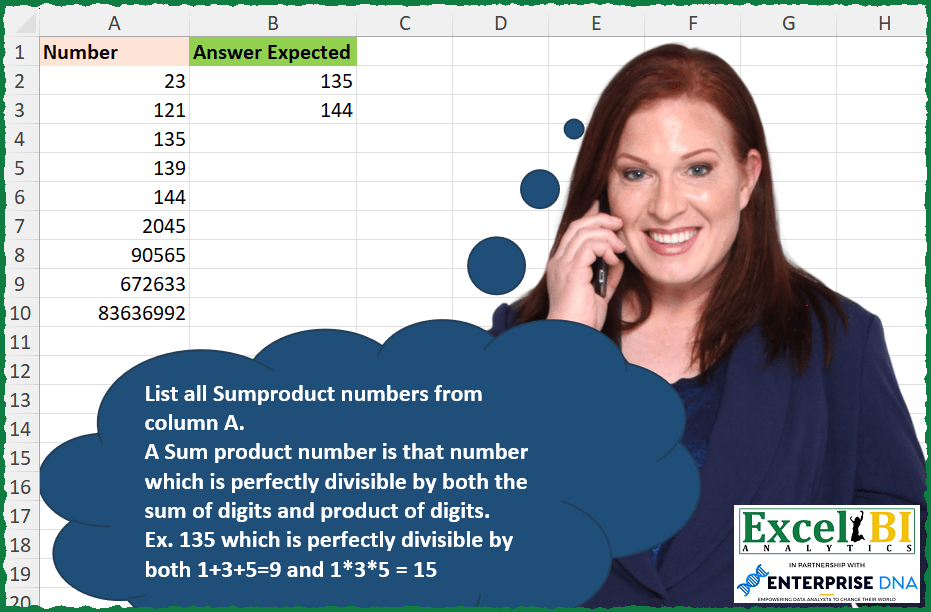
List all Sumproduct numbers from column A. A Sum product number is that number which is perfectly divisible by both the sum of digits and product of digits. Ex. 135 which is perfectly divisible by both 1+3+5=9 and 1*3*5 = 15
📌 Challenge Details and Links
ExcelBI Excel Challenge Number: 312
Challenge Difficulty: ⭐️
📥Download Sample File
📥Link to the solutions on LinkedIn
Solving the challenge of List all Sumproduct numbers with Power Query
Power Query solution 1 for List all Sumproduct numbers, proposed by Zoran Milokanović:
let
  Source = Excel.CurrentWorkbook(){[Name = "Input"]}[Content],
  S = Table.SelectRows(
    Source,
    each
      let
        n = [Number],
        d = List.Transform(Text.ToList(Text.From(n)), Number.From),
        F = (n, d) => Number.Mod(n, d) = 0
      in
        F(n, List.Sum(d)) and F(n, List.Product(d))
  )
in
  S
Power Query solution 2 for List all Sumproduct numbers, proposed by Rick de Groot:
let
  Source = Table.FromRows(
    Json.Document(
      Binary.Decompress(
        Binary.FromText(
          "i45WMjJWitWJVjI0MoTQxqZQ2hJCm5iAaSMDE4iEpYGpGYRlZm5kZgzRbWFsZmxmaWmkFBsLAA==",
          BinaryEncoding.Base64
        ),
        Compression.Deflate
      )
    ),
    let
      _t = ((type nullable text) meta [Serialized.Text = true])
    in
      type table [Number = _t]
  ),
  Test = Table.SelectRows(
    Source,
    each [
      z = Number.From([Number]),
      a = Text.ToList([Number]),
      b = List.Transform(a, Number.From),
      c = List.Product(b),
      d = List.Sum(b),
      e = (Number.Mod(z, c) + Number.Mod(z, d)) = 0
    ][e]
  )
in
  Test
Power Query solution 3 for List all Sumproduct numbers, proposed by Alejandro Simón 🇵🇦 🇪🇸:
let
  Source = Excel.CurrentWorkbook(){[Name = "Table1"]}[Content],
  Sol = Table.SelectRows(
    Source,
    each
      let
        a = Text.ToList(Text.From([Number])),
        b = List.Transform(a, Number.From),
        c = List.Sum(b),
        d = List.Accumulate(b, 1, (s, c) => s * c),
        e = List.AllTrue(List.Transform({c, d}, (x) => Number.Mod([Number], x) = 0))
      in
        e
  )
in
  Sol
Power Query solution 4 for List all Sumproduct numbers, proposed by Alejandro Simón 🇵🇦 🇪🇸:
let
  Source = Excel.CurrentWorkbook(){[Name = "Table1"]}[Content],
  Sol = Table.SelectRows(
    Source,
    each
      let
        a = Text.ToList(Text.From([Number])),
        b = List.Transform(a, Number.From),
        c = List.Sum(b),
        d = Expression.Evaluate(Text.Combine(a, "*")),
        e = List.AllTrue(List.Transform({c, d}, (x) => Number.Mod([Number], x) = 0))
      in
        e
  )
in
  Sol
Power Query solution 5 for List all Sumproduct numbers, proposed by Luan Rodrigues:
let
  Fonte = Tabela1,
  res = Table.SelectRows(
    Fonte,
    each [
      a = Text.ToList(Text.From([Number])),
      b = List.Transform(a, Number.From),
      c = [Number] / List.Sum(b) + [Number] / Expression.Evaluate(Text.Combine(a, "*")),
      d = (try Int64.From(c) = c otherwise false)
    ][d]
  )
in
  res
Power Query solution 6 for List all Sumproduct numbers, proposed by Ramiro Ayala Chávez:
let
  Origen = Table.TransformColumnTypes(
    Excel.CurrentWorkbook(){[Name = "Tabla1"]}[Content],
    {{"Number", type text}}
  ),
  a = Table.AddColumn(
    Origen,
    "Sum",
    each List.Sum(List.Transform(Text.ToList([Number]), each Number.From(_)))
  ),
  b = Table.AddColumn(
    a,
    "Prod",
    each List.Product(List.Transform(Text.ToList([Number]), each Number.From(_)))
  ),
  c = Table.TransformColumnTypes(b, {{"Number", Int64.Type}}),
  d = Table.AddColumn(c, "Mod1", each Number.Mod([Number], [Sum])),
  e = Table.AddColumn(d, "Mod2", each Number.Mod([Number], [Prod])),
  Sol = Table.RenameColumns(
    Table.SelectRows(e, each [Mod1] = 0 and [Mod2] = 0)[[Number]],
    {"Number", "Answer Expected"}
  )
in
  Sol
Power Query solution 7 for List all Sumproduct numbers, proposed by Rafael González B.:
let
Source = Excel.CurrentWorkbook(){0}[Content],
Fx_SumProduct = (Num as number, Oper as number) =>
let
N = Text.From(Num),
Op = Oper,
b = Text.ToList(N),
d = " + ",
e = " * ",
f = List.Accumulate(b, if Op = 0 then "0" else "1",
(s,c) => s & (if Op = 0 then d else e) & c)
in
Number.Mod(Number.From(N), Expression.Evaluate(f)) = 0,
Ans = Table.SelectRows(Source, each Fx_SumProduct(Number.From([Number]), 0) and Fx_SumProduct(Number.From([Number]), 1))
in
Ans
🧙♂️ 🧙♂️ 🧙♂️
Solving the challenge of List all Sumproduct numbers with Excel
Excel solution 1 for List all Sumproduct numbers, proposed by Bo Rydobon 🇹🇭:
=TOCOL(
    MAP(
        A2:A10,
        LAMBDA(
            a,
            LET(
                b,
                --MID(
                    a,
                    SEQUENCE(
                        LEN(
                            a
                        )
                    ),
                    1
                ),
                IF(
                    MOD(
                        a,
                        SUM(
                            b
                        )
                    )+MOD(
                        a,
                        PRODUCT(
                            b
                        )
                    ),
                    z,
                    a
                )
            )
        )
    ),
    3
)
Excel solution 2 for List all Sumproduct numbers, proposed by Rick Rothstein:
=FILTER(
    A2:A10,
    MAP(
        A2:A10,
        LAMBDA(
            x,
            LET(
                m,
                0+MID(
                    x,
                    SEQUENCE(
                        LEN(
                            x
                        )
                    ),
                    1
                ),
                x=SUM(
                    m
                )*PRODUCT(
                    m
                )
            )
        )
    )
)
Excel solution 3 for List all Sumproduct numbers, proposed by Rick Rothstein:
=FILTER(A2:A10,
    MAP(A2:A10,
    LAMBDA(x,
    LET(m,
    MID(
        x,
        SEQUENCE(
            LEN(
                x
            )
        ),
        1
    ),
    IFERROR((MOD(
        x,
        SUM(
            0+m
        )
    )=0)*(MOD(
        x,
        PRODUCT(
            0+m
        )
    )=0),
    0)))))
Excel solution 4 for List all Sumproduct numbers, proposed by John V.:
=TOCOL(MAP(A2:A10,
    LAMBDA(x,
    LET(v,
    --MID(
        x,
        SEQUENCE(
            LEN(
                x
            )
        ),
        1
    ),
    x/(SUM(
        v
    )*PRODUCT(
        v
    )=x)))),
    2)
Excel solution 5 for List all Sumproduct numbers, proposed by محمد حلمي:
=TOCOL(MAP(A2:A10,LAMBDA(a,a/LET(c,-MID(a,SEQUENCE(LEN(a)),1),PRODUCT(c)=a/SUM(c)))),2)Excel solution 6 for List all Sumproduct numbers, proposed by Kris Jaganah:
=TOCOL(MAP(A2:A10,
    LAMBDA(x,
    LET(a,
    --MID(
        x,
        SEQUENCE(
            LEN(
                x
            )
        ),
        1
    ),
    b,
    x/SUM(
        a
    ),
    c,
    x/PRODUCT(
        a
    ),
    x/(INT(
        b
    )=b)*(INT(
        c
    )=c)))),
    3)
Excel solution 7 for List all Sumproduct numbers, proposed by Timothée BLIOT:
=TOCOL(MAP(A2:A10,
    LAMBDA(z,
    LET(A,
    --MID(
        z,
        SEQUENCE(
            LEN(
                z
            )
        ),
        1
    ),
    IF((MOD(
        z,
        PRODUCT(
            A
        )
    )=0)*(MOD(
        z,
        SUM(
            A
        )
    )=0),
    z,
    1/0)))),
    3)

Filter version:
=FILTER(A2:A10,
    MAP(A2:A10,
    LAMBDA(z,
    IFERROR(LET(A,
    --MID(
        z,
        SEQUENCE(
            LEN(
                z
            )
        ),
        1
    ),
    (MOD(
        z,
        PRODUCT(
            A
        )
    )=0)*(MOD(
        z,
        SUM(
            A
        )
    )=0)),
    0))))
Excel solution 8 for List all Sumproduct numbers, proposed by Nikola Z Grujicic – Nikola Ž Grujičić:
=LET(
    x,
     MAP(
         A2:A10,
         LAMBDA(
             a,
              LET(
                  f,
                   MID(
                       a,
                        SEQUENCE(
                            1,
                            LEN(
                                a
                            )
                        ),
                       1
                   ),
                   n,
                   PRODUCT(
                       --f
                   ),
                   m,
                   SUM(
                       --f
                   ),
                  FILTER(
                      a,
                       AND(
                           MOD(
                               a,
                                n
                           )=0,
                           MOD(
                               a,
                                m
                           )=0
                       )
                  )
              )
         )
     ),
     FILTER(
         x,
          ISNUMBER(
              x
          )
     )
)
Excel solution 9 for List all Sumproduct numbers, proposed by Hussein SATOUR:
=FILTER(
    A2:A10,
     IFERROR(
         MAP(
             A2:A10,
              LAMBDA(
                  x,
                   LET(
                       a,
                        --MID(
                            x,
                             SEQUENCE(
                                 LEN(
                                     x
                                 )
                             ),
                             1
                        ),
                        MOD(
                            x,
                             SUM(
                                 a
                             )
                        ) + MOD(
                            x,
                             PRODUCT(
                                 a
                             )
                        )
                   )=0
              )
         ),
          0
     )
)
Excel solution 10 for List all Sumproduct numbers, proposed by Sunny Baggu:
=FILTER(
 A2:A10,
 MAP(
 A2:A10,
 LAMBDA(a,
 LET(
 _num, --MID(a, SEQUENCE(LEN(a)), 1),
 0 = SUM(IFERROR(MOD(a, VSTACK(PRODUCT(_num), SUM(_num))), 1))
 )
 )
 )
)
Excel solution 11 for List all Sumproduct numbers, proposed by Abdallah Ally:
=FILTER(
    A2:A10,
    MAP(
        A2:A10,
        LAMBDA(
            u,
            LET(
                a,
                u,
                b,
                -MID(
                    a,
                    SEQUENCE(
                        LEN(
                            a
                        )
                    ),
                    1
                ),
                s,
                SUM(
                    b
                ),
                p,
                PRODUCT(
                    b
                ),
                IFERROR(
                    AND(
                        MOD(
                            a,
                            s
                        )=0,
                        MOD(
                            a,
                            p
                        )=0
                    ),
                    FALSE
                )
            )
        )
    )
)
Excel solution 12 for List all Sumproduct numbers, proposed by Abdallah Ally:
=FILTER(A2:A10,MAP(A2:A10,LAMBDA(u,LET(a,u,b,-MID(a,SEQUENCE(LEN(a)),1),s,REDUCE(0,b,LAMBDA(x,y,x+y)),p, REDUCE(1,b,LAMBDA(x,y,x*y)),IFERROR(AND(MOD(a,s)=0,MOD(a,p)=0), FALSE)))))Excel solution 13 for List all Sumproduct numbers, proposed by 🇵🇪 Ned Navarrete C.:
=FILTER(A2:A10,

 MAP(A2:A10,

 LAMBDA(r,

 LET(a,
    --MID(
        r,
        SEQUENCE(
            LEN(
                r
            )
        ),
        1
    ),

 IFERROR((AND(
     MOD(
         r,
         VSTACK(
             PRODUCT(
                 a
             ),
             SUM(
                 a
             )
         )
     )=0
 )),
    0))
 )
 )
)
Excel solution 14 for List all Sumproduct numbers, proposed by Md. Zohurul Islam:
=FILTER(
    A2:A10,
    MAP(
        A2:A10,
        LAMBDA(
            x,
            LET(
                a,
                --MID(
                    x,
                    SEQUENCE(
                        LEN(
                            x
                        )
                    ),
                    1
                ),
                b,
                HSTACK(
                    SUM(
                        a
                    ),
                    PRODUCT(
                        a
                    )
                ),
                BYROW(
                    IFERROR(
                        MOD(
                            x,
                            b
                        ),
                        99
                    ),
                    SUM
                )
            )
        )
    )=0
)
Excel solution 15 for List all Sumproduct numbers, proposed by Oscar Javier Rosero Jiménez:
=LET(

    _b,
     A2:A10,

    _d,
     LAMBDA(
         i,
          MAP(
              SEQUENCE(
                  ,
                  LEN(
                      i
                  )
              ),
              LAMBDA(
                  x,
                  --MID(
                      i,
                      x,
                      1
                  )
              )
          )
     ),

    _s,
     MAP(
         _b,
          LAMBDA(
              x,
               SUM(
                   _d(
                       x
                   )
               )
          )
     ),

    _p,
     MAP(
         _b,
          LAMBDA(
              x,
               PRODUCT(
                   _d(
                       x
                   )
               )
          )
     ),

    _v,
    IFERROR(
        MO&D(
            _b,
            _s
        )*MOD(
            _b,
            _p
        ),
        1
    ),

    FILTER(
        _b,
        _v=0
    )
)
Excel solution 16 for List all Sumproduct numbers, proposed by Pieter de Bruijn:
=TOCOL(
    A2:A10/MAP(
        A2:A10,
        LAMBDA(
            a,
            LET(
                b,
                --MID(
                    a,
                    SEQUENCE(
                        ,
                        LEN(
                            a
                        )
                    ),
                    1
                ),
                AND(
                    MOD(
                        a/HSTACK(
                            SUM(
                                b
                            ),
                            PRODUCT(
                                b
                            )
                        ),
                        1
                    )=0
                )
            )
        )
    ),
    2
)
Excel solution 17 for List all Sumproduct numbers, proposed by Nicolas Micot:
=LET(
    _nombres;
    A2:A10;

    FILTRE(
        _nombres;
        MAP(
            _nombres;
            LAMBDA(
                l_nombre;

                LET(
                    _chiffres;
                    STXT(
                        l_nombre;
                        SEQUENCE(
                            NBCAR(
                                l_nombre
                            )
                        );
                        1
                    )+0;

                    ET(
                        MOD(
                            l_nombre;
                            SOMME(
                                _chiffres
                            )
                        )=0;
                        SIERREUR(
                            MOD(
                                l_nombre;
                                PRODUIT(
                                _chiffres
                            )
                            );
                            -1
                        )=0
                    )
                )
            )
        );
        ""
    )
)
Excel solution 18 for List all Sumproduct numbers, proposed by Ziad A.:
=TOCOL(
    MAP(
        A2:A10,
        LAMBDA(
            a,
            LET(
                m,
                --MID(
                    a,
                    SEQUENCE(
                        LEN(
                            a
                        )
                    ),
                    1
                ),
                a/AND(
                    0=MOD(
                        a,
                        HSTACK(
                            SUM(
                                m
                            ),
                            PRODUCT(
                                m
                            )
                        )
                    )
                )
            )
        )
    ),
    2
)
Excel solution 19 for List all Sumproduct numbers, proposed by Edwin Tisnado:
=TOCOL(
    MAP(
        A2:A10,
        LAMBDA(
            a,
            LET(
                x,
                --MID(
                    a,
                    SEQUENCE(
                        LEN(
                            a
                        )
                    ),
                    1
                ),
                IF(
                    AND(
                        MOD(
                            a,
                            SUM(
                                x
                            )
                        )=0,
                        MOD(
                            a,
                            PRODUCT(
                                x
                            )
                        )=0
                    ),
                    a,
                    NA()
                )
            )
        )
    ),
    2
)
Excel solution 20 for List all Sumproduct numbers, proposed by Abdelrahman Omer, MBA, PMP:
=FILTER(A2:A10,MAP(A2:A10,LAMBDA(a,LET(b,SUM(--MID(a,SEQUENCE(LEN(a)),1)),c,PRODUCT(--MID(a,SEQUENCE(LEN(a)),1)),IFERROR(--(MOD(a,b)+MOD(a,c)=0),0)))))Excel solution 21 for List all Sumproduct numbers, proposed by Diarmuid Early:
=TOCOL(MAP(A2:A10,
    LAMBDA(num,

 LET(digits,
    --MID(
        num,
        SEQUENCE(
            LEN(
                num
            )
        ),
        1
    ),

 IF((MOD(
     num,
     SUM(
         digits
     )
 )=0)*
 (MOD(
     num,
     PRODUCT(
         digits
     )
 )=0),

 num,
    NA()))
)),
    2)

Looks like I had about the same idea as Rick,
     but with a TOCOL wrapper (and the non-matches returning errors,
     which get dropped)
Excel solution 22 for List all Sumproduct numbers, proposed by Hazem Hassan:
=TOCOL(MAP(A2:A10,LAMBDA(x,LET(a,MID(x,SEQUENCE(LEN(x)),1)*1,
IF((MOD(x,SUM(a))=0)*(MOD(x,PRODUCT(a))=0),x,1/0)))),3)
Excel solution 23 for List all Sumproduct numbers, proposed by Jeff Blakley:
=FILTER(A2:A10,
    MAP(A2:A10,
    LAMBDA(x,
    LET(c,
    -MID(
        x,
        SEQUENCE(
            LEN(
                x
            )
        ),
        1
    ),
    (MOD(
        x/SUM(
            c
        ),
        1
    )=0)*IFERROR(
        MOD(
            x/PRODUCT(
            c
        ),
            1
        )=0,

    )))))
Excel solution 24 for List all Sumproduct numbers, proposed by Bruno Rafael Diaz Ysla:
=INDICE(

     A2:A10;

     COINCIDIR(

          1;

          MAP(

               A2:A10;

               LAMBDA(
                   _cells;

                    LET(

                         _sepnum;
                         DERECHA(
                             EXTRAE(
                                 _cells;
                                  1;
                                  SECUENCIA(
                                      LARGO(
                                          _cells
                                      )
                                  )
                             );
                              1
                         );

                         _sumnum;
                         SUMA(
                             _sepnum * 1
                         );

                         _mulnum;
                         REDUCE(
                             ;
                              _sepnum;
                              LAMBDA(
                                  _acu;
                                   _eln;
                                   _acu * _eln
                              )
                         );

                         _condfiltro;
                         _sumnum * _mulnum;

                         _solu;
                         COINCIDIRX(
                             _condfiltro;
                              _cells;
                              0
                         );

                         _solu

                    )

               )

          );

          {-1;
          1}

     )

)
Excel solution 25 for List all Sumproduct numbers, proposed by Pierluigi Stallone:
=TOCOL(
    MAP(
        A2:A11,
        LAMBDA(
            _single,
            LET(
                _number,
                NUMBERVALUE(
                    MID(
                        _single,
                        SEQUENCE(
                            ,
                            LEN(
                                _single
                            )
                        ),
                        1
                    )
                ),
                IF(
                    NOT(
                        MOD(
                            _single,
                            SUM(
                                _number
                            )
                        )*MOD(
                            _single,
                            PRODUCT(
                                _number
                            )
                        )
                    ),
                    _single,
                    ""
                )
            )
        )
    ),
    3
)
Solving the challenge of List all Sumproduct numbers with Python in Excel
Python in Excel solution 1 for List all Sumproduct numbers, proposed by John V.:
Hi everyone!
One [Python] option could be:
 v = [int(i) for i in str(n)]
 return n == sum(v) * np.prod(v)
[i for i in xl("A2:A10")[0] if f(i)]
Blessings!
Solving the challenge of List all Sumproduct numbers with R
R solution 1 for List all Sumproduct numbers, proposed by Konrad Gryczan, PhD:
library(tidyverse)
library(readxl)
library(data.table)
input = read_excel("Sumproduct Number.xlsx", range = "A1:A10")
test = read_excel("Sumproduct Number.xlsx", range = "B1:B3")
is_sum_product_tv = function(number){
 digits = as.numeric(str_split(as.character(number), "")[[1]])
 sum = reduce(digits, `+`)
 product = reduce(digits, `*`)

 check = number %% sum == 0 & number %% product == 0
 return(check)

}
 result_tv = input %>%
 mutate(my_answer = map_lgl(Number, is_sum_product_tv)) %>%
 filter(my_answer) %>%
 select(my_answer = Number)
 identical(test$`Answer Expected`, result_tv$my_answer)
 #[1] TRUE
Solving the challenge of List all Sumproduct numbers with Excel VBA
Excel VBA solution 1 for List all Sumproduct numbers, proposed by Vasin Nilyok:
Sub SumproductNumber()
LastRow = Cells(Rows.Count, 1).End(xlUp).Row
rAns = 2
For r = 2 To LastRow
 QNum = Cells(r, 1)
 LenQNum = Len(QNum)
 Dim NumCollection As New Collection
 For i = 1 To LenQNum
 NumCollection.Add Int(Mid(QNum, i, 1))
 Next i
 Plus = Empty
 X = 1
 For ii = 1 To NumCollection.Count
 Plus = Plus + NumCollection(ii)
 X = X * NumCollection(ii)
 Next ii
 If X = 0 Then
 GoTo skip
 ElseIf QNum Mod Plus = 0 And QNum Mod X = 0 Then
 Cells(rAns, 3) = QNum
 rAns = rAns + 1
 End If
skip:
 Set NumCollection = New Collection
Next r
End Sub
&&