
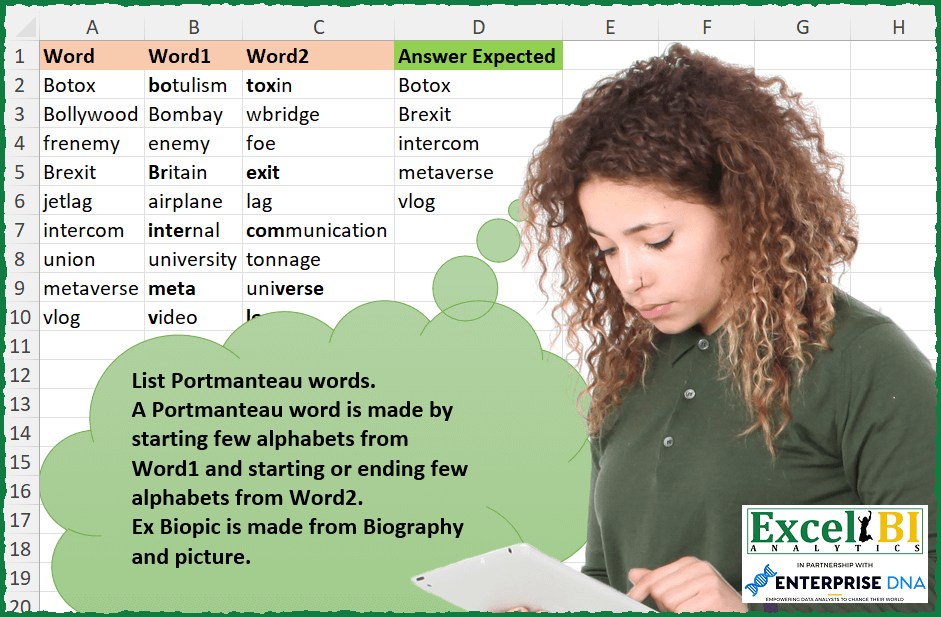
List Portmanteau words. A Portmanteau word is made by starting few alphabets from Word1 and starting or ending few alphabets from Word2. Ex. Biopic is made from Biography and picture.
📌 Challenge Details and Links
ExcelBI Excel Challenge Number: 308
Challenge Difficulty: ⭐️
📥Download Sample File
📥Link to the solutions on LinkedIn
Solving the challenge of List Portmanteau words with Power Query
Power Query solution 1 for List Portmanteau words, proposed by Bo Rydobon 🇹🇭:
let
  Source = Excel.CurrentWorkbook(){[Name = "Table1"]}[Content],
  Ans = Table.SelectRows(
    Source,
    each
      let
        w = Text.Lower([Word]),
        c = Text.Lower([Word2])
      in
        List.AnyTrue(
          List.Transform(
            {1 .. Text.Length(w) - 1},
            (n) =>
              Text.StartsWith(Text.Lower([Word1]), Text.Start(w, n))
                and (
                  Text.StartsWith(c, Text.Middle(w, n + 1, 9))
                    or Text.EndsWith(c, Text.Middle(w, n + 1, 9))
                )
          )
        )
  )[[Word]]
in
  Ans
Power Query solution 2 for List Portmanteau words, proposed by Zoran Milokanović:
let
  Source = Excel.CurrentWorkbook(){[Name = "Input"]}[Content],
  L = Text.Lower,
  M = (w, r) =>
    List.Transform({1 .. Text.Length(w)}, (c) => if r then Text.End(w, c) else Text.Start(w, c)),
  S = Table.SelectRows(
    Source,
    each List.Contains(
      List.Combine(
        List.Transform(
          M(L([Word1]), false),
          (f) => List.Transform(M(L([Word2]), false) & M(L([Word2]), true), (s) => f & s)
        )
      ),
      L([Word])
    )
  )[Word]
in
  S
Power Query solution 3 for List Portmanteau words, proposed by Alejandro Simón 🇵🇦 🇪🇸:
let
  Source = Excel.CurrentWorkbook(){[Name = "Table1"]}[Content],
  Sol = Table.SelectRows(
    Source,
    each
      let
        s = Text.Lower([Word]),
        t = Text.Lower([Word1]),
        v = Text.Lower([Word2]),
        a = List.Transform({1 .. Text.Length(t)}, (x) => Text.Range(t, 0, x)),
        b = List.Transform({1 .. Text.Length(v)}, (x) => Text.Range(v, 0, x)),
        c = List.Transform(
          {1 .. Text.Length(v)},
          (x) => Text.Reverse(Text.Range(Text.Reverse(v), 0, x))
        ),
        d = List.AnyTrue(
          List.Transform(
            List.Combine(List.Transform(a, each List.Transform(b, (x) => {_} & {x}))),
            (y) => Text.Combine(y) = s
          )
        ),
        e = List.AnyTrue(
          List.Transform(
            List.Combine(List.Transform(a, each List.Transform(c, (x) => {_} & {x}))),
            (y) => Text.Combine(y) = s
          )
        )
      in
        d or e
  )[[Word]]
in
  Sol
Power Query solution 4 for List Portmanteau words, proposed by Alejandro Simón 🇵🇦 🇪🇸:
let
  Source = Excel.CurrentWorkbook(){[Name = "Table1"]}[Content],
  Lower = Table.TransformColumns(
    Source,
    List.Transform(Table.ColumnNames(Source), each {_, each Text.Lower(_)})
  ),
  Sol = Table.SelectRows(
    Lower,
    each
      let
        a = List.Transform({1 .. e}, (x) => Text.Range([Word], 0, x)),
        b = List.Transform({1 .. e}, (x) => Text.Range([Word1], 0, x)),
        c = List.FirstN(List.Zip({a, b}), List.Min({e, Text.Length([Word1])})),
        d = List.Last(List.Select(c, each _{0} = _{1})){0}?,
        e = Text.Length([Word]),
        f = Text.Length(d),
        g = Text.End([Word], e - f),
        h = try

            if Text.End(d, 1) = Text.Start([Word2], 1) then
              Text.Range([Word2], 1, f - 1)
            else if g = Text.End([Word2], e - f) then
              g
            else
              Text.Start([Word2], e - f)
        otherwise
          "0"
      in
        d & h = [Word]
  )
in
  Sol
Power Query solution 5 for List Portmanteau words, proposed by Luan Rodrigues:
let
  Fonte = Tabela1,
  res = Table.SelectRows(
    Fonte,
    each (
      [
        a = List.Distinct(
          List.Combine(
            List.Transform(
              List.RemoveFirstN(Record.FieldValues(_), 1),
              each Text.ToList(Text.Lower(_))
            )
          )
        ),
        b = Text.ToList(Text.Lower([Word])),
        c = List.ContainsAll(a, b)
      ][c]
    )
      and [
        a = Text.ToList(Text.Lower(Text.End([Word2], 3))),
        b = Text.ToList(Text.Lower(Text.Start([Word2], 3))),
        c = List.ContainsAll(Text.ToList(Text.Lower([Word])), a),
        d = List.ContainsAll(Text.ToList(Text.Lower([Word])), b),
        e = List.AnyTrue({c, d})
      ][e]
  )[[Word]]
in
  res
Power Query solution 6 for List Portmanteau words, proposed by Rafael González B.:
let
Source = Excel.CurrentWorkbook(){0}[Content],
Fx_PMW = (tx1 as text, tx2 as text, tx3 as text) =>
let
t1 = Text.Lower(tx1),
t2 = Text.Lower(tx2),
t3 = Text.Lower(tx3),
l1 = {1..Text.Length(t1)},
W1 =
List.Accumulate(l1,{},
(s,c) =>
let
o = Text.Start(t1,c),
p = Text.StartsWith(t2, o),
q = s & {p}
in
q),
W2 =
List.Accumulate(l1,{},
(s,c) =>
let
o1 = Text.Middle(t1, c-1, Text.Length(t1)),
p1 = Text.StartsWith(t3, o1),
q1 = s & {p1},
p2 = Text.EndsWith(t3, o1),
q2 = s & {p2},
lt = q1 & q2
in
List.Distinct(lt))
in
List.AnyTrue(W1) and List.AnyTrue(W2),
Ans = Table.SelectRows(Source, each Fx_PMW([Word], [Word1], [Word2] ))[[Word]]
in
Ans
🧙♂️ 🧙♂️ 🧙♂️
Solving the challenge of List Portmanteau words with Excel
Excel solution 1 for List Portmanteau words, proposed by Bo Rydobon 🇹🇭:
=FILTER(A2:A10,
    MAP(A2:A10,
    B2:B10,
    C2:C10,
    LAMBDA(a,
    b,
    c,
    LET(s,
    SEQUENCE(
        LEN(
            a
        )-1
    ),
    m,
    MID(
        a,
        s+1,
        9
    ),
    OR(COUNTIF(
        b,
        LEFT(
            a,
            s
        )&"*"
    )*(COUNTIF(
        c,
        "*"&m
    )+COUNTIF(
        c,
        m&"*"
    )))))))
Excel solution 2 for List Portmanteau words, proposed by Rick Rothstein:
=FILTER(
    A2:A10,
    MAP(
        A2:A10,
        B2:B10,
        C2:C10,
        LAMBDA(
            a,
            b,
            c,
            LET(
                s,
                SEQUENCE(
                    LEN(
                        a
                    )
                ),
                t,
                TAKE(
                    REDUCE(
                        "",
                        s,
                        LAMBDA(
                            z,
                            x,
                            z&"-"&LEFT(
                                b,
                                x
                            )&LEFT(
                                c,
                                s-x
                            )&LEFT(
                                b,
                                x
                            )&RIGHT(
                                c,
                                s-x
                            )
                        )
                    ),
                    -1
                ),
                ISNUMBER(
                    SEARCH(
                        a,
                        t
                    )
                )
            )
        )
    )
)
Excel solution 3 for List Portmanteau words, proposed by John V.:
=FILTER(A2:A10,MAP(A2:A10,B2:B10,C2:C10,LAMBDA(a,b,c,LET(s,ROW(1:9),w,LEFT(b,TOROW(s)),x,MID(a,1+LEN(w),9),OR((LEFT(a,s)=w)*(COUNTIF(c,"*"&x)+COUNTIF(c,x&"*")))))))

✅=FILTER(A2:A10,MAP(A2:A10,B2:B10,C2:C10,LAMBDA(a,b,c,LET(s,ROW(1:15),w,LEFT(b,s),r,TOROW(s),OR(w&LEFT(c,r)=a,w&RIGHT(c,r)=a)))))
Excel solution 4 for List Portmanteau words, proposed by محمد حلمي:
=FILTER(
    A2:A10,
    MAP(
        A2:A10,
        B2:B10,
        C2:C10,
        LAMBDA(
            a,
            b,
            c,
            LET(
                s,
                SEQUENCE(
                    9
                ),
                x,
                LAMBDA(
                    w,
                    TOCOL(
                        VSTACK(

                            LEFT(
                                w,
                                s
                            ),
                            RIGHT(
                                w,
                                s
                            )
                        )
                    )
                ),
                OR(
                    a=x(
                        b
                    )&TOROW(
                        x(
                            c
                        )
                    )
                )
            )
        )
    )
)
Excel solution 5 for List Portmanteau words, proposed by Kris Jaganah:
=TOCOL(MAP(A2:A10,B2:B10,C2:C10,LAMBDA(x,y,z,LET(a,UNIQUE(TOCOL(MID(x,SEQUENCE(LEN(x)),SEQUENCE(,LEN(x))))),b,MID(y,SEQUENCE(LEN(y)),SEQUENCE(,LEN(y))),c,MID(z,SEQUENCE(LEN(z)),SEQUENCE(,LEN(z))),d,VSTACK(TOCOL(TAKE(b,1)),DROP(TAKE(b,,-1),1)),e,VSTACK(TOCOL(TAKE(c,1)),DROP(TAKE(c,,-1),1)),f,UNIQUE(TOCOL(XLOOKUP(d,a,a,"")&TOROW(XLOOKUP(e,a,a),3))),FILTER(f,f=x)))),3)Excel solution 6 for List Portmanteau words, proposed by Timothée BLIOT:
=FILTER(A2:A10,
    MAP(A2:A10,
    B2:B10,
    C2:C10,
    LAMBDA(a,
    b,
    c,
    LET(z,
    LEN(
        c
    ),
    SUM(--(MAKEARRAY(
        LEN(
            b
        ),
        2*z,
        LAMBDA(
            x,
            y,
            MID(
                b,
                1,
                x
            )&IF(
                y<=z,
                MID(
                    c,
                    z+1-y,
                    y
                ),
                MID(
                    c,
                    1,
                    y-z
                )
            )
        )
    )=LOWER(
        a
    )))))))
Excel solution 7 for List Portmanteau words, proposed by Hussein SATOUR:
=FILTER(A2:A10, MAP(B2:B10,C2:C10,A2:A10,
LAMBDA(x,y,z, LET(a, MID(x, 1, SEQUENCE(LEN(x))),
b, VSTACK(MID(y, 1, SEQUENCE(LEN(y))),
 MID(y, SEQUENCE(LEN(y)), 99)),
IFNA(XMATCH(z, TOCOL(a & TOROW(b))), 0)>0))))
Excel solution 8 for List Portmanteau words, proposed by Sunny Baggu:
=FILTER(

     A2:A10,

     IFERROR(

          MAP(

               A2:A10,

               B2:B10,

               C2:C10,

               LAMBDA(
                   a,
                    b,
                    c,

                    LET(

                         _l,
                         LAMBDA(
                             y,
                              LEFT(
                                  y,
                                   SEQUENCE(
                                       LEN(
                                           y
                                       )
                                   )
                              )
                         ),

                         _r,
                         LAMBDA(
                             z,
                              RIGHT(
                                  z,
                                   SEQUENCE(
                                       LEN(
                                           z
                                       )
                                   )
                              )
                         ),

                         _sw1,
                         SEARCH(
                             _l(
                                 a
                             ),
                              b
                         ),

                         _fsw1,
                         FILTER(
                             _l(
                                 a
                             ),
                              ISNUMBER(
                                  _sw1
                              )
                         ),

                         _sw2,
                         TOROW(
                             VSTACK(
                                 _l(
                                     c
                                 ),
                                  _r(
                                     c
                                 )
                             )
                         ),

                         OR(
                             _fsw1 & _sw2 = a
                         )

                    )

               )

          ),

          0

     )

)
Excel solution 9 for List Portmanteau words, proposed by LEONARD OCHEA 🇷🇴:
=FILTER(
    A2:A10,
    MAP(
        A2:A10,
        B2:B10,
        C2:C10,
        LAMBDA(
            a,
            b,
            c,
            LET(
                F,
                LAMBDA(
                    x,
                    SEQUENCE(
                        LEN(
                            x
                        )
                    )
                ),
                OR(
                    LEFT(
                        b,
                        F(
                            b
                        )
                    )&LEFT(
                        c,
                        TOROW(
                            F(
                                c
                            )
                        )
                    )=a
                )+OR(
                     LEFT(
                        b,
                        F(
                            b
                        )
                    )&RIGHT(
                        c,
                        TOROW(
                            F(
                                c
                            )
                        )
                    )=a
                )
            )
        )
    )
)
Excel solution 10 for List Portmanteau words, proposed by Abdallah Ally:
=FILTER(A2:A10,MAP(A2:A10,LAMBDA(x,LET(a,x,b,OFFSET(x,,1),c,OFFSET(x,,2),d,REDUCE(0,SEQUENCE(LEN(b)),LAMBDA(x,y,IF(LEFT(a,y)=LEFT(b,y),x+1,x))),OR(LEFT(c,LEN(a)-d)=RIGHT(a,LEN(a)-d),RIGHT(c,LEN(a)-d)=RIGHT(a,LEN(a)-d),LEFT(c,LEN(a)-d+1)=RIGHT(a,LEN(a)-d+1),RIGHT(c,LEN(a)-d+1)=RIGHT(a,LEN(a)-d+1))))))Excel solution 11 for List Portmanteau words, proposed by 🇵🇪 Ned Navarrete C.:
=FILTER(A2:A10,
 MAP(A2:A10,B2:B10,C2:C10,
 LAMBDA(w,_w1,_w2,
 LET(h,MID(_w1,1,SEQUENCE(,LEN(_w1))),
 l,LEFT(_w2,SEQUENCE(LEN(_w2))),
 r, RIGHT(_w2,SEQUENCE(LEN(_w2))),
 wl, LOWER(w),
 SUM( --OR((h&l )=wl,(h&r)=wl  ) )=1
 )
 )
 )
)
Excel solution 12 for List Portmanteau words, proposed by Pieter de B.:
=LET(a,
    A2:A10,
    c,
    C2:C10,
    s,
    SEQUENCE(
        ,
        9
    ),
    p,
    LEN(
        a
    )-s,
    FILTER(a,
    MMULT(IFERROR(ISNUMBER(
        SEARCH(
 &           LEFT(
                a,
                s
            ),
            B2:B10
        )
    )*((RIGHT(
        a,
        p
    )=RIGHT(
        c,
        p
    ))+(RIGHT(
        a,
        p
    )=LEFT(
        c,
        p
    ))),
    0),
    SEQUENCE(
        9
    ))))
Excel solution 13 for List Portmanteau words, proposed by Pieter de B.:
=LET(a,
    A2:A10,
    c,
    C2:C10,
    l,
    LEN(
        a
    ),
    s,
    SEQUENCE(
        ,
        MAX(
            l
        )
    ),
    p,
    l-s,
    FILTER(a,
    MMULT(IFERROR(ISNUMBER(
        SEARCH(
            LEFT(
                a,
                s
            ),
            B2:B10
        )
    )*((RIGHT(
        a,
        p
    )=RIGHT(
        c,
        p
    ))+(RIGHT(
        a,
        p
    )=LEFT(
        c,
        p
    ))),
    0),
    TOCOL(
        s
    ))))
Excel solution 14 for List Portmanteau words, proposed by Charles Roldan:
=LET(Word, A2:A10, Word1, B2:B10, Word2, C2:C10,
FILTER(Word, MAP(Word, Word1, Word2, LAMBDA(x,a,b,
LET(n, LEN(x), s, SEQUENCE(n - 1),
aL, LEFT(a, n - s), bL, LEFT(b, s), bR, RIGHT(b, s),
c, VSTACK(aL & bL, aL & bR), ISNUMBER(XMATCH(x, c)))))))
Excel solution 15 for List Portmanteau words, proposed by Giorgi Goderdzishvili:
=LET(

    flt,
    MAP(
        A1:A9,
        B1:B9,
        C1:C9,

        LAMBDA(
            a,
            b,
            c,
            LET(

                w,
                a,

                w_1,
                b,

                w_2,
                c,

                w_1Chr,
                MID(
                    w_1,
                    1,
                    SEQUENCE(
                        ,
                        LEN(
                            w_1
                        )
                    )
                ),

                lns,
                LEN(
                    w
                )-LEN(
                    w_1Chr
                ),

                n,
                FILTER(
                    lns,
                    lns>0
                ),

                norm,
                MID(
                    w_2,
                    1,
                    n
                ),

                rev,
                MID(
                    w_2,
                    LEN(
                        w_2
                    )-n+1,
                    n
                ),

                hst,
                UNIQUE(
                    TOCOL(
                        w_1Chr& IFERROR(
                            TOCOL(
                                HSTACK(
                                    norm,
                                    rev
                                )
                            ),
                            ""
                        )
                    )
                ),

                chck,
                SUM(
                    IF(
                        w=hst,
                        1,
                        0
                    )
                )>0,

                chck
            )
        )
    ),

    FILTER(
        A1:A9,
        flt
    )
)
Excel solution 16 for List Portmanteau words, proposed by Abdelrahman Omer, MBA, PMP:
=FILTER(A2:A10,
    MAP(A2:A10,
    B2:B10,
    C2:C10,
    LAMBDA(a,
    b,
    c,
    LET(d,
    SEQUENCE(
        LEN(
            a
        )-1
    ),
    SUM((LEFT(
        b,
        d
    )&LEFT(
        c,
        LEN(
            a
        )-d
    )=a)+(LEFT(
        b,
        d
    )&RIGHT(
        c,
        LEN(
            a
        )-d
    )=a))))))
Excel solution 17 for List Portmanteau words, proposed by LUIS FLORENTINO COUTO CORTEGOSO:
=FILTER(
    A2:A10,
    MAP(
        A2:A10,
        B2:B10,
        C2:C10,
        LAMBDA(
            x,
            y,
            z,
            LET(
                l,
                LEN(
                    x
                ),
                s,
                SEQUENCE(
                    l
                ),
                OR(
                    LEFT(
                        y,
                        s
                    )&HSTACK(
                        LEFT(
                            z,
                            l-s
                        ),
                        RIGHT(
                            z,
                            l-s
                        )
                    )=x
                )
            )
        )
    )
)
Excel solution 18 for List Portmanteau words, proposed by Md Ismail Hosen:
=LAMBDA(
    WordMatrix,
    LET(

         _IsPortManteauWord,
         LAMBDA(
             Word,
             Word1,
             Word2,
             LET(

                  _PossiblePrefixIndexFromFirstWord,
                  FILTER(
                      SEQUENCE(
                          LEN(
                              Word
                          )
                      ),
                      MID(
                          Word1,
                          1,
                          SEQUENCE(
                          LEN(
                              Word
                          )
                      )
                      )=MID(
                          Word,
                          1,
                          SEQUENCE(
                          LEN(
                              Word
                          )
                      )
                      )
                  ),

                  _SecondWordPart,
                  MID(
                      Word,
                      _PossiblePrefixIndexFromFirstWord+1,
                      LEN(
                              Word
                          )-_PossiblePrefixIndexFromFirstWord
                  ),

                  _IsFoundOnStartOrEnd,
                  MAP(
                      _SecondWordPart,
                      LAMBDA(
                          SecondWordPart,
                          OR(
                              LEFT(
                                  Word2,
                                  LEN(
                                      SecondWordPart
                                  )
                              )=SecondWordPart,
                              RIGHT(
                                  Word2,
                                  LEN(
                                      SecondWordPart
                                  )
                              )=SecondWordPart
                          )
                      )
                  ),

                  _Result,
                 IFERROR(
                      OR(
                          _IsFoundOnStartOrEnd
                      ),
                     FALSE
                 ),

                  _Result

             )

         ),

         _Result,
         FILTER(
             CHOOSECOLS(
                 WordMatrix,
                 1
             ),
             MAP(
                 CHOOSECOLS(
                 WordMatrix,
                 1
             ),
                 CHOOSECOLS(
                     WordMatrix,
                     2
                 ),
                 CHOOSECOLS(
                     WordMatrix,
                     3
                 ),
                 _IsPortManteauWord
             )
         ),

         _Result

    )

)(A2:C10)
Excel solution 19 for List Portmanteau words, proposed by Jeff Blakley:
=FILTER(A2:A10,
    MAP(A2:A10,
    B2:B10,
    C2:C10,
    LAMBDA(a,
    b,
    c,
    LET(l,
    LEN(
        a
    ),
    s,
    SEQUENCE(
        l
    ),
    ar,
    RIGHT(
        a,
        l-s
    ),
    SUM((LEFT(
        a,
        s
    )=LEFT(
        b,
        s
    ))*((ar=LEFT(
        c,
        l-s
    ))+(ar=RIGHT(
        c,
        l-s
    ))))))))
Solving the challenge of List Portmanteau words with Python in Excel
Python in Excel solution 1 for List Portmanteau words, proposed by Bo Rydobon 🇹🇭:
import re
[a for a,b,c in xl("A2:C10").values if any(len(re.findall(r'^'+a[:i],b,re.I)) and len(re.findall(r'^'+a[i:]+'|'+a[i:]+'$',c,re.I)) for i in range(1,len(a)))]
Python in Excel solution 2 for List Portmanteau words, proposed by John V.:
Hi everyone!
 a, b, c = map(str.lower, r)
 return any(b[:j] + c[:i] == a or b[:j] + c[-i:] == a for i in range(1, 1 + len(c)) for j in range(1, 1 + len(b)))
d = xl("A2:C10").values
d[np.apply_along_axis(g, 1, d), 0]
Blessings!
Solving the challenge of List Portmanteau words with R
R solution 1 for List Portmanteau words, proposed by Konrad Gryczan, PhD:
library(tidyverse)
library(readxl)
input = read_excel("Portmanteau Words.xlsx", range ="A1:C10")
test = read_excel("Portmanteau Words.xlsx", range ="D1:D6")
detect_portmanteau <- function(portmanteau, word1, word2) {
 indices <- seq(1, str_length(portmanteau) - 1)
 portmanteau_checks <- map_lgl(indices, function(i) {
 pattern1 <- str_c('^', str_sub(portmanteau, 1, i))
 pattern2 <- str_c('^', str_sub(portmanteau, i + 1, -1), '|', str_sub(portmanteau, i + 1, -1), '$')

 match_word1 <- str_detect(word1, regex(pattern1, ignore_case = TRUE))
 match_word2 <- str_detect(word2, regex(pattern2, ignore_case = TRUE))

 return(match_word1 && match_word2)
 })

 is_portmanteau <- any(portmanteau_checks)

 return(is_portmanteau)
}
result <- input %>%
 mutate(is_portmanteau = pmap_lgl(list(Word, Word1, Word2), detect_portmanteau)) %>%
 filter(is_portmanteau) %>%
 select(Word)
identical(test$`Answer Expected`, result$Word)
#> [1] TRUE
&&