
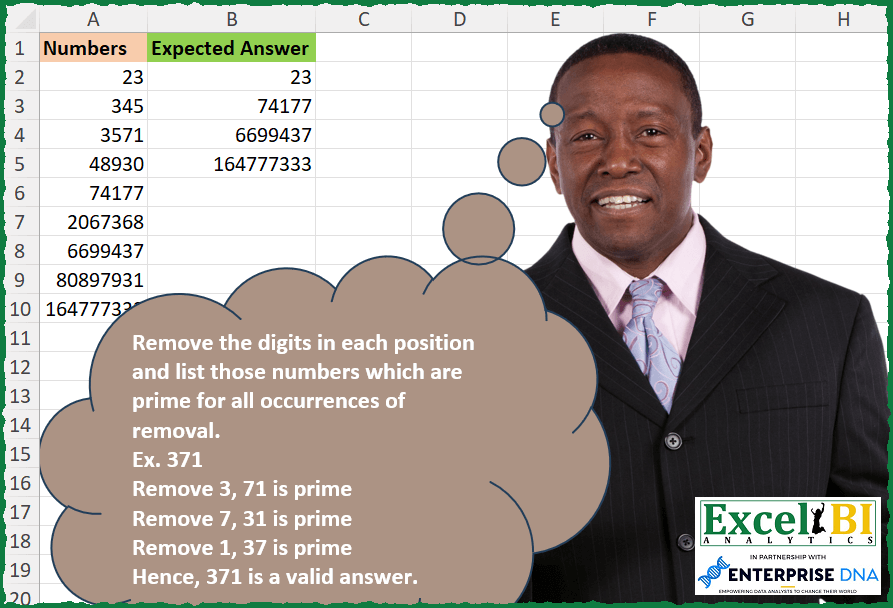
Remove the digits in each position and list those numbers which are prime for all occurrences of removal. Ex. 371 Remove first position digit i.e. 3, 71 is prime Remove second position digit i.e. 7, 31 is prime Remove third position digit i.e. 1, 37 is prime Ex. 3311 Remove first position digit i.e. 3, 311 is prime Remove second position digit i.e. 3, 311 is prime Remove third position digit i.e. 1, 331 is prime Remove fourth position digit i.e. 1, 331 is prime
📌 Challenge Details and Links
ExcelBI Excel Challenge Number: 303
Challenge Difficulty: ⭐️⭐️
📥Download Sample File
📥Link to the solutions on LinkedIn
Solving the challenge of Prime After Digit Removal with Power Query
Power Query solution 1 for Prime After Digit Removal, proposed by Bo Rydobon 🇹🇭:
let
  Source = Excel.CurrentWorkbook(){[Name = "Table1"]}[Content],
  Ans = Table.SelectRows(
    Source,
    each
      let
        w = Text.From([Numbers])
      in
        List.AllTrue(
          List.Transform(
            {0 .. Text.Length(w) - 1},
            each
              let
                n = Number.From(Text.RemoveRange(w, _, 1))
              in
                List.AllTrue(
                  List.Transform({2 .. Int64.From(Number.Sqrt(n))}, (d) => Number.Mod(n, d) > 0)
                )
          )
        )
  )
in
  Ans
Power Query solution 2 for Prime After Digit Removal, proposed by Zoran Milokanović:
let
  Source = Excel.CurrentWorkbook(){[Name = "Input"]}[Content],
  IsPrime = (n) =>
    not List.Accumulate(
      {2 .. Number.RoundDown(Number.Sqrt(n))},
      n = 1,
      (s, d) => s or (Number.Mod(n, d) = 0)
    ),
  S = Table.SelectRows(
    Source,
    each
      let
        t = Text.From([Numbers])
      in
        List.AllTrue(
          List.Transform(
            List.Transform({0 .. Text.Length(t) - 1}, each Text.RemoveRange(t, _)),
            each IsPrime(Number.From(_))
          )
        )
  )
in
  S
Power Query solution 3 for Prime After Digit Removal, proposed by Alejandro Simón 🇵🇦 🇪🇸:
let
  Origen = Excel.CurrentWorkbook(){[Name = "Tabla1"]}[Content],
  Sol = Table.SelectRows(
    Origen,
    each List.AllTrue(
      let
        a = Text.From([Numbers]),
        b = List.Transform({0 .. Text.Length(a) - 1}, each Number.From(Text.RemoveRange(a, _, 1))),
        c = List.Transform(
          {0 .. List.Count(b) - 1},
          each List.AllTrue(
            List.Transform({3 .. Int64.From(Number.Sqrt(b{_}))}, (x) => Number.Mod(b{_}, x) <> 0)
          )
        )
      in
        c
    )
  )
in
  Sol
Power Query solution 4 for Prime After Digit Removal, proposed by Luan Rodrigues:
let
  Fonte = Tabela1,
  fx = (n) =>
    List.Select({2 .. Number.RoundDown(Number.Sqrt(n))}, (x) => Number.Mod(n, x) = 0){0}? = null,
  res = Table.SelectRows(
    Fonte,
    each List.AllTrue(
      List.RemoveNulls(
        List.Transform(
          {0 .. Text.Length(Text.From([Numbers]))},
          (x) => try fx(Number.From(Text.RemoveRange(Text.From([Numbers]), x))) otherwise null
        )
      )
    )
  )
in
  res
Solving the challenge of Prime After Digit Removal with Excel
Excel solution 1 for Prime After Digit Removal, proposed by Bo Rydobon 🇹🇭:
=TOCOL(
    MAP(
        A2:A10,
        LAMBDA(
            n,
            LET(
                m,
                --REPLACE(
                    n,
                    SEQUENCE(
                        ,
                        LEN(
                            n
                        )
                    ),
                    1,

                ),
                n/OR(
                    AND(
                        MMULT(
                            {1,
                            1,
                            1,
                            1},
                            N(
                                m={2;3;5;7}
                            )
                        )
                    ),
                    AND(
                        MOD(
                            m,
                            SEQUENCE(
                                MAX(
                                    m^0.5
                                ),
                                ,
                                2
                            )
                        )
                    )
                )
            )
        )
    ),
    3
)
Excel solution 2 for Prime After Digit Removal, proposed by John V.:
=TOCOL(
    MAP(
        A2:A10,
        LAMBDA(
            n,
            n/AND(
                MAP(
                    REPLACE(
                        n,
                        SEQUENCE(
                            LEN(
                                n
                            )
                        ),
                        1,

                    ),
                    LAMBDA(
                        x,
                        SUM(
                            N(
                                MOD(
                                    x,
                                    SEQUENCE(
                                        x^0.5
                                    )
                                )=0
                            )
                        )=1
                    )
                )
            )
        )
    ),
    2
)
Excel solution 3 for Prime After Digit Removal, proposed by محمد حلمي:
=TOCOL(MAP(A2:A10,LAMBDA(a,a/AND(MAP(REPLACE(a,
SEQUENCE(LEN(a)),1,),LAMBDA(V,1=SUM(--(MOD(V/SEQUENCE(V^0.5),1)=0))))))),2)
Excel solution 4 for Prime After Digit Removal, proposed by محمد حلمي:
=TOCOL(MAP(A2:A10,
    LAMBDA(a,
    a/AND(MAP(SEQUENCE(
        LEN(
            a
        )
    ),
    LAMBDA(c,
    LET(v,
    REPLACE(
        a,
        c,
        1,

    ),
    1=SUM(--(MOD(
        v/SEQUENCE(
            v^0.5
        ),
        1
    )=0)))))))),
    2)
Excel solution 5 for Prime After Digit Removal, proposed by Kris Jaganah:
=TOCOL(MAP(A2:A10,
    LAMBDA(x,
    LET(a,
    --REPLACE(
        x,
        SEQUENCE(
            LEN(
                x
            )
        ),
        1,
        ""
    ),
    b,
    (a-1)/6,
    c,
    (a+1)/6,
    x/MIN(IFS(a=2,
    1,
    a=3,
    1,
    a=5,
    1,
    1,
    (INT(
        b
    )=b)+(INT(
        c
    )=c)))))),
    3)
Excel solution 6 for Prime After Digit Removal, proposed by Timothée BLIOT:
=FILTER(A2:A10,
    MAP(A2:A10,
    LAMBDA(z,
    LET(D,
    LAMBDA(n,
    IF(n<5,
    2,
    VSTACK(2,
    SEQUENCE(ROUNDDOWN(((n^0.5)-3),
    0)/2+1,
    ,
    3,
    2)))),
    P,
    LAMBDA(x,
     SWITCH(x,
    1,
    0,
    2,
    1,
    LET(A,
    D(
        x
    ),
    --(SUM(MAP(A,
     LAMBDA(a,
    --(MOD(
        x,
        a
    )=0)))) =0)))),
    A,
    LEN(
        z
    ),
    B,
    SEQUENCE(
        A
    ),
    N,
    MID(
        z,
        B,
        1
    ),
    SUM(MAP(B,
    LAMBDA(x,
    P((IF(
        x=1,
        "",
        MID(
            z,
            1,
            x-1
        )
    )&IF(
        x
Excel solution 7 for Prime After Digit Removal, proposed by Hussein SATOUR:
=FILTER(A2:A10,
     MAP(A2:A10,
     LAMBDA(y,
     SUM(--MAP(--REPLACE(
         y,
          SEQUENCE(
              LEN(
                  y
              )
          ),
         1,
         ""
     ),
     LAMBDA(x,
     LET(b,
     {2;3;5;7},
     a,
     IFS(
         LEN(
             x
         )=1,
          XLOOKUP(
              x,
              b,
              b+0.1,
              1.1
          ),
          LEN(
             x
         ) = 2,
          x/SEQUENCE(
              x-2,
              ,
              2
          ),
          1,
          x/SEQUENCE(
              ROUNDUP(
                  SQRT(
             x
         ),
                   0
              ),
              ,
              2
          )
     ),
     SUM(-(a=INT(
         a
     )))=0))))=LEN(
                  y
              ))))
Excel solution 8 for Prime After Digit Removal, proposed by Sunny Baggu:
=FILTER(
 A2:A10,

 MAP(
 A2:A10,

 LAMBDA(num,

 AND(
 MAP(
 UNIQUE(
     REPLACE(
         num,
          SEQUENCE(
              LEN(
                  num
              )
          ),
          1,
          ""
     )
 ),

 LAMBDA(x,

 OR(
 BYCOL(
 (x + {1,
     -1}) / 6,

 LAMBDA(
     a,
      IFS(
          a = 2,
           1,
           a = 3,
           1,
           a = 5,
           1,
           INT(
               a
           ) = a,
           1,
           a < 1,
           1,
           1,
           0
      )
 )
 )
 )
 )
 )
 )
 )
 )
)
Excel solution 9 for Prime After Digit Removal, proposed by LEONARD OCHEA 🇷🇴:
=TOCOL(MAP(A2:A10,
    LAMBDA(a,
    LET(n,
    --REPLACE(
        a,
        SEQUENCE(
            LEN(
                a
            )
        ),
        1,
        ""
    ),
    x,
    (n+1)/6,
    y,
    (n-1)/6,
    a/AND((n=2)+(n=3)+(x=INT(
        x
    ))+(y=INT(
        y
    )))))),
    3)
Excel solution 10 for Prime After Digit Removal, proposed by Abdallah Ally:
=FILTER(A2:A10,MAP(A2:A10,LAMBDA(u,LET(a,u,b,SEQUENCE(LEN(a)),REDUCE(TRUE,b,LAMBDA(x,y,LET(d,IFERROR(--REPLACE(a,y,1,""),y),e,d/SEQUENCE(SQRT(d)-1,,2),AND(x,IFS(d<2,FALSE,OR(d={2,3,5,7}),TRUE,1,AND(e-INT(e)>0))))))))))Excel solution 11 for Prime After Digit Removal, proposed by 🇵🇪 Ned Navarrete C.:
=FILTER(A2:A10,

 MAP(A2:A10,

 LAMBDA(_r,

 IFERROR( LEN(
     _r
 ) = REDUCE(0,
    REPLACE(
        _r,
        SEQUENCE(
            LEN(
     _r
 )
        ),
        1,

    ),
    LAMBDA(c,
    v,
    c+LET(d,
    v/SEQUENCE(
        v^0.5
    ),
    SUM(--(d=INT(
        d
    )))=1))),
    0 )
 )
 )
)
Excel solution 12 for Prime After Digit Removal, proposed by Giorgi Goderdzishvili:
=LAMBDA(x,
    MAP(x,
    LAMBDA(y,

 IF(OR(
     y=2,
     y=3,
     y=1
 ),
    1,

IF(SUM(--(MOD(
    y,
    SEQUENCE(
        INT(
            y^0.5
        )-3,
        ,
        3,
        1
    )
)=0))>0,
    0,
    1)))))

Solution:
=TOCOL(MAP(A2:A10,
    LAMBDA(x,

LET(
nm,
    x,

ln,
     LEN(
         nm
     ),

rp,
     REPLACE(
         nm,
         SEQUENCE(
             ,
             ln
         ),
         1,
         ""
     ),

chck,
    1* isPrime(
        --rp
    ),

nm/(SUM(
    chck
)=ln)))),
    3)
Excel solution 13 for Prime After Digit Removal, proposed by Abdelrahman Omer, MBA, PMP:
=FILTER(A2:A10,
    BYROW(A2:A10,
    LAMBDA(a,
    LET(b,
    --REPLACE(
        a,
        SEQUENCE(
            LEN(
                a
            )
        ),
        1,

    ),
    c,
    MAP(b,
    LAMBDA(b,
    --IF(b=2,
    TRUE,
    PRODUCT(--(MOD(
        b,
        SEQUENCE(
            ROUNDDOWN(
                SQRT(
                    b
                ),

            ),
            ,
            ROUNDUP(
                SQRT(
                    b
                ),

            ),
            -1
        )
    )<>0))=1))),
    --(LEN(
                a
            )=SUM(
                c
            ))))))
Excel solution 14 for Prime After Digit Removal, proposed by Daniel Garzia:
=TOCOL(MAP(A2:A10,LAMBDA(x,x/AND(MAP(REPLACE(x,SEQUENCE(LEN(x)),1,),LAMBDA(r,AND((r="2")+MOD(r,SEQUENCE(ROUNDUP(r^0.5,)-1,,2)))))))),3)Excel solution 15 for Prime After Digit Removal, proposed by Kriddakorn Pongthanisorn:
=FILTER(A2:A10,
    MAP(A2:A10,
    LAMBDA(r,
    LET(t,
    r,

l,
    LEN(
        t
    ),
    o,
    SEQUENCE(
        l
    ),

s,
    MID(
        t,
        o,
        1
    ),
    p,
    MID(
        SUBSTITUTE(
            CONCAT(
                o
            ),
            o,
            ""
        ),
        SEQUENCE(
            1,
            l-1
        ),
        1
    ),

AND(MAP(BYROW(
    p,
    LAMBDA(
        r,
        --CONCAT(
            INDEX(
                s,
                TOCOL(
                    r
                )
            )
        )
    )
),

LAMBDA(r,
    SUM(1*(MOD(
        r,
        SEQUENCE(
            ROUND(
                SQRT(
                    r
                ),
                0
            )
        )
    )=0))))=1))))=TRUE)
Solving the challenge of Prime After Digit Removal with Python in Excel
Python in Excel solution 1 for Prime After Digit Removal, proposed by Bo Rydobon 🇹🇭:
from sympy import isprime
[n for n in xl("A2:A10")[0] if all(isprime(int((w:=str(n))[:i]+w[i+1:])) for i,d in enumerate(str(n)))]
Python in Excel solution 2 for Prime After Digit Removal, proposed by John V.:
Hi everyone!
from sympy import *
def f(n):
 t = str(n)
 return all(isprime(int(t[:i] + t[i+1:])) for i in range(len(t)))
[i for i in xl("A2:A10")[0] if f(i)]
Blessings!
Solving the challenge of Prime After Digit Removal with R
R solution 1 for Prime After Digit Removal, proposed by Konrad Gryczan, PhD:
library(tidyverse)
library(readxl)
library(primes)
input = read_excel("All Primes After Removal Single Digits.xlsx", range = "A1:A10")
test = read_excel("All Primes After Removal Single Digits.xlsx", range = "B1:B5")
primes_inside = function(n){
 vec = str_split(as.character(n), "")[[1]]
 res = map(1:length(vec), ~ as.numeric(paste0(vec[-c(.x)], collapse = "")))
 x = map_lgl(res, is_prime) %>% all()
 }
result = input %>%
 mut&ate(my_answer = map_lgl(Numbers, primes_inside)) %>%
 filter(my_answer)
identical(result$Numbers, test$`Expected Answer`)
#> [1] TRUE
R solution 2 for Prime After Digit Removal, proposed by Krzysztof Nowak:
Answer <- df |>
 group_by(Number) |>
 mutate(Replicated = paste(rep(Number,nchar(Number)),collapse = ",")) |>
 separate_longer_delim(Replicated,",") |>
 mutate(Index = row_number(),
 Removed = str_remove(Replicated,substr(Replicated,Index,Index)),
 IsPrime = is_prime(as.numeric(Removed)),
 HowManyPrimes = sum(IsPrime)) |>
 filter(HowManyPrimes == max(Index)) |>
 select(Number) |>
 unique()
Solving the challenge of Prime After Digit Removal with Excel VBA
Excel VBA solution 1 for Prime After Digit Removal, proposed by Nicolas Micot:
VBA code:
Function f_challenge303(Nombres As Range) As Variant
Dim tableau As Variant, resultat As Variant
Dim Primes As New Collection
tableau = Nombres.Value
For i = 1 To UBound(tableau, 1)
 If allPrime(tableau(i, 1)) Then
 Primes.Add i
 End If
Next i
If Primes.Count > 0 Then
 ReDim resultat(1 To Primes.Count, 1 To 1)
 For i = 1 To Primes.Count
 resultat(i, 1) = tableau(Primes(i), 1)
 Next i
Else
 resultat = ""
End If
f_challenge303 = resultat
End Function
Private Function allPrime(nombre) As Boolean
Dim pourTest
allPrime = True
For i = 1 To Len(nombre)
 pourTest = (Left(nombre, i - 1) & Right(nombre, Len(nombre) - i)) + 0
 If Not isPrime(pourTest) Then
 allPrime = False
 Exit For
 End If
Next i
End Function
Private Function isPrime(nombre) As Boolean
isPrime = True
For i = 2 To (nombre ^ 0.5)  1
 If (nombre Mod i) = 0 Then
 isPrime = False
 Exit For
 End If
Next i
End Function
&&