
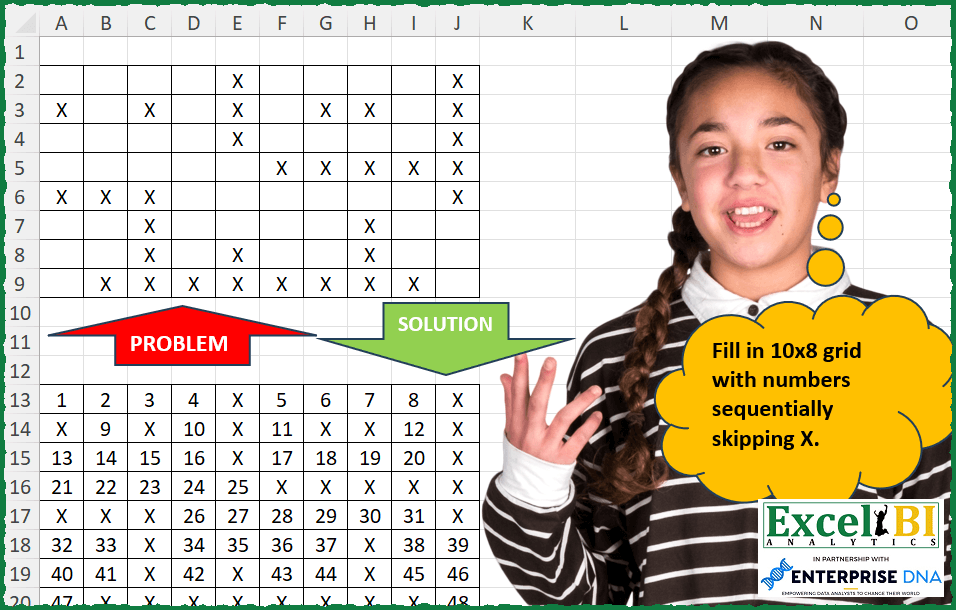
Fill in 10×8 grid with numbers sequentially skipping X.
📌 Challenge Details and Links
ExcelBI Excel Challenge Number: 300
Challenge Difficulty: ⭐️
📥Download Sample File
📥Link to the solutions on LinkedIn
Solving the challenge of Fill Grid Skipping Values with Power Query
Power Query solution 1 for Fill Grid Skipping Values, proposed by Bo Rydobon 🇹🇭:
let
  Source = Excel.CurrentWorkbook(){[Name = "Table1"]}[Content],
  Ans = Table.FromRows(
    List.Split(
      List.Accumulate(
        List.Combine(Table.ToRows(Source)),
        {},
        (s, l) =>
          s
            & {
              if l = "" then
                List.Max(List.Select(s, each _ is number), 0) + Number.From(l = "")
              else
                l
            }
      ),
      10
    )
  )
in
  Ans
Power Query solution 2 for Fill Grid Skipping Values, proposed by Zoran Milokanović:
let
  Source = Excel.CurrentWorkbook(){[Name = "Input"]}[Content],
  S = Table.FromRows(
    List.Split(
      List.Accumulate(
        List.Combine(Table.ToRows(Source)),
        {},
        (s, c) =>
          let
            E = each _ = "X"
          in
            s & {if E(c) then c else (List.Skip(List.Reverse(s), E){0}? ?? 0) + 1}
      ),
      10
    )
  )
in
  S
Power Query solution 3 for Fill Grid Skipping Values, proposed by Alejandro Simón 🇵🇦 🇪🇸:
let
  Source = Excel.CurrentWorkbook(){[Name = "Table1"]}[Content],
  Lista = List.Combine(Table.ToRows(Source)),
  LGenerate = List.Skip(
    List.Generate(
      () => [x = 1, y = 0, z = 0],
      each [y] <= List.Count(Lista),
      each [
        z = if Lista{[y]} = "X" then "X" else [x],
        x = if Lista{[y]} = "X" then [x] else [x] + 1,
        y = [y] + 1
      ],
      each [z]
    )
  ),
  Sol = Table.FromRows(List.Split(LGenerate, 10))
in
  Sol
Power Query solution 4 for Fill Grid Skipping Values, proposed by Alejandro Simón 🇵🇦 🇪🇸:
let
  Source = Excel.CurrentWorkbook(){[Name = "Table1"]}[Content],
  Lista  = List.Combine(Table.ToRows(Source)),
  Zip    = List.Zip({List.Positions(Lista), Lista}),
  Pos    = List.Transform(List.Select(Zip, each _{1} = ""), each _{0}),
  Zip2   = List.Zip({Pos, {1 .. List.Count(Pos)}}) & List.Select(Zip, each _{1} = "X"),
  Sol    = Table.FromRows(List.Split(List.Transform(List.Sort(Zip2, each _{0}), each _{1}), 10))
in
  Sol
Power Query solution 5 for Fill Grid Skipping Values, proposed by Luan Rodrigues:
let
  Fonte = Tabela1,
  nd = Table.UnpivotOtherColumns(Fonte, {}, "Atributo", "Valor"),
  Ind = Table.AddIndexColumn(nd, "Ind", 1, 1, Int64.Type),
  fil = Table.SelectRows(Ind, each ([Valor] = "X")),
  X = Table.SelectRows(Ind, each [Valor] <> "X"),
  In = Table.AddIndexColumn(X, "Índice", 1, 1, Int64.Type),
  rem = Table.RemoveColumns(In, {"Ind"}),
  ren = Table.RenameColumns(rem, {{"Índice", "Ind"}}) & fil,
  cls = Table.Sort(ren, {{"Ind", Order.Ascending}}),
  add = Table.AddColumn(cls, "Personalizar", each if [Valor] = "X" then "X" else [Ind]),
  rv = Table.RemoveColumns(add, {"Valor", "Ind"}),
  gp = Table.Combine(
    Table.Group(rv, {"Atributo"}, {{"Contagem", each Table.FromRows({_[Personalizar]})}})[Contagem]
  ),
  res = Table.Transpose(gp)
in
  res
Power Query solution 6 for Fill Grid Skipping Values, proposed by Luke Jarych:
let
  Source       = Excel.CurrentWorkbook(){[Name = "Table1"]}[Content],
  columnsCount = Table.ColumnCount(Source),
  ListOfRows   = List.Combine(Table.ToRows(Source)),
  ListZip      = List.Zip({List.Positions(ListOfRows), ListOfRows}),
  Pos          = List.Transform(List.Select(ListZip, each _{1} = ""), each _{0}),
  ListZip2     = List.Zip({Pos, {1 .. List.Count(Pos)}}) & List.Select(ListZip, each _{1} = "X"),
  ListTrans    = List.Sort(ListZip2, each _{0}),
  ListTrans2   = List.Transform(ListTrans, each _{1}),
  ListSplit    = List.Split(ListTrans2, columnsCount),
  TableToTows  = Table.FromRows(ListSplit)
in
  TableToTows
Solving the challenge of Fill Grid Skipping Values with Excel
Excel solution 1 for Fill Grid Skipping Values, proposed by Bo Rydobon 🇹🇭:
=LET(z,
    A2:J9,
    IF(z="",
    SCAN(0,
    z,
    LAMBDA(a,
    v,
    a+(v=""))),
    z))
Excel solution 2 for Fill Grid Skipping Values, proposed by Rick Rothstein:
=LET(t,TOROW(A2:J9),s,SCAN(0,0+(t=""),LAMBDA(a,x,a+(x>0))),WRAPROWS(IF(t="x","x",s),10))Excel solution 3 for Fill Grid Skipping Values, proposed by John V.:
=IF(A2="X",A2,MAX($L1:$U1)+COUNTIF($A2:A2,"Excel solution 4 for Fill Grid Skipping Values, proposed by محمد حلمي:
=SCAN(0,
    A2:J9,
    LAMBDA(a,
    d,
    IF(d="",
    SUM(--(TAKE(
        A1:J8,
        ROW(
            d
        )-1
    )=""),
    --(TAKE(
        A2:d,
        -1
    )=""))-10,
    d)))

////
10 = COLUMNS(
    A2:J9
)

///
Incomplete attempt
=SCAN(
    0,
    A2:J9,
    LAMBDA(
        a,
        d,

        IF(
            d="",
            SUBSTITUTE(
                a,
                "X",

            )+1,
            TEXT(
                a&d,
                "X"
            )
        )
    )
)
Excel solution 5 for Fill Grid Skipping Values, proposed by محمد حلمي:
=IF(B2="",
1+MAX($A10:$J10,IF(COLUMN(B1)=1,0,$A11:A11)),B2)
Excel solution 6 for Fill Grid Skipping Values, proposed by محمد حلمي:
=WRAPROWS(
    DROP(
        REDUCE(
            0,
            A2:J9,
            LAMBDA(
                _,
                d,
                VSTACK(
                    _,
                    IF(
                        d="",
                        1+MAX(
                            _
                        ),
                        d
                    )
                )
            )
        ),
        1
    ),
    10
)
Excel solution 7 for Fill Grid Skipping Values, proposed by محمد حلمي:
=LET(
    a,
    A2:J9,
    IF(
        a="",
        SEQUENCE(
            8,
            10
        )-SCAN(
            ,
            a<>"",
            LAMBDA(
                a,
                d,
                a+d
            )
        ),
        a
    )
)
Excel solution 8 for Fill Grid Skipping Values, proposed by محمد حلمي:
=IF(
    A2:J9="x",
    "X",
    SCAN(
        0,
        A2:J9="",
        LAMBDA(
            a,
            d,
            a+d
        )
    )
)
Excel solution 9 for Fill Grid Skipping Values, proposed by Kris Jaganah:
=IF(A2:J9="X","X",SCAN(0,A2:J9,LAMBDA(x,y,IF(y="X",x,x+1))))Excel solution 10 for Fill Grid Skipping Values, proposed by Timothée BLIOT:
=MAKEARRAY(8,10,LAMBDA(x,y,IF(INDEX(A2:J9,x,y)="X","X",INDEX(SCAN(0,TOCOL(A2:J9),LAMBDA(a,v,IF(v="X",a,a+1))),y+((x-1)*10)))))
Second attempt:
=IF(A2:J9="X","X",SCAN(0,A2:J9,LAMBDA(a,v,IF(v="X",a,a+1))))
Excel solution 11 for Fill Grid Skipping Values, proposed by Hussein SATOUR:
=WRAPROWS(MAP(SEQUENCE(
    80
),
     TOCOL(
         A2:J9
     ),
     SCAN(
         ,
          TOCOL(
         A2:J9
     ),
          LAMBDA(
              x,
              y,
               x&y
          )
     ),
     LAMBDA(v,
    w,
    z,
     IF(w="",
     v-(LEN(
         z
     ) - LEN(
         SUBSTITUTE(
             z,
              "X",
              ""
         )
     )),
     "X"))),
     10)
Excel solution 12 for Fill Grid Skipping Values, proposed by Oscar Mendez Roca Farell:
=IF(LEN(A2:J9), "X", SCAN(0, A2:J9, LAMBDA(i, x, (x="")+i)))Excel solution 13 for Fill Grid Skipping Values, proposed by Sunny Baggu:
=IF(
    A2:J9 = "x",
     "x",
     SCAN(
         0,
          A2:J9,
          LAMBDA(
              a,
               v,
               IF(
                   v = "",
                    1 + a,
                    a
               )
          )
     )
)
Excel solution 14 for Fill Grid Skipping Values, proposed by Bhavya Gupta:
=LET(
    grid,
    A2:J9,
    bool,
    grid="",
    IF(
        bool,
        SCAN(
            0,
            bool,
            LAMBDA(
                x,
                y,
                x+y
            )
        ),
        grid
    )
)
=LET(
    grid,
    A2:J9,
    bool,
    grid<>"",
    IF(
        bool,
        grid,
        SEQUENCE(
            ROWS(
                grid
            ),
            COLUMNS(
                grid
            )
        )-SCAN(
            0,
            bool,
            LAMBDA(
                x,
                y,
                x+y
            )
        )
    )
)
Excel solution 15 for Fill Grid Skipping Values, proposed by 🇵🇪 Ned Navarrete C.:
=LET(
rng, TOCOL(A2:J9,1),
WRAPROWS(IF(rng="", SCAN(0,rng,LAMBDA(c,v,IF(v<>"",c, c+1  ))),"X"),10)
)
Excel solution 16 for Fill Grid Skipping Values, proposed by Pieter de B.:
=LET(a,A2:J9,b,SEQUENCE(8,10),IF(a="",b-SCAN(0,a,LAMBDA(c,d,c+(d="x"))),a))
or
=LET(a,A2:J9,x,a="",IF(x,SCAN(0,x,LAMBDA(c,d,c+d)),a))
Excel solution 17 for Fill Grid Skipping Values, proposed by Nicolas Micot:
=LET(_grille;A4:J11;
_vals;SCAN(0;A4:J11;LAMBDA(l_val;l_grille;SI(l_grille="X";l_val;l_val+1)));
SI(_grille="X";"X";_vals))
Excel solution 18 for Fill Grid Skipping Values, proposed by Ziad A.:
=IF(A1:J8="X",
    "X",
    SCAN(0,
    A1:J8,
    LAMBDA(a,
    c,
    a+(c<>"X"))))
Excel solution 19 for Fill Grid Skipping Values, proposed by Quadri Olayinka Atharu:
=LET(
    rng,
    A2:J9,

    t,
    N(
        rng<>"X"
    ),

    c,
    SCAN(
        ,
        t,
        LAMBDA(
            a,
            b,
            a+b
        )
    ),

    IF(
        t,
        c,
        "X"
    )
)
Solving the challenge of Fill Grid Skipping Values with Python in Excel
Python in Excel solution 1 for Fill Grid Skipping Values, proposed by Bo Rydobon 🇹🇭:
a=0
[[(a:=a+c) if (c:=n=='') else n for n in r] for r in xl("A2:J9").values]
Python in Excel solution 2 for Fill Grid Skipping Values, proposed by John V.:
Hi everyone!
d[d == ''] = range(c, c + (d == '').sum())
d
Blessings!
Python in Excel solution 3 for Fill Grid Skipping Values, proposed by Aditya Kumar Darak 🇮🇳:
df = xl("A2:J9").T
def MyFun(df):
 counter = iter(range(1, df.size - (df == "X").sum().sum() + 1))
 return df.applymap(lambda x: str(next(counter)) if x != "X" else "X")
df = MyFun(df).T
df
Solving the challenge of Fill Grid Skipping Values with R
R solution 1 for Fill Grid Skipping Values, proposed by Konrad Gryczan, PhD:
library(tidyverse)
library(readxl)
fill_sequential = function(df) {
 df_long = df %>%
 rowid_to_column() %>%
 pivot_longer(cols = -rowid, names_to = "col", values_to = "value")

 position_to_fill = which(is.na(df_long$value))

 df_long$value[position_to_fill] = as.character(1:length(position_to_fill))

 df_filled = df_long %>%
 pivot_wider(names_from = "col", values_from = "value") %>%
 select(-rowid)

 return(df_filled)
}
result = fill_sequential(input)
&&&