
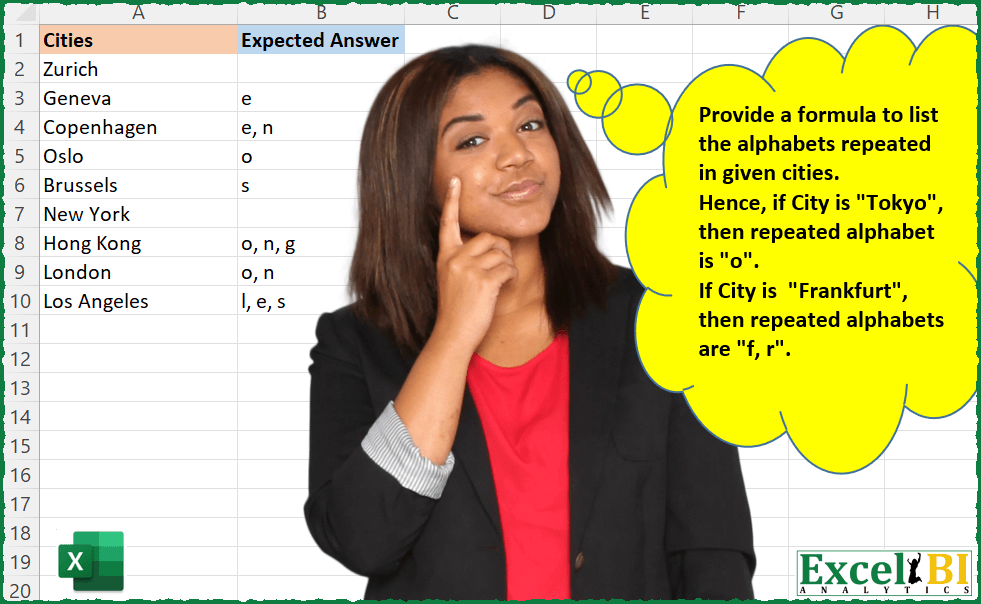
Provide a formula to list the alphabets repeated in given cities. Hence, if City is “Tokyo”, then repeated alphabet is “o”. If City is “Frankfurt”, then repeated alphabets are “f, r”.
📌 Challenge Details and Links
ExcelBI Excel Challenge Number: 30
Challenge Difficulty: ⭐️⭐️
📥Download Sample File
📥Link to the solutions on LinkedIn
Solving the challenge of Repeated Letters in Cities with Power Query
Power Query solution 1 for Repeated Letters in Cities, proposed by Aditya Kumar Darak 🇮🇳:
let
  Source = Excel.CurrentWorkbook(){[Name = "data"]}[Content],
  Return = Table.AddColumn(
    Source,
    "Answer",
    each [
      Lower   = Text.Lower([Cities]),
      ToList  = Text.ToList(Lower),
      Unique  = List.Distinct(ToList),
      Repeat  = List.Difference(ToList, Unique),
      Combine = Text.Combine(List.Distinct(Repeat), ", ")
    ][Combine]
  )
in
  Return
Power Query solution 2 for Repeated Letters in Cities, proposed by Brian Julius:
let
  Source = Table.ExpandListColumn(
    Table.AddIndexColumn(
      Table.AddColumn(CitiesRaw, "Letters", each Text.ToList([City])),
      "Index",
      1,
      1
    ),
    "Letters"
  ),
  Grouped = Table.Group(
    Source,
    {"City", "Letters"},
    {
      {"AllRows", each _, type table [City = nullable text, Letters = text, Index = number]},
      {"LetterCount", each Table.RowCount(_), Int64.Type}
    }
  ),
  Repeated = Table.AddColumn(Grouped, "Repeated", each if [LetterCount] > 1 then [Letters] else "*"),
  Regrouped = Table.Group(
    Repeated,
    {"City"},
    {
      {
        "AllRows",
        each _,
        type table [
          City = nullable text,
          Letters = text,
          AllRows = table,
          LetterCount = number,
          Repeated = text
        ]
      }
    }
  ),
  CombineClean = Table.RemoveColumns(
    Table.AddColumn(
      Regrouped,
      "ExpectedAnswer",
      each Text.Combine(List.Select([AllRows][Repeated], each _ <> "*"), ", ")
    ),
    "AllRows"
  )
in
  CombineClean
Power Query solution 3 for Repeated Letters in Cities, proposed by Matthias Friedmann:
letters, _, Occurrence.All) ) tells how many times a letter is included:
let
 Source = Excel.CurrentWorkbook(){[Name="repeatedAlphabet"]}[Content],
 #"Added Custom" = Table.AddColumn(Source, "Custom", each
 let
 letters = Text.ToList( Text.Lower([Cities]) )
 in
 Text.Combine(
 List.Distinct(
 List.Select(
 letters, each
 List.Count( List.PositionOf(letters, _, Occurrence.All) ) > 1
 )
 ),
 ", ")
 )
in
 #"Added Custom"

____
here Los Angeles is "l, s, e"
Power Query solution 4 for Repeated Letters in Cities, proposed by Venkata Rajesh:
let
  Source = Data,
  Result = Table.AddColumn(
    Source,
    "Expected",
    each
      let
        _Cities = Text.Lower([Cities]),
        _list   = Text.ToList(_Cities)
      in
        Text.Combine(
          List.Distinct(
            List.Select(_list, each List.Count(Text.PositionOf(_Cities, _, Occurrence.All)) > 1)
          ),
          ", "
        )
  )
in
  Result
Power Query solution 5 for Repeated Letters in Cities, proposed by Sue Bayes:
let
  Source = Data,
  #"Added Index" = Table.AddIndexColumn(Source, "Index", 0, 1, Int64.Type),
  ToList = Table.AddColumn(
    #"Added Index",
    "List",
    each List.Select(Text.ToList([Cities]), each _ <> " ")
  ),
  Expand = Table.TransformColumns(
    Table.ExpandListColumn(ToList, "List"),
    {{"List", Text.Lower, type text}}
  ),
  Group = Table.Group(
    Expand,
    {"Index", "Cities", "List"},
    {{"Count", each Table.RowCount(_), Int64.Type}}
  ),
  Duplicates = Table.SelectRows(Group, each ([Count] <> 1)),
  Combine = Table.Group(
    Duplicates,
    {"Cities", "Index"},
    {{"Answer", each Text.Combine([List], ", "), type text}}
  ),
  Merge = Table.NestedJoin(
    Combine,
    {"Index", "Cities"},
    #"Added Index",
    {"Index", "Cities"},
    "Data",
    JoinKind.FullOuter
  ),
  ExpandAnswer = Table.ReorderColumns(
    Table.RenameColumns(
      Table.RemoveColumns(
        Table.Sort(
          Table.ExpandTableColumn(Merge, "Data", {"Cities", "Index"}, {"Cities.1", "Index.1"}),
          {"Index.1"}
        ),
        {"Cities", "Index", "Index.1"}
      ),
      {"Cities.1", "Cities"}
    ),
    {"Cities", "Answer"}
  )
in
  ExpandAnswer
Power Query solution 6 for Repeated Letters in Cities, proposed by Thomas DUCROQUETZ:
let
  Source = YourData,
  AddLetters = Table.AddColumn(
    Source,
    "Letters",
    each
      let
        Letters = Text.ToList(Text.Lower([Cities])),
        SelectLetters = List.Select(
          Letters,
          each
            let
              currLetter = _,
              count      = List.Count(List.Select(Letters, each _ = currLetter))
            in
              count >= 2
        )
      in
        Text.Combine(List.Distinct(SelectLetters), ", "),
    type text
  )
in
  AddLetters
Power Query solution 7 for Repeated Letters in Cities, proposed by Hristo Tsenov:
let
  Source = Excel.CurrentWorkbook(){[Name = "Table2"]}[Content],
  Group = Table.Group(
    Table.ExpandListColumn(
      Table.AddColumn(Source, "Letters", each Text.ToList(Text.Lower([Cities]))),
      "Letters"
    ),
    {"Cities", "Letters"},
    {{"Count", each Table.RowCount(_), Int64.Type}}
  ),
  Result = Table.Group(
    Table.AddColumn(Group, "Char", each if [Count] > 1 then [Letters] else null),
    {"Cities"},
    {{"Result", each Text.Combine([Char], ", "), type text}}
  )
in
  Result
Solving the challenge of Repeated Letters in Cities with Excel
Excel solution 1 for Repeated Letters in Cities, proposed by Rick Rothstein:
=IFERROR(
    MAP(
        A2:A10,
        LAMBDA(
            x,
            LET(
                L,
                LOWER(
                    MID(
                        x,
                        SEQUENCE(
                            LEN(
                                x
                            )
                        ),
                        1
                    )
                ),
                TEXTJOIN(
                    ", ",
                    ,
                    UNIQUE(
                        FILTER(
                            L,
                            LEN(
                                x
                            )-LEN(
                                SUBSTITUTE(
                                    LOWER(
                                x
                            ),
                                    L,
                                    ""
                                )
                            )>1
                        )
                    )
                )
            )
        )
    ),
    ""
)
Excel solution 2 for Repeated Letters in Cities, proposed by John V.:
=MAP(
    A2:A10,
    LAMBDA(
        x,
        LET(
            s,
            ROW(
                1:99
            ),
            e,
            MID(
                x,
                s,
                1
            ),
            TEXTJOIN(
                ", ",
                ,
                UNIQUE(
                    IF(
                        s=XMATCH(
                            e,
                            e
                        ),
                        "",
                        e
                    )
                )
            )
        )
    )
)
Excel solution 3 for Repeated Letters in Cities, proposed by محمد حلمي:
=MAP(
    A2:A10,
    LAMBDA(
        b,

        LET(
            x,
            MID(
                b,
                SEQUENCE(
                    ,
                    LEN(
                        b
                    )
                ),
                1
            ),

            IFERROR(
                TEXTJOIN(
                    ", ",
                    ,
                    UNIQUE(
                        FILTER(
                            x,

                            BYCOL(
                                TRANSPOSE(
                                    UNIQUE(
                                        x,
                                        1,
                                        1
                                    )
                                )=x,

                                LAMBDA(
                                    a,
                                    SUM(
                                        --a
                                    )
                                )
                            )=0
                        ),
                        1
                    )
                ),
                ""
            )
        )
    )
)
Excel solution 4 for Repeated Letters in Cities, proposed by 🇰🇷 Taeyong Shin:
=MAP(
    LOWER(
        A2:A10
    ),
     LAMBDA(
         m,

          LET(

               chr,
               MID(
                   m,
                    SEQUENCE(
                        LEN(
                            m
                        )
                    ),
                    1
               ),

               TEXTJOIN(
                   ", ",
                    ,
                    UNIQUE(
                        TEXTSPLIT(
                            chr,
                             ,
                             UNIQUE(
                                 chr,
                                  ,
                                  1
                             )
                        )
                    )
               )

          )

     )
)
Excel solution 5 for Repeated Letters in Cities, proposed by 🇰🇷 Taeyong Shin:
=MAP(
    LOWER(
        A2:A10
    ),
    LAMBDA(
        x,
        TEXTJOIN(
            ", ",
            ,
            REGEXEXTRACT(
                x,
                "([a-z])(?=.*1)(?!(?:.*1){2,})|$",
                1
            )
        )
    )
)
Excel solution 6 for Repeated Letters in Cities, proposed by Julian Poeltl:
=LOWER(
    MAP(
        A2:A10,
        LAMBDA(
            C,
            LET(
                SP,
                MID(
                    C,
                    SEQUENCE(
                        LEN(
                            C
                        )
                    ),
                    1
                ),
                U,
                UNIQUE(
                    SP
                ),
                TEXTJOIN(
                    ", ",
                    ,
                    IFERROR(
                        FILTER(
                            U,
                            MAP(
                                U,
                                LAMBDA(
                                    A,
                                    ROWS(
                                        FILTER(
                                            SP,
                                            SP=A
                                        )
                                    )
                                )
                            )>1
                        ),
                        ""
                    )
                )
            )
        )
    )
)
Excel solution 7 for Repeated Letters in Cities, proposed by Aditya Kumar Darak 🇮🇳:
= MAP(
 A2:A10,
 LAMBDA(
 text,
 LET(
 _splt,
 MID(text, SEQUENCE(LEN(text)), 1),
 _count,
 MAP(_splt, LAMBDA(a, SUM(--(_splt = a)))),
 _dbl,
 UNIQUE(FILTER(_splt, _count > 1, "")),
 TEXTJOIN(", ", TRUE, LOWER(_dbl)))))
Excel solution 8 for Repeated Letters in Cities, proposed by Timothée BLIOT:
=LET(

    Word,
     A2,

    Letters,
     MID(
         Word,
          SEQUENCE(
              LEN(
                  Word
              )
          ),
          1
     ),


    DuplicateCondition,
     BYROW(
         Letters,
          LAMBDA(
              x,
               SUM(
                   --ISNUMBER(
                       SEARCH(
                           x,
                            Letters
                       )
                   )
               ) > 1
          )
     ),

    Duplicates,
     FILTER(
         Letters,
          DuplicateCondition,
          ""
     ),


    LOWER(
        TEXTJOIN(
            ", ",
            TRUE,
            UNIQUE(
                Duplicates
            )
        )
    )
)
Excel solution 9 for Repeated Letters in Cities, proposed by Duy Tùng:
=MAP(
    A2:A10,
    LAMBDA(
        x,
        IFNA(
            ARRAYTOTEXT(
                CHAR(
                    MODE.MULT(
                        CODE(
                            LOWER(
                                MID(
                                    x,
                                    SEQUENCE(
                                        LEN(
                                            x
                                        )
                                    ),
                                    1
                                )
                            )
                        )
                    )
                )
            ),
            ""
        )
    )
)
Excel solution 10 for Repeated Letters in Cities, proposed by Bhavya Gupta:
=MAP(
    A2:A10,
    LAMBDA(
        a,
        IFERROR(
            TEXTJOIN(
                ", ",
                TRUE,
                UNIQUE(
                    MID(
                        a,
                        TOCOL(
                            MAP(
                                SEQUENCE(
                                    LEN(
                                        a
                                    )
                                ),
                                LAMBDA(
                                    t,
                                    SEARCH(
                                        MID(
                                            a,
                                            t,
                                            1
                                        ),
                                        a,
                                        t+1
                                    )
                                )
                            ),
                            3
                        ),
                        1
                    )
                )
            ),
            ""
        )
    )
)
Excel solution 11 for Repeated Letters in Cities, proposed by Charles Roldan:
=MAP(A2:A10,LAMBDA(x,LAMBDA(x,ARRAYTOTEXT(FILTER(x,LAMBDA(x,DROP(FREQUENCY(x,x),-1)>1)(CODE(x)),"")))(LAMBDA(x,MID(x,SEQUENCE(LEN(x)),1))(LOWER(x)))))Excel solution 12 for Repeated Letters in Cities, proposed by Charles Roldan:
=LET(Cities,A2:A10,Alphabet,CHAR(SEQUENCE(,26,97)),
f,LAMBDA(x,SEARCH(Alphabet,Cities,1+x)),
g,LAMBDA(x,ARRAYTOTEXT(FILTER(Alphabet,x,""))),
BYROW(ISNUMBER(f(f(0))),g))
Excel solution 13 for Repeated Letters in Cities, proposed by Jardiel Euflázio:
=BYROW(

    A2:A10,


    LAMBDA(
        a,


        LET(

            b,
            LEN(
                a
            ),

            c,
            SEQUENCE(
                b
            ),

            d,
            MID(
                a,
                c,
                1
            ),


            TEXTJOIN(

                ", ",

                ,

                UNIQUE(

                     FILTER(

                          d,

                          MATCH(
                              d,
                              d,
                              0
                          )<>c,

                          ""

                     )

                )

            )

        )

    )

)
Excel solution 14 for Repeated Letters in Cities, proposed by Cary Ballard, DML:
=MAP(
    A2:A10,
     LAMBDA(
         a,
          LET(
              b,
               MID(
                   a,
                    SEQUENCE(
                        LEN(
                            a
                        )
                    ),
                    1
               ),
               ARRAYTOTEXT(
                   UNIQUE(
                       FILTER(
                           b,
                            MAP(
                                b,
                                 LAMBDA(
                                     m,
                                      SUM(
                                          N(
                                              m = b
                                          )
                                      )
                                 )
                            ) > 1,
                            ""
                       )
                   )
               )
          )
     )
)
Excel solution 15 for Repeated Letters in Cities, proposed by Sarun Chimamphant:
=BYROW(
    A2:A10,
    LAMBDA(
        a,
        LET(
            b,
            MID(
                LOWER(
                    a
                ),
                SEQUENCE(
                    LEN(
                    a
                )
                ),
                1
            ),
            TEXTJOIN(
                ", ",
                ,
                FILTER(
                    b,
                    INDEX(
                        FREQUENCY(
                            MATCH(
                                b,
                                b,

                            ),
                            MATCH(
                                b,
                                b,

                            )
                        ),
                        SEQUENCE(
                    LEN(
                    a
                )
                )
                    )>1,
                    ""
                )
            )
        )
    )
)
Excel solution 16 for Repeated Letters in Cities, proposed by Ibrahim Sadiq:
=MAP(

    LOWER(
        A2:A10
    ),
    LAMBDA(
        Rng,
        LET(

            a,
            MID(
                Rng,
                SEQUENCE(
                    LEN(
                        Rng
                    )
                ),
                1
            ),

            b,
            UNIQUE(
                a,
                ,
                1
            ),

            TEXTJOIN(
                ",",
                ,
                UNIQUE(
                    REDUCE(
                        a,
                        b,
                        LAMBDA(
                            a,
                            b,
                            SUBSTITUTE(
                                a,
                                b,
                                ""
                            )
                        )
                    )
                )
            )
        )
    )
)
Excel solution 17 for Repeated Letters in Cities, proposed by Riley Johnson:
=LET(
 cities, tbl[Cities],

 repeats, LAMBDA(_city,
 LET(
 _chars, UNIQUE( LOWER( MID( _city, SEQUENCE( LEN( _city ) ), 1 ) ) ),
 _include, LEN(_city) - 1 > LEN( SUBSTITUTE( LOWER(_city), _chars, "" ) ),
 ARRAYTOTEXT( FILTER( _chars, _include, "" ) )
 )
 ),

 MAP( cities, repeats)

)