
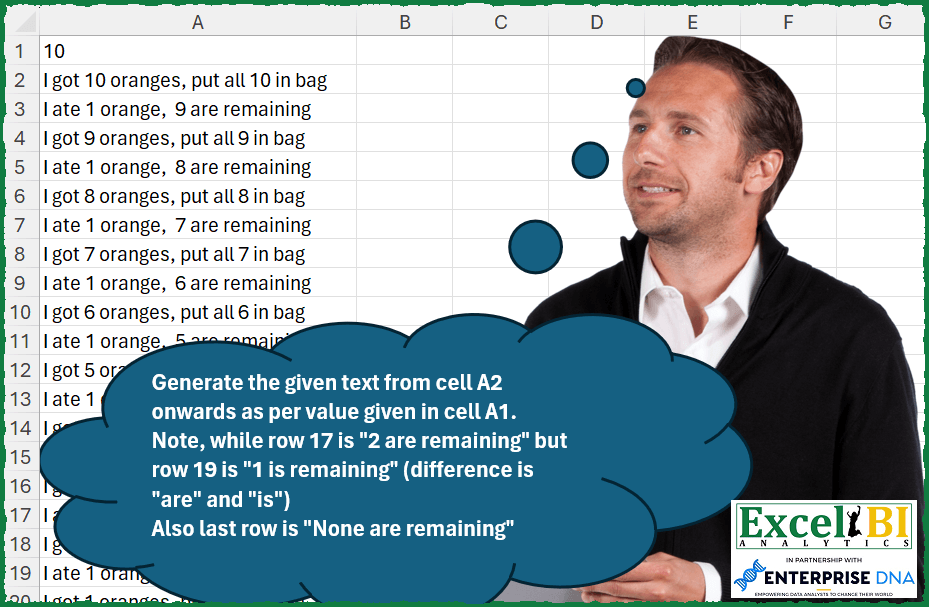
Generate the given text from cell A2 onwards as per value given in cell A1. Note, while row 17 is “2 are remaining” but row 19 is “1 is remaining” (difference is “are” and “is”) Also last row is “None are remaining”
📌 Challenge Details and Links
ExcelBI Excel Challenge Number: 295
Challenge Difficulty: ⭐️
📥Download Sample File
📥Link to the solutions on LinkedIn
Solving the challenge of Generate Remaining Count Sentences with Power Query
Power Query solution 1 for Generate Remaining Count Sentences, proposed by Bo Rydobon 🇹🇭:
let
  n = 10,
  Ans = List.Transform(
    {1 .. n * 2},
    (s) =>
      let
        b = n - s / 2,
        g = Text.From(n - (s - 1) / 2)
      in
        if Number.IsOdd(s) then
          "I got " & g & " oranges, put all " & g & " in bag"
        else
          "I ate 1 orange, "
            & (if b > 0 then Text.From(b) & (if b > 1 then " are" else " is") else "None are")
            & " remaining"
  )
in
  Ans
Power Query solution 2 for Generate Remaining Count Sentences, proposed by Zoran Milokanović:
let
  Source = 10,
  S = List.Accumulate(
    List.Numbers(Source, Source, - 1),
    {},
    (s, c) =>
      let
        o = Text.From(c),
        r = Text.From(c - 1)
      in
        s
          & {"I got " & o & " oranges, put all " & o & " in bag"}
          & {
            "I ate 1 orange, "
              & (if r = "0" then "None" else r)
              & {" are", " is"}{Number.From(r = "1")}
              & " remaining"
          }
  )
in
  S
Power Query solution 3 for Generate Remaining Count Sentences, proposed by Alejandro Simón 🇵🇦 🇪🇸:
let
  Source = 10,
  Sol = List.Combine(
    List.Transform(
      {0 .. Source - 1},
      each
        let
          a = Text.Split(
            "I got "
              & Text.From(Source - _)
              & " oranges, put all "
              & Text.From(Source - _)
              & " in bag;I ate 1 orange, "
              & Text.From(Source - _ - 1)
              & " are remaining",
            ";"
          ),
          b = List.Transform(
            a,
            each
              if Text.Contains(_, "1 are") then
                Text.Replace(_, "1 are", "1 is")
              else if Text.Contains(_, "0 are") then
                Text.Replace(_, "0 are", "None are")
              else
                _
          )
        in
          b
    )
  )
in
  Sol
Power Query solution 4 for Generate Remaining Count Sentences, proposed by Szabolcs Phraner:
let
  text
    = "I got #[got] oranges, put all #[put] in bag#(lf)I ate #[ate] orange, #[rem] are remaining.",
  count = 10,
  ListGen = List.Generate(
    () => [got = count, put = got, ate = 1, rem = got - ate],
    each [got] > 0,
    each [got = [rem], put = got, ate = 1, rem = got - ate],
    each Text.Split(Text.Format(text, _), "#(lf)")
  ),
  Combine = List.Combine(ListGen),
  fr = {[f = "0", r = "none"], [f = "1 oranges", r = "1 orange"]},
  Replace = List.Transform(
    Combine,
    each List.Accumulate(fr, _, (s, c) => Text.Replace(s, c[f], c[r]))
  )
in
  Replace
Solving the challenge of Generate Remaining Count Sentences with Excel
Excel solution 1 for Generate Remaining Count Sentences, proposed by Bo Rydobon 🇹🇭:
=LET(
    n,
    A1,
    s,
    SEQUENCE(
        n*2
    ),
    g,
    n-INT(
        s/2
    ),
    IF(
        MOD(
            s,
            2
        ),
        "I got "&g&" oranges, put all "&g&" in bag",
        "I ate 1 orange, "&TEXT(
            n-s/2,
            "[>1]0 are;[=1]0 is;None are"
        )&" remaining"
    )
)
Excel solution 2 for Generate Remaining Count Sentences, proposed by Rick Rothstein:
=LET(
    f,
    LAMBDA(
        x,
        "I got "&x&" oranges, put all "&x&" in bag/I ate 1 orange, "&IF(
            x=1,
            "None",
            x-1
        )&IF(
            x=2,
            " is",
            " are"
        )&" remaining"
    ),
    TOCOL(
        TEXTSPLIT(
            TEXTJOIN(
                "#",
                ,
                f(
                    SEQUENCE(
                        A1,
                        ,
                        A1,
                        -1
                    )
                )
            ),
            "/",
            "#"
        )
    )
)
Excel solution 3 for Generate Remaining Count Sentences, proposed by John V.:
=LET(
    s,
    1+A1-SEQUENCE(
        A1
    ),
    TOCOL(
        HSTACK(
            "I got "&s&" oranges, put all "&s&" in bag",
            "I ate 1 orange, "&IF(
                s=1,
                "None",
                s-1
            )&IF(
                s=2,
                " is",
                " are"
            )&" remaining"
        )
    )
)
Excel solution 4 for Generate Remaining Count Sentences, proposed by محمد حلمي:
=LET(
    s,
    A1*2,
    n,
    s+2-SEQUENCE(
        s
    ),
    e,
    DROP(
        INT(
            n/2
        ),
        1
    ),
    u,
    " are remaining",
    x,
    "I ate 1 orange,  ",
    IFNA(
        IF(
            ISODD(
                n
            ),
            "I got "&
            e&" oranges, put all "&e&" in bag",
            x&e&u
        ),
        x&"None"&u
    )
)
Excel solution 5 for Generate Remaining Count Sentences, proposed by Kris Jaganah:
=LET(a,SEQUENCE(A1,,A1,-1),b,a-1,c,"I got "&a&" oranges, put all "&a&" in bag",d,"I ate 1 orange, "&SWITCH(b,0,"None are",1,b&" is",b&" are")&" remaining",TOCOL(HSTACK(c,d)))Excel solution 6 for Generate Remaining Count Sentences, proposed by Timothée BLIOT:
=DROP(REDUCE("",SEQUENCE(10,,10,-1),LAMBDA(a,v, VSTACK(a,VSTACK("I got "&v&" orange"&IF(v=1,"","s")&", I put "&IF(v>1,"all ","")&v&" in a bag.","I ate 1 orange, "&SWITCH(v,2,v-1&" is",1,"none are",v-1&" are")&" remaining.")))),1)Excel solution 7 for Generate Remaining Count Sentences, proposed by Hussein SATOUR:
=LET(a, SEQUENCE(A1,,A1, -1), b, SEQUENCE(A1,,A1-1,-1),
TOCOL(HSTACK("I got "&a&" oranges, put all "&a&" in bag", "I ate 1 orange, " &IFS(b=1, b&" is ", b=0, "None are ", 1, b& " are ") & "remaining")))
Excel solution 8 for Generate Remaining Count Sentences, proposed by Sunny Baggu:
=LET(

     _s,
     SEQUENCE(
         A1,
          ,
          A1,
          -1
     ),

     TOCOL(
         HSTACK(
             "I got " & _s & " Oranges",
              "I ate " & _s ^ 0 & " Orange"
         )
     ) &
     ", " &
     TOCOL(

          HSTACK(

               "Put all " & _s & " in bag",

               VSTACK(

                    DROP(
                        IF(
                            _s = 1,
                             _s & " is ",
                             _s & " are"
                        ),
                         1
                    ),

                    " None are"

               ) & " remaining"

          )

     )

)
Excel solution 9 for Generate Remaining Count Sentences, proposed by LEONARD OCHEA 🇷🇴:
=LET(s,SEQUENCE(A1,,A1,-1),TOCOL(HSTACK("I got "&s&" oranges, put all "&s&" in bag","I ate 1 orange, "&IF(s-1,s-1,"None")&" are remaining")))Excel solution 10 for Generate Remaining Count Sentences, proposed by Charles Roldan:
=LET(Msg, LAMBDA(n, VSTACK("I got " & n & " oranges, put all " & n & " in bag", "I ate 1 orange, " & n - 1 & IF(n = 2, " is", " are") & " remaining")), VSTACK(DROP(REDUCE("", SEQUENCE(A1), LAMBDA(a,b, VSTACK(Msg(b), a))), -2), "I ate 1 orange, None are remaining"))Excel solution 11 for Generate Remaining Count Sentences, proposed by Julien Lacaze:
=LET(n,
    A1,

txt_1,
    "I got zzz oranges, put all zzz in bag",
    txt_2,
    "I ate 1 orange, zzz yyy remaining",

ret_1,
    LAMBDA(
        v,
        SUBSTITUTE(
            txt_1,
            "zzz",
            v
        )
    ),

ret_2,
    LAMBDA(
        v,
        SUBSTITUTE(
            SUBSTITUTE(
                txt_2,
                "zzz",
                v
            ),
            "yyy",
            SWITCH(
                v,
                1,
                "is",
                "are"
            )
        )
    ),

recursive,
    LAMBDA(n,
    f,
    IF(n=1,
    VSTACK(ret_1(1),
    ret_2("None")),
    VSTACK(ret_1(n),
    ret_2(n-1),
    f(
        n-1,
        f
    )))),

recursive(
    n,
    recursive
))

Please note that to handle the "s" for the "I got 1 oranges" you might want to change txt_1/ret_1 with this :
txt_1,
    "I got zzz orangeyyy, put all zzz in bag"
ret_1,
    LAMBDA(
        v,
        SUBSTITUTE(
            SUBSTITUTE(
                txt_1,
                "zzz",
                v
            ),
            "yyy",
            SWITCH(
                v,
                1,
                "",
                "s"
            )
        )
    )
Excel solution 12 for Generate Remaining Count Sentences, proposed by Pieter de Bruijn:
=LET(
    o,
    SEQUENCE(
        A1,
        ,
        A1,
        -1
    ),
    TOCOL(
        HSTACK(
            "I got "&o&" orange"&IF(
                o-1,
                "s, put all ",
                ", put "
            )&o&" in bag",
            "I ate 1 orange, "&IF(
                o-1,
                o-1&" are",
                "none is"
            )&" remaining"
        )
    )
)
Excel solution 13 for Generate Remaining Count Sentences, proposed by Ziad A.:
=TOCOL(
    MAP(
        SEQUENCE(
            A1,
            1,
            A1,
            -1
        ),
        LAMBDA(
            n,
            {"I got "&n&" oranges, put all "&n&" in bag",
            "I ate 1 orange, "&IF(
                n-1,
                n-1,
                "None"
            )&IF(
                n-2,
                " are",
                " is"
            )&" remaining"}
        )
    )
)
Excel solution 14 for Generate Remaining Count Sentences, proposed by Abdelrahman Omer, MBA, PMP:
=LET(N,A1,b,ROUND(SEQUENCE(N*2+1,,N,-0.5),0),d,VSTACK(N,DROP(IF(ISEVEN(SEQUENCE(N*2+1)),"I got " &b &" oranges, put all "&b&" in bag","I ate 1 orange, " &IFS(b<1,"None are ",b=1,b&" is ",b>1,b&" are ")&"remaining"),1)),d)Excel solution 15 for Generate Remaining Count Sentences, proposed by Daniel Garzia:
=LET(
    i,
    A1,
    s,
    SEQUENCE(
        i,
        ,
        i,
        -1
    ),
    g,
    s-1,
    SORTBY(
        VSTACK(
            "I got "&s&" oranges, put all "&s&" in bag",
            "I ate 1 orange, "&IFS(
                g=1,
                g&" is",
                g=0,
                "None are",
                1,
                g&" are"
            )&" remaining"
        ),
        VSTACK(
            s,
            s
        ),
        -1
    )
)
Excel solution 16 for Generate Remaining Count Sentences, proposed by samir tobeil:
=LET(a,
    SEQUENCE(
        A1*2,
        ,
        A1*2,
        -1
    ),
    x,
    MOD(
        a,
        2
    ),
    MAP((a-x)/2,
    x,
    LAMBDA(
        s,
        t,
        IF(
            t,
            "I ate 1 oranges, "&IFS(
                s=1,
                s&" is ",
                s=0,
                "Non ",
                1,
                s&" are "
            )&"remaining",
            "I got "&s&" oranges, put all "&s&" in bag"
        )
    )))
Excel solution 17 for Generate Remaining Count Sentences, proposed by Rayan S.:
=LET(

     n,
     A1,

     a,
     "I got " & SEQUENCE(
         n,
          ,
          n,
          -1
     ) & " oranges",

     b,
     DROP(
         TEXTSPLIT(
             REPT(
                 "I ate 1 orange,",
                  n
             ),
              ,
              ","
         ),
          -1
     ),

     c,
     "put all " & SEQUENCE(
         n,
          ,
          n,
          -1
     ) & " in bag",

     d,
     VSTACK(

          " " & DROP(
              SEQUENCE(
                  n,
                   ,
                   n - 1,
                   -1
              ) & " are remaining",
               -2
          ),

          " 1 is remaining",

          " None are remaining"

     ),

     TOCOL(
         HSTACK(
             a,
              b
         ),
          ,
          FALSE
     ) & ", " & TOCOL(
         HSTACK(
             c,
              d
         ),
          ,
          FALSE
     )

)
Excel solution 18 for Generate Remaining Count Sentences, proposed by Rayan S.:
=LET(a, "I got " & SEQUENCE(10, , 10, -1) & " oranges", b, DROP(TEXTSPLIT(REPT("I ate 1 orange,", 10), , ","), -1), c, "put all " & SEQUENCE(10, , 10, -1) & " in bag", d, VSTACK(" " & DROP(SEQUENCE(10, , 9, -1) & " are remaining", -2), " 1 is remaining", " None are remaining"), TOCOL(HSTACK(a, b), , FALSE) & ", " & TOCOL(HSTACK(c, d), , FALSE))Solving the challenge of Generate Remaining Count Sentences with Python in Excel
Python in Excel solution 1 for Generate Remaining Count Sentences, proposed by Bo Rydobon 🇹🇭:
n=xl("A1")Python in Excel solution 2 for Generate Remaining Count Sentences, proposed by John V.:
Hi everyone!
Blessings!
Solving the challenge of Generate Remaining Count Sentences with R
_x000D_
R solution 1 for Generate Remaining Count Sentences, proposed by Konrad Gryczan, PhD:
library(tidyverse)
initial_value <- 10
generate_sentence <- function(x, initial_value) {
 if (x <= initial_value & x > 2) {
 second_row = paste("I ate 1 orange,", x-1, "are remaining.")
 res = tribble(~sentence, first_row, second_row)
 return(res)
 } else if (x == 2) {
 second_row = paste("I ate 1 orange,", x-1, "is remaining.")
 res = tribble(~sentence, first_row, second_row)
 return(res)
 } else if (x == 1) {
 second_row = paste("I ate 1 orange, None are remaining.")
 res = tribble(~sentence, first_row, second_row)
 return(res)
 }
}
# Use purrr::map_chr to generate sentences
sentences <- map_dfr(initial_value:0, ~ generate_sentence(.x, initial_value))
_x000D_
Solving the challenge of Generate Remaining Count Sentences with Excel VBA
_x000D_
Excel VBA solution 1 for Generate Remaining Count Sentences, proposed by Nicolas Micot:
VBA solution:
Function f_genereTexte(ByVal nombre As Integer) As Variant
Dim tableau As Variant
Dim nbOrange As Integer
ReDim tableau(1 To nombre * 2, 1 To 1)
For i = 1 To nombre
 nbOrange = nombre - i + 1
 tableau(2 + (i - 1) * 2, 1) = "I ate 1 orange, " & IIf(nbOrange - 1 = 0, "None", nbOrange - 1) & IIf(nbOrange - 1 = 1, " is", " are") & " remaining"
Next i
f_genereTexte = tableau
End Function
_x000D_
&&