
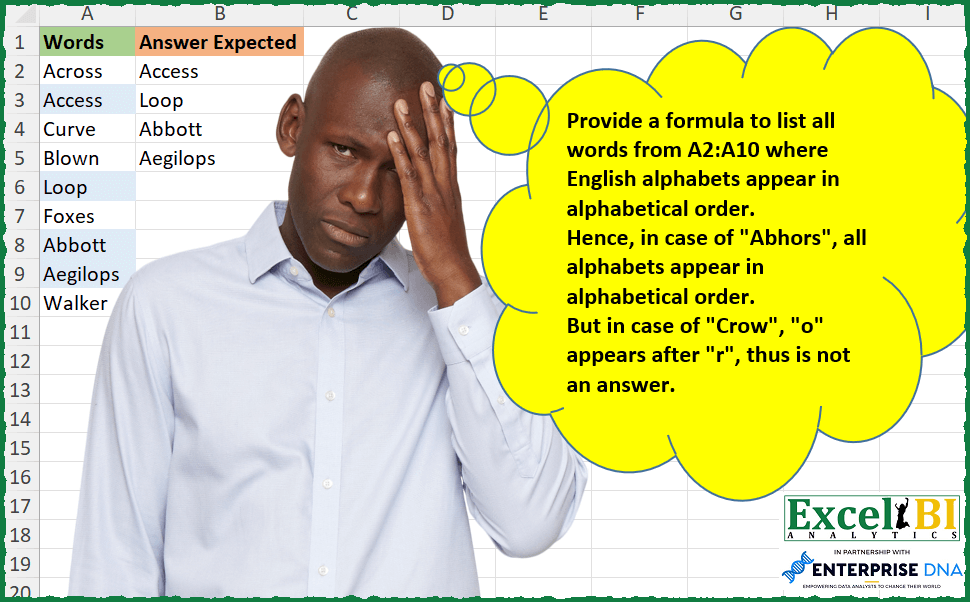
Provide a formula to list all words from A2:A10 where English alphabets appear in alphabetical order. Hence, in case of “Abhors”, all alphabets appear in alphabetical order. But in case of “Crow”, “o” appears after “r”, thus is not an answer.
📌 Challenge Details and Links
ExcelBI Excel Challenge Number: 293
Challenge Difficulty: ⭐️
📥Download Sample File
📥Link to the solutions on LinkedIn
Solving the challenge of Words in Alphabetical Order with Power Query
Power Query solution 1 for Words in Alphabetical Order, proposed by Bo Rydobon 🇹🇭:
let
  Source = Excel.CurrentWorkbook(){[Name = "Table1"]}[Content],
  Ans = Table.SelectRows(Source, each [Words] = Text.Combine(List.Sort(Text.ToList([Words])), ""))
in
  Ans
Power Query solution 2 for Words in Alphabetical Order, proposed by Zoran Milokanović:
let
  Source = Excel.CurrentWorkbook(){[Name = "Input"]}[Content][Words],
  S = List.Select(
    Source,
    each
      let
        l = Text.ToList(Text.Lower(_))
      in
        List.Accumulate(List.Positions(l), true, (s, c) => s and (l{c + 1}? ?? l{c}) >= l{c})
  )
in
  S
Power Query solution 3 for Words in Alphabetical Order, proposed by Aditya Kumar Darak 🇮🇳:
let
  Source = Excel.CurrentWorkbook(){[Name = "data"]}[Content],
  Return = Table.SelectRows(
    Source,
    each Text.Combine(List.Sort(Text.ToList(Text.Lower([Words])))) = Text.Lower([Words])
  )
in
  Return
Power Query solution 4 for Words in Alphabetical Order, proposed by Alejandro Simón 🇵🇦 🇪🇸:
let
  Source = Excel.CurrentWorkbook(){[Name = "Table1"]}[Content],
  Sol = Table.SelectRows(
    Source,
    each
      let
        a = {"A" .. "Z"},
        b = List.Zip({a, List.Positions(a)}),
        c = Text.ToList(Text.Upper([Words])),
        d = List.ReplaceMatchingItems(c, b),
        e = List.AllTrue(
          List.RemoveLastN(List.Transform({0 .. List.Count(c) - 1}, each (d{_ + 1} - d{_}) >= 0))
        )
      in
        e
  )
in
  Sol
Power Query solution 5 for Words in Alphabetical Order, proposed by Luan Rodrigues:
let
  Fonte = Tabela1,
  res   = Table.SelectRows(Fonte, each [a = Text.ToList([Words]), b = List.Sort(a) = a][b])
in
  res
Power Query solution 6 for Words in Alphabetical Order, proposed by Ramiro Ayala Chávez:
let
  Origen = Excel.CurrentWorkbook(){[Name = "Tabla1"]}[Content],
  a = Table.TransformColumns(
    Origen,
    {
      "Words",
      each
        let
          b = Text.ToList(_),
          c = List.Transform(b, each Text.Lower(_)),
          d = List.Transform(c, each Character.ToNumber(_)),
          e = if d = List.Sort(d) then d else null,
          f = List.Transform(e, each Character.FromNumber(_)),
          g = Text.Combine(f)
        in
          g
    }
  ),
  h = Table.RemoveRowsWithErrors(a, {"Words"}),
  i = Table.TransformColumns(h, {{"Words", Text.Proper}}),
  Sol = Table.RenameColumns(i, {{"Words", "Answer Expected"}})
in
  Sol
Solving the challenge of Words in Alphabetical Order with Excel
Excel solution 1 for Words in Alphabetical Order, proposed by Bo Rydobon 🇹🇭:
=TOCOL(
    MAP(
        A2:A10,
        LAMBDA(
            a,
            IFS(
                a=CONCAT(
                    SORT(
                        MID(
                            a,
                            SEQUENCE(
                                9
                            ),
                            1
                        )
                    )
                ),
                a
            )
        )
    ),
    3
)
Excel solution 2 for Words in Alphabetical Order, proposed by Rick Rothstein:
=FILTER(
    A2:A10,
    MAP(
        A2:A10,
        LAMBDA(
            x,
            CONCAT(
                SORT(
                    MID(
                        LOWER(
                            x
                        ),
                        SEQUENCE(
                            LEN(
                            x
                        )
                        ),
                        1
                    )
                )
            )=LOWER(
                            x
                        )
        )
    )
)

EDIT NOTE: Abdelrahman Omer,
     MBA,
     PMP observed in a reply below that the LOWER function was not needed in this formula and I agree with him. Here is the above formula with the LOWER function removed...
=FILTER(
    A2:A10,
    MAP(
        A2:A10,
        LAMBDA(
            x,
            CONCAT(
                SORT(
                    MID(
                        x,
                        SEQUENCE(
                            LEN(
                            x
                        )
                        ),
                        1
                    )
                )
            )=x
        )
    )
)
Excel solution 3 for Words in Alphabetical Order, proposed by Rick Rothstein:
=FILTER(
    A2:A10,
    MAP(
        A2:A10,
        LAMBDA(
            x,
            LET(
                m,
                MID(
                    LOWER(
                        x
                    ),
                    SEQUENCE(
                        LEN(
                        x
                    )
                    ),
                    1
                ),
                AND(
                    SORT(
                        m
                    )=m
                )
            )
        )
    )
)
Excel solution 4 for Words in Alphabetical Order, proposed by John V.:
=FILTER(
    A2:A10,
    MAP(
        A2:A10,
        LAMBDA(
            x,
            x=CONCAT(
                SORT(
                    MID(
                        x,
                        ROW(
                            1:9
                        ),
                        1
                    )
                )
            )
        )
    )
)
Excel solution 5 for Words in Alphabetical Order, proposed by محمد حلمي:
=FILTER(
    A2:A10,
    MAP(
        A2:A10,
        LAMBDA(
            a,
            LET(
                i,
                MID(
                    a,
                    SEQUENCE(
                        LEN(
                            a
                        )
                    ),
                    1
                ),
                AND(
                    DROP(
                        i,
                        1
                    )>=DROP(
                        i,
                        -1
                    )
                )
            )
        )
    )
)
Excel solution 6 for Words in Alphabetical Order, proposed by محمد حلمي:
=FILTER(
    A2:A10,
    MAP(
        A2:A10,
        LAMBDA(
            a,
            LET(
                i,
                TOCOL(
                    SEARCH(
                        CHAR(
                            ROW(
                                65:90
                            )
                        ),
                        a
                    ),
                    2
                ),
                AND(
                    i=SORT(
                        i
                    )
                )
            )
        )
    )
)
Excel solution 7 for Words in Alphabetical Order, proposed by محمد حلمي:
=FILTER(
    A2:A10,
    MAP(
        A2:A10,
        LAMBDA(
            a,
            LET(
                i,
                MID(
                    a,
                    SEQUENCE(
                        LEN(
                            a
                        )
                    ),
                    1
                ),
                AND(
                    i=SORT(
                        i
                    )
                )
            )
        )
    )
)
Excel solution 8 for Words in Alphabetical Order, proposed by محمد حلمي:
=FILTER(
    A2:A10,
    MAP(
        A2:A10,
        LAMBDA(
            a,
            LET(
                i,
                TOCOL(
                    SEARCH(
                        CHAR(
                            ROW(
                                65:90
                            )
                        ),
                        a
                    ),
                    2
                ),
                AND(
                    DROP(
                        i,
                        1
                    )>DROP(
                        i,
                        -1
                    )
                )
            )
        )
    )
)
Excel solution 9 for Words in Alphabetical Order, proposed by Kris Jaganah:
=TOCOL(MAP(A2:A10,
    LAMBDA(x,
    LET(a,
    MID(
        x,
        SEQUENCE(
            LEN(
                x
            )
        ),
        1
    ),
    b,
    MIN(--(SORT(
        a
    )=a)),
    IFS(
        b,
        x
    )))),
    3)
Excel solution 10 for Words in Alphabetical Order, proposed by Timothée BLIOT:
=FILTER(
    A2:A10,
    MAP(
        A2:A10,
        LAMBDA(
            x,
            CONCAT(
                SORT(
                    MID(
                        x,
                        SEQUENCE(
                            LEN(
                                x
                            )
                        ),
                        1
                    )
                )
            )=x
        )
    )
)
Excel solution 11 for Words in Alphabetical Order, proposed by Nikola Z Grujicic – Nikola Ž Grujičić:
=LET(r,
     MAP(A2:A10,
     LAMBDA(x,
     LET(y,
     LOWER(
         MID(
             x,
              SEQUENCE(
                  LEN(
                      x
                  ),
                  1,
                  1,
                  1
              ),
             1
         )
     ),
     z,
     UNICODE(
         y
     ),
     IF(PRODUCT(--(z=SORT(
         z
     ))),
    x,
    "")))),
     FILTER(
         r,
          r<>""
     ))
Excel solution 12 for Words in Alphabetical Order, proposed by Hussein SATOUR:
=FILTER(A2:A10,
     MAP(A2:A10,
     LAMBDA(x,
     LET(a,
     MID(
         UPPER(
             x
         ),
          SEQUENCE(
              LEN(
             x
         )
          ),
          1
     ),
     PRODUCT((SORTBY(
         a,
          CODE(
              a
          )
     )=a)*1)))) = 1)
Excel solution 13 for Words in Alphabetical Order, proposed by Oscar Mendez Roca Farell:
=LET(
    _w,
     A2:A10,
     TOCOL(
         IF(
             _w=BYROW(
                 MID(
                     _w,
                      SEQUENCE(
                           ,
                          9
                      ),
                      1
                 ),
                  LAMBDA(
                      r,
                       CONCAT(
                            SORT(
                                TOCOL(
                                    r
                                )
                            )
                       )
                  )
             ),
              _w,
              1/0
         ),
          3
     )
)
Excel solution 14 for Words in Alphabetical Order, proposed by Duy Tùng:
=FILTER(A2:A10,MAP(A2:A10,LAMBDA(x,x=CONCAT(SORT(MID(x,SEQUENCE(LEN(x)),1))))))Excel solution 15 for Words in Alphabetical Order, proposed by Sunny Baggu:
=FILTER(

     A2:A10,

     MAP(

          A2:A10,

          LAMBDA(
              x,

               LET(

                    _c,
                    CODE(
                        LOWER(
                            MID(
                                x,
                                 SEQUENCE(
                                     LEN(
                                         x
                                     )
                                 ),
                                 1
                            )
                        )
                    ),

                    AND(
                        DROP(
                            _c,
                             1
                        ) - DROP(
                            _c,
                             -1
                        ) >= 0
                    )

               )

          )

     )

)
Excel solution 16 for Words in Alphabetical Order, proposed by Abdallah Ally:
=FILTER(
    A2:A10,
    MAP(
        A2:A10,
        LAMBDA(
            x,
            CONCAT(
                SORT(
                    MID(
                        x,
                        SEQUENCE(
                            LEN(
                                x
                            )
                        ),
                        1
                    )
                )
            )=x
        )
    )
)
Excel solution 17 for Words in Alphabetical Order, proposed by Abdallah Ally:
=FILTER(A2:A10,MAP(A2:A10,LAMBDA(u,LET(a,u,b,LOWER(MID(a,SEQUENCE(LEN(a)),1)),REDUCE(TRUE,SEQUENCE(LEN(u)-1,,2),LAMBDA(x,y,AND(x,(CODE(CHOOSEROWS(b,y))>=CODE(CHOOSEROWS(b,y-1))))))))))Excel solution 18 for Words in Alphabetical Order, proposed by Hamidi Hamid:
=LET(
    x,
    A2:A10,
    FILTER(
        x,
        x=MAP(
            A2:A10,
            LAMBDA(
                a;CONCAT(
                    SORT(
                        STXT(
                            a,
                            LINE(
                                INDIRECT(
                                    "1:"&LEN(
                                        a
                                    )
                                )
                            ),
          &                  1
                        )
                    )
                )
            )
        ),
        ""
    )
)
Excel solution 19 for Words in Alphabetical Order, proposed by Asheesh Pahwa:
=LET(a,B3:B11,b,MAP(a,LAMBDA(x,LET(b,CODE(
LOWER(MID(X,SEQUENCE(LEN(x)),1))),
c,DROP(b,1),d,c-DROP(b,-1),
AND(d>=0)))),FILTER(a,b))
Excel solution 20 for Words in Alphabetical Order, proposed by Charles Roldan:
=LET(
 _Split,
     LAMBDA(
         x,
          MID(
              x,
               SEQUENCE(
                   LEN(
                       x
                   )
               ),
               1
          )
     ),

 _isIncr,
     LAMBDA(
         x,
          AND(
              DROP(
                  x,
                   1
              ) >= DROP(
                  x,
                   -1
              )
          )
     ),

 B,
     LAMBDA(
         f,
          LAMBDA(
              g,
               LAMBDA(
                   x,
                    f(
                        g(
                       x
                   )
                    )
               )
          )
     ),

 Mp,
     LAMBDA(
         f,
          LAMBDA(
              x,
               MAP(
                   x,
                    f
               )
          )
     ),

 Fl,
     LAMBDA(
         f,
          LAMBDA(
              x,
               FILTER(
                   x,
                    f(
                       x
                   )
               )
          )
     ),

 B(
     Fl
 )(Mp)(B(
     _isIncr
 )(_Split))
)(A2:A10)
Excel solution 21 for Words in Alphabetical Order, proposed by Charles Roldan:
=LET(
Fl,
     LAMBDA(
         f,
          LAMBDA(
              x,
               FILTER(
                   x,
                    f(
                        x
                    )
               )
          )
     ),

Mp,
     LAMBDA(
         f,
          LAMBDA(
              x,
               MAP(
                   x,
                    f
               )
          )
     ),

S,
     LAMBDA(f,
     LAMBDA(g,
     LAMBDA(x,
     (f(
                        x
                    ))(g(
                        x
                    ))))),

Same,
     LAMBDA(
         a,
          LAMBDA(
              b,
               EXACT(
                   a,
                    b
               )
          )
     ),

ByChar,
     LAMBDA(
         f,
          LAMBDA(
              x,

               CONCAT(
                   f(
                       MID(
                           x,
                            SEQUENCE(
                                LEN(
                        x
                    )
                            ),
                            1
                       )
                   )
               )
          )
     ),

Sort,
     LAMBDA(
         x,
          SORT(
                        x
                    )
     ),

Fl(Mp(S(
    Same
)(ByChar(
    Sort
))))
)(A2:A10)
Excel solution 22 for Words in Alphabetical Order, proposed by JvdV –:
=TOCOL(
    REDUCE(
        A2:A10,
        ROW(
            1:99
        ),
        LAMBDA(
            x,
            y,
            IFS(
                MID(
                    x,
                    y+1,
                    1
                )&"z">=MID(
                    x,
                    y,
                    1
                ),
                x
            )
        )
    ),
    3
)
Excel solution 23 for Words in Alphabetical Order, proposed by Pieter de Bruijn:
=FILTER(
    A2:A10,
    MAP(
        A2:A10,
        LAMBDA(
            a,
            CONCAT(
                SORT(
                    MID(
                        a,
                        SEQUENCE(
                            LEN(
                                a
                            )
                        ),
                        1
                    )
                )
            )=a
        )
    )
)
or
=LET(
    a,
    A2:A10,
    FILTER(
        a,
        MAP(
            a,
            LAMBDA(
                w,
                LET(
                    x,
                    MID(
                        w,
                        INT(
                            SEQUENCE(
                                LEN(
                                    w
                                )-1,
                                2,
                                1.5,
                                0.5
                            )
                        ),
                        1
                    ),
                    y,
                    IF(
                        x="",
                        "Z",
                        x
                    ),
                    AND(
                        TAKE(
                            y,
                            ,
                            1
                        )<=DROP(
                            y,
                            ,
                            1
                        )
                    )
                )
            )
        )
    )
)
Excel solution 24 for Words in Alphabetical Order, proposed by Nicolas Micot:
=LET(
    _mots;
    A4:A12;

    _motsTries;
    MAP(
        _mots;
        LAMBDA(
            l_mot;
            CONCAT(
                TRIER(
                    STXT(
                        l_mot;
                        SEQUENCE(
                            NBCAR(
                                l_mot
                            )
                        );
                        1
                    )
                )
            )
        )
    );

    FILTRE(
        _motsTries;
        SIERREUR(
            RECHERCHEV(
                _motsTries;
                _mots;
                1;
                FAUX
            );
            ""
        )<>""
    )
)
Excel solution 25 for Words in Alphabetical Order, proposed by Ziad A.:
=FILTER(
    A:A,
    MAP(
        A:A,
        LAMBDA(
            a,
            LET(
                m,
                MID(
                    LOWER(
                        a
                    ),
                    SEQUENCE(
                        LEN(
                        a
                    )
                    ),
                    1
                ),
                AND(
                    IFNA(
                        m>={"";m}
                    )
                )
            )
        )
    )
)
Excel solution 26 for Words in Alphabetical Order, proposed by Giorgi Goderdzishvili:
=LET(
w,
    A2:A10,

mp,
    MAP(w,
    LAMBDA(x,
    LET(
wr,
    LOWER(
        x
    ),

cd,
     CODE(
         MID(
             wr,
              SEQUENCE(
                  ,
                  LEN(
                      wr
                  )
              ),
             1
         )
     ),

cmp,
     DROP(
         cd,
         ,
         -1
     ) - DROP(
         cd,
         ,
         1
     ),

ck,
    SUM(--(cmp<=0))=(LEN(
                      wr
                  )-1),

ck))),

FILTER(
    w,
     mp
))
Excel solution 27 for Words in Alphabetical Order, proposed by Abdelrahman Omer, MBA, PMP:
=TOCOL(
MAP(A2:A10,
LAMBDA(w,
LET(b,MID(w,SEQUENCE(LEN(w)),1),
c,SORT(b),IF(LEN(w)=SUM(1*(c=b)),w,NA())
)))
,2)
Excel solution 28 for Words in Alphabetical Order, proposed by Daniel Garzia:
=FILTER(
    A2:A10,
    MAP(
        A2:A10,
        LAMBDA(
            x,
            LET(
                c,
                CODE(
                    MID(
                        UPPER(
                            x
                        ),
                        SEQUENCE(
                            LEN(
                            x
                        )
                        ),
                        1
                    )
                ),
                AND(
                    DROP(
                        c,
                        -1
                    )-DROP(
                        c,
                        1
                    )<1
                )
            )
        )
    )
)
Excel solution 29 for Words in Alphabetical Order, proposed by Quadri Olayinka Atharu:
=TOCOL(MAP(A2:A10,LAMBDA(w,IF(w=CONCAT(SORT(MID(w,SEQUENCE(LEN(w)),1))),w,x))),2)Excel solution 30 for Words in Alphabetical Order, proposed by Quadri Olayinka Atharu:
=FILTER(
    A2:A10,
    MAP(
        A2:A10,
        LAMBDA(
            w,
            LET(
                sw,
                CONCAT(
                    SORT(
                        MID(
                            w,
                            SEQUENCE(
                                LEN(
                                    w
                                )
                            ),
                            1
                        )
                    )
                ),

                w=sw
            )
        )
    )
)
Excel solution 31 for Words in Alphabetical Order, proposed by Anup Kumar:
=FILTER(
    A2:A10,
    BYROW(
        A2:A10,
        LAMBDA(
            x,
            LET(

                cd,
                 UNICODE(
                     MID(
                         LOWER(
                             x
                         ),
                          SEQUENCE(
                              LEN(
                             x
                         )
                          ),
                         1
                     )
                 ),

                AND(
                    cd=SORT(
                        cd
                    )
                )
            )

        )
    )
)
Excel solution 32 for Words in Alphabetical Order, proposed by samir tobeil:
=FILTER(A2:A10,MAP(A2:A10,LAMBDA(x,EXACT(x,CONCAT(SORT(MID(x,ROW(1:9),1)))))))Excel solution 33 for Words in Alphabetical Order, proposed by Rayan S.:
=FILTER(A2:A10,
    ISTEXT(MAP(A2:A10,
     LAMBDA(a,
     LET(x,
     CODE(
         MID(
             a,
              SEQUENCE(
                  LEN(
                      a
                  )
              ),
              1
         )
     ),
     s,
     SORT(
         x
     ),
     IFERROR(MATCH(0,
    --(s=x),
    0),
    a))))))
Excel solution 34 for Words in Alphabetical Order, proposed by Amardeep Singh:
=LET(rng,A2:A10,
chk,BYROW(rng,LAMBDA(x,
LET(d,MID(x,SEQUENCE(LEN(x)),1),
s,SORT(d),
MIN(--(d=s))))),
FILTER(rng,chk))
Excel solution 35 for Words in Alphabetical Order, proposed by Amardeep Singh:
=DROP(
    REDUCE(
        "",
        A2:A10,
        LAMBDA(
            a,
            v,

            LET(
                d,
                MID(
                    v,
                    SEQUENCE(
                        LEN(
                            v
                        )
                    ),
                    1
                ),

                IF(
                    CONCAT(
                        SORT(
                            d
                        )
                    )=v,
                    VSTACK(
                        a,
                        v
                    ),
                    VSTACK(
                        a
                    )
                )
            )
        )
    ),
    1
)
Excel solution 36 for Words in Alphabetical Order, proposed by Jeff Blakley:
=FILTER(
    A2:A10,
    MAP(
        A2:A10,
        LAMBDA(
            x,
            x=CONCAT(
                SORT(
                    MID(
                        x,
                        SEQUENCE(
                            LEN(
                                x
                            )
                        ),
                        1
                    )
                )
            )
        )
    )
)
Excel solution 37 for Words in Alphabetical Order, proposed by Harry Seiders:
=FILTER(A2:A10,
    MAP(A2:A10,
    LAMBDA(X,
    LET(word,
    CODE(
        MID(
            LOWER(
                X
            ),
            SEQUENCE(
                LEN(
                X
            )
            ),
            1
        )
    ),
    REDUCE(1,
    SEQUENCE(
        COUNT(
            word
        )-1
    ),
    LAMBDA(a,
    I,
    a*(INDEX(
        word,
        I
    )<=INDEX(
        word,
        I+1
    ))))))))
Excel solution 38 for Words in Alphabetical Order, proposed by Hammed Toheeb:
=FILTER(
    A2:A10,
    MAP(
        A2:A10,
        LAMBDA(
            x,
            CONCAT(
                SORT(
                    MID(
                        x,
                        SEQUENCE(
                            ,
                            LEN(
                                x
                            ),
                            1,
                            1
                        ),
                        1
                    ),
                    ,
                    1,
                    TRUE
                )
            ) = x
        )
    )
)
Solving the challenge of Words in Alphabetical Order with Python in Excel
Python in Excel solution 1 for Words in Alphabetical Order, proposed by Bo Rydobon 🇹🇭:
[a for a in xl("A2:A10")[0] if a == ''.join(sorted(a))]Python in Excel solution 2 for Words in Alphabetical Order, proposed by John V.:
Hi everyone!
Blessings!
Python in Excel solution 3 for Words in Alphabetical Order, proposed by Victor Momoh (MVP, MOS, R.Eng):
Just me playing around with Python Excel BI
df=xl("A2:A10")[0].values
[x for x in df if x.lower()=="".join(sorted(x.lower()))] or a 1-liner
[x for x in xl("A2:A10")[0].values if x.lower()=="".join(sorted(x.lower()))]
[x for x in xl("A2:A10")[0].values if x=="".join(sorted(x))]
Solving the challenge of Words in Alphabetical Order with R
_x000D_
R solution 1 for Words in Alphabetical Order, proposed by Konrad Gryczan, PhD:
library(tidyverse)
library(readxl)
input = read_excel("Alphabets in Sequence.xlsx", range = "A1:A10")
test = read_excel("Alphabets in Sequence.xlsx", range = "B1:B5")
is_alphabetical = function(word) {
 vector = str_split(word, pattern = "")[[1]]
 ordered_vector = sort(vector)
 check = identical(vector, ordered_vector)
 return(check)
}
result = input %>%
 mutate(check = map(Words, is_alphabetical)) %>%
 filter(check == T) %>%
 select(`Answer Expected` = Words)
identical(test, result)
_x000D_
&