
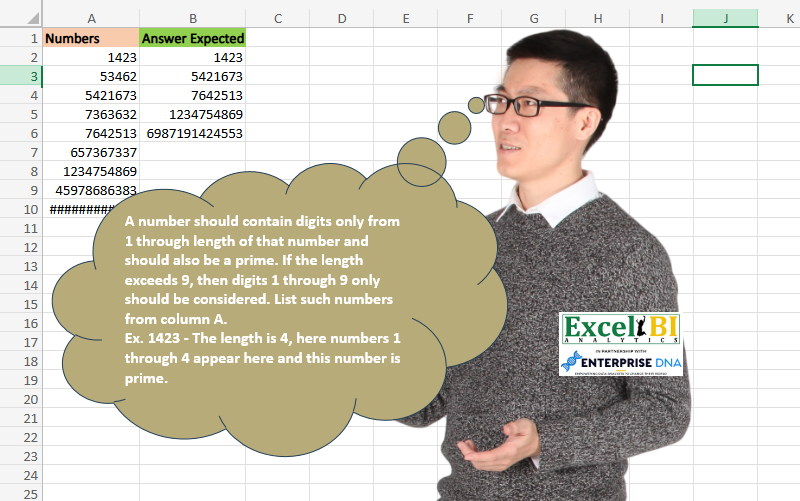
A number should contain digits only from 1 through length of that number and should also be a prime. If the length exceeds 9, then digits 1 through 9 only should be considered. List such numbers from column A. Ex. 1423 – The length is 4, here numbers 1 through 4 appear here and this number is prime. 1234754869 – This number’s length is 10, here all digits from 1 through 9 appear and this number is also prime.
📌 Challenge Details and Links
ExcelBI Excel Challenge Number: 283
Challenge Difficulty: ⭐️⭐️⭐️⭐️
📥Download Sample File
📥Link to the solutions on LinkedIn
Solving the challenge of Prime with Consecutive Digits Only with Power Query
Power Query solution 1 for Prime with Consecutive Digits Only, proposed by Bo Rydobon 🇹🇭:
let
  Source = Excel.CurrentWorkbook(){[Name = "Table1"]}[Content],
  Prime = (n) =>
    List.AllTrue(
      List.Transform(
        {2} & List.Numbers(3, Number.IntegerDivide(Number.Sqrt(n), 2), 2),
        (d) => Number.Mod(n, d) > 0
      )
    ),
  Ans = Table.SelectRows(
    Source,
    each Prime([Numbers])
      and List.AllTrue(
        List.Transform(
          {1 .. List.Min({9, Text.Length(Text.From([Numbers]))})},
          (d) => Text.Contains(Text.From([Numbers]), Text.From(d))
        )
      )
  )
in
  Ans
Power Query solution 2 for Prime with Consecutive Digits Only, proposed by Zoran Milokanović:
let
  Source = Excel.CurrentWorkbook(){[Name = "Input"]}[Content][Numbers],
  IsPrime = (n) =>
    not List.Accumulate(
      {2 .. Number.RoundDown(Number.Sqrt(n))},
      n = 1,
      (s, d) => s or (Number.Mod(n, d) = 0)
    ),
  S = List.Select(
    Source,
    each
      let
        t = Text.ToList(Text.From(_))
      in
        List.AllTrue(
          List.Transform(List.FirstN({"1" .. "9"}, List.Count(t)), each List.Contains(t, _))
        )
          and IsPrime(_)
  )
in
  S
Power Query solution 3 for Prime with Consecutive Digits Only, proposed by Rick de Groot:
let
  Source = Table.FromRows(
    Json.Document(
      Binary.Decompress(
        Binary.FromText(
          "LY3BDcAwDAJ3ybsf2xjsWaLsv0ajuuIDBxJ7L4PHOs9eGaCPgxs1VMGr4SI8bTjzNorQl8wDShT7i8hWsRj1j7tkfZ+QOcTWOS8=",
          BinaryEncoding.Base64
        ),
        Compression.Deflate
      )
    ),
    let
      _t = ((type nullable text) meta [Serialized.Text = true])
    in
      type table [Numbers = _t]
  ),
  IsPrime = Table.AddColumn(
    Source,
    "IsPrime",
    each [
      n        = Number.From([Numbers]),
      root     = Number.RoundDown(Number.Sqrt(n)),
      seq      = {2 .. root},
      divisors = List.Select(seq, each Number.Mod(n, _) = 0),
      result   = List.IsEmpty(divisors) and n <> 1
    ][result]
  ),
  IsValid = Table.AddColumn(
    IsPrime,
    "IsValid",
    each [
      a = Text.Length([Numbers]),
      b = Text.From(List.Min({a, 9})),
      c = List.ContainsAll(Text.ToList([Numbers]), {"1" .. b})
    ][c]
  ),
  SelRows = Table.SelectRows(IsValid, each [IsPrime] = true and [IsValid] = true)[[Numbers]]
in
  SelRows
Power Query solution 4 for Prime with Consecutive Digits Only, proposed by Alejandro Simón 🇵🇦 🇪🇸:
let
  Source = Excel.CurrentWorkbook(){[Name = "Table1"]}[Content],
  Sol = Table.SelectRows(
    Source,
    each
      let
        a = [Numbers],
        b = Text.From(a),
        c = List.Count(List.Distinct(Text.ToList(b))),
        d = {1 .. c} = List.Sort(List.Distinct(List.Transform(Text.ToList(b), Number.From))),
        e = List.Transform({2 .. Number.RoundDown(Number.Sqrt(a))}, each Number.Mod(a, _) <> 0)
      in
        List.AllTrue(e) and d and a <> 1
  )
in
  Sol
Power Query solution 5 for Prime with Consecutive Digits Only, proposed by Luan Rodrigues:
let
  Fonte = Tabela1,
  res = Table.SelectRows(
    Fonte,
    each [
      a = List.Distinct(List.Transform(Text.ToList(Text.From([Numbers])), Number.From)),
      b = {List.Min(a) .. List.Count(a)} = List.Sort(a),
      c = [Numbers],
      d = List.Select({2 .. Number.RoundDown(Number.Sqrt(c))}, each Number.Mod(c, _) = 0){0}? = null,
      e = b = true and d = true
    ][e]
  )
in
  res
Power Query solution 6 for Prime with Consecutive Digits Only, proposed by Brian Julius:
let
  Source = Table.TransformColumnTypes(DataRaw, {"Numbers", Int64.Type}),
  RunRScript = R.Execute(
    "library(primes)#(lf)df <- dataset#(lf)df$IsPrime <- is_prime( df$Numbers )",
    [dataset = Source]
  ),
  FilterRResult = Table.SelectRows(RunRScript{[Name = "df"]}[Value], each [IsPrime] = true),
  AddDistinctTest = Table.AddColumn(
    FilterRResult,
    "DistinctTest",
    each [
      a = Text.From([Numbers]),
      b = Text.Length(a),
      c = Text.ToList(a),
      d = List.Distinct(c),
      e = List.Count(d),
      f = if b <= 9 then (if b = e then true else false) else (if e = 9 then true else false)
    ]
  ),
  RemoveCols = Table.RemoveColumns(AddDistinctTest, {"IsPrime", "DistinctTest"})
in
  RemoveCols
Power Query solution 7 for Prime with Consecutive Digits Only, proposed by Rafael González B.:
let
  Source = Excel.CurrentWorkbook(){0}[Content],
  fx = (Num as number) =>
    let
      a = Num,
      b = Text.From(a),
      c = List.Transform(Text.ToList(b), each Number.From(_)),
      cc = List.Distinct(c),
      d = Text.Length(b),
      e = if d < 10 then {1 .. d} else {1 .. 9},
      f = List.ContainsAll(cc, e),
      Prime =
        let
          m = Table.FromColumns({cc}, {"Divisor"}),
          n = Table.AddColumn(m, "Number", each Number.Mod(a, [Divisor])),
          o = Table.SelectRows(n, each [Number] = 0),
          p = Table.RowCount(o)
        in
          p,
      g = if f and (Prime = 1) then true else false
    in
      g,
  Ch = Table.AddColumn(Source, "Check", each fx([Numbers])),
  Result = Table.SelectRows(Ch, each ([Check] = true))[[Numbers]]
in
  Result
Solving the challenge of Prime with Consecutive Digits Only with Excel
Excel solution 1 for Prime with Consecutive Digits Only, proposed by Bo Rydobon 🇹🇭:
=TOCOL(
    MAP(
        A2:A10,
        LAMBDA(
            a,
            LET(
                x,
                a/SEQUENCE(
                    a^0.5/6,
                    ,
                    5,
                    6
                ),
                a/AND(
                    a/{2,
                    3}>INT(
                        a/{2,
                        3}
                    ),
                    INT(
                        x
                    )
Excel solution 2 for Prime with Consecutive Digits Only, proposed by John V.:
=TOCOL(MAP(A2:A10,
    LAMBDA(x,
    LET(b,
    SEQUENCE(
        x^0.5/3,
        3
    ),
    x/(SUM(
        N(
            x-b*INT(
                x/b
            )=0
        )
    )=1)/AND(
        FIND(
            SEQUENCE(
                MIN(
                    9,
                    LEN(
                        x
                    )
                )
            ),
            x
        )
    )))),
    2)
Excel solution 3 for Prime with Consecutive Digits Only, proposed by محمد حلمي:
=TOCOL(MAP(A2:A9,LAMBDA(a,LET(
x,a/SEQUENCE(a^0.25,,2),
a/AND(FIND(
SEQUENCE(MIN(9,LEN(a))),a),
INT(x)<>(x))))),2)
Excel solution 4 for Prime with Consecutive Digits Only, proposed by Timothée BLIOT:
=TOCOL(A2:A10/MAP(A2:A10,
    LAMBDA(z,
    LET(A,
    MID(
        z,
        SEQUENCE(
            LEN(
                z
            )
        ),
        1
    ),
    PRODUCT(--(SORT(
        UNIQUE(
            --A
        )
    )=SEQUENCE(
        MIN(
            9,
            LEN(
                z
            )
        )
    )))*REGEXTEST(
        z,
        ".?|(..+?)\1+"
    )))),
    3)
Excel solution 5 for Prime with Consecutive Digits Only, proposed by Sunny Baggu:
=TOCOL(
 A2:A10 * 1 /
 MAP(
 A2:A10,

 LAMBDA(x,

 AND(
 OR(BYCOL((x + {1,
     -1}) / 6,
     LAMBDA(
         a,
          INT(
              a
          ) = a
     ))),

 LET(

      _num,
      UNIQUE(
          SORT(
              MID(
                  x,
                   SEQUENCE(
                       LEN(
                           x
                       )
                   ),
                   1
              ) + 0
          )
      ),

      AND(
          _num = SEQUENCE(
              ROWS(
                  _num
              )
          )
      )

 )
 )
 )
 ),

 3
)
Excel solution 6 for Prime with Consecutive Digits Only, proposed by Pieter de Bruijn:
=LET(a,
    A2:A10,
    b,
    LEN(
        a
    ),
    s,
    ROW(
        1:9
    ),
    FILTER(a,
    MMULT(ISNUMBER(
        FIND(
            TOROW(
                s
            ),
            a
        )
    )*(TOROW(
                s
            )<=b),
    SEQUENCE(
        ROWS(
        a
    ),
        ,
        ,
        0
    ))=IF(
        b>9,
        9,
        b
    )))
Excel solution 7 for Prime with Consecutive Digits Only, proposed by Giorgi Goderdzishvili:
=TOCOL(MAP(A2:A10,
    LAMBDA(x,
    LET(
nm,
    x,

sq,
     SEQUENCE(
         ,
         MIN(
             LEN(
                 nm
             ),
             9
         )
     ),

fr,
     (nm-1)/6,

sc,
     (nm+1)/6,

chck_1,
     (fr=INT(
         fr
     ))+(sc=INT(
         sc
     )),

chck_2,
    (SUM(--((LEN(
                 nm
             )-LEN(
        SUBSTITUTE(
            nm,
            sq,
            ""
        )
    ))=0)))=0,

nm/chck_2))),
    3)
Solving the challenge of Prime with Consecutive Digits Only with Python in Excel
Python in Excel solution 1 for Prime with Consecutive Digits Only, proposed by Bo Rydobon 🇹🇭:
def Prime(n):
 if n%2==0: return False
 for d in set(range(3,int(n**0.5),2)):
 if n%d==0:return False
 return True

[n for n in xl("A2:A10")[0] if Prime(n) and all(map(lambda x: str(x) in str(n),range(1,min(10,len(str(n))+1))))]
Python in Excel solution 2 for Prime with Consecutive Digits Only, proposed by John V.:
Hi everyone!
r = []
for x in xl("A2:A10")[0]:
 p = [x % i for i in range(2, int(x**0.5)) if x % i == 0]
 c = str(x)
 d = all([str(i) in c for i in range(1, 1 + min(9, len(c)))])
 if len(p) == 0 and d: r.append(x)
r
Another one:
Blessings!
Solving the challenge of Prime with Consecutive Digits Only with R
R solution 1 for Prime with Consecutive Digits Only, proposed by Konrad Gryczan, PhD:
library(tidyverse)
library(readxl)
input = read_excel("Pandigital Primes.xlsx") %>% select(Numbers)
test = read_excel("Pandigital Primes.xlsx") %>% select(2) %>% drop_na()
is_prime <- function(n) {
 if (n <= 1) return(FALSE)
 if (n <= 3) return(TRUE)
 if (n %% 2 == 0 || n %% 3 == 0) return(FALSE)
 i <- 5
 while (i * i <= n) {
 if (n %% i == 0 || n %% (i + 2) == 0) return(FALSE)
 i <- i + 6
 }
 return(TRUE)
}
is_pandigital <- function(num) {
 digits <- strsplit(as.character(num), split = "")[[1]]
 n <- length(digits)
 if (n >= 10) {
 required_digits <- as.character(1:9)
 } else {
 required_digits <- as.character(1:n)
 }

 all(required_digits %in% digits)
}
result = input %>%
 mutate(is_pandigital= map_lgl(Numbers, is_pandigital),
 is_prime = map_lgl(Numbers, is_prime),
 both = is_prime & is_pandigital)
answer = result$Numbers[result$both == TRUE]

test_df = data.frame(Answer.Expected = test, my_answer = answer) %>%
 mutate(check = Answer.Expected == my_answer)
&&&