
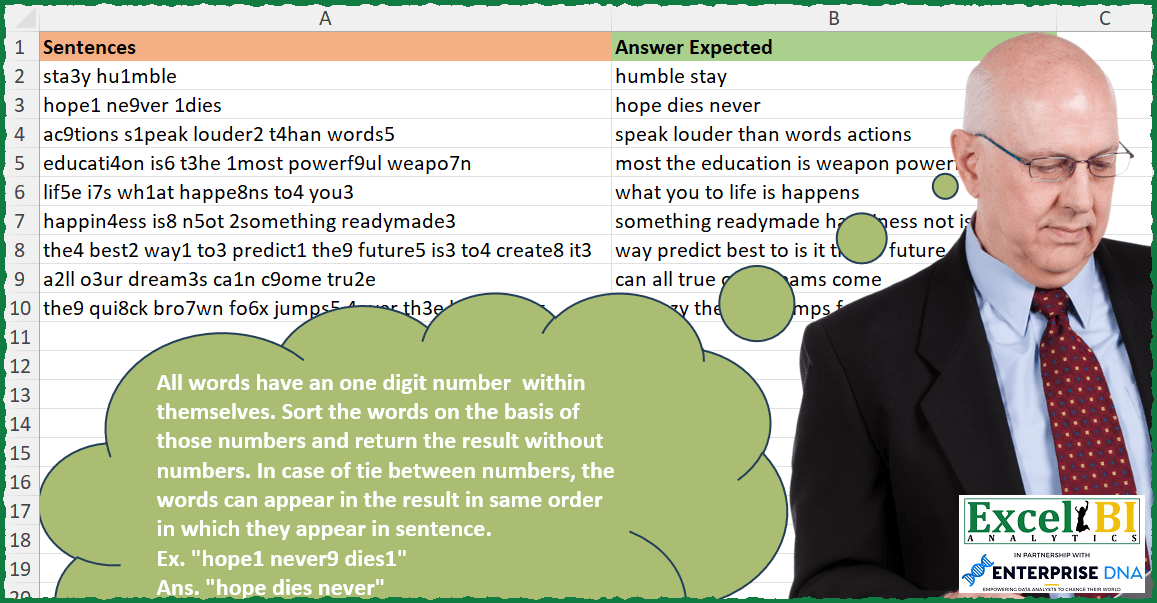
All words have an one digit number within themselves. Sort the words on the basis of those numbers and return the result without numbers. In case of tie between numbers, the words can appear in the result in same order in which they appear in sentence. Ex. “hope1 never9 dies1” Ans. “hope dies never”
📌 Challenge Details and Links
ExcelBI Excel Challenge Number: 277
Challenge Difficulty: ⭐️
📥Download Sample File
📥Link to the solutions on LinkedIn
Solving the challenge of Sort Words By Embedded Numbers with Power Query
Power Query solution 1 for Sort Words By Embedded Numbers, proposed by Bo Rydobon 🇹🇭:
let
  Source = Excel.CurrentWorkbook(){[Name = "Table1"]}[Content],
  Ans = Table.AddColumn(
    Source,
    "Custom",
    each Text.Select(
      Text.Combine(List.Sort(Text.Split([Sentences], " "), each Text.Select(_, {"1" .. "9"})), " "),
      {" ", "a" .. "z"}
    )
  )
in
  Ans
Power Query solution 2 for Sort Words By Embedded Numbers, proposed by Zoran Milokanović:
let
  Source = Excel.CurrentWorkbook(){[Name = "Input"]}[Content],
  S = Table.TransformRows(
    Source,
    each
      let
        w = Text.Split([Sentences], " "),
        n = {"0" .. "9"}
      in
        Text.Remove(
          Text.Combine(List.Sort(w, {{each Text.Select(_, n)}, {each List.PositionOf(w, _)}}), " "),
          n
        )
  )
in
  S
Power Query solution 3 for Sort Words By Embedded Numbers, proposed by Rick de Groot:
let
  Source = Excel.CurrentWorkbook(){[Name = "Table1"]}[Content],
  List = Table.AddColumn(Source, "Custom", each Text.Split([Sentences], " "), type list),
  Exp = Table.ExpandListColumn(List, "Custom"),
  Num = Table.AddColumn(Exp, "SelectNumbers", each Text.Select([Custom], {"0" .. "9"})),
  Sort = Table.Buffer(Table.Sort(Num, {{"Sentences", 0}, {"SelectNumbers", 0}})),
  Grp = Table.Group(
    Sort,
    {"Sentences"},
    {{"Combine", each Text.Select(Text.Combine([Custom], " "), {"a" .. "z", " "}), type text}}
  ),
  Custom1 = Grp[[Combine]]
in
  Custom1
Power Query solution 4 for Sort Words By Embedded Numbers, proposed by Aditya Kumar Darak 🇮🇳:
let
  Source = Excel.CurrentWorkbook(){[Name = "data"]}[Content],
  Return = Table.AddColumn(
    Source,
    "Answer",
    each [
      S = Text.Split([Sentences], " "),
      O = List.Sort(S, {{(f) => Text.Select(f, {"1" .. "9"})}, {(f) => List.PositionOf(S, f)}}),
      C = Text.Combine(O, " "),
      R = Text.Remove(C, {"1" .. "9"})
    ][R]
  )
in
  Return
Power Query solution 5 for Sort Words By Embedded Numbers, proposed by Alejandro Simón 🇵🇦 🇪🇸:
let
  Source = Excel.CurrentWorkbook(){[Name = "Table1"]}[Content],
  Sol = Table.TransformColumns(
    Source,
    {
      "Sentences",
      each
        let
          a = Text.Split(_, " "),
          b = List.Transform(
            a,
            each {Text.Select(_, {"1" .. "9"})} & {Text.Select(_, {"a" .. "z"})}
          ),
          c = Text.Combine(
            List.Transform(List.Sort(b, {{each _{0}}, {each _{1}, 1}}), each _{1}),
            " "
          )
        in
          c
    }
  )
in
  Sol
Power Query solution 6 for Sort Words By Embedded Numbers, proposed by Luan Rodrigues:
let
  Fonte = Tabela1,
  res = Table.AddColumn(
    Fonte,
    "Personalizar",
    each Text.Combine(
      List.Transform(
        List.Sort(
          Text.Split([Sentences], " "),
          {{each Text.Select(_, {"0" .. "9"}), 0}, {each Text.Select(_, {"a" .. "z"}), 1}}
        ),
        each Text.Select(_, {"a" .. "z"})
      ),
      " "
    )
  )
in
  res
Power Query solution 7 for Sort Words By Embedded Numbers, proposed by Szabolcs Phraner:
let

//Split text string into a list of words
Words = Text.Split([Sentences]," "),
//List of numeric characters in text format
Numbers = {"0".."9"},
Create a nested list of words cleaned from numbers and the numeric character in a separate list
Separate = List.Transform(Words, each {
Text.Remove(_,Numbers),
Number.From( Text.Select(_,Numbers) )
}
),
//Create table from nested list, one column for words and another one for numbers
Table = Table.FromRows(Separate,{"Word", "Number"}),
//Sort table based on the numbers
SortColumn = Table.Sort(Table,{"Number"})

// Combine reordered list of words into one text string
in Text.Combine(SortColumn[Word]," ")
,type text
)
Power Query solution 8 for Sort Words By Embedded Numbers, proposed by Kalyan Kumar Reddy Kethireddy:
let
  Source = Table.FromRows(
    Json.Document(
      Binary.Decompress(Binary.FromText(#"Order Words", BinaryEncoding.Base64), Compression.Deflate)
    ),
    let
      _t = ((type nullable text) meta [Serialized.Text = true])
    in
      type table [Sentences = _t]
  ),
  #"Changed Type" = Table.TransformColumnTypes(Source, {{"Sentences", type text}}),
  Expected = Table.AddColumn(
    #"Changed Type",
    "Expected Answer",
    each [
      a = Text.Split([Sentences], " "),
      b = List.Transform(a, each Text.Select(_, {"1" .. "9"}) & Text.Select(_, {"a" .. "z"})),
      c = List.Sort(b, each Text.Start(_, 1)),
      d = List.Transform(c, each Text.Select(_, {"a" .. "z"})),
      e = Text.Combine(d, " ")
    ][e]
  )
in
  Expected
Power Query solution 9 for Sort Words By Embedded Numbers, proposed by Ian Segard:
let
 Source = Excel.CurrentWorkbook(){[Name="Table4"]}[Content],
 #"Changed Type" = Table.TransformColumnTypes(Source,{{"Sentences", type text}}),
 #"Inserted Kept Characters" = Table.AddColumn(#"Changed Type", "Kept Characters", each Text.Select([Sentences], {" ", "0".."9"}), type text),
 #"Added Custom" = Table.AddColumn(#"Inserted Kept Characters", "Custom", each Text.Select([Sentences], {" ", "a".."z"}), type text),
 #"Removed Columns" = Table.RemoveColumns(#"Added Custom",{"Sentences"}),
 #"Split Column by Delimiter1" = Table.TransformColumns(#"Removed Columns", {{"Kept Characters", Splitter.SplitTextByDelimiter(" ", QuoteStyle.Csv), let itemType = (type nullable text) meta [Serialized.Text = true] in type {itemType}}}),
 #"Split Column by Delimiter2" = Table.TransformColumns(#"Split Column by Delimiter1", {{"Custom", Splitter.SplitTextByDelimiter(" ", QuoteStyle.Csv), let itemType = (type nullable text) meta [Serialized.Text = true] in type {itemType}}}),
Solving the challenge of Sort Words By Embedded Numbers with Excel
Excel solution 1 for Sort Words By Embedded Numbers, proposed by Bo Rydobon 🇹🇭:
=MAP(
    A2:A10,
    LAMBDA(
        s,
        CONCAT(
            TEXTSPLIT(
                TEXTJOIN(
                    " ",
                    ,
                    SORTBY(
                        TEXTSPLIT(
                            s,
                            ,
                            " "
                        ),
                        TEXTSPLIT(
                            s,
                            CHAR(
                                SEQUENCE(
                                    26,
                                    ,
                                    97
                                )
                            ),
                            " ",
                            1
                        )
                    )
                ),
                SEQUENCE(
                    10,
                    ,
                    0
                )
            )
        )
    )
)
Excel solution 2 for Sort Words By Embedded Numbers, proposed by Rick Rothstein:
=MAP(
    A2:A10,
    LAMBDA(
        x,
        LET(
            f,
            LAMBDA(
                z,
                TEXTSPLIT(
                    CONCAT(
                        TEXTSPLIT(
                            x,
                            z
                        )
                    ),
                    " "
                )
            ),
            s,
            f(
                SEQUENCE(
                    10,
                    ,
                    0
                )
            ),
            TEXTJOIN(
                " ",
                ,
                SORTBY(
                    s,
                    f(
                        CHAR(
                            SEQUENCE(
                                26,
                                ,
                                97
                            )
                        )
                    )
                )
            )
        )
    )
)
Excel solution 3 for Sort Words By Embedded Numbers, proposed by John V.:
=MAP(
    A2:A10,
    LAMBDA(
        x,
        LET(
            c,
            MID(
                x,
                ROW(
                    1:99
                ),
                1
            ),
            TEXTJOIN(
                " ",
                ,
                SORTBY(
                    TEXTSPLIT(
                        CONCAT(
                            REPT(
                                c,
                                ISERR(
                                    -c
                                )
                            )
                        ),
                        ,
                        " "
                    ),
                    TOCOL(
                        --c,
                        2
                    )
                )
            )
        )
    )
)
Excel solution 4 for Sort Words By Embedded Numbers, proposed by محمد حلمي:
=MAP(
    A2:A10,
    LAMBDA(
        a,
        TEXTJOIN(
            " ",
            ,
            SORTBY(

                TEXTSPLIT(
                    CONCAT(
                        TEXTSPLIT(
                            a,
                            ROW(
                                1:10
                            )-1
                        )
                    ),
                    ,
                    " "
                ),

                TEXTSPLIT(
                    a,
                    CHAR(
                        ROW(
                            97:122
                        )
                    ),
                    " ",
                    1
                )
            )
        )
    )
)
Excel solution 5 for Sort Words By Embedded Numbers, proposed by Kris Jaganah:
=MAP(
    A2:A10,
    LAMBDA(
        x,
        LET(
            a,
            TEXTSPLIT(
                x,
                ,
                " "
            ),
            b,
            MAP(
                a,
                LAMBDA(
                    x,
                    TOCOL(
                        FIND(
                            SEQUENCE(
                                10,
                                ,
                                0
                            ),
                            x
                        ),
                        3
                    )
                )
            ),
            TEXTJOIN(
                " ",
                1,
                SORTBY(
                    REPLACE(
                        a,
                        b,
                        1,
                        ""
                    ),
                    MID(
                        a,
                        b,
                        1
                    )
                )
            )
        )
    )
)
Excel solution 6 for Sort Words By Embedded Numbers, proposed by Timothée BLIOT:
=MAP(
    A2:A10,
    LAMBDA(
        z,
        LET(
            A,
            TEXTSPLIT(
                z,
                " "
            ),
            B,
            SEQUENCE(
                10,
                ,
                0
            ),
             TEXTJOIN(
                 " ",
                 ,
                 REDUCE(
                     SORTBY(
                         A,
                         MAP(
                             A,
                             LAMBDA(
                                 x,
                                 FILTER(
                                     B,
                                     ISNUMBER(
                                          FIND(
                                              B,
                                              x
                                          )
                                     )
                                 )
                             )
                         )
                     ),
                     B,
                     LAMBDA(
                         x,
                         y,
                         SUBSTITUTE(
                             x,
                             y,
                             ""
                         )
                     )
                 )
             )
        )
    )
)
Excel solution 7 for Sort Words By Embedded Numbers, proposed by Hussein SATOUR:
=MAP(A2:A10, LAMBDA(x, LET(
a, TEXTSPLIT(x,, " "),
b, MAP(a, LAMBDA(y, LET(c, --MID(y, SEQUENCE(LEN(y)), 1), FILTER(c, NOT(ISERR(--c)))))),
d, b*100 + SEQUENCE(COUNTA(a)),
TEXTJOIN(" ",, SORTBY(SUBSTITUTE(a,b, ""), d)))))
Excel solution 8 for Sort Words By Embedded Numbers, proposed by Oscar Mendez Roca Farell:
=MAP(
    A2:A10,
     LAMBDA(
         a,
          LET(
              _w,
               TEXTSPLIT(
                   a,
                    ,
                   " "
               ),
              _n,
               TOCOL(
                   --MID(
                       _w,
                        TOROW(
                            ROW(
                                1:20
                            )
                        ),
                        1
                   ),
                    2
               ),
               TEXTJOIN(
                   " ",
                    ,
                    SORTBY(
                        SUBSTITUTE(
                            _w,
                             _n,
                             ""
                        ),
                         _n
                    )
               )
          )
     )
)
Excel solution 9 for Sort Words By Embedded Numbers, proposed by Duy Tùng:
=MAP(
    A2:A10,
    LAMBDA(
        v,
        LET(
            a,
            REGEXREPLACE(
                TEXTSPLIT(
                    v,
                    ,
                    " "
                ),
                {"[+d]",
                "[+D]"},

            ),
            TEXTJOIN(
                " ",
                ,
                SORTBY(
                    TAKE(
                        a,
                        ,
                        1
                    ),
                    DROP(
                        a,
                        ,
                        1
                    )
                )
            )
        )
    )
)
Excel soluti&on 10 for Sort Words By Embedded Numbers, proposed by Sunny Baggu:
=MAP(

     A2:A10,

     LAMBDA(
         x,

          LET(

               _t,
               TEXTSPLIT(

                    REDUCE(
                        x,
                         SEQUENCE(
                             10
                         ) - 1,
                         LAMBDA(
                             a,
                              v,
                              SUBSTITUTE(
                                  a,
                                   v,
                                   ""
                              )
                         )
                    ),

                    ,

                    " "

               ),

               _n,
               TEXTSPLIT(

                    REDUCE(
                        x,
                         CHAR(
                             SEQUENCE(
                                 26,
                                  ,
                                  97
                             )
                         ),
                         LAMBDA(
                             a,
                              v,
                              SUBSTITUTE(
                                  a,
                                   v,
                                   ""
                              )
                         )
                    ),

                    ,

                    " "

               ),

               TEXTJOIN(
                   " ",
                    ,
                    SORTBY(
                        _t,
                         _n
                    )
               )

          )

     )

)
Excel solution 11 for Sort Words By Embedded Numbers, proposed by LEONARD OCHEA 🇷🇴:
=MAP(A2:A10,LAMBDA(z,LET(m,SEQUENCE(10,,0),n,CHAR(SEQUENCE(26,,97)),F,LAMBDA(x,TEXTSPLIT(REDUCE(z,x,LAMBDA(a,b,SUBSTITUTE(a,b,"")))," ")),TEXTJOIN(" ",,SORTBY(F(m),F(n))))))Excel solution 12 for Sort Words By Embedded Numbers, proposed by Abdallah Ally:
=MAP(A2:A10,LAMBDA(x,LET(a,MID(x,SEQUENCE(LEN(x)),1),b,TEXTSPLIT(CONCAT(IF(ISERR(-a),a,""))," "),c,TEXTSPLIT(TEXTJOIN(" ",TRUE,IFERROR(--a,""))," "),TEXTJOIN(" ",TRUE,SORTBY(b,c)))))Excel solution 13 for Sort Words By Embedded Numbers, proposed by Abdallah Ally:
=MAP(
    A2:A10,
    LAMBDA(
        s,
        LET(
            a,
            CONCAT(
                IFERROR(
                    --MID(
                        s,
                        SEQUENCE(
                            LEN(
                                s
                            )
                        ),
                        1
                    ),
                    ""
                )
            ),
            b,
            MID(
                a,
                SEQUENCE(
                    LEN(
                        a
                    )
                ),
                1
            ),
            c,
            TOCOL(
                TEXTSPLIT(
                    s,
                    " "
                )
            ),
            d,
            SORTBY(
                c,
                b
            ),
            TEXTJOIN(
                " ",
                TRUE,
                MAP(
                    d,
                    LAMBDA(
                        x,
                        REDUCE(
                            "",
                            MID(
                                x,
                                SEQUENCE(
                                    LEN(
                                        x
                                    )
                                ),
                                1
                            ),
                            LAMBDA(
                                u,
                                v,
                                IF(
                                    ISERROR(
                                        --v
                                    ),
                                    u&v,
                                    u
                                )
                            )
                        )
                    )
                )
            )
        )
    )
)
Excel solution 14 for Sort Words By Embedded Numbers, proposed by 🇵🇪 Ned Navarrete C.:
=MAP(
A2:A10,
LAMBDA(str, LET(
 ci, TEXTSPLIT(str," "),
 co, MAP( ci, LAMBDA(_f, LET( x,  MID(_f,SEQUENCE(LEN(_f)),1), TOCOL(x*(x/x),3) ))),
 cf, SUBSTITUTE(ci,co,""),
 TEXTJOIN(" ",1;SORTBY(cf,co))
 )
 )
)
Excel solution 15 for Sort Words By Embedded Numbers, proposed by Asheesh Pahwa:
=LET(
    a,
    A2:A5,
    MAP(
        a,
        LAMBDA(
            x,

            LET(
                m,
                MID(
                    x,
                    SEQUENCE(
                        LEN(
                            x
                        )
                    ),
                    1
                ),
                 i,
                ISNUMBER(
                    --m
                ),
                f,
                FILTER(
                    m,
                    i
                ),

                r,
                REDUCE(
                    x,
                    f,
                    LAMBDA,
                    v,

                    SUBSTITUTE(
                        a,
                        v,
                        ""
                    )
                )
            ),
            t,
            TEXTSPLIT(
                r,
                ,
                " "
            ),

            TEXTJOIN(
                " ",
                ,
                SORTBY(
                    t,
                    f,
                    1
                )
            )
        )
    )
))
Excel solution 16 for Sort Words By Embedded Numbers, proposed by Charles Roldan:
=LET(
    _map,
     LAMBDA(
         f,
          LAMBDA(
              x,
               MAP(
                   x,
                    f
               )
          )
     ),

    g,
     _map(
         LAMBDA(
             x,
              XMATCH(
                  TRUE,
                   ISNUMBER(
                       FIND(
                           SEQUENCE(
                               9
                           ),
                            x
                       )
                   )
              )
         )
     ),

    h,
     LAMBDA(
         b,
          TEXTJOIN(
              " ",
               ,
               SORTBY(
                   SUBSTITUTE(
                       b,
                        g(
                            b
                        ),

                   ),
                    g(
                            b
                        )
               )
          )
     ),

    _map(
        LAMBDA(
            a,
             h(
                 TEXTSPLIT(
                     a,
                      ,
                      " "
                 )
             )
        )
    )

)(A2:A10)
Excel solution 17 for Sort Words By Embedded Numbers, proposed by Pieter de Bruijn:
=LET(
    b,
    LOWER(
        BASE(
            ROW(
                1:36
            )-1,
            36
        )
    ),
    MAP(
        A2:A10,
        LAMBDA(
            a,
            TEXTJOIN(
                " ",
                ,
                TAKE(
                    SORT(
                        HSTACK(
                            TEXTSPLIT(
                                CONCAT(
                                    TEXTSPLIT(
                                        a,
                                        TAKE(
                                            b,
                                            10
                                        )
                                    )
                                ),
                                ,
                                " "
                            ),
                            --TEXTSPLIT(
                                CONCAT(
                                    TEXTSPLIT(
                                        a,
                                        DROP(
                                            b,
                                            10
                                        )
                                    )
                                ),
                                ,
                                " "
                            )
                        ),
                        2
                    ),
                    ,
                    1
                )
            )
        )
    )
)
Excel solution 18 for Sort Words By Embedded Numbers, proposed by Pieter de Bruijn:
=LET(b,LOWER(BASE(ROW(1:36)-1,36)),MAP(A2:A10,LAMBDA(a,TEXTJOIN(" ",,SORTBY(TEXTSPLIT(CONCAT(TEXTSPLIT(a,TAKE(b,10)))," "),TEXTSPLIT(CONCAT(TEXTSPLIT(a,DROP(b,10)))," "))))))

inspired by محمد حلمي's TEXTSPLIT(CONCAT(TEXTSPLIT solution.
Original answer was:
=LET(b,LOWER(BASE(ROW(1:36)-1,36)),MAP(A2:A10,LAMBDA(a,LET(t,CONCAT(TEXTSPLIT(a,TAKE(b,10))),n,CONCAT(TEXTSPLIT(a,DROP(b,10))),TEXTJOIN(" ",,SORTBY(TEXTSPLIT(t," "),TEXTSPLIT(n," ")))))))
Excel solution 19 for Sort Words By Embedded Numbers, proposed by Ziad A.:
=MAP(A2:A10,LAMBDA(a,LET(R,LAMBDA(e,REGEXREPLACE(TOCOL(SPLIT(a," ")),e,)),JOIN(" ",SORT(R("d"),--R("D"),1)))))Excel solution 20 for Sort Words By Embedded Numbers, proposed by Giorgi Goderdzishvili:
=MAP(
    A2:A10,
    LAMBDA(
        a,
        LET(

            snt,
            a,

            spl,
            TEXTSPLIT(
                snt,
                " "
            ),

            mp,
             MAP(
                 spl,
                 LAMBDA(
                     x,

                     --CONCAT(
                         TOCOL(
                             --MID(
                                 x,
                                 SEQUENCE(
                                     ,
                                     LEN(
                                         x
                                     )
                                 ),
                                 1
                             ),
                             3
                         )
                     )
                 )
             ),

            chr,
             SEQUENCE(
                 ,
                 10,
                 0
             ),

            rp,
             REDUCE(
                 snt,
                 chr,
                 LAMBDA(
                     x,
                     y,
                     SUBSTITUTE(
                         x,
                         y,
                         ""
                     )
                 )
             ),

            spl_2,
             TEXTSPLIT(
                 rp,
                 " "
             ),

            srt,
             SORTBY(
                 spl_2,
                 mp,
                 1
             ),

            TEXTJOIN(
                " ",
                TRUE,
                srt
            )
        )
    )
)
Excel solution 21 for Sort Words By Embedded Numbers, proposed by Daniel Garzia:
=REDUCE(
    MAP(
        A2:A10,
        LAMBDA(
            x,
            TEXTJOIN(
                " ",
                ,
                SORTBY(
                    TEXTSPLIT(
                        x,
                        ,
                        " "
                    ),
                    TEXTSPLIT(
                        x,
                        ,
                        TEXTSPLIT(
                            x,
                            ,
                            ROW(
                                1:9
                            ),
                            1
                        ),
                        1
                    )
                )
            )
        )
    ),
    ROW(
                                1:9
                            ),
    LAMBDA(
        a,
        b,
        SUBSTITUTE(
            a,
            b,

        )
    )
)
Excel solution 22 for Sort Words By Embedded Numbers, proposed by samir tobeil:
=MAP(
    A2:A10,
    LAMBDA(
        x,
        LET(
            s,
            MID(
                x,
                SEQUENCE(
                    99
                ),
                1
            ),

            TEXTJOIN(
                " ",
                ,
                SORTBY(
                    TEXTSPLIT(
                        CONCAT(
                            IF(
                                ISNUMBER(
                                    s+0
                                ),
                                "",
                                s
                            )
                        ),
                        ,
                        " "
                    ),
                    TOCOL(
                        N(
                                    s+0
                                ),
                        3
                    ),
                    1
                )
            )
        )
    )
)
Excel solution 23 for Sort Words By Embedded Numbers, proposed by Md Ismail Hosen:
=LET(
    fxOne,
     LAMBDA(
         Sentence,
          LET(
              Words,
               TEXTSPLIT(
                   Sentence,
                    " "
               ),
               WordsOnly,
               MAP(
                   Words,
                    KeepOnlyAlphabets
               ),
               DigitsOnly,
               MAP(
                   Words,
                    KeepOnlyDigits
               ),
               Result,
               TEXTJOIN(
                   " ",
                    FALSE(),
                    SORTBY(
                        WordsOnly,
                         DigitsOnly,
                         1,
                         SEQUENCE(
                             1,
                              COLUMNS(
                                  Words
                              )
                         ),
                         1
                    )
               ),
               Result
          )
     ),
     MAP(
         A2:A10,
          fxOne
     )
)
Excel solution 24 for Sort Words By Embedded Numbers, proposed by Mungunbayar Bat-Ochir:
=MAP(
    A2:A10;
    LAMBDA(
        input;
        LET(

             arr;
            TEXTSPLIT(
                input;
                " "
            );

             nums;
            TOROW(
                VALUE(
                    MID(
                        arr;
                        SEQUENCE(
                            MAX(
                                LEN(
                                    arr
                                )
                            )
                        );
                        1
                    )
                );
                2;
                TRUE
            );

             TEXTJOIN(
                 " ";
                 ;
                 SORTBY(
                     SUBSTITUTE(
                         arr;
                         TEXT(
                             nums;
                             "0"
                         );
                         ""
                     );
                     nums
                 )
             )

        )
    )
)
Excel solution 25 for Sort Words By Embedded Numbers, proposed by Hazem Hassan:
=LET(
    r,
    DROP(
        SORT(
            CHAR(
                SEQUENCE(
                    75,
                    ,
                    48
                )
            )
        ),
        13
    ),

    MAP(
        A2:A10,
        LAMBDA(
            x,
            CONCAT(
                TEXTSPLIT(
                    CONCAT(
                        SORTBY(
          &                  TEXTSPLIT(
                                x,
                                ,
                                " ",
                                1
                            ),
                            TEXTSPLIT(
                                x,
                                DROP(
                                    r,
                                    10
                                ),
                                " ",
                                1
                            ),
                            1
                        )&" "
                    ),
                    ,
                    TAKE(
                                    r,
                                    10
                                ),
                    1
                )
            )
        )
    )
)
Excel solution 26 for Sort Words By Embedded Numbers, proposed by Kriddakorn Pongthanisorn:
=BYROW(
    A2:A10,
    LAMBDA(
        set,
        LET(
            _sent,
            set,
            _ext_n,
             ARRAYFORMULA(
                 REGEXEXTRACT(
                     TRANSPOSE(
                         SPLIT(
                             _sent,
                             " ",
                             1
                         )
                     ),
                     "[0-9]"
                 )
             ),
            _ext_o,
            SEQUENCE(
                ROWS(
                    _ext_n
                ),
                1,
                1,
                1
            ),
            _ext_t,
            ARRAYFORMULA(
                REGEXREPLACE(
                    TRANSPOSE(
                        SPLIT(
                            _sent,
                            " ",
                            1
                        )
                    ),
                    "[0-9]",
                    ""
                )
            ),

            _table,
            SORTN(
                HSTACK(
                    _ext_n,
                    _ext_o,
                    ARRAYFORMULA(
                        LOWER(
                            _ext_t
                        )
                    )
                ),
                ROWS(
                    _ext_n
                ),
                ,
                1,
                1,
                2,
                1
            ),
            _output,
            TEXTJOIN(
                " ",
                1,
                CHOOSECOLS(
                    _table,
                    3
                )
            ),
            _output
        )
    )
)
Excel solution 27 for Sort Words By Embedded Numbers, proposed by Jeff Blakley:
=MAP(
    A2:A10,
     LAMBDA(
         x,

          LET(
              words,
               TEXTSPLIT(
                   x,
                    " "
               ),

               num,
               MAP(
                   words,
                    LAMBDA(
                        y,
                         CONCAT(
                             TEXT(
                                 MID(
                                     y,
                                      SEQUENCE(
                                          LEN(
                                              y
                                          )
                                      ),
                                      1
                                 ),
                                  "0;;;"
                             )
                         )
                    )
               ),

               txt,
               MAP(
                   words,
                    LAMBDA(
                        y,
                         CONCAT(
                             TEXT(
                                 MID(
                                     y,
                                      SEQUENCE(
                                          LEN(
                                              y
                                          )
                                      ),
                                      1
                                 ),
                                  ";;;@"
                             )
                         )
                    )
               ),

               TEXTJOIN(
                   " ",
                   ,
                   SORTBY(
                       txt,
                        num
                   )
               )
          )
     )
)
Solving the challenge of Sort Words By Embedded Numbers with Python
Python solution 1 for Sort Words By Embedded Numbers, proposed by Anshu Bantra:
import re
def func1(sentences):
 new_lst = []
 for sentence in sentences:
 nums = re.findall(r'[0-9]', sentence)
 wrds = ''.join(re.findall(r'[a-zA-zs]{1,}',sentence)).split()
 pos = [str(_) for _, x in enumerate(wrds)]
 new_lst.append(' '.join([x for _, a, x in sorted(zip(nums, pos, wrds))]))
 return new_lst
func1(sentences.Sentences)
Python solution 2 for Sort Words By Embedded Numbers, proposed by Vijay Tumbur:
def removeNums(a):
 list1 = [(sum([int(j) for j in list(k) if j.isnumeric() == True]),"".join([i for i in list(k) if i.isnumeric() == False])) for k in a.split(" ")]
 list1.sort(key=lambda x:x[0])
 return " ".join([i[1] for i in list1])
print(list(map(removeNums,data.Sentences)))
Solving the challenge of Sort Words By Embedded Numbers with Python in Excel
Python in Excel solution 1 for Sort Words By Embedded Numbers, proposed by Bo Rydobon 🇹🇭:
Python
import re
[re.sub('d','',' '.join(sorted([a for a in s.split()], key=lambda x:re.sub('[a-z]','',x)))) for s in xl("A2:A10")[0].values]
Python in Excel solution 2 for Sort Words By Embedded Numbers, proposed by Diarmuid Early:
import regex as re
[" ".join([t[-1] for t in
 sorted(zip(
 range(len(input.split())), # 0 to n-1 for original sort order
 for input in xl("A4:A12")[0]]
In other words:
3. " ".join to combine
I'm saving all my Python solutions to these challenges here if anyone wants to explore:
bit.ly/PythonLearningFolder
Solving the challenge of Sort Words By Embedded Numbers with R
R solution 1 for Sort Words By Embedded Numbers, proposed by Konrad Gryczan, PhD:
library(tidyverse)
library(readxl)
result = input %>%
 numbers = map(words, ~ as.numeric(str_extract(.x, "\d+"))),
 sorted_sentence = map_chr(sorted_words, ~ paste(.x, collapse = " "))) %>%
 select(Sentences,`Answer Expected`,sorted_sentence) %>%
 mutate(is_answer_correct = `Answer Expected` == sorted_sentence)
print(result)
&