
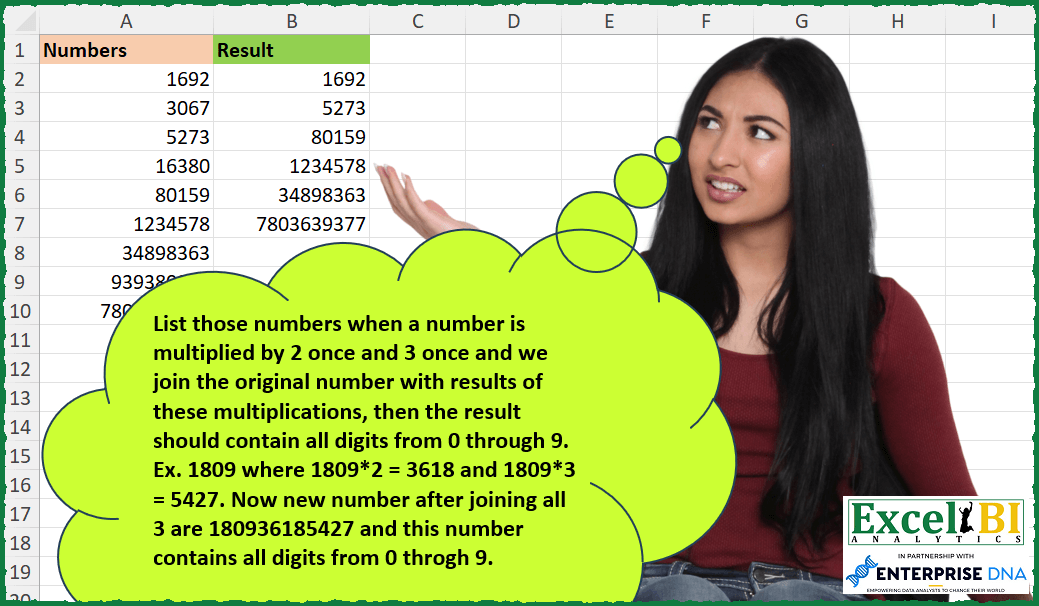
List those numbers when a number is multiplied by 2 once and 3 once and we join the original number with results of these multiplications, then the result should contain all digits from 0 through 9. Ex. 1809 where 1809*2 = 3618 and 1809*3 = 5427. Now new number after joining all 3 are 180936185427 and this number contains all digits from 0 through 9.
📌 Challenge Details and Links
ExcelBI Excel Challenge Number: 274
Challenge Difficulty: ⭐️
📥Download Sample File
📥Link to the solutions on LinkedIn
Solving the challenge of Concatenated Multiples All Digits with Power Query
Power Query solution 1 for Concatenated Multiples All Digits, proposed by Bo Rydobon 🇹🇭:
let
  Source = Excel.CurrentWorkbook(){[Name = "Table1"]}[Content],
  Ans = Table.SelectRows(
    Source,
    each List.Count(
      List.Distinct(
        Text.ToList(Text.From([Numbers]) & Text.From([Numbers] * 2) & Text.From([Numbers] * 3))
      )
    )
      > 9
  )
in
  Ans
Power Query solution 2 for Concatenated Multiples All Digits, proposed by Zoran Milokanović:
let
  Source = Excel.CurrentWorkbook(){[Name = "Input"]}[Content][Numbers],
  S = List.Select(
    Source,
    each List.ContainsAll(
      List.Combine(List.Transform({1 .. 3}, (m) => Text.ToList(Text.From(m * _)))),
      {"0" .. "9"}
    )
  )
in
  S
Power Query solution 3 for Concatenated Multiples All Digits, proposed by Rick de Groot:
let
  Source = Excel.CurrentWorkbook(){[Name = "Table1"]}[Content],
  Filter = Table.SelectRows(
    Source,
    each [
      a = [Numbers],
      b = {a, a * 2, a * 3},
      c = List.Transform(b, each Text.From(_)),
      d = Text.Combine(c),
      e = Text.ToList(d),
      f = List.ContainsAll(e, {"0" .. "9"})
    ][f]
  )
in
  Filter
Power Query solution 4 for Concatenated Multiples All Digits, proposed by Rick de Groot:
= Table.SelectRows(Source, each
[ a = [Numbers],
 c = List.Transform( {1..3}, each Text.From(_ * a ) ),
 d = Text.Combine( c ),
 e = Text.ToList( d ),
 f = List.ContainsAll( e, {"0".."9"})][f])
Power Query solution 5 for Concatenated Multiples All Digits, proposed by Rick de Groot:
List.Transform starting with {1,2,3}. I like it!Power Query solution 6 for Concatenated Multiples All Digits, proposed by Aditya Kumar Darak 🇮🇳:
let
  Source = Excel.CurrentWorkbook(){[Name = "data"]}[Content],
  Digits = {"0" .. "9"},
  Return = Table.SelectRows(
    Source,
    each [
      L = {[Numbers], [Numbers] * 2, [Numbers] * 3},
      T = List.Transform(L, (f) => Text.ToList(Text.From(f))),
      C = List.Combine(T),
      R = List.ContainsAll(C, Digits)
    ][R]
  )
in
  Return
Power Query solution 7 for Concatenated Multiples All Digits, proposed by Alejandro Simón 🇵🇦 🇪🇸:
let
  Source = Excel.CurrentWorkbook(){[Name = "Table1"]}[Content],
  Sol = Table.SelectRows(
    Source,
    each
      let
        a = List.Transform({1 .. 3}, (x) => Text.From(x * [Numbers])),
        b = List.Sort(List.Distinct(Text.ToList(Text.Combine(a)))) = {"0" .. "9"}
      in
        b
  )
in
  Sol
Power Query solution 8 for Concatenated Multiples All Digits, proposed by Luan Rodrigues:
let
  Fonte = Tabela1,
  res = Table.SelectRows(
    Fonte,
    each List.ContainsAll(
      Text.ToList(
        Number.ToText([Numbers]) & Number.ToText([Numbers] * 2) & Number.ToText([Numbers] * 3)
      ),
      {"0" .. "9"}
    )
      = true
  )
in
  res
Power Query solution 9 for Concatenated Multiples All Digits, proposed by Brian Julius:
let
  Source = Excel.CurrentWorkbook(){[Name = "Table1"]}[Content],
  AddResult = Table.RemoveColumns(
    Table.SelectRows(
      Table.AddColumn(
        Source,
        "DistDigits",
        each List.Count(
          List.Distinct(
            Text.ToList(Text.From([Numbers]) & Text.From([Numbers] * 2) & Text.From([Numbers] * 3))
          )
        )
      ),
      each [DistDigits] = 10
    ),
    "DistDigits"
  )
in
  AddResult
Power Query solution 10 for Concatenated Multiples All Digits, proposed by Kalyan Kumar Reddy Kethireddy:
let
  Source = Table.FromRows(
    Json.Document(
      Binary.Decompress(
        Binary.FromText(#"Fascinating Numbers", BinaryEncoding.Base64),
        Compression.Deflate
      )
    ),
    let
      _t = ((type nullable text) meta [Serialized.Text = true])
    in
      type table [Numbers = _t]
  ),
  #"Changed Type" = Table.TransformColumnTypes(Source, {{"Numbers", Int64.Type}}),
  Filter = Table.SelectRows(
    #"Changed Type",
    each [
      Number = Text.From([Numbers]),
      a      = Text.From([Numbers] * 2),
      b      = Text.From([Numbers] * 3),
      c      = Number & a & b,
      d      = List.ContainsAll(Text.ToList(c), {"0" .. "9"})
    ][d]
  )
in
  Filter
Solving the challenge of Concatenated Multiples All Digits with Excel
Excel solution 1 for Concatenated Multiples All Digits, proposed by Bo Rydobon 🇹🇭:
=TOCOL(
    MAP(
        A2:A10,
        LAMBDA(
            a,
            a/AND(
                FIND(
                    SEQUENCE(
                        10,
                        ,
                        0
                    ),
                    CONCAT(
                        a*{1,
                        2,
                        3}
                    )
                )
            )
        )
    ),
    3
)
Excel solution 2 for Concatenated Multiples All Digits, proposed by Rick Rothstein:
=FILTER(
    A2:A10,
    MAP(
        A2:A10,
        LAMBDA(
            x,
            LET(
                p,
                2*x&3*x&x,
                CONCAT(
                    SORT(
                        UNIQUE(
                            MID(
                                p,
                                SEQUENCE(
                                    LEN(
                                        p
                                    )
                                ),
                                1
                            )
                        )
                    )
                )="0123456789"
            )
        )
    )
)
Excel solution 3 for Concatenated Multiples All Digits, proposed by Rick Rothstein:
=FILTER(A2:A10,
    MAP(A2:A10,
    LAMBDA(x,
    LET(p,
    2*x&3*x&x,
    SUM(0+(LEN(
        p
    )-LEN(
        SUBSTITUTE(
            p,
            SEQUENCE(
                10,
                ,
                0
            ),
            ""
        )
    )>0))=10))))
Excel solution 4 for Concatenated Multiples All Digits, proposed by John V.:
=TOCOL(MAP(A2:A10,LAMBDA(x,x/AND(FIND(ROW(1:10)-1,x&2*x&3*x)))),2)Excel solution 5 for Concatenated Multiples All Digits, proposed by محمد حلمي:
=TOCOL(
    MAP(
        A2:A10,
        LAMBDA(
            a,
            a*OR(
                FIND(
                    ROW(
                        1:10
                    )-1,
                    CONCAT(
                        a,
                        a*{2,
                        3}
                    )
                )
            )
        )
    ),
    2
)

By REDUCE

=REDUCE(
    A2:A10,
    A2:A10,
    LAMBDA(
        a,
        c,
        DROP(
            IF(
                ISERR(
                    c*OR(
                        FIND(
                            ROW(
                        1:10
                    )-1,
                            c&c*2&c*3
                        )
                    )
                ),
                a,
                VSTACK(
                    a,
                    c
                )
            ),
            1
        )
    )
)
Excel solution 6 for Concatenated Multiples All Digits, proposed by محمد حلمي:
=TOCOL(MAP(A2:A10,
    LAMBDA(a,
    a/(COUNT(
        FIND(
            ROW(
                1:10
            )-1,
            CONCAT(
                a,
                a*{2,
                3}
            )
        )
    )=10))),
    2)
Excel solution 7 for Concatenated Multiples All Digits, proposed by Kris Jaganah:
=TOCOL(MAP(A2:A10,
    LAMBDA(x,
    x/(COUNT(
        FIND(
            SEQUENCE(
                10,
                ,
                0
            ),
            CONCAT(
                {1,
                2,
                3}*x
            )
        )
    )=10))),
    3)
Excel solution 8 for Concatenated Multiples All Digits, proposed by Timothée BLIOT:
=FILTER(A2:A10,MAP(A2:A10,LAMBDA(z,LET(A,z&z*2&z*3,ROWS(UNIQUE(MID(A,SEQUENCE(LEN(A)),1)))=10))))Excel solution 9 for Concatenated Multiples All Digits, proposed by Oscar Mendez Roca Farell:
=TOCOL(
    MAP(
        A2:A10,
         LAMBDA(
             a ,
             a/AND(
                 NO(
                     ISERR(
                         FIND(
                             ROW(
                                 1:10
                             )-1,
                              CONCAT(
                                  a,
                                   a*{2,
                                   3}
                              )
                         )
                     )
                 )
             )
         )
    ),
     2
)
Excel solution 10 for Concatenated Multiples All Digits, proposed by Sunny Baggu:
=TOCOL(

     A2:A10 * 1 /
     MAP(

          A2:A10,

          LAMBDA(
              a,

               LET(

                    _num,
                    CONCAT(
                        a,
                         a * {2,
                         3}
                    ),

                    IFNA(

                         AND(
                             UNIQUE(
                                 SORT(
                                     --MID(
                                         _num,
                                          SEQUENCE(
                                              LEN(
                                                  _num
                                              )
                                          ),
                                          1
                                     )
                                 )
                             ) = SEQUENCE(
                                 10
                             ) - 1
                         ),

                         FALSE

                    )

               )

          )

     ),

     3

)
Excel solution 11 for Concatenated Multiples All Digits, proposed by LEONARD OCHEA 🇷🇴:
=LET(
    n,
    A2:A10,
    FILTER(
        n,
        MAP(
            n,
            LAMBDA(
                a,
                LET(
                    b,
                    CONCAT(
                        a*SEQUENCE(
                            3
                        )
                    ),
                    AND(
                        LEN(
                            b
                        )>LEN(
                            SUBSTITUTE(
                                b,
                                SEQUENCE(
                                    10
                                )-1,
                                ""
                            )
                        )
                    )
                )
            )
        )
    )
)
Excel solution 12 for Concatenated Multiples All Digits, proposed by Abdallah Ally:
=FILTER(A2:A10,
    MAP(A2:A10,
    LAMBDA(x,
    LET(a,
    x&(x*2)&(x*3),
    COUNTA(
        UNIQUE(
            MID(
                a,
                SEQUENCE(
                    LEN(
                        a
                    )
                ),
                1
            )
        )
    )=10))))
Excel solution 13 for Concatenated Multiples All Digits, proposed by Abdallah Ally:
=FILTER(A2:A10,MAP(A2:A10,LAMBDA(x,LET(a,x&(x*2)&(x*3),--CONCAT(SORT(UNIQUE(MID(a,SEQUENCE(LEN(a)),1)),,-1))=9876543210))))Excel solution 14 for Concatenated Multiples All Digits, proposed by Asheesh Pahwa:
=LET(
    a,
    A2:A9,

    b,
    MAP(
        a,
        LAMBDA(
            x,
            LET(
                m,

                CONCAT(
                    x,
                    x*{2,
                    3}
                ),

                md,
                --MID(
                    m,
                    SEQUENCE(
                        LEN(
                            m
                        )
                    ),
                    1
                ),
                ch,
                --CHAR(
                    SEQUENCE(
                        10,
                        ,
                        48
                    )
                ),
                AND(
                    ISNUMBER(
                        VLOOKUP(
                            ch,
                            md,
                            1,
                            0
                        )
                    )
                )
            )
        )
    ),
    FILTER(
        a,
        b
    )
)
Excel solution 15 for Concatenated Multiples All Digits, proposed by JvdV –:
=TOCOL(
    MAP(
        A2:A10,
        LAMBDA(
            s,
            s/AND(
&                FIND(
                    ROW(
                        1:10
                    )-1,
                    s&s*2&s*3
                )
            )
        )
    ),
    3
)
Excel solution 16 for Concatenated Multiples All Digits, proposed by Julien Lacaze:
=LET(
    data,
    A2:A10,
     FILTER(
         data,
         MAP(
             data,
             LAMBDA(
                 d,
                 LET(

                     v,
                     CONCAT(
                         d,
                         d*2,
                         d*3
                     ),

                     s,
                     UNIQUE(
                         MID(
                             v,
                             SEQUENCE(
                                 LEN(
                                     v
                                 )
                             ),
                             1
                         )
                     ),

                     10=SUM(
                         --ISNUMBER(
                             FIND(
                                 SEQUENCE(
                                     ,
                                     10,
                                     0
                                 ),
                                 s
                             )
                         )
                     )
                 )
             )
         )
     )
)
Excel solution 17 for Concatenated Multiples All Digits, proposed by Pieter de Bruijn:
=LET(
    x,
    A2:A10,
    FILTER(
        x,
        MMULT(
            N(
                ISNUMBER(
                    FIND(
                        COLUMN(
                            A:J
                        )-1,
                        x&x*2&x*3
                    )
                )
            ),
            ROW(
                1:10
            )^0
        )=10
    )
)
Excel solution 18 for Concatenated Multiples All Digits, proposed by Ziad A.:
=FILTER(
    A2:A10,
    MAP(
        A2:A10,
        LAMBDA(
            n,
            45=SUM(
                --REGEXEXTRACT(
                    JOIN(
                        ,
                        n*{1,
                        2,
                        3}
                    ),
                    ""&ROW(
                        1:10
                    )-1
                )
            )
        )
    )
)
Excel solution 19 for Concatenated Multiples All Digits, proposed by Giorgi Goderdzishvili:
=TOCOL(MAP(A2:A10,
    LAMBDA(x,
    LET(
nm,
    x,

ml_2,
    2*nm,

ml_3,
    3*nm,

cn,
     CONCAT(
         nm,
         ml_2,
         ml_3
     ),

cnt,
     LEN(
         cn
     )-LEN(
         SUBSTITUTE(
             cn,
             SEQUENCE(
                 ,
                 10,
                 0
             ),
             ""
         )
     ),

nm/(SUM(--(cnt>=1))=10)))),
    3)
Excel solution 20 for Concatenated Multiples All Digits, proposed by Daniel Garzia:
=FILTER(
    A2:A10,
    MAP(
        A2:A10,
        LAMBDA(
            x,
            AND(
                ISERR(
                    FIND(
                        ROW(
                            1:10
                        )-1,
                        x&x*2&x*3
                    )
                )-1
            )
        )
    )
)
Excel solution 21 for Concatenated Multiples All Digits, proposed by Daniel Garzia:
=FILTER(
    A2:A10,
    MAP(
        A2:A10,
        LAMBDA(
            x,
            LET(
                n,
                x&x*2&x*3,
                AND(
                    LEN(
                        n
                    )-LEN(
                        SUBSTITUTE(
                            n,
                            ROW(
                                1:10
                            )-1,

                        )
                    )
                )
            )
        )
    )
)
Excel solution 22 for Concatenated Multiples All Digits, proposed by Quadri Olayinka Atharu:
=TOCOL(MAP(A2:A10,LAMBDA(x,LET(c,SEQUENCE(10,,0),
r,x&x*2&x*3,
IF(SUM(ISNUMBER(SEARCH(c,r))^1)=10,x,y)))),2)
Excel solution 23 for Concatenated Multiples All Digits, proposed by Md Ismail Hosen:
=LET(
    data,
     A2:A10,
     FILTER(
         data,
          MAP(
              data & data * 2 & data * 3,
               LAMBDA(
                   a,
                    IFNA(
                        AND(
                            SORT(
                                UNIQUE(
                                    MID(
                                        a,
                                         SEQUENCE(
                                             LEN(
                                                 a
                                             )
                                         ),
                                         1
                                    ) * 1
                                )
                            ) = SEQUENCE(
                                10,
                                 ,
                                 0
                            )
                        ),
                         FALSE
                    )
               )
          ),

     )
)
Excel solution 24 for Concatenated Multiples All Digits, proposed by Mungunbayar Bat-Ochir:
=LET(

    input,
    A2:A10,

    concats,
    ARRAYFORMULA(
        input&input*2&input*3
    ),

    where,
    JOIN(
        " and ",
        ARRAYFORMULA(
            "Col2 contains " & SEQUENCE(
                10,
                1,
                0
            )
        )
    ),

    qr,
    QUERY(
        {input,
        concats},
        "SELECT Col1 WHERE " & where
    ),

    qr

)
Excel solution 25 for Concatenated Multiples All Digits, proposed by Mungunbayar Bat-Ochir:
=LET(
input;A2:A10;
bool;MAP(input&input*2&input*3;LAMBDA(num;AND(ISNUMBER(SEARCH(SEQUENCE(10;;0);num)))));
FILTER(input;bool)
)
Excel solution 26 for Concatenated Multiples All Digits, proposed by Mungunbayar Bat-Ochir:
=LET(

    input;
    A2:A10;

    bool;
    MAP(
        input&input*2&input*3;
        LAMBDA(
            num;
            LEN(
                CONCAT(
                    UNIQUE(
                        MID(
                            num;
                            SEQUENCE(
                                LEN(
                                    num
                                )
                            );
                            1
                        )
                    )
                )
            )=10
        )
    );

    FILTER(
        input;
        bool
    )

)
Excel solution 27 for Concatenated Multiples All Digits, proposed by Hazem Hassan:
=LET(a;
    A2:A10;
    FILTER(a;
    BYROW(a;
    LAMBDA(x;
    AND(ISNUMBER(FIND(SEQUENCE(
        10;
        ;
        0
    );
    (x&x*2&x*3))))))))
Excel solution 28 for Concatenated Multiples All Digits, proposed by Hazem Hassan:
=LET(
    r;
    A2:A10;
    FILTER(
        r;
        BYROW(
            r&r*2&r*3;
            LAMBDA(
                x;
                LEN(
                    CONCAT(
                        SORT(
                            UNIQUE(
                                MID(
                                    x;
                                    ROW(
                                        1:60
                                    );
                                    1
                                )
                            );
                            ;
                            1
                        )
                    )
                )=10
            )
        )
    )
)
Excel solution 29 for Concatenated Multiples All Digits, proposed by Hussain Ali Nasser:
=FILTER(
    A2:A10,
    MAP(
        A2:A10,
         LAMBDA(
             _n,
              LET(
                  _n2,
                   _n * 2,
                   _n3,
                   _n * 3,
                   _r,
                   CONCAT(
                       _n,
                        _n2,
                        _n3
                   ),
                   _o,
                   LEN(
                       CONCAT(
                           UNIQUE(
                               MID(
                                   _r,
                                    SEQUENCE(
                                        LEN(
                                            _r
                                        )
                                    ),
                                    1
                               )
                           )
                       )
                   ),
                   _o
              )
         )
    )=10
)
Excel solution 30 for Concatenated Multiples All Digits, proposed by Kriddakorn Pongthanisorn:
=LET(
    _raw,
     A2:A10,
     _concat,
     BYROW(
         _raw,
         LAMBDA(
             _r,
             CONCATENATE(
                 _r,
                 _r*2,
                 _r*3
             )
         )
     ),
    _fasc,
    BYROW(
        _concat,
        LAMBDA(
            _concat,
            ARRAYFORMULA(
                COUNTA(
                    UNIQUE(
                        TRANSPOSE(
                            MID(
                                _concat,
                                SEQUENCE(
                                    1,
                                    LEN(
                                        _concat
                                    ),
                                    1
                                ),
                                1
                            )
                        )
                    )
                )
            )
        )
    ),
    _output,
    CHOOSECOLS(
        FILTER(
            HSTACK(
                _raw,
                _fasc
            ),
            _fasc>9
        ),
        1
    ),
    _output
)
Excel solution 31 for Concatenated Multiples All Digits, proposed by Jeff Blakley:
=FILTER(
    A2:A10,
     MAP(
         MAP(
             A2:A10,
              LAMBDA(
                  x,
                   CONCAT(
                       x*{1,
                       2,
                       3}
                   )
              )
         ),
          LAMBDA(
              x,
               CONCAT(
                   SORT(
                       UNIQUE(
                           MID(
                               x,
                                SEQUENCE(
                                    LEN(
                                        x
                                    )
                                ),
                                1
                           )
                       )
                   )
               )
          )
     )=CONCAT(
         SEQUENCE(
             10,
             ,
             0
         )
     )
)
Excel solution 32 for Concatenated Multiples All Digits, proposed by Ali Hassan, CPA:
=LET(result,BYROW(A2:A10,LAMBDA(row,IF((LET(input,row,string,input&(input*2)&(input*3),array,MAKEARRAY(LEN(string),1,LAMBDA(r,c,MID(string,r,1))),output,TEXTJOIN("",,SORT(UNIQUE(array))),output))="0123456789",row,""))),FILTER(result,result<>""))Excel solution 33 for Concatenated Multiples All Digits, proposed by Neil Foot JP MBA MBCS:
=SUM(
    FIND(
        {0,
        1,
        2,
        3,
        4,
        5,
        6,
        7,
        8,
        9},
        A2&A2*2&A2*3
    )
)
Column B: =TOCOL(
    IF(
        C2:C9>0,
        A2:A9,
        NA()
    ),
    2
)
Excel solution 34 for Concatenated Multiples All Digits, proposed by Alfredo David Mendoza Calderón:
=SCAN(
    0,
    E3:E11,
    LAMBDA(
        _in,
        _dat,
        LET(
            _por2,
            _dat*2,
            _por3,
            _dat*3,
            _con,
            VALOR.NUMERO(
                CONCAT(
                    _dat,
                    _por2,
                    _por3
                )
            ),
            _val,
            Y(
                ESNUMERO(
                    HALLAR(
                        SECUENCIA(
                            10,
                            1,
                            0,
                            1
                        ),
                        _con
                    )
                )
            ),
            _res,
            SI.ERROR(
                FILTRAR(
                    _dat,
                    _val
                ),
                "No contiene todos los numeros"
            ),
            _res
        )
    )
)
Solving the challenge of Concatenated Multiples All Digits with Python in Excel
Python in Excel solution 1 for Concatenated Multiples All Digits, proposed by Bo Rydobon 🇹🇭:
Python
[a for a in xl("A2:A10")[0].values if len(set([d for d in str(a)+str(a*2)+str(a*3)]))==10]
Python in Excel solution 2 for Concatenated Multiples All Digits, proposed by 🇰🇷 Taeyong Shin:
nd = xl("A2:A10")[0].values
set_nums = set('0123456789')
[a for a in nd if set(str(a) + str(a * 2) + str(a * 3)) == set_nums]
[a for a in nd if not set_nums.difference(str(a), str(a * 2), str(a * 3)) ]
Python in Excel solution 3 for Concatenated Multiples All Digits, proposed by Hussein SATOUR:
Formula :
=FILTER(A2:A10, MAP(A2:A10, LAMBDA(x, NOT(ISERR(CONCAT(FIND(ROW(1:10)-1, CONCAT(x*{1,2,3}))))))))
Python :
a = xl("A1:A10", headers = True); a['N2'] = a['Numbers'] * 2; a['N3'] = a['Numbers'] * 3; a['Conc'] = a['Numbers'].astype(str) + a['N2'].astype(str) + a['N3'].astype(str); a['Check'] = a['Conc'].apply(lambda x: len(np.unique([*x]))); a.query('Check == 10')['Numbers']
Python in Excel solution 4 for Concatenated Multiples All Digits, proposed by Diarmuid Early:
[num for num in xl("A4:A12").values if all([str(i) in str(num) + str(2*num) + str(3*num) for i in range(10)])]
https://1drv.ms/f/s!Aryypvyx4xIO3BDB5UetNvBOsC3a?e=kRX2o6
Python in Excel solution 5 for Concatenated Multiples All Digits, proposed by Md Ismail Hosen:
df =xl("A1:A10", headers=True)
df=df[df["Numbers"].apply(lambda number:len(list(set([char for char in (str(number)+str(number*2)+str(number*3))])))==10)]
df["Numbers"].values
Solving the challenge of Concatenated Multiples All Digits with R
R solution 1 for Concatenated Multiples All Digits, proposed by Konrad Gryczan, PhD:
library(tidyverse)
library(readxl)
input = read_excel("Fascinating Numbers.xlsx") %>% select(1)
result = input %>%
 mutate(twice = Numbers * 2,
 thrice = Numbers * 3,
 conc = paste0(as.character(Numbers), as.character(twice), as.character(thrice)),
 vec = unique(str_split(conc,"")),
 nu_digits = map(vec, n_distinct)) %>%
 filter(nu_digits == 10) %>%
 select(Numbers)
print(result)
#
# # A tibble: 6 × 1
#    Numbers
#
# 1    1692
# 2    5273
# 3   80159
# 4  1234578
# 5  34898363
# 6 7803639377
Solving the challenge of Concatenated Multiples All Digits with Excel VBA
Excel VBA solution 1 for Concatenated Multiples All Digits, proposed by Vasin Nilyok:
Sub FascinatingNumbers()
LastRow = Cells(Rows.Count, 1).End(xlUp).Row
rAns = 2
For r = 2 To LastRow
 iNum = CStr(Cells(r, 1))
 m2Num = CStr(iNum * 2)
 m3Num = CStr(iNum * 3)
 AggText = iNum & m2Num & m3Num
 NumLen = Len(AggText)
 Dim iNumCollnt As New Collection
 For i = 1 To NumLen
 On Error Resume Next
 cDigit = Mid(AggText, i, 1)
 iNumCollnt.Add cDigit, CStr(cDigit)
 Next i
 If iNumCollnt.Count = 10 Then
 Cells(rAns, 3) = iNum
 rAns = rAns + 1
 End If
 Set iNumCollnt = New Collection
Next r
End Sub
&