
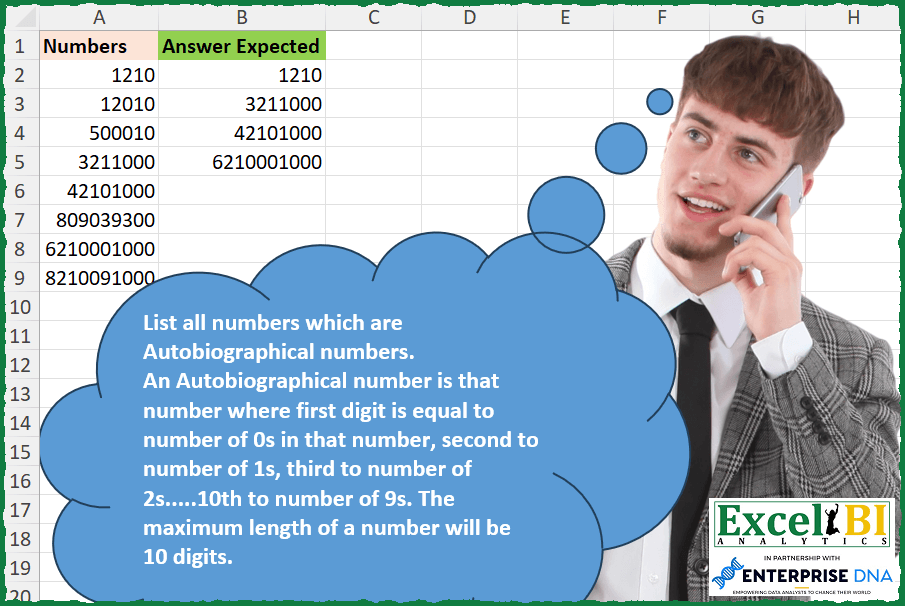
List all numbers which are Autobiographical numbers. An Autobiographical number is that number where first digit is equal to number of 0s in that number, second to number of 1s, third to number of 2s…..10th to number of 9s. The maximum length of a number will be 10 digits. Ex. 21200 – first digit 2 is equal to number of 0s in 21200. Second digit 1 is equal to number of 1s. Third digit 2 is equal to number of 2s. 4th & 5th digits are 0s so will not matter.
📌 Challenge Details and Links
ExcelBI Excel Challenge Number: 273
Challenge Difficulty: ⭐️
📥Download Sample File
📥Link to the solutions on LinkedIn
Solving the challenge of List Autobiographical Numbers with Power Query
Power Query solution 1 for List Autobiographical Numbers, proposed by Zoran Milokanović:
let
  Source = Excel.CurrentWorkbook(){[Name = "Input"]}[Content][Numbers],
  S = List.Select(
    Source,
    each
      let
        n = Text.From(_)
      in
        List.Accumulate(
          {1 .. Text.Length(n)},
          true,
          (s, c) =>
            s and Text.Length(Text.Select(n, Text.From(c - 1))) = Number.From(Text.At(n, c - 1))
        )
  )
in
  S
Power Query solution 2 for List Autobiographical Numbers, proposed by Rick de Groot:
let
  Source = Excel.CurrentWorkbook(){[Name = "Table1"]}[Content],
  AddC = Table.SelectRows(
    Source,
    each [
      b = Number.ToText([Numbers]),
      c = Text.ToList(b),
      d = List.Transform(c, each Number.From(_)),
      e = {0 .. (List.Count(c) - 1)},
      f = List.Transform(e, (x) => List.Count(List.Select(d, each _ = x))),
      g = d = f
    ][g]
  )
in
  AddC
Power Query solution 3 for List Autobiographical Numbers, proposed by Aditya Kumar Darak 🇮🇳:
let
  Source = Excel.CurrentWorkbook(){[Name = "data"]}[Content],
  Digits = {"0" .. "9"},
  Return = Table.SelectRows(
    Source,
    each [
      T  = Text.From([Numbers]),
      L  = List.FirstN(Digits, Text.Length(T)),
      TR = List.Transform(L, (f) => Text.From(Text.Length(Text.Select(T, f)))),
      R  = Text.Combine(TR) = T
    ][R]
  )
in
  Return
Power Query solution 4 for List Autobiographical Numbers, proposed by Alejandro Simón 🇵🇦 🇪🇸:
let
 Source = Excel.CurrentWorkbook(){[Name="Table1"]}[Content],
 Sol = Table.SelectRows(Source, each
 let
 a = Text.From([Numbers]),
 b = List.Transform({0..Text.Length(a)-1},
 each Text.Length(Text.Select(a,Text.From(_)))),
 c = List.Transform(Text.ToList(a), Number.From)
 in c = b)
in
 Sol

Espero que funcione como Rick de Groot y Zoran Milokanović señalaron.  Gracias por avisarme.  Estaba totalmente lejos de presentar una solución viable. En definitiva, como dijo Rafael González B. : "sencillo jamás ".....


        Show translation


        Show translation of this comment
Power Query solution 5 for List Autobiographical Numbers, proposed by Luan Rodrigues:
let
  Fonte = Tabela1,
  res = Table.SelectRows(
    Fonte,
    each [
      a = Text.ToList(Text.From([Numbers])),
      b = List.Transform(
        {0 .. List.Count(a) - 1},
        (x) => Text.From(List.Count(List.Select(a, each _ = Text.From(x))))
      ),
      c = a = b
    ][c]
  )
in
  res
Power Query solution 6 for List Autobiographical Numbers, proposed by Brian Julius:
let
  Source = Excel.CurrentWorkbook(){[Name = "Table1"]}[Content],
  AddCountDigits = Table.AddColumn(
    Source,
    "Answer",
    each [
      a = Text.ToList(Text.From([Numbers])),
      b = Text.From(List.Count(a) - 1),
      c = {"0" .. b},
      d = List.Transform(c, each Text.From(List.Count(List.FindText(a, _)))),
      e = Number.From(Text.Combine(d, ""))
    ][e]
  ),
  Clean = Table.SelectColumns(Table.SelectRows(AddCountDigits, each [Numbers] = [Answer]), "Answer")
in
  Clean
Power Query solution 7 for List Autobiographical Numbers, proposed by Rafael González B.:
let
  Source = Excel.CurrentWorkbook(){0}[Content],
  Add = Table.AddColumn(
    Source,
    "Test",
    each
      let
        b = Text.From([Numbers]),
        c = Text.ToList(b),
        d = List.Select(List.Reverse(List.Skip(List.Reverse(c), each _ = "0")), each _ <> "0"),
        e = Table.FromList(c, Splitter.SplitByNothing(), {"Num"}),
        f = Table.Group(e, {"Num"}, {{"Count", each Table.RowCount(_), Int64.Type}}),
        g = Table.Sort(f, {{"Num", Order.Ascending}})[Count],
        h = List.Transform(g, each Text.From(_))
      in
        d = h
  ),
  Answer = Table.SelectRows(Add, each ([Test] = true))[[Numbers]]
in
  Answer
Solving the challenge of List Autobiographical Numbers with Excel
Excel solution 1 for List Autobiographical Numbers, proposed by Bo Rydobon 🇹🇭:
=TOCOL(
    MAP(
        A2:A9,
        LAMBDA(
            a,
            LET(
                n,
                SEQUENCE(
                    LEN(
                        a
                    )
                ),
                a/AND(
                    -MID(
                        a,
                        n,
                        1
                    )=LEN(
                        SUBSTITUTE(
                            a,
                            n-1,

                        )
                    )-LEN(
                        a
                    )
                )
            )
        )
    ),
    3
)
Excel solution 2 for List Autobiographical Numbers, proposed by Rick Rothstein:
=LET(
    a,
    A2:A9,
    FILTER(
        a,
        a=0+SCAN(
            "",
            a,
            LAMBDA(
                a,
                x,
                LEFT(
                    CONCAT(
                        LEN(
                            x
                        )-LEN(
                            SUBSTITUTE(
                                x,
                                SEQUENCE(
                                    ,
                                    10,
                                    0
                                ),
                                ""
                            )
                        )
                    ),
                    LEN(
                            x
                        )
                )
            )
        )
    )
)
Excel solution 3 for List Autobiographical Numbers, proposed by John V.:
=TOCOL(MAP(A2:A9,LAMBDA(x,x/LET(s,SEQUENCE(LEN(x)),AND(LEN(SUBSTITUTE(x,s-1,))-LEN(x)=-MID(x,s,1))))),2)
✅=TOCOL(MAP(A2:A9,LAMBDA(x,x/(--CONCAT(LEN(x)-LEN(SUBSTITUTE(x,SEQUENCE(LEN(x))-1,)))=x))),2)
Excel solution 4 for List Autobiographical Numbers, proposed by محمد حلمي:
=TOCOL(MAP(A2:A9,LAMBDA(a,a/AND((0&MID(a,ROW(1:10),1))+0=LEN(a)-LEN(SUBSTITUTE(a,ROW(1:10)-1,))))),2)Excel solution 5 for List Autobiographical Numbers, proposed by Kris Jaganah:
=TOCOL(MAP(A2:A9,
    LAMBDA(x,
    x/(--CONCAT(
        LEN(
            x
        )-LEN(
            SUBSTITUTE(
                x,
                SEQUENCE(
                    LEN(
            x
        ),
                    ,
                    0
                ),
                ""
            )
        )
    )=x))),
    3)
Excel solution 6 for List Autobiographical Numbers, proposed by Timothée BLIOT:
=FILTER(
    A2:A9,
    MAP(
        A2:A9,
        LAMBDA(
            x,
             LET(
                 A,
                 LEN(
                     x
                 ),
                 B,
                 LEN(
                     SUBSTITUTE(
                         x,
                         SEQUENCE(
                             A,
                             ,
                             0
                         ),
                         ""
                     )
                 ),
                 --CONCAT(
                     A-B
                 )=x
             )
        )
    )
)
Excel solution 7 for List Autobiographical Numbers, proposed by Hussein SATOUR:
=FILTER(A2:A9, MAP(A2:A9, LAMBDA(y, LET(a, SEQUENCE(LEN(y),, 0), b, --MID(y, a+1, 1), SUM((MAP(a, LAMBDA(x, COUNT(FILTER(b, b=x)))) = b)*1) = MAX(a)+1))))Excel solution 8 for List Autobiographical Numbers, proposed by Oscar Mendez Roca Farell:
=TOCOL(MAP(A2:A9, LAMBDA(a, a/(--LEFT(a)=SUM(N(ISERR(1/MID(a, SEQUENCE(LEN(a)), 1))))))),2)Excel solution 9 for List Autobiographical Numbers, proposed by Sunny Baggu:
=TOCOL(

     A2:A9 * 1 /
     MAP(

          A2:A9,

          LAMBDA(
              x,

               LET(

                    _m,
                    --MID(
                        x,
                         SEQUENCE(
                             LEN(
                                 x
                             )
                         ),
                         1
                    ),

                    _seq,
                    TAKE(
                        SEQUENCE(
                            10
                        ) - 1,
                         LEN(
                                 x
                             )
                    ),

                    AND(
                        MAP(
                            _seq,
                             LAMBDA(
                                 a,
                                  SUM(
                                      N(
                                          _m = a
                                      )
                                  )
                             )
                        ) = _m
                    )

               )

          )

     ),

     3

)
Excel solution 10 for List Autobiographical Numbers, proposed by Abdallah Ally:
=FILTER(
    A2:A9,
    MAP(
        A2:A9,
        LAMBDA(
            v,
            LET(
                a,
                SEQUENCE(
                    LEN(
                        v
                    ),
                    ,
                    0
                ),
                b,
                --MID(
                    v,
                    SEQUENCE(
                        LEN(
                        v
                    )
                    ),
                    1
                ),
                REDUCE(
                    TRUE,
                    a,
                    LAMBDA(
                        x,
                        y,
                        AND(
                            x,
                            COUNT(
                                FILTER(
                                    b,
                                    b=y
                                )
                            )=--MID(
                                v,
                                y+1,
                                1
                            )
                        )
                    )
                )
            )
        )
    )
)
Excel solution 11 for List Autobiographical Numbers, proposed by Pieter de Bruijn:
=TOCOL(MAP(A2:A9,
    LAMBDA(b,
    b/(b=--CONCAT(
        LEN(
            b
        )-LEN(
            SUBSTITUTE(
                b,
                SEQUENCE(
                    LEN(
            b
        )
                )-1,

            )
        )
    )))),
    2)

or same result:
=TOCOL(MAP(A2:A9,
    LAMBDA(a,
    a/(a-CONCAT(
        LEN(
            a
        )-LEN(
            SUBSTITUTE(
                a,
                SEQUENCE(
                    LEN(
            a
        )
                )-1,

            )
        )
    )=0))),
    2)

Originally:
=TOCOL(MAP(A2:A9,
    LAMBDA(b,
    b/(b=--LEFT(
        CONCAT(
            LEN(
            b
        )-LEN(
                SUBSTITUTE(
                    b,
                    ROW(
                        1:10
                    )-1,
                    ""
                )
            )
        ),
        LEN(
            b
        )
    )))),
    2)
Excel solution 12 for List Autobiographical Numbers, proposed by Ziad A.:
=FILTER(
    A2:A,
    MAP(
        A2:A,
        LAMBDA(
            a,
            a=JOIN(
                ,
                LEN(
                    REGEXREPLACE(
                        a,
                        "[^"&SEQUENCE(
                            LEN(
                                a
                            )
                        )-1&"]",

                    )
                )
            )
        )
    )
)
Excel solution 13 for List Autobiographical Numbers, proposed by Giorgi Goderdzishvili:
=FILTER(A2:A9,
    MAP(A2:A9,
    LAMBDA(x,
    LET(
nm,
    x,

seq,
     SEQUENCE(
         ,
         10,
         0
     ),

cont,
    LEN(
        nm
    )-LEN(
        SUBSTITUTE(
            nm,
            seq,
            ""
        )
    ),

chkc,
     IFERROR(
         --MID(
             nm,
             SEQUENCE(
                 ,
                 10,
                 1
             ),
             1
         ),
         0
     ),

SUM(--(cont=chkc))=10))))
Excel solution 14 for List Autobiographical Numbers, proposed by Daniel Garzia:
=FILTER(
    A2:A9,
    MAP(
        A2:A9,
        LAMBDA(
            x,
            LET(
                l,
                LEN(
                    x
                ),
                s,
                SEQUENCE(
                    l
                ),
                OR(
                    l-LEN(
                        SUBSTITUTE(
                            x,
                            s-1,

                        )
                    )-MID(
                        x,
                        s,
                        1
                    )
                )-1
            )
        )
    )
)
Excel solution 15 for List Autobiographical Numbers, proposed by Quadri Olayinka Atharu:
=TOCOL(
    MAP(
        A2:A9,
        LAMBDA(
            n,

     &       LET(
                l,
                LEN(
                    n
                ),

                n_s,
                MID(
                    n,
                    SEQUENCE(
                        l
                    ),
                    1
                )^1,

                r,
                --CONCAT(
                    DROP(
                        FREQUENCY(
                            n_s,
                            SEQUENCE(
                                l,
                                ,
                                0
                            )
                        ),
                        -1
                    )
                ),

                IF(
                    r=n,
                    n,
                    NA()
                )
            )
        )
    ),
    2
)
Excel solution 16 for List Autobiographical Numbers, proposed by Quadri Olayinka Atharu:
=LET(
    num,
    A2:A9,

    FILTER(
        num,
        MAP(
            num,
            LAMBDA(
                n,

                LET(
                    l,
                    LEN(
                        n
                    ),

                    n_s,
                    MID(
                        n,
                        SEQUENCE(
                            l
                        ),
                        1
                    )^1,

                    --CONCAT(
                        DROP(
                            FREQUENCY(
                                n_s,
                                SEQUENCE(
                                    l,
                                    ,
                                    0
                                )
                            ),
                            -1
                        )
                    )=n
                )
            )
        )
    )
)
Excel solution 17 for List Autobiographical Numbers, proposed by Quadri Olayinka Atharu:
=TOCOL(
    MAP(
        A2:A9,
        LAMBDA(
            n,

            LET(
                l,
                LEN(
                    n
                ),

                n_s,
                MID(
                    n,
                    SEQUENCE(
                        l
                    ),
                    1
                )^1,

                _i,
                SEQUENCE(
                    l,
                    ,
                    0
                ),

                r,
                --CONCAT(
                    MAP(
                        _i,
                        LAMBDA(
                            a,
                            SUM(
                                N(
                                    n_s=a
                                )
                            )
                        )
                    )
                ),

                IF(
                    r=n,
                    n,
                    NA()
                )
            )
        )
    ),
    2
)


Variable Description
1. `n`: The input string of numbers.
2. `_i`: The index of each character (number) in the string,
     starting from zero.
3. `n_s`: Individual characters (numbers)
Excel solution 18 for List Autobiographical Numbers, proposed by Md Ismail Hosen:
=LET(Numbers, A2:A9, FxOne, LAMBDA(Number, LET(Seq, SEQUENCE(LEN(Number), , 0), Digits, MID(Number, Seq + 1, 1) * 1, MultiplicationMatrix, MMULT(--(Seq = TOROW(Digits)), 1 ^ Seq), Result, IF(AND(Digits = MultiplicationMatrix), Number, NA()), Result)), Result, TOCOL(MAP(Numbers, FxOne), 3), Result)Excel solution 19 for List Autobiographical Numbers, proposed by Mungunbayar Bat-Ochir:
=DROP(

     REDUCE(
         "";
         A2:A9;
         LAMBDA(
             result;
             input;
             LET(

                  nums;
                 VALUE(
                     MID(
                         input;
                         SEQUENCE(
                             LEN(
                                 input
                             )
                         );
                         1
                     )
                 );

                  counts;
                 TAKE(
                     FREQUENCY(
                         nums;
                         SEQUENCE(
                             10;
                             ;
                             0
                         )
                     );
                     LEN(
                                 input
                             )
                 );

                  IF(
                      AND(
                          nums=counts
                      );
                      VSTACK(
                          result;
                          input
                      );
                      result
                  )

             )
         )
     );
    1
)
Excel solution 20 for List Autobiographical Numbers, proposed by Mungunbayar Bat-Ochir:
=FILTER(
    A2:A9;
    MAP(
        A2:A9;
        LAMBDA(
            input;
            LET(

                 nums;
                VALUE(
                    MID(
                        input;
                        SEQUENCE(
                            LEN(
                                input
                            )
                        );
                        1
                    )
                );

                 counts;
                TAKE(
                    FREQUENCY(
                        nums;
                        SEQUENCE(
                            10;
                            ;
                            0
                        )
                    );
                    LEN(
                                input
                            )
                );

                 AND(
                     nums=counts
                 )

            )
        )
    )
)
Excel solution 21 for List Autobiographical Numbers, proposed by Hazem Hassan:
=LET(
    x;
    A2:A9;
    y;
    LEN(
        x
    );
    TOCOL(
        IF(
            y-LEN(
                SUBSTITUTE(
                    x;
                    SEQUENCE(
                        y;
                        ;
                        0
                    );
                    ""
                )
            )=MID(
                x;
                SEQUENCE(
                    y
                );
                1
            )*1;
            x;
            NA()
        );
        3
    )
)
Excel solution 22 for List Autobiographical Numbers, proposed by Mercy Olaoluwa:
=IFERROR(VALUE(MID($A2,COLUMNS($A$2:A$2),1)),"")

I used a formula to check if the count of 0,1, and 2 is equal to the first, 2nd and 3rd numbers of listed numbers(the formula need to be dragged left and down as required)---=COUNTIF($D2:$M2,O$1)=D2

Then another formula checks if all the three columns computed earlier returned TRUE, if yes, the number is returned, if no, a blank value is returned. ---=IF((O2*P2*Q2) = 1, A2, "")
Solving the challenge of List Autobiographical Numbers with Python in Excel
Python in Excel solution 1 for List Autobiographical Numbers, proposed by Bo Rydobon 🇹🇭:
Python
df = xl("A2:A9")[0]
df[list(df.apply(str).apply(lambda x: min([x.count(str(d))==int(n) for n, d in zip(x,range(len(x)))])))].tolist()
Python in Excel solution 2 for List Autobiographical Numbers, proposed by Diarmuid Early:
[num for num in xl("A2:A9")[0] if all([str(num).count(str(index)) == int(digit) for index, digit in enumerate(str(num))])]
Anyway, here's how it works:
[str(num).count(str(index)) == int(digit) for index, digit in enumerate(str(num))]
Python in Excel solution 3 for List Autobiographical Numbers, proposed by Md Ismail Hosen:
Python in Excel :
def is_autobiographical(number):
 num_str = str(number)
 counts = [0] * 10
 for digit in num_str:
 digit = int(digit)
 counts[digit] += 1
 for i, count in enumerate(counts):
 if i
Solving the challenge of List Autobiographical Numbers with R
R solution 1 for List Autobiographical Numbers, proposed by Konrad Gryczan, PhD:
library(tidyverse)
update_count <- function(digit, count) {
 count[digit + 1] <- count[digit + 1] + 1
 return(count)
}
isAutobiographical <- function(n) {
 n_str <- as.character(n)
 len <- nchar(n_str)

 digits <- str_split(n_str, "")[[1]] %>% as.integer()
 count <- map_dbl(0:9, ~ sum(digits == .x))

 positions <- 1:len
 described_digits <- str_split(n_str, "")[[1]] %>% as.integer()

 partial_result <- map2_lgl(positions, described_digits, ~ {
 if (.x <= length(count)) {
 count[.x] == .y
 } else {
 .y == 0
 }
 })

 return(all(partial_result))
}
numbers_to_check = c(1210,12010,500010,3211000,42101000,809039300,6210001000,82100910000)
answer = keep(numbers_to_check, isAutobiographical)
print(answer)
&&