
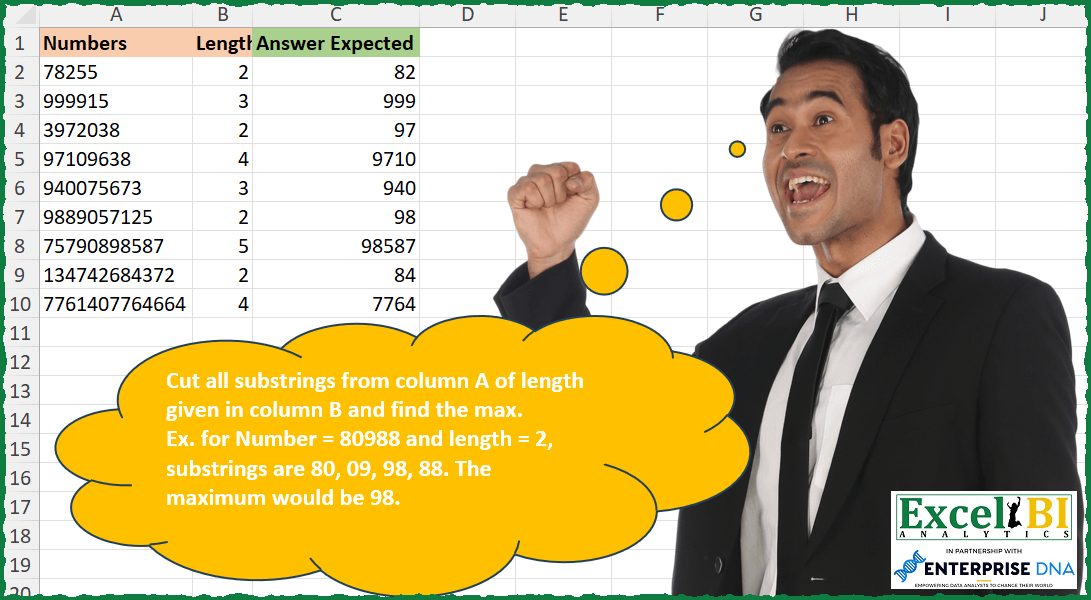
Cut all substrings from column A of length given in column B and find the max. Ex. for Number = 80988 and length = 2, substrings are 80, 09, 98, 88. The maximum would be 98.
📌 Challenge Details and Links
ExcelBI Excel Challenge Number: 271
Challenge Difficulty: ⭐️
📥Download Sample File
📥Link to the solutions on LinkedIn
Solving the challenge of Find Max Substring from Length with Power Query
Power Query solution 1 for Find Max Substring from Length, proposed by Zoran Milokanović:
let
  Source = Excel.CurrentWorkbook(){[Name = "Input"]}[Content],
  S = Table.CombineColumns(
    Source,
    {"Numbers", "Length"},
    each List.Max(
      List.Transform(
        {0 .. Text.Length(_{0}) - _{1}},
        (p) => Number.From(Text.Middle(_{0}, p, _{1}))
      )
    ),
    "Answer Expected"
  )
in
  S
Power Query solution 2 for Find Max Substring from Length, proposed by Rick de Groot:
let
  Source = Excel.CurrentWorkbook(){[Name = "Table1"]}[Content],
  AddResult = Table.AddColumn(
    Source,
    "Answer",
    each [
      MyValue = Text.From([Numbers]),
      Iterations = Text.Length(MyValue) - [Length],
      Values = List.Accumulate(
        {0 .. Iterations},
        {},
        (s, c) => s & {Text.Range(MyValue, c, [Length])}
      ),
      Numbers = List.Transform(Values, each Number.From(_)),
      Result = List.Max(Numbers)
    ][Result]
  )
in
  AddResult
Power Query solution 3 for Find Max Substring from Length, proposed by Rick de Groot:
https://www.linkedin.com/feed/update/urn:li:activity:7102137802192039937?commentUrn=urn%3Ali%3Acomment%3A%28activity%3A7102137802192039937%2C7102561900437086208%29&dashCommentUrn=urn%3Ali%3Afsd_comment%3A%287102561900437086208%2Curn%3Ali%3Aactivity%3A7102137802192039937%29
We all learn!
Power Query solution 4 for Find Max Substring from Length, proposed by Aditya Kumar Darak 🇮🇳:
let
  Source = Excel.CurrentWorkbook(){[Name = "data"]}[Content],
  Answer = Table.AddColumn(
    Source,
    "Answer",
    each [
      L = Text.Length([Numbers]),
      G = List.Transform(
        {0 .. L - [Length]},
        (f) => Number.From(Text.Range([Numbers], f, [Length]))
      ),
      M = List.Max(G)
    ][M]
  )
in
  Answer
Power Query solution 5 for Find Max Substring from Length, proposed by Alejandro Simón 🇵🇦 🇪🇸:
let
  Source = Excel.CurrentWorkbook(){[Name = "Table1"]}[Content],
  Sol = Table.AddColumn(
    Source,
    "Answer",
    each List.Max(
      List.Transform(
        List.Accumulate(
          {0 .. Text.Length([Numbers]) - [Length]},
          {},
          (s, c) => s & {Text.Range([Numbers], c, [Length])}
        ),
        Number.From
      )
    )
  )[[Answer]]
in
  Sol
Power Query solution 6 for Find Max Substring from Length, proposed by Alejandro Simón 🇵🇦 🇪🇸:
let
  Source = Excel.CurrentWorkbook(){[Name = "Table1"]}[Content],
  Sol = Table.AddColumn(
    Source,
    "Answer",
    (x) =>
      let
        a = Text.ToList(x[Numbers]),
        b = List.Transform(
          {0 .. List.Count(a) - 1},
          each Text.Combine(List.FirstN(List.RemoveFirstN(a, _), x[Length]))
        ),
        c = List.Max(
          List.Select(List.Transform(b, Number.From), each Text.Length(Text.From(_)) = x[Length])
        )
      in
        c
  )[[Answer]]
in
  Sol
Power Query solution 7 for Find Max Substring from Length, proposed by Luan Rodrigues:
let
  Fonte = Tabela1,
  res = Table.AddColumn(
    Fonte,
    "Personalizar",
    each List.Max(
      List.Transform(
        {0 .. List.Count(Text.ToList([Numbers])) - 1},
        (x) => Text.Middle([Numbers], x, [Length])
      )
    )
  )
in
  res
Power Query solution 8 for Find Max Substring from Length, proposed by Brian Julius:
let
  Source = Excel.CurrentWorkbook(){[Name = "rng"]}[Content],
  HeaderPromote = Table.PromoteHeaders(Source, [PromoteAllScalars = true]),
  ReType = Table.TransformColumnTypes(
    HeaderPromote,
    {{"Numbers", Int64.Type}, {"Length", Int64.Type}}
  ),
  AddMaxSubstring = Table.AddColumn(
    ReType,
    "MaxSubstring",
    each [
      z = [Length],
      y = Text.From([Numbers]),
      a = Text.Length(y) - [Length] + 1,
      b = {0 .. a},
      c = List.Transform(b, each try Text.Range(y, _, z) otherwise null),
      d = List.Transform(c, each Number.From(_)),
      e = List.Max(d)
    ][e]
  )
in
  AddMaxSubstring
Power Query solution 9 for Find Max Substring from Length, proposed by Rafael González B.:
let
  Source = Excel.CurrentWorkbook(){0}[Content],
  A = Table.AddColumn(
    Source,
    "Answer",
    each
      let
        a = [Numbers],
        b = Text.Length(a),
        c = {0 .. b - 1},
        d = List.Accumulate(c, {}, (s, c) => s & {Text.Middle(a, c, [Length])}),
        e = List.Transform(d, each Number.From(_)),
        f = List.Max(e)
      in
        f
  )[[Answer]]
in
  A
Power Query solution 10 for Find Max Substring from Length, proposed by Fatih Demirciler:
let
 Source = Excel.CurrentWorkbook(){[Name = "Table1"]}[Content],
 #"Removed Columns" = Table.RemoveColumns(Source, {"Answer Expected"}),
 #"Changed Type" = Table.TransformColumnTypes(
 #"Removed Columns",
 {{"Numbers", type text}, {"Length", Int64.Type}}
 ),
 #"Generate Answer" = Table.AddColumn(
 #"Changed Type",
 "Answer",
 each List.Max(
 List.Transform(
 {0 .. (Text.Length([Numbers]) - [Length])},
 (x) => Number.From(Text.Start(Text.Range([Numbers], x), [Length]))
 )
 ),
 type number
 )
in
 #"Generate Answer"


hashtag#powerquery
hashtag#excel
hashtag#m
Solving the challenge of Find Max Substring from Length with Excel
Excel solution 1 for Find Max Substring from Length, proposed by Bo Rydobon 🇹🇭:
=MAP(
    A2:A10,
    B2:B10,
    LAMBDA(
        a,
        b,
        MAX(
            --MID(
                a,
                SEQUENCE(
                    LEN(
                        a
                    )-b+1
                ),
                b
            )
        )
    )
)
Excel solution 2 for Find Max Substring from Length, proposed by Rick Rothstein:
=MAP(
    A2:A10,
    B2:B10,
    LAMBDA(
        a,
        b,
        MAX(
            0+MID(
                a,
                SEQUENCE(
                    ,
                    LEN(
                        a
                    )-1
                ),
                b
            )
        )
    )
)
Excel solution 3 for Find Max Substring from Length, proposed by John V.:
=MAP(A2:A10,
    B2:B10,
    LAMBDA(n,
    l,
    MAX(--(0&MID(
        n,
        ROW(
            1:15
        ),
        l
    )))))
Excel solution 4 for Find Max Substring from Length, proposed by محمد حلمي:
=BYROW(A2:B10,
    LAMBDA(a,
    MAX(--(0&MID(
        a,
        ROW(
            1:10
        ),
        DROP(
            a,
            ,
            1
        )
    )))))
Excel solution 5 for Find Max Substring from Length, proposed by محمد حلمي:
=MAP(A2:A10,B2:B10,LAMBDA(a,b,MAX(--(0&MID(a,ROW(1:10),b)))))Excel solution 6 for Find Max Substring from Length, proposed by Kris Jaganah:
=MAP(A2:A10,B2:B10,LAMBDA(x,y,MAX(--MID(x,SEQUENCE(LEN(x)),y))))Excel solution 7 for Find Max Substring from Length, proposed by Timothée BLIOT:
=LET(
    A,
    A2:A10,
     B,
    B2:B10,
     MAP(
         A,
         LAMBDA(
             x,
             MAX(
                 MID(
                     x,
                     SEQUENCE(
                         LEN(
                             x
                         )-XLOOKUP(
                             x,
                             A,
                             B
                         )+1
                     ),
                     XLOOKUP(
                             x,
                             A,
                             B
                         )
                 )*1
             )
         )
     )
)
Excel solution 8 for Find Max Substring from Length, proposed by Hussein SATOUR:
=MAP(
    A2:A10,
    B2:B10,
     LAMBDA(
         x,
         y,
          MAX(
              --MID(
                  x,
                   SEQUENCE(
                       LEN(
                           x
                       )
                   ),
                   y
              )
          )
     )
)
Excel solution 9 for Find Max Substring from Length, proposed by Sunny Baggu:
=MAP(

     A2:A10,

     B2:B10,

     LAMBDA(
         x,
          y,

          MAX(
              --DROP(
                  SCAN(
                      "",
                       MID(
                           x,
                            SEQUENCE(
                                LEN(
                                    x
                                )
                            ),
                            1
                       ),
                       LAMBDA(
                           a,
                            v,
                            RIGHT(
                                a & v,
                                 y
                            )
                       )
                  ),
                   1
              )
          )

     )

)
Excel solution 10 for Find Max Substring from Length, proposed by Sunny Baggu:
=MAP(
    A2:A10,
    B2:B10,
    LAMBDA(
        a,
        b,
        MAX(
            --MID(
                a,
                SEQUENCE(
                    LEN(
                        a
                    )
                ),
                b
            )
        )
    )
)
Excel solution 11 for Find Max Substring from Length, proposed by LEONARD OCHEA 🇷🇴:
=BYROW(
    --MID(
        A2:A10,
        SEQUENCE(
            ,
            20
        ),
        B2:B10
    ),
    LAMBDA(
        a,
        MAX(
             TOROW(
                 a,
                 3
             )
        )
    )
)
Excel solution 12 for Find Max Substring from Length, proposed by Abdallah Ally:
=MAP(
    A2:A10,
    B2:B10,
    LAMBDA(
        x,
        y,
        MAX(
            --MID(
                x,
                SEQUENCE(
                    LEN(
                        x
                    ),
                    ,
                    1,
                    1
                ),
                y
            )
        )
    )
)
Excel solution 13 for Find Max Substring from Length, proposed by Asheesh Pahwa:
LET(n,
    A2:A10,
    1,
    B2:B10,

MAP(n,
    I,
    LAMBDA(x,
    y,

MAX(--DROP (REDUCE(
    "",
    SEQUENCE(
        LEN(
            x
        )-1
    ),
     LAMBDA(
         a,
         v,

         VSTACK(
             a,
             MID(
                 x,
                 v,
                 y
             )
         )
     )
),
    1)))))
Excel solution 14 for Find Max Substring from Length, proposed by JvdV –:
=MAP(A2:A10,
    B2:B10,
    LAMBDA(s,
    l,
    MAX(--(0&MID(
        s,
        ROW(
            1:99
        ),
        l
    )))))
Excel solution 15 for Find Max Substring from Length, proposed by Julien Lacaze:
=MAP(A2:A10,B2:B10,
LAMBDA(n,l,MAX(--MID(n,SEQUENCE(LEN(n)-l+1),l))))
Excel solution 16 for Find Max Substring from Length, proposed by Ziad A.:
=LET(X,LAMBDA(X,n,l,r,IF(LEN(n)Excel solution 17 for Find Max Substring from Length, proposed by Giorgi Goderdzishvili:
=MAP(
    A2:A10,
    B2:B10,
    LAMBDA(
        a,
        b,

        LET(

            nm,
            a,

            ln,
            b,

            exp,
             EXPAND(
                 nm,
                 ,
                 LEN(
                     nm
                 ),
                 nm
             ),

            mp,
             MAP(
                 exp,
                 SEQUENCE(
                     ,
                     LEN(
                     nm
                 )
                 ),
                 LAMBDA(
                     x,
                     y,

                     MID(
                         x,
                         y,
                         ln
                     )
                 )
             ),
 &
            fin,
            MAX(
                IFERROR(
                    --mp,
                    0
                )
            ),

            fin
        )
    )
)
Excel solution 18 for Find Max Substring from Length, proposed by Daniel Garzia:
=MAP(A2:A10,B2:B10,LAMBDA(x,y,MAX(0+MID(x,SEQUENCE(LEN(x)),y))))Excel solution 19 for Find Max Substring from Length, proposed by Daniel Garzia:
=MAP(
    A2:A10,
    B2:B10,
    LAMBDA(
        x,
        l,
        MAX(
            BYROW(
                MID(
                    x,
                    SEQUENCE(
                        LEN(
                            x
                        )
                    )+SEQUENCE(
                        ,
                        l
                    )-1,
                    1
                ),
                LAMBDA(
                    r,
                    0+CONCAT(
                        r
                    )
                )
            )
        )
    )
)
Excel solution 20 for Find Max Substring from Length, proposed by samir tobeil:
=MAP(A2:A10,LAMBDA(x,MAX(--MID(x,SEQUENCE(LEN(x)),OFFSET(x,,1)))))Excel solution 21 for Find Max Substring from Length, proposed by Md Ismail Hosen:
=MAP(
    A2:A10,
    B2:B10,
    LAMBDA(
        Number,
        Length,
         MAX(
             MID(
                 Number,
                 SEQUENCE(
                     LEN(
                         Number
                     )-Length+1
                 ),
                 Length
             )*1
         )
    )
)
Excel solution 22 for Find Max Substring from Length, proposed by Mungunbayar Bat-Ochir:
=MAP(
    A2:A10;
    B2:B10;
    LAMBDA(
        num;
        length;
        MAX(
            VALUE(
                MID(
                    num;
                    SEQUENCE(
                        LEN(
                            num
                        )
                    );
                    length
                )
            )
        )
    )
)
Excel solution 23 for Find Max Substring from Length, proposed by Hazem Hassan:
=LET(
    A;
    A2:A10;
    B;
    B2:B10;
    BYROW(
        IFERROR(
            MID(
                A;
                SEQUENCE(
                    ;
                    MAX(
                        LEN(
                            A
                        )
                    )
                );
                B
            )*1;
            0
        );
        LAMBDA(
            X;
            MAX(
                X
            )
        )
    )
)
Excel solution 24 for Find Max Substring from Length, proposed by Hazem Hassan:
=MAP(A2:A10;B2:B10;LAMBDA(X;Y;MAX(MID(X;SEQUENCE(LEN(X));Y)*1)))Excel solution 25 for Find Max Substring from Length, proposed by Miguel Angel Franco García:
=MAX(
    LET(
        a;
        EXTRAE(
            A2;
            SECUENCIA(
                LARGO(
                    A2
                )
            );
            B2
        );
        ENFILA(
            ABS(
                SI(
                    LARGO(
                        a
                    )=B2;
                    a;
                    NOD()
                )
            );
            3
        )
    )
)
Excel solution 26 for Find Max Substring from Length, proposed by Stevenson Yu:
=MAP(
    A2:A10,
     B2:B10,
     LAMBDA(
         A,
         B,
         MAX(
             --MID(
                 A,
                 SEQUENCE(
                     LEN(
                         A
                     )
                 ),
                 B
             )
         )
     )
)
Excel solution 27 for Find Max Substring from Length, proposed by Crispo Mwangi:
=MAX(MID(A2,ROW(INDIRECT("1:"&LEN(A2))),B2)+0)Excel solution 28 for Find Max Substring from Length, proposed by Neil Foot JP MBA MBCS:
=MAX(
    NUMBERVALUE(
        MID(
            A10,
            SEQUENCE(
                1,
                LEN(
                    A10
                )-B10+1,
                1,
                1
            ),
            B10
        ),
        "."
    )
)
Excel solution 29 for Find Max Substring from Length, proposed by Vaughan Grandin:
=MAX((1*MID(
    A2,
    SEQUENCE(
        1,
        LEN(
            A2
        ),
        1,
        1
    ),
    B2
)))
Solving the challenge of Find Max Substring from Length with Python
Python solution 1 for Find Max Substring from Length, proposed by Abdallah Ally:
numbers = [['78255', 2], ['999915', 3], ['3972038', 2],
 ['97109638', 4], ['940075673', 3], ['9889057125', 2],
 ['75790898587', 5], ['134742684372', 2], ['7761407764664', 4]
 ]
max_values = []
for number in numbers:
 values = []
 for i in range(len(number[0])-1):
 values.append(int(number[0][i: i + number[1]]))
 max_values.append(max(values))
print(max_values)
Solving the challenge of Find Max Substring from Length with Python in Excel
Python in Excel solution 1 for Find Max Substring from Length, proposed by Bo Rydobon 🇹🇭:
Still trying to figure out how to operate byrow
but for now  for loop
rs=[]
df = xl("A2:B10")
for i in range(len(df)):
 a = df[0][i]
 l = df[1][i]
 m = ''
 for j in range(len(a)-l+1):
 m = a[j:j+l] if a[j:j+l]> m else m
 rs.append(int(m))
rs
Python in Excel solution 2 for Find Max Substring from Length, proposed by 🇰🇷 Taeyong Shin:
from functools import reduce
def str_max(row):
 num = row[0]
 length = row[1]
 gen = (int(num[i:i + length]) for i in range(0, len(num) - length + 1))
 return reduce(lambda a, c: a if a > c else c, gen)

xl("A2:B10").apply(str_max, axis=1).values
Python in Excel solution 3 for Find Max Substring from Length, proposed by Diarmuid Early:
Python in Excel day 2: list comprehension, regex, unpivot, and more!
https://youtu.be/zVQy2XvBJ7U


          Python in Excel day 2: list comprehension, regex, unpivot, and more!
Python in Excel solution 4 for Find Max Substring from Length, proposed by Diarmuid Early:
[max([num[0+x:leng+x] for x in range(len(num)-leng+1)]) for num, leng in xl("A2:B10").values.tolist()]Python in Excel solution 5 for Find Max Substring from Length, proposed by Md Ismail Hosen:
Python in Excel Code:
def find_max(Number,Length):
 SplittedNumbers = [Number[i:i+Length] for i in range(0,len(Number)-Length+1)]
 return max(map(int,SplittedNumbers))
df =xl("A1:B10", headers=True)
df["Answer Expected"] = df.apply(lambda row: find_max(row["Numbers"],row["Length"]),axis=1)
df["Answer Expected"]
Solving the challenge of Find Max Substring from Length with Excel VBA
Excel VBA solution 1 for Find Max Substring from Length, proposed by Vasin Nilyok:
VBA
Sub LargestSubstring()
LastRow = Cells(Rows.Count, 1).End(xlUp).Row
For r = 2 To LastRow
 lenCut = Cells(r, 2)
 lenNum = Cells(r, 1)
 For i = 1 To Len(lenNum) - 1
 iNum = Int(Mid(lenNum, i, lenCut))
 Dim NumColltn As New Collection
 If i = 1 Then
 NumColltn.Add iNum
 ElseIf iNum >= NumColltn(1) Then
 NumColltn.Add iNum, , 1
 Else
 NumColltn.Add iNum
 End If
 Next i
 Cells(r, 4) = NumColltn(1)
 Set NumColltn = New Collection
Next r

End Sub
&&