
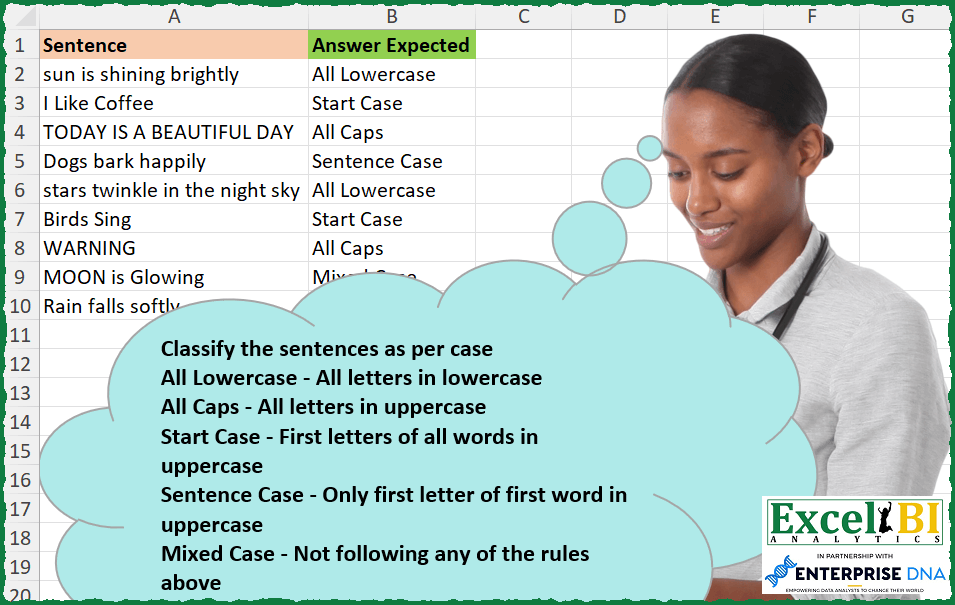
Classify the sentences as per case All Lowercase – All letters in lowercase All Caps – All letters in uppercase Start Case – First letters of all words in uppercase Sentence Case – Only first letter of first word in uppercase Mixed Case – Not following any of the rules above
📌 Challenge Details and Links
ExcelBI Excel Challenge Number: 270
Challenge Difficulty: ⭐️
📥Download Sample File
📥Link to the solutions on LinkedIn
Solving the challenge of Classify Sentence Text Case with Power Query
Power Query solution 1 for Classify Sentence Text Case, proposed by Zoran Milokanović:
let
  Source = Excel.CurrentWorkbook(){[Name = "Input"]}[Content][Sentence],
  S = List.Transform(
    Source,
    each
      let
        l = Text.Lower(_),
        u = Text.Upper(_)
      in
        {"All Lowercase", "All Caps", "Start Case", "Sentence Case", "Mixed Case"}{

            if l = _ then
              0
            else if u = _ then
              1
            else if Text.Proper(_) = _ then
              2
            else if Text.Start(u, 1) & Text.Middle(l, 1) = _ then
              3
            else
              4
        }
  )
in
  S
Power Query solution 2 for Classify Sentence Text Case, proposed by Rick de Groot:
let
  Source = Excel.CurrentWorkbook(){[Name = "Table1"]}[Content],
  AddCol = Table.AddColumn(
    Source,
    "Anwer Expected",
    each
      let
        a = Text.RemoveRange([Sentence], 0, 1),
        s = [Sentence],
        index = List.PositionOf(
          {Text.Upper(s) = s, Text.Proper(s) = s, Text.Lower(s) = s, a = Text.Lower(a)},
          true
        ),
        r = try
          {"All Caps", "Start Case", "All Lowercase", "Sentence Case"}{index}
        otherwise
          "Mixed Case"
      in
        r
  )
in
  AddCol
Power Query solution 3 for Classify Sentence Text Case, proposed by Rick de Groot:
letter. Love this!Power Query solution 4 for Classify Sentence Text Case, proposed by Rick de Groot:
https://www.linkedin.com/feed/update/urn:li:activity:7102137802192039937?commentUrn=urn%3Ali%3Acomment%3A%28activity%3A7102137802192039937%2C7102561900437086208%29&dashCommentUrn=urn%3Ali%3Afsd_comment%3A%287102561900437086208%2Curn%3Ali%3Aactivity%3A7102137802192039937%29
Power Query solution 5 for Classify Sentence Text Case, proposed by Aditya Kumar Darak 🇮🇳:
let
  Source = Excel.CurrentWorkbook(){[Name = "data"]}[Content],
  List = {
    {"All Lowercase", Text.Lower},
    {"All Caps", Text.Upper},
    {"Start Case", Text.Proper},
    {"Sentence Case", each Text.Upper(Text.Start(_, 1)) & Text.Lower(Text.Middle(_, 1, 99))}
  },
  Return = Table.AddColumn(
    Source,
    "Answer",
    each (List.Select(List, (f) => [Sentence] = f{1}([Sentence])){0}? ?? {"Mixed Case"}){0}
  )
in
  Return
Power Query solution 6 for Classify Sentence Text Case, proposed by Alejandro Simón 🇵🇦 🇪🇸:
let
  Source = Excel.CurrentWorkbook(){[Name = "Table1"]}[Content],
  Sol = Table.AddColumn(
    Source,
    "Answer",
    each
      if [Sentence] = Text.Lower([Sentence]) then
        "All Lowercase"
      else if [Sentence] = Text.Upper([Sentence]) then
        "All Caps"
      else if [Sentence] = Text.Proper([Sentence]) then
        "Start Case"
      else if Text.Proper(Text.Start([Sentence], 1))
        = Text.Start([Sentence], 1) and Text.Middle([Sentence], 1, Text.Length([Sentence]) - 1)
        = Text.Lower(Text.Middle([Sentence], 1, Text.Length([Sentence]) - 1))
      then
        "Sentence Case"
      else
        "Mixed Case"
  )
in
  Sol
Power Query solution 7 for Classify Sentence Text Case, proposed by Luan Rodrigues:
let
  Fonte = Tabela1,
  res = Table.AddColumn(
    Fonte,
    "Personalizar",
    each
      if [Sentence] = Text.Lower([Sentence]) then
        "All Lowercase"
      else if [Sentence] = Text.Upper([Sentence]) then
        "All Caps"
      else if [Sentence] = Text.Proper([Sentence]) then
        "Start Case"
      else if Text.Length(Text.Select([Sentence], {"A" .. "Z"})) = 1 then
        "Sentence Case"
      else
        "Mixed Case"
  )
in
  res
Power Query solution 8 for Classify Sentence Text Case, proposed by Mahmoud Bani Asadi:
let
  Source = Excel.CurrentWorkbook(){[Name = "Table1"]}[Content],
  x = {"All Caps", "Start Case", "All Lowercase", "Sentence Case", "Mixed Case"},
  Custom = Table.AddColumn(
    Source,
    "Custom",
    each [
      txt = [Sentence],
      start = Text.Start(txt, 1),
      end = Text.Middle(txt, 1, 100),
      result =
        if txt = Text.Upper(txt) then
          x{0}
        else if txt = Text.Proper(txt) then
          x{1}
        else if txt = Text.Lower(txt) then
          x{2}
        else if start = Text.Upper(start) and end = Text.Lower(end) then
          x{3}
        else
          x{4}
    ][result]
  )
in
  Custom
Solving the challenge of Classify Sentence Text Case with Excel
Excel solution 1 for Classify Sentence Text Case, proposed by Bo Rydobon 🇹🇭:
=LET(
    c,
    LAMBDA(
        a,
        b,
        EXACT(
            a,
            b
        )
    ),
    MAP(
        A2:A10,
        LAMBDA(
            a,

            IFS(
                c(
                    a,
                    LOWER(
                        a
                    )
                ),
                "All Lowercase",
                c(
                    a,
                    UPPER(
                        a
                    )
                ),
                "All Caps",
                c(
                    a,
                    PROPER(
                        a
                    )
                ),
                "Start Case",

                c(
                    a,
                    UPPER(
                        LEFT(
                        a
                    )
                    )&LOWER(
                        MID(
                            a,
                            2,
                            99
                        )
                    )
                ),
                "Sentence Case",
                1,
                "Mixed Case"
            )
        )
    )
)
Excel solution 2 for Classify Sentence Text Case, proposed by Rick Rothstein:
=MAP(
    A2:A10,
    LAMBDA(
        r,
        LET(
            s,
            VSTACK(
                UPPER(
                    r
                ),
                LOWER(
                    r
                ),
                PROPER(
                    r
                ),
                REPLACE(
                    LOWER(
                    r
                ),
                    1,
                    1,
                    UPPER(
                        LEFT(
                    r
                )
                    )
                )
            ),
            a,
            VSTACK(
                "All Caps",
                "All Lowercase",
                "Start Case",
                "Sentence Case"
            ),
            c,
            CONCAT(
                MAP(
                    SEQUENCE(
                        4
                    ),
                    LAMBDA(
                        x,
                        IF(
                            EXACT(
                                r,
                                INDEX(
                                    s,
                                    x
                                )
                            ),
                            INDEX(
                                a,
                                x
                            ),
                            ""
                        )
                    )
                )
            ),
            IF(
                c="",
                "Mixed Case",
                c
            )
        )
    )
)
Excel solution 3 for Classify Sentence Text Case, proposed by John V.:
=MAP(
    A2:A10,
    LAMBDA(
        x,
        XLOOKUP(
            1,
            --EXACT(
                x,
                VSTACK(
                    UPPER(
                        x
                    ),
                    LOWER(
                        x
                    ),
                    PROPER(
                        x
                    ),
                    UPPER(
                        LEFT(
                        x
                    )
                    )&LOWER(
                        MID(
                            x,
                            2,
                            99
                        )
                    )
                )
            ),
            {"All Caps";"All Lowercase";"Start Case";"Sentence Case"},
            "Mixed Case"
        )
    )
)
Excel solution 4 for Classify Sentence Text Case, proposed by محمد حلمي:
=LET(
a,A2:A10,
e,LAMBDA(v,EXACT(a,v)),
IFS(
e(PROPER(a)),"Start Case",
e(UPPER(a)),"All Caps",
e(LOWER(a)),"All Lowercase",
e(LEFT(a)&LOWER(MID(a,2,99))),"Sentence Case",
1,"Mixed Case"))
Excel solution 5 for Classify Sentence Text Case, proposed by محمد حلمي:
=MAP(A2:A10,LAMBDA(a,
XLOOKUP(1,--EXACT(a,
HSTACK(
LOWER(a),PROPER(a),UPPER(a),
LEFT(a)&LOWER(MID(a,2,99)))),
{"All Lowercase","Start Case","All Caps",
"Sentence Case"},"Mixed Case")))
Excel solution 6 for Classify Sentence Text Case, proposed by Kris Jaganah:
=MAP(
    A2:A10,
    LAMBDA(
        x,
        XLOOKUP(
            1,
            --EXACT(
                x,
                VSTACK(
                    PROPER(
                        x
                    ),
                    LOWER(
                        x
                    ),
                    UPPER(
                        x
                    ),
                    UPPER(
                        LEFT(
                        x
                    )
                    )&LOWER(
                        MID(
                            x,
                            2,
                            LEN(
                        x
                    )-1
                        )
                    )
                )
            ),
            {"Start Case";"All lowercase";"All Caps";"Sentence Case"},
            "Mixed Case"
        )
    )
)
Excel solution 7 for Classify Sentence Text Case, proposed by Timothée BLIOT:
=MAP(
    A2:A10,
    LAMBDA(
        z,
        SWITCH(
            TRUE,
            EXACT(
                z,
                LOWER(
                    z
                )
            ),
            "All Lowercase",
            EXACT(
                z,
                UPPER(
                    z
                )
            ),
            "All Caps",
            EXACT(
                z,
                PROPER(
                    z
                )
            ),
            "Start Case",
            AND(
                EXACT(
                    LEFT(
                    z
                ),
                    UPPER(
                        LEFT(
                    z
                )
                    )
                ),
                LET(
                    A,
                    MID(
                        z,
                        2,
                        LEN(
                    z
                )-1
                    ),
                    EXACT(
                        A,
                        LOWER(
                            A
                        )
                    )
                )
            ),
            "Sentence Case",
            "Mixed Case"
        )
    )
)
Excel solution 8 for Classify Sentence Text Case, proposed by Hussein SATOUR:
=MAP(
    A2:A10,
     LAMBDA(
         x,
          IFS(
              EXACT(
                  UPPER(
                      x
                  ),
                   x
              ),
               "All Caps",
               EXACT(
                   LOWER(
                      x
                  ),
                    x
               ),
               "All Lowercase",
               EXACT(
                   PROPER(
                      x
                  ),
                    x
               ),
               "Start Case",
               EXACT(
                   UPPER(
                       LEFT(
                      x
                  )
                   )&LOWER(
                       RIGHT(
                           x,
                            LEN(
                      x
                  )-1
                       )
                   ),
                    x
               ),
               "Sentence Case",
               1,
               "Mixed Case"
          )
     )
)
Excel solution 9 for Classify Sentence Text Case, proposed by Oscar Mendez Roca Farell:
=MAP(
    A2:A10,
     LAMBDA(
         a,
          LET(
              _w,
               TRIM(
                   MID(
                       SUBSTITUTE(
                           a,
                           " ",
                            REPT(
                                " ",
                                50
                            )
                       ),
                        1+50*SEQUENCE(
                            10,
                            ,
                            0
                        ),
                       50
                   )
               ),
              _m,
               HSTACK(
                   UPPER(
                       _w
                   ),
                    LOWER(
                       _w
                   ),
                    PROPER(
                       _w
                   ),
                    VSTACK(
                        PROPER(
                            @_w
                        ),
                        DROP(
                            _w,
                            1
                        )
                    )
               ),
               IFNA(
                   XLOOKUP(
                       1,
                        N(
                            BYCOL(
                                _m,
                                 LAMBDA(
                                     c,
                                      AND(
                                          EXACT(
                                              _w,
                                               c
                                          )
                                      )
                                 )
                            )
                        ),
                       {"All Caps",
                        "All Lowercase",
                        "Start Case",
                        "Sentence Case"}
                   ),
                    "Mixed Case"
               )
          )
     )
)
Excel solution 10 for Classify Sentence Text Case, proposed by Sunny Baggu:
=MAP(
 A2:A10,

 LAMBDA(x,

 LET(
 _ts,
     TEXTSPLIT(
         x,
          ,
          " "
     ),

 _r,
     ROWS(
         _ts
     ),
    &
 _c1,
     MAP(CODE(
         LEFT(
         _ts
     )
     ),
     LAMBDA(a,
     (a >= 65) * (a <= 90))),

 _c2,
     MAP(IF(
         LEN(
         _ts
     ) > 1,
          CODE(
              RIGHT(
         _ts
     )
          ),
          100
     ),
     LAMBDA(b,
     (b >= 65) * (b <= 90))),

 _res,
     SUM(
         _c1 + _c2
     ),

 IFS(

      _res = 0,

      "All Lowercase",

      _res = 2 * _r,

      "All Caps",

      _res = _r,

      "Start Case",

      _res = 1,

      "Sentence Case",

      1,

      "Mixed Case"

 )
 )
 )
)
Excel solution 11 for Classify Sentence Text Case, proposed by Abdallah Ally:
=MAP(A2:A10,LAMBDA(x,LET(a,x,IFS(EXACT(a,UPPER(a)),"All Caps",EXACT(a,LOWER(a)),"All Lowercase",EXACT(a,PROPER(a)),"Start Case",EXACT(a,UPPER(LEFT(a))&LOWER(RIGHT(a,LEN(a)-1))),"Sentence Case",TRUE,"Mixed Case"))))Excel solution 12 for Classify Sentence Text Case, proposed by Charles Roldan:
=MAP(A2:A10, LAMBDA(x, INDEX({"Mixed Case";"All Lowercase";"All Caps";"Start Case";"Sentence Case"},
1 + IFNA(XMATCH(TRUE, EXACT(x, VSTACK(
LOWER(x), UPPER(x), PROPER(x),
UPPER(LEFT(x)) & LOWER(REPLACE(x, 1, 1, ))))), ))))
Excel solution 13 for Classify Sentence Text Case, proposed by Julien Lacaze:
=LET(data,A2:A10,f,LAMBDA(text,
IFS(EXACT(text,PROPER(text)),"Start Case",
EXACT(text,LOWER(text)),"All Lowercase",
EXACT(text,UPPER(text)),"All Caps",
EXACT(text,UPPER(LEFT(text))&LOWER(RIGHT(text,LEN(text)-1))),"Sentence Case",
1,"Mixed Case")),
MAP(data,LAMBDA(d,f(d))))
Excel solution 14 for Classify Sentence Text Case, proposed by Ziad A.:
=LET(
    X,
    LAMBDA(
        a,
        b,
        EXACT(
            a,
            b
        )
    ),
    MAP(
        A2:A10,
        LAMBDA(
            a,
            IFS(
                X(
                    a,
                    LOWER(
                        a
                    )
                ),
                "All Lowercase",
                X(
                    a,
                    UPPER(
                        a
                    )
                ),
                "All Caps",
                X(
                    a,
                    PROPER(
                        a
                    )
                ),
                "Start Case",
                X(
                    a,
                    UPPER(
                        LEFT(
                        a
                    )
                    )&LOWER(
                        MID(
                            a,
                            2,
                            99
                        )
                    )
                ),
                "Sentence Case",
                1,
                "Mixed Case"
            )
        )
    )
)
Excel solution 15 for Classify Sentence Text Case, proposed by Ziad A.:
=LET(
    R,
    LAMBDA(
        s,
        e,
        REGEXMATCH(
            s,
            "^"&e&"$"
        )
    ),
    MAP(
        A2:A10,
        LAMBDA(
            a,
            IFS(
                R(
                    a,
                    "[a-z ]+"
                ),
                "All Lowercase",
                R(
                    a,
                    "[A-Z ]+"
                ),
                "All Caps",
                R(
                    a,
                    "[A-Z][a-z ]+"
                ),
                "Sentence Case",
                R(
                    a,
                    "([A-Z][a-z]* ?)+"
                ),
                "Start Case",
                1,
                "Mixed Case"
            )
        )
    )
)
Excel solution 16 for Classify Sentence Text Case, proposed by Giorgi Goderdzishvili:
=MAP(
    A2:A10,
    LAMBDA(
        x,

        LET(

            snt,
            x,

            upp,
             UPPER(
                 snt
             ),

            lw,
             LOWER(
                 snt
             ),

            pr,
             PROPER(
                 snt
             ),

            sen,
             REPLACE(
                 LOWER(
                 snt
             ),
                 1,
                 1,
                 UPPER(
                     MID(
                         snt,
                         1,
                         1
                     )
                 )
             ),

            logic,

            IF(
                EXACT(
                    snt,
                    upp
                ),
                "All Caps",

                IF(
                    EXACT(
                        snt,
                        lw
                    ),
                     "All Lowercase",

                    IF(
                        EXACT(
                            snt,
                            pr
                        ),
                        "Start Case",

                        IF(
                            EXACT(
                                snt,
                                sen
                            ),
                             "Sentence Case",
                             "Mixed Case"
                        )
                    )
                )
            ),

            logic
        )
    )
)
Excel solution 17 for Classify Sentence Text Case, proposed by Daniel Garzia:
=MAP(
    A2:A10,
    LAMBDA(
        l,
        IFS(
            EXACT(
                LOWER(
                    l
                ),
                l
            ),
            "All lowercase",
            EXACT(
                PROPER(
                    l
                ),
                l
            ),
            "Start Case",
            EXACT(
                UPPER(
                    LEFT(
                    l
                )
                )&LOWER(
                    RIGHT(
                        l,
                        LEN(
                    l
                )-1
                    )
                ),
                l
            ),
            "Sentence Case",
            EXACT(
                UPPER(
                    l
                ),
                l
            ),
            "All caps",
            1,
            "Mixed Case"
        )
    )
)
Excel solution 18 for Classify Sentence Text Case, proposed by samir tobeil:
=MAP(
    A2:A10,
    LAMBDA(
        x,

        IFS(
            EXACT(
                x,
                LOWER(
                    x
                )
            ),
            "All Lowercase",

            EXACT(
                x,
                 UPPER(
                    x
                )
            ),
            "All Caps",

            EXACT(
                x,
                 PROPER(
                    x
                )
            ),
            "Start Case",

            EXACT(
                LOWER(
                    x
                ),
                LOWER(
                    LEFT(
                        x,
                        1
                    )
                )&RIGHT(
                    x,
                    LEN(
                    x
                )-1
                )
            ),
            "Sentence Case",

            TRUE,
            "Mixed Case"
        )
    )
)
Excel solution 19 for Classify Sentence Text Case, proposed by Md Ismail Hosen:
=LET(
    Texts,
     A2:A10,
     ToChar,
     LAMBDA(
         Input,
          MID(
              Input,
               SEQUENCE(
                   LEN(
                       Input
                   )
               ),
               1
          )
     ),
     IsCharCodeEqual,
     LAMBDA(
         Chars1,
         Chars2,
          AND(
              CODE(
                  Chars1
              ) = CODE(
                  Chars2
              )
          )
     ),
     fxOne,
     LAMBDA(
         Text,
          LET(
              Chars,
               ToChar(
                   Text
               ),
               LowerCaseChar,
               ToChar(
                   LOWER(
                   Text
               )
               ),
               UpperCaseChar,
               ToChar(
                   UPPER(
                   Text
               )
               ),
               ProperCaseChar,
               ToChar(
                   PROPER(
                   Text
               )
               ),
               IsLowerCase,
               IsCharCodeEqual(
                   Chars,
                    LowerCaseChar
               ),
               IsUpperCase,
               IsCharCodeEqual(
                   Chars,
                    UpperCaseChar
               ),
               IsProperCase,
               IsCharCodeEqual(
                   Chars,
                    ProperCaseChar
               ),
               IsSentenceCase,
               AND(
                   IsCharCodeEqual(
                       DROP(
                           Chars,
                            1
                       ),
                        DROP(
                            LowerCaseChar,
                             1
                        )
                   ),
                    CODE(
                        INDEX(
                            Chars,
                             1,
                             1
                        )
                    ) = CODE(
                        INDEX(
                            UpperCaseChar,
                             1,
                             1
                        )
                    )
               ),
               Result,
               SWITCH(
                   TRUE,
                    IsLowerCase,
                    "All Lowercase",
                    IsUpperCase,
                    "All Caps",
                    IsProperCase,
                    "Start Case",
                    IsSentenceCase,
                    "Sentence Case",
                    "Mixed Case"
               ),
               Result
          )
     ),
     Result,
     MAP(
         Texts,
          fxOne
     ),
     Result
)
Excel solution 20 for Classify Sentence Text Case, proposed by Rayan S.:
=LET(

     x,
     A2:A10,

     SWITCH(

          TRUE,

          EXACT(
              LOWER(
                  x
              ),
               x
          ),
          "All Lowercase",

          EXACT(
              UPPER(
                  x
              ),
               x
          ),
          "All Caps",

          EXACT(
              PROPER(
                  x
              ),
               x
          ),
          "Start Case",

          EXACT(
              PROPER(
                  LEFT(
                      x,
                       1
                  )
              ) & LOWER(
                  RIGHT(
                      x,
                       LEN(
                  x
              ) - 1
                  )
              ),
               x
          ),
          "Sentence Case",

          "Mixed Case"

     )

)
Excel solution 21 for Classify Sentence Text Case, proposed by Amardeep Singh:
=MAP(A2:A10,LAMBDA(t,
LET(u,UPPER(t),
l,LOWER(t),
p,PROPER(t),
fc,LEFT(t),
rc,REPLACE(t,1,1,""),
IFS(EXACT(t,u),"All Caps",
EXACT(t,l),"All Lowercase",
EXACT(t,p),"Start Case",
EXACT(fc,UPPER(fc))*EXACT(rc,LOWER(rc)),"Sentence case",
TRUE,"Mixed case"))))
Excel solution 22 for Classify Sentence Text Case, proposed by Mungunbayar Bat-Ochir:
=MAP(
    A2:A10;
    LAMBDA(
        input;

         IFS(

              EXACT(
                  input;
                  LOWER(
                      input
                  )
              );
             "All Lowercase";

              EXACT(
                  input;
                  UPPER(
                      input
                  )
              );
             "All Caps";

              EXACT(
                  input;
                  PROPER(
                      input
                  )
              );
             "Start Case";

              EXACT(
                  input;
                  UPPER(
                      LEFT(
                          input;
                          1
                      )
                  )&LOWER(
                      MID(
                          input;
                          2;
                          LEN(
                      input
                  )-1
                      )
                  )
              );
             "Sentence Case";

              TRUE;
             "Mixed Case"

         )

    )
)
Excel solution 23 for Classify Sentence Text Case, proposed by Mungunbayar Bat-Ochir:
=MAP(A2:A10;LAMBDA(input;SWITCH(
 TRUE;
 EXACT(input;LOWER(input));"All Lowercase";
 EXACT(input;UPPER(input));"All Caps";
 EXACT(input;PROPER(input));"Start Case";
 EXACT(input;LEFT(input;1)&LOWER(MID(input;2;LEN(input)-1)));"Sentence Case";
 "Mixed Case"
 )
))
Excel solution 24 for Classify Sentence Text Case, proposed by Mungunbayar Bat-Ochir:
=ARRAYFORMULA(ifs(
REGEXMATCH(A2:A10,"^[a-zs]+$"),"All Lowercase",
REGEXMATCH(A2:A10,"^[A-Zs]+$"),"All Caps",
REGEXMATCH(A2:A10,"^(?:[A-Z][a-z]*s?)+$"),"Start Case",
REGEXMATCH(A2:A10,"^[A-Z][a-zs]+$"),"Sentence Case",
TRUE,"Mixed Case"
))
Excel solution 25 for Classify Sentence Text Case, proposed by Hazem Hassan:
=BYROW(
    A2:A10;

    LAMBDA(
        x;
        IFERROR(
            IFS(
                EXACT(
                    LOWER(
                        x
                    );
                    x
                );
                "all lowercase";
                EXACT(
                    PROPER(
                        x
                    );
                    x
                );
                "start case";
                EXACT(
                    UPPER(
                        x
                    );
                    x
                );
                "all caps";
                EXACT(
                    LEFT(
                        x;
                        2
                    );
                    UPPER(
                        LEFT(
                        x;
                        2
                    )
                    )
                );
                "mixed case"
            );
            "sentence case"
        )
    )
)
Excel solution 26 for Classify Sentence Text Case, proposed by Hazem Hassan:
=BYROW(A2:A10;
LAMBDA(X;
LET(a;TEXTSPLIT(X;;" ";1);c;MID(SUBSTITUTE(X;" ";"");SEQUENCE(LEN(SUBSTITUTE(X;" ";"")));1);
IFERROR(IFS(EXACT(UPPER(X);X);"all caps";EXACT(LOWER(X);X);"all lowercase";SUM(EXACT(c;UPPER(c))*1)>COUNTA(a);"MIXED CASE";EXACT(X;PROPER(X));"starts case");"Sentence Case"))))
Excel solution 27 for Classify Sentence Text Case, proposed by Stevenson Yu:
=MAP(
    A2:A10,
     LAMBDA(
         A,
          IFS(
              EXACT(
                  A,
                  LOWER(
                      A
                  )
              ),
               "All Lowercase",
               EXACT(
                   A,
                   UPPER(
                      A
                  )
               ),
               "All Caps",
               EXACT(
                   A,
                    PROPER(
                      A
                  )
               ),
               "Start Case",
               EXACT(
                   A,
                   UPPER(
                       LEFT(
                      A
                  )
                   ) & LOWER(
                       RIGHT(
                           A,
                           LEN(
                      A
                 & )-1
                       )
                   )
               ),
               "Sentence Case",
               1,
               "Mixed Case"
          )
     )
)
Solving the challenge of Classify Sentence Text Case with Python in Excel
Python in Excel solution 1 for Classify Sentence Text Case, proposed by Bo Rydobon 🇹🇭:
Baby step Python
def Ans(txt):
 if txt == txt.lower():
 rs = 'All Lowercase'
 elif txt == txt.upper():
 rs = 'All Caps'
 elif txt == txt.capitalize():
 rs = 'Sentence Case'
 elif txt == txt.title():
 rs = 'Start Case'
 else:
 rs = 'Mixed Case'
 return rs
df =xl("A1:A10", headers=True)
df.Sentence.apply(Ans).tolist()
Python in Excel solution 2 for Classify Sentence Text Case, proposed by Mahmoud Bani Asadi:
def Ans(txt):
 if txt == txt.lower():
 rs = 'All Lowercase'
 elif txt == txt.upper():
 rs = 'All Caps'
 elif txt == txt.capitalize():
 rs = 'Sentence Case'
 elif txt == txt.title():
 rs = 'Start Case'
 else:
 rs = 'Mixed Case'
 return rs
df =xl("A1:A10", headers=True)
[Ans(txt) for txt in df.Sentence]
Python in Excel solution 3 for Classify Sentence Text Case, proposed by Diarmuid Early:
def classify(sentence):
 return "All Caps" if sentence.isupper() else "All Lowercase" if  sentence.islower() else "Start Case" if sentence == sentence.title() else "Sentence case" if sentence[:1].upper() + sentence[1-len(sentence):].lower() == sentence else "Mixed Case"
xl("A2:A10")[0].apply(classify).tolist()
I just put up a video of stumbling my way through it here:
https://youtu.be/fcPQim6kBNM
Python in Excel solution 4 for Classify Sentence Text Case, proposed by Md Ismail Hosen:
Python in Excel solution:
def classify_case(sentence):
 if sentence.isupper():
 return "All Caps"
 elif sentence.istitle():
 return "Start Case"
 elif sentence.islower():
 return "All Lowercase"
 elif sentence[0].isupper() and sentence[1:].islower():
 return "Sentence Case"
 else:
 return "Mixed Case"
df=xl("A2:A10")
df["Case_Type"] = df[0].apply(classify_case)
df["Case_Type"].values
&