
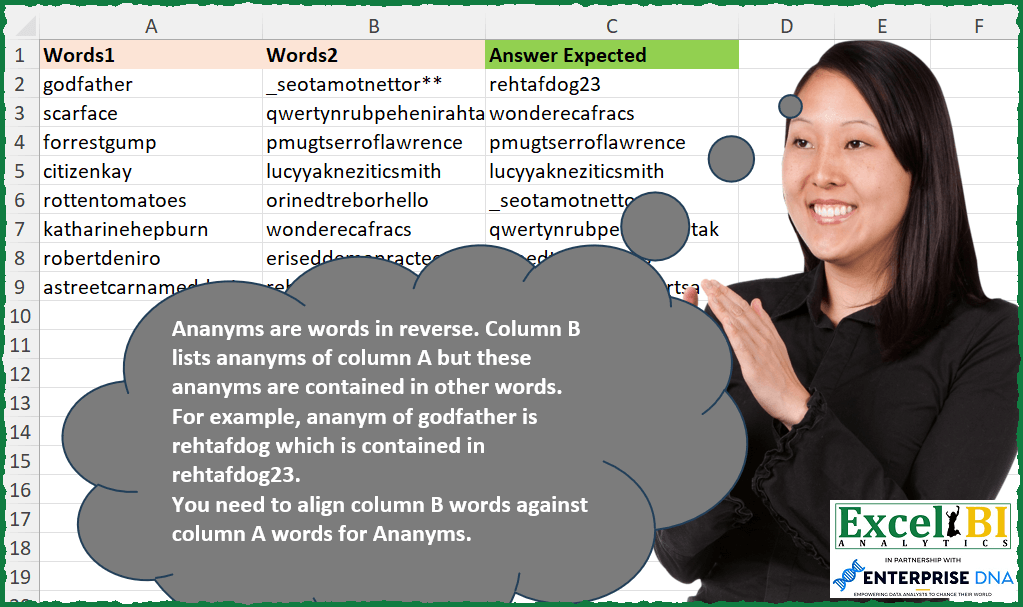
Ananyms are words in reverse. Column B lists ananyms of column A but these ananyms are contained in other words. For example, ananym of godfather is rehtafdog which is contained in rehtafdog23. You need to align column B words against column A words for Ananyms.
📌 Challenge Details and Links
ExcelBI Excel Challenge Number: 264
Challenge Difficulty: ⭐️
📥Download Sample File
📥Link to the solutions on LinkedIn
Solving the challenge of Match Reverse Word Containment with Power Query
Power Query solution 1 for Match Reverse Word Containment, proposed by Bo Rydobon 🇹🇭:
let
  Source = Excel.CurrentWorkbook(){[Name = "Table1"]}[Content],
  Ans = Table.TransformRows(
    Source,
    each List.Select(Source[Words2], (l) => Text.Contains(l, Text.Reverse([Words1]))){0}
  )
in
  Ans
Power Query solution 2 for Match Reverse Word Containment, proposed by Zoran Milokanović:
let
  Source = Excel.CurrentWorkbook(){[Name = "Input"]}[Content],
  R      = List.Transform(Source[Words1], Text.Reverse)
in
  List.Sort(Source[Words2], each List.PositionOf(R, List.Select(R, (r) => Text.Contains(_, r)){0}))
Power Query solution 3 for Match Reverse Word Containment, proposed by Aditya Kumar Darak 🇮🇳:
let
  Source = Excel.CurrentWorkbook(){[Name = "data"]}[Content],
  Return = Table.AddColumn(
    Source,
    "Answer",
    each [
      R = Text.Reverse([Words1]),
      A = List.Select(Source[Words2], (f) => Text.Contains(f, R)){0}
    ][A]
  )
in
  Return
Power Query solution 4 for Match Reverse Word Containment, proposed by Alejandro Simón 🇵🇦 🇪🇸:
let
  Source = Excel.CurrentWorkbook(){[Name = "Table1"]}[Content],
  Sol = Table.AddColumn(
    Source,
    "Custom",
    each
      let
        a = Source[Words2],
        b = List.Select(a, (x) => Text.Contains(x, Text.Reverse([Words1]))){0}
      in
        b
  )
in
  Sol
Power Query solution 5 for Match Reverse Word Containment, proposed by Luan Rodrigues:
let
  Fonte = Tabela1,
  res = Table.AddColumn(
    Fonte,
    "Personalizar",
    each Table.SelectRows(Fonte, (x) => Text.Contains(Text.Reverse(x[Words2]), [Words1]))[Words2]{0}
  )
in
  res
Power Query solution 6 for Match Reverse Word Containment, proposed by Brian Julius:
let
  Source = Excel.CurrentWorkbook(){[Name = "Table1"]}[Content]
in
  Table.AddColumn(
    Source,
    "Answer",
    each [a = Text.Reverse([Words1]), b = List.Select(Source[Words2], each Text.Contains(_, a))]
      [b]
      {0}
  )
Power Query solution 7 for Match Reverse Word Containment, proposed by Mihai Radu O:
let
  Source = Excel.CurrentWorkbook(){[Name = "Table1"]}[Content],
  R = Table.AddColumn(
    Source,
    "R",
    each
      let
        a = Source[Words2],
        b = Text.Reverse([Words1]),
        c = List.FindText(a, b){0}
      in
        c
  )[R]
in
  R
Solving the challenge of Match Reverse Word Containment with Excel
Excel solution 1 for Match Reverse Word Containment, proposed by Bo Rydobon 🇹🇭:
=MAP(
    A2:A9,
    LAMBDA(
        a,
        VLOOKUP(
            CONCAT(
                "*",
                MID(
                    a,
                    99-SEQUENCE(
                        98
                    ),
                    1
                ),
                "*"
            ),
            B2:B9,
            1,

        )
    )
)
Excel solution 2 for Match Reverse Word Containment, proposed by John V.:
=MAP(
    A2:A9,
    LAMBDA(
        x,
        LOOKUP(
            99,
            FIND(
                CONCAT(
                    MID(
                        x,
                        30-ROW(
                            1:29
                        ),
                        1
                    )
                ),
                B2:B9
            ),
            B2:B9
        )
    )
)
Excel solution 3 for Match Reverse Word Containment, proposed by محمد حلمي:
=MAP(
    A2:A9,
    LAMBDA(
        a,
        TOCOL(
            IF(
                FIND(
                    CONCAT(
                        MID(
                            a,
                            21-ROW(
                                1:20
                            ),
                            1
                        )
                    ),
                    B2:B9
                ),
                B2:B9
            ),
            2
        )
    )
)
Excel solution 4 for Match Reverse Word Containment, proposed by Kris Jaganah:
=MAP(A2:A9,LAMBDA(x,LET(a,B2:B9,FILTER(a,--ISERR(FIND(CONCAT(MID(x,SEQUENCE(LEN(x),,LEN(x),-1),1)),a))=0))))Excel solution 5 for Match Reverse Word Containment, proposed by Timothée BLIOT:
=MAP(A2:A9,LAMBDA(z,CONCAT(MAP(B2:B9,LAMBDA(x,IF(ISNUMBER(FIND(CONCAT(MID(z,SEQUENCE(LEN(z),,LEN(z),-1),1)),x)),x,""))))))Excel solution 6 for Match Reverse Word Containment, proposed by Hussein SATOUR:
=MAP(
    A2:A9,
     LAMBDA(
         x,
          XLOOKUP(
              "*"&CONCAT(
                  MID(
                      x,
                       SEQUENCE(
                           LEN(
                               x
                           ),
                           ,
                           LEN(
                               x
                           ),
                            -1
                       ),
                       1
                  )
              )&"*",
               B2:B9,
              B2:B9,
              ,
              2
          )
     )
)
Excel solution 7 for Match Reverse Word Containment, proposed by Oscar Mendez Roca Farell:
=MAP(
    A2:A9,
     LAMBDA(
         a,
          FILTER(
              B2:B9,
               NOT(
                   ISERR(
                       FIND(
                           CONCAT(
                               LEFT(
                                   RIGHT(
                                       a,
                                        SEQUENCE(
                                            LEN(
                                                a
                                            )
                                        )
                                   )
                               )
                           ),
                            B2:B9
                       )
                   )
               )
          )
     )
)
Excel solution 8 for Match Reverse Word Containment, proposed by LEONARD OCHEA 🇷🇴:
=LET(x,A2:A9,y,B2:B9,XLOOKUP("*"&x&"*",BYROW(MID(y,SEQUENCE(,30,30,-1),1),LAMBDA(a,CONCAT(a))),y,,2))Excel solution 9 for Match Reverse Word Containment, proposed by Abdallah Ally:
=MAP(A2:A9,LAMBDA(v,LET(a,CONCAT(MID(v,SEQUENCE(LEN(v),,LEN(v),-1),1)),FILTER(B2:B9,MAP(B2:B9,LAMBDA(x,IFERROR(SEARCH(a,x),0)))))))Excel solution 10 for Match Reverse Word Containment, proposed by Charles Roldan:
=LET(Words1,
     A2:A9,
     Words2,
     B2:B9,

Reverse,
     LAMBDA(
         f,
          f(
              f
          )
     )(LAMBDA(f,
     LAMBDA(x,

 IF(LEN(
     x
 ),
     f(
              f
          )(REPLACE(
              x,
               1,
               1,

          )) & LEFT(
     x
 ),
     )))),

XLOOKUP(
    "*" & MAP(
        Words1,
         Reverse
    ) & "*",
     Words2,
     Words2,
     ,
     2
))
Excel solution 11 for Match Reverse Word Containment, proposed by JvdV –:
=VLOOKUP(
    REDUCE(
        "*",
        ROW(
            1:99
        ),
        LAMBDA(
            x,
            y,
            MID(
                A2:A9&"*",
                y,
                1
            )&x
        )
    ),
    B2:B9,
    1,

)
Excel solution 12 for Match Reverse Word Containment, proposed by Julien Lacaze:
=LET(data,A2:A9,words2,B2:B9,
rev,MAP(data,LAMBDA(d,CONCAT(MID(d,SEQUENCE(LEN(d),,LEN(d),-1),1)))),
XLOOKUP("*"&rev&"*",words2,words2,,2))
Excel solution 13 for Match Reverse Word Containment, proposed by Ziad A.:
=ARRAYFORMULA(
    MAP(
        A2:A9,
        LAMBDA(
            a,
            LET(
                l,
                LEN(
                    a
                ),
                VLOOKUP(
                    "*"&JOIN(
                        ,
                        MID(
                            a,
                            SEQUENCE(
                                l,
                                1,
                                l,
                                -1
                            ),
                            1
                        )
                    )&"*",
                    B2:B9,
                    1,

                )
            )
        )
    )
)
Excel solution 14 for Match Reverse Word Containment, proposed by Giorgi Goderdzishvili:
=MAP(
    B3:B10,
    LAMBDA(
        x,
        LET(

            wr_1,
            x,

            rev,
             CONCAT(
                 MID(
                     wr_1,
                     SEQUENCE(
                         ,
                         LEN(
                             wr_1
                         ),
                         LEN(
                             wr_1
                         ),
                         -1
                     ),
                     1
                 )
             ),

            FILTER(
                C3:C10,
                ISNUMBER(
                    FIND(
                        rev,
                        C3:C10
                    )
                )
            )
        )
    )
)
Excel solution 15 for Match Reverse Word Containment, proposed by Daniel Garzia:
=LET(
    d,
    A2:A9,
    l,
    B2:B9,
    SORTBY(
        l,
        XMATCH(
            BYROW(
                MAP(
                    l,
                    LAMBDA(
                        x,
                        CONCAT(
                            MID(
                                x,
                                23-ROW(
                                    1:22
                                ),
                                1
                            )
                        )
                    )
                ),
                LAMBDA(
                    r,
                    LOOKUP(
                        0,
                        -FIND(
                            d,
                            r
                        ),
                        d
                    )
                )
            ),
            d
        )
    )
)
Excel solution 16 for Match Reverse Word Containment, proposed by Anup Kumar:
=XLOOKUP(

    SCAN(
        "",
        A2:A9,
         LAMBDA(
             x,
             y,
             CONCAT(
                 "*"&MID(
                     y,
                     SEQUENCE(
                         LEN(
                             y
                         ),
                         ,
                         LEN(
                             y
                         ),
                         -1
                     ),
                     1
                 )&"*"
             )
         )

    ),
    B2:B9,
    B2:B9,
    ,
    2
)
Excel solution 17 for Match Reverse Word Containment, proposed by samir tobeil:
=MAP(
    A2:A9,
    LAMBDA(
        x,
        LET(
            s,
            LEN(
                x
            ),
            d,
            CONCAT(
                INDEX(
                    MID(
                        x,
                        SEQUENCE(
                            s
                        ),
                        1
                    ),
                    SEQUENCE(
                        s,
                        ,
                        s,
                        -1
                    )
                )
            ),

            INDEX(
                B2:B9,
                SUM(
                    ISNUMBER(
                        FIND(
                            d,
                            B2:B9
                        )
                    )*ROW(
                        1:8
                    )
                )
            )
        )
    )
)
Excel solution 18 for Match Reverse Word Containment, proposed by Md Ismail Hosen:
=LET(
    Word1AndWord2,
     A2:B9,
     Words2,
     CHOOSECOLS(
         Word1AndWord2,
          2
     ),
     fx_One,
     LAMBDA(
         Word1,
          LET(
              ReverseText,
               CONCAT(
                   MID(
                       Word1,
                        SEQUENCE(
                            LEN(
                                Word1
                            ),
                             ,
                             LEN(
                                Word1
                            ),
                             -1
                        ),
                        1
                   )
               ),
               Result,
               XLOOKUP(
                   "*" & ReverseText & "*",
                    Words2,
                    Words2,
                    ,
                    2
               ),
               Result
          )
     ),
     MAP(
         CHOOSECOLS(
             Word1AndWord2,
              1
         ),
          fx_One
     )
)
Excel solution 19 for Match Reverse Word Containment, proposed by Mungunbayar Bat-Ochir:
=BYROW(
    A2:A9;
    LAMBDA(
        word_1;
        LET(

             length;
            LEN(
                word_1
            );

             words_2;
            B2:B9;

             chars;
             MID(
                 word_1;
                 SEQUENCE(
                     length
                 );
                 1
             );

             ananym;
            CONCAT(
                SORTBY(
                    chars;
                    SEQUENCE(
                        length;
                        ;
                        length;
                        -1
                    )
                )
            );

             result;
            INDEX(
                words_2;
                MATCH(
                    "*"&ananym&"*";
                    words_2;
                    0
                )
            );

             result

        )

    )
)
Excel solution 20 for Match Reverse Word Containment, proposed by Jeff Blakley:
=LET(
    ananyms,
     MAP(
         A2:A9,
          LAMBDA(
              x,
               CONCAT(
                   MID(
                       x,
                        SEQUENCE(
                            LEN(
                                x
                            ),
                            ,
                            LEN(
                                x
                            ),
                             -1
                        ),
                        1
                   )
               )
          )
     ),

     INDEX(
         B2:B9,
          MATCH(
              "*"&ananyms&"*",
               B2:B9,
               0
          )
     )
)
Excel solution 21 for Match Reverse Word Containment, proposed by Deepak Dalal:
= LET(
    _mch,
     B2:B9,
     INDEX(
         _mch,
         MAP(
             A2:A9,
              LAMBDA(
                  a,
                   MATCH(
                       "*" & TEXTJOIN(
                           ,
                            ,
                            SORTBY(
                                MID(
                                    a,
                                     SEQUENCE(
                                         LEN(
                                             a
                                         )
                                     ),
                                     1
                                ),
                                SEQUENCE(
                                    LEN(
                                             a
                                         ),
                                    ,
                                    LEN(
                                             a
                                         ),
                                    -1
                                )
                            )
                       ) &"*",
                        _mch,

                   )
              )
         )
     )
)
&&