
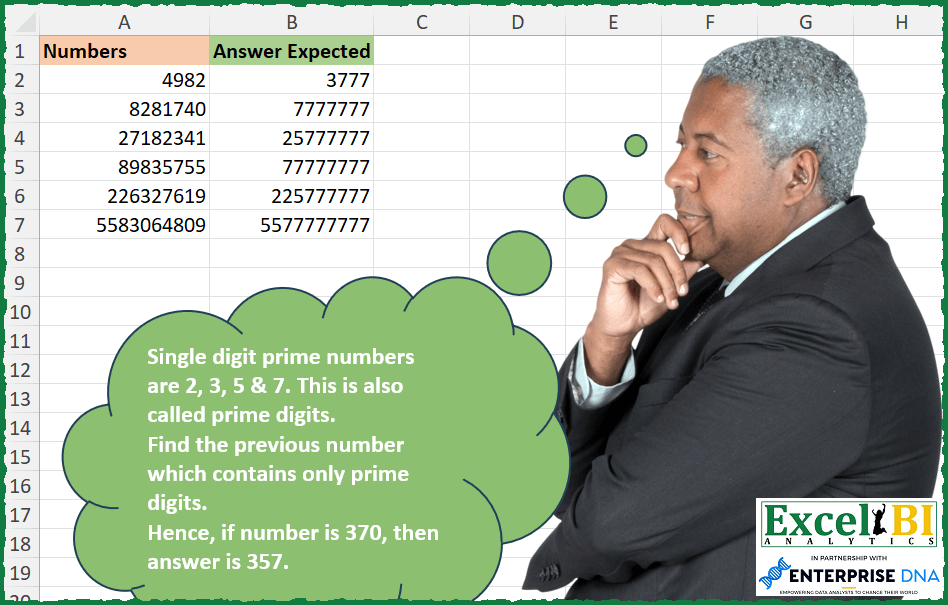
Single digit prime numbers are 2, 3, 5 & 7. These are also called prime digits. Find the previous number which contains only prime digits. Hence, if number is 370, then answer is 357.
📌 Challenge Details and Links
ExcelBI Excel Challenge Number: 261
Challenge Difficulty: ⭐️⭐️
📥Download Sample File
📥Link to the solutions on LinkedIn
Solving the challenge of Find Previous Prime Digit Number with Power Query
Power Query solution 1 for Find Previous Prime Digit Number, proposed by Bo Rydobon 🇹🇭:
let
  Source = Excel.CurrentWorkbook(){[Name = "Table1"]}[Content],
  Ans = Table.TransformRows(
    Source,
    each
      let
        N = Text.ToList(Text.From([Numbers] - 1)),
        Pr = {"2", "3", "5", "7"},
        P = List.Transform(N, each List.Max(List.Select(Pr, (p) => p <= _))),
        L = List.Count(N),
        Q = List.Min(
          {
            List.PositionOf(List.Transform(List.Zip({N, P}), each _{0} <> _{1}) & {true}, true),
            L - 1
          }
        )
      in
        Number.From(
          Text.Combine(
            List.FirstN(
              (
                if P{Q} = null then
                  try
                    List.FirstN(P, Q - 1) & {List.Max(List.Select(Pr, each _ < P{Q - 1}))}
                  otherwise
                    {"0"} & {"7"}
                else
                  List.FirstN(P, Q + 1)
              )
                & List.Repeat({"7"}, 15),
              L
            )
          )
        )
  )
in
  Ans
Power Query solution 2 for Find Previous Prime Digit Number, proposed by Zoran Milokanović:
let
  Source = Excel.CurrentWorkbook(){[Name = "Input"]}[Content][Numbers],
  None = (n) =>
    let
      t = Text.From(n)
    in
      t <> Text.Select(t, {"2", "3", "5", "7"}),
  S = List.Transform(
    Source,
    each List.Min(List.Generate(() => _ - 1, None, each _ - 1, each _ - 1))
  )
in
  S
Power Query solution 3 for Find Previous Prime Digit Number, proposed by Alejandro Simón 🇵🇦 🇪🇸:
let
  Origen = Excel.CurrentWorkbook(){[Name = "Tabla1"]}[Content],
  Sol = Table.AddColumn(
    Origen,
    "Answer",
    each
      let
        a = List.Numbers([Numbers], Number.RoundDown([Numbers] / 4), - 1),
        b = List.Transform(a, each Text.ToList(Text.From(_))),
        c = Number.From(
          Text.Combine(
            List.Select(b, (x) => not List.ContainsAny({"1", "4", "6", "8", "9", "0"}, x)){0}
          )
        )
      in
        c
  )[[Answer]]
in
  Sol
Power Query solution 4 for Find Previous Prime Digit Number, proposed by Alejandro Simón 🇵🇦 🇪🇸:
let
 Source = Excel.CurrentWorkbook(){[Name="Table1"]}[Content],
 Sol = Table.AddColumn(Source, "Answer", each
let
a = List.Buffer(List.Generate(
 ()=> [z = [Numbers], w = false],
 each [w] <> true,
 each [w = List.AllTrue(List.Transform(Text.ToList(Text.From([z])), each List.ContainsAny({"2", "3", "5", "7"}, {_}))),
 z = [z]-1],
 each [z])),
b = List.Last(a)
in b)[[Answer]]
in
 Sol
Lastimosamente, toma mucho tiempo, pero funciona.
Solving the challenge of Find Previous Prime Digit Number with Excel
Excel solution 1 for Find Previous Prime Digit Number, proposed by Bo Rydobon 🇹🇭:
=MAP(A2:A10-1,LAMBDA(a,LET(p,{-1,2,3,5,7},l,LEN(a),m,--MID(a,SEQUENCE(l),1),n,MATCH(m,p),o,INDEX(p,n),
r,REPT(7,15),b,LEFT(CONCAT(TAKE(o,IFNA(XMATCH(0,N(o=m)),l)),r),l),f,FIND("-",b)-1,
g,IFERROR(BASE(DECIMAL(CONCAT(1,TAKE(n-2,f)),4)-1,4),0),h,LEN(g)-f,
c,LEFT(CONCAT(IFERROR(INDEX(p,MID(g,SEQUENCE(f)+h,1)+2),0))&r,l+h-1),
IF(COUNT(f),--c,--b))))
Excel solution 2 for Find Previous Prime Digit Number, proposed by Bo Rydobon 🇹🇭:
=MAP(
    A2:A10-1,
    LAMBDA(
        a,
        LET(
            b,
            {0,
            2,
            3,
            5,
            7},
            l,
            LEN(
                a
            ),
            n,
            --MID(
                a,
                SEQUENCE(
                    l
                ),
                1
            ),
            p,
            LOOKUP(
                n,
                b
            ),
            q,
            IFNA(
                XMATCH(
                    0,
                    N(
                        n=p
                    )
                ),
                l
            ),

            --LEFT(
                CONCAT(
                    TAKE(
                        IF(
                            INDEX(
                                p,
                                q
                            ),
                            p,
                            VSTACK(
                                IF(
                                    q>2,
                                    TAKE(
                                        p,
                                        q-2
                                    ),
                                    0
                                ),
                                LOOKUP(
                                    INDEX(
                                        p,
                                        q-1
                                    )-1,
                                    b
                                ),
                                7
                            )
                        ),
                        q
                    ),
                    REPT(
                        7,
                        15
                    )
                ),
                l
            )
        )
    )
)
Excel solution 3 for Find Previous Prime Digit Number, proposed by John V.:
=MAP(
    A2:A7,
    LAMBDA(
        x,
        LET(
            n,
            --MID(
                x,
                SEQUENCE(
                    LEN(
                        x
                    )
                ),
                1
            ),
            c,
            {0;2;3;5;7},
            b,
            LOOKUP(
                n,
                c
            ),
            m,
            IFNA(
                MATCH(
                    ,
                    b,

                ),
                9
            ),
            z,
            XMATCH(
                1,
                N(
                    b
Excel solution 4 for Find Previous Prime Digit Number, proposed by محمد حلمي:
=MAP(
    A2:A7,
    LAMBDA(
        a,
        LET(

            s,
            SEQUENCE(
                LEN(
                    a
                )
            ),
            v,
            MID(
                a,
                s,
                1
            )+0,
            i,
            {2,
            3,
            5,
            7},

            CONCAT(
                SCAN(
                    ,
                    MAP(
                        v,
                        s,
                        LAMBDA(
                            a,
                            b,

                            IFNA(
                                LOOKUP(
                                    IF(
                                        AND(
                                            OR(
                                                a=i
                                            ),
                                            b<>1
                                        ),
                                        a-1,
                                        a
                                    ),
                                    i
                                ),
                                2
                            )
                        )
                    ),

                    LAMBDA(
                        a,
                        d,
                        IFS(
                            d>=a,
                            d,
                            @v=a,
                            @v,
                            1,
                            7
                        )
                    )
                )
            )
        )
    )
)
Excel solution 5 for Find Previous Prime Digit Number, proposed by محمد حلمي:
=MAP(
    A2:A7,
    LAMBDA(
        a,
        CONCAT(

            SCAN(
                ,
                IFNA(
                    LOOKUP(
                        MID(
                            a,
                            SEQUENCE(
                                LEN(
                                    a
                                )
                            ),
                            1
                        )+0,
                        {2,
                        3,
                        5,
                        7}
                    ),

                ),
                LAMBDA(
                    a,
                    d,
                    IF(
                        d>a,
                        d,
                        a
                    )
                )
            )
        )
    )
)
Excel solution 6 for Find Previous Prime Digit Number, proposed by Julian Poeltl:
=MAP(
    A2:A7,
    LAMBDA(
        L,
        --LET(
            N,
            HSTACK(
                2,
                3,
                5,
                7
            ),
            S,
            --MID(
                L,
                SEQUENCE(
                    LEN(
                        L
                    )
                ),
                1
            ),
            X,
            XMATCH(
                FALSE,
                ISNUMBER(
                    XMATCH(
                        S,
                        N
                    )
                )
            ),
            M,
            --MID(
                L,
                X,
                1
            )>2,
            CONCAT(
                IF(
                    M,
                    XLOOKUP(
                        TAKE(
                            S,
                            X
                        ),
                        N,
                        N,
                        ,
                        -1
                    ),
                    XLOOKUP(
                        DROP(
                            TAKE(
                                S,
                                X-1
                            ),
                            -1
                        ),
                        N,
                        N,
                        ,
                        -1
                    )&XLOOKUP(
                        TAKE(
                            TAKE(
                                S,
                                X-1
                            ),
                            -1
                        )-1,
                        N,
                        N,
                        ,
                        -1
                    )
                )
            )&REPT(
                7,
                LEN(
                        L
                    )-X+IF(
                        M,
                        0,
                        1
                    )
            )
        )
    )
)
Excel solution 7 for Find Previous Prime Digit Number, proposed by Timothée BLIOT:
=MAP(
    A2:A7,
    LAMBDA(
        z,
        LET(
            P,
            {2,
            3,
            5,
            7},
             V,
            --REDUCE(
                "",
                SEQUENCE(
                    LEN(
                        z
                    )
                ),
                 LAMBDA(
                     w,
                     v,
                     LET(
                         A,
                         FILTER(
                             w,
                             LEN(
                                 w
                             )=v-1
                         ),
                         TOCOL(
                             A&P
                         )
                     )
                 )
            ),
            TAKE(
                FILTER(
                    V,
                    V-z<0
                ),
                -1
            )
        )
    )
)
Excel solution 8 for Find Previous Prime Digit Number, proposed by JvdV -:
=LET(
    a,
    LAMBDA(
        a,
        b,
        LET(
            c,
            b-ROW(
                1:100000
            ),
            d,
            @FILTER(
                c,
                REDUCE(
                    c,
                    {2,
                    3,
                    5,
                    7},
                    LAMBDA(
                        e,
                        f,
                        SUBSTITUTE(
                            e,
                            f,

                        )
                    )
                )="",
                0
            ),
            IF(
                d,
                d,
                a(
                    a,
                    b-100000
                )
            )
        )
    ),
    MAP(
        A2:A7,
        LAMBDA(
            g,
            a(
                a,
                g
            )
        )
    )
)
Excel solution 9 for Find Previous Prime Digit Number, proposed by Pieter de Bruijn:
=LET(b,
    {0,
    2,
    3,
    5,
    7},
    --MAP(A2:A10,
    LAMBDA(a,
    @REDUCE("",
    SEQUENCE(
        LEN(
            a
        )
    ),
    LAMBDA(x,
    y,
    LET(z,
    TOCOL(
        x
    )&b,
    SORT(TOCOL(IFS((z<=(""&(a-1)))*(ISERR(
        FIND(
            0,
            z,
            2
        )
    )),
    z),
    3),
    ,
    -1)))))))
Excel solution 10 for Find Previous Prime Digit Number, proposed by Pieter de Bruijn:
=MAP(
    A2:A10,
    LAMBDA(
        a,
        --REDUCE(
            "",
            SEQUENCE(
                LEN(
                    a
                )
            ),
            LAMBDA(
                x,
                y,
                LET(
                    m,
                    --MID(
                        a,
                        y,
                        1
                    ),
                    p,
                    {0;2;3;5;7},
                    l,
                    XLOOKUP(
                        IF(
                            y=1,
                            IF(
                                m<2,
                                2,
                                m
                            ),
                            IF(
                                m=7,
                                6,
                                IF(
                                m<2,
                                2,
                                m
                            )
                            )
                        ),
                        p,
                        p,
                        ,
                        -1
                    ),
                    IF(
        &                x
Excel solution 11 for Find Previous Prime Digit Number, proposed by Ziad A.:
=LET(
    V,
    LAMBDA(
        V,
        n,
        i,
        LET(
            s,
            SEQUENCE(
                MIN(
                    n,
                    10^5
                ),
                1,
                n-i*10^5,
                -1
            ),
            IFNA(
                INDEX(
                    FILTER(
                        s,
                        REGEXMATCH(
                            s&"",
                            "^[2357]+$"
                        )
                    ),
                    1
                ),
                V(
                    V,
                    n,
                    i+1
                )
            )
        )
    ),
    V(
        V,
        A2-1,
        0
    )
)

This formula is essentially analyzing 10e5 numbers at a time using recursion and counting down from the values in col A.

To check if a number contains only prime digits we use regular expressions.

REGEXMATCH(
    num,
    "^[2357]+$"
)
Excel solution 12 for Find Previous Prime Digit Number, proposed by samir tobeil:
=MAP(A2:A7,
    LAMBDA(t,
    LET(s,
    MAP(
        MID(
            t,
            SEQUENCE(
                LEN(
                    t
                )
            ),
            1
        )*1,
        LAMBDA(
            x,
            LET(
                e,
                IFNA(
                    VLOOKUP(
                        x,
                        {2;3;5;7},
                        1
                    ),
                    0
                ),
                IF(
                    e=x,
                    x,
                    0
                )
            )
        )
    ),
    h,
    FIND(
        0,
        CONCAT(
            s
        )
    ),
    SUBSTITUTE(MID(
        CONCAT(
            s
        ),
        1,
        h-1
    )&IFNA(VLOOKUP((MID(
        t,
        h,
        1
    )*1)-1,
    {2;3;5;7},
    1),
    0)&REPT(
        7,
        LEN(
                    t
                )-h
    ),
    70,
    57))))
Excel solution 13 for Find Previous Prime Digit Number, proposed by Md Ismail Hosen:
=LAMBDA(Numbers,
     LET(fx_One,
     LAMBDA(Number,
     LET(SingleDigitsPrime,
     {2,
    3,
    5,
    7},
     Chars,
     MID(
         Number,
          SEQUENCE(
              LEN(
                  Number
              )
          ),
          1
     ) * 1,
     TOTAL_SINGLE_DIGIT_PRIME,
     4,
     IsAlreadySinglePrimeDigits,
     MMULT(--(Chars = SingleDigitsPrime),
     SEQUENCE(
         TOTAL_SINGLE_DIGIT_PRIME,
          ,
          1,
          0
     )),
     InsertionPoint,
     XMATCH(
         0,
          IsAlreadySinglePrimeDigits,
          0
     ),
     LOWEST_SINGLE_DIGIT_PRIME,
     2,
     CorrectInsertionPoint,
     IF(
         INDEX(
             Chars,
              InsertionPoint,
              1
         ) < LOWEST_SINGLE_DIGIT_PRIME,
          InsertionPoint - 1,
          InsertionPoint
     ),
     CorrectedNumberAtInsertionPoint,
     XLOOKUP(
         INDEX(
             Chars,
              CorrectInsertionPoint,
              1
         ) - 1,
          SingleDigitsPrime,
          SingleDigitsPrime
     ),
     Top,
     IF(
         CorrectInsertionPoint = 1,
          "",
          TAKE(
              Chars,
               CorrectInsertionPoint - 1
          )
     ),
     HIGHEST_SINGLE_DIGIT_PRIME,
     7,
     Bottom,
     REPT(
         HIGHEST_SINGLE_DIGIT_PRIME,
          LEN(
                  Number
              ) - CorrectInsertionPoint
     ),
     Result,
     IF(ISNA(
         InsertionPoint
     ),
     Number,
     (CONCAT(
         VSTACK(
             Top,
              CorrectedNumberAtInsertionPoint
         )
     ) & Bottom) * 1),
     Result)),
     Result,
     MAP(
         Numbers,
          fx_One
     ),
     Result))(A2:A8)
Solving the challenge of Find Previous Prime Digit Number with Excel VBA
Excel VBA solution 1 for Find Previous Prime Digit Number, proposed by Mungunbayar Bat-Ochir:
VBA:
Function FindLargest(input_num As Double) As Double
 Dim i As Double
 Dim regex As Object

 Set regex = CreateObject("VBScript.RegExp")
 regex.Pattern = "^[2357]+$"

 For i = input_num To 1 Step -1
 If regex.test(i) Then
 FindLargest = i
 Exit Function
 End If

 Next i

End Function
&&