
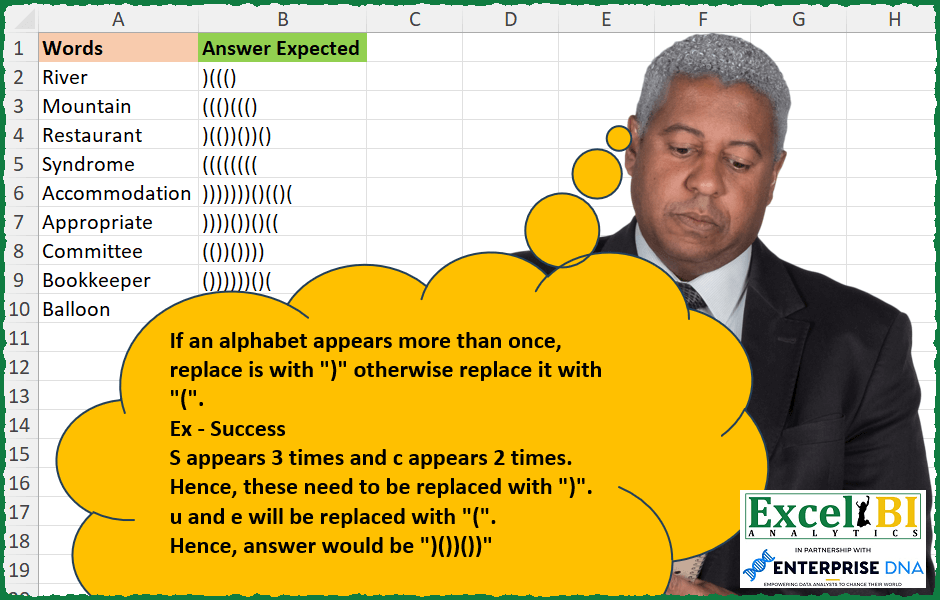
If an alphabet appears more than once, replace is with “)” otherwise replace it with “(“. Ex – Success S appears 3 times and c appears 2 times. Hence, these need to be replaced with “)”. u and e will be replaced with “(“. Hence, answer would be )())())
📌 Challenge Details and Links
ExcelBI Excel Challenge Number: 259
Challenge Difficulty: ⭐️
📥Download Sample File
📥Link to the solutions on LinkedIn
Solving the challenge of Replace Repeated Letters with Power Query
Power Query solution 1 for Replace Repeated Letters, proposed by Bo Rydobon 🇹🇭:
let
  Source = Excel.CurrentWorkbook(){[Name = "Table1"]}[Content],
  Ans = Table.TransformRows(
    Source,
    each Text.Combine(
      List.Transform(
        Text.ToList(Text.Upper([Words])),
        (a) => if Text.Length(Text.Select(Text.Upper([Words]), a)) > 1 then ")" else "("
      )
    )
  )
in
  Ans
Power Query solution 2 for Replace Repeated Letters, proposed by Zoran Milokanović:
let
  Source = Excel.CurrentWorkbook(){[Name = "Input"]}[Content][Words],
  S = List.Transform(
    Source,
    each
      let
        w = Text.Lower(_)
      in
        List.Accumulate(
          {0 .. Text.Length(w) - 1},
          "",
          (s, c) => s & (if Text.Length(Text.Select(w, Text.At(w, c))) > 1 then ")" else "(")
        )
  )
in
  S
Power Query solution 3 for Replace Repeated Letters, proposed by Aditya Kumar Darak 🇮🇳:
let
  Source = Excel.CurrentWorkbook(){[Name = "data"]}[Content],
  Return = Table.AddColumn(
    Source,
    "Answer",
    each [
      Upper = Text.Upper([Words]),
      OLength = Text.Length([Words]),
      ToList = Text.ToList(Upper),
      Calc = List.Transform(
        ToList,
        (f) => if Text.Length(Text.Select(Upper, f)) = 1 then "(" else ")"
      ),
      Output = Text.Combine(Calc)
    ][Output]
  )
in
  Return
Power Query solution 4 for Replace Repeated Letters, proposed by Luan Rodrigues:
let
  Fonte = Tabela1,
  res = Table.AddColumn(
    Fonte,
    "Personalizar",
    each [
      a = Text.ToList(Text.Lower([Words])),
      b = List.Distinct(List.Difference(a, List.Distinct(a))),
      c = List.ReplaceMatchingItems(a, List.Transform(b, each Text.ToList(_ & ")"))),
      d = Text.Combine(
        List.ReplaceMatchingItems(c, List.Transform({"a" .. "z"}, each Text.ToList(_ & "(")))
      )
    ][d]
  )
in
  res
Power Query solution 5 for Replace Repeated Letters, proposed by Brian Julius:
let
  Source = Excel.CurrentWorkbook(){[Name = "Table1"]}[Content],
  AddReplaceLetters = Table.AddColumn(
    Source,
    "Answer",
    each [
      a = Text.ToList(Text.Lower([Words])),
      b = List.Distinct(List.Difference(a, List.Distinct(a))),
      c = List.Transform(a, each if List.Contains(b, _) then ")" else "("),
      d = Text.Combine(c, "")
    ][d]
  )
in
  AddReplaceLetters
Power Query solution 6 for Replace Repeated Letters, proposed by Venkata Rajesh:
let
  Source = Data,
  Output = Table.AddColumn(
    Source,
    "Expected",
    each [
      x = Text.Lower([Words]),
      y = Text.ToList(x),
      z = Text.Combine(
        List.Transform(
          y,
          each if List.Count(Text.PositionOf(x, _, Occurrence.All)) > 1 then ")" else "("
        )
      )
    ][z]
  )
in
  Output
Solving the challenge of Replace Repeated Letters with Excel
Excel solution 1 for Replace Repeated Letters, proposed by Bo Rydobon 🇹🇭:
=MAP(
    UPPER(
        A2:A10
    ),
    LAMBDA(
        a,
        CONCAT(
            IF(
                LEN(
                    a
                )-LEN(
                    SUBSTITUTE(
                        a,
                        MID(
                            a,
                            SEQUENCE(
                                LEN(
                    a
                )
                            ),
                            1
                        ),

                    )
                )-1,
                ")",
                "("
            )
        )
    )
)
Excel solution 2 for Replace Repeated Letters, proposed by John V.:
=MAP(
    A2:A10,
    LAMBDA(
        x,
        LET(
            s,
            SEQUENCE(
                LEN(
                    x
                )
            ),
            w,
            MID(
                x,
                s,
                1
            ),
            CONCAT(
                IF(
                    MMULT(
                        N(
                            w=TOROW(
                                w
                            )
                        ),
                        s^0
                    )>1,
                    ")",
                    "("
                )
            )
        )
    )
)
Excel solution 3 for Replace Repeated Letters, proposed by محمد حلمي:
=MAP(A2:A10,LAMBDA(a,LET(i,MID(a,SEQUENCE(LEN(a)),1),
CONCAT(IF(MMULT(N(i=TOROW(i)),N(i)+1)>1,")","(")))))
Excel solution 4 for Replace Repeated Letters, proposed by محمد حلمي:
=MAP(A2:A10,LAMBDA(a,LET(s,SEQUENCE(LEN(a)),i,MID(a,s,1),CONCAT(IF(MMULT(--(i=TOROW(i)),s^0)>1,")","(")))))Excel solution 5 for Replace Repeated Letters, proposed by Kris Jaganah:
=MAP(A2:A10,
    LAMBDA(y,
    LET(a,
    MID(
        y,
        SEQUENCE(
            LEN(
                y
            )
        ),
        1
    ),
    CONCAT(MAP(a,
    LAMBDA(x,
    IF(SUM(--(a=x))>1,
    ")",
    "(")))))))
Excel solution 6 for Replace Repeated Letters, proposed by Julian Poeltl:
=MAP(
    A2:A10,
    LAMBDA(
        A,
        LET(
            C,
            MID(
                A,
                SEQUENCE(
                    LEN(
                        A
                    )
                ),
                1
            ),
            CONCAT(
                IF(
                    MAP(
                        C,
                        LAMBDA(
                            A,
                            ROWS(
                                FILTER(
                                    C,
                                    C=A
                                )
                            )
                        )
                    )>1,
                    ")",
                    "("
                )
            )
        )
    )
)
Excel solution 7 for Replace Repeated Letters, proposed by Aditya Kumar Darak 🇮🇳:
=MAP(

     A2:A10,

     LAMBDA(
         a,

          LET(

               upc,
               UPPER(
                   a
               ),

               splt,
               MID(
                   upc,
                    SEQUENCE(
                        LEN(
                   a
               )
                    ),
                    1
               ),

               cnt,
               LEN(
                   a
               ) - LEN(
                   SUBSTITUTE(
                       upc,
                        splt,
                        ""
                   )
               ),

               r,
               CONCAT(
                   IF(
                       cnt = 1,
                        "(",
                        ")"
                   )
               ),

               r

          )

     )

)
Excel solution 8 for Replace Repeated Letters, proposed by Timothée BLIOT:
=MAP(A2:A10,LAMBDA(z,LET(A,MID(z,SEQUENCE(LEN(z)),1),CONCAT(MAP(A,LAMBDA(x,IF(SUM(1*(A=x))>1,")","(")))))))Excel solution 9 for Replace Repeated Letters, proposed by Oscar Mendez Roca Farell:
=MAP(
    A2:A10,
     LAMBDA(
         a,
          LET(
              _s,
              SEQUENCE(
                  LEN(
                      a
                  )
              ),
              _w,
              MID(
                  a,
                  _s,
                   1
              ),
               CONCAT(
                   IF(
                       MMULT(
                           N(
                               _w=TOROW(
                                   _w
                               )
                           ),
                           _s^0
                       )=1,
                        "(",
                        ")"
                   )
               )
          )
     )
)
Excel solution 10 for Replace Repeated Letters, proposed by Sunny Baggu:
=MAP(

     A2:A10,

     LAMBDA(
         x,

          LET(

               s,
               SEQUENCE(
                   LEN(
                       x
                   )
               ),

               w,
               MID(
                   x,
                    s,
                    1
               ),

               wt,
               TOROW(
                   w
               ),

               CONCAT(
                   IF(
                       BYCOL(
                           N(
                               w = wt
                           ),
                            LAMBDA(
                                a,
                                 SUM(
                                     a
                                 ) - 1
                            )
                       ),
                        ")",
                        "("
                   )
               )

          )

     )

)
Excel solution 11 for Replace Repeated Letters, proposed by Abdallah Ally:
=MAP(
    A2:A10,
    LAMBDA(
        v,
        LET(
            a,
            LOWER(
                v
            ),
            b,
            SEQUENCE(
                LEN(
                    a
                )
            ),
            REDUCE(
                a,
                b,
                LAMBDA(
                    x,
                    y,
                    IF(
                        LEN(
                    a
                )-LEN(
                            SUBSTITUTE(
                                a,
                                MID(
                                    a,
                                    y,
                                    1
                                ),
                                ""
                            )
                        )>1,
                        SUBSTITUTE(
                            x,
                            MID(
                                x,
                                y,
                                1
                            ),
                            ")"
                        ),
                        SUBSTITUTE(
                            x,
                            MID(
                                x,
                                y,
                                1
                            ),
                            "("
                        )
                    )
                )
            )
        )
    )
)
Excel solution 12 for Replace Repeated Letters, proposed by Anshu Bantra:
=MAP(
 A1:A9,
 LAMBDA(str,
 LET(
 len_1, LEN(str),
 chars, MID(str, SEQUENCE(len_1), 1),
 reps, len_1 - LEN(SUBSTITUTE(str, chars, "")),
 TEXTJOIN("", TRUE, IF(reps >= 2, "(", ")"))
 )
 )
)
Excel solution 13 for Replace Repeated Letters, proposed by Pieter de B.:
=MAP(A2:A10,LAMBDA(a,LET(b,SEQUENCE(LEN(a)),c,MID(a,b,1),CONCAT(IF(MMULT(--(TOROW(c)=c),b^0)-1,")","(")))))Excel solution 14 for Replace Repeated Letters, proposed by Asheesh Pahwa:
=MAP(A2:A10,
    LAMBDA(
        x,
        LET(
            a,
            MID(
                x,
                SEQUENCE(
                    LEN(
                        x
                    )
                ),
                1,
                b,
                UNIQUE(
                    a,
                    ,
                    TRUE
                ),
                CONCAT(
                    IF(
                        ISNUMBER(
                            XMATCH(
                                a,
                                b
                            )
                        ),
                        "(",
                        ")"
                    )
                )
            )
        )
    )
Excel solution 15 for Replace Repeated Letters, proposed by Charles Roldan:
=LET(
    A,
     LAMBDA(
         f,
          LAMBDA(
              x,
               MAP(
                   x,
                    f
               )
          )
     ),

    S,
     LAMBDA(
         f,
          LAMBDA(
              x,
               CONCAT(
                   f(
                       MID(
                           x,
                            SEQUENCE(
                                LEN(
                                    x
                                )
                            ),
                            1
                       )
                   )
               )
          )
     ),

    A(
        S(
            LAMBDA(
                x,
                 IF(
                     ISNA(
                         XMATCH(
                             x,
                              UNIQUE(
                                  x,
                                   ,
                                   1
                              )
                         )
                     ),
                      ")",
                      "("
                 )
            )
        )
    )
)(A2:A10)
Excel solution 16 for Replace Repeated Letters, proposed by Julien Lacaze:
=LET(data,A2:A10,
split,LAMBDA(text,MID(text,SEQUENCE(LEN(text)),1)),
MAP(data,LAMBDA(d, LET(s,split(d),
b,BYROW(s,LAMBDA(a,SUM(--(a=TRANSPOSE(s))))),
CONCAT(IF(b=1,"(",")"))))))
Excel solution 17 for Replace Repeated Letters, proposed by Ziad A.:
=ARRAYFORMULA(MAP(A2:A10,LAMBDA(w,JOIN(,IF(LEN(REGEXREPLACE(w,"(?i)[^"&MID(w,SEQUENCE(LEN(w)),1)&"]",))=1,"(",")")))))
This formula uses REGEXREPLACE and LEN to count the occurrences of each character:
LEN(REGEXREPLACE(w,"(?i)[^"&MID(w,SEQUENCE(LEN(w)),1)&"]",))
If the result is 1, it returns "(", otherwise it returns ")
Excel solution 18 for Replace Repeated Letters, proposed by Daniel Garzia:
=MAP(A2:A10,
    LAMBDA(x,
    LET(c,
    MID(
        x,
        SEQUENCE(
            LEN(
                x
            )
        ),
        1
    ),
    CONCAT(IF(MAP(c,
    LAMBDA(r,
    SUM(--(c=r))))-1,
    ")",
    "(")))))
Excel solution 19 for Replace Repeated Letters, proposed by Quadri Olayinka Atharu:
=MAP(A2:A10,LAMBDA(w,LET(m,MID(w,SEQUENCE(LEN(w)),1),
CONCAT(IF(MAP(m,LAMBDA(x,SUM(N(m=x))))>1,")","(")))))
Excel solution 20 for Replace Repeated Letters, proposed by samir tobeil:
=MAP(A2:A10,
    LAMBDA(x,
    LET(t,
    LEN(
        x
    ),
    e,
    CODE(
        UPPER(
            MID(
                x,
                SEQUENCE(
                    t
                ),
                1
            )
        )
    ),
    r,

FREQUENCY(
    e,
    e
),
    LEFT(CONCAT(IF((r=1),
    "(",
    ")")),
    t))))
Excel solution 21 for Replace Repeated Letters, proposed by Md Ismail Hosen:
=LAMBDA(
    Words,

     LET(

          fx_ForOne,
          LAMBDA(
              Word,

               LET(

                    Chars,
                    MID(
                        Word,
                         SEQUENCE(
                             LEN(
                                 Word
                             )
                         ),
                         1
                    ),

                    Counts,
                    MAP(
                        Chars,
                         LAMBDA(
                             a,
                              ROWS(
                                  FILTER(
                                      Chars,
                                       Chars = a
                                  )
                              )
                         )
                    ),

                    Result,
                    CONCAT(
                        IF(
                            Counts > 1,
                             ")",
                             "("
                        )
                    ),

                    Result

               )

          ),

          Result,
          MAP(
              Words,
               fx_ForOne
          ),

          Result

     )

)(A2:A10)
Excel solution 22 for Replace Repeated Letters, proposed by Amardeep Singh:
=MAP(A2:A10,
    LAMBDA(x,

LET(d,
    MID(
        x,
        SEQUENCE(
            LEN(
                x
            )
        ),
        1
    ),

CONCAT(MAP(d,
    LAMBDA(m,
    IF(SUM(--(m=d))-1,
    ")",
    "(")))))))
Excel solution 23 for Replace Repeated Letters, proposed by Mungunbayar Bat-Ochir:
=LET(

    input;
    A2;

    chars;
    MID(
        input;
        SEQUENCE(
            LEN(
                input
            )
        );
        1
    );

    uniques;
    CONCAT(
        UNIQUE(
            chars;
            ;
            TRUE
        )
    );

    CONCAT(
        MAP(
            chars;
            LAMBDA(
                chr;
                IF(

                     ISNUMBER(
                         SEARCH(
                             chr;
                             uniques
                         )
                     );

                     SUBSTITUTE(
                         chr;
                         chr;
                         "("
                     );

                     SUBSTITUTE(
                         chr;
                         chr;
                         ")"
                     )
                )

            )
        )
    )
)
Excel solution 24 for Replace Repeated Letters, proposed by Narayanan J 🇮🇳:
=MAP(
    A2:A10,
    LAMBDA(
        w,
        LET(
            ln,
            LEN(
                w
            ),
            c,
            UPPER(
                MID(
                    w,
                    SEQUENCE(
                        ln
                    ),
                    1
                )
            ),
            TEXTJOIN(
                ,
                0,
                MAP(
                    c,
                    LAMBDA(
                        ch,
                        IF(
                            LEN(
                w
            )-LEN(
                                SUBSTITUTE(
                                    w,
                                    ch,
                                    ""
                                )
                            )=0,
                            "(",
                            ")"
                        )
                    )
                )
            )
        )
    )
)
Solving the challenge of Replace Repeated Letters with Excel VBA
Excel VBA solution 1 for Replace Repeated Letters, proposed by Hiran de Silva FCMA:
 'create lookup table

 For iChar = 1 To Len(strSourceWord)

 For iLookupList = 1 To 26

 If Cells(iLookupList, 6).Value = Mid(strSourceWord, iChar, 1) Then

 If Cells(iLookupList, 7).Value = "" Then

 Cells(iLookupList, 7).Value = "["

 Else

 Cells(iLookupList, 7).Value = "]"

 End If

 End If
 Next iLookupList

 Next iChar
 'lookup

 For iChar = 1 To Len(strSourceWord)
 For iRow = 1 To 26

 If Cells(iRow, 6).Value = Mid(strSourceWord, iChar, 1) Then

 strNewChar = Cells(iRow, 7).Value

 End If

 Next iRow


 Next iChar

End Function
'--------------------------------------------------
Sub DoThis()
 Range("B2:B100").ClearContents
 For iRow = 2 To 10

 Columns("G:G").Clear

 Cells(iRow, 2).Value = EncryptThis(Cells(iRow, 1))

 Next iRow
End Sub
&&