
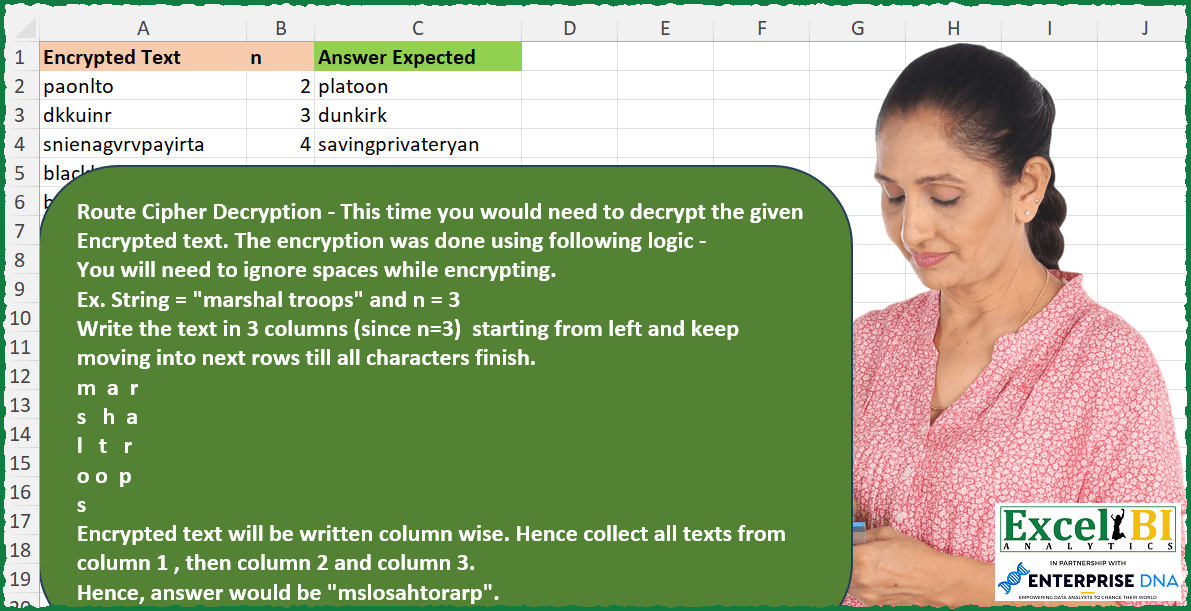
Route Cipher Decryption – This time you would need to decrypt the given Encrypted text. The encryption was done using following logic – You will need to ignore spaces while encrypting. Ex. String = “marshal troops” and n = 3 Write the text in 3 columns (since n=3) starting from left and keep moving into next rows till all characters finish. m a r s h a l t r o o p s Encrypted text will be written column wise. Hence collect all texts from column 1 , then column 2 and column 3. Hence, answer would be “mslosahtorarp”.
📌 Challenge Details and Links
ExcelBI Excel Challenge Number: 258
Challenge Difficulty: ⭐️⭐️
📥Download Sample File
📥Link to the solutions on LinkedIn
Solving the challenge of Decrypt Route Cipher with Power Query
Power Query solution 1 for Decrypt Route Cipher, proposed by Bo Rydobon 🇹🇭:
let
  Source = Excel.CurrentWorkbook(){[Name = "Table1"]}[Content],
  Ans = Table.AddColumn(
    Source,
    "Custom",
    each
      let
        a = [Encrypted Text],
        l = Number.RoundUp(Text.Length(a) / [n]) * [n],
        m = List.Transform(List.Combine(List.Zip(List.Split(Text.ToList(a), [n]))), Text.Length),
        c = List.Accumulate(m, {}, (s, l) => s & {List.Last(s, - 1) + (l ?? 0)}),
        d = List.Zip(
          List.Split(
            List.Transform(List.Zip({c, m}), each if _{1} = 1 then Text.At(a, _{0}) else ""),
            l / [n]
          )
        )
      in
        Text.Combine(List.Combine(d))
  )
in
  Ans
Power Query solution 2 for Decrypt Route Cipher, proposed by Zoran Milokanović:
let
  Source = Excel.CurrentWorkbook(){[Name = "Input"]}[Content],
  S = Table.TransformRows(
    Source,
    each
      let
        e = [Encrypted Text],
        p = {0 .. Text.Length(e) - 1},
        n = List.RemoveNulls(List.Combine(List.Zip(List.Split(p, [n]))))
      in
        List.Accumulate(
          p,
          e,
          (s, c) => Text.ReplaceRange(s, c, 1, Text.At(e, List.PositionOf(n, c)))
        )
  )
in
  S
Power Query solution 3 for Decrypt Route Cipher, proposed by Alexis Olson:
let
  Source = Excel.CurrentWorkbook(){[Name = "Table1"]}[Content],
  AddCustom = Table.AddColumn(
    Source,
    "Answer Expected",
    each
      let
        n = [n],
        len = Text.Length([Encrypted Text]),
        full_rows = Number.IntegerDivide(len, n),
        remainder = Number.Mod(len, n),
        char_list = Text.ToList([Encrypted Text]),
        loop = List.Generate(
          () => [chars = char_list, lst = {}, bool = 1],
          each List.Count([lst]) <= n,
          each [
            bool  = if List.Count([lst]) < remainder then 1 else 0,
            chars = List.RemoveFirstN([chars], full_rows + bool),
            lst   = [lst] & {List.FirstN([chars], full_rows + bool)}
          ],
          each [lst]
        ),
        partition = List.Last(loop),
        transpose = Table.ToRows(Table.FromColumns(partition)),
        table_to_text = Text.Combine(List.Combine(transpose))
      in
        table_to_text
  )
in
  AddCustom
Solving the challenge of Decrypt Route Cipher with Excel
Excel solution 1 for Decrypt Route Cipher, proposed by Bo Rydobon 🇹🇭:
=MAP(
    A2:A7,
    B2:B7,
    LAMBDA(
        a,
        n,
        LET(
            l,
            ROUNDUP(
                LEN(
                    a
                )/n,

            ),
            m,
            TOCOL(
                LEN(
                    MID(
                        a,
                        SEQUENCE(
                            l,
                            n
                        ),
                        1
                    )
                ),
                ,
                1
            ),

            CONCAT(
                WRAPCOLS(
                    MID(
                        a,
                        SCAN(
                            ,
                            m,
                            LAMBDA(
                                b,
                                v,
                                b+v
                            )
                        ),
                        m
                    ),
                    l
                )
            )
        )
    )
)
Excel solution 2 for Decrypt Route Cipher, proposed by John V.:
=MAP(A2:A7,
    B2:B7,
    LAMBDA(a,
    b,
    LET(c,
    LEN(
        a
    ),
    LEFT(CONCAT(MID(a,
    SEQUENCE(
        -INT(
            -c/b
        )
    )+HSTACK(0,
    TAKE(c-SCAN(
        c,
        1+b-SEQUENCE(
            ,
            b
        ),
        LAMBDA(
            a,
            v,
            a+INT(
                -a/v
            )
        )
    ),
    ,
    b-(b>1))),
    1)),
    c))))
Excel solution 3 for Decrypt Route Cipher, proposed by محمد حلمي:
=MAP(
    A2:A7,
    B2:B7,
    LAMBDA(
        a,
        b,
        LET(
            i,
            LEN(
                a
            ),
            s,
            SEQUENCE(
                i
            ),
            v,
            MID(
                a,
                s,
                1
            ),
            r,
            i/b,
            IFERROR(
                CONCAT(
                    WRAPCOLS(
                        FILTER(
                            v,
                            s<>INT(
                                1+r
                            )
                        ),
                        r
                    ),
                    INDEX(
                        v,
                        r+1
                    )
                ),
                CONCAT(
                    WRAPCOLS(
                        v,
                        r
                    )
                )
            )
        )
    )
)
Excel solution 4 for Decrypt Route Cipher, proposed by Kris Jaganah:
=MAP(A2:A7,B2:B7,LAMBDA(x,y,LET(a,SEQUENCE(LEN(x)),CONCAT(SORTBY(MID(x,a,1),TOCOL(WRAPROWS(a,y)/y,3,1))))))Excel solution 5 for Decrypt Route Cipher, proposed by Kris Jaganah:
=MAP(
    A2:A7,
    B2:B7,
    LAMBDA(
        x,
        y,
        LET(
            a,
            SEQUENCE(
                LEN(
                    x
                )
            ),
            b,
            MID(
                x,
                a,
                1
            ),
            c,
            TOCOL(
                WRAPROWS(
                    a,
                    y
                )/y,
                3,
                1
            ),
            d,
            MOD(
                c,
                1
            ),
            e,
            IF(
                d=0,
                1,
                d
            ),
            CONCAT(
                SORTBY(
                    b,
                    c-e,
                    1,
                    e,
                    1
                )
            )
        )
    )
)
Excel solution 6 for Decrypt Route Cipher, proposed by Kris Jaganah:
=MAP(
    A2:A7,
    B2:B7,
    LAMBDA(
        x,
        y,
        LET(
            a,
            MID(
                x,
                SEQUENCE(
                    LEN(
                        x
                    )
                ),
                1
            ),
            CONCAT(
                TOCOL(
                    WRAPROWS(
                        a,
                        y,
                        ""
                    ),
                    ,
                    1
                )
            )
        )
    )
)
Excel solution 7 for Decrypt Route Cipher, proposed by Timothée BLIOT:
=MAP(A2:A7,B2:B7,LAMBDA(t,n,LET(A,LEN(t),B,ROUNDUP(A/n,0),C,B*n-A-1,D,TAKE(TOCOL(SEQUENCE(n,B),,1),A),CONCAT(MAP(IF(C<=0,D,REDUCE(D,SEQUENCE(C,,B,B),LAMBDA(a,v,IF(a>=B*n-v,a-1,a)))),LAMBDA(x,MID(t,x,1)))))))Excel solution 8 for Decrypt Route Cipher, proposed by Hussein SATOUR:
=MAP(C2:C7, B2:B7, LAMBDA(x,y, LET(
a, SUBSTITUTE(x, " ", ""), b, MID(a, SEQUENCE(LEN(a)), 1),
c, WRAPROWS(b, y, ""), CONCAT(TRANSPOSE(c)))))
Excel solution 9 for Decrypt Route Cipher, proposed by Pieter de B.:
=MAP(
    A2:A7,
    B2:B7,
    LAMBDA(
        t,
        n,
        LET(
            s,
            SEQUENCE(
                LEN(
                    t
                )
            ),
            CONCAT(
                SORTBY(
                    MID(
                        t,
                        s,
                        1
                    ),
                    TOCOL(
                        WRAPCOLS(
                            s,
                            n
                        ),
                        2
                    )
                )
            )
        )
    )
)
Excel solution 10 for Decrypt Route Cipher, proposed by JvdV -:
=MAP(
    A2:A7,
    B2:B7,
    LAMBDA(
        a,
        b,
        LET(
            l,
            LEN(
                a
            ),
            s,
            ROUNDUP(
                l/b,
                0
            ),
            CONCAT(
                IFNA(
                    MID(
                        a,
                        HSTACK(
                            SEQUENCE(
                                s
                            ),
                            WRAPCOLS(
                                SEQUENCE(
                                    l
                                )+s,
                                l/b
                            )
                        ),
                        1
                    ),
                    ""
                )
            )
        )
    )
)
Excel solution 11 for Decrypt Route Cipher, proposed by Ziad A.:
=ARRAYFORMULA(MAP(A2:A7,B2:B7,LAMBDA(s,n,LET(I,LEN(s),r,ROUNDUP(I/n),l,n*r,t,IF(MOD(I,n),REDUCE(,SEQUENCE(l,1,l,-1),LAMBDA(a,c,MID(s,c,1)&IF(COUNTIF(r*(SEQUENCE(I/r)-1),LEN(a)),"-",)&a)),s),SPLIT(REDUCE(,SEQUENCE(l,1,0),LAMBDA(a,c,a&MID(t,MOD(c*l/n,l)+c/n+1,1))),"-")))))Excel solution 12 for Decrypt Route Cipher, proposed by Daniel Garzia:
=MAP(
    A2:A7,
    B2:B7,
    LAMBDA(
        x,
        n,
        LET(
            s,
            SEQUENCE(
                LEN(
                    x
                )
            ),
            t,
            TOCOL(
                WRAPROWS(
                    s,
                    n,
                    0
                ),
                ,
                1
            ),
            CONCAT(
                SORTBY(
                    MID(
                        x,
                        s,
                        1
                    ),
                    FILTER(
                        t,
                        t
                    )
                )
            )
        )
    )
)

=MAP(
    A2:A7,
    B2:B7,
    LAMBDA(
        x,
        n,
        LET(
            s,
            SEQUENCE(
                LEN(
                    x
                )
            ),
            CONCAT(
                SORTBY(
                    MID(
                        x,
                        s,
                        1
                    ),
                    TOCOL(
                        WRAPROWS(
                            s,
                            n
                        ),
                        2,
                        1
                    )
                )
            )
        )
    )
)
Excel solution 13 for Decrypt Route Cipher, proposed by Md Ismail Hosen:
=LAMBDA(
    Data,

     LET(

          fx_ForOne,
          LAMBDA(
              Text,
               N,

               LET(

                    _Length,
                    LEN(
                        Text
                    ),

                    _EncryptionGridMap,
                    WRAPROWS(
                        SEQUENCE(
                            _Length
                        ),
                         N
                    ),

                    _DescriptionOrder,
                    TOCOL(
                        _EncryptionGridMap,
                         3,
                         TRUE
                    ),

                    _Seq,
                    SEQUENCE(
                        ROWS(
                            _DescriptionOrder
                        )
                    ),

                    _ExtractCharSeq,
                    SORTBY(
                        _Seq,
                         _DescriptionOrder
                    ),

                    _DecryptedText,
                    MID(
                        Text,
                         _ExtractCharSeq,
                         1
                    ),

                    _Result,
                    CONCAT(
                        _DecryptedText
                    ),

                    _Result

               )

          ),

          Result,
          MAP(
              CHOOSECOLS(
                  Data,
                   1
              ),
               CHOOSECOLS(
                   Data,
                    2
               ),
               fx_ForOne
          ),

          Result

     )

)(A2:B7)
Excel solution 14 for Decrypt Route Cipher, proposed by Mungunbayar Bat-Ochir:
=MAP(
    A2:A7;
    B2:B7;
    LAMBDA(
        input;
        n;
        LET(

            seq;
            SEQUENCE(
                LEN(
                    input
                )
            );

            chars;
            MID(
                input;
                seq;
                1
            );

            sort_arr;
            TOCOL(
                WRAPROWS(
                    seq;
                    n
                );
                2;
                TRUE
            );

            result;
            CONCAT(
                SORTBY(
                    chars;
                    sort_arr
                )
            );

            result

        )
    )
)
Excel solution 15 for Decrypt Route Cipher, proposed by Deepak Dalal:
MAP(
    A2:A7,
     B2:B7,
     LAMBDA(
         _text,
         _int,
          LET(
              ltrs,
               MID(
                   _text,
                   SEQUENCE(
                       LEN(
                           _text
                       )
                   ),
                   1
               ),
               REDUCE(
                   "",
                    TOCOL(
                        WRAPCOLS(
                            ltrs,
                             ROUNDUP(
                                 LEN(
                           _text
                       ) / _int,
                                  0
                             )
                        ),
                         3
                    ),
         &           LAMBDA(
                        a,
                        b,
                         a&b
                    )
               )
          )
     )
)
Answers for A3 and A4 seem to be incorrect
Excel solution 16 for Decrypt Route Cipher, proposed by Ron Davidowicz:
=TEXTJOIN(,TRUE,TRANSPOSE(MID(SUBSTITUTE(String," ",""),SEQUENCE(LEN(String),n),1)))Solving the challenge of Decrypt Route Cipher with Excel VBA
Excel VBA solution 1 for Decrypt Route Cipher, proposed by Nicolas Micot:
Function f_decrypterBis(ByVal texte As String, ByVal nbCol As Integer) As String
Dim nbLig As Integer, position As Integer, longueur As Integer, reste As Integer
Dim resultat As String
longueur = Len(texte)
nbLig = WorksheetFunction.RoundUp(longueur / nbCol, 0)
reste = (longueur - 1) Mod nbCol + 1
For i = 1 To nbLig
 For j = 1 To nbCol
 If j = 1 Then
 position = i
 Else
 position = position + nbLig + IIf(j - 1 <= reste, 0, -1)
 End If
 resultat = resultat & Mid(texte, position, 1)
 If Len(resultat) = longueur Then GoTo fin
 Next j
Next i
fin:
f_decrypterBis = resultat
End Function
Excel VBA solution 2 for Decrypt Route Cipher, proposed by Nicolas Micot:
VBA solution:
Function f_decrypter(ByVal texte As String, ByVal nbCol As Integer) As String
Dim nbLig As Integer, position As Integer, longueur As Integer
Dim resultat As String
Dim tableau As Variant
longueur = Len(texte)
nbLig = WorksheetFunction.RoundUp(longueur / nbCol, 0)
ReDim tableau(1 To nbLig, 1 To nbCol)
position = 1
For j = 1 To nbCol
 nbLig = WorksheetFunction.RoundUp(longueur / (nbCol - j + 1), 0)
 For i = 1 To nbLig
 tableau(i, j) = Mid(texte, position, 1)
 position = position + 1
 Next i
 longueur = longueur - nbLig
Next j
For i = 1 To UBound(tableau, 1)
 For j = 1 To UBound(tableau, 2)
 resultat = resultat & tableau(i, j)
 Next j
Next i
f_decrypter = resultat
End Function
&&