
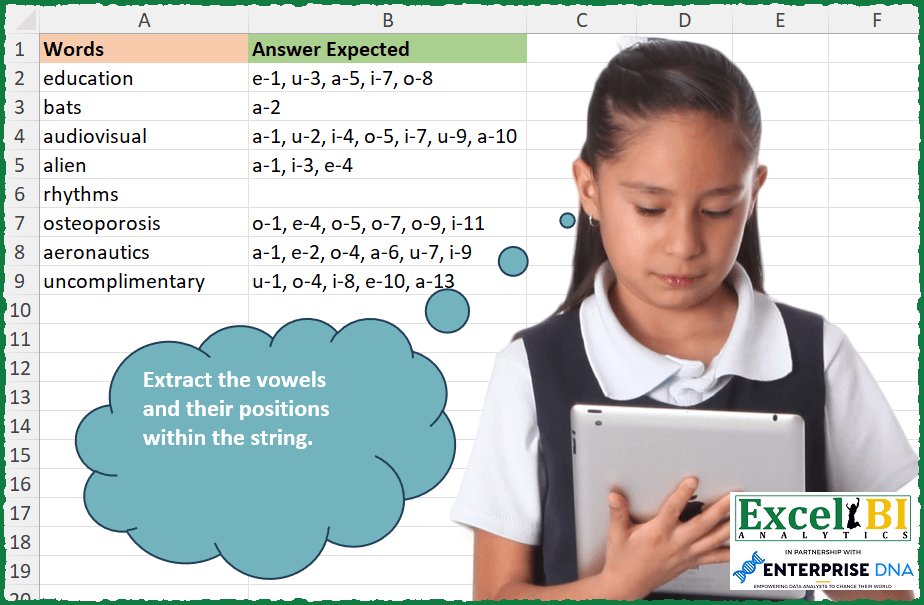
Extract the vowels and their positions within the string. The answer should be in the format vowel-position and should be separated by comma.
📌 Challenge Details and Links
ExcelBI Excel Challenge Number: 256
Challenge Difficulty: ⭐️
📥Download Sample File
📥Link to the solutions on LinkedIn
Solving the challenge of Extract Vowels with Positions with Power Query
Power Query solution 1 for Extract Vowels with Positions, proposed by Bo Rydobon 🇹🇭:
let
  Source = Excel.CurrentWorkbook(){[Name = "Table1"]}[Content],
  Ans = Table.TransformRows(
    Source,
    each Text.Combine(
      List.Transform(
        {1 .. Text.Length([Words]) - 1},
        (n) =>
          let
            v = Text.Select("aeiou", Text.Middle([Words], n - 1, 1))
          in
            if v = "" then null else v & Text.From(- n)
      ),
      ", "
    )
  )
in
  Ans
Power Query solution 2 for Extract Vowels with Positions, proposed by Zoran Milokanović:
let
  Source = Excel.CurrentWorkbook(){[Name = "Index"]}[Content],
  S = Table.TransformRows(
    Source,
    each
      let
        v = Text.ToList([Words])
      in
        List.Accumulate(
          {1 .. List.Count(v)},
          "",
          (s, c) =>
            if List.IsEmpty(List.Intersect({{"a", "e", "i", "o", "u"}, {v{c - 1}}})) then
              s
            else
              s & (if s = "" then s else ", ") & v{c - 1} & "-" & Text.From(c)
        )
  )
in
  S
Power Query solution 3 for Extract Vowels with Positions, proposed by Aditya Kumar Darak 🇮🇳:
let
  Source = Excel.CurrentWorkbook(){[Name = "data"]}[Content],
  Return = Table.AddColumn(
    Source,
    "Answer",
    each [
      Len     = Text.Length([Words]),
      Seq     = {0 .. Len - 1},
      Splt    = List.Transform(Seq, (f) => Text.At([Words], f) & "-" & Text.From(f + 1)),
      Select  = List.Select(Splt, (f) => Text.Contains("aeiou", Text.Start(f, 1))),
      Combine = Text.Combine(Select, ", ")
    ][Combine]
  )
in
  Return
Power Query solution 4 for Extract Vowels with Positions, proposed by Alejandro Simón 🇵🇦 🇪🇸:
let
  Source = Excel.CurrentWorkbook(){[Name = "Table1"]}[Content],
  Sol = Table.AddColumn(
    Source,
    "Answer",
    each
      let
        a = Text.ToList([Words]),
        b = {1 .. List.Count(a)},
        c = List.Zip({a, b}),
        d = List.Select(c, each List.Contains({"a", "e", "i", "o", "u"}, _{0}))
      in
        Text.Combine(List.Transform(d, each _{0} & "-" & Text.From(_{1})), ", ")
  )[[Answer]]
in
  Sol
Power Query solution 5 for Extract Vowels with Positions, proposed by Luan Rodrigues:
let
  Fonte = Tabela1,
  res = Table.AddColumn(
    Fonte,
    "Personalizar",
    each [
      a = List.Transform(
        Text.PositionOfAny([Words], {"a", "e", "i", "o", "u"}, Occurrence.All),
        each "-" & Text.From(_ + 1)
      ),
      b = Text.ToList(Text.Select([Words], {"a", "e", "i", "o", "u"})),
      c = Text.Combine(List.Transform(List.Zip({b, a}), Text.Combine), ", ")
    ][c]
  )
in
  res
Power Query solution 6 for Extract Vowels with Positions, proposed by Alexis Olson:
let
  Source = Excel.CurrentWorkbook(){[Name = "Table1"]}[Content],
  #"Added Custom" = Table.AddColumn(
    Source,
    "Answer Expected",
    each
      let
        LettersAndPositions = List.Transform(
          {1 .. Text.Length([Words])},
          (i) => Text.Middle([Words], i - 1, 1) & "-" & Text.From(i)
        ),
        SelectVowels = List.Select(
          LettersAndPositions,
          (a) => Text.Contains("aeiou", Text.Start(a, 1))
        )
      in
        Text.Combine(SelectVowels, ", ")
  )
in
  #"Added Custom"
Power Query solution 7 for Extract Vowels with Positions, proposed by Brian Julius:
let
  Source = Excel.CurrentWorkbook(){[Name = "Table1"]}[Content],
  LetterList = Table.AddColumn(
    Source,
    "Answer",
    each [
      Vowels = {"a", "e", "i", "o", "u"},
      LetterList = Text.ToList([Words]),
      Positions = List.Positions(LetterList),
      LP = Table.Transpose(Table.FromColumns(List.Zip({LetterList, Positions}))),
      LP2 = Table.AddColumn(LP, "Column3", each [Column1] & "-" & Text.From([Column2] + 1)),
      VowelSelect = Table.SelectColumns(
        Table.SelectRows(LP2, each List.ContainsAny({[Column1]}, Vowels)),
        "Column3"
      ),
      Concat = Text.Combine(VowelSelect[Column3], ", ")
    ][Concat]
  )
in
  LetterList
Power Query solution 8 for Extract Vowels with Positions, proposed by Rafael González B.:
let
  Source = Excel.CurrentWorkbook(){0}[Content],
  TC = Table.TransformColumnTypes(Source, {{"Words", type text}}),
  R = Table.AddColumn(
    TC,
    "Answer Expected",
    each
      let
        a = Text.ToList([Words]),
        b = Table.FromList(a, Splitter.SplitByNothing(), {"Words1"}),
        c = Table.AddIndexColumn(b, "Index", 1, 1),
        d = {"a", "e", "i", "o", "u"},
        e = Table.SelectRows(c, each List.Contains(d, [Words1]) = true),
        f = Table.AddColumn(e, "TU", each Text.Combine({[Words1], "-", Text.From([Index])}))[TU],
        g = Text.Combine(f, ", ")
      in
        g,
    type text
  )[[Answer Expected]]
in
  R
Power Query solution 9 for Extract Vowels with Positions, proposed by Venkata Rajesh:
let
  Source = Data,
  Output = Table.AddColumn(
    Source,
    "Expected",
    each [
      x = Text.ToList([Words]),
      y = List.Count(x),
      z = Text.Combine(
        List.RemoveNulls(
          List.Transform(
            {0 .. y - 1},
            each if Text.Contains("aeiou", x{_}) then x{_} & "-" & Text.From(_ + 1) else null
          )
        ),
        ", "
      )
    ][z]
  )
in
  Output
Solving the challenge of Extract Vowels with Positions with Excel
Excel solution 1 for Extract Vowels with Positions, proposed by Bo Rydobon 🇹🇭:
=MAP(
    A2:A9,
    LAMBDA(
        a,
        LET(
            s,
            SEQUENCE(
                LEN(
                    a
                )
            ),
            m,
            MID(
                a,
                s,
                1
            ),
            TEXTJOIN(
                ", ",
                ,
                IFERROR(
                    IF(
                        FIND(
                            m,
                            "aeiou"
                        ),
                        m&-s
                    ),
                    ""
                )
            )
        )
    )
)
Excel solution 2 for Extract Vowels with Positions, proposed by Rick Rothstein:
=MAP(
    A2:A9,
    LAMBDA(
        x,
        LET(
            v,
            "aeiou",
            s,
            SEQUENCE(
                LEN(
                    x
                )
            ),
            m,
            MID(
                x,
                s,
                1
            ),
            TEXTJOIN(
                ", ",
                ,
                IFERROR(
                    IF(
                        FIND(
                            m,
                            v
                        ),
                        m&"-"&s,
                        v
                    ),
                    ""
                )
            )
        )
    )
)

EDIT NOTE: A late addition of the IFERROR function above made the v (the vowel string) unnecessary in the IF(FIND part of my formula which means I no longer need the v variable as the vowel string will now only appear once. So me formula above reduces to this..
=MAP(
    A2:A9,
    LAMBDA(
        x,
        LET(
            s,
            SEQUENCE(
                LEN(
                    x
                )
            ),
            m,
            MID(
                x,
                s,
                1
            ),
            TEXTJOIN(
                ", ",
                ,
                IFERROR(
                    IF(
                        FIND(
                            m,
                            "aeiou"
                        ),
                        m&"-"&s,

                    ),
                    ""
                )
            )
        )
    )
)
Excel solution 3 for Extract Vowels with Positions, proposed by John V.:
=MAP(A2:A9,LAMBDA(x,LET(r,ROW(1:20),c,MID(x,r,1),TEXTJOIN(", ",,REPT(c&-r,ISNUMBER(XMATCH(c,{"a";"e";"i";"o";"u"})))))))

✅=MAP(A2:A9,LAMBDA(x,LET(r,ROW(1:20),c,MID(x,r,1),TEXTJOIN(", ",,TOCOL(REPT(c&-r,FIND(c," aeiou")>1),2)))))
Excel solution 4 for Extract Vowels with Positions, proposed by محمد حلمي:
=MAP(
    A2:A9,
    LAMBDA(
        a,
        LET(
            i,
            MID(
                a,
                SEQUENCE(
                    LEN(
                        a
                    )
                ),
                1
            ),

            TEXTJOIN(
                ", ",
                ,
                IFERROR(
                    IF(
                        FIND(
                            i,
                            "aeiou"
                        ),
                        i&"-"&
                        ROW(
                            1:20
                        )
                    ),
                    ""
                )
            )
        )
    )
)
Excel solution 5 for Extract Vowels with Positions, proposed by محمد حلمي:
=MAP(A2:A9,LAMBDA(a,LET(x,SEQUENCE(LEN(a)),i,MID(a,x,1),TEXTJOIN(", ",,IFERROR(i&"-"&FIND(i,"aeiou")^0*x,"")))))Excel solution 6 for Extract Vowels with Positions, proposed by Kris Jaganah:
=MAP(
    A2:A9,
    LAMBDA(
        x,
        LET(
            a,
            SEQUENCE(
                LEN(
                    x
                )
            ),
            b,
            MID(
                x,
                a,
                1
            ),
            TEXTJOIN(
                ", ",
                1,
                IF(
                    ISERR(
                        FIND(
                            b,
                            "aeiou"
                        )
                    ),
                    "",
                    b&"-"&a
                )
            )
        )
    )
)
Excel solution 7 for Extract Vowels with Positions, proposed by Julian Poeltl:
=MAP(A2:A9,LAMBDA(A,LET(V,HSTACK("a","e","i","o","u"),S,SEQUENCE(LEN(A)),SP,MID(A,S,1),TEXTJOIN(", ",,IF(ISNUMBER(XMATCH(SP,V)),SP&"-"&S,"")))))Excel solution 8 for Extract Vowels with Positions, proposed by Aditya Kumar Darak 🇮🇳:
=MAP(

     A2:A9,

     LAMBDA(
         a,

          LET(

               vwl,
               "aeiou",

               seq,
               SEQUENCE(
                   LEN(
                       a
                   )
               ),

               splt,
               MID(
                   a,
                    seq,
                    1
               ),

               join,
               splt & "-" & seq,

               fltr,
               FILTER(
                   join,
                    ISNUMBER(
                        SEARCH(
                            splt,
                             vwl
                        )
                    ),
                    ""
               ),

               r,
               ARRAYTOTEXT(
                   fltr
               ),

               r

          )

     )

)
Excel solution 9 for Extract Vowels with Positions, proposed by Timothée BLIOT:
=MAP(A2:A9,LAMBDA(z,LET(A,SEQUENCE(LEN(z)),B,MID(z,A,1),c,{"a";"e";"i";"o";"u"},TEXTJOIN(", ",,MAP(A,LAMBDA(x, IF(ISNUMBER(XMATCH(INDEX(B,x),c)),INDEX(B,x)&"-"&x,"")))))))Excel solution 10 for Extract Vowels with Positions, proposed by Hussein SATOUR:
=MAP(
    A2:A9,
     LAMBDA(
         x,
          LET(

              a,
               SEQUENCE(
                   LEN(
                       x
                   )
               ),
               b,
               MID(
                   x,
                    a,
                    1
               ),

              IFERROR(
                  ARRAYTOTEXT(
                      FILTER(
                          b&"-"&a,
                           NOT(
                               ISERR(
                                   FIND(
                                       b,
                                        "aeiou"
                                   )
                               )
                           )
                      )
                  ),
                   ""
              )
          )
     )
)
Excel solution 11 for Extract Vowels with Positions, proposed by Oscar Mendez Roca Farell:
=MAP(A2:A9,
     LAMBDA(a,
     LET(_s,
     SEQUENCE(
         LEN(
             a
         )
     ),
    _v,
    {"a",
    "e",
    "i",
    "o",
    "u"},
     TEXTJOIN(", ",
     1,
     REPT(_v&"-"&_s,
    --(MID(
        a,
        _s,
         1
    )=_v))))))
Excel solution 12 for Extract Vowels with Positions, proposed by Duy Tùng:
=MAP(A2:A9,LAMBDA(x,LET(a,MID(x,SEQUENCE(LEN(x)),1),TEXTJOIN({"-",", "},,FILTER(HSTACK(a,SEQUENCE(ROWS(a))),BYROW(FIND(a,{"a","e","i","u","o"}),COUNT)>0,"")))))Excel solution 13 for Extract Vowels with Positions, proposed by Sunny Baggu:
=MAP(

     A2:A9,

     LAMBDA(
         x,

          LET(

               _ts,
               MID(
                   x,
                    SEQUENCE(
                        LEN(
                            x
                        )
                    ),
                    1
               ),

               _r,
               SEQUENCE(
                   ROWS(
                       _ts
                   )
               ),

               _cri,
               MAP(
                   _ts,
                    LAMBDA(
                        a,
                         OR(
                             a = {"a"&; "e"; "i"; "o"; "u"}
                         )
                    )
               ),

               IFERROR(
                   ARRAYTOTEXT(
                       TOCOL(
                           IFS(
                               _cri,
                                _ts & "-" & _r
                           ),
                            3
                       )
                   ),
                    ""
               )

          )

     )

)
Excel solution 14 for Extract Vowels with Positions, proposed by LEONARD OCHEA 🇷🇴:
=MAP(
    A2:A9,
    LAMBDA(
        a,
        LET(
            s,
            SEQUENCE(
                LEN(
                    a
                )
            ),
            e,
            MID(
                a,
                s,
                1
            ),
            w,
            HSTACK(
                "a",
                "e",
                "i",
                "o",
                "u"
            ),
            m,
            e=w,
            TEXTJOIN(
                ", ",
                ,
                IF(
                    m,
                    e&"-"&m*s,
                    ""
                )
            )
        )
    )
)
Excel solution 15 for Extract Vowels with Positions, proposed by Asheesh Pahwa:
=MAP(
    BL2:BL9,
    LAMBDA(
        2,
        LET(
            sq,
            SEQUENCE(
                LEN(
                    z
                )
            ),
            b,
            MID(
                z,
                sq,
                1
            ),

            c,
            SEQUENCE(
                ROWS(
                    b
                )
            ),
            d,

            FILTER(
                HSTACK(
                    b,
                    c
                ),
                ISNUMBER(
                    FIND(
                        b,
                        "aeiou"
                    )
                )
            ),
            IFERROR(
                ARRAYTOTEXT(
                    BYROW(
                        d,
                        LAMBDA(
                            x,
                            TEXTJOIN(
                                "-",
                                TRUE,
                                x
                            )
                        )
                    )
                ),
                ""
            )
        )
    )
)
Excel solution 16 for Extract Vowels with Positions, proposed by JvdV –:
=MAP(
    A2:A9,
    LAMBDA(
        x,
        LET(
            y,
            ROW(
                1:99
            ),
            z,
            MID(
                x,
                y,
                1
            ),
            TEXTJOIN(
                ", ",
                ,
                TOCOL(
                    IF(
                        FIND(
                            z,
                            " aeiou"
                        )>1,
                        z&-y,
                        ""
                    ),
                    3
                )
            )
        )
    )
)
Excel solution 17 for Extract Vowels with Positions, proposed by Julien Lacaze:
=MAP(A2:A9,LAMBDA(d,LET(sq,SEQUENCE(LEN(d)),s,MID(d,sq,1),
TEXTJOIN(", ",1,REPT(s&"-"&sq,ISNUMBER(SEARCH(s,"aeiou")))))))
Excel solution 18 for Extract Vowels with Positions, proposed by Nicolas Micot:
=LET(
    _isVowel;
    LAMBDA(
        l_character;
        MAP(
            l_character;
            LAMBDA(
                l_chars;
                OU(
                    l_chars={"a";
                    "e";
                    "i";
                    "o";
                    "u"}
                )
            )
        )
    )
    ;
    _lettres;
    STXT(
        A2;
        SEQUENCE(
            NBCAR(
                A2
            )
        );
        1
    );

    _seq;
    SEQUENCE(
            NBCAR(
                A2
            )
        );

    JOINDRE.TEXTE(
        ", ";
        VRAI;
        SI(
            _isVowel(
                _lettres
            );
            _lettres&"-"&_seq;
            ""
        )
    )
)
Excel solution 19 for Extract Vowels with Positions, proposed by Giorgi Goderdzishvili:
=LET(
wrd,
    A2,

ln,
    LEN(
        wrd
    ),

sq,
    SEQUENCE(
        ,
        ln
    ),

chrs,
    MID(
        wrd,
        sq,
        1
    ),

flt,
    ((chrs="a") + (chrs="e") + (chrs="i")+(chrs="o")+(chrs="u")),

fltr,
    FILTER(
        VSTACK(
            chrs,
            sq
        ),
        flt
    ),

brc,
    BYCOL(
        fltr,
        LAMBDA(
            x,
            TEXTJOIN(
                "-",
                TRUE,
                x
            )
        )
    ),

IFERROR(
    TEXTJOIN(
        ", ",
        TRUE,
        brc
    ),
    ""
))
Excel solution 20 for Extract Vowels with Positions, proposed by Daniel Garzia:
=MAP(
    A2:A9,
    LAMBDA(
        x,
        LET(
            s,
            SEQUENCE(
                LEN(
                    x
                )
            ),
            l,
            MID(
                x,
                s,
                1
            ),
            TEXTJOIN(
                ", ",
                ,
                IF(
                    ISERR(
                        SEARCH(
                            l,
                            "aeiou"
                        )
                    ),
                    "",
                    l&"-"&s
                )
            )
        )
    )
)
Excel solution 21 for Extract Vowels with Positions, proposed by Quadri Olayinka Atharu:
=MAP(
    A2:A9,
    LAMBDA(
        words,

        LET(

            length_sequence,
            SEQUENCE(
                LEN(
                    words
                )
            ),

            all_chars,
            MID(
                words,
                length_sequence,
                1
            ),

            rownumber,
            ISNUMBER(
                SEARCH(
                    all_chars,
                    "aeiou"
                )
            )*length_sequence,

            vowels_and_position,
            FILTER(
                HSTACK(
                    all_chars,
                    rownumber
                ),
                rownumber<>0,
                ""
            ),

            result,
            TEXTJOIN(
                {"-",
                ", "},
                ,
                vowels_and_position
            ),

            result
        )
    )
)
Excel solution 22 for Extract Vowels with Positions, proposed by Quadri Olayinka Atharu:
=MAP(
    A2:A9,
    LAMBDA(
        w,

        LET(

            l,
            SEQUENCE(
                LEN(
                    w
                )
            ),

            c,
            MID(
                w,
                l,
                1
            ),

            r,
            ISNUMBER(
                SEARCH(
                    c,
                    "aeiou"
                )
            )*l,

            vp,
            FILTER(
                HSTACK(
                    c,
                    r
                ),
                r<>0,
                ""
            ),

            TEXTJOIN(
                {"-",
                ", "},
                ,
                vp
            )
        )
    )
)
Excel solution 23 for Extract Vowels with Positions, proposed by Md Ismail Hosen:
=LET(

     Data,
     A2:A9,

     fx,
     LAMBDA(
         x,

          LET(

               Seq,
               SEQUENCE(
                   LEN(
                       x
                   )
               ),

               Chars,
               MID(
                   x,
                    Seq,
                    1
               ),

               Equality,
               BYROW(
                   Chars = {"a",
                    "e",
                    "i",
                    "o",
                    "u"},
                    LAMBDA(
                        Row,
                         OR(
                             Row
                         )
                    )
               ),

               Result,
               TEXTJOIN(

                    ", ",

                    ,

                    BYROW(

                         FILTER(
                             HSTACK(
                                 Chars,
                                  Seq
                             ),
                              Equality
                         ),

                         LAMBDA(
                             Row,
                              TEXTJOIN(
                                  "-",
                                   ,
                                   Row
                              )
                         )

                    )

               ),

               IFERROR(
                   Result,
                    ""
               )

          )

     ),

     Result,
     MAP(
         Data,
          fx
     ),

     Result

)
Excel solution 24 for Extract Vowels with Positions, proposed by Rayan S.:
=MAP(
    A2:A9,
    LAMBDA(
        arr,
        LET(
            v,
            {"a",
            "e",
            "I",
            "o",
            "u"},
            n,
            SEQUENCE(
                LEN(
                    arr
                )
            ),
            s,
            MID(
                arr,
                SEQUENCE(
                LEN(
                    arr
                )
            ),
                1
            ),
            TEXTJOIN(
                ", ",
                ,
                IF(
                    IFERROR(
                        MATCH(
                            s,
                            v,
                            0
                        )>0,
                        0
                    ),
                    s&"-"&n,
                    ""
                )
            )
        )
    )
)
Excel solution 25 for Extract Vowels with Positions, proposed by Mungunbayar Bat-Ochir:
=BYROW(
    A2:A9;
    LAMBDA(
        input;

        LET(

             idx;
            SEQUENCE(
                LEN(
                    input
                )
            );

             chars;
            MID(
                input;
                idx;
                1
            );

             TEXTJOIN(
                 ", ";
                 TRUE;
                 IF(
                     ISNUMBER(
                         XMATCH(
                             chars;
                             {"a";
                             "e";
                             "i";
                             "u";
                             "o"}
                         )
                     );
                     chars&"-"&idx;
                     ""
                 )
             )

        )

    )
)
Excel solution 26 for Extract Vowels with Positions, proposed by Henriette Hamer:
=IF(
    ISERROR(
        FIND(
            MID(
                A2;
                SEQUENCE(
                    ;
                    LEN(
                        A2
                    )
                );
                1
            );
            "aeiou"
        )
    );
    "";
    MID(
                A2;
                SEQUENCE(
                    ;
                    LEN(
                        A2
                    )
                );
                1
            )&"-"&SEQUENCE(
                    ;
                    LEN(
                        A2
                    )
                )
)

aaargh, forgot the textjoin...
et voila:
=MAP(
    A2:A9;
    LAMBDA(
        a;
        LET(
            s;
            SEQUENCE(
                LEN(
                    a
                )
            );
            m;
            MID(
                a;
                s;
                1
            );
            TEXTJOIN(
                ", ";
                TRUE;
                IF(
                    ISERROR(
                        FIND(
                            m;
                            "aeiou"
                        )
                    );
                    "";
                    m&"-"&s
                )
            )
        )
    )
)
Excel solution 27 for Extract Vowels with Positions, proposed by Hussain Ali Nasser:
=MAP(
    A2:A9,
    LAMBDA(
        _words,
        LET(
            _seq,
            SEQUENCE(
                LEN(
                    _words
                )
            ),
            _split,
            MID(
                _words,
                _seq,
                1
            ),
            _result,
            ARRAYTOTEXT(
                FILTER(
                    _split&-_seq,
                    ISNUMBER(
                        SEARCH(
                            _split,
                            "aeiou"
                        )
                    ),
                    ""
                )
            ),
            _result
        )
    )
)
Excel solution 28 for Extract Vowels with Positions, proposed by Jeff Blakley:
=LET(
    vowels,
     {"a",
    "e",
    "i",
    "o",
    "u"},

     MAP(
         A2:A9,
          LAMBDA(
              x,
               IF(
                   LEN(
                       x
                   )=0,
                    "",
                    LET(
                        seq,
                         SEQUENCE(
                             LEN(
                       x
                   )
                         ),
                         chars,
                         MID(
                             x,
                              seq,
                              1
                         ),
                         TEXTJOIN(
                             ", ",
                             1,
                             FILTER(
                                 chars&"-"&seq,
                                  ISNUMBER(
                                      XMATCH(
                                          chars,
                                           vowels
                                      )
                                  ),
                                  ""
                             )
                         )
                    )
               )
          )
     )
)
Excel solution 29 for Extract Vowels with Positions, proposed by Deepak Dalal:
=({"a";"e";"i";"o";"u"}),1,""))=1,a&"-"&b,""))), FILTER(onecell, onecell <> "","")),LAMBDA(a,b,a&","&b)),RIGHT(ans,LEN(ans)-1))))Excel solution 30 for Extract Vowels with Positions, proposed by Vishal Mishra:
=MAP(
    A2:A7,

    LAMBDA(
        Value,

         LET(

              CharNumList,
             SEQUENCE(
                 LEN(
                     Value
                 )
             ),

              ValueList,
             MID(
                 Value,
                 CharNumList,
                 1
             ),

              TEXTJOIN(

                   ",",

                   1,

                   FILTER(
                         HSTACK(
                             ValueList&"-"&CharNumList
                         ),
                          ISNUMBER(
               &                SEARCH(
                                   ValueList,
                                   "aeiou"
                               )
                          ),
                          ""

                   )

              )

         )


    )

)
Solving the challenge of Extract Vowels with Positions with Excel VBA
Excel VBA solution 1 for Extract Vowels with Positions, proposed by Nicolas Micot:
Function f_ExtractVowels(ByVal mot As String) As String
Dim resultat As String, lettre As String
For i = 1 To Len(mot)
 lettre = Mid(mot, i, 1)
 Select Case lettre
 Case "a", "e", "i", "o", "u"
 resultat = resultat & IIf(resultat = "", "", ", ") & lettre & "-" & i
 End Select
Next i
f_ExtractVowels = resultat
End Function

Function f_ExtractVowelsFromRange(Mots As Range) As String()
Dim tableau As Variant
Dim lettre As String, resultat() As String
ReDim resultat(1 To Mots.Rows.Count, 1 To 1)
tableau = Mots.Value
For a = 1 To UBound(tableau, 1)
 For i = 1 To Len(tableau(a, 1))
 lettre = Mid(tableau(a, 1), i, 1)
 Select Case lettre
 Case "a", "e", "i", "o", "u"
 resultat(a, 1) = resultat(a, 1) & IIf(resultat(a, 1) = "", "", ", ") & lettre & "-" & i
 End Select
 Next i
Next a
f_ExtractVowelsFromRange = resultat
End Function
&