
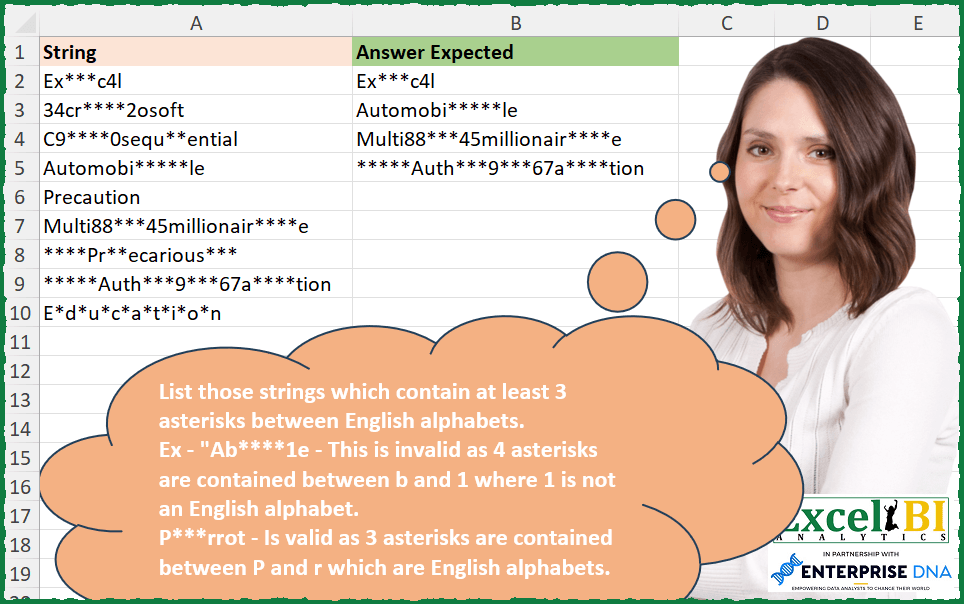
List those strings which contain at least 3 asterisks between English alphabets. Ex – “Ab****1e – This is invalid as 4 asterisks are contained between b and 1 where 1 is not an English alphabet. P***rrot – Is valid as 3 asterisks are contained between P and r which are English alphabets.
📌 Challenge Details and Links
ExcelBI Excel Challenge Number: 254
Challenge Difficulty: ⭐️
📥Download Sample File
📥Link to the solutions on LinkedIn
Solving the challenge of Strings With Asterisks Between Letters with Power Query
Power Query solution 1 for Strings With Asterisks Between Letters, proposed by Bo Rydobon 🇹🇭:
let
  Source = Excel.CurrentWorkbook(){[Name = "Table1"]}[Content],
  Ans = Table.SelectRows(
    Source,
    each
      let
        b = List.Transform(Text.Split([String], "***"), each Text.Replace(_, "*", ""))
      in
        List.AnyTrue(
          List.Transform(
            List.Zip(
              {
                List.Transform(List.RemoveLastN(b), each Text.End(_, 1) > "9"),
                List.Transform(List.Skip(b), each Text.Start(_, 1) > "9")
              }
            ),
            List.AllTrue
          )
        )
  )
in
  Ans
Power Query solution 2 for Strings With Asterisks Between Letters, proposed by Zoran Milokanović:
let
  Source = Excel.CurrentWorkbook(){[Name = "Input"]}[Content][String],
  IsLetter = (l) => List.Contains({"A" .. "Z"}, l, Comparer.OrdinalIgnoreCase),
  S = List.Select(
    Source,
    each
      let
        l = List.Select(
          List.Transform(Text.Split(_, "***"), each Text.TrimStart(_, "*")),
          each _ <> ""
        )
      in
        List.Accumulate(
          {1 .. List.Count(l) - 1},
          false,
          (s, c) => s or (IsLetter(Text.At(l{c}, 0)) and IsLetter(Text.End(l{c - 1}, 1)))
        )
  )
in
  S
Power Query solution 3 for Strings With Asterisks Between Letters, proposed by Alejandro Simón 🇵🇦 🇪🇸:
let
  Source = Excel.CurrentWorkbook(){[Name = "Table1"]}[Content],
  Sol = Table.SelectRows(
    Source,
    each
      let
        a = Text.Replace([String], "***", " "),
        b = Text.Remove(a, "*"),
        c = Text.TrimStart(b, " "),
        d = Text.PositionOf(c, " ", Occurrence.All),
        e = List.Transform(Text.ToList(c), each try Number.From(_) otherwise _),
        f = List.AnyTrue(
          List.Transform(
            d,
            each Value.Type(e{_ - 1}?) = Text.Type and Value.Type(e{_ + 1}?) = Text.Type
          )
        )
      in
        f
  )
in
  Sol
Power Query solution 4 for Strings With Asterisks Between Letters, proposed by Alejandro Simón 🇵🇦 🇪🇸:
let
  Source = Excel.CurrentWorkbook(){[Name = "Table1"]}[Content],
  Sol = Table.SelectRows(
    Source,
    each
      let
        a = Table.FromColumns({Text.ToList([String])}),
        b = Table.Group(a, {"Column1"}, {"Count", each List.Count(_)}, GroupKind.Local),
        c = Table.TransformColumns(b, {"Column1", each try Number.From(_) otherwise _}),
        d = List.PositionOf(b[Column1], "*", Occurrence.All),
        e = List.AnyTrue(
          List.Transform(
            d,
            each try
              Value.Type(c[Column1]{_ - 1})
                = type text and Value.Type(c[Column1]{_ + 1})
                = type text and c[Count]{_}
                > 2
            otherwise
              false
          )
        )
      in
        e
  )
in
  Sol
Power Query solution 5 for Strings With Asterisks Between Letters, proposed by Alexis Olson:
let
Source = Excel.CurrentWorkbook(){[Name = "Table1"]}[Content],
RegEx = (string, rule) =>
Logical.FromText(
Web.Page("")[
Data
]{0}[Children]{0}[Children]{1}[Text]{0}
),
Result = Table.SelectRows(Source, each RegEx([String], ".*[A-Z|a-z]+*{3,}[A-z|a-z]+.*"))
in
ResultPower Query solution 6 for Strings With Asterisks Between Letters, proposed by Alexis Olson:
let
  Source = Excel.CurrentWorkbook(){[Name = "Table1"]}[Content],
  Filtered = Table.SelectRows(
    Source,
    each
      let
        split = List.Transform(Text.Split([String], "***"), each Text.Replace(_, "*", "")),
        check = List.Transform(
          {1 .. List.Count(split) - 1},
          (index) =>
            List.Contains({"A" .. "Z", "a" .. "z"}, Text.End(split{index - 1}, 1))
              and List.Contains({"A" .. "Z", "a" .. "z"}, Text.Start(split{index}, 1))
        )
      in
        List.AnyTrue(check)
  )
in
  Filtered
Solving the challenge of Strings With Asterisks Between Letters with Excel
Excel solution 1 for Strings With Asterisks Between Letters, proposed by Bo Rydobon 🇹🇭:
=TOCOL(MAP(A2:A10,LAMBDA(a,LET(b,SUBSTITUTE(TEXTSPLIT(a,,"***",1),"*",),IFS(OR(DROP(RIGHT(b)>"9",-1)*DROP(LEFT(b)>"9",1)),a)))),3)Excel solution 2 for Strings With Asterisks Between Letters, proposed by Rick Rothstein:
=FILTER(
    A2:A10,
    ISNUMBER(
        FIND(
            "@",
            REDUCE(
                SUBSTITUTE(
                    SUBSTITUTE(
                        1&UPPER(
                            A2:A10
                        )&1,
                        "***",
                        "@"
                    ),
                    "*",
                    ""
                ),
                SEQUENCE(
                    10,
                    ,
                    0
                ),
                LAMBDA(
                    a,
                    x,
                    SUBSTITUTE(
                        SUBSTITUTE(
                            a,
                            "@"&x,
                            ""
                        ),
                        x&"@",
                        ""
                    )
                )
            )
        )
    )
)
Excel solution 3 for Strings With Asterisks Between Letters, proposed by John V.:
=FILTER(A2:A10,
    MAP(A2:A10,
    LAMBDA(x,
    LET(b,
    TEXTSPLIT(
        UPPER(
            0&x&0
        ),
        CHAR(
            ROW(
                65:90
            )
        )
    ),
    OR((LEN(
        SUBSTITUTE(
            b,
            "*",

        )
    )=0)*(LEN(
        b
    )>2))))))
Excel solution 4 for Strings With Asterisks Between Letters, proposed by محمد حلمي:
=FILTER(
    A2:A10,
    MAP(
        A2:A10,
        LAMBDA(
            a,
            OR(
                DROP(
                    DROP(
                        TEXTSPLIT(
                            UPPER(
                                a
                            ),
                            ,
                            CHAR(
                                ROW(
                                    65:90
                                )
                            )
                        ),
                        1
                    ),
                    -1
                )=REPT(
                    "*",
                    SEQUENCE(
                        ,
                        9,
                        3
                    )
                )
            )
        )
    )
)
Excel solution 5 for Strings With Asterisks Between Letters, proposed by 🇰🇷 Taeyong Shin:
=LET(d, A2:A10, n, CHAR(SEQUENCE(26, , 97)), FILTER(d, MAP(d, LAMBDA(m, MAX(COUNTIF(m, "*" & n & "~*~**~*" & TOROW(n) & "*"))))))Excel solution 6 for Strings With Asterisks Between Letters, proposed by Kris Jaganah:
=TOCOL(
    MAP(
        A2:A10,
        LAMBDA(
            x,
            LET(
                a,
                1&x&1,
                b,
                TEXTSPLIT(
                    a,
                    ,
                    "*",
                    1
                ),
                c,
                DROP(
                    b,
                    -1
                ),
                d,
                DROP(
                    b,
                    1
                ),
                e,
                TEXTSPLIT(
                    UPPER(
                        a
                    ),
                    ,
                    BASE(
                        SEQUENCE(
                            36,
                            ,
                            0
                        ),
                        36
                    ),
                    1
                ),
                f,
                RIGHT(
                    c
                )&e&LEFT(
                    d
                ),
                g,
                IFERROR(
                    0/LEFT(
                        f
                    ),
                    1
                )*IFERROR(
                    0/RIGHT(
                        f
                    ),
                    1
                )*LEN(
                    e
                ),
                IFS(
                    MAX(
                        g
                    )>2,
                    x
                )
            )
        )
    ),
    3
)
Excel solution 7 for Strings With Asterisks Between Letters, proposed by Julian Poeltl:
=FILTER(A2:A10,
    MAP(A2:A10,
    LAMBDA(A,
    (MIN(
        IFERROR(
            RIGHT(
                TEXTSPLIT(
                    CONCAT(
                        SCAN(
                            0,
                            TEXTSPLIT(
                                A,
                                "*"
                            ),
                            LAMBDA(
                                A,
                                B,
                                IF(
                                    ISERR(
                                        CODE(
                                            B
                                        )
                                    ),
                                    A+1,
                                    0
                                )
                            )
                        )
                    ),
                    0
                )
            )+1,
            9
        )
    )>2)*ISNUMBER(
        SEARCH(
            "~*~*~*",
            A
        )
    ))))
Excel solution 8 for Strings With Asterisks Between Letters, proposed by Timothée BLIOT:
=FILTER(
    A2:A10,
    MAP(
        A2:A10,
        LAMBDA(
            z,
            LET(
                A,
                LEN(
                    z
                ),
                B,
                MID(
                    UPPER(
                    z
                ),
                    SEQUENCE(
                        A
                    ),
                    1
                ),
                C,
                SCAN(
                    1,
                    B,
                    LAMBDA(
                        a,
                        v,
                        IF(
                            AND(
                                CODE(
                                    v
                                )>64,
                                CODE(
                                    v
                                )<91
                            ),
                            "#",
                            IF(
                                v="*",
                                IF(
                                    ISNUMBER(
                                        a
                                    ),
                                    a+1,
                                    1
                                ),
                                0
                            )
                        )
                    )
                ),
                D,
                MAP(
                    SEQUENCE(
                        ROWS(
                            C
                        )
                    ),
                    LAMBDA(
                        x,
                        IF(
                            INDEX(
                                C,
                                x
                            )>=3,
                            IF(
                                AND(
                                    INDEX(
                                        C,
                                        x+1
                                    )="#",
                                    INDEX(
                                        C,
                                        x-INDEX(
                                C,
                                x
                            )
                                    )="#"
                                ),
                                1,
                                0
                            ),
                            0
                        )
                    )
                ),
                IFERROR(
                    SUM(
                        TOCOL(
                            D,
                            3
                        )
                    )>0,
                    0
                )
            )
        )
    )
)
Excel solution 9 for Strings With Asterisks Between Letters, proposed by Hussein SATOUR:
=FILTER(A2:A10, MAP(A2:A10, LAMBDA(x, LET(
a, DROP(DROP(TEXTSPLIT(UPPER(x),, CHAR(SEQUENCE(26,,65))), 1), -1),
b, FILTER(a, LEN(a) >= 3),
c, SUBSTITUTE(IF(b="", "/", b), "*", ""),
IFERROR(SUM((c = "")*1), 0)))))
Excel solution 10 for Strings With Asterisks Between Letters, proposed by Oscar Mendez Roca Farell:
=TOCOL(
    IFS(
        LET(
            a,
            CHAR(
                SEQUENCE(
                    26,
                     ,
                    97
                )
            ),
             MAP(
                 A2:A10,
                  LAMBDA(
                      i,
                       SUM(
                           --ISNUMBER(
                               FIND(
                                   "*"&a&"~*~**~*"&TOROW(
                                       a
                                   )&"*",
                                    i
                               )
                           )
                       )
                  )
             )
        ),
         A2:A10
    ),
     2
)
Excel solution 11 for Strings With Asterisks Between Letters, proposed by Sunny Baggu:
=FILTER(
 A2:A10,
 IFERROR(
 MAP(
 A2:A10,
 LAMBDA(x,
 LET(
 _bef, TOCOL(TEXTBEFORE(LOWER(x), "***", SEQUENCE(5)), 3),
 _aft, TOCOL(TEXTAFTER(LOWER(x), "***", SEQUENCE(5)), 3),
 _befcode, IFERROR(CODE(RIGHT(MAP(_bef, LAMBDA(a, TAKE(TEXTSPLIT(a, , "*", 1), -1))))), 1),
 _aftcode, IFERROR(CODE(LEFT(MAP(_aft, LAMBDA(a, TAKE(TEXTSPLIT(a, , "*", 1), 1))))), 0),
 OR(MAP(_befcode, _aftcode, LAMBDA(a, b, AND(AND(a >= 97, a <= 122), AND(b >= 97, b <= 122)))))
 )
 )
 ),
 FALSE
 )
)
Excel solution 12 for Strings With Asterisks Between Letters, proposed by Sunny Baggu:
=FILTER(

     A2:A10,

     MAP(

          A2:A10,

          LAMBDA(
              text&,

               LET(

                    _ts,
                    TEXTSPLIT(
                        text,
                         ,
                         "*",
                         1
                    ),

                    _col1,
                    SEARCH(
                        _ts,
                         text
                    ) + LEN(
                        _ts
                    ),

                    _col2,
                    SEARCH(
                        _ts,
                         text
                    ),

                    _cd1,
                    DROP(
                        _col1,
                         -1
                    ),

                    _cd2,
                    DROP(
                        _col2,
                         1
                    ),

                    _cm1,
                    MID(
                        LOWER(
                            text
                        ),
                         _cd1 - 1,
                         1
                    ),

                    _cm2,
                    IFERROR(
                        MID(
                            LOWER(
                            text
                        ),
                             _cd2,
                             1
                        ),
                         _cd2
                    ),

                    _cc1,
                    MAP(
                        _cm1,
                         LAMBDA(
                             a,
                              AND(
                                  CODE(
                                      a
                                  ) >= 97,
                                   CODE(
                                      a
                                  ) <= 122
                              )
                         )
                    ),

                    _cc2,
                    MAP(
                        _cm2,
                         LAMBDA(
                             a,
                              AND(
                                  CODE(
                                      a
                                  ) >= 97,
                                   CODE(
                                      a
                                  ) <= 122
                              )
                         )
                    ),

                    _cri,
                    MAP(
                        _cc1,
                         _cc2,
                         LAMBDA(
                             c,
                              d,
                              AND(
                                  c,
                                   d
                              )
                         )
                    ),

                    IFERROR(
                        AND(
                            FILTER(
                                _cd2 - _cd1,
                                 _cri
                            ) >= 3
                        ),
                         FALSE
                    )

               )

          )

     )

)
Excel solution 13 for Strings With Asterisks Between Letters, proposed by Abdallah Ally:
=FILTER(
    A2:A10,
    MAP(
        A2:A10,
        LAMBDA(
            v,
            LET(
                a,
                LOWER(
                    v
                ),
                b,
                SUBSTITUTE(
                    a,
                    "-",
                    " "
                ),
                c,
                SUBSTITUTE(
                    b,
                    "***",
                    "-"
                ),
                d,
                TEXTSPLIT(
                    c,
                    "*"
                ),
                e,
                TEXTJOIN(
                    "",
                    TRUE,
                    d
                ),
                f,
                SEQUENCE(
                    LEN(
                        e
                    )
                ),
                REDUCE(
                    0,
                    f,
                    LAMBDA(
                        x,
                        y,
                        IFERROR(
                            IFS(
                                MID(
                                    e,
                                    y,
                                    1
                                )<>"-",
                                x,
                                AND(
                                    MID(
                                    e,
                                    y,
                                    1
                                )="-",
                                    CODE(
                                        MID(
                                            e,
                                            y-1,
                                            1
                                        )
                                    )>=97,
                                    CODE(
                                        MID(
                                            e,
                                            y-1,
                                            1
                                        )
                                    )<=122,
                                    CODE(
                                        MID(
                                            e,
                                            y+1,
                                            1
                                        )
                                    )>=97,
                                    CODE(
                                        MID(
                                            e,
                                            y+1,
                                            1
                                        )
                                    )<=122
                                ),
                                x+1,
                                TRUE,
                                x
                            ),
                            x
                        )
                    )
                )
            )
        )
    )
)
Excel solution 14 for Strings With Asterisks Between Letters, proposed by Charles Roldan:
=LAMBDA(f, LAMBDA(x, FILTER(x, MAP(x, f))))(
LAMBDA(s, OR(LEN(REDUCE(LAMBDA(x, IFERROR(RIGHT(DROP(x, , -1)) & LEFT(DROP(x, , 1)), ))(SUBSTITUTE(TEXTSPLIT(s, "***"), "*", )), SEQUENCE(10, , 0), LAMBDA(a,b, SUBSTITUTE(a, b, )))) = 2))
)(A2:A10)
Excel solution 15 for Strings With Asterisks Between Letters, proposed by JvdV -:
=LET(s,A2:A10,q,ROW(1:99),x,MID(s,TOROW(q),99),FILTER(s,MMULT((LEFT(x)>"9")*(MID(x,2,3)="***")*(MID(SUBSTITUTE(x,"*",),2,1)>"9"),q^0)))Excel solution 16 for Strings With Asterisks Between Letters, proposed by Stefan Olsson:
=QUERY(
    {A1:A10},
     "Where Col1 Matches '.*[A-Za-z]*{3,}[A-Za-z].*'",
     1
)
Excel solution 17 for Strings With Asterisks Between Letters, proposed by Ziad A.:
=FILTER(
    A2:A,
    REGEXMATCH(
        A2:A,
        "(?i)[a-z]*{3,}[a-z]"
    )
)

The following case-insensitive (?i)
Excel solution 18 for Strings With Asterisks Between Letters, proposed by Giorgi Goderdzishvili:
=LET(b,
    A2:A10,
    k,
    MAP(b,
    LAMBDA(x,
    LET(
st,
    x,

str,
    SUBSTITUTE(
        SUBSTITUTE(
            st,
            "*****",
            "****"
        ),
        "****",
        "***"
    ),

chr,
    MID(
        LOWER(
            str
        ),
        SEQUENCE(
            ,
            LEN(
            str
        )
        ),
        1
    ),

arr,

IF((CODE(
    chr
)>96)*((CODE(
    chr
))<122),
    2,

IF(
    chr="*",
    1,
    0
)),

mkr,
    MAKEARRAY(
        1,
        LEN(
            str
        ),
        LAMBDA(
            r,
            c,

            IF(

                AND(
                    INDEX(
                        arr,
                        1,
                        c
                    )=2,

                    INDEX(
                        arr,
                        1,
                        c+1
                    )=1,

                    INDEX(
                        arr,
                        1,
                        c+2
                    )=1,

                    INDEX(
                        arr,
                        1,
                        c+3
                    )=1,

                    INDEX(
                        arr,
                        1,
                        c+4
                    )=2
                ),
                1,
                0
            )
        )
    ),

SUM(
    IFERROR(
        mkr,
        0
    )
)=1))),
     FILTER(
         b,
         k
     ))
Excel solution 19 for Strings With Asterisks Between Letters, proposed by Daniel Garzia:
=FILTER(A2:A10,
    ISNUMBER(SEARCH("x--*-x",
    MAP(A2:A10,
    LAMBDA(x,
    LET(c,
    CODE(
        MID(
            UPPER(
                x
            ),
            SEQUENCE(
                LEN(
                x
            )
            ),
            1
        )
    ),
    CONCAT(SUBSTITUTE(IF((c>64)*(c<91),
    "x",
    c),
    42,
    "-"))))))))
Excel solution 20 for Strings With Asterisks Between Letters, proposed by samir tobeil:
=FILTER(A3:A10,
    MAP(A3:A10,
    LAMBDA(f,
    LET(e,
    LAMBDA(x,
    REDUCE("",
    UPPER(
        MID(
            x,
            ROW(
                1:99
            ),
            1
        )
    ),
    LAMBDA(s,
    b,
    IFERROR(IF((CODE(
        b
    )>64)*((CODE(
        b
    )<91)),
    s&"a",
    s&b),
    s&"")))),

MAX(
    IFERROR(
        FIND(
            "a"&REPT(
                "*",
                ROW(
                    3:9
                )
            )&"a",
            e(
                f
            )
        ),
        0
    )
))))>0)
Excel solution 21 for Strings With Asterisks Between Letters, proposed by Mungunbayar Bat-Ochir:
=FILTER(A2:A10,Byrow(A2:A10,LAMBDA(row, REGEXMATCH(row,"[A-Za-z]*{3,}[A-Za-z]"))))&&