
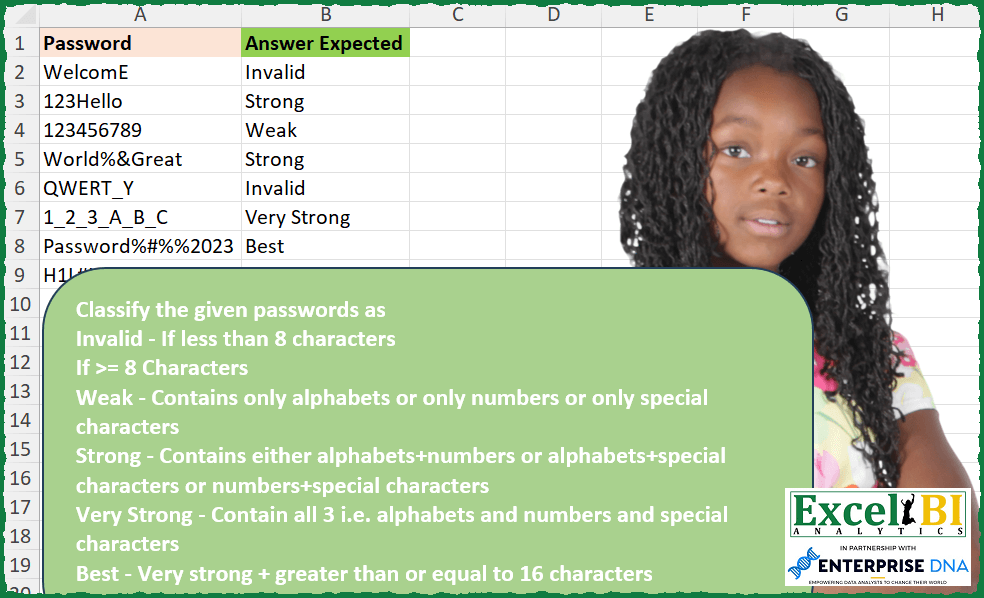
Classify the given passwords as Invalid – If less than 8 characters If >= 8 Characters Weak – Contains only alphabets or only numbers or only special characters Strong – Contains either alphabets+numbers or alphabets+special characters or numbers+special characters Very Strong – Contains all 3 i.e. alphabets and numbers and special characters Best – Very strong + greater than or equal to 16 characters
📌 Challenge Details and Links
ExcelBI Excel Challenge Number: 250
Challenge Difficulty: ⭐️
📥Download Sample File
📥Link to the solutions on LinkedIn
Solving the challenge of Classify Password Strength with Power Query
Power Query solution 1 for Classify Password Strength, proposed by Bo Rydobon 🇹🇭:
let
  Source = Excel.CurrentWorkbook(){[Name = "Table1"]}[Content],
  Ans = Table.AddColumn(
    Source,
    "Ans",
    each
      let
        l = Text.Length([Password]),
        n = Text.Select([Password], {"0" .. "9"}),
        a = Text.Select([Password], {"A" .. "Z", "a" .. "z"}),
        c = Number.From(Text.Length(a) > 0)
          + Number.From(Text.Length(n) > 0)
          + Number.From(l > Text.Length(n & a))
      in
        if l < 8 then
          "Invalid"
        else if c = 1 then
          "Weak"
        else if c = 2 then
          "Storng"
        else if l > 15 then
          "Best"
        else
          "Very Storng"
  )
in
  Ans
Power Query solution 2 for Classify Password Strength, proposed by Zoran Milokanović:
let
  Source = Excel.CurrentWorkbook(){[Name = "Input"]}[Content],
  S = Table.TransformRows(
    Source,
    each
      let
        c = Text.ToList([Password]),
        n = List.Count(c),
        d = List.Count(
          List.Distinct(
            (
              List.Transform(
                c,
                each
                  if List.Contains({"0" .. "9"}, _) then
                    "0"
                  else if List.Contains({"a" .. "z"}, _, Comparer.OrdinalIgnoreCase) then
                    "a"
                  else
                    "~"
              )
            )
          )
        )
      in
        {"Invalid", "Weak", "Strong", "Very Strong", "Best"}{
          if n < 8 then 0 else if n > 15 and d = 3 then 4 else d
        }
  )
in
  S
Power Query solution 3 for Classify Password Strength, proposed by Alejandro Simón 🇵🇦 🇪🇸:
let
  Source = Excel.CurrentWorkbook(){[Name = "Table1"]}[Content],
  Sol = Table.TransformRows(
    Source,
    each
      let
        a = Text.ToList([Password]),
        b = List.Count(a),
        c = List.RemoveMatchingItems(a, {"a" .. "z", "A" .. "Z", "0" .. "9"}),
        d = List.RemoveMatchingItems(a, {"0" .. "9"} & c),
        e = List.RemoveMatchingItems(a, {"a" .. "z", "A" .. "Z"} & c),
        f =
          if b < 8 then
            "Invalid"
          else if b = List.Count(c) or b = List.Count(d) or b = List.Count(e) then
            "Weak"
          else if List.AllTrue(
            {List.ContainsAny(a, c), List.ContainsAny(a, d), List.ContainsAny(a, e)}
          )
            and b
            >= 16
          then
            "Best"
          else if List.AllTrue(
            {List.ContainsAny(a, c), List.ContainsAny(a, d), List.ContainsAny(a, e)}
          )
          then
            "Very Strong"
          else
            "Strong"
      in
        f
  )
in
  Sol
Power Query solution 4 for Classify Password Strength, proposed by Luan Rodrigues:
let
  Fonte = Tabela1,
  res = Table.AddColumn(
    Fonte,
    "Personalizar",
    each [
      a = [Password],
      c = Text.Select(a, {"a" .. "z", "A" .. "Z"}),
      d = Text.Select(a, {"!" .. "/", "[" .. "`"}),
      e = Text.Select(a, {"0" .. "9"}),
      f = Text.Length(a),
      z =
        if f < 8 then
          "Invalid"
        else if (c <> "" and d <> "" and e <> "" and f < 16) then
          "Very Strong"
        else if (c <> "" and d <> "" and e <> "" and f >= 16) then
          "Best"
        else if (c <> "" and d <> "" or e <> "")
          and (c <> "" and e <> "" or d <> "")
          and (d <> "" and e <> "" or c <> "")
        then
          "Strong"
        else
          "Weak"
    ][z]
  )
in
  res
Power Query solution 5 for Classify Password Strength, proposed by Alexis Olson:
let
  Source = Excel.CurrentWorkbook(){[Name = "Table1"]}[Content],
  AddAnswer = Table.AddColumn(
    Source,
    "Answer",
    each
      let
        Chars = Text.Length([Password]),
        CharList = Text.ToList([Password]),
        HasAlpha = List.ContainsAny(CharList, {"a" .. "z", "A" .. "Z"}),
        HasNumber = List.ContainsAny(CharList, {"0" .. "9"}),
        HasSpecial = not List.IsEmpty(
          List.RemoveItems(CharList, {"A" .. "Z", "a" .. "z", "0" .. "9"})
        ),
        Indicators = List.Transform({HasAlpha, HasNumber, HasSpecial}, each if _ then 1 else 0),
        TypeCount = List.Sum(Indicators),
        Answer =
          if Chars < 8 then
            "Invalid"
          else if TypeCount = 1 then
            "Weak"
          else if TypeCount = 2 then
            "Strong"
          else if Chars <= 15 and TypeCount = 3 then
            "Very Strong"
          else if Chars >= 16 and TypeCount = 3 then
            "Best"
          else
            null
      in
        Answer,
    Text.Type
  )
in
  AddAnswer
Power Query solution 6 for Classify Password Strength, proposed by Brian Julius:
let
  Source = Excel.CurrentWorkbook(){[Name = "Table1"]}[Content],
  AddClassify = Table.AddColumn(
    Source,
    "Answer",
    each [
      a = Text.ToList([Password]),
      b = List.Transform(a, each Character.ToNumber(_)),
      c = List.Count(a),
      lowercase = if List.ContainsAny(b, {98 .. 123}) = true then 1 else 0,
      uppercase = if List.ContainsAny(b, {66 .. 91}) = true then 1 else 0,
      numbers = if List.ContainsAny(b, {49 .. 58}) = true then 1 else 0,
      special =
        if List.Count(List.RemoveItems(a, {"A" .. "Z", "a" .. "z", "0" .. "9"})) = 0 then
          0
        else
          1,
      classify =
        if c < 8 then
          "Invalid"
        else if List.Max({lowercase, uppercase}) + numbers + special = 1 then
          "Weak"
        else if List.Max({lowercase, uppercase}) + numbers + special = 2 then
          "Strong"
        else if c >= 16 then
          "Best"
        else
          "Very Strong"
    ][classify],
    Text.Type
  )
in
  AddClassify
Power Query solution 7 for Classify Password Strength, proposed by Venkata Rajesh:
let
  Source = Data,
  Output = Table.AddColumn(
    Source,
    "Strength",
    each [
      len = Text.Length([Password]),
      x = if Text.Length(Text.Select([Password], {"A" .. "Z", "a" .. "z"})) > 0 then 1 else 0,
      y = if Text.Length(Text.Select([Password], {"0" .. "9"})) > 0 then 1 else 0,
      z =
        if Text.Length(Text.Remove([Password], {"A" .. "Z", "a" .. "z", "0" .. "9"})) > 0 then
          1
        else
          0,
      sum = x + y + z,
      result =
        if len < 8 then
          "Invalid"
        else if len >= 16 and sum = 3 then
          "Best"
        else if len >= 8 and sum = 3 then
          "Very Strong"
        else if len >= 8 and sum = 2 then
          "Strong"
        else if len >= 8 and sum = 1 then
          "Week"
        else
          null
    ][result]
  )
in
  Output
Solving the challenge of Classify Password Strength with Excel
Excel solution 1 for Classify Password Strength, proposed by Bo Rydobon 🇹🇭:
=MAP(
    A2:A9,
    LAMBDA(
        a,
        LET(
            l,
            LEN(
                a
            ),
            IF(
                l<8,
                "Invalid",
                CHOOSE(
                    ROWS(
                        UNIQUE(
                            MATCH(
                                MID(
                                    a,
                                    SEQUENCE(
                                        l
                                    ),
                                    1
                                ),
                                {"0",
                                "A"}
                            )
                        )
                    ),
                    "Weak",
                    "Strong",
                    IF(
                        l>15,
                        "Best",
                        "Very Strong"
                    )
                )
            )
        )
    )
)
Excel solution 2 for Classify Password Strength, proposed by Rick Rothstein:
=MAP(A2:A9,
    LAMBDA(a,
    LET(d,
    SEQUENCE(
        10,
        ,
        0
    ),
    c,
    UPPER(
        CHAR(
            SEQUENCE(
                26,
                ,
                65
            )
        )
    ),
    z,
    CHAR(
        SEQUENCE(
            94,
            ,
            33
        )
    ),
    s,
    TEXTSPLIT(
        TRIM(
            CONCAT(
                TEXTSPLIT(
                    TEXTJOIN(
                        " ",
                        ,
                        z
                    ),
                    VSTACK(
                        d,
                        c
                    )
                )
            )
        ),
        ,
        " "
    ),
    f,
    LAMBDA(
        x,
        COLUMNS(
            TEXTSPLIT(
                UPPER(
                    a
                ),
                x
            )
        )>1
    ),
    t,
    f(
        d
    )+f(
        c
    )+f(
        s
    ),
    IF(LEN(
                    a
                )<8,
    "Invalid",
    IF((t=3)*(LEN(
                    a
                )>15),
    "Best",
    CHOOSE(
        t,
        "Weak",
        "Strong",
        "Very Strong"
    ))))))
Excel solution 3 for Classify Password Strength, proposed by John V.:
=MAP(A2:A9,
    LAMBDA(x,
    LET(n,
    LEN(
        x
    ),
    IF(n<8,
    "Invalid",
    CHOOSE(MATCH(SUM(UNIQUE(IFERROR(2+(DECIMAL(
        MID(
            x,
            SEQUENCE(
                n
            ),
            1
        ),
        36
    )>9),
    1))),
    {1;4;6}),
    "Weak",
    "Strong",
    IF(
        n<16,
        "Very Strong",
        "Best"
    ))))))
Excel solution 4 for Classify Password Strength, proposed by محمد حلمي:
=MAP(A2:A10,LAMBDA(a,LET(
r,LAMBDA(x,OR(COUNT(FIND(CHAR(x),UPPER(a))))),
v,r(ROW(48:57)),
i,r(ROW(65:90)),
x,r(VSTACK(ROW(1:47),ROW(58:64),ROW(91:255))),
s,v+i+x,
e,LEN(a),
SWITCH(NOT(e<8)*s+(N(e>15)*s=3),
4,"Best",3,"Very Strong",2,"Strong",1,"Weak","Invalid"))))
Excel solution 5 for Classify Password Strength, proposed by Kris Jaganah:
=MAP(A2:A9,
    LAMBDA(x,
    LET(a,
    BASE(
        SEQUENCE(
            36,
            ,
            0
        ),
        36
    ),
    b,
    LEN(
        x
    ),
    c,
    MID(
        x,
        SEQUENCE(
            b
        ),
        1
    ),
    d,
    --(b>7),
    e,
    --(b>15),
    f,
    TAKE(
        a,
        10
    ),
    g,
    DROP(
        a,
        10
    ),
    h,
    MAX(--(c<>XLOOKUP(
        c,
        a,
        a,
        ""
    ))),
    i,
    MAX(--(XLOOKUP(
        c,
        f,
        f,
        ""
    )=c)),
    j,
    MAX(--(XLOOKUP(
        c,
        g,
        g,
        ""
    )=c)),
    k,
    d*(h+i+j+e),
    CHOOSE(
        k+1,
        "Invalid",
        "Weak",
        "Strong",
        "Very Strong",
        "Best"
    ))))
Excel solution 6 for Classify Password Strength, proposed by Julian Poeltl:
=MAP(A2:A9,LAMBDA(P,LET(L,LEN(P),C,CODE(MID(UPPER(P),SEQUENCE(L),1)),R,ROWS(UNIQUE(IFS((C<58)*(C>47),1,(C<91)*(C>64),2,1,3))),IF(L<8,"Invalid",IFS((L>15)*(R=3),"Best",1,CHOOSE(R,"Weak","Strong","Very Strong"))))))Excel solution 7 for Classify Password Strength, proposed by Timothée BLIOT:
=MAP(A2:A9, LAMBDA(z, LET(A,LEN(z),B,UPPER(MID(z,SEQUENCE(A),1)),C, UNIQUE(MAP(B, LAMBDA(x, IF(AND(CODE(x)>64,CODE(x)<91),1, IF(ISNUMBER(x*1),2,3))))), D, SWITCH(ROWS(C),1,"Weak",2,"Strong",3,"Very Strong"), IF(A<8,"Invalid",IF((A>=16)*(D="Very Strong"),"Best",D)))))Excel solution 8 for Classify Password Strength, proposed by Hussein SATOUR:
=MAP(A2:A9, LAMBDA(x, LET(
a, UPPER(x), b, LEN(x), c, MID(a, SEQUENCE(b), 1),
d, COUNT(UNIQUE(IFS(ISNUMBER(--c), 1, ((CODE(c) >64)*1 + (CODE(c) <91)*1) = 2, 2, 1, 3))),
IFS(b < 8, "Invalid", d = 1, "Weak", d = 2, "Strong", AND(d=3, b >= 16), "Best", 1, "Very strong"))))
Excel solution 9 for Classify Password Strength, proposed by Oscar Mendez Roca Farell:
=MAP(A2:A9,
     LAMBDA(a,
     LET(_l,
    LEN(
        a
    ),
    _s,
    SEQUENCE(
        _l
    ),
    _c,
    CODE(
        MID(
            UPPER(
        a
    ),
            _s,
             1
        )
    ),
    _m,
    MMULT(TOROW(
        _s^0
    ),
    --(ABS(
        {77.5,
        52.5}-_c
    )<={12.5,
    4.5})),
                                                                                   _lns,
     SUM(--(HSTACK(
         _m,
         MAX(
             _s
         )-SUM(
             _m
         )
     )>0)),
     CHOOSE(
         1+IF(
             AND(
                 _l>15,
                 _lns>2
             ),
             4,
             IF(
                 _l>7,
                 _lns,

             )
         ),
          "Invalid",
          "Weak",
          "Strong",
          "Very Strong",
          "Best"
     ))))
Excel solution 10 for Classify Password Strength, proposed by Sunny Baggu:
=MAP(

     A2:A9,

     LAMBDA(
         a,

          LET(

               _m,
               LOWER(
                   MID(
                       a,
                        SEQUENCE(
                            LEN(
                                a
                            )
                        ),
                        1
                   )
               ),

               _alpha,
               MAP(
                   _m,
                    LAMBDA(
                        a,
                         AND(
                             CODE(
                                a
                            ) >= 97,
                              CODE(
                                a
                            ) <= 122
                         )
                    )
               ),

               _num,
               MAP(
                   _m,
                    LAMBDA(
                        a,
                         AND(
                             CODE(
                                a
                            ) >= 48,
                              CODE(
                                a
                            ) <= 57
                         )
                    )
               ),

               _spch,
               MAP(
                   _alpha,
                    _num,
                    LAMBDA(
                        a,
                         b,
                         NOT(
                             OR(
                                 a,
                                  b
                             )
                         )
                    )
               ),

        &       _r,
               ROWS(
                   _m
               ),

               _c1,
               OR(
                   _alpha
               ),

               _c2,
               OR(
                   _num
               ),

               _c3,
               OR(
                   _spch
               ),

               IFS(

                    AND(
                        _r >= 16,
                         AND(
                             _c1,
                              _c2,
                              _c3
                         )
                    ),

                    "Best",

                    _r < 8,

                    "Invalid",

                    AND(
                             _c1,
                              _c2,
                              _c3
                         ),

                    "Very Strong",

                    OR(
                        AND(
                            _c1,
                             _c2
                        ),
                         AND(
                             _c2,
                              _c3
                         ),
                         AND(
                             _c3,
                              _c1
                         )
                    ),

                    "Strong",

                    OR(
                             _c1,
                              _c2,
                              _c3
                         ),

                    "Weak"

               )

          )

     )

)
Excel solution 11 for Classify Password Strength, proposed by LEONARD OCHEA 🇷🇴:
=MAP(A2:A9,LAMBDA(a,LET(l,LEN(a),e,MID(a,SEQUENCE(,l),1),c,CODE(e),u,UNIQUE(XLOOKUP(c,{0,48,58,65,91,97,123},{1,2,1,3,1,3,1},,-1),1),d,COUNT(u),IF(l<8,"Invalid",IFS(d=1,"Weak",d=2,"Strong",(l>=16)*(d=3),"Best",d=3,"Very Strong")))))Excel solution 12 for Classify Password Strength, proposed by Abdallah Ally:
=MAP(
    A2:A9,

    LAMBDA(
        v,

        LET(
            a,
            v,

            b,
            UPPER(
                MID(
                    a,
                    SEQUENCE(
                        LEN(
                            v
                        )
                    ),
                    1
                )
            ),

            c,
            IF(
                REDUCE(
                    0,
                    b,
                    LAMBDA(
                        x,
                        y,
                        IF(
                            AND(
                                CODE(
                                    y
                                )>=65,
                                CODE(
                                    y
                                )<=90
                            ),
                            x+1,
                            x
                        )
                    )
                )>0,
                1,
                0
            ),

            d,
            IF(
                REDUCE(
                    0,
                    b,
                    LAMBDA(
                        x,
                        y,
                        IF(
                            AND(
                                CODE(
                                    y
                                )>=48,
                                CODE(
                                    y
                                )<=57
                            ),
                            x+1,
                            x
                        )
                    )
                )>0,
                1,
                0
            ),

            e,
            IF(
                REDUCE(
                    0,
                    b,
                    LAMBDA(
                        x,
                        y,
                        IF(
                            NOT(
                                OR(
                                    AND(
                                CODE(
                                    y
                                )>=48,
                                CODE(
                                    y
                                )<=57
                            ),
                                    AND(
                                CODE(
                                    y
                                )>=65,
                                CODE(
                                    y
                                )<=90
                            )
                                )
                            ),
                            x+1,
                            x
                        )
                    )
                )>0,
                1,
                0
            ),

            f,
            SUM(
                c,
                d,
                e
            ),

            IFS(
                LEN(
                    a
                )<8,
                "Invalid",
                f=1,
                "Weak",
                f=2,
                "Strong",
                AND(
                    f=3,
                    LEN(
                    a
                )>=16
                ),
                "Best",
                f=3,
                "Very Strong"
            )
        )
    )
)
Excel solution 13 for Classify Password Strength, proposed by Anshu Bantra:
=LET(
 val,
     A2,

 split,
     MID(
         val,
          SEQUENCE(
              LEN(
                  val
              )
          ),
          1
     ),

 num_count,
     SUM(
         ISNUMBER(
             VALUE(
                 split
             )
         ) * 1
     ),

 spcl_count,
     SUM((split = {"#",
     "@",
     "$",
     "%",
     "&",
     "_"}) * 1),

 char_count,
     SUM(
         ISTEXT(
                 split
             ) * 1
     ) - num_count - spcl_count,

 sum_all,
     num_count + spcl_count + char_count,

 prod_all,
     num_count * spcl_count * char_count,

 combination,
     ((num_count > 0) * 1 + (char_count > 0) * 1 + (spcl_count > 0) * 1),

 IFS(

      AND(
          sum_all >= 16,
           prod_all > 0
      ),

      "Best",

      AND(
          sum_all >= 8,
           prod_all > 0
      ),

      "Very Strong",

      AND(
          sum_all >= 8,
           combination = 2
      ),

      "Strong",

      sum_all < 8,

      "Invalid",

      TRUE,

      "Weak"

 )
)
Excel solution 14 for Classify Password Strength, proposed by JvdV -:
=MAP(A2:A9,LAMBDA(x,LET(l,LEN(x),y,ROWS(UNIQUE(MMULT(N(MID(x,SEQUENCE(l),1)>{"",">","9"}),{1;2;3}))),IF((y=3)*(l>15),"Best",IF(l>7,CHOOSE(y,"Weak","Strong","Very Strong"),"Invalid")))))Excel solution 15 for Classify Password Strength, proposed by Pieter de Bruijn:
=MAP(A2:A9,
    LAMBDA(a,
    LET(l,
    LEN(
        a
    ),
    m,
    MID(
        a,
        SEQUENCE(
            l
        ),
        1
    ),
    a,
    SUM(
        N(
            ISNUMBER(
                SEARCH(
                    m,
                    TOROW(
                        BASE(
                            ROW(
                                10:35
                            ),
                            36
                        )
                    )
                )
            )
        )
    ),
    b,
    SUM(
        N(
            ISNUMBER(
                SEARCH(
                    m,
                    TOROW(
                        ROW(
                            1:10
                        )-1
                    )
                )
            )
        )
    ),
    c,
    l-a-b,
    IF(l>7,
    CHOOSE(SUM((SIGN(
        HSTACK(
            a,
            b,
            c
        )
    ))),
    "Weak",
    "Strong",
    IF(
        l>15,
        "Best",
        "VeryStrong"
    )),
    "Invalid"))))
Excel solution 16 for Classify Password Strength, proposed by Nicolas Micot:
=LET(_password;MINUSCULE(A2);_test1;NBCAR(_password)>=8;
_nbLettre;SOMME(NBCAR(_password)-NBCAR(SUBSTITUE(_password;CAR(SEQUENCE(26;;CODE("a")));"")));_test2;_nbLettre>=1;
_nbChiffre;SOMME(NBCAR(_password)-NBCAR(SUBSTITUE(_password;SEQUENCE(10;;0);"")));_test3;_nbChiffre>=1;
_nbSpecial;NBCAR(_password)-_nbLettre-_nbChiffre;_test4;_nbSpecial>=1;
_test5;NBCAR(_password)>=16;
CHOISIR(_test1*(_test2+_test3+_test4+_test5)+1;"Invalid";"Weak";"Strong";"Very Strong";"Best"))
Excel solution 17 for Classify Password Strength, proposed by Daniel Garzia:
=MAP(A2:A9,
    LAMBDA(p,
    LET(l,
    LEN(
        p
    ),
    c,
    CODE(
        MID(
            UPPER(
        p
    ),
            SEQUENCE(
                l
            ),
            1
        )
    ),
    n,
    (c>47)*(c<58),
    a,
    (c>64)*(c<91),
    v,
    AND(
        n+a+NOT(
            n+a
        )
    ),
    IFS(
        l<8,
        "Invalid",
        OR(
            AND(
                n
            ),
            AND(
                a
            ),
            AND(
                NOT(
            n+a
        )
            )
        ),
        "Weak",
        OR(
            AND(
            n+a
        ),
            AND(
                a+NOT(
                n
            )
            ),
            AND(
                n+NOT(
                a
            )
            )
        ),
        "Strong",
        AND(
            l>15,
            v
        ),
        "Best",
        v,
        "Very Strong"
    ))))
Excel solution 18 for Classify Password Strength, proposed by Md Ismail Hosen:
=LAMBDA(Passwords,

 MAP(
 Passwords,

 LAMBDA(Password,

 LET(
 _ToChars,
     LAMBDA(
         InputText,
          IF(
              InputText = "",
               "",
               MID(
                   InputText,
                    SEQUENCE(
                        LEN(
                            InputText
                        )
                    ),
                    1
               )
          )
     ),

 _Length,
     LEN(
         Password
     ),

 _Chars,
     _ToChars(
         Password
     ),

 _Type,
     LET(
 Code,
     CODE(
         UPPER(
             _Chars
         )
     ),

 IsAlphabet,
     (Code >= 65) * (Code <= 90),

 IsDigit,
     (Code >= 48) * (Code <= 90),

 Type,
     IF(
         IsAlphabet,
          "Alphabet",
          IF(
              IsDigit,
               "Digit",
               "Special"
          )
     ),

 Type
 ),

 _UniqueTypesCount,
     ROWS(
         UNIQUE(
             _Type
         )
     ),

 _BasedOnChars,
     CHOOSE(
         _UniqueTypesCount,
          "Weak",
          "Strong",
          "Very Strong"
     ),

 _Result,
     IF(
         _Length < 8,
          "Invalid",
          IF(
              AND(
                  _Length >= 16,
                   _BasedOnChars = "Very Strong"
              ),
               "Best",
               _BasedOnChars
          )
     ),

 _Result
 )
 )
 )
)(A2:A9)
Excel solution 19 for Classify Password Strength, proposed by Amardeep Singh:
=MAP(A2:A9,
    LAMBDA(m,

LET(_len,
    LEN(
        m
    ),

_schar,
    VSTACK(
        SEQUENCE(
            15,
            ,
            33
        ),
        SEQUENCE(
            7,
            ,
            58
        ),
        SEQUENCE(
            6,
            ,
            91
        ),
        SEQUENCE(
            4,
            ,
            123
        )
    ),

_num,
    SEQUENCE(
        10,
        ,
        48
    ),

_alph,
    VSTACK(
        SEQUENCE(
            26,
            ,
            65
        ),
        SEQUENCE(
            26,
            ,
            97
        )
    ),

_fn,
    LAMBDA(
        x,
        COUNT(
            FIND(
                CHAR(
                    x
                ),
                m
            )
        )>0
    ),

c_char,
    _fn(
        _schar
    )+_fn(
        _num
    )+_fn(
        _alph
    ),

IFS(_len<8,
    "Invalid",
    c_char=1,
    "Weak",
    c_char=2,
    "Strong",
    (c_char+(_len>=16))=3,
    "Very Strong",
    TRUE,
    "Best"))))
Excel solution 20 for Classify Password Strength, proposed by Mungunbayar Bat-Ochir:
=LET(
input,text(A2,"@"),
has_digit,REGEXMATCH(input,"[d]"),
has_alpha,REGEXMATCH(input,"[a-zA-Z]"),
has_special,REGEXMATCH(input,"[W_]"),
has_all,AND(has_digit,has_special,has_alpha),
is_alpha, AND(has_alpha,NOT(has_digit),NOT(has_special)),
is_numeric, AND(has_digit,NOT(has_alpha),NOT(has_special)),
is_special, AND(has_special,NOT(has_alpha),NOT(has_digit)),
is_alpha_numeric, AND(has_digit,has_alpha,NOT(has_special)),
is_alpha_special, AND(has_alpha,has_special,NOT(has_digit)),
is_numeric_special, AND(has_digit,has_special,NOT(has_alpha)),
result,IFS(
LEN(input)<8,"Invalid",
OR(is_alpha,is_numeric,is_special),"Weak",
OR(is_alpha_numeric,is_alpha_special,is_numeric_special),"Strong",
AND(has_all,LEN(input)<16),"Very Strong",
AND(has_all,LEN(input)>=16),"Best"
),
result
)
Excel solution 21 for Classify Password Strength, proposed by Deepak Dalal:
=MAP(A2:A9,LAMBDA(q,LET(a,SEQUENCE(LEN(q)),b,MID(q,a,1),cletter,b>"9",dnumber,ISNUMBER(--b),especial,NOT(-dnumber)* (b<"9"),IFS(LEN(q)<8,"invalid",SUM(MAX(cletter*1),MAX(dnumber*1),MAX(especial*1))=1,"weak",SUM(MAX(cletter*1),MAX(dnumber*1),MAX(especial*1))=2,"strong",AND(LEN(q)>=16,SUM(MAX(cletter*1),MAX(dnumber*1),MAX(especial*1))=3),"Best",TRUE,"Very Strong"))))Excel solution 22 for Classify Password Strength, proposed by Patrick O'Beirne:
=LET(uc,UPPER(A2),
ulen,LEN(uc),
idx,SEQUENCE(1,ulen),
chars,MID(uc,idx,1),
nlet, SUM((chars>="A")*(chars<="Z")),
nnum, SUM((chars>="0")*(chars<="9")),
HSTACK(ulen, nlet, nnum,ulen-nlet-nnum))
H2: =IFS(D2<8,"Invalid",(D2>=16)*(E2>0)*(F2>0)*(G2>0),"Best",(E2>0)*(F2>0)*(G2>0),"Very Strong",((E2>0)*(F2>0)+(E2>0)*(G2>0)+(F2>0)*(G2>0)),"Strong", ((D2=E2)+(D2=F2)+(D2=G2)),"Weak",TRUE,"?")
Solving the challenge of Classify Password Strength with Excel VBA
Excel VBA solution 1 for Classify Password Strength, proposed by Nicolas Micot:
VBA solution:
Dim length As Integer, nbAlphabets As Integer, nbNumbers As Integer, nbSpecials As Integer, strength As Integer
length = Len(password)
For i = 1 To length
 Select Case Mid(password, i, 1)
 Case "a" To "z", "A" To "Z"
 nbAlphabets = nbAlphabets + 1
 Case "0" To "9"
 nbNumbers = nbNumbers + 1
 Case Else
 nbSpecials = nbSpecials + 1
 End Select
Next i
strength = (length >= 8) * ((nbAlphabets >= 1) + (nbNumbers >= 1) + (nbSpecials >= 1)) + 1
If strength = 4 And length >= 16 Then strength = 5
End Function
&&