
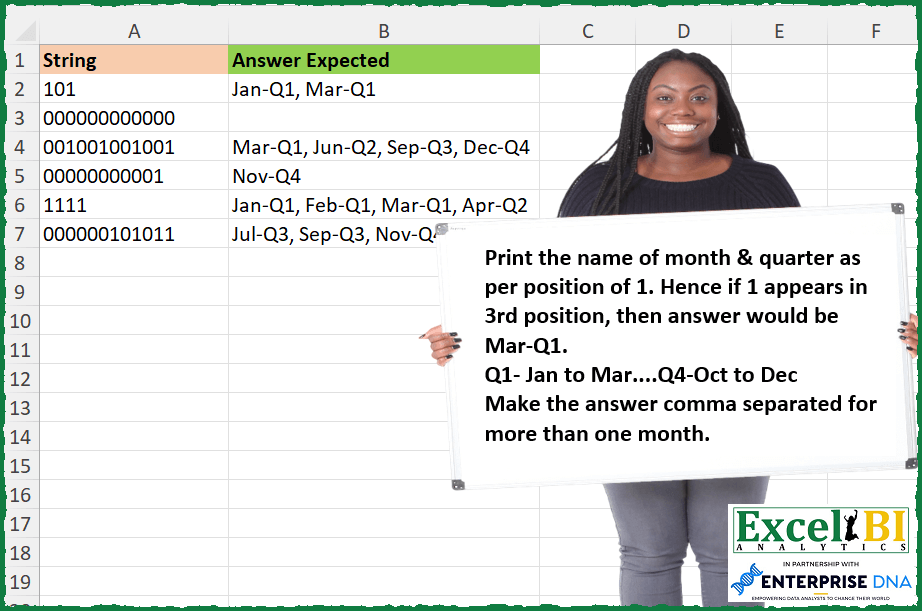
Print the name of month & quarter as per position of 1. Hence if 1 appears in 3rd position, then answer would be Mar-Q1. Q1- Jan to Mar….Q4-Oct to Dec Make the answer comma separated for more than one month.
📌 Challenge Details and Links
ExcelBI Excel Challenge Number: 248
Challenge Difficulty: ⭐️
📥Download Sample File
📥Link to the solutions on LinkedIn
Solving the challenge of Month and Quarter by Index with Power Query
Power Query solution 1 for Month and Quarter by Index, proposed by Zoran Milokanović:
let
  Source = Excel.CurrentWorkbook(){[Name = "Input"]}[Content],
  S = Table.TransformRows(
    Source,
    each Text.Combine(
      List.Transform(
        List.PositionOf(Text.ToList([String]), "1", 2),
        each
          let
            d = Date.FromText(Text.From(_ + 1) & "-1", [Format = "M-d"])
          in
            Date.ToText(d, [Format = "MMM", Culture = "en-US"])
              & "-Q"
              & Text.From(Date.QuarterOfYear(d))
      ),
      ", "
    )
  )
in
  S
Power Query solution 2 for Month and Quarter by Index, proposed by Alejandro Simón 🇵🇦 🇪🇸:
let
 Source = Excel.CurrentWorkbook(){[Name="Table1"]}[Content],
 Sol = Table.AddColumn(Source, "Answer", each
 let
 a = Text.PositionOf([String], "1", Occurrence.All),
 b = List.Transform(a, each "-Q"&Text.From(Number.IntegerDivide(_, 3)+1)),
 c = List.Transform(a, each Date.ToText(hashtag#date(2023, _+1,1), [Format="MMM", Culture="en-US"])),
 d = List.Transform(List.Zip({c,b}), each _{0}&_{1})
 in Text.Combine(d, ", "))[[Answer]]
in
 Sol
Power Query solution 3 for Month and Quarter by Index, proposed by Luan Rodrigues:
let
  Fonte = Tabela1,
  sub = List.Zip(
    {
      {1 .. 12},
      {
        "Jan-Q1",
        "Feb-Q1",
        "Mar-Q1",
        "Apr-Q2",
        "May-Q2",
        "Jun-Q2",
        "Jul-Q3",
        "Aug-Q3",
        "Sep-Q3",
        "Oct-Q4",
        "Nov-Q4",
        "Dec-Q4"
      }
    }
  ),
  res = Table.AddColumn(
    Fonte,
    "Personalizar",
    each Text.Combine(
      List.ReplaceMatchingItems(
        List.Transform(Text.PositionOfAny([String], {"1"}, Occurrence.All), each _ + 1),
        sub
      ),
      ", "
    )
  )
in
  res
Power Query solution 4 for Month and Quarter by Index, proposed by Matthias Friedmann:
let
 Source = Excel.CurrentWorkbook(){[Name = "PosOfOne"]}[Content],
 #"Added Custom" = Table.AddColumn(
 Source,
 "Month-Quarter",
 each [
 a = {
 "Jan-Q1", "Feb-Q1", "Mar-Q1",
 "Apr-Q2", "May-Q2", "Jun-Q2",
 "Jul-Q3", "Aug-Q3", "Sep-Q3",
 "Oct-Q4", "Nov-Q4", "Dec-Q4"
 },
 b = Text.PositionOf([String], "1", Occurrence.All),
 c = Text.Combine(
 List.Select(a, each List.Contains(b, List.PositionOf(a, _)) ),
 ", "
 )
 ][c]
 )
in
 #"Added Custom"


2. Original post with Text.ToList
let
 Source = Excel.CurrentWorkbook(){[Name = "PosOfOne"]}[Content],
 #"Added Custom" = Table.AddColumn(
 Source,
 "Month-Quarter",
 each [
 a = {
 "Jan-Q1", "Feb-Q1", "Mar-Q1",
 "Apr-Q2", "May-Q2", "Jun-Q2",
 "Jul-Q3", "Aug-Q3", "Sep-Q3",
 "Oct-Q4", "Nov-Q4", "Dec-Q4"
 },
 b = Text.ToList([String]),
 c = Text.Combine(
 List.Select(a, each List.Contains(List.PositionOf(b, "1", Occurrence.All), List.PositionOf(a, _)) ),
 ", "
 )
 ][c]
 )
in
 #"Added Custom"
Power Query solution 5 for Month and Quarter by Index, proposed by Rafael González B.:
let
 Source = Excel.CurrentWorkbook(){[Name="Table1"]}[Content],
 TC = Table.TransformColumnTypes(Source,{{"String", type text}}),

 MQ =
 let
 a = List.Dates(hashtag#date(2023,1,15), 12, hashtag#duration(30,0,0,0)),
 b = List.Transform(a, each Text.Start(Text.Proper(Date.MonthName(_)), 3)),
 c = List.Transform(a, each "Q" & Text.From( Date.QuarterOfYear(_))),
 d = List.Zip({b,c}),
 e = Table.FromList(d, Splitter.SplitByNothing(), {"Lists"}),
 f = Table.TransformColumns(e, {"Lists", each Text.Combine(List.Transform(_, Text.From), "-"), type text})
 in
 f,

 TblCod = Table.TransformColumns(TC, {"String", each
 let
 aa = Text.PadEnd(_, 12, "0"),
 bb = Text.ToList(aa),
 cc = Table.FromList(bb, null, {"Code"}),
 dd = Table.AddIndexColumn(MQ, "Index", 1,1),
 ee = Table.AddIndexColumn(cc, "Index", 1,1),
 ff = Table.NestedJoin(ee, "Index", dd, "Index", "Union", 1),
 gg = Table.ExpandTableColumn(ff, "Union", {"Lists"}, {"Answer Expected"} ),
 hh = Text.Combine(Table.SelectRows(gg, each [Code] = "1")[Answer Expected], ", ")
 in
 hh})

in
 TblCod
Power Query solution 6 for Month and Quarter by Index, proposed by Kalyan Kumar Reddy Kethireddy:
let
  Source = Excel.Workbook(File.Contents(Data_1), true, true),
  #"Month Quarter Printing_Sheet" = Source{[Item = "Month Quarter Printing", Kind = "Sheet"]}[Data],
  Answer = Table.AddColumn(
    #"Month Quarter Printing_Sheet",
    "Expected Answer",
    each [
      a = Text.ToList([String]),
      b = List.Transform(List.PositionOfAny(a, {"1"}, Occurrence.All), each Number.From(_) + 1),
      c = List.Zip(
        {
          {1 .. 12},
          {
            "Jan-Q1",
            "Feb-Q1",
            "Mar-Q1",
            "Apr-Q2",
            "May-Q2",
            "Jun-Q2",
            "Jul-Q3",
            "Aug-Q3",
            "Sep-Q3",
            "Oct-Q4",
            "Nov-Q4",
            "Dec-Q4"
          }
        }
      ),
      d = Text.Combine(List.ReplaceMatchingItems(b, c), ",")
    ][d]
  )
in
  Answer
Solving the challenge of Month and Quarter by Index with Excel
Excel solution 1 for Month and Quarter by Index, proposed by Bo Rydobon 🇹🇭:
=MAP(A2:A8,
    LAMBDA(a,
    LET(m,
    SEQUENCE(
        12
    ),
    TEXTJOIN(", ",
    ,
    REPT(TEXT(
        29*m,
        "mmm-Q"
    )&DAY((m+2)/3),
    MID(
        a,
        m,
        1
    )="1")))))
Excel solution 2 for Month and Quarter by Index, proposed by Rick Rothstein:
=MAP(A2:A7,
    LAMBDA(x,
    LET(m,
    UNIQUE(
        FIND(
            1,
            x,
            SEQUENCE(
                LEN(
                    x
                )
            )
        )
    ),
    IFERROR(TEXTJOIN(", ",
    ,
    TEXT(
        28*m,
        "mmm-Q"
    )&1+INT((m-1)/3)),
    ""))))
Excel solution 3 for Month and Quarter by Index, proposed by John V.:
=MAP(A2:A7,LAMBDA(x,LET(s,ROW(1:12),TEXTJOIN(", ",,REPT(TEXT(28*s,"mmm-Q")&1+INT((s-1)/3),0&MID(x,s,1))))))Excel solution 4 for Month and Quarter by Index, proposed by محمد حلمي:
=MAP(A2:A7,
    LAMBDA(a,
    LET(i,
    UNIQUE(
        TOCOL(
            FIND(
                1,
                a,
                ROW(
                    1:12
                )
            ),
            2
        )
    ),
    IFERROR(ARRAYTOTEXT(TEXT(
        i*29,
        "mmm"
    )&"-Q"&INT((i-1)/3)+1),
    ""))))
Excel solution 5 for Month and Quarter by Index, proposed by محمد حلمي:
=MAP(A2:A7,
    LAMBDA(a,
    LET(i,
    UNIQUE(
        FIND(
            1,
            a,
            ROW(
                1:12
            )
        )
    ),
    TEXTJOIN(", ",
    ,
    IFERROR(TEXT(
        i*29,
        "mmm"
    )&"-Q"&INT((i-1)/3)+1,
    "")))))
Excel solution 6 for Month and Quarter by Index, proposed by Kris Jaganah:
=MAP(
    A2:A7,
    LAMBDA(
        x,
        LET(
            a,
            UNIQUE(
                FIND(
                    "1",
                    x,
                    SEQUENCE(
                        12
                    )
                )
            ),
            TEXTJOIN(
                ", ",
                1,
                IFERROR(
                    TEXT(
                        DATE(
                            2023,
                            a,
                            1
                        ),
                        "Mmm"
                    )&"-Q"&CEILING(
                        a/3,
                        1
                    ),
                    ""
                )
            )
        )
    )
)
Excel solution 7 for Month and Quarter by Index, proposed by Julian Poeltl:
=MAP(
    A2:A7,
    LAMBDA(
        S,
        LET(
            N,
            SCAN(
                0,
                DROP(
                    TEXTSPLIT(
                        S,
                        1
                    ),
                    ,
                    -1
                ),
                LAMBDA(
                    A,
                    B,
                    A+LEN(
                        B
                    )+1
                )
            ),
            IFERROR(
                TEXTJOIN(
                    ", ",
                    ,
                    TEXT(
                        N*28,
                        "MMM"
                    )&"-Q"&ROUNDUP(
                        N/3,
                        0
                    )
                ),
                ""
            )
        )
    )
)
Excel solution 8 for Month and Quarter by Index, proposed by Timothée BLIOT:
=MAP(A2:A7,LAMBDA(z,LET(A,CONCAT(z,IF(LEN(z)<12,REPT(0,12-LEN(z)),"")),B,SEQUENCE(12),ARRAYTOTEXT(FILTER(HSTACK(TEXT(DATE(1900,B,1),"mmm")&"-Q"&ROUNDUP(B/3,0)),MID(A,B,1)*1,"")))))Excel solution 9 for Month and Quarter by Index, proposed by Hussein SATOUR:
=MAP(
    A2:A7,
     LAMBDA(
         x,
          LET(

              a,
               SEQUENCE(
                   LEN(
                       x
                   )
               ),

              TEXTJOIN(
                  ", ",
                  ,
                  IF(
                      MID(
                          x,
                           a,
                           1
                      ) = "1",
                       TEXT(
                           1 &"/"& a,
                            "mmm"
                       ) &"-Q"& ROUNDUP(
                           a/3,
                            0
                       ),
                       ""
                  )
              )
          )
     )
)
Excel solution 10 for Month and Quarter by Index, proposed by Oscar Mendez Roca Farell:
=MAP(
    A2:A7,
     LAMBDA(
         a,
          LET(
              _n,
               TOCOL(
                   UNIQUE(
                       SEARCH(
                           1,
                            a,
                            ROW(
                                1:12
                            )
                       )
                   ),
                    2
               ),
               IFERROR(
                   ARRAYTOTEXT(
                       TEXT(
                           30*_n,
                           "mmm"
                       )&"-Q"&MONTH(
                           _n&0
                       )
                   ),
                    ""
               )
          )
     )
)
Excel solution 11 for Month and Quarter by Index, proposed by Sunny Baggu:
=MAP(

     A2:A7,

     LAMBDA(
         a,

          LET(

               _t,
               MID(
                   a,
                    SEQUENCE(
                        LEN(
                            a
                        )
                    ),
                    1
               ) + 0,

               _m,
               TAKE(
                   TEXT(
                       DATE(
                           2023,
                            SEQUENCE(
                                12
                            ),
                            1
                       ),
                        "mmm"
                   ),
                    ROWS(
                        _t
                    )
               ),

               _q,
               TAKE(
                   "Q" & ROUNDUP(
                       SEQUENCE(
                                12
                            ) / 3,
                        0
                   ),
                    ROWS(
                        _t
                    )
               ),

               TEXTJOIN(
                   ", ",
                    ,
                    FILTER(
                        _m & "-" & _q,
                         _t,
                         ""
                    )
               )

          )

     )

)
Excel solution 12 for Month and Quarter by Index, proposed by Abdallah Ally:
=MAP(A2:A7,LAMBDA(x,LET(a,UNIQUE(FIND(1,x,SEQUENCE(LEN(x)))),IFERROR(TEXTJOIN(", ",TRUE,TEXT("1/"&a,"mmm-Q")&ROUNDUP(a/3,0)),""))))Excel solution 13 for Month and Quarter by Index, proposed by JvdV -:
=MAP(A2:A7,
    LAMBDA(x,
    LET(s,
    SEQUENCE(
        LEN(
            x
        )
    ),
    TEXTJOIN(", ",
    ,
    IF(-MID(
        x,
        s,
        1
    ),
    TEXT(
        s*30,
        "mmm-Q"
    )&INT((s-1)/3)+1,
    "")))))

The TEXT()
Excel solution 14 for Month and Quarter by Index, proposed by Tolga Demirci, PMP, PMI-ACP, MOS-Expert:
=MAP(A2:A7;LAMBDA(b;LET(i;ROUNDUP(SEQUENCE(12)/3;0);w;SEQUENCE(12);o;{"Jan";"Feb";"Mar";"Apr";"May";"Jun";"Jul";"Aug";"Sep";"Oct";"Nov";"Dec"};LET(e;LET(a;IFERROR(MAP(LET(f;VALUE(MID(b;SEQUENCE(LEN(b));1));IF(f=0;0;SEQUENCE(LEN(TEXTJOIN(;;f)))));LAMBDA(x;XLOOKUP(x;w;o)));"");FILTER(a;a<>""));TEXTJOIN(", ";;MAP(e;"-Q"&IFERROR(MAP(e;LAMBDA(p;XLOOKUP(p;o;i)));"");LAMBDA(m;n;m&n)))))))Excel solution 15 for Month and Quarter by Index, proposed by Julien Lacaze:
=LET(
    data,
    A2:A7,

    mq,
    LAMBDA(
        value,
        PROPER(
            TEXT(
                DATE(
                    ,
                    value,
                    1
                ),
                "mmm"
            )
        )&"-Q"&ROUNDUP(
            value/3,
            0
        )
    ),

    MAP(
        data,
        LAMBDA(
            d,
            LET(
                n,
                SEQUENCE(
                    LEN(
                        d
                    )
                ),
                s,
                --MID(
                    d,
                    n,
                    1
                ),
                TEXTJOIN(
                    ", ",
                    ,
                    IF(
            &            s,
                        mq(
                            n
                        ),
                        ""
                    )
                )
            )
        )
    )
)
Excel solution 16 for Month and Quarter by Index, proposed by Nicolas Micot:
=LET(_string;A2;_seq;SEQUENCE(NBCAR(_string));JOINDRE.TEXTE(", ";VRAI;SI(STXT(_string;_seq;1)="1";CHOISIR(_seq;"Jan";"Feb";"Mar";"Apr";"May";"Jun";"Jul";"Aug";"Sep";"Oct";"Nov";"Dec")&"-Q""IENT(_seq-1;3)+1;"")))
I wanted to use the TEXT()
Excel solution 17 for Month and Quarter by Index, proposed by Daniel Garzia:
=MAP(A2:A7,LAMBDA(x,LET(s,SEQUENCE(LEN(x)),IFERROR(TEXTJOIN(", ",,FILTER(TEXT(--(s&"/23"),"mmm")&"-Q"&INT(SEQUENCE(LEN(x),,,1/3)),-MID(x,s,1))),""))))Excel solution 18 for Month and Quarter by Index, proposed by Quadri Olayinka Atharu:
=MAP(
    A2:A7,
    LAMBDA(
        s,
        LET(
            l,
            SEQUENCE(
                LEN(
                    s
                )
            ),

            m,
            --MID(
                s,
                l,
                1
            )*l,
            k,
            FILTER(
                m,
                m>0
            ),

            IFERROR(
                TEXTJOIN(
                    ", ",
                    1,
                    TEXT(
                        k*28,
                        "mmm"
                    )&"-"&"Q"&CEILING.MATH(
                        k/3
                    )
                ),
                ""
            )
        )
    )
)
Excel solution 19 for Month and Quarter by Index, proposed by Quadri Olayinka Atharu:
=MAP(A2:A7,LAMBDA(s,LET(l,SEQUENCE(LEN(s)),
m,--MID(s,l,1),mn,IFERROR(TEXT(DATE(,m*l,1),"mmm"),""),
q,"Q"&ROUNDUP(m*l/3,0),qm,mn&"-"&q,TEXTJOIN(", ",,FILTER(qm,qm<>"-Q0","")))))
Excel solution 20 for Month and Quarter by Index, proposed by Anup Kumar:
=BYROW(
    A2:A7,
    LAMBDA(
        x,
        LET(

            str,
             x,

            arr,
             EXPAND(
                 --MID(
                     str,
                     SEQUENCE(
                         LEN(
                             str
                         )
                     ),
                     1
                 ),
                 12,
                 ,
                 0
             ),

            edt,
             EDATE(
                 DATE(
                     2022,
                     12,
                     1
                 ),
                 SEQUENCE(
                     12
                 )
             ),

            mnthqtr,
             TEXT(
                 edt,
                 "mmm"
             )&"-Q"&ROUNDUP(
                 MONTH(
                     edt
                 )/3,
                 0
             ),

            IFERROR(
                ARRAYTOTEXT(
                    FILTER(
                        mnthqtr,
                        arr
                    )
                ),
                ""
            )

        )
    )
)
Excel solution 21 for Month and Quarter by Index, proposed by Md Ismail Hosen:
=LAMBDA(Strings,
 LET(
 _CalculationForOne, LAMBDA(String,
 LET(
 _MonthNumber, SEQUENCE(12),
 _TOCHARS, LAMBDA(InputText, IF(InputText = "", "", MID(InputText, SEQUENCE(LEN(InputText)), 1))),
 _MonthName, TEXT(DATE(2023, _MonthNumber, 1), "mmm"),
 _QuarterNumber, "Q" & IF(MOD(_MonthNumber, 3) = 0, INT(_MonthNumber / 3), ROUNDUP(_MonthNumber / 3, 0)),
 _Chars, _TOCHARS(String),
 _RowIndex, SEQUENCE(ROWS(_Chars)),
 _MonthAndQuarter, MAP(
 _Chars,
 _RowIndex,
 LAMBDA(CurrentChar, RowIndex,
 IF(VALUE(CurrentChar) = 0, "", INDEX(_MonthName, RowIndex, 1) & "-" & INDEX(_QuarterNumber, RowIndex, 1))
 )
 ),
 _Result, TEXTJOIN(", ", TRUE, _MonthAndQuarter),
 _Result
 )
 ),
 _Result, MAP(Strings, _CalculationForOne),
 _Result
 )
)(Sheet1!A2:A7)
Excel solution 22 for Month and Quarter by Index, proposed by Rayan S.:
=MAP(
    A2:A7,
    LAMBDA(
        arr,
        LET(
            s,
            MID(
                arr,
                SEQUENCE(
                    LEN(
                        arr
                    )
                ),
                1
            )+0,
            l,
            SEQUENCE(
                    LEN(
                        arr
                    )
                ),
            TEXTJOIN(
                ", ",
                ,
                IF(
                    s=1,
                    TEXT(
                        DATE(
                            2001,
                            l,
                            1
                        ),
                        "Mmm"
                    )&"-"&"Q"&ROUNDUP(
                        l/3,
                        0
                    ),
                    ""
                )
            )
        )
    )
)
Excel solution 23 for Month and Quarter by Index, proposed by Henriette Hamer:
=MAP(A2:A7;LAMBDA(_d;TEXTJOIN(", ";TRUE;LET(_c;LET(_a;_d;_b;SEQUENCE(;LEN(_a));MID(_a;_b;1)*_b*29);IF(_c=0;"";TEXT(_c;"mmm-Q")&ROUNDUP(MONTH(_c)/3;0))))))

I did it for the Dutch outcome when you do TEXT(x;"mmm") which is jan/feb/mrt/apr/mei/jun/jul/aug/sep/okt/nov/dec - didn't bother with the capitals. Probably put a PROPER() in there somewhere :-)
Excel solution 24 for Month and Quarter by Index, proposed by Harry Seiders:
=MAP(A2:A7,LAMBDA(X,TEXTJOIN(",",,MAP(SEQUENCE(LEN(X)),LAMBDA(Z,IF(MID(X,Z,1)="1",TEXT(DATE(2023,Z,1),"MMM")&"-Q"&ROUNDUP(Z/3,0),""))))))&&