
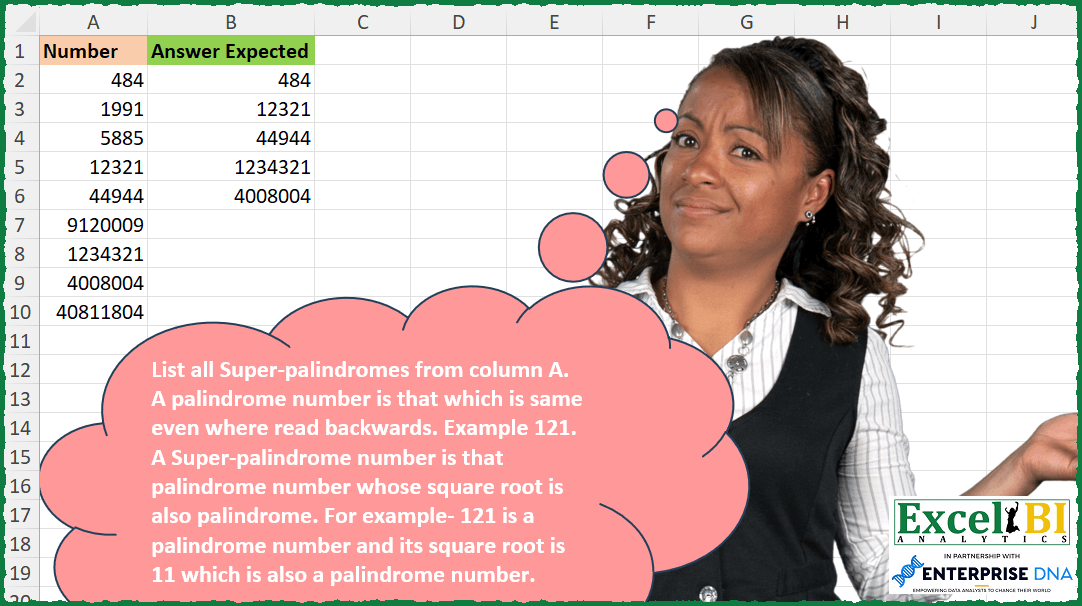
List all Super-palindromes from column A. A palindrome number is that which is same even where read backwards. Example 121. A Super-palindrome number is that palindrome number whose square root is also palindrome. For example- 121 is a palindrome number and its square root is 11 which is also a palindrome number.
📌 Challenge Details and Links
ExcelBI Excel Challenge Number: 244
Challenge Difficulty: ⭐️
📥Download Sample File
📥Link to the solutions on LinkedIn
Solving the challenge of Find Super Palindromes with Power Query
Power Query solution 1 for Find Super Palindromes, proposed by Bo Rydobon 🇹🇭:
let
  Source = Excel.CurrentWorkbook(){[Name = "Table1"]}[Content],
  Ans = Table.SelectRows(
    Source,
    each
      let
        n = [Number],
        b = Text.From(n) & Text.From(Number.Sqrt(n)) & Text.From(n)
      in
        b = Text.Reverse(b)
  )
in
  Ans
Power Query solution 2 for Find Super Palindromes, proposed by Zoran Milokanović:
let
  Source = Excel.CurrentWorkbook(){[Name = "Input"]}[Content][Number],
  IsPal = (n) =>
    let
      t = Text.From(n)
    in
      t = Text.Reverse(t),
  S = List.Select(Source, each IsPal(_) and IsPal(Number.Power(_, 0.5)))
in
  S
Power Query solution 3 for Find Super Palindromes, proposed by Kris Jaganah:
let
 Source = Excel.CurrentWorkbook(){[Name="Table1"]}[Content],
 AddedColumn = Table.AddColumn(Source, "Answer Expected", each

 let
a = [Number],
b = Number.FromText(Text.Reverse(Number.ToText(a))),
c = Number.Mod(Number.Sqrt(b),1),
d = a/(if b =a and c = 0 then 1 else 0)
in
d),
 Filter = Table.SelectRows(AddedColumn, each ([Answer Expected] <> hashtag#infinity)),
 Remove = Table.RemoveColumns(Filter,{"Number"})
in
 Remove
Power Query solution 4 for Find Super Palindromes, proposed by Rick de Groot:
let
  Source = Excel.CurrentWorkbook(){[Name = "Table1"]}[Content],
  SelectPalindromes = Table.SelectRows(
    Source,
    each [
      value = Text.From([Number]),
      SqrtNumber = Number.Sqrt([Number]),
      SqrtText = Text.From(Number.Sqrt([Number])),
      Result = Text.Reverse(value)
        = value and Text.Reverse(SqrtText)
        = SqrtText and Number.Mod(SqrtNumber, 1)
        = 0
    ][Result]
      = true
  )
in
  SelectPalindromes
Power Query solution 5 for Find Super Palindromes, proposed by Alejandro Simón 🇵🇦 🇪🇸:
let
  Source = Excel.CurrentWorkbook(){[Name = "Table1"]}[Content],
  Sol = Table.SelectRows(
    Source,
    each
      let
        a = Number.Sqrt([Number]),
        b = Number.From(Text.Reverse(Text.From(a * a))),
        c = Number.From(Text.Reverse(Text.From(a)))
      in
        a * a = b and a = c
  )
in
  Sol
Power Query solution 6 for Find Super Palindromes, proposed by Alejandro Simón 🇵🇦 🇪🇸:
let
  Source = Excel.CurrentWorkbook(){[Name = "Table1"]}[Content],
  Palindrome = Table.SelectRows(
    Source,
    each [Number] = Number.From(Text.Reverse(Text.From([Number])))
  ),
  Sol = Table.SelectRows(
    Palindrome,
    each Number.Sqrt([Number]) = Number.From(Text.Reverse(Text.From(Number.Sqrt([Number])))) = true
  )
in
  Sol
Power Query solution 7 for Find Super Palindromes, proposed by Luan Rodrigues:
let
  Fonte = Query_Tabela1,
  res = Table.SelectRows(
    Fonte,
    each [a = Text.ToList(Text.From(Number.Sqrt([Number]))), b = a = List.Reverse(a) = true][b]
  )
in
  res
Power Query solution 8 for Find Super Palindromes, proposed by Brian Julius:
let
  Source = Excel.CurrentWorkbook(){[Name = "Table1"]}[Content],
  AddSqyareRoot = Table.AddColumn(Source, "SquareRoot", each Number.Sqrt([Number]), type number),
  AddKeep = Table.AddColumn(
    AddSqyareRoot,
    "Keep",
    each [
      a = Text.From([Number]),
      b = if a = Text.Reverse(a) then 1 else 0,
      c = Text.From([SquareRoot]),
      d = if c = Text.Reverse(c) then 1 else 0,
      e = b + d
    ][e]
  ),
  Filter = Table.SelectColumns(Table.SelectRows(AddKeep, each ([Keep] = 2)), "Number")
in
  Filter
Power Query solution 9 for Find Super Palindromes, proposed by Paolo Pozzoli:
let
  Origine = Excel.CurrentWorkbook(){[Name = "Tabella1"]}[Content],
  #"Modificato tipo" = Table.TransformColumnTypes(Origine, {{"Colonna1", Int64.Type}}),
  #"Filtrate righe" = Table.SelectRows(
    #"Modificato tipo",
    each (Number.Mod(Number.Sqrt([Colonna1]), 1) = 0)
      = true and Number.ToText([Colonna1])
      = Text.Reverse(Number.ToText([Colonna1]))
  )
in
  #"Filtrate righe"
Power Query solution 10 for Find Super Palindromes, proposed by Kalyan Kumar Reddy Kethireddy:
let
  Source = Excel.Workbook(File.Contents(Super_Palindromes), true, true),
  #"Super Palindromes_Sheet" = Source{1}[Data],
  #"Changed Type" = Table.TransformColumnTypes(#"Super Palindromes_Sheet", {{"Number", Int64.Type}}),
  #"Filtered Rows" = Table.SelectRows(
    #"Changed Type",
    each (
      Text.From([Number])
        = [
          a = [Number],
          b = Number.Sqrt(a),
          c = Text.From(b),
          d = Text.Reverse(c),
          e = if c = d then Text.Reverse(Text.From(a)) else null
        ][e]
    )
  )
in
  #"Filtered Rows"
Solving the challenge of Find Super Palindromes with Excel
Excel solution 1 for Find Super Palindromes, proposed by Bo Rydobon 🇹🇭:
=TOCOL(MAP(A2:A10,LAMBDA(a,LET(b,a&a^0.5&a,a/(b=CONCAT(LEFT(RIGHT(b,SEQUENCE(LEN(b))))))))),3)Excel solution 2 for Find Super Palindromes, proposed by Bo Rydobon 🇹🇭:
=TOCOL(MAP(A2:A10,LAMBDA(a,LET(b,a^{1,0.5},s,SEQUENCE(LEN(a)),a/AND(RIGHT(LEFT(b,s))=LEFT(RIGHT(b,s)))))),3)Excel solution 3 for Find Super Palindromes, proposed by Rick Rothstein:
=LET(
    p,
    LAMBDA(
        r,
        r=0+CONCAT(
            MID(
                r,
                SEQUENCE(
                    LEN(
                        r
                    ),
                    ,
                    LEN(
                        r
                    ),
                    -1
                ),
                1
            )
        )
    ),
    a,
    A2:A10,
    FILTER(
        a,
        MAP(
            a,
            LAMBDA(
                n,
                p(
                    n
                )*p(
                    n^0.5
                )
            )
        )
    )
)
Excel solution 4 for Find Super Palindromes, proposed by John V.:
=LET(f,LAMBDA(n,n=--CONCAT(MID(n,16-ROW(1:15),1))),TOCOL(MAP(A2:A10,LAMBDA(a,a/f(a)/f(a^0.5))),2))Excel solution 5 for Find Super Palindromes, proposed by محمد حلمي:
=TOCOL(
    MAP(
        A2:A10,
        LAMBDA(
            a,
            LET(
                e,
                a&a^0.5&a,
                i,
                LEN(
                    e
                ),
                s,
                SEQUENCE(
                    i
                ),
                a/AND(
                    MID(
                        e,
                        i-s+1,
                        1
                    )=MID(
                        e,
                        s,
                        1
                    )
                )
            )
        )
    ),
    2
)
Excel solution 6 for Find Super Palindromes, proposed by محمد حلمي:
=TOCOL(MAP(A2:A10,
    LAMBDA(a,
    a/(a&a^0.5&a=CONCAT(
        MID(
            a&a^0.5&a,
            51-SEQUENCE(
                50
            ),
            1
        )
    )))),
    2)
Excel solution 7 for Find Super Palindromes, proposed by Kris Jaganah:
=TOCOL(LET(a,A2:A10,b,MAP(a,LAMBDA(x,--CONCAT(MID(x,SEQUENCE(LEN(x),,LEN(x),-1),1)))),a/((a=b)*(MOD(b^0.5,1)=0))),3)Excel solution 8 for Find Super Palindromes, proposed by Julian Poeltl:
=FILTER(
    A2:A10,
    MAP(
        A2:A10,
        LAMBDA(
            N,
            LET(
                P,
                LAMBDA(
                    A,
                    LET(
                        L,
                        LEN(
                            A
                        ),
                        LEFT(
                            A,
                            L/2
                        )=CONCAT(
                            MID(
                                A,
                                SEQUENCE(
                                    L/2,
                                    ,
                                    L,
                                    -1
                                ),
                                1
                            )
                        )
                    )
                ),
                P(
                    N
                )*P(
                    SQRT(
                    N
                )
                )
            )
        )
    )
)
Excel solution 9 for Find Super Palindromes, proposed by Alejandro Campos:
=LET(
 n, A2:A10,
 x, SQRT(n),
 y, (INT(x)) ^ 2,
 FILTER(n, n = y)
)
Excel solution 10 for Find Super Palindromes, proposed by Timothée BLIOT:
=LET(
    F,
    LAMBDA(
        n,
        LET(
            A,
            LEN(
                n
            )/2,
            B,
            LEFT(
                n,
                A
            ),
            D,
            CONCAT(
                MID(
                    RIGHT(
                n,
                A
            ),
                    SEQUENCE(
                        A,
                        ,
                        A,
                        -1
                    ),
                    1
                )
            ),
            D=B
        )
    ),
    Z,
    A2:A10,
    FILTER(
        Z,
        MAP(
            Z,
            LAMBDA(
                x,
                F(
                    x
                )*F(
                    x^0.5
                )
            )
        )
    )
)
Excel solution 11 for Find Super Palindromes, proposed by Hussein SATOUR:
=FILTER(A2:A10, MAP(A2:A10, LAMBDA(x, LET(
a, --CONCAT(MID(x, SEQUENCE(LEN(x),,LEN(x), -1), 1)),
b, a^.5, c, --CONCAT(MID(b, SEQUENCE(LEN(b),,LEN(b), -1), 1)),
AND(x=a, b=c)))))
Excel solution 12 for Find Super Palindromes, proposed by Sunny Baggu:
=FILTER(
 A2:A10,

 MAP(
 A2:A10,

 LAMBDA(a,

 LET(
 _e1,
     LAMBDA(
         x,
          MID(
              x,
               SEQUENCE(
                   LEN(
                       x
                   )
               ),
               1
          )
     ),

 _e2,
     LAMBDA(
         y,

          SORTBY(
              MID(
                  y,
                   SEQUENCE(
                       LEN(
                           y
                       )
                   ),
                   1
              ),
               SEQUENCE(
                       LEN(
                           y
                       )
                   ),
               -1
          )

     ),

 AND(AND(
     _e1(
         a
     ) = _e2(
         a
     )
 ),
     AND(_e1(SQRT(
         a
     )) = _e2(SQRT(
         a
     ))))
 )
 )
 )
)
Excel solution 13 for Find Super Palindromes, proposed by Sunny Baggu:
=FILTER(
 A2:A10,

 MAP(
 A2:A10,

 LAMBDA(a,

 LET(
 _e1,
     LAMBDA(
         x,
          0 + CONCAT(
              MID(
                  x,
                   LEN(
                       x
                   ) - SEQUENCE(
                       LEN(
                       x
                   )
                   ) + 1,
                   1
              )
          )
     ),

 AND(_e1(a) = a,
     _e1(a ^ 0.5) = a ^ 0.5)
 )
 )
 )
)
Excel solution 14 for Find Super Palindromes, proposed by LEONARD OCHEA 🇷🇴:
=LET(d,A2:A10,p,LAMBDA(x,MAP(x,LAMBDA(a,LET(l,LEN(a),s,SEQUENCE(l),AND(MID(a,s,1)=MID(a,l-s+1,1)))))),FILTER(d,p(d)*p(d^0.5)))Excel solution 15 for Find Super Palindromes, proposed by Abdallah Ally:
=FILTER(A2:A10,BYROW(A2:A10,LAMBDA(z,LET(a,z,b,SQRT(z),c,--REDUCE("",MID(a,SEQUENCE(LEN(a)),1),LAMBDA(e,f,e&f)),d,--REDUCE("",MID(b,SEQUENCE(LEN(b),,LEN(b),-1),1),LAMBDA(e,f,e&f)),AND(a=c,b=d)))))Excel solution 16 for Find Super Palindromes, proposed by Asheesh Pahwa:
=LET(a,A2:A10,
P,LAMBDA(Num, MID(Num, SEQUENCE(LEN(Num),,LEN(Num),-1),1)),
b,--MAP(a,LAMBDA(x,CONCAT(P(x))))=a,
sq,SQRT(a),isuppal,--MAP(sq,LAMBDA(y,CONCAT(P(y))))=sq,FILTER(a,(b*isuppal)))
Excel solution 17 for Find Super Palindromes, proposed by Charles Roldan:
=LET(
_isPal, LAMBDA(g, LAMBDA(x, IF(LEN(x) < 2, TRUE, IF(LEFT(x) = RIGHT(x), g(g)(MID(x, 2, LEN(x) - 2)))))),
_makeRoot, LAMBDA(x, x ^ (1 / {1,2})),
And, LAMBDA(x, AND(x)),
M, LAMBDA(g, g(g)),
A, LAMBDA(g, LAMBDA(x, MAP(x, g))),
B, LAMBDA(g, LAMBDA(h, LAMBDA(x, g(h(x))))),
F, LAMBDA(g, LAMBDA(x, FILTER(x, g(x)))),
F(A(B(B(And)(A(M(_isPal))))(_makeRoot)))
)(A2:A10)
Excel solution 1&8 for Find Super Palindromes, proposed by Julien Lacaze:
=LET(data,
    A2:A10,

isPalindrome,
    LAMBDA(text,
    MAP(text,
    LAMBDA(t,
    LET(a,
    --CONCAT(
        MID(
            t,
            SEQUENCE(
                LEN(
                    t
                ),
                ,
                LEN(
                    t
                ),
                -1
            ),
            1
        )
    ),
    --(a=t))))),

sqrt,
    SQRT(
        data
    ),
    FILTER(
        data,
        isPalindrome(
        data
    )*isPalindrome(
        sqrt
    )
    ))

=LET(
    data,
    A2:A10,

    isPalindrome,
    LAMBDA(
        t,
        MAP(
            t,
            LAMBDA(
                t,
                LET(
                    a,
                    MID(
                        t,
                        SEQUENCE(
                            LEN(
                    t
                )
                        ),
                        1
                    ),
                    b,
                    INDEX(
                        a,
                        SEQUENCE(
                            ROWS(
                                a
                            ),
                            ,
                            ROWS(
                                a
                            ),
                            -1
                        )
                    ),
                    --AND(
                        a=b
                    )
                )
            )
        )
    ),

    sqrt,
    SQRT(
        data
    ),

    FILTER(
        data,
        isPalindrome(
        data
    )*isPalindrome(
        sqrt
    )
    )
)
Excel solution 19 for Find Super Palindromes, proposed by Nicolas Micot:
Show translation
Excel solution 20 for Find Super Palindromes, proposed by Nicolas Micot:
=LET(
    _nombres;
    A2:A10;
    _racine;
    RACINE(
        _nombres
    );
    f_inverser;
    LAMBDA(
        l_valeur;
        CONCAT(
            STXT(
                l_valeur;
                SEQUENCE(
                    NBCAR(
                        l_valeur
                    );
                    ;
                    NBCAR(
                        l_valeur
                    );
                    -1
                );
                1
            )
        )
    );

    FILTRE(
        _nombres;
        MAP(
            _nombres;
            LAMBDA(
                l_nombres;
                l_nombres= f_inverser(
                    l_nombres
                )*1
            )
        )*MAP(
            _racine;
            LAMBDA(
                l_racine;
                l_racine = f_inverser(
                    l_racine
                )*1
            )
        )
    )
)
Excel solution 21 for Find Super Palindromes, proposed by Ziad A.:
=LET(
    r,
    A2:A10,
    P,
    LAMBDA(
        n,
        MAP(
            n,
            LAMBDA(
                n,
                n=--REDUCE(
                    ,
                    SEQUENCE(
                        LEN(
                            n
                        )
                    ),
                    LAMBDA(
                        a,
                        c,
                        MID(
                            n,
                            c,
                            1
                        )&a
                    )
                )
            )
        )
    ),
    FILTER(
        r,
        P(
            r
        ),
        P(
            SQRT(
            r
        )
        )
    )
)

Here we're defining a custom function P(
                            n
                        ) that returns TRUE if "n" is a Palindrome and FALSE otherwise.

n=--REDUCE(
                    ,
                    SEQUENCE(
                        LEN(
                            n
                        )
                    ),
                    LAMBDA(
                        a,
                        c,
                        MID(
                            n,
                            c,
                            1
                        )&a
                    )
                )

Then we are FILTERing the numbers in the range "r" A2:A10 that respect the conditions P(
            r
        ) and P(
            SQRT(
            r
        )
        ).

FILTER(
        r,
        P(
            r
        ),
        P(
            SQRT(
            r
        )
        )
    )
Excel solution 22 for Find Super Palindromes, proposed by Giorgi Goderdzishvili:
= pd.read_excel(
    '2024 Problems.xlsx',

     sheet_name='Ex-394',
    usecols='A'
).dropna().astype(
    int
)
def flt_sup(
    nmb
):
 nmbf,
     nmbs = str(
    nmb
),
     str(round(nmb**(1/2)))
 return all([nmbf==nmbf[::-1],
    nmbs==nmbs[::-1],
    nmb**(1/2) == round(nmb**(1/2))])

df.loc[df["Number"].apply(
    flt_sup
)
Excel solution 23 for Find Super Palindromes, proposed by Abhishek Kumar Jain:
=FILTER(A2:A10,
    MAP(
A2:A10,
    LAMBDA(x,

LET(
a,
    --CONCAT(
        MID(
            x,
            SEQUENCE(
                LEN(
                    x
                ),
                ,
                LEN(
                    x
                ),
                -1
            ),
            1
        )
    ),

b,
    --CONCAT(
        MID(
            SQRT(
                    x
                ),
            SEQUENCE(
                LEN(
                    SQRT(
                    x
                )
                ),
                ,
                LEN(
                    SQRT(
                    x
                )
                ),
                -1
            ),
            1
        )
    ),

c,
    FILTER(x,
    (x=a)*(SQRT(
                    x
                )=b),
    ""),

c)))<>"")
Excel solution 24 for Find Super Palindromes, proposed by Daniel Garzia:
=LET(
    d,
    A2:A10,
    f,
    LAMBDA(
        x,
        LET(
            i,
            LEN(
                x
            ),
            x=--CONCAT(
                MID(
                    x,
                    SEQUENCE(
                        i,
                        ,
                        i,
                        -1
                    ),
                    1
                )
            )
        )
    ),
    FILTER(
        d,
        MAP(
            d,
            LAMBDA(
                l,
                AND(
                    f(
                        l
                    ),
                    f(
                        SQRT(
                        l
                    )
                    )
                )
            )
        )
    )
)
Excel solution 25 for Find Super Palindromes, proposed by Quadri Olayinka Atharu:
=TOCOL(MAP(A2:A10,LAMBDA(_n,LET(ispal,LAMBDA(x,--CONCAT(MID(x,SORT(SEQUENCE(LEN(x)),,-1),1))=x),
IF(ispal(_n)*ispal(SQRT(_n)),_n,y)))),2)
Excel solution 26 for Find Super Palindromes, proposed by Anup Kumar:
=FILTER(
    A2:A10,

    BYROW(
        A2:A10,
        LAMBDA(
            x,
            LET(

                n,
                x,

                revN,
                 CONCAT(
                     MID(
                         n,
                         SEQUENCE(
                             LEN(
                                 n
                             ),
                             ,
                             LEN(
                                 n
                             ),
                             -1
                         ),
                         1
                     )
                 )*1,

                sqrtN,
                 SQRT(
                                 n
                             ),

                revsqrtN,
                 CONCAT(
                     MID(
                         sqrtN,
                         SEQUENCE(
                             LEN(
                                 sqrtN
                             ),
                             ,
                             LEN(
                                 sqrtN
                             ),
                             -1
                         ),
                         1
                     )
                 )*1,

                AND(
                    n=revN,
                    sqrtN=revsqrtN
                )

            )
        )
    )

)
Excel solution 27 for Find Super Palindromes, proposed by Md Ismail Hosen:
=LAMBDA(Numbers,

 LET(
 _IsPalindromeCheck,
     LAMBDA(
         NumberOrText,
          [ConsiderCase],

          LET(

               _CorrectCaseSensitivity,
               IF(
                   ISOMITTED(
                       ConsiderCase
                   ),
                    TRUE,
                    ConsiderCase
               ),

               _CorrectTextForCasehaviour,
               IF(
                   _CorrectCaseSensitivity,
                    NumberOrText,
                    LOWER(
                        NumberOrText
                    )
               ),

               _Seq,
               SEQUENCE(
                   LEN(
                       _CorrectTextForCasehaviour
                   )
               ),

               _Chars,
               MID(
                   _CorrectTextForCasehaviour,
                    _Seq,
                    1
               ),

               _ReverseChars,
               MID(
                   _CorrectTextForCasehaviour,
                    SORT(
                        _Seq,
                         ,
                         -1
                    ),
                    1
               ),

               _Result,
               AND(
                   _Chars = _ReverseChars
               ),

               _Result

          )

     ),

 _Sqrts,
     SQRT(
         Numbers
     ),

 _IsNumbersArePalindrome,
     MAP(
         Numbers,
          LAMBDA(
              Curr,
               _IsPalindromeCheck(
                   Curr,
                    FALSE
               )
          )
     ),

 _IsSqrtsPalindrome,
     MAP(
         _Sqrts,
          LAMBDA(
              Curr,
               _IsPalindromeCheck(
                   Curr,
                    FALSE
               )
          )
     ),

 _IsBothPalindrome,
     --(_IsNumbersArePalindrome * _IsSqrtsPalindrome),

 _Result,
     FILTER(
         Numbers,
          _IsBothPalindrome
     ),

 _Result
 )
)(A2:A10)
Excel solution 28 for Find Super Palindromes, proposed by Md Ismail Hosen:
ISPALINDROME is one of my LAMBDA Collections.Excel solution 29 for Find Super Palindromes, proposed by Henriette Hamer:
= LAMBDA(
    x;
    SQRT(
        x
    ) = ROUND(
        SQRT(
        x
    );
        0
    )
)
IsPalindrome = LAMBDA(
    x;
    AND(
        MID(
            x;
            SEQUENCE(
                ROUNDDOWN(
                    LEN(
        x
    )/2;
                    0
                );
                ;
                1;
                1
            );
            1
        )=MID(
            x;
            LEN(
        x
    )-SEQUENCE(
                ROUNDDOWN(
                    LEN(
        x
    )/2;
                    0
                );
                ;
                0;
                1
            );
            1
        )
    )
)

And then for this challenge:
=MAP(
    A2:A10;
    LAMBDA(
        x;
        IF(
            IsSquare(
        x
    );
            AND(
                IsPalindrome(
        x
    );
                IsPalindrome(
                    SQRT(
        x
    )
                )
            )
        )
    )
)
Excel solution 30 for Find Super Palindromes, proposed by Ricardo Alexis Domínguez Hernández:
=FILTER(A2:A10,
    MAP(A2:A10,
    LAMBDA(x,
    AND((CONCAT(
        MID(
            x,
            SEQUENCE(
                ,
                LEN(
                    x
                )
            ),
            1
        )
    )=CONCAT(
        MID(
            x,
            SEQUENCE(
                ,
                LEN(
                    x
                ),
                LEN(
                    x
                ),
                -1
            ),
            1
        )
    )),
    CONCAT(
        MID(
            SQRT(
                    x
                ),
            SEQUENCE(
                ,
                LEN(
                    SQRT(
                    x
                )
                )
            ),
            1
        )
    )=CONCAT(
        MID(
            SQRT(
                    x
                ),
            SEQUENCE(
                ,
                LEN(
                    SQRT(
                    x
                )
                ),
                LEN(
                    SQRT(
                    x
                )
                ),
                -1
            ),
            1
        )
    ))))=TRUE)
Excel solution 31 for Find Super Palindromes, proposed by Jeff Blakley:
=LET(rng, A2:A10,
 IsPalindrome, LAMBDA(val, TEXT(val, "@")=CONCAT(MID(val, SEQUENCE(LEN(val),,LEN(val), -1), 1))),
 filterKey, MAP(rng, SQRT(rng), LAMBDA(x,y, IsPalindrome(x) * IsPalindrome(y))),
 FILTER(rng, filterKey))
Excel solution 32 for Find Super Palindromes, proposed by Harry Seiders:
=LET(
    test,
    A2:A10,
    A,
    MAP(
        test,
        LAMBDA(
            testa,
            LET(
                R,
                CONCAT(
                    MID(
                        testa,
                        SEQUENCE(
                            LEN(
                                testa
                            ),
                            ,
                            LEN(
                                testa
                            ),
                            -1
                        ),
                        1
                    )
                ),
                R
            )
        )
    ),
    Alpha,
    A=TEXT(
        test,
        "0"
    ),

    B,
    MAP(
        test,
        LAMBDA(
            testb,
            LET(
                Z,
                INT(
                    SQRT(
                        testb
                    )
                ),
                X,
                CONCAT(
                    MID(
                        Z,
                        SEQUENCE(
                            LEN(
                                Z
                            ),
                            ,
                            LEN(
                                Z
                            ),
                            -1
                        ),
                        1
                    )
                ),
                X
            )
        )
    ),
    Beta,
    B=TEXT(
        INT(
            SQRT(
                test
            )
        ),
        "0"
    ),
    Charlie,
    MOD(
        test,
        INT(
            SQRT(
                test
            )
        )
    )=0,
    FILTER(
        test,
        Alpha*Beta*Charlie
    )

)
Excel solution 33 for Find Super Palindromes, proposed by Deepak Dalal:
= SORT(IF(INT((A2:A10)^(1/2))=(A2:A10)^(1/2),A2:A10," "),,1)Solving the challenge of Find Super Palindromes with Python in Excel
Python in Excel solution 1 for Find Super Palindromes, proposed by Alejandro Campos:
import pandas as pd
import math
def es_palindromo(num):
 return str(num) == str(num)[::-1]
def es_superpalindromo(num):
& raiz = math.sqrt(num)
 return es_palindromo(num) and (int(raiz) * int(raiz) == num)
numeros = xl("A2:A10")[0]
superpalindromos = []
for num in numeros:
 if es_superpalindromo(num):
 superpalindromos.append(num)
superpalindromos
Solving the challenge of Find Super Palindromes with Excel VBA
Excel VBA solution 1 for Find Super Palindromes, proposed by Vasin Nilyok:
VBA
Sub SuperPalindromes()
LastRow = ActiveSheet.Cells(Rows.Count, 1).End(xlUp).Row
rAns = 2
For r = 2 To LastRow
 Obj = Cells(r, 1)
 lenObj = Len(Obj)
 If Fix(WorksheetFunction.Power(Obj, 0.5)) = WorksheetFunction.Power(Obj, 0.5) Then
 If lenObj Mod 2 = 0 Then
 For i = 1 To lenObj / 2
 If Mid(Obj, i, 1) = Mid(Obj, lenObj + 1 - i, 1) Then

 Else
 GoTo nextObj
 End If
 Next
 Else
 For i = 1 To Fix(lenObj / 2)
 If Mid(Obj, i, 1) = Mid(Obj, lenObj + 1 - i, 1) Then

 Else
 GoTo nextObj
 End If
 Next
 End If
 Cells(rAns, 4) = Obj
 rAns = rAns + 1
 Else
 GoTo nextObj
 End If
nextObj:
Next
End Sub
&